
Epson Workforce Pro WF-7310
3.8Editor score
High-speed wide-format printing
500-sheet paper capacity
Zero warmup time
This guide compares the top A3 printers for businesses and pros, analyzing speed, ink costs, and quality to help you choose the right wide-format device today.
Choosing the right A3 printer can transform your workflow by allowing you to print larger documents without compromising on quality or speed. Whether you need to produce brochures, engineering plans, or creative artwork, having a reliable wide-format machine is essential for modern productivity needs.
We evaluated ten leading models based on print quality, connectivity options, ink efficiency, and overall reliability. Our analysis focuses on real-world performance metrics to ensure you get a printer that meets your specific demands without unnecessary complexity or hidden costs.
Each pick below highlights key strengths and potential trade-offs to help you make an informed decision. Please note that product availability and pricing may fluctuate, so checking the latest details before purchasing is always recommended for the best value.
3.8Editor score

4.0Editor score

3.9Editor score
The following table provides a side-by-side comparison of all ten models, highlighting their core specifications and key capabilities to simplify your selection process.



The Epson EcoTank Photo ET-8550 stands out as a top-tier choice for users requiring lab-quality photos and graphics. With a rating of 4.0, this wireless wide-format all-in-one tank printer delivers vibrant colors and sharp text using Epson's high-accuracy printhead and Claria ET Premium 6-color inks.
We may earn a commission when you buy through this link, at no additional cost to you.
Its cartridge-free printing system allows for affordable in-house printing, enabling users to print 4×6 photos for approximately 4 cents each compared to 40 cents with traditional ink cartridges. The printer includes up to 2 years of ink in the box, minimizing out-of-ink frustrations for long-term projects.
While the initial investment is higher than standard inkjet printers, the long-term savings on ink replacement are significant. Replacement ink bottles do not need to be changed as frequently as traditional cartridges, reducing the amount of cartridge waste ending up in landfills.
This model is ideal for photographers and creative professionals who need reliable performance and cost efficiency. It is highly recommended for those prioritizing print quality and low operational costs over initial price point.
The use of high-yield ink bottles significantly lowers the cost per page compared to traditional cartridge-based systems.
Six-color ink technology ensures vivid colors and sharp text suitable for professional creative projects and photo printing.
We may earn a commission when you buy through this link, at no additional cost to you.
The Epson Workforce Pro WF-7820 offers high-speed wide-format printing capabilities up to 13×19 inches, making it a strong contender for budget-conscious businesses. It features PrecisionCore Heat-Free Technology which delivers 25 black and 12 color ISO ppm with fast first-page-out times.
We may earn a commission when you buy through this link, at no additional cost to you.
This all-in-one printer is designed for reliability and reduced downtime, making it useful for heavy workloads. The inclusion of a 50-sheet automatic document feeder and a 250-sheet paper capacity allows for efficient printing without frequent paper changes.
Users should be aware that the system is designed to be used exclusively with Epson Genuine Cartridges to avoid warranty issues. Despite this, the DURABrite Ultra instant-dry pigment inks provide professional-quality prints that are durable and smudge-resistant.
Ideal for offices needing fast wide-format output without the premium price tag, this model balances speed and functionality well. It is a solid choice for users prioritizing workflow efficiency and low operating costs.
PrecisionCore technology streamlines workflow with fast speeds and reduced energy consumption for heavy-duty office tasks.
Bluetooth Low Energy and Wi-Fi Direct allow for seamless setup and control from mobile devices without complex network configurations.
We may earn a commission when you buy through this link, at no additional cost to you.
The HP OfficeJet Pro 9730 stands as the premier wide-format option for professionals requiring screen-accurate color reproduction. Featuring P3 color gamut support, it ensures vibrant, true-to-screen prints ideal for mood boards, floorplans, and spreadsheets.
We may earn a commission when you buy through this link, at no additional cost to you.
This model offers print speeds up to 22 ppm in black and 18 ppm in color, supported by a 4.3-inch touchscreen for easy navigation. The inclusion of HP AI helps optimize print formatting to eliminate awkward layouts and wasted pages.
Users should note the requirement for original HP chips or circuitry, which prevents the use of non-HP cartridges. Additionally, while the Instant Ink trial is included, ongoing subscription costs apply after the initial period.
Best for designers and creatives needing high-fidelity color prints, this printer combines advanced technology with robust security features like HP Wolf Pro Security. It is highly recommended for offices prioritizing color accuracy and smart printing tools.
The P3 wide color gamut provides a broader range of colors than sRGB for more vibrant and accurate output.
HP AI removes unwanted content from web pages and emails to ensure prints are just the way you want.
We may earn a commission when you buy through this link, at no additional cost to you.
The Epson Workforce Pro WF-7310 is engineered for productivity with a massive 500-sheet paper capacity that easily tackles high-volume print tasks. It supports fast wide-format printing up to 13×19 inches with zero warmup time.
We may earn a commission when you buy through this link, at no additional cost to you.
This model features DURABrite Ultra instant-dry pigment inks which deliver sharp text and vivid colors suitable for shop-quality outputs. The printer includes two 250-sheet trays and a rear feed for efficient and convenient printing workflows.
While the color display is smaller at 2.4 inches, the Epson Smart Panel App provides enhanced connectivity and control from mobile devices. Users should ensure they use genuine Epson cartridges to maintain warranty coverage.
Ideal for busy offices needing to handle heavy workloads without frequent paper changes, this printer offers excellent efficiency. It is highly recommended for users prioritizing large paper capacity and energy-saving technology.
The dual 250-sheet trays combined with a rear feed offer flexibility and reduced downtime during large print jobs.
Epson Smart Panel App allows for easy setup and device control from smartphones and tablets.
We may earn a commission when you buy through this link, at no additional cost to you.
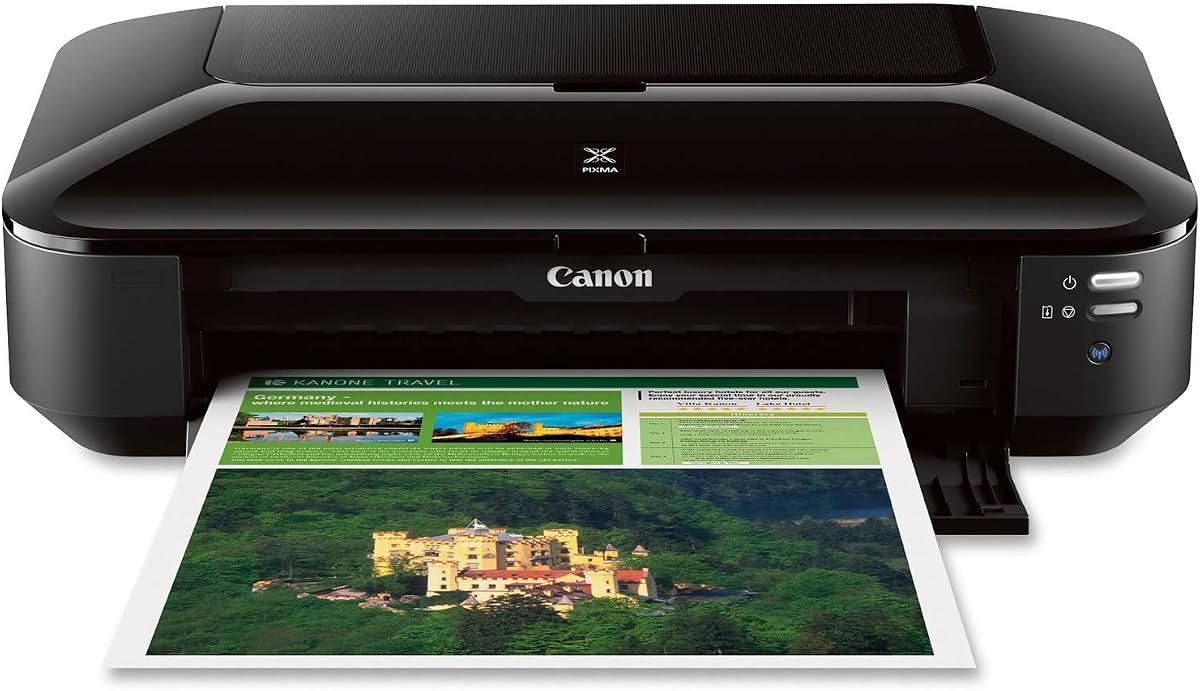
The Canon Pixma iX6820 offers a high-resolution printing experience with up to 9600 x 2400 dots per inch for excellent output quality. It utilizes Fine print head technology and a high-performance 5 individual ink tank system to deliver sharp results.
We may earn a commission when you buy through this link, at no additional cost to you.
This printer supports AirPrint, Google Cloud Print, and Pixma Printing Solutions, allowing for versatile cloud-based printing options. It is designed with compact dimensions suitable for smaller office spaces while maintaining wide-format capabilities.
While the auto sheet feeder capacity is 150 sheets, which is lower than some competitors, the overall versatility and connectivity options make it a strong contender. Users on older operating systems should verify compatibility before purchase.
Ideal for businesses needing reliable cloud printing and high resolution, this model balances performance with size. It is recommended for users who prioritize connectivity features and fine print details.
Full photolithography inkjet nozzle engineering ensures precise ink placement for high-quality documents.
Support for AirPrint and Google Cloud Print allows seamless printing from various devices and platforms.
We may earn a commission when you buy through this link, at no additional cost to you.
The Epson EcoTank ET-15000 is a wireless all-in-one wide-format Supertank printer that offers exceptional reliability for heavy office use. It boasts a monthly duty cycle of 33000 pages and resolution up to 4800 x 2400 dpi for excellent readability.
We may earn a commission when you buy through this link, at no additional cost to you.
This printer provides printing, faxing, copying, and scanning capabilities, making it a versatile central hub for office tasks. With a monthly duty cycle of 33000 pages, it is built to handle substantial workloads without performance drops.
Users should be aware that this model is larger and requires more desk space than standard office printers. However, the cost savings from the Supertank system justify the investment for high-volume printing environments.
Best for medium to large offices needing a reliable wide-format solution, this model combines efficiency with versatility. It is highly recommended for users prioritizing high duty cycles and wireless convenience.
With a 33000 page monthly capacity, this printer is designed to handle intense daily printing demands reliably.
Integrated faxing and scanning capabilities reduce the need for multiple separate devices in the office.
We may earn a commission when you buy through this link, at no additional cost to you.
The Epson Workforce Pro WF-7840 is an all-in-one wireless wide-format inkjet printer capable of delivering prints up to 13×19 inches. It features a 500-sheet capacity designed to meet the demands of busy offices with heavy printing needs.
We may earn a commission when you buy through this link, at no additional cost to you.
This model includes secure wireless features and a comprehensive suite of Epson Connect Solutions including Email Print and Smart Panel app for enhanced mobile productivity. The DURABrite Ultra ink ensures quick drying and smudge-free results.
While speed is moderate compared to higher-end industrial models, the balance of speed and capacity makes it a practical choice for general business use. Users should ensure they have access to genuine Epson ink to maintain warranty coverage.
Ideal for teams needing a versatile all-in-one solution with large capacity, this printer simplifies office workflows. It is recommended for users prioritizing capacity and mobile connectivity options.
Epson Connect Solutions allow users to print, scan, and fax from mobile devices easily.
Built-in security protocols help protect sensitive data transmitted wirelessly through the printer.
We may earn a commission when you buy through this link, at no additional cost to you.
The HP OfficeJet Pro 9135 is designed for offices printing professional-quality color documents like presentations and brochures. It offers print speeds up to 25 ppm black and 20 ppm color, ensuring fast turnaround for daily tasks.
We may earn a commission when you buy through this link, at no additional cost to you.
Key features include a large 4.3-inch touchscreen and single-pass 2-sided scanning with a two 250-sheet input tray system. HP AI optimizes print formatting to remove unwanted content and ensure precise layouts for web pages and emails.
Users should note the 3-month Instant Ink trial included, which delivers ink automatically but requires a monthly fee afterward. The printer is built with sustainable materials and includes robust security features via HP Wolf Pro Security.
Ideal for teams requiring fast color printing and smart formatting, this model is a great office workhorse. It is recommended for users prioritizing speed and modern AI-driven productivity features.
HP AI ensures precise layouts by removing unwanted content from printed web pages and emails.
Built with more than 40% recycled plastic content to support environmental sustainability goals.
We may earn a commission when you buy through this link, at no additional cost to you.
The Brother INKvestment 6960 is built for small businesses needing to print up to 11×17 inch paper. It features MAXIDRIVE Technology with print speeds up to 31 ppm in black and 30 ppm in color for rapid output.
We may earn a commission when you buy through this link, at no additional cost to you.
This model includes a 500-sheet capacity and a 100-sheet multipurpose tray, supporting high-volume tasks. The Refresh Subscription Trial offers convenient ink delivery options, though the long-term value depends on ongoing subscription terms.
Users can connect via wireless network, Ethernet, or USB to stay productive. The Brother Mobile Connect app provides simple on-screen menu navigation for printing and device management from mobile devices.
Ideal for small businesses prioritizing speed and capacity, this printer offers a strong balance of performance and features. It is recommended for users needing fast color output without compromising on volume.
Engineered for speed with rapid print rates that keep workflows moving efficiently.
Cloud services integration allows printing directly from apps like Google Drive and Dropbox.
We may earn a commission when you buy through this link, at no additional cost to you.
The Epson Workforce WF-7710 is a wireless wide-format color inkjet printer capable of printing up to 13×19 inches. It features PrecisionCore technology which allows for borderless prints up to 13×19 inches in size.
We may earn a commission when you buy through this link, at no additional cost to you.
This all-in-one printer includes a 250-sheet paper tray capable of holding up to 20 sheets of photo paper or 10 envelopes. It offers automatic 2-sided print speeds of 8.7 ppm in black and 6 ppm in color.
Users should note that the system is designed to be used with Epson Genuine Cartridges. The printer is Amazon Dash Replenishment Ready, allowing for convenient ink ordering directly from the device.
Ideal for users needing a reliable wide-format inkjet solution with solid connectivity, this model delivers consistent performance. It is recommended for those prioritizing reliability and borderless print capabilities.
Delivers borderless prints and high-quality output with efficient ink usage.
Seamlessly reorder ink supplies directly from your printer using Amazon Dash technology.
We may earn a commission when you buy through this link, at no additional cost to you.
Selecting the best A3 printer involves considering several critical factors including speed, ink costs, connectivity, and print quality to ensure it meets your specific needs.
Consider the printer's pages per minute (ppm) and monthly duty cycle to ensure it can handle your workload without bottlenecks. Higher speeds are beneficial for high-volume business environments.
Look for models with robust duty cycles that match your expected monthly output to prevent premature wear and performance issues.
Evaluate whether the printer uses traditional cartridges or a tank system, as the latter often offers lower long-term costs. Check the price of ink refills to calculate the cost per page accurately.
Tank systems generally provide better value for high-volume printing while cartridges may be simpler for low-volume users.
Ensure the printer supports necessary connections like Wi-Fi, Ethernet, and USB for flexible integration. Mobile printing support like AirPrint or HP Smart app is essential for modern workflows.
Strong wireless capabilities enable users to print from various devices and locations within the office.
Check the number of trays and total paper capacity to minimize interruptions during large jobs. A large sheet feeder is helpful for frequent printing tasks.
Higher capacity means less time spent refilling trays and more time focused on productivity.
For design work, prioritize printers with advanced color gamuts and high DPI resolution to ensure vibrant outputs. Review sample images or specifications to verify print quality for your specific needs.
High resolution ensures sharp text and accurate color reproduction suitable for professional materials.
Look for features like automatic duplex printing and scanning to save time and paper. Software tools like AI formatting can streamline document preparation.
Automation features reduce manual effort and improve overall efficiency in busy office settings.
Verify the warranty terms and support options to protect your investment against potential hardware issues. Security features like data erasure are important for protecting sensitive business information.
Strong security measures ensure your network remains protected against cyber threats while printing.
Consider the dimensions and physical footprint to ensure the printer fits your workspace comfortably. Compact designs save space but may have limited paper capacity.
A design that fits your office layout improves workflow without creating clutter or space issues.
Start by following the manufacturer's setup guide to connect the printer to your network and install drivers properly. Ensure all cables are secure and the printer is placed on a stable surface.
Regularly update the printer firmware and drivers through the manufacturer's app or website to maintain performance and security features. Use genuine or recommended ink cartridges to prevent clogging.
Run periodic print head cleaning cycles if print quality degrades to maintain sharp output. Keep the printer covered when not in use to protect against dust accumulation.
A3 printers can handle larger paper sizes up to 13×19 inches compared to standard printers limited to 8.5×11. This makes them ideal for posters and technical drawings.
Tank printers generally offer a lower cost per page and less waste, making them more suitable for high-volume printing. Cartridge printers may have lower initial costs but higher ongoing expenses.
Most manufacturers require genuine ink to maintain warranty coverage. Using non-genuine ink can cause damage not covered under the printer's limited warranty.
Regularly run cleaning cycles and replace ink when low to prevent clogging. Use high-quality paper and store media in a dry environment to maintain consistent results.
Most modern A3 printers support wireless connectivity and mobile apps. Check for compatibility with AirPrint or manufacturer-specific apps for seamless mobile printing.
Duty cycles vary but typically range from 30,000 to 50,000 pages for office models. Choose a model that matches your expected monthly volume to ensure reliability.
Yes, most all-in-one A3 printers include scanning capabilities for documents up to 13×19 inches. High-resolution scanning ensures detailed digital copies.
Many models support automatic duplex printing, but always verify specific specs. Duplex features help save paper and reduce operating costs significantly.
The Epson EcoTank Photo ET-8550 leads our list for its exceptional ink efficiency and photo quality. Other strong options include the Workforce Pro series and HP OfficeJet Pro models for business needs.
Prioritize factors such as print speed, ink costs, and capacity to match your specific workflow demands. Consider connectivity and software features to ensure seamless integration with your existing tech stack.
Always check current pricing and availability before purchase as these details can change quickly. Selecting the right A3 printer will enhance your productivity and deliver professional-quality results consistently.