
10Gtek 10Gb Dual RJ45 Port
4.1Editor score
Intel X540 Controller Chip
Dual Copper RJ45 Ports
3 Year Free Warranty
This guide compares the top 10GB Ethernet cards for speed and reliability. Find the best PCIe or USB adapter for your NAS or workstation setup today.
Modern computing demands faster data transfer speeds than ever before. A 10GB Ethernet card transforms your desktop or server into a high performance workstation capable of handling large file transfers with ease.
We evaluated ten top rated network adapters based on chipset performance, compatibility, and build quality. Our comparison covers PCIe and USB options to help you find the right upgrade for your specific needs.
Each pick highlights key features and real world performance expectations for home labs or enterprise use. Note that availability and stock levels change frequently so check current listings before purchasing your new network card.
4.1Editor score

4.2Editor score

4.6Editor score
The following table provides a side by side overview of all ten network adapters selected for this guide. Each entry highlights the core interface type, port configuration, and primary use case to help you make an informed decision.




The TP-Link TX401 stands out as a reliable entry into 10G networking for desktop users. It offers solid performance with 10GBase-T technology ensuring you get consistent speeds without complex fiber setups.
We may earn a commission when you buy through this link, at no additional cost to you.
Its compatibility with Windows and Linux makes it versatile for various setups including home servers and gaming rigs. The included CAT6A cable is a thoughtful touch that ensures you can achieve max speeds immediately.
While it lacks the flexibility of multiple ports it performs well for single connection needs. The low profile bracket supports smaller cases making it a great option for compact builds needing a network upgrade.
This card is ideal for users wanting a straightforward 10G upgrade without breaking the bank. Its solid build and comprehensive support make it a top choice for general high speed network tasks.
The card supports 10Gbps speeds enabling fast file transfers ideal for large media libraries or backups.
Drivers are easy to install and the included cable means no extra purchases are needed for immediate use.
We may earn a commission when you buy through this link, at no additional cost to you.
The VIMIN card offers dual ports which is rare in this price range. It uses the Intel X540-T2 chipset known for stability in server environments making it a strong candidate for multi device setups.
We may earn a commission when you buy through this link, at no additional cost to you.
Its compatibility with VMware and Linux expands its utility beyond simple desktop use. The heat sink ensures the card stays cool during heavy data loads preventing throttling and maintaining consistent throughput.
Users should note it does not support intermediate 2.5G or 5G speeds which might limit some networks. However for pure 10G or 1G connections it delivers robust performance and flexibility for different server configurations.
This adapter is perfect for users needing redundancy or link aggregation. Its strong chipset and broad compatibility make it a versatile choice for advanced networking needs.
Dual ports allow for link aggregation or failover setups enhancing reliability in critical environments.
Using the Intel X540-T2 ensures high stability and compatibility with professional virtualization platforms.
We may earn a commission when you buy through this link, at no additional cost to you.
Asus delivers a robust network card with its NADACA0140 model designed for bandwidth demanding tasks. It supports full backward compatibility ensuring smooth operation with older network equipment.
We may earn a commission when you buy through this link, at no additional cost to you.
The built-in QoS technology helps prioritize critical traffic which is beneficial for gamers or streamers. This ensures a smooth online experience even when the network is under heavy load.
While it comes at a premium price the performance and brand reputation justify the cost for many users. It is an excellent choice for those seeking a straightforward and reliable 10G upgrade.
Ideal for desktop users needing fast local transfer speeds this card simplifies the upgrade process. Its broad OS support makes it a flexible option for diverse computing environments.
QoS allows users to prioritize specific data streams ensuring critical apps perform well.
Standard RJ45 ports mean you can use existing cabling for a simple and fast upgrade.
We may earn a commission when you buy through this link, at no additional cost to you.
This card provides exceptional value with its dual ports and Intel X540 controller at a low price point. It is designed for server environments offering stability for storage over Ethernet protocols.
We may earn a commission when you buy through this link, at no additional cost to you.
The 30-day return policy and 3-year warranty add peace of mind for buyers. It supports a wide range of OS including Windows Server which is crucial for enterprise or home lab setups.
Note that Windows 11 support requires manual setup which might be tricky for less technical users. However for most users the price and performance balance makes it a standout budget option.
Buyers looking for a cost-effective way to add 10G connectivity should consider this card. Its dual ports and robust warranty make it a smart investment for expanding network capabilities.
Designed with server protocols in mind it supports iSCSI and FCoE for advanced storage needs.
Dual ports allow for load balancing or failover at a very competitive price.
We may earn a commission when you buy through this link, at no additional cost to you.
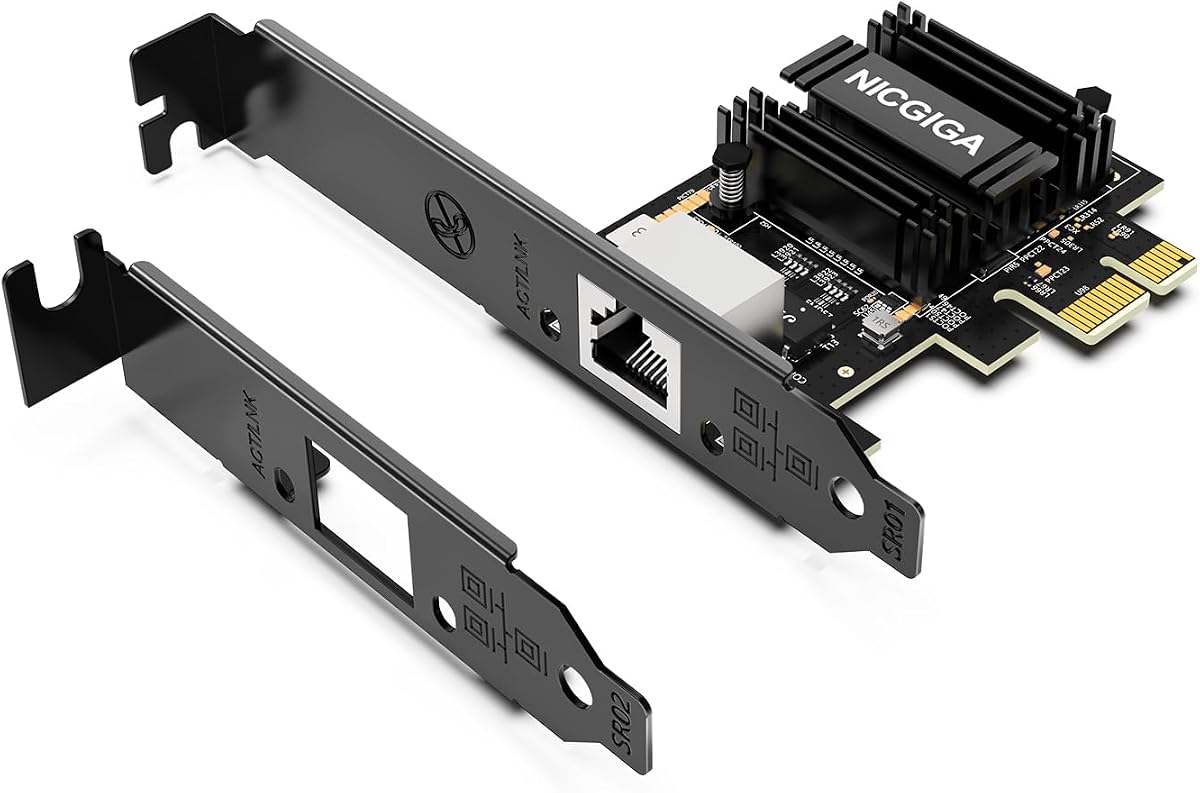
NICGIGA offers a sleek solution for compact systems with its PCIe 4.0 x1 interface. It uses the Realtek RTL8127 which provides stable performance with low power consumption and heat output.
We may earn a commission when you buy through this link, at no additional cost to you.
The auto-negotiation feature seamlessly adjusts speeds matching your network gear without manual tweaks. This makes it ideal for home labs where devices might support different speeds like 2.5G or 5G.
While it is small it fits into most slots including x4 x8 and x16 without blocking GPU lanes. This is a huge plus for gaming PCs where space and airflow are critical factors.
Users seeking a quiet efficient card for small form factors will find this appealing. Its support for modern OS and NAS platforms makes it a practical upgrade for many setups.
The PCIe 4.0 x1 interface allows it to fit into slots where larger cards cannot.
Low heat output ensures stable operation even in compact cases without extra cooling.
We may earn a commission when you buy through this link, at no additional cost to you.
The VunLink card mirrors the NICGIGA performance using the same RTL8127AT chipset. It offers high-speed networking ideal for NAS storage media editing and general file transfers.
We may earn a commission when you buy through this link, at no additional cost to you.
Its energy-efficient design reduces heat output which helps maintain consistent speeds during long transfers. The auto-negotiation ensures it works smoothly with routers and switches supporting various speeds.
Users should check compatibility with older Linux kernels as updates may be needed. However for Windows and modern Linux it offers a plug-and-play experience that simplifies the upgrade process.
This adapter is a strong choice for home users needing a simple reliable 10G link. Its balance of performance and thermal management makes it suitable for daily heavy use.
Reduced heat output ensures the card performs well without throttling during heavy loads.
Support for multiple Gig speeds makes it versatile across different network infrastructures.
We may earn a commission when you buy through this link, at no additional cost to you.
This adapter is unique because it uses an SFP+ cage allowing for fiber optic or copper connections. It is perfect for scenarios where long-distance runs are needed without signal loss.
We may earn a commission when you buy through this link, at no additional cost to you.
The aluminum heatsink keeps the card cool even during intense data transfers ensuring consistent performance. Built-in QoS technology allows users to prioritize traffic streams for critical tasks.
While powerful it requires separate transceivers which adds to the total cost of ownership. This makes it a more complex option for those new to fiber networking but worth it for performance.
Ideal for home labs with fiber switches or server rooms this card offers flexibility. It bridges the gap between standard copper and high-performance fiber optics effectively.
Fiber optic support allows for data transmission over longer distances than copper cables.
The built-in heatsink ensures the card stays cool and stable under high performance tasks.
We may earn a commission when you buy through this link, at no additional cost to you.
For Synology NAS owners this is the best upgrade option available. It is purpose-built for their systems ensuring seamless integration without compatibility issues or driver headaches.
We may earn a commission when you buy through this link, at no additional cost to you.
The dual 10GbE ports allow for high-performance storage applications and link aggregation. This significantly boosts throughput for multiple clients accessing files simultaneously on a NAS.
It comes with a 5-year warranty which reflects its high reliability and build quality. While the price is higher than generic cards the peace of mind and performance are worth it for NAS users.
This adapter is essential for power users maximizing their Synology investment. It transforms a standard NAS into a high-speed storage server capable of handling demanding workloads.
Designed specifically for Synology DSM it installs easily and works out of the box.
Dual ports enable bandwidth aggregation for faster file transfers from multiple users.
We may earn a commission when you buy through this link, at no additional cost to you.
TRENDnet provides a compliant solution that meets government standards for government contractors. It supports both 2.5G and 5G speeds ensuring future-proofing with existing infrastructure.
We may earn a commission when you buy through this link, at no additional cost to you.
The card includes both standard and low-profile brackets which covers most desktop cases easily. With 3 years of manufacturer protection users get reliable support and confidence in their purchase.
While it is a single port card it offers robust performance and standard compatibility for various systems. This makes it a safe choice for organizations needing compliant and stable networking hardware.
Buyers looking for a professional grade adapter should consider this option. Its compliance and support features make it stand out in a crowded market.
NDAA and TAA compliance makes it suitable for government and secure infrastructure projects.
Support for 2.5G BASE-T ensures flexibility with existing cabling without immediate upgrades.
We may earn a commission when you buy through this link, at no additional cost to you.
This adapter offers a portable alternative to PCIe cards for laptops and desktops without internal slots. It supports high speeds but actual throughput depends on your USB port capabilities.
We may earn a commission when you buy through this link, at no additional cost to you.
The aluminum housing and thermal silicone help dissipate heat ensuring the adapter stays cool during use. This design addresses common heat issues found in many USB Ethernet adapters.
Users should note that real-world speeds often fall short of the 10Gbps theoretical max. However for large backups or media workflows it provides a significant speed boost over standard Gigabit.
It is perfect for users who need high speed networking on the go without opening their PC. Its rugged build and broad OS support make it a versatile accessory for professionals.
A compact solution for laptops that lack internal expansion slots or 10G ports.
Advanced cooling materials keep the adapter running cool even during extended data transfers.
We may earn a commission when you buy through this link, at no additional cost to you.
Selecting the right 10GB Ethernet card involves evaluating several technical factors to ensure compatibility and performance with your specific setup.
Most desktop users will want a PCIe card which connects directly to the motherboard. PCIe offers stable high bandwidth performance ideal for desktops and servers. For laptops or those without PCIe slots a USB C adapter provides a portable alternative though performance depends on the USB port version.
Ensure your motherboard has the correct PCIe slot such as x4 x8 or x16. USB options require a USB 3.2 Gen 2×2 port to approach true 10G speeds.
Single port cards are sufficient for most home users needing a faster connection to a router. Dual port cards allow for link aggregation or failover setups which are crucial for servers needing redundancy.
Consider if you need to connect multiple devices or just one main network line. Dual ports offer flexibility for advanced users but add complexity to the setup.
Always check that the card supports your operating system before buying. Windows 10 and 11 are widely supported but Linux and VMware need specific drivers or kernel versions.
Verify that drivers are available for your specific OS version to avoid installation issues. Some cards require manual configuration for newer systems like Windows 11.
10G Ethernet typically requires Category 6A cabling to maintain full speeds over distances up to 100 meters. Using older cables might limit you to lower speeds or shorter runs.
Check if the card comes with a cable as some do which saves an extra purchase. Ensure your existing network cables are rated for 10G speeds.
The internal chipset determines stability and speed performance. Intel X540 and Realtek RTL8127 are well known for reliability in consumer and server environments.
Stick with cards using proven chipsets to avoid packet loss or dropouts. Quality chipsets also tend to handle heat better during long transfers.
Small form factor PCs need low-profile brackets to fit inside the case. Most cards come with both standard and low-profile brackets but it is important to check the dimensions before buying.
Measure your case clearance to ensure the card fits without blocking other components like GPU fans. A compact design helps maintain good airflow inside your PC.
A longer warranty period indicates confidence in the product quality. Some brands offer three to five years of coverage which protects your investment against defects.
Look for manufacturers that provide clear support channels in case of issues. Reliable support can save you time and frustration during installation or troubleshooting.
Prices vary significantly based on features like dual ports or fiber support. Budget cards offer solid performance for basic needs while premium options come with extra reliability.
Determine if the extra cost for dual ports or fiber support is necessary for your use case. A balanced choice ensures you get value without overspending on unused features.
First power down your computer and unplug the power cable before installing the card. Locate an available PCIe slot on your motherboard and remove the corresponding bracket slot on your case back panel.
Second insert the card firmly into the slot and secure it with screws to prevent movement. Connect your Ethernet cable securely to the port and ensure it clicks into place for a stable connection.
Third turn on your computer and install the necessary drivers from the manufacturer's website. Once the drivers are installed restart your system to finalize the setup and check connection status in your network settings.
Yes for 10G speeds over 55 meters you typically need Cat6A or higher cables. For shorter runs under 55 meters Cat6 cables can work but Cat6A is recommended to avoid signal loss and ensure consistent performance.
Only if your router supports 10G Ethernet on its LAN ports. Most routers have standard 1G or 2.5G ports which limits the card to those lower speeds regardless of its 10G capacity.
Yes PCIe 3.0 x4 provides enough bandwidth to handle full 10G speeds. Many cards use this interface and it is widely compatible with most modern motherboards without needing PCIe 4.0.
RJ45 uses standard copper cables while SFP+ allows fiber optic or copper transceivers. SFP+ is better for longer distances and higher reliability while RJ45 is simpler and uses cheaper cabling.
Not unless your internet plan exceeds 1Gbps. The card mainly boosts local file transfers between devices on your network not your connection to the wider internet unless you have a 10G ISP.
Most are but some may require manual driver installation on Windows 11. Always check manufacturer support pages before buying to ensure drivers are available for your specific system version.
Yes if your motherboard allows PCIe passthrough to the VM. Cards with Intel chipsets tend to work best with VMware and similar virtualization software for direct network access.
It is good practice to ensure your switch supports 10G speeds. Firmware updates might be needed for older switches to fully utilize 10G bandwidth and ensure compatibility with the new card.
We reviewed ten top options ranging from budget friendly PCIe cards to specialized adapters for Synology users. Whether you need a simple upgrade or a dual port solution there is a fit for every setup.
Focus on chipset reliability and OS compatibility to avoid common headaches. Ensure your router and cables are ready for 10G speeds to get the most out of your new card.
Check current stock and pricing before buying since these items can sell out quickly. With the right card you can transform your home lab or workstation into a high speed machine.