
Air Mouse Remote MX3 Pro
3.8Editor score
Built in mini keyboard
Simple plug and play
Five programmable keys
This guide compares the top air mouse for Android TV Box options to help you find the best remote with voice control and gyro navigation.
Finding the right air mouse for Android TV Box can transform your streaming experience significantly. A good device combines precise motion control with a convenient keyboard for easy typing. It allows you to navigate menus effortlessly without needing a traditional remote or a physical mouse setup.
We analyzed ten top-rated models based on connectivity, features, and user feedback. Each product offers unique benefits like voice control or IR learning to suit different needs. Our comparison ensures you understand which model fits your specific smart TV or streaming environment best.
Each pick highlights key specifications and real-world performance insights for informed decisions. Prices and availability may change frequently so always verify current offers before buying. This guide aims to simplify your search for the perfect remote control solution today.
3.8Editor score

4.2Editor score
4.3Editor score
This table provides a quick side-by-side view of all ten selected air mouse models. You can easily compare their core specs and unique features to identify the right choice for your setup.


The BOXPUT BPR1S Plus stands out as a top contender for Android TV Box users seeking advanced features. It holds a strong rating based on its dual connectivity options and precise motion tracking capabilities. This device is designed to replace multiple remotes by combining voice control with a traditional mouse interface.
We may earn a commission when you buy through this link, at no additional cost to you.
Its key strength lies in the full IR learning capability that allows control of almost any AOSP device or smart TV. The six-axis gyroscope sensor ensures accurate cursor movement which enhances navigation speed significantly. Users benefit from both Bluetooth and 2.4G modes to adapt to different device environments effortlessly.
Trade-offs include the need for separate batteries and some incompatibility with specific brands like Fire Stick. These issues are minor compared to the versatility offered by the dual firmware versions for PC and TV use. The clear learning process ensures you can customize buttons to match your existing setup quickly.
If you prioritize voice search and flexible connectivity this remote is an excellent investment. It suits users who want a single device to manage both their streaming box and television seamlessly. We recommend it for anyone looking to upgrade their smart home control system with precision.
Switch between Bluetooth and 2.4G to ensure compatibility with your specific TV or streaming box.
Use the built-in microphone to search for shows directly without typing on the keyboard.
We may earn a commission when you buy through this link, at no additional cost to you.
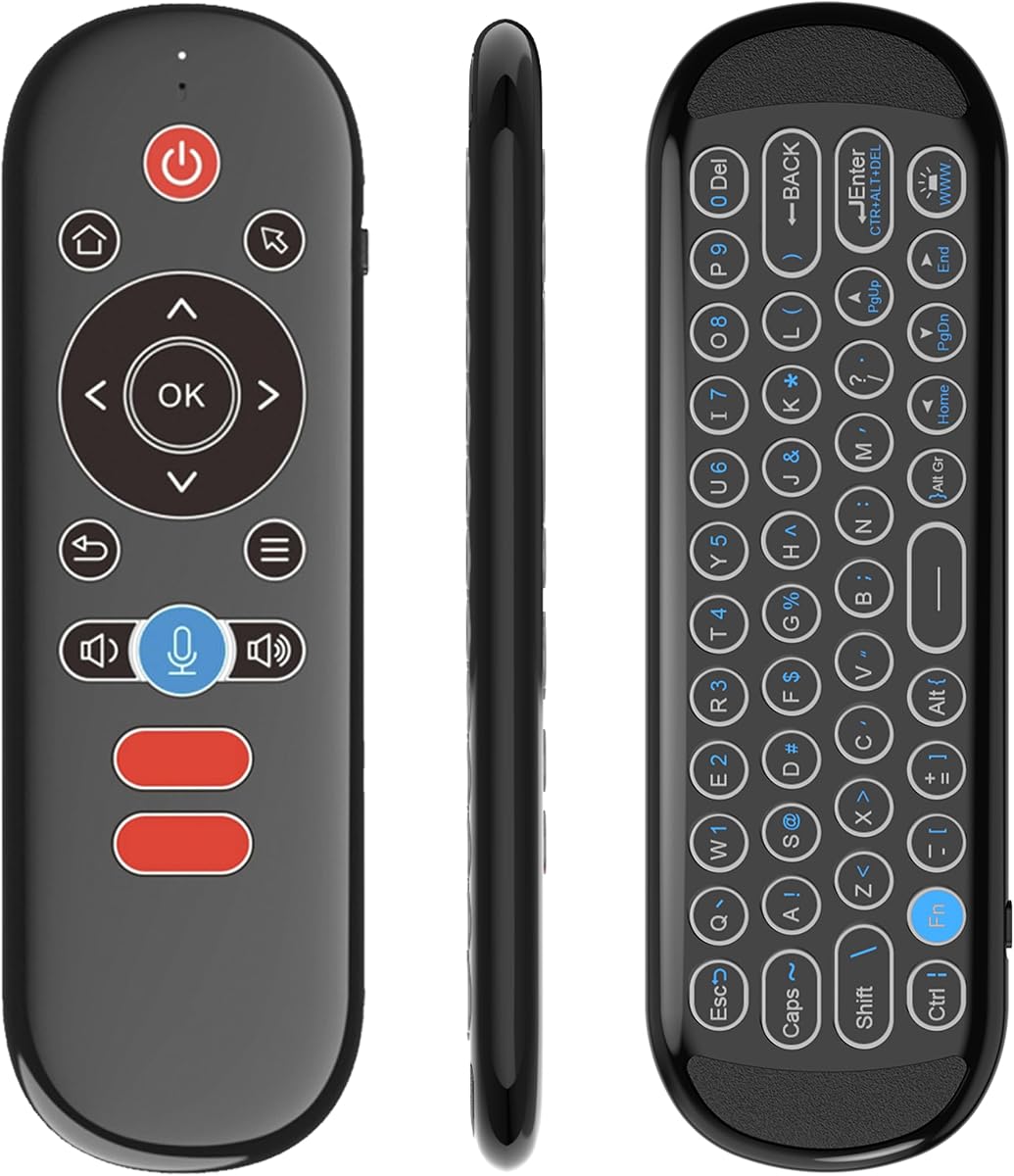
The Air Mouse Remote MX3 Pro is an ideal choice for those seeking a cost-effective solution for TV navigation. It offers a functional combination of a wireless mouse and a mini keyboard at an attractive price. This makes it accessible for users who need basic control without extra complexity or high costs.
We may earn a commission when you buy through this link, at no additional cost to you.
Key strengths include the convenient mini keyboard on the back which simplifies text entry for searches. The motion sensor allows for intuitive cursor control by simply waving your hand. It supports IR learning so you can program specific keys to manage your TV power and volume remotely.
While the build quality is somewhat basic it remains reliable for everyday use. Some users might find the buttons less responsive compared to premium models but the value is undeniable. The setup is straightforward with a USB receiver that requires no additional software installation.
This device is perfect for casual viewers who want to save money while gaining better control. It works well with various systems including Android TV Boxes and Raspberry Pi projects. We suggest this model for anyone needing a simple entry-level air mouse today.
Type searches and logins easily with the compact keyboard on the back of the device.
No drivers needed just plug the receiver in and start using the remote immediately.
We may earn a commission when you buy through this link, at no additional cost to you.
The 2.4G & Bluetooth Dual Mode air mouse represents a premium option for users needing full functionality. It combines a rechargeable battery with a vibrant backlit keyboard for use in dark rooms. This model caters to those who want a professional-grade remote with extensive customization capabilities.
We may earn a commission when you buy through this link, at no additional cost to you.
Its standout features include the 7-color backlit keys which ensure visibility during night viewing. The 6-axis gyro system provides smooth navigation while voice control adds convenience for quick searches. IR learning allows full control over external devices like soundbars or cable boxes with one unit.
Trade-offs involve a higher price tag and a weight that might feel substantial for some. However these are justified by the build quality and extended battery life compared to disposable options. The dual-sided design offers ergonomic comfort for extended use without hand fatigue.
Select this remote if you value quality and versatility over budget constraints. It is suitable for home theaters and gaming setups requiring precise input methods. We recommend it for users who want a long-lasting and feature-rich control solution.
Type in the dark with ease thanks to the colorful backlighting on the keyboard keys.
Save on battery costs with a built-in rechargeable power source for frequent use.
We may earn a commission when you buy through this link, at no additional cost to you.
The BOXPUT BPR2S Plus is a highly rated universal remote designed to replace multiple controllers. It supports a wide range of Android TV boxes and streaming devices with reliable performance. Users appreciate its ability to handle various inputs through smart switching between Bluetooth and 2.4G modes.
We may earn a commission when you buy through this link, at no additional cost to you.
Key strengths include the six-axis gyroscope which ensures precise cursor movement on screen. The inclusion of an electronic manual on the back of the remote provides instant troubleshooting help. IR learning capabilities let you control your TV and soundbar alongside the streaming box.
Some users report that PC usage might require a firmware update for optimal performance. This is a minor hurdle compared to the versatility and support provided by the device. The build is solid and fits comfortably in the hand for extended operation without issues.
This device is recommended for users seeking a robust universal control solution. It works well for those who manage multiple media devices in one room. We suggest it for anyone needing a reliable and well-supported remote control option.
Use the electronic manual printed on the back for quick troubleshooting tips.
Experience precise cursor control with the advanced gyroscope technology.
We may earn a commission when you buy through this link, at no additional cost to you.
The EASYTONE Air Mouse offers a balanced mix of voice and motion features at a reasonable cost. It is designed for users who need basic control across PCs and Android TV boxes. This model simplifies navigation by combining standard remote keys with a compact mouse interface.
We may earn a commission when you buy through this link, at no additional cost to you.
Its voice input capability uses a high fidelity microphone to facilitate quick searches. The 17-key layout allows for easy volume and navigation control. It supports multiple operating systems including Windows and Mac which adds to its versatility for mixed setups.
While the microphone works best within built-in search boxes it may not support all apps. The build is simple and durable enough for daily use without feeling cheap. Users generally find it comfortable for sitting back on the couch and controlling content.
Consider this option if you want a cost-effective voice remote for general use. It suits users with mixed OS environments who need a single control point. We recommend it for those prioritizing functionality over premium build quality.
Use the compact 17-key keyboard for quick access to common functions.
Find content quickly using the built-in microphone for voice commands.
We may earn a commission when you buy through this link, at no additional cost to you.
The iPazzPort Mini Mouse is a compact device designed for users who value portability and style. It features a vibrant 7-color backlight which enhances visibility in low light conditions. This remote is a great option for those who want a sleek and modern control solution.
We may earn a commission when you buy through this link, at no additional cost to you.
Its dual mode connectivity supports both Bluetooth and 2.4G for flexibility. The rechargeable battery ensures you do not need to buy disposable batteries often. It works with a wide range of smart TV boxes and laptops for consistent performance.
One limitation is that the charging cable is not included which might inconvenience some buyers. Compatibility with proprietary systems like LG smart TVs may vary without testing. Despite these issues the design and functionality remain solid for general streaming use.
Choose this if you want a stylish remote with a useful backlight feature. It suits users who often watch TV in the dark and need to see keys. We suggest it for anyone looking for a compact and rechargeable air mouse.
Customize your typing experience with colorful backlighting that adds style.
Connect via Bluetooth or 2.4G to suit your specific device needs.
We may earn a commission when you buy through this link, at no additional cost to you.
The Rii MX3 Remote is a classic model known for its reliable fly mouse functionality. It provides a solid foundation for navigation with a simple and intuitive layout. This device is widely used for its ease of connection and stable wireless performance.
We may earn a commission when you buy through this link, at no additional cost to you.
Key strengths include its 3-in-1 design which combines a mouse keyboard and IR remote. The motion sensor allows you to control the cursor by waving the device in the air. It supports most Android systems and PCs making it a versatile choice for many users.
Some users find the pairing process can be tricky if the initial connection fails. However resetting the device usually resolves this quickly without hassle. The build is durable enough to withstand daily use in a living room setting.
This remote is recommended for those seeking a proven and reliable solution. It works well for users who prefer simple navigation without complex features. We suggest it for anyone needing a trusted tool for media control.
Navigate menus effortlessly by waving the remote like a magic wand.
Control your TV sound and cursor with one unified device.
We may earn a commission when you buy through this link, at no additional cost to you.
The MX3 Pro Backlit is designed specifically for users who need visibility in dark environments. Its LED backlit keys make typing easy even when the room lights are off. This feature makes it a practical choice for evening entertainment sessions.
We may earn a commission when you buy through this link, at no additional cost to you.
The double-faced design offers comfort with a layout that fits natural hand positions. It includes IR learning to control external devices alongside your streaming box. The wireless connection is stable and reaches up to ten meters effectively.
Some users may find the need for batteries slightly inconvenient compared to rechargeable models. However the device is lightweight and easy to hold for long periods. It remains a solid option for general use across Windows and Android platforms.
Consider this if you need a reliable remote with good lighting. It suits those who prefer a straightforward layout with essential features. We recommend it for anyone wanting a functional tool for media control.
Type searches in the dark without needing extra light sources.
Enjoy a design that fits comfortably in your hand.
We may earn a commission when you buy through this link, at no additional cost to you.
The G20S PRO BT offers a streamlined design focused on essential functions. It features permanent buttons that resist wear and maintain functionality over time. This remote is a good pick for users who prefer a no-fuss layout with reliable performance.
We may earn a commission when you buy through this link, at no additional cost to you.
Its gyroscope core algorithm helps identify gestures accurately to reduce shake during movement. Voice search is available via Bluetooth which works well on Android systems. This makes it suitable for quick searches and navigation without needing a keyboard.
To use Bluetooth mode you must disconnect the USB receiver which requires a switch. This might be confusing for users expecting seamless automatic switching. The single-sided design is simple but limits some ergonomic possibilities for certain users.
Choose this if you need a straightforward remote for Android streaming. It suits users who prefer durability and simplicity over complex features. We recommend it for anyone needing a reliable basic control device.
Enjoy long-lasting buttons that resist wear from daily use.
Control the cursor with stable hand movements that avoid shakes.
We may earn a commission when you buy through this link, at no additional cost to you.
The Rock&Rown MX3 Pro is a versatile remote designed for diverse device support. It combines a mini wireless keyboard with a motion sensor for intuitive navigation. This model is a strong candidate for users needing basic control across multiple platforms.
We may earn a commission when you buy through this link, at no additional cost to you.
Its 3-Gyro sensor allows smooth cursor movement in both horizontal and vertical modes. Key learning lets you program common functions from your old remote for convenience. It supports Android and Windows systems making it a good general purpose tool.
Some users might find the key learning limited to five keys which is standard for this class. The device does not include batteries but works well with standard types. The layout is ergonomic enough for casual viewing sessions.
This remote is recommended for those seeking a balanced and affordable option. It works well for users who need a keyboard and mouse in one. We suggest it for anyone needing a reliable and compatible control device.
Move the cursor with precise control using the gyro technology.
Teach common buttons to control your TV easily.
We may earn a commission when you buy through this link, at no additional cost to you.
Selecting the right air mouse requires considering connectivity and features that match your needs. This guide breaks down the key factors to help you make an informed decision.
Connectivity determines how your remote connects to your device. Look for Bluetooth and 2.4G options to ensure compatibility with various systems like TV and Android boxes.
Always check if the remote supports the connection type your device uses to avoid issues.
Motion control allows you to navigate menus by waving your hand. Models with a six-axis gyroscope offer smoother and more precise cursor movement compared to basic motion sensors.
Prioritize remotes with gyroscopes for a better user experience during navigation.
Voice control lets you search for content without typing. Ensure the remote has a built-in microphone and supports your device's voice assistant for easy searches.
Choose a model with voice input to save time when looking for shows.
Backlit keyboards are essential for typing in low-light environments. Remotes with LED backlighting help you see keys easily during night viewing.
Select a remote with backlighting to enhance comfort when using it in the dark.
IR learning allows the remote to control other devices like your TV or soundbar. This feature helps reduce clutter by combining multiple remotes into one.
Look for full IR learning to manage your entire entertainment setup from one device.
Battery life impacts how often you need to replace or charge the remote. Rechargeable models are cost-effective while disposable ones are convenient for travel.
Decide between rechargeable or disposable batteries based on your preference for maintenance.
Compatibility ensures the remote works with your specific TV box or operating system. Check if the device supports Android Windows or specific streaming platforms.
Verify the manufacturer's compatibility list before purchasing to ensure it fits your device.
Build quality affects durability and comfort. Remotes with solid buttons and ergonomic designs last longer and feel better in your hand.
Choose a well-constructed model to ensure it withstands daily use.
To start using your air mouse insert the USB receiver into your TV box or PC. Power on the remote and wait for the connection to establish automatically.
Navigate by pointing the remote at the screen or waving it gently to move the cursor. Use the keyboard to type text for searches or logins.
Clean the device with a dry cloth and avoid exposing it to liquids. Store it in a cool dry place when not in use to preserve battery life.
Many air mice do not work with Fire Stick due to proprietary restrictions. Always check the compatibility list before buying to ensure it works with Fire Stick.
To set up IR learning hold the learning key and press the key on your TV remote. Repeat for each function you want to copy.
Most air mice support laptops via USB receiver or Bluetooth. Ensure your laptop has a USB port or Bluetooth capability to connect the device.
Cursor jumping may occur if there is interference or low battery. Replace batteries or move the receiver closer to fix the issue.
Bluetooth models do not need a receiver but 2.4G models do. Check your remote type to determine if a USB dongle is necessary.
Battery life varies from weeks to months depending on usage. Rechargeable models often last longer with a single charge cycle.
Some air mice support gaming via motion controls. Check if the device has a game mode or supports specific games.
Voice search may fail if the mic is muted or the device does not support it. Check settings and ensure the remote is in the correct mode.
We reviewed ten top air mice ranging from budget-friendly to premium models. Each offers unique features like voice control or backlighting for different needs.
Prioritize features like motion accuracy and compatibility to ensure the remote works well with your setup.
Check current prices before buying as offers change frequently on Amazon today.