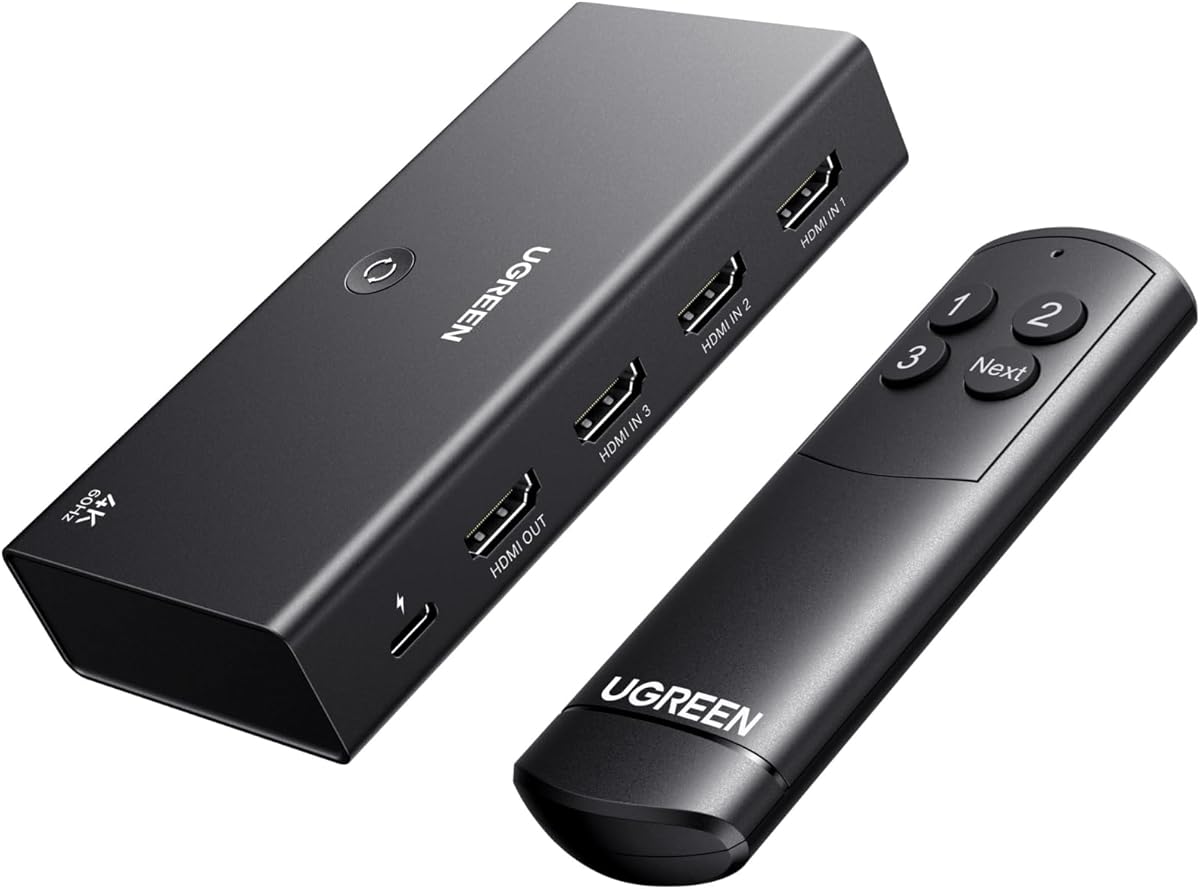
UGREEN HDMI Switch 3 in 1 Out
4.4Editor score
Supports 4K at 60Hz
Includes remote control
Requires USB power
We compare the top 10 Cheap HDMI Switch models for 2026 based on resolution support, port count, remote control, and reliability to find the best value.
Finding a reliable Cheap HDMI Switch can transform your entertainment setup without breaking the bank. These devices allow you to connect multiple sources like consoles and laptops to a single display. A good switch ensures stable transmission and easy control.
We analyzed ten top-rated models to find the best options for your needs. Our comparison focuses on resolution support, port availability, and build quality. We reviewed user feedback and technical specs to ensure accuracy and helpfulness.
Each pick below highlights specific strengths like remote control or aluminum construction. Prices and availability change frequently, so check current listings before buying. This guide helps you choose the right device for your home or office setup.
4.4Editor score

4.3Editor score

4.1Editor score
This table provides a side-by-side comparison of the top ten Cheap HDMI Switch models available this month. We highlight key specifications like port count, resolution limits, and included accessories to help you make an informed decision quickly.


This UGREEN model stands out as a top choice for users needing multiple inputs. It holds a solid 4.3 star rating and supports 4K at 60Hz for smooth gaming. The black finish fits modern setups well.
We may earn a commission when you buy through this link, at no additional cost to you.
The standout quality is its support for Variable Refresh Rate and HDR. This ensures better visuals when gaming on PS5 or Xbox. The remote control allows switching from the couch, adding convenience to your daily use.
One trade-off is the lack of automatic switching. You must press a button or use the remote to change sources. This is acceptable since it prevents unwanted source changes during use.
Buy this if you connect five devices like consoles and streaming sticks. It handles high bandwidth well. Just remember to use short HDMI cables for full 4K at 60Hz performance.
The switch supports VRR and high refresh rates up to 240Hz for 1080p, reducing screen tearing during fast games.
An included IR remote lets you switch inputs from up to 33 feet away, making it easy to manage your TV setup.
We may earn a commission when you buy through this link, at no additional cost to you.
This UGREEN model offers exceptional value for budget-conscious buyers. With a 4.4 star rating, it delivers reliable performance for three devices. The compact design saves space on your entertainment center.
We may earn a commission when you buy through this link, at no additional cost to you.
Key strengths include support for HDR10+ and Dolby Atmos. This means you get rich audio and vibrant visuals from streaming sticks or consoles. The manual switch button works quickly for easy transitions between inputs.
The need for external USB power is a minor downside. However, it ensures stable signal transmission without flickering. Just keep a power source nearby for best results.
Choose this if you need a simple 3-in-1 setup. It handles 4K at 60Hz well. The remote adds convenience, making it a strong contender for the best budget option.
The device supports Dolby Atmos and DTS, delivering high-quality surround sound for movies and games without extra hardware.
Its small footprint fits easily behind TVs or desks while providing reliable switching between three sources.
We may earn a commission when you buy through this link, at no additional cost to you.
This BENFEI switch is ideal for larger setups where cables run long. It supports adaptive equalization to maintain signal quality over distance. The 4.1 rating reflects solid real-world performance.
We may earn a commission when you buy through this link, at no additional cost to you.
The unique feature is support for 30ft HDMI transmission. This helps in conference rooms or large living rooms. The fixed 4ft pigtail saves money and reduces connection issues.
A trade-off is the need for a USB power cable. The packaging includes one, but it must stay plugged in for operation. This ensures stable 4K output without glitches.
Buy this if your display is far from your gaming devices. The long transmission capability is rare in budget switches. It handles high refresh rates well for smooth gaming.
This technology compensates for signal loss over long distances, ensuring a stable image even with cables up to 30 feet.
A 4ft HDMI cable is fixed to the output, saving you from buying one separately and reducing potential connection errors.
We may earn a commission when you buy through this link, at no additional cost to you.
This GANA model offers unique bidirectional functionality. You can use it as a 2-in-1 switch or a 1-in-2 splitter. The 4.3 rating shows users appreciate its flexibility.
We may earn a commission when you buy through this link, at no additional cost to you.
The aluminum body dissipates heat well and looks premium. Since it needs no external power, setup is truly plug-and-play. This makes it great for travel or simple home setups.
The limitation is having only two ports. If you need more, this won't work. However, for two devices, it handles 4K at 60Hz smoothly with minimal signal loss.
Choose this if you want a versatile tool that switches both ways. The lack of power needs is a big plus. It suits those needing basic 2-device switching with quality.
You can switch two sources to one screen or send one source to two displays, offering flexibility without buying two devices.
The device draws enough power from the HDMI signal itself, so no extra cables or adapters clutter your desk.
We may earn a commission when you buy through this link, at no additional cost to you.
Anker is known for quality accessories, and this switch fits that reputation. It supports 4K at 60Hz and has a 4.4 rating. The small size fits anywhere behind a TV.
We may earn a commission when you buy through this link, at no additional cost to you.
The manual button provides quick transitions without needing batteries. It supports various devices from laptops to VR headsets. The 18-month warranty gives extra peace of mind for buyers.
The lack of a remote means you must reach the device. This is a trade-off for simplicity and cost. If you sit close to your screen, this is not an issue.
Buy this if you need a trusted brand for two devices. The compact form factor is ideal for clean setups. It ensures smooth 4K output without complex wiring.
Anker offers an 18-month warranty and friendly customer service, ensuring help if any issues arise with the device.
Its tiny footprint hides easily behind monitors or TVs, keeping your entertainment area tidy and organized.
We may earn a commission when you buy through this link, at no additional cost to you.
This acer switch handles five inputs, making it great for complex setups. The 4.1 rating is solid given the high port count. It supports 4K at 60Hz for modern gaming.
We may earn a commission when you buy through this link, at no additional cost to you.
A metallic body with heat vents ensures stable performance. The remote control allows easy switching between devices. It eliminates the mess of multiple cables on your TV.
The lack of auto switching requires manual selection. This is acceptable as it prevents accidental input changes. The USB power ensures stable signals without flickering.
Buy this if you have many devices like consoles and sticks. It keeps your setup organized. Just remember to plug in the power cable for full functionality.
Connect up to five sources simultaneously without unplugging, making it perfect for homes with multiple consoles and streaming sticks.
Bottom vents help cool the device during long gaming sessions, maintaining stability and longevity of the hardware.
We may earn a commission when you buy through this link, at no additional cost to you.
This GANA model includes a pigtail cable for easy setup. It handles three inputs and supports 4K up to 30Hz. The 4.2 rating reflects solid performance for the price.
We may earn a commission when you buy through this link, at no additional cost to you.
The manual button allows quick switching without a remote. It includes a USB-C cable for power. The clear LEDs show which port is active at a glance.
The 4K at 30Hz limit is a trade-off. It works well for movies but not high frame-rate gaming. Ensure your device matches this resolution for best results.
Choose this if you need a quick setup with a cable included. It is affordable and functional for streaming or casual gaming. Just note the refresh rate limit.
A fixed 1.8ft pigtail cable is attached, simplifying the initial connection to your TV without extra costs.
LED lights show the active port clearly, helping you confirm your source selection instantly.
We may earn a commission when you buy through this link, at no additional cost to you.
This NEWCARE switch offers 4K at 60Hz and includes a cable. It supports 12-bit deep color for vibrant visuals. The 4.1 rating suggests good reliability for daily use.
We may earn a commission when you buy through this link, at no additional cost to you.
The gold-plated connectors resist corrosion and ensure better signal. It supports 3D and various resolutions. The 2.6ft cable helps get started quickly.
Without a remote, manual switching is required. The power cable must also be connected. These are standard for budget switches and ensure stable operation.
Buy this if you need 4K at 60Hz with a cable. It supports rich colors for movies. It is a strong option for home theaters or office screens.
The device supports 12-bit deep color, ensuring vibrant and accurate visuals for high-quality media playback.
A 2.6ft high-speed HDMI cable is included, reducing the need for immediate additional purchases.
We may earn a commission when you buy through this link, at no additional cost to you.
This GANA model combines five inputs with a solid aluminum body. It supports 4K at 60Hz and HDR. The 4.2 rating shows users appreciate the build quality.
We may earn a commission when you buy through this link, at no additional cost to you.
The remote control adds convenience for daily use. It handles high bandwidth for smooth gaming. The all-in ports design simplifies cable management.
You need to connect a power source for operation. Auto switching is not supported. These are normal trade-offs for a reliable 5-in-1 switch.
Choose this for a robust 5-device setup. The aluminum build ensures durability. It suits users wanting quality and flexibility.
The aluminum body provides better heat dissipation and protection compared to plastic alternatives.
Supporting 18Gbps ensures lossless transmission of high-resolution video and audio signals.
We may earn a commission when you buy through this link, at no additional cost to you.
This selector offers simplicity for basic setups. It supports 4K at 30Hz and comes with a remote. The 4.2 rating indicates it works well for general use.
We may earn a commission when you buy through this link, at no additional cost to you.
It handles three devices easily with no lag. The remote allows switching from a distance. LED indicators help confirm the active input clearly.
The 4K refresh rate is limited to 30Hz. This is fine for movies but not fast gaming. It is a good fit for streaming or presentations.
Buy this if you need a simple remote-controlled switch. It keeps your setup clean. Just note the refresh rate limit when choosing.
The plug-and-play design means no complex configurations are needed to get started with three devices.
An included remote lets you switch inputs quickly from your couch, enhancing ease of use.
We may earn a commission when you buy through this link, at no additional cost to you.
Selecting the right switch involves checking port count, resolution support, and control methods. These factors ensure the device meets your setup needs.
Count your HDMI sources like consoles, laptops, and streaming sticks. If you have more than two inputs, choose a 3-in-1 or 5-in-1 model to avoid constant cable swapping.
More ports keep your TV tidy and allow quick switching between devices.
Check if the switch supports your display resolution. Look for 4K at 60Hz for modern TVs or consoles. Some models only support 30Hz at 4K which limits gaming.
Ensure the switch matches your TV capabilities for the best video quality.
Decide if you want to switch from a distance. Remote control adds convenience while manual buttons are simpler. Manual buttons avoid battery changes but require getting up.
Remote control is best if you sit far from your TV.
Some switches need USB power for stable signals while others run on HDMI power. USB powered models are more stable for high bandwidth video.
Check if the power adapter is included or sold separately.
Auto switching detects the last active input automatically. It simplifies use but may cause unwanted changes if a console sleeps.
Manual switching gives you full control over input changes.
Aluminum housings dissipate heat better than plastic. This ensures the device lasts longer during long gaming sessions.
Look for gold-plated connectors to prevent corrosion and signal loss.
For 4K at 60Hz, cable length affects performance. Shorter cables reduce signal degradation over distance.
Some models include a pigtail to save you from buying extra cables.
A good warranty protects your purchase. Brands offering 12 months or more show confidence in product quality.
Check customer service options to resolve issues quickly.
Connect your devices to the input ports and your TV to the output. Ensure all cables are fully seated for best signal transfer.
Press the manual button or use the remote to switch inputs. If you use USB power, plug it in before turning on your devices.
Keep the switch in a well-ventilated area to avoid overheating. Dust off the surface regularly to maintain performance.
Most modern switches support PS5 but check for 4K at 60Hz compatibility. Ensure the HDMI cable is high speed to avoid frame drops.
Many models support audio pass-through for Dolby Atmos or DTS. Check the specs to ensure your soundbar works correctly.
Flickering often comes from poor cables or power issues. Use short high-speed cables and ensure USB power is connected firmly.
No standard HDMI switch splits one signal to two displays. For dual screens you need an HDMI splitter instead.
For 4K at 60Hz limit cable lengths to under 10 feet. Some models support longer runs with adaptive technology.
Manual buttons work well if you are close to the device. Remotes are convenient for large living rooms or home theaters.
The UGREEN 5-in-1 and BENFEI 4-in-1 offer strong value for multi-device setups. They balance features like remote control and high refresh rates well.
Prioritize resolution support and power needs when selecting. Ensure your TV benefits from 4K at 60Hz to justify the purchase.
Check current listings before buying to confirm specs and availability. Prices may change so choose based on the features you need most.