
2026 Mac OS Shortcuts Sticker
4.6Editor score
Zero Residue Adhesive
Ultra Thin Design
Water Repellent Surface
Finding the right Mac Keyboard Shortcut Sticker can transform your daily workflow significantly. These visual aids help you master essential commands without constantly searching online or interrupting your creative flow. Whether you are a student or a professional, having quick access to shortcuts boosts efficiency and reduces frustration.
We evaluated ten leading products based on compatibility, durability, adhesive quality, and layout clarity. Each option was analyzed to ensure it fits your specific MacBook model and provides accurate information for current macOS versions. Our goal is to help you choose a sticker that enhances productivity without compromising your device's aesthetics.
Each pick in this guide shows specific strengths like residue-free removal, color options, and shortcut coverage. Please note that product availability and pricing may change frequently on retail platforms. We recommend verifying current details before purchasing to ensure you get the exact version that matches your device requirements.
4.6Editor score

4.6Editor score

4.8Editor score
As an Amazon Associate we earn from qualifying purchases.
This side-by-side comparison highlights the key specifications and unique features of each top-rated Mac Keyboard Shortcut Sticker available this month.




The Synerlogic Mac OS Shortcuts Sticker stands out as a reliable visual guide for MacBook users seeking efficiency. Rated highly by customers, this sticker provides essential commands without the need for constant online searches. Its laminated vinyl construction ensures durability against daily wear and tear while maintaining clarity.
We may earn a commission when you buy through this link, at no additional cost to you.
This product covers a wide range of essential shortcuts grouped logically for quick reference during work. The adhesive is formulated to hold strong yet allows removal with care. The manufacturing origin in the USA adds a layer of trust regarding quality control and material standards.
While the adhesive is strong, users should be aware that removal might leave a light residue requiring gentle cleaning. The design does not fit smaller 11 or 12 inch MacBook models so checking compatibility is crucial. These minor trade-offs are generally acceptable given the productivity gains offered.
Ideal for students and professionals transitioning to macOS this sticker accelerates learning and workflow optimization. It serves as an excellent tool for beginners needing confidence in keyboard navigation. We recommend this option for those prioritizing comprehensive coverage and build quality in a reference tool.
Access essential commands instantly to reduce task interruption and speed up daily operations.
Designed and packaged in the USA ensuring high standards for materials and print clarity.
We may earn a commission when you buy through this link, at no additional cost to you.
This SYNERLOGIC sticker expands beyond basic OS commands to include essential Word and Excel shortcuts for productivity. It is highly rated for its military grade vinyl that resists wear and maintains a professional look. The inclusion of startup commands adds value for users needing deep system access or troubleshooting support.
We may earn a commission when you buy through this link, at no additional cost to you.
The design targets both basic and advanced users by organizing shortcuts to support skill progression. The adhesive is designed for secure attachment but requires a careful application process to avoid bubbles. Its compatibility covers a vast range of MacBook Air Pro and Mac Mini models effectively.
Applying the sticker demands attention to dust and adhesive handling to ensure a smooth finish. The removal process is generally clean but requires patience to avoid tearing the vinyl. These handling requirements are minor compared to the extensive shortcut data provided in one compact sheet.
Recommended for office professionals or students using Office suite apps alongside macOS basics. It balances cost effectiveness with high utility making it a strong budget friendly choice. Select this if you need both system and application specific shortcuts in a single reference source.
Streamline document creation with dedicated Word and Excel commands alongside system shortcuts.
Military grade vinyl ensures the sticker lasts through heavy daily typing and handling.
We may earn a commission when you buy through this link, at no additional cost to you.
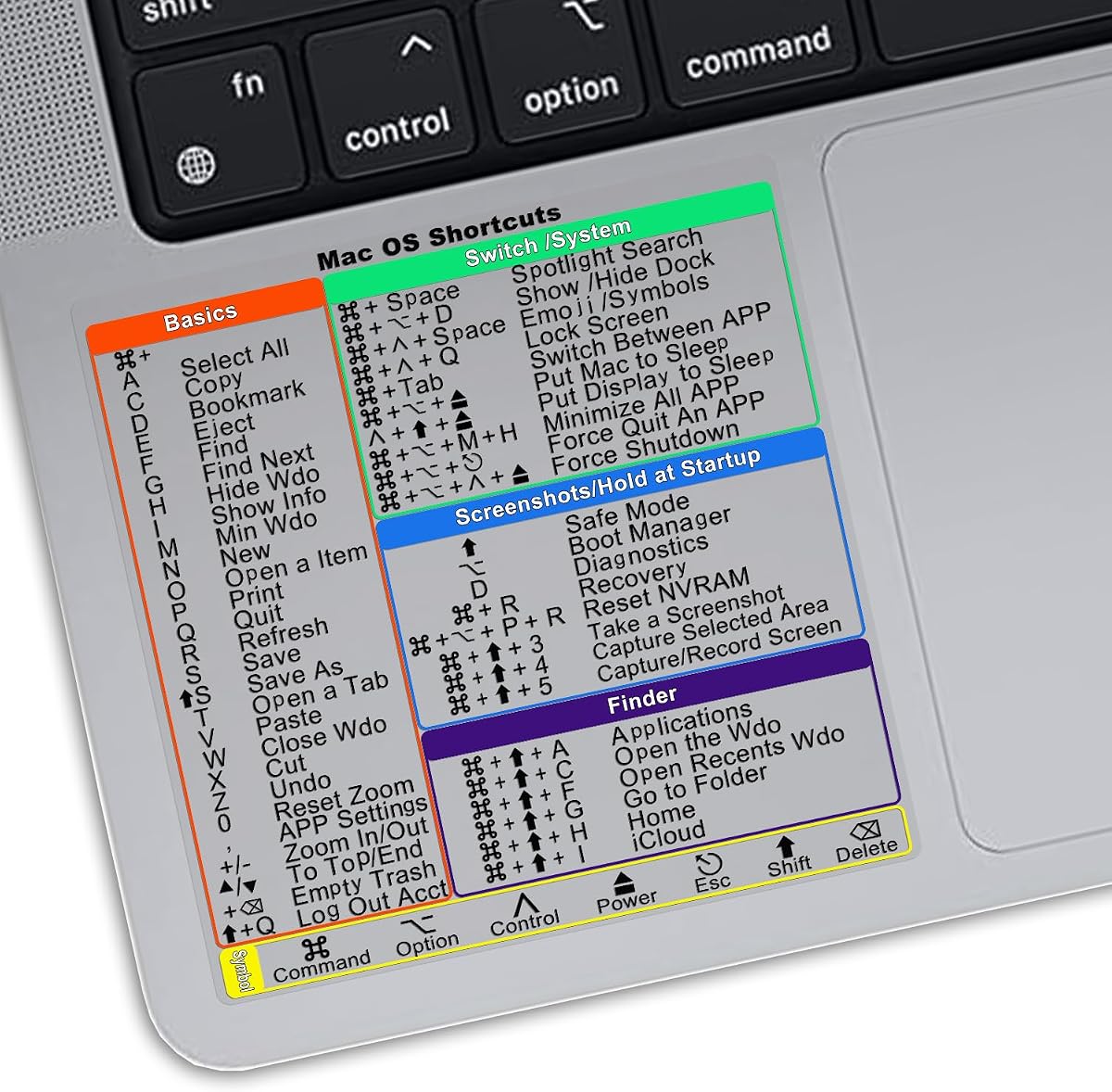
The 2026 Mac OS Shortcuts Sticker is designed with a focus on protecting your device surface while offering quick access. It boasts a zero residue adhesive formula ensuring removal leaves no marks on your MacBook. The ultra thin profile means it sits barely noticeable under your wrists during typing sessions.
We may earn a commission when you buy through this link, at no additional cost to you.
Content is curated to include only the 52 shortcuts users actually need for daily tasks. This simplifies the learning curve and reduces visual clutter compared to denser cheat sheets. The matte vinyl repels water and oils which helps maintain visibility over time in a busy workspace.
While the focus on essentials is a strength it may lack some advanced commands found in broader guides. The price reflects the premium adhesive technology and specialized material choice. For users prioritizing device care and minimalist aesthetics this trade-off is often worth the investment.
This option is perfect for professionals who value a clean device surface and efficient learning. It fits well with modern MacBook models including the Neo series for comprehensive coverage. We suggest this for those willing to pay slightly more for superior adhesive quality and design.
Enjoy peace of mind with an adhesive that removes completely without damaging your device.
Curated essentials reduce clutter and help you master the most useful commands first.
We may earn a commission when you buy through this link, at no additional cost to you.
This sticker offers a clean design with over 50 essential shortcuts grouped for easy scanning. It features a residue-free adhesive that protects your MacBook surface during removal. The color options allow you to match or contrast with your device finish for a personalized look.
We may earn a commission when you buy through this link, at no additional cost to you.
Designed specifically for 13 to 16 inch MacBook models it ensures a precise fit on the palm rest. The layout is user-friendly making it accessible for beginners and experienced users alike. The material resists scratches and water adding longevity to its utility in a daily work environment.
Users with smaller 11 or 12 inch devices will find this option incompatible due to size constraints. The clear black text works well on light surfaces but may need care on dark models. These limitations are specific to the model range but do not detract from the utility provided.
Ideal for users who prioritize aesthetics and a residue-free experience on newer MacBook Air or Pro models. The installation process is simple and supports hassle-free removal when needed. Consider this if matching your device color or protecting the surface is a high priority for you.
Choose a color that complements your device finish for a seamless professional appearance.
Apply and remove with confidence knowing no sticky residue will be left behind.
We may earn a commission when you buy through this link, at no additional cost to you.
This two pack offers great value by providing a spare set for sharing or replacement. It supports the latest M1 to M5 chip MacBooks ensuring compatibility with modern hardware. The clear design blends seamlessly with the backlight preserving the sleek look of your keyboard while providing reference.
We may earn a commission when you buy through this link, at no additional cost to you.
The vinyl is scratch proof and the ink is UV resistant to prevent fading over time. This durability ensures that the text remains legible even with heavy typing contact. The no residue adhesive allows for removal without leaving marks on your palm rest area.
Users must ensure precise alignment during installation to avoid misalignment with key spacing. The pack does not cover 11 or 12 inch models so verify dimensions before purchase. These factors are manageable for most users who understand the layout requirements of their device.
Perfect for households or offices where multiple users need reference guides without buying separately. It is also ideal for those worried about long term wear and tear on a single sticker. We recommend this for budget conscious buyers seeking longevity and compatibility with new chipsets.
Share the second sticker with a colleague or keep it as a backup for longevity.
Optimized for the latest Apple Silicon chips to ensure accuracy and compatibility.
We may earn a commission when you buy through this link, at no additional cost to you.
This three pack is an excellent choice for families or teams needing multiple reference stickers. The clear transparent design maintains the aesthetic of your device while showing necessary shortcuts. It supports Apple Silicon chips making it suitable for modern MacBooks and Mac Minis effectively.
We may earn a commission when you buy through this link, at no additional cost to you.
The universal compatibility ensures it fits a wide range of MacBook Air and Pro models without issues. Users appreciate the high rating which reflects satisfaction with both quality and usability. The inclusion of three units allows for easy replacement or distribution across different workspaces.
The layout is basic which might not satisfy power users needing advanced command details. Universal sizing means it might not align perfectly on every specific model edge. These drawbacks are minor considering the high value and flexibility offered by the multiple unit pack.
Ideal for educational settings or home offices where several MacBooks are in regular use. It provides a cost effective solution for equipping multiple devices with quick reference tools. We suggest this for those prioritizing quantity and compatibility over specialized design features.
Equip multiple devices easily with a set that supports various MacBook Air and Pro models.
Transparent material keeps your device looking clean while highlighting essential keys.
We may earn a commission when you buy through this link, at no additional cost to you.
The Synerlogic Universal sticker is crafted to fit Neo Air and Pro models along with iMacs and Mac Minis. It features a laminated vinyl build that protects the printed shortcuts from wear and tear. The clear white design ensures high contrast and readability against most device finishes.
We may earn a commission when you buy through this link, at no additional cost to you.
Its adhesive is designed for a stronger hold to prevent peeling at the edges over time. The manufacturing in the USA implies quality control that many users find reassuring for daily tools. The layout is organized to help you find commands quickly without scanning too much area.
Like other strong adhesive stickers removal might leave a light residue that needs cleaning. It is not suitable for very small 11 inch models so checking your device size is important. These considerations are standard for durable vinyl stickers and do not reduce its overall utility.
This option is great for users with older or newer Macs needing a single versatile reference. It works well for both beginners and power users looking to streamline their typing. We recommend it for those who prioritize fit flexibility and build quality in a universal tool.
Compatible with Neo Air Pro iMac and Mini ensuring broad usability across Apple devices.
Laminated surface resists scratches and moisture for long term visual clarity.
We may earn a commission when you buy through this link, at no additional cost to you.
This pack offers four distinct colors to match various tastes and device finishes effectively. It focuses on Intel Macs which ensures compatibility for users with older hardware systems. The military grade vinyl adds durability to withstand daily handling and accidental spills on your desk.
We may earn a commission when you buy through this link, at no additional cost to you.
The professional OEM look helps the sticker blend well without looking like an aftermarket add on. You can choose rainbow for a fun touch or black and white for a neutral style. The compact size makes it easy to place on the palm rest without blocking keys.
Users with Apple Silicon chips might need to verify specific compatibility as this targets Intel. The application requires care to avoid bubbles and ensure a smooth finish over the surface. These points are minor trade-offs for the significant variety and build strength offered in this set.
Ideal for users who want customization or have an older Intel Mac that needs a visual guide. It also suits environments where multiple color options are useful for different teams. We suggest this for those valuing color choice and durability in their reference tool.
Select from black white clear or rainbow to match your personal or office style.
Military grade vinyl provides a strong surface that resists daily wear and tear.
We may earn a commission when you buy through this link, at no additional cost to you.
This sticker targets productivity with a focus on Word and Excel shortcuts for Mac users. It is designed to be highly visible on dark surfaces like Midnight Black MacBooks for clarity. The inclusion of startup commands adds utility for users needing system level access or troubleshooting.
We may earn a commission when you buy through this link, at no additional cost to you.
The strong adhesive ensures the sticker stays in place during regular typing and usage cycles. It is made in the USA which provides confidence in the quality and durability of the materials. The clear white design offers a clean look that fits well with standard MacBook aesthetics.
While excellent for Office users it might lack depth for general system shortcuts compared to OS only versions. The adhesive may leave residue upon removal so gentle cleaning is advised for a pristine surface. These trade-offs are acceptable for users specifically looking for office app efficiency.
Recommended for professionals who rely heavily on Word and Excel for daily tasks and presentations. It helps reduce cognitive load by keeping commands visible without needing to switch windows. We suggest this for those prioritizing office suite efficiency over broad system command coverage.
Keep essential document commands visible to speed up writing and data entry tasks.
Optimized for dark surfaces ensuring high readability even in low light environments.
We may earn a commission when you buy through this link, at no additional cost to you.
TEACHUCOMP brings years of training experience to a reliable sticker with trusted content. It features a large clear design that maximizes readability for all key commands at a glance. The no residue adhesive ensures safe removal without compromising your MacBook surface or warranty status.
We may earn a commission when you buy through this link, at no additional cost to you.
The laminated vinyl adds an extra layer of protection against scratches and spills on your desk. It fits 13 to 16 inch laptops effectively covering the palm rest without overhang. The high rating reflects user satisfaction with the clarity and accuracy of the printed information.
The large size means it covers more area which some users might find slightly bulky. It is only available in clear so color matching options are limited compared to others. These points are minor compared to the reliability and clarity offered by this established brand.
Perfect for educational institutions or self taught learners valuing accuracy and clear instructions. The large layout helps beginners grasp the full keyboard map more quickly. We recommend this for those prioritizing educational quality and safety for their device surface.
Trusted by training professionals to ensure accurate and essential shortcut information.
No residue adhesive allows you to move or remove the sticker without damage.
We may earn a commission when you buy through this link, at no additional cost to you.
Selecting the right sticker involves considering compatibility material quality and layout design to match your workflow needs.
Ensure the sticker dimensions match your MacBook Air Pro or Neo model size precisely. Check if the sticker is designed for 13 to 16 inch devices or if it fits smaller 11 inch models as well.
Verify compatibility notes in the product description to avoid buying a sheet that will not align with your specific keys.
Look for adhesive that holds securely but does not leave permanent residue when removed. Some premium options use residue free glue that peels off cleanly without damaging the MacBook finish.
If you plan to replace the sticker often choose a formula that allows repeated removal without tearing the vinyl.
High quality laminated vinyl protects against water spills scratches and daily wear from your wrists. This ensures the text remains legible and the sticker does not curl or fade over time.
Water repellent surfaces are useful for coffee drinkers or those working in humid environments near their devices.
Decide if you need basic OS shortcuts or comprehensive lists including Office app commands and startup codes. A curated essential set reduces clutter while a full sheet supports advanced power users.
Check if the layout groups commands by category so you can find navigation or screenshot commands quickly without searching.
Clear stickers blend seamlessly with the device finish while white or black options offer higher contrast for readability. Consider your MacBook color and whether you want the sticker to stand out or remain subtle.
Some packs include rainbow or colored options for those who want a more customized aesthetic look on their laptop.
Choosing a brand with a history of educational or professional products often ensures higher accuracy in the shortcuts provided. Trusted manufacturers typically offer better customer support if you encounter printing defects or fit issues.
Reviews and ratings help validate the quality of the print and adhesive over time for long term satisfaction.
Multi pack options like two or three sets offer better value if you have multiple devices or need a spare. This ensures you can replace a worn sticker without waiting for a new shipment.
Compare the price per unit in the pack to see if it offers a budget friendly solution compared to single items.
A clean layout with clear fonts and logical grouping speeds up the learning process and reduces eye strain. Avoid designs that are too crowded with tiny text that is hard to scan quickly.
Look for concise labels that use common symbols so you can translate them to key presses instantly.
Before applying clean the palm rest area with a soft dry cloth to remove dust and oils. Ensure the surface is completely dry to help the adhesive bond properly without air bubbles forming.
Align the sticker carefully starting at one edge and smoothing it down gradually to avoid trapping air. Press firmly with a soft cloth to ensure full contact and a flat finish across the keys.
To remove later peel back slowly and use warm soapy water to wipe any residue if present. This protects your device finish and allows you to apply a new sticker later without marks.
Most high quality stickers use residue free adhesives that do not damage the finish. However strong adhesives may leave light marks that clean off with gentle wiping and warm water.
Yes most modern stickers specify support for M1 to M5 chips. Check the product details to confirm it includes commands for your specific system version.
Many brands offer no residue adhesive. If residue remains use a soft cloth with warm soapy water to wipe it off cleanly.
Several models specify universal compatibility for iMac and Mac Mini keyboards. Verify the dimensions to ensure it fits your desktop keyboard palm rest.
Laminated vinyl and UV resistant inks ensure they last years under normal conditions. Heavy friction may wear edges over time but the text stays readable.
Yes they are ideal for beginners as they keep essential commands visible for quick learning. This reduces the need to search online constantly while you memorize shortcuts.
We reviewed ten top options ranging from universal fits to specialized Word Excel guides. The Synerlogic and TEACHUCOMP models stand out for durability and educational value.
Prioritize adhesive quality and layout clarity to ensure the sticker supports your workflow daily. A clean design helps you learn faster without visual clutter or eye strain.
Please verify current prices and availability as they may change on retail platforms. Select the model that fits your specific device size and productivity goals today.