
Corded Landline Phones for Seniors
4.2Editor score
Photo dialing buttons
110dB loud ringer
No battery required
This guide compares the top captioned telephone models for seniors and hearing impaired users, focusing on clarity, ease of use, and accessibility features
Captioned telephones provide a vital communication bridge for those with hearing loss. These devices display real-time text of conversations, ensuring no word is missed during important calls with family and friends.
We evaluated ten leading models based on screen size, caption accuracy, volume control, and user interface simplicity. Our analysis covers corded, cordless, and voice-activated options to suit diverse needs.
Each pick highlights unique strengths like photo dialing, amplified sound, or voice commands. Please note that specific pricing and availability may change frequently, so verify details before purchasing.
4.2Editor score

4.3Editor score
4.5Editor score
The following table offers a side-by-side comparison of all ten products to help you quickly identify the right model for your specific hearing and mobility needs.


This Hamilton CapTel model stands out as a top choice for users needing reliable captioning. It features a large touchscreen that displays real-time text of conversations clearly and efficiently.
We may earn a commission when you buy through this link, at no additional cost to you.
The device offers up to 40dB of amplified sound and allows users to customize caption sizes. Both incoming and outgoing calls are captioned to ensure full comprehension during every interaction.
While it requires high-speed internet and is only available for US residents, the clarity provided is exceptional. Users benefit from both automated and assisted captioning options for flexibility.
Anyone with significant hearing loss who wants a clear view of conversations will find this model highly effective. It transforms standard calls into accessible experiences for seniors.
The large screen ensures text is easy to read even in dim lighting conditions.
Live operator support is available for complex calls or technical issues.
We may earn a commission when you buy through this link, at no additional cost to you.
This landline phone is designed specifically for seniors with memory impairments like dementia. It simplifies dialing using customizable photo buttons so users can reach loved ones with a single touch.
We may earn a commission when you buy through this link, at no additional cost to you.
The device is incredibly loud with a 110dB ringer and adjustable receiver volume. It runs entirely on phone line power which means it works during outages without needing batteries.
While it lacks internet connectivity or captioning features, its simplicity makes it ideal for those who just need to connect easily. The hands-free function helps users with limited mobility or weak grip.
Families seeking a low-maintenance device for elderly parents will appreciate this reliability. It ensures that staying connected remains effortless even with cognitive challenges.
Photo dialing reduces the burden of remembering phone numbers for users.
A programmable SOS button provides a direct link to help in emergencies.
We may earn a commission when you buy through this link, at no additional cost to you.
The VTech SN5147 combines a corded base with a cordless handset for maximum flexibility. This hybrid system allows users to move freely while keeping the base reliable for power outages.
We may earn a commission when you buy through this link, at no additional cost to you.
It features a 90dB extra-loud ringer and up to 50dB of audio assist. The backlit display and big buttons make dialing and reading caller ID easy for those with low vision.
Users can block up to 1,000 robocalls and access a 22-minute digital answering machine. These security and convenience features add significant value for seniors living alone.
This phone is best for those who need mobility within their home. It balances modern convenience with essential amplification for hearing impaired users effectively.
The cordless handset allows users to answer calls from any room easily.
Robocall blocking helps protect seniors from unwanted scams and interruptions.
We may earn a commission when you buy through this link, at no additional cost to you.
This home telephone allows users to answer, dial, and hang up using only voice commands. It eliminates the need to press buttons which is ideal for those with severe mobility or vision issues.
We may earn a commission when you buy through this link, at no additional cost to you.
The device uses the home phone line and is always ready to listen for commands. It responds to simple instructions to manage calls efficiently without physical interaction.
While it lacks a visual display or text capabilities, the hands-free nature makes it unique. Users with physical limitations can maintain independence through this voice-driven interface.
It is best suited for individuals who struggle with traditional interfaces. This phone offers a truly accessible solution for daily communication needs.
Simple spoken words trigger actions making the phone easy to operate.
Removing buttons reduces frustration for users with hand tremors.
We may earn a commission when you buy through this link, at no additional cost to you.
This phone is designed with large buttons that are easy to see and press. It features up to 40dB of amplified volume to support seniors with varying degrees of hearing loss.
We may earn a commission when you buy through this link, at no additional cost to you.
It includes three replaceable picture buttons that store favorite numbers securely. Data is protected even if the phone line is unplugged preventing loss of contacts.
The phone can be mounted on a wall or placed on a desktop with non-skid pieces. This flexibility ensures it stays secure and accessible wherever it is placed.
Users who need physical ease of use will appreciate this sturdy design. It combines amplification with simplicity for reliable daily communication.
Large buttons reduce the strain on eyesight during dialing.
Wall mounting prevents accidental falls that could damage the phone.
We may earn a commission when you buy through this link, at no additional cost to you.
This VoIP phone is designed for seniors with dementia using customizable image keys. Photos can be inserted behind keys to remind users who they are calling quickly and easily.
We may earn a commission when you buy through this link, at no additional cost to you.
It offers amplified sound up to 110dB with a bright red light for incoming calls. A dedicated help key provides instant access to pre-programmed emergency assistance.
Users must have an active VoIP service or SIP server for this device to function. It does not connect to standard phone lines which limits its use to specific setups.
Families with modern internet phone setups will find this highly effective for caregivers. It balances technology with intuitive design for complex needs.
Visual cues help recall contacts without relying on memory.
Visual alerts ensure users know when someone is calling immediately.
We may earn a commission when you buy through this link, at no additional cost to you.
This model focuses on delivering high-quality audio for clear communication. It provides amplification to boost volume significantly for those with hearing loss.
We may earn a commission when you buy through this link, at no additional cost to you.
The design is ergonomic and tailored for seniors using it daily. It emphasizes performance to ensure that every word is heard clearly.
While it lacks advanced digital features, the core function of clear sound is its main strength. Users seeking pure audio enhancement will find it effective.
It is suitable for those who prioritize sound quality over digital convenience. A reliable choice for essential phone interactions.
High definition technology reduces static and improves voice clarity.
A simple interface ensures seniors can use it without confusion.
We may earn a commission when you buy through this link, at no additional cost to you.
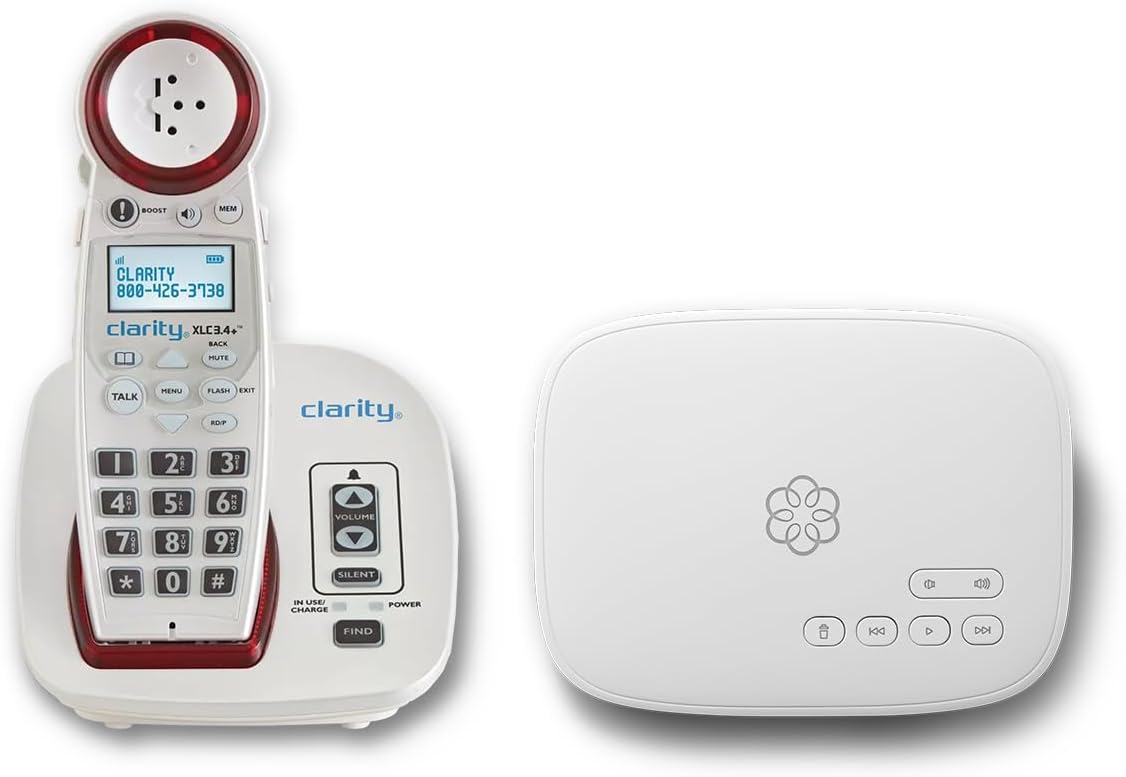
This bundle includes both hardware and unlimited nationwide phone service with 24/7 support. It features a talking keypad and caller ID speak for users who cannot read text clearly.
We may earn a commission when you buy through this link, at no additional cost to you.
Users get a visual ringer and adjustable volumes to suit hearing needs. Robocall blocking keeps spam out of the household for peace of mind.
A subscription is required for the service plan which adds to the cost. However, the support and convenience it provides are unmatched in the category.
Families wanting a complete solution without separate service providers will love this. It simplifies life by combining service and hardware into one package.
All calling needs are met in one bundle with no extra bills.
Advanced call blocking protects seniors from unwanted scam attempts.
We may earn a commission when you buy through this link, at no additional cost to you.
This phone allows users to make calls using three simple voice commands. It includes a talking caller ID and visual ring indicator for added accessibility.
We may earn a commission when you buy through this link, at no additional cost to you.
Users can store up to 17 names and numbers in voice memory for quick access. The device also supports traditional dialing with loud volume options.
While it offers many useful features, the low rating suggests it can be difficult to use. Command recognition may require practice to ensure reliability.
It is best for tech-savvy users who want voice integration without smart home systems. A unique option for those willing to learn the commands.
Storing names verbally helps users recall contacts faster.
Flashing lights provide a clear signal when someone is calling.
We may earn a commission when you buy through this link, at no additional cost to you.
This landline phone features nine photo memory keys for instant dialing. It helps seniors with memory loss stay connected to family by pressing a picture instead of numbers.
We may earn a commission when you buy through this link, at no additional cost to you.
It offers over 110dB of ringer volume and 90dB of earpiece volume for clarity. Hands-free calling allows users to talk without holding the receiver which helps with mobility.
The phone runs without batteries so it works during power outages reliably. It requires no internet and is simple to program for any user.
Families looking for a cost-effective way to simplify communication will choose this. It ensures seniors stay in touch with loved ones effortlessly.
Picture keys bridge the gap between memory loss and calling loved ones.
Phone line power ensures the device never runs out of electricity.
We may earn a commission when you buy through this link, at no additional cost to you.
Selecting the right telephone requires understanding your specific hearing and mobility needs. This guide covers the essential factors to consider before purchasing.
The primary function of a captioned telephone is to provide real-time text of conversations. Look for models with high accuracy ratings that minimize errors during fast speech or noisy calls. Poor captioning can lead to misunderstandings and frustration during important interactions.
Choose devices that offer assisted captioning options for better clarity.
A large, bright display is critical for readability especially for those with low vision. Ensure the text is large enough to read comfortably without straining your eyes. Many models offer adjustable font sizes which accommodate different visual needs.
Prioritize screens that are anti-glare and easy to read in daylight.
Amplification levels vary significantly between models so check the maximum dB gain. Some phones offer up to 40dB or more while others are more modest. Ensure the device allows you to adjust volume for both the receiver and the ringer.
Look for adjustable volume settings to suit your hearing threshold.
Memory buttons and photo dialing can simplify the process for seniors with cognitive decline. These features allow you to store favorite numbers and access them with a single touch. Voice dialing is another option for those who struggle with physical buttons.
Choose memory options that are easy to program and access quickly.
Most captioned phones require electricity to display text so a standard outlet is necessary. Some corded phones offer backup power or work without batteries which is useful during outages. Ensure you have a reliable power source near where you plan to place the device.
Consider battery backups if you live in an area with frequent power outages.
Ensure the phone is compatible with your existing telephone service and internet connection. Some models require high-speed internet while others work with standard landlines. Review the setup requirements to avoid installation issues or compatibility problems.
Verify compatibility with your current service before purchasing the device.
Caller ID functionality helps you know who is calling before you answer. Visual alerts like flashing lights are essential for those with severe hearing loss. These features ensure you never miss an important call even in a quiet environment.
Look for phones with strong visual indicators for incoming call alerts.
Safety features like SOS buttons or emergency calling options can provide peace of mind. Some models offer call blocking to protect against scams and unwanted telemarketing. These additional tools help ensure safe and secure communication at home.
Prioritize safety features if you live alone or are vulnerable to scams.
Place the telephone on a flat stable surface near a power outlet and phone jack. Connect the device securely to ensure no loose wires disrupt the connection or service.
Set up memory buttons or photo keys by following the manufacturer's instructions carefully. Test each function to ensure it works before relying on it for daily calls.
Clean the device regularly with a soft dry cloth to prevent dust buildup. Avoid using harsh chemicals that could damage the screen or the casing.
Many modern captioned telephones rely on internet connections for real-time text services. Check if the model you choose supports your internet provider. Some landline options work without internet but lack advanced features.
Coverage varies by provider and location so contact your insurance company. Some providers offer free or discounted captioned phones for eligible residents. Verify eligibility requirements before applying for assistance.
Most captioned telephones are compatible with hearing aids but check the specifications. Look for telecoil compatibility to ensure clear sound. Proper placement of the phone can also reduce feedback during calls.
Accuracy depends on speech clarity and connection speed but most systems are reliable. Some models offer human-assisted captioning for better precision. Practice using the device to get comfortable with the text flow.
If the internet fails or service is down the phone will not display text. However the audio usually still works if the device is amplified. Some models have a manual captioning option for emergencies.
Most phones have a simple menu to assign photos to buttons. Follow the step-by-step guide in the manual or contact customer support. Ensure photos are small enough to fit within the button slots.
Yes these phones are designed for independent use by seniors with hearing loss. Features like big buttons and photo dialing simplify the process. Family members can help set it up initially.
Yes most models support both incoming and outgoing calls with captions. This ensures full communication in both directions. Some require special registration or service plans.
Choosing the right captioned telephone depends on your specific hearing and memory needs. Whether you need advanced real-time text or simple photo dialing these products offer reliable options.
Focus on features like screen size volume control and memory to ensure the device fits your lifestyle. Prioritize ease of use and accessibility for long-term satisfaction and confidence.
Verify current pricing and availability before making your decision as offers may change. Investing in a quality telephone ensures clear and consistent communication with loved ones.