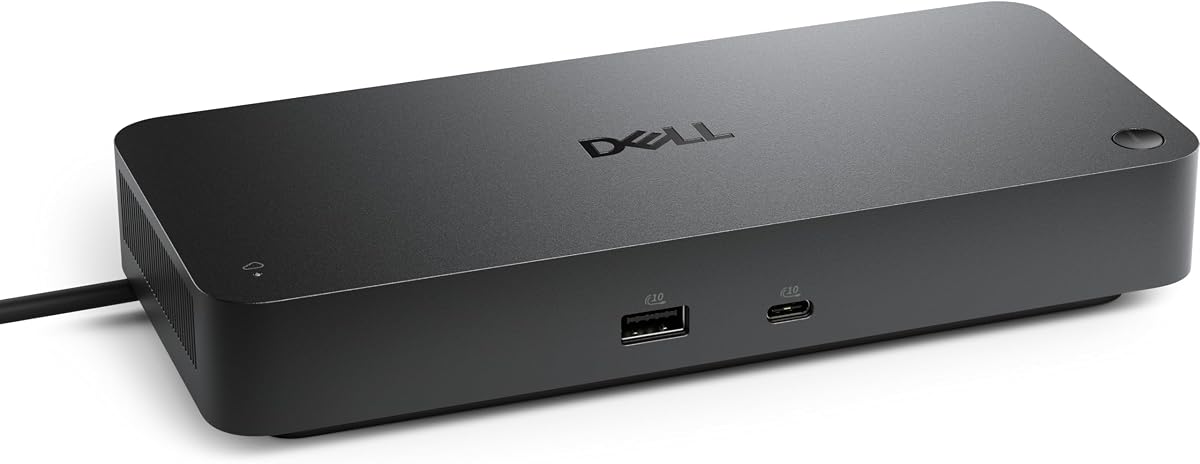
Dell Pro Thunderbolt 4 Smart Dock SD25TB4
4.2Editor score
Dual Thunderbolt 4 Ports
130W USB-C Charging Performance
Supports Up to Four 4K Displays
This comprehensive guide compares the top ten docking stations for Dell Pro 14 Plus laptops to help users find the perfect connectivity solution for their
Finding the right docking station for your Dell Pro 14 Plus is essential for maximizing productivity and creating a seamless workstation environment. These devices expand connectivity options significantly.
We compared ten leading models based on power delivery, display support, build quality, and special features like sustainability and management tools to ensure you get the best value today.
Each pick highlights key strengths and potential trade-offs to help you decide quickly. Please note that product availability and pricing can change frequently on Amazon platforms.
4.2Editor score

4.5Editor score
4.4Editor score
This side-by-side comparison evaluates all ten products across critical specifications including power output, video output capabilities, port selection, and unique features to help you make an informed decision.


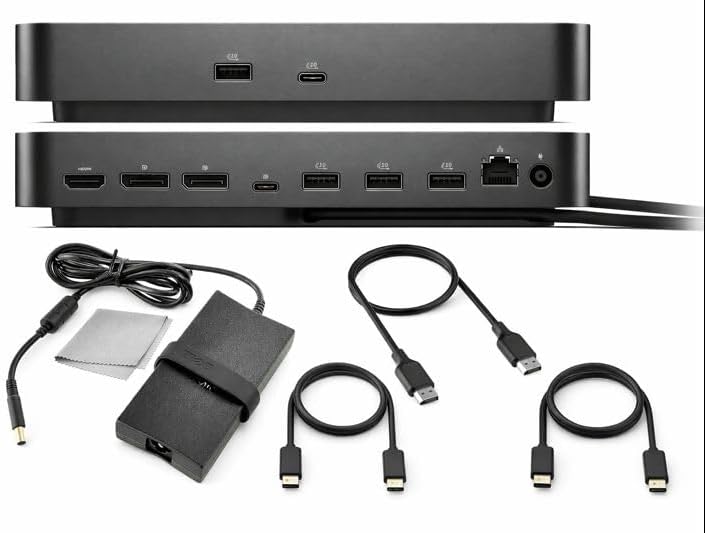


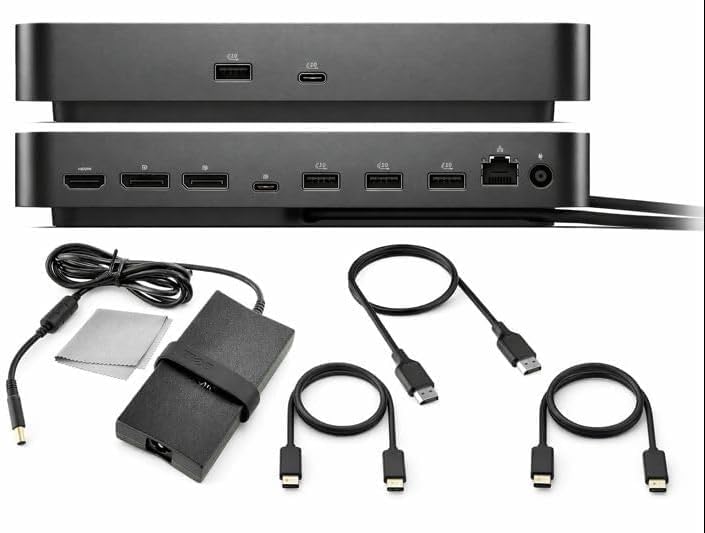

The Dell Pro Laptop Docking Station WD25 stands out as a top choice for modern workplaces needing reliable connectivity. With a strong 4.5-star rating it delivers essential power and display capabilities efficiently.
We may earn a commission when you buy through this link, at no additional cost to you.
It offers up to 100W of power delivery which is perfect for new Dell AI PCs and other non-Dell machines needing fast charging. The design includes an ambidextrous USB-C cable that can be routed left or right for better desk organization.
While it focuses heavily on modern connectivity you may need separate adapters for older peripherals. However the sustainable design reducing power consumption makes it a responsible choice for eco-conscious IT departments.
Ideal for professionals wanting a clean setup with multiple monitors this dock balances performance and sustainability. It is highly recommended for users prioritizing efficiency and reliable daily connectivity.
This dock provides up to 100W power to laptops ensuring they stay charged during intense work sessions without bulky adapters.
Built with at least 65% postconsumer recycled materials it reduces environmental impact while maintaining high durability standards.
We may earn a commission when you buy through this link, at no additional cost to you.
The Dell Pro Smart Dock SD25 is designed with enterprise needs in mind offering robust security and management features. Its high rating reflects strong performance in secure environments requiring remote oversight.
We may earn a commission when you buy through this link, at no additional cost to you.
IT teams will appreciate the ability to manage docks remotely via Wi-Fi without user presence. The encryption standards protect sensitive data while the ambidextrous cable adds flexibility to desk layouts.
The need for specific management software might be a barrier for smaller setups but the security benefits are unmatched. Firmware updates during off-hours prevent disruptions ensuring smooth daily operations.
Best suited for businesses needing centralized control over peripherals this dock delivers peace of mind through advanced security protocols. It is an excellent choice for IT managers seeking efficiency.
Manage fleetwide compliance and updates effortlessly with the Dell Device Management Console ensuring all docks stay current.
WPA3 encryption and hardware based encryption safeguard your data against unauthorized access and tampering attempts.
We may earn a commission when you buy through this link, at no additional cost to you.
This premium dock excels in high power delivery and speed making it ideal for creative professionals and data heavy workloads. With Thunderbolt 4 ports it offers unmatched versatility for complex setups.
We may earn a commission when you buy through this link, at no additional cost to you.
It delivers up to 130W for Dell laptops ensuring fast charging even during heavy use. The ability to connect four 4K monitors simultaneously makes it perfect for multi-screen productivity environments.
While it requires Thunderbolt capable devices the speed and power benefits justify the investment for serious users. Sustainability features also align with modern corporate responsibility goals effectively.
If you need maximum performance and multi display support this dock is the top contender. It is highly recommended for power users who cannot afford connectivity bottlenecks in their workflow.
Connect up to four 4K monitors via HDMI 2.1 and DP 1.4 for an immersive multitasking environment.
Dual Thunderbolt 4 ports allow chaining up to six devices with high-speed data transfer capabilities.
We may earn a commission when you buy through this link, at no additional cost to you.
Anker Prime Docking Station offers impressive power with 160W total output allowing simultaneous charging of multiple devices. It appeals to users needing diverse ports and fast data speeds in one unit.
We may earn a commission when you buy through this link, at no additional cost to you.
The 14-in-1 design covers almost all connectivity needs from HDMI to USB-A. With 10Gbps data speeds you can transfer large files quickly while keeping peripherals connected efficiently.
Compatibility issues with Linux and macOS limitations for extended displays are notable trade-offs. However for Windows users it provides a robust solution for complex setups without extra hardware.
Best for general users needing broad connectivity this dock delivers reliable performance and strong warranty support. It is a solid choice if you need flexibility across different device types.
Deliver powerful charge with 160W total output capable of charging up to four devices simultaneously.
Manage data across multiple devices with versatile ports offering speeds up to 10Gbps efficiently.
We may earn a commission when you buy through this link, at no additional cost to you.
This bundle ensures you have everything needed right out of the box making setup incredibly easy. It is a practical choice for those who do not want to buy accessories separately.
We may earn a commission when you buy through this link, at no additional cost to you.
The inclusion of a cleaning cloth and cables adds value beyond just the dock itself. High power delivery ensures your laptop stays charged while connected to multiple monitors and peripherals.
The lower rating suggests some users may prefer more advanced features or better build quality. However the convenience of a complete kit makes it appealing for quick deployments.
If you prioritize convenience and completeness over premium features this bundle is an excellent fit. It is recommended for small teams or individuals needing a hassle-free docking solution immediately.
Comes fully equipped with dock cables and adapter for instant multi-monitor and peripheral connectivity.
Includes a premium microfiber cleaning cloth to keep your screens and laptops dust free.
We may earn a commission when you buy through this link, at no additional cost to you.
The WD25Z boasts an impressive 180W power delivery which is rare in this category. It is designed for laptops that require extra power for high performance tasks and multiple peripherals.
We may earn a commission when you buy through this link, at no additional cost to you.
Its high rating indicates strong satisfaction among users who need reliable power. The USB-C connectivity ensures modern laptops are supported while the compact design fits well in professional offices.
Due to limited public info on specific port layouts you should verify compatibility before purchase. The power capacity makes it suitable for workstations where charging needs exceed standard limits.
Ideal for power users or specialized workstations this dock provides robust energy delivery. It is highly recommended if your setup demands more than 100W for stability and performance.
Delivers up to 180W power ensuring your system stays charged even under heavy load.
Designed to support a wide range of Dell and non Dell laptops via USB-C.
We may earn a commission when you buy through this link, at no additional cost to you.
This standard dock offers a balanced mix of power and port selection suitable for most daily tasks. The included cables reduce initial setup costs and make it ready to use immediately.
We may earn a commission when you buy through this link, at no additional cost to you.
With dual 4K display support it handles video demands well for professionals. The fast networking port ensures stable internet connections which is crucial for remote work environments.
While it lacks advanced features like remote management it covers essentials reliably. The 3-year warranty adds confidence in the product's longevity and reliability over time.
Best for general office use this dock provides dependable performance without unnecessary extras. It is recommended for users seeking a straightforward solution with solid build quality and support.
Delivers up to 100W of power to laptops ensuring your system stays charged.
Includes four USB-A ports and one USB-C port for fast data transfer.
We may earn a commission when you buy through this link, at no additional cost to you.
This bundle stands out with a perfect 5-star rating indicating high satisfaction among buyers. It includes essential cables and a cleaning cloth making it a ready-to-go solution.
We may earn a commission when you buy through this link, at no additional cost to you.
The 130W charging capability ensures fast power delivery for connected laptops. Multiple display support allows for efficient multitasking which boosts productivity significantly for daily users.
The higher price reflects the complete nature of the bundle. However the convenience and strong ratings justify the cost for those wanting everything included out of the box.
If you want a hassle-free setup with high performance this bundle is an excellent choice. It is highly recommended for users who value simplicity and comprehensive connectivity options.
Get the Dell Pro Smart Dock SD25 with everything you need to set up your workspace.
Supports up to four displays simultaneously via HDMI and DisplayPort connections.
We may earn a commission when you buy through this link, at no additional cost to you.
With a high rating of 4.8 this dock is trusted by many for its consistent performance. It offers essential connectivity and power delivery without unnecessary complexity.
We may earn a commission when you buy through this link, at no additional cost to you.
The 100W power delivery keeps your laptop running smoothly while connected. Fast Ethernet ensures stable network connections which is vital for reliable online collaboration and access.
The 3-year warranty provides long-term peace of mind for business users. While it lacks advanced features it is reliable for daily professional use in stable environments.
Ideal for those needing a reliable workhorse this dock delivers solid performance. It is recommended for users prioritizing long-term reliability and standard connectivity over smart features.
Enhance your workspace with versatile connection options including HDMI and DisplayPort.
Stay connected with built-in 2.5GbE Ethernet port for faster stable connections.
We may earn a commission when you buy through this link, at no additional cost to you.
This model focuses on sustainability and efficiency which appeals to modern business needs. It offers excellent video support and power delivery in a compact footprint.
We may earn a commission when you buy through this link, at no additional cost to you.
The ambidextrous cable allows flexible routing for cleaner desks. It supports up to four WQHD displays making it suitable for detailed visual tasks without clutter.
Power consumption is reduced significantly on standby which helps with energy bills. The compact design saves desk space while maintaining professional build quality and reliability.
For eco-conscious users wanting solid performance this dock is a smart choice. It is highly recommended for offices prioritizing sustainability without compromising on essential features.
Supports up to four WQHD displays via HDMI and DP ports for multitasking.
Made with 65% post-consumer recycled plastic and reduced standby power.
We may earn a commission when you buy through this link, at no additional cost to you.
Choosing the right docking station involves evaluating power, ports, and performance needs.
Ensure the dock provides enough wattage to charge your Dell Pro 14 Plus while connected to multiple peripherals. Look for models offering at least 100W to support high performance laptops efficiently.
Higher wattage ensures stable power delivery even under heavy usage loads without draining your laptop battery.
Consider how many monitors you need and their resolution requirements. Supports offering HDMI 2.1 and DisplayPort 1.4 can handle multiple 4K screens effectively.
Check for specific port configurations that match your existing monitor cables to avoid needing extra adapters.
Look for a mix of USB-A and USB-C ports to connect legacy and modern devices. USB-C ports with Power Delivery can charge smaller devices like phones or tablets.
Fast data transfer speeds ensure smooth file sharing between your laptop and connected storage drives efficiently.
For businesses remote management features like Wi-Fi updates can save IT time and reduce downtime. Ensure the dock supports secure protocols to protect sensitive company data.
Advanced management tools allow centralized control over firmware updates and device configurations across multiple units.
Ambidextrous cable designs allow routing left or right for better desk ergonomics. Flexible cables reduce clutter and make it easier to connect multiple devices neatly.
Ensure the included cable length suits your desk setup to avoid the need for additional extension cables.
Choose docks with robust connectors designed to withstand frequent plugging and unplugging. High quality materials ensure the device lasts longer and performs reliably over time.
Metal housings often dissipate heat better than plastic keeping the dock cool during extended use sessions.
Many modern docks are made with recycled materials to reduce environmental footprints. Look for energy efficient models that reduce power consumption in standby mode.
Supporting sustainable products aligns with corporate responsibility goals and helps reduce electronic waste over time.
Verify that the dock is compatible with your specific Dell Pro 14 Plus model and OS. Check warranty terms to ensure you have protection against potential hardware failures.
A solid warranty period indicates manufacturer confidence and provides peace of mind for business users investing in hardware.
Connect the dock to your Dell Pro 14 Plus using the provided USB-C cable for optimal power and data transfer. Ensure the cable is securely seated on both ends to prevent connection drops.
Plug peripherals like monitors keyboards and mice into the appropriate ports on the dock before powering on the system. This ensures the device recognizes all connected accessories immediately.
Keep the dock in a well-ventilated area to prevent overheating. Regularly clean dust from vents with compressed air to maintain airflow and performance over time.
Yes many Dell Pro Docks support non-Dell laptops if they have compatible USB-C ports with DisplayPort Alt Mode. Check specific product details for confirmed compatibility with your device model.
The WD25 supports up to 100W power delivery which is sufficient for most Dell Pro 14 Plus models. Higher wattage docks may be needed for larger or more power-hungry laptops.
Certain models like the Thunderbolt 4 dock support up to four high-res displays simultaneously. Standard models might support fewer screens depending on port configuration and laptop capabilities.
You can manage updates remotely via the Dell Device Management Console over Wi-Fi. This allows IT administrators to update firmware without physical access to the dock.
The USB-C cable is typically integrated but some bundles include extra cables for replacement. Ensure you use the original or compatible cables to avoid power issues.
Most Dell docks are optimized for Windows but can work with macOS if USB-C and DP Alt Mode are supported. Some features like display mirroring may differ depending on the OS.
Smart Docks include WPA3 encryption and tamper-resistant hardware based encryption. These features help protect sensitive data and prevent unauthorized physical or network access.
Most modern docks work plug and play with Windows 10 and 11. However installing Dell Display Manager may enhance features like display control and power management.
The Dell Pro Laptop Docking Station WD25 stands out as the top overall choice due to its balance of power sustainability and display support. It suits most professional environments looking for reliable daily connectivity.
If you require more power or Thunderbolt capabilities the Thunderbolt 4 model offers superior performance despite a higher cost. Businesses focused on management should consider the Smart Dock SD25 for remote features.
Always verify your specific laptop model compatibility and current pricing on Amazon before purchasing. Prices change frequently so checking current deals ensures you get the best value today.