
Laptop Monitor Light Bar with Clip USB LED Task Lamp No Screen Glare
4.6Editor score
Asymmetrical optical design
3 color temperatures
USB powered memory
Finding the right lighting for your workspace is crucial for productivity and eye health. A Laptop Monitor Light Bar offers a sleek solution by mounting directly on your screen to illuminate your desk without causing glare.
We have carefully evaluated the top models available this month based on optical design, adjustability, build quality, and user feedback. Our goal is to help you find the perfect lighting companion for your specific setup and needs.
Each pick below highlights key features and real-world performance insights to guide your decision. Remember that stock and availability can change quickly, so check current listings before making your final purchase decision.
4.6Editor score

4.6Editor score

4.7Editor score
As an Amazon Associate we earn from qualifying purchases.
The following table provides a side-by-side overview of the key specifications and features for all ten top-rated models to help you compare at a glance.

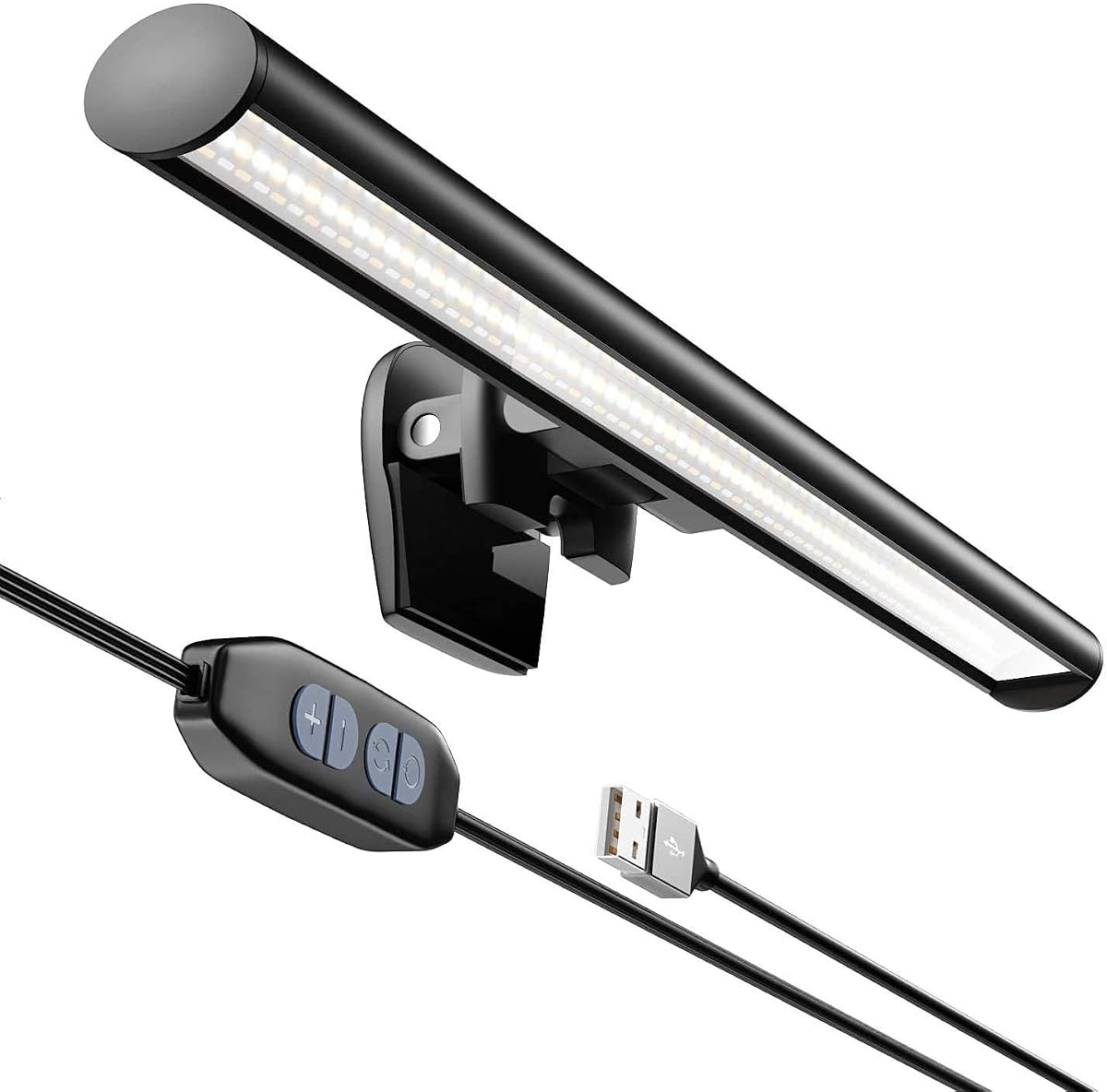


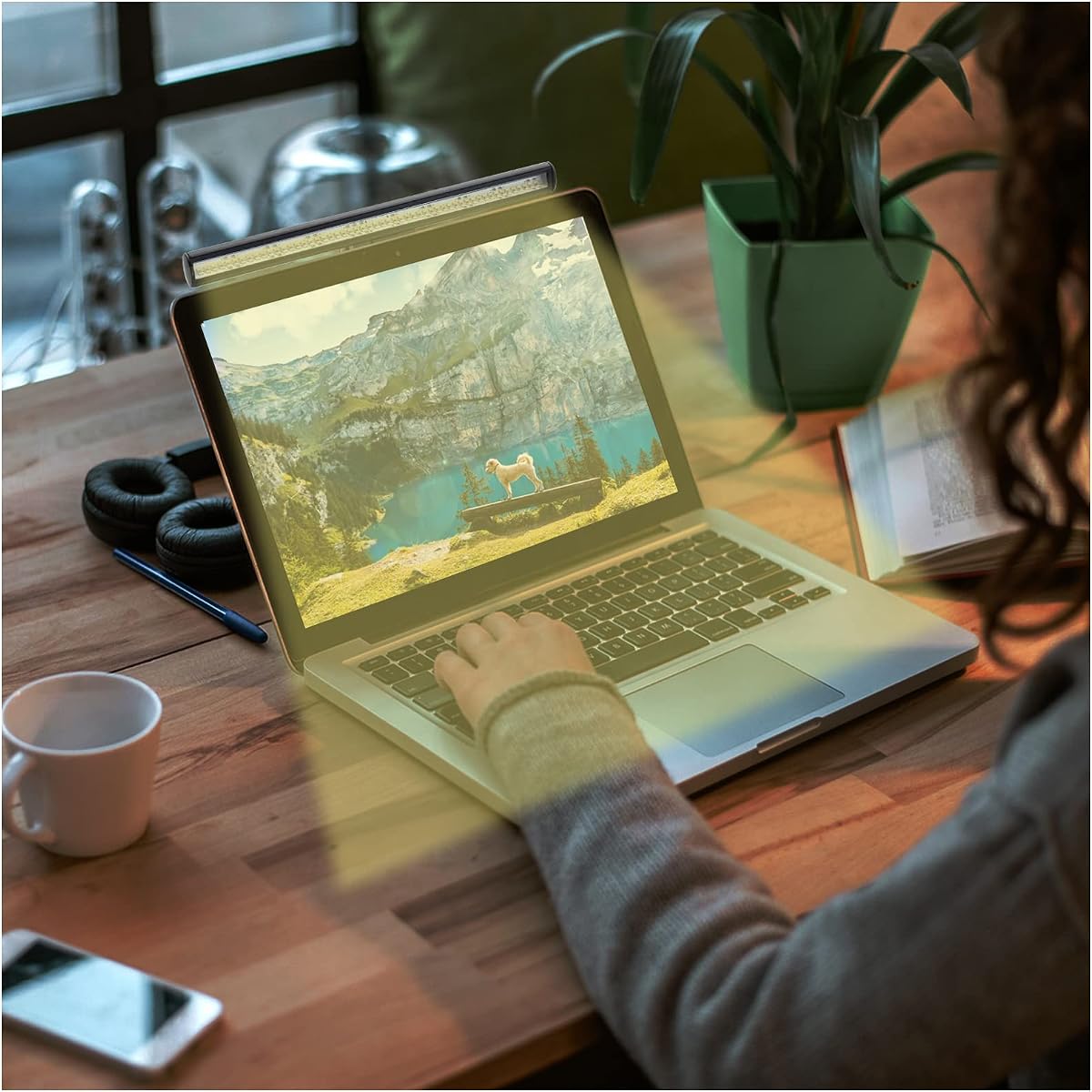


This model is an excellent entry-level option for anyone seeking affordable eye-care lighting without sacrificing core functionality. It holds a strong rating due to its effective asymmetrical optical design that prioritizes user comfort.
We may earn a commission when you buy through this link, at no additional cost to you.
The standout quality is its ability to direct light exclusively onto the desk surface while avoiding screen reflections. With three color temperatures and ten brightness levels, it offers versatile lighting conditions suitable for various tasks.
While it does not feature advanced sensors or high-end materials found in premium models, the trade-off is a very accessible price point. The clip mechanism is straightforward and does not require tools for setup.
It is ideal for students or remote workers on a tight budget who need immediate glare reduction. The memory function adds convenience by remembering your last settings for the next session.
The design ensures light is cast only where needed, preventing harsh glare on your screen that can cause distraction.
You do not need to readjust brightness every time you plug it in as it recalls your preferred settings automatically.
We may earn a commission when you buy through this link, at no additional cost to you.
This lamp is designed specifically to protect your eyes during extended computer use by eliminating screen glare entirely. It uses fifty-four LED beads to provide a soft and even lighting source across your workspace.
We may earn a commission when you buy through this link, at no additional cost to you.
Users appreciate the range of brightness options which allows for precise customization depending on the ambient lighting conditions. The matte black frame design also adds a touch of elegance to modern desks.
The main limitation is that the clip might not fit monitors that are significantly thicker than the specified range. However for for most standard laptops and monitors, the installation is secure and stable.
It serves well as a practical gift or a personal upgrade for home offices. Its lightweight design makes it easy to carry if you work from different locations regularly.
The asymmetrical design ensures that light is never directed at your eyes, reducing fatigue during long work sessions.
By mounting on top of your screen, it completely frees up your desk from bulky bases and lamp arms.
We may earn a commission when you buy through this link, at no additional cost to you.
This portable option is engineered for users who move between different workspaces frequently. It prioritizes a flicker-free design to ensure that long hours of work do not lead to unnecessary eye fatigue.
We may earn a commission when you buy through this link, at no additional cost to you.
The build quality is rated well for durability, ensuring it can withstand the rigors of daily travel and handling. Its slim profile makes it an unobtrusive addition to any laptop or monitor setup.
While it lacks some advanced features like auto-dimming, the manual controls are intuitive and effective for setting up the desired lighting level quickly. The space-saving design is consistent with modern workspace needs.
It is a solid choice for those who need a reliable light source for reading and studying on the go. The USB power capability means you can use it with power banks in various locations.
The flicker-free design helps prevent headaches and eye strain by providing a stable light source without rapid fluctuations.
You can easily adjust the angle and position to suit your specific needs whether sitting at a desk or working on a lap.
We may earn a commission when you buy through this link, at no additional cost to you.
This model stands out for its advanced auto-dimming sensor which adjusts brightness based on ambient light conditions automatically. It is certified to meet strict safety standards for blue light hazard and flicker-free performance.
We may earn a commission when you buy through this link, at no additional cost to you.
The Color Rendering Index of 98 ensures that colors on your screen and desk look true to life which is critical for designers and color-sensitive work. The touch controls provide a modern and intuitive user interface.
The main drawback is that it is priced higher than basic models due to these premium features. However the investment is justified for users who spend long hours in front of screens daily.
It is the top recommendation for professionals who need precision lighting that adapts to their environment. The combination of eye care features and high-quality output makes it a comprehensive solution.
The ambient light sensor continuously monitors your surroundings to prevent visual fatigue from too much or too little light.
With a high CRI, this light helps maintain accurate color perception which is vital for creative and professional tasks.
We may earn a commission when you buy through this link, at no additional cost to you.
This light bar offers a wider illumination area of over eleven inches which ensures that larger desks are fully lit without dark spots. It delivers up to eight hundred lux of central brightness for comfortable visibility.
We may earn a commission when you buy through this link, at no additional cost to you.
The stepless dimming allows you to find the exact brightness level that suits your mood and task requirements. It is particularly noted for its gaming capabilities where a well-lit desk improves immersion.
The clip is designed with a counterweight to ensure it stays secure on monitors of varying thicknesses without slipping. The mechanical switch provides a tactile feel that many users prefer over touch controls.
It is a great choice for users who have wider setups and need broad light coverage. The memory function adds convenience by restoring your last preferred settings automatically every time.
The wider light bar covers more desk space effectively reducing shadows in corners and providing a uniform lighting experience.
Physical buttons provide a reliable and easy way to adjust settings even in dark conditions without relying on touch sensors.
We may earn a commission when you buy through this link, at no additional cost to you.
This model emphasizes a minimalist aesthetic that fits perfectly with tidy and uncluttered workstation setups. It offers dual control modes which provide flexibility in how you interact with the light settings.
We may earn a commission when you buy through this link, at no additional cost to you.
It is designed to work with curved monitors which is a critical feature for users with modern curved displays. The professional grade parts ensure that the light performance remains consistent over time.
The forty-five degree asymmetric optical structure ensures that your focus is directed only to the desk and not your eyes. This helps in boosting concentration and efficiency during long shifts.
It is a reliable choice for those who need a straightforward and effective lighting solution. The sturdy universal mount accommodates a wide range of monitor types and bezel shapes.
Having multiple control options allows you to adjust settings quickly without needing to touch the lamp directly every time.
The design accommodates curved monitors ensuring that the light bar stays secure and properly aligned on these modern screens.
We may earn a commission when you buy through this link, at no additional cost to you.
This light is specifically designed for laptop users who prioritize eye protection and portability in equal measure. The housing is made from lightweight ABS material which makes it easy to carry in a laptop bag.
We may earn a commission when you buy through this link, at no additional cost to you.
The scientific optical design focuses illumination on the keyboard area which is essential for typing accuracy in dimly lit environments. It effectively eliminates reflected glare on the screen for better visual clarity.
The angle and illuminating area can be adjusted to facilitate comfortable viewing and typing for extended periods. It is a practical gift option for friends and elders who spend time on computers.
It is well suited for travelers who need reliable lighting in hotel rooms or co-working spaces. The counterweight fixture ensures it stays securely attached without damaging the monitor surface.
The light focuses specifically on the keyboard area helping you type accurately without needing to turn on harsh room lights.
The design minimizes glare and reduces fatigue making it safer for your eyes during evening study or work sessions.
We may earn a commission when you buy through this link, at no additional cost to you.
This model offers a premium metal body that ensures durability and efficient heat conduction during long periods of use. It holds the highest standard for blue light safety which is RG0 rated for maximum protection.
We may earn a commission when you buy through this link, at no additional cost to you.
The ultra-high color rendering index of 95 ensures that your workspace looks vibrant and true to life. The full-metal body adds a sleek and elegant aesthetic to any modern professional desk setup.
The retractable clip adapts to a wide range of monitor thicknesses including flat and curved screens easily. The touch control interface provides a seamless way to adjust stepless dimming settings with precision.
It is an ideal choice for content creators who need accurate color representation in their environment. The metal build quality suggests a longer lifespan compared to plastic alternatives.
This highest standard ensures that harmful blue light is effectively filtered out to protect your vision from potential damage.
The metal finish ensures effective heat conduction keeping the bar cool during use and enhancing overall structural longevity.
We may earn a commission when you buy through this link, at no additional cost to you.
This model distinguishes itself with a dual light design that includes both front and rear ambient lighting. This helps reduce pressure on the eyes by balancing the contrast between the screen and the surroundings.
We may earn a commission when you buy through this link, at no additional cost to you.
With a Color Rendering Index of 95 it ensures precise lighting that restores true natural light colors. This is beneficial for reducing color errors and visual fatigue during long periods of work.
The memory dimming function saves your preferred color temperature and brightness settings so you do not have to reset them manually. The Type C power line adds a modern touch to the connectivity.
It is a solid choice for users who want extra eye care features beyond a standard front light. The dual ambient lights create a softer more immersive environment for reading and working.
Having rear ambient lights reduces the dark pressure on the eyes making the overall reading or working experience more comfortable.
With a CRI of 95 the light ensures that colors are rendered accurately which is essential for quality work environments.
We may earn a commission when you buy through this link, at no additional cost to you.
This premium model is designed specifically for large ultrawide curved monitors providing unparalleled coverage and illumination. It features a foldable dual light bar design which allows for flexible lighting angles tailored to your specific setup.
We may earn a commission when you buy through this link, at no additional cost to you.
The front light offers stepless dimming while the rear offers fifteen RGB modes to create an immersive ambiance. This dual lighting setup reduces the contrast between the screen and the surrounding room effectively.
The precision light sensor automatically adjusts brightness based on ambient changes ensuring consistent comfort throughout the day. The clamp design accommodates thick screens up to three point three five inches securely.
It is the ultimate choice for enthusiasts and professionals using large curved displays. The investment provides superior brightness and customization options that justify the higher price point.
The flexible design allows you to adjust angles for creative work or focused study providing versatile illumination options.
Fifteen RGB modes let you customize the ambient mood which is perfect for late night gaming or relaxing movie watching.
We may earn a commission when you buy through this link, at no additional cost to you.
Selecting the right monitor light bar involves considering several key features that impact eye comfort and desk usability.
The most critical factor is the optical design which determines how light is directed. Look for asymmetrical designs that focus light on the desk and avoid the screen to reduce reflections.
A good design ensures no glare hits your eyes directly which prevents fatigue during long sessions.
Versatility is key for a good light bar. Models that offer multiple color temperatures allow you to switch from warm light for relaxing to cool light for focus.
Adjustable brightness levels ranging from dim to bright ensure you can adapt to any time of day or room lighting condition.
The build material determines durability and stability. Metal bodies tend to last longer and dissipate heat better than plastic alternatives.
Check the clip mechanism to ensure it fits your monitor thickness securely without damaging the screen surface over time.
For professionals needing accurate color perception, a high CRI is essential. Values above 95 ensure colors on your desk and screen look true to life.
Higher CRI values reduce eye strain caused by poor color contrast in your workspace environment.
Most modern light bars are USB powered which offers great flexibility. You can plug them into your laptop or any available power adapter.
Ensure the cable is long enough to reach your power source without stretching or blocking other devices on your desk.
Advanced models include ambient light sensors that adjust brightness automatically. This prevents visual fatigue by avoiding excessive or insufficient lighting.
Memory functions are also beneficial as they save your preferred settings so you do not have to adjust them every time you turn it on.
If you use a curved monitor, ensure the clip and light bar are compatible with your screen's curvature. Some designs are specific to flat screens only.
Look for products that explicitly state support for curved displays to avoid installation issues or light unevenness.
Consider the width of the light bar relative to your desk size. Wider bars provide more even illumination for large setups without dark corners.
A compact design saves valuable desk space and keeps your workstation looking clean and organized.
First attach the light bar to the top of your monitor using the provided clip ensuring it sits securely and level. Plug the USB cable into your computer or power adapter to activate the light.
Adjust the brightness and color temperature to your preference using the touch controls or physical switch provided. This helps you create the ideal lighting environment for your current task.
Regularly clean the light bar surface with a soft dry cloth to prevent dust buildup which can affect light output. Avoid using harsh chemicals that might damage the matte finish or internal components.
Yes, a monitor light bar helps reduce eye strain by eliminating screen glare and providing consistent light on your desk. This balanced lighting reduces the contrast between your screen and the surroundings which is a common cause of fatigue.
Many modern light bars are designed to be compatible with curved monitors. Always check the product specifications for clip range to ensure it fits your specific curvature before purchasing.
Most models come with a USB power cable included so you do not need to buy extras. You can plug it directly into your laptop or a standard power adapter for power.
For working at night, a warm or neutral color temperature is often best to avoid disrupting your sleep cycle. Cool light is suitable for focus but may affect your circadian rhythm if used late in the evening.
Most well-designed light bars have a low-profile structure that does not block the webcam. Always verify the height of the clamp to ensure it sits above the camera lens on your screen.
Yes it is safe to leave these lights on all night as they are low power and generate minimal heat. However it is generally recommended to dim them or turn them off when not in use to save energy.
The LEDs in modern monitor light bars typically last for thousands of hours which means they can last several years with daily use. They are designed to withstand daily wear and tear effectively.
We have reviewed ten top models ranging from budget-friendly options to premium solutions for specialized needs. Each offers unique benefits that can significantly improve your workspace lighting and comfort.
Prioritize features like auto-dimming, high CRI, and glare-free designs if you spend many hours at your desk. These attributes provide the most tangible long-term benefits for eye health and productivity.
Remember to check current prices and availability before making your purchase as market conditions can change. Investing in the right light can transform your daily work routine and overall comfort.