
2 in 2 Out USB 3.0 Switch
4.6Editor score
One button switching
5Gbps data transfer
Aluminum alloy build
This guide compares the best keyboard and mouse switch for 2 computers to help you share peripherals efficiently across dual PC setups without cable clutter.
Managing multiple computers often leads to tangled cables and constant unplugging. A keyboard and mouse switch for 2 computers allows you to share peripherals seamlessly. This setup boosts productivity by letting you toggle between machines instantly with just one click or button press.
We evaluated ten top-rated USB switches based on compatibility, build quality, and switching speed. Our analysis focuses on devices that support both USB-A and USB-C connections. We also considered power delivery options to ensure stable performance with high-demand peripherals like external drives.
Each pick highlights specific strengths for different user needs and office environments. Prices and availability fluctuate frequently so verify current listings before purchasing. These selections represent the most reliable options for dual-computer sharing available in November 2026 across major retailers.
4.6Editor score

4.1Editor score

4.3Editor score
The following table provides a side-by-side overview of key specifications for each switch. This helps you quickly identify which device matches your port requirements and performance needs for sharing peripherals between two machines.


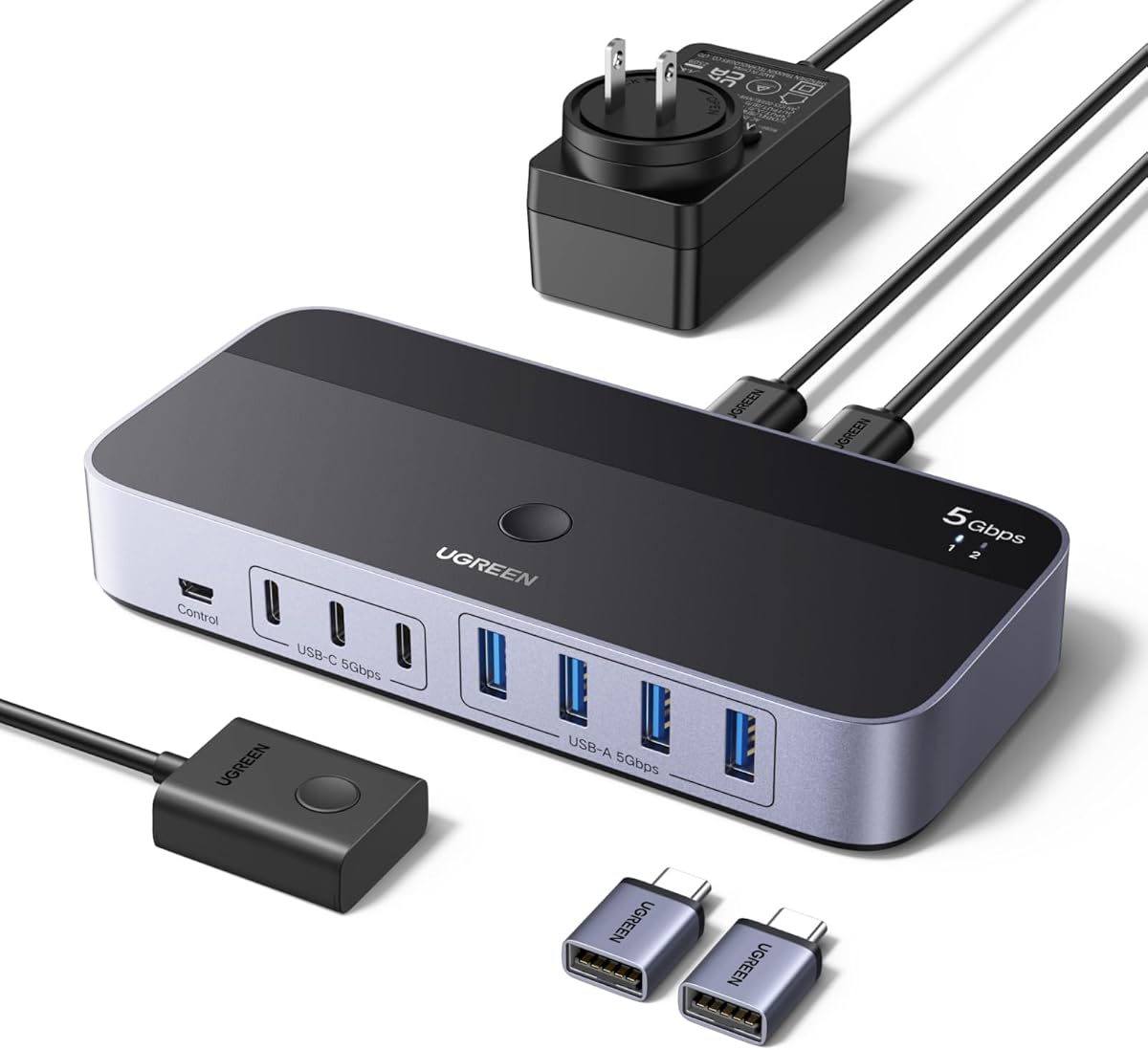

The UGREEN USB 3.0 Switch stands out as a versatile solution for sharing peripherals between two computers. It supports up to four USB devices simultaneously making it ideal for setups needing more than just keyboard and mouse access. With a 4.0 rating users appreciate its robust design and plug and play functionality across multiple operating systems.
We may earn a commission when you buy through this link, at no additional cost to you.
This switch includes both USB-C and USB-A ports accommodating modern and legacy devices seamlessly. The dual switching modes using a physical button or external controller offer convenience for keeping your desk tidy. Data transfer speeds reach up to 5Gbps ensuring quick file movements between connected PCs without lag or bottlenecks.
While it excels in flexibility this device is not a true KVM switch so it does not support video transmission or monitor sharing. Power stability may require an external supply when connecting high-demand peripherals like external hard drives. These limitations are acceptable given the focus on data peripheral sharing rather than full workstation control.
This UGREEN model is perfect for professionals managing work and personal machines who need flexible device access. It balances port variety with reliability making it a top choice for modern dual PC environments. Consider this switch if you prioritize connectivity options over video capabilities in your setup.
With combined USB-C and USB-A ports this switch adapts to various peripheral types without needing extra adapters for standard connections.
Choose between a hidden switch or an external controller to match your desk organization preferences and workflow efficiency needs.
We may earn a commission when you buy through this link, at no additional cost to you.
The BENFEI USB 3.0 Switch offers excellent value for users seeking a straightforward way to share peripherals between two PCs. It supports four USB devices with one click switching controlled by an LED indicator showing active status. With a 4.1 rating it is praised for its reliability and ease of setup without needing driver installations.
We may earn a commission when you buy through this link, at no additional cost to you.
This device delivers fast 5Gbps data transfer speeds enabling quick file swaps between computers. It works seamlessly with Windows Mac and Linux systems ensuring broad compatibility for most office environments. The included warranty and responsive service team provide added peace of mind for long term usage and support needs.
Some users may need to purchase additional power supplies for high consumption devices since the adapter is not included. The requirement for specific USB-A to USB-A cables can limit flexibility compared to models with more universal connection options. These minor trade-offs are balanced by the low cost and solid performance for basic tasks.
Choose this BENFEI switch if you need a budget friendly solution for sharing printers scanners and input devices. It is well suited for home offices or small businesses where cost efficiency matters most. Ensure you have the necessary power and cables before purchase for optimal performance.
This switch delivers core functionality at an accessible price point making it ideal for users with tight budgets.
Stable connections and fast transfer speeds ensure smooth daily usage without interruptions or frequent reconnections.
We may earn a commission when you buy through this link, at no additional cost to you.
The UGREEN 2-in 7-Out USB 3.2 Switch represents a premium solution for users needing maximum connectivity and speed. It supports up to seven USB devices with a 10Gbps transfer rate significantly faster than standard 5Gbps switches. With a 4.3 rating users value its comprehensive port selection and included power adapter for stable operation.
We may earn a commission when you buy through this link, at no additional cost to you.
This model includes both USB-A and USB-C ports along with a converter adapter ensuring compatibility with all device types. The built-in power adapter prevents disconnections when using multiple high demand peripherals simultaneously. Button or controller switching modes provide flexibility in managing active devices across two computers efficiently.
The advanced features come with a higher price tag which might not suit casual users with simpler needs. The large port count can make setup slightly complex for basic keyboard and mouse sharing tasks. These factors are acceptable for power users who require extensive connectivity and speed for productivity workflows.
Select this switch if you manage multiple external drives webcams and peripherals between two systems. It is ideal for creative professionals or IT setups needing reliable high bandwidth sharing. The included accessories ensure everything works out of the box without additional purchases.
With 10Gbps transfer rates large files move between computers in seconds saving valuable time during work sessions.
Multiple port types and a converter adapter eliminate the need for extra cables or hubs in your workspace.
We may earn a commission when you buy through this link, at no additional cost to you.
This 2 in 2 Out USB 3.0 Switch delivers a compact and efficient way to share two peripherals between computers. With a 4.6 rating it is one of the highest rated options for basic sharing needs. Users appreciate its solid aluminum construction and intuitive one button switching for seamless workflow transitions.
We may earn a commission when you buy through this link, at no additional cost to you.
The included USB 3.0 cables and LED indicator simplify setup and active device identification. It operates without drivers supporting Windows Mac Linux and Chrome OS for broad compatibility. The metal housing helps dissipate heat ensuring long term reliability during extended use periods.
Its limited two device capacity may not suffice for setups needing more peripherals connected simultaneously. Video transmission is not supported as this focuses purely on USB data sharing. These constraints are acceptable for users who only need to switch input devices or a printer.
Ideal for home offices or small workstations this switch provides reliable performance at a competitive price. Choose it if you need a straightforward plug and play solution without extra complexity. Ensure your devices fit within the two port limit before purchasing.
The aluminum alloy shell provides durability and better heat management compared to plastic alternatives.
One button operation with LED feedback makes switching between computers instant and clear for all users.
We may earn a commission when you buy through this link, at no additional cost to you.
The UGREEN USB 3.0 Switch 2 in 2 Out provides a reliable method to share two peripherals between two computers. It boasts a 4.1 rating for its consistent performance and straightforward design. Users appreciate the five foot USB cables that offer flexibility in device placement without signal issues.
We may earn a commission when you buy through this link, at no additional cost to you.
This switch requires no drivers and works across major operating systems for hassle free setup. A single button with LED indicator ensures clear status awareness when toggling between active computers. It is ideal for sharing input devices and printers without needing complex network configurations.
This model is limited to data sharing and does not support video or monitor transmission. It lacks advanced features like multiple ports or high speed data transfer beyond standard USB 3.0. These limitations suit basic users who prioritize simplicity over expanded functionality.
Choose this switch if you need a no fuss solution for dual PC input sharing. The included cables save time on additional purchases and ensure immediate usability. Verify that two ports meet your needs before finalizing your selection.
Five foot cables provide ample reach to connect devices comfortably across a desk setup.
Plug and play design with included cables means you can start sharing devices right out of the box.
We may earn a commission when you buy through this link, at no additional cost to you.
The Hearvo USB 3.0 HDMI KVM Switch allows sharing both peripherals and a single monitor between two computers. With a 4.0 rating it is valued for enabling full workstation control without duplicate hardware. The 4K resolution support ensures sharp visuals for demanding tasks on connected displays.
We may earn a commission when you buy through this link, at no additional cost to you.
This KVM includes four USB ports for comprehensive peripheral access alongside HDMI connectivity. A wired remote switch facilitates easy toggling between systems without reaching for the main unit. Adaptive EDID maintains stable display settings during transitions reducing flicker and connection issues.
Installation requires connecting video and USB cables correctly which adds complexity over simple USB switches. It is not ideal if you only need keyboard mouse sharing without monitor duplication. These factors are manageable for users needing true KVM capabilities in tight spaces.
Select this switch if you need to control two systems from one monitor and keyboard mouse. It maximizes desk space while maintaining full functionality for both machines. Ensure your monitors support HDMI before purchasing for best results.
Control both video and input devices from one setup reducing hardware clutter on your workspace.
A wired remote makes switching systems quick and easy without leaning over the main device.
We may earn a commission when you buy through this link, at no additional cost to you.
The UGREEN USB Switch Selector supports sharing four USB 2.0 devices between two computers efficiently. With a 4.4 rating it is praised for compatibility with older peripherals like legacy scanners and keyboards. One button swapping with LED indicators simplifies daily switching between machines in office environments.
We may earn a commission when you buy through this link, at no additional cost to you.
This switch operates without drivers and supports all major operating systems for easy deployment. It includes USB A to A cables for immediate connectivity upon unboxing. A separate micro USB port provides stable power when connecting multiple devices simultaneously.
USB 2.0 speeds may feel slow for modern data transfer tasks involving large files. The micro USB power port is less convenient than USB-C options in newer setups. These limitations suit users prioritizing legacy support and cost over high speed transfer.
Choose this model if you manage older hardware that does not require fast data throughput. It is an economical solution for shared peripherals in mixed age office setups. Verify your devices support USB 2.0 for full compatibility.
Designed to work with older USB devices ensuring existing peripherals remain usable without upgrades.
A single button toggle with LED feedback makes switching between computers effortless for anyone.
We may earn a commission when you buy through this link, at no additional cost to you.
The UGREEN USB 3.0 Switch Selector offers four ports for sharing multiple peripherals between two computers. It holds a 4.3 rating for reliable performance and consistent data transfer speeds up to 5Gbps. Users appreciate the included cables and simple one button control for daily workflow adjustments.
We may earn a commission when you buy through this link, at no additional cost to you.
This switch works across Windows Mac and Linux systems without requiring any driver installations. An external power port option ensures stability when connecting power hungry devices like hard drives. LED indicators provide clear feedback on which computer is currently active and connected.
While it lacks an included power adapter the USB powered option suits most standard devices easily. Video transmission is not supported as this focuses exclusively on USB data sharing. These factors are minor compared to the overall utility and flexibility offered.
This model is ideal for users needing a balance of port count and speed without premium pricing. Ensure you have a power adapter for high demand devices to avoid disconnections. It is a versatile choice for most dual PC setups.
Combines speed and port count effectively for users needing more than basic two port functionality.
Optional external power ensures consistent performance even with multiple high demand peripherals connected.
We may earn a commission when you buy through this link, at no additional cost to you.
The UGREEN 2-in 7-Out USB 3.0 Switch allows sharing up to seven devices between two computers. With a 4.3 rating it is valued for accommodating both USB-C and USB-A peripherals seamlessly. The included power adapter ensures stable operation with multiple devices without external sourcing.
We may earn a commission when you buy through this link, at no additional cost to you.
This switch comes with a USB-C to USB-A adapter enhancing flexibility for mixed device environments. Controller and button modes let you choose how to switch based on desk layout. It supports all modern operating systems with zero driver requirements for quick deployment.
The large port count and included accessories make it more complex and expensive than basic switches. It may be overkill for users only needing keyboard and mouse sharing functionality. These trade-offs are acceptable for those needing extensive connectivity options.
Select this switch if your setup involves various modern and legacy devices needing simultaneous access. The included power and adapters simplify setup and reduce additional purchases. Ideal for advanced users managing complex dual PC configurations.
Power adapters and converters ensure you have everything needed to start sharing immediately.
Choose between button or controller modes to match your workflow and desk organization preferences.
We may earn a commission when you buy through this link, at no additional cost to you.
The USB Switch 2 in 2 Out provides a straightforward way to share two peripherals between computers. With a 4.2 rating it is appreciated for its simple plug and play setup and included USB cables. An external desktop controller keeps switching easy and organized on your desk.
We may earn a commission when you buy through this link, at no additional cost to you.
LED indicators show which computer is active preventing confusion during workflow transitions. It works without drivers across Windows Mac Linux and Chrome OS for broad compatibility. USB power eliminates the need for additional AC adapters making it a clean solution.
Only two ports are available limiting expansion if more peripherals are needed later. Input direction must be correct for proper function which can confuse new users initially. These minor points are manageable for basic shared device scenarios.
This switch suits home users needing an easy and affordable way to share keyboards and mice. The controller offers a nice touch for convenience and tidiness. Verify that two ports are sufficient for your daily needs.
An external controller keeps the switching button accessible and tidy on your work surface.
Powered directly from USB ports this device avoids clutter from additional power bricks on your desk.
We may earn a commission when you buy through this link, at no additional cost to you.
Selecting the right switch involves evaluating your specific device needs and workspace constraints. This section outlines key factors to consider for an informed decision.
Determine how many devices you need to share simultaneously. Modern setups often require both USB-A and USB-C ports to accommodate newer laptops and legacy peripherals efficiently.
Choose a model with enough ports for all shared devices to avoid needing additional hubs. Verify port types match your connected devices for seamless compatibility.
USB 3.0 and 3.2 switches offer faster data transfer than USB 2.0 models. Higher speeds are crucial if you frequently move large files between computers using external drives.
Opt for at least USB 3.0 support to ensure quick file access and reduce wait times during routine tasks.
Some switches offer manual buttons while others include remote controllers. Remote controllers help keep your desk tidy by allowing hidden unit placement while keeping controls accessible.
Select a switching method that fits your workflow to minimize interruption during work sessions.
High power devices like external hard drives may require external power sources. Ensure the switch supports USB power or includes an adapter for stability.
Look for models with dedicated power ports to prevent disconnections when using multiple peripherals.
Most switches work across Windows Mac and Linux without drivers. Confirm broad compatibility to avoid installation issues across different systems.
Plug and play functionality ensures immediate usability across your existing operating environments.
Metal housings dissipate heat better than plastic models improving durability. A sturdy build ensures longevity during daily switching cycles.
Prioritize switches with robust construction to withstand long term use in busy environments.
USB switches share data only and not video signals. If you need monitor sharing consider a KVM switch instead.
Confirm whether your setup requires full KVM functionality beyond peripheral sharing.
Manufacturers offering extended warranties provide better consumer protection. Responsive support teams help resolve connectivity issues quickly.
Choose reputable brands with clear warranty terms for long term reliability and peace of mind.
Connect your computers to the switch input ports using the provided USB cables ensuring correct direction. Then attach your shared peripherals to the output ports of the switch.
Press the physical button on the switch or use the remote controller to toggle between active computers. The LED indicator will show which system is currently in control.
Avoid exceeding the maximum power rating of the switch to prevent disconnections. If using high demand devices connect an external power adapter if the model supports it.
Most modern switches operate plug and play without driver installation on major operating systems. However specific legacy devices may require their own manufacturer drivers to function correctly with the switch.
Yes standard USB switches can share printers scanners and other peripheral devices between two PCs. Ensure the device is compatible with USB 2.0 or 3.0 depending on your model specifications.
A USB switch shares data devices like keyboards and printers but not video. A KVM switch also shares a monitor allowing full control over both systems simultaneously from one display.
Most switches are compatible with macOS Windows and Linux operating systems by default. Always check the product specifications to confirm support for your specific Mac model and operating version.
External drives often require more power than a USB switch can supply. Connect an external power adapter if the switch supports it to maintain stable device connections.
No the switch connects one computer at a time to shared peripherals. This prevents conflicts and ensures stable operation between active systems during switching.
Controllers allow hiding the switch unit for a tidier desk while keeping controls accessible. Choose based on your preference for visibility and convenience during regular work sessions.
The UGREEN USB 3.0 Switch 2 Computers leads as our top choice for its versatile port options and reliable performance. The BENFEI USB 3.0 Switch offers great value for those prioritizing budget efficiency.
Focus on port types and power requirements when making your final selection to ensure all your devices work correctly. Prioritize models that match your specific workflow needs for maximum productivity.
Check current listings for the latest pricing and availability before purchasing as these details may change. Your ideal switch depends on balancing speed capacity and cost for your dual PC setup.