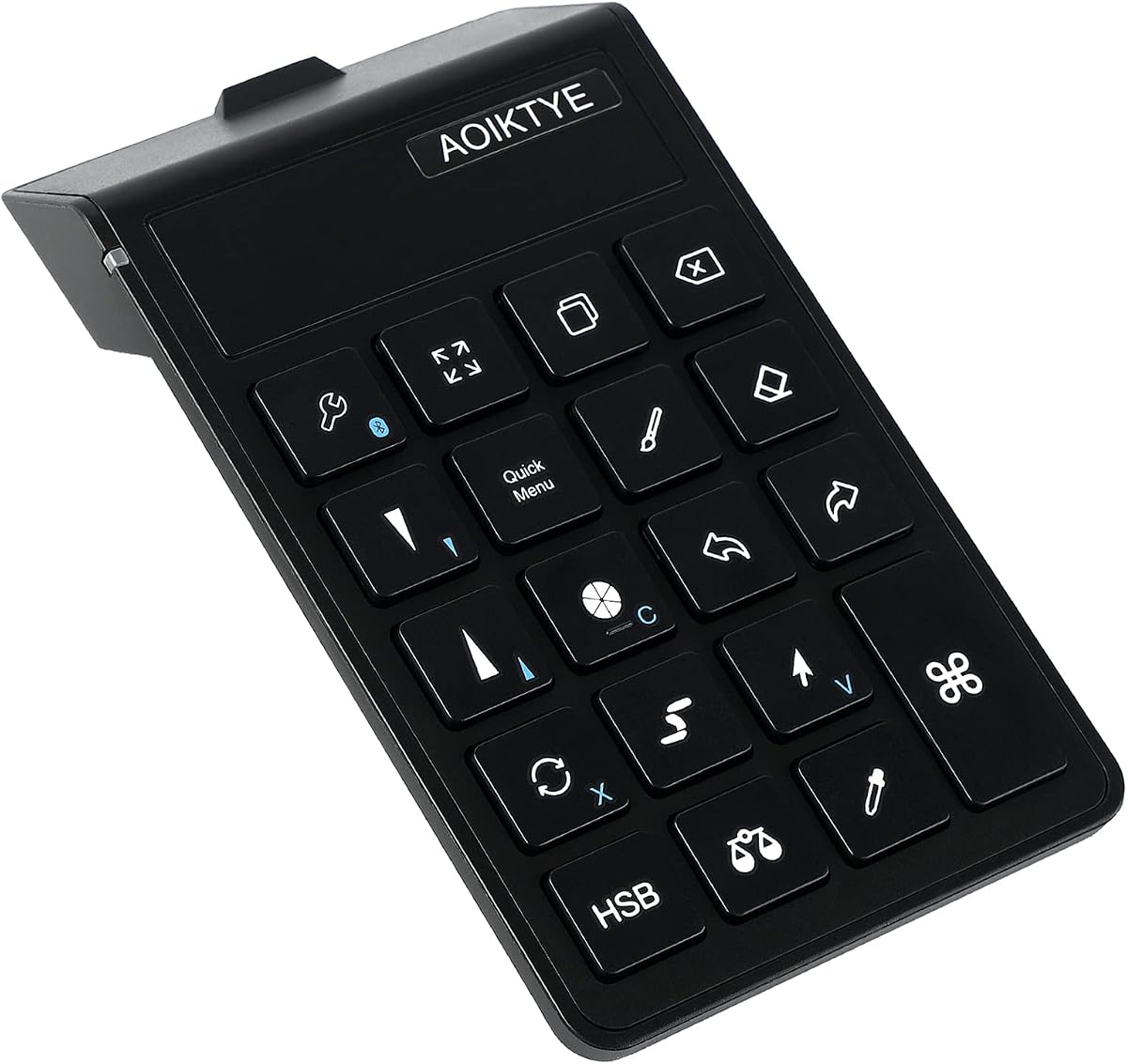
AOIKTYE Keyboard for Procreate
4.5Editor score
22 shortcut keys for Procreate
84-hour battery life
Ergonomic one-handed design
This guide compares the top iPad drawing Bluetooth controllers for digital artists, covering key features compatibility and workflow efficiency to help you
Digital artists seeking enhanced workflow efficiency often turn to specialized input devices. An iPad drawing Bluetooth controller offers a tactile solution for managing complex shortcuts and functions without cluttering your workspace.
We evaluated ten leading models based on connectivity, customization options, and ergonomic design. Our analysis focuses on how each device integrates with popular creative applications and supports seamless drawing sessions.
Each pick highlights distinct strengths for different user needs and creative styles. Please note that specific product availability and pricing may vary over time as market conditions change.
4.5Editor score

4.2Editor score

4.4Editor score
The following table provides a side-by-side comparison of all featured models to help you quickly identify key specifications and capabilities.


The HUION Keydial Mini stands out as a versatile tool for digital artists who need quick access to frequently used commands. Its rating reflects a strong balance between functionality and ease of use across multiple creative applications.
We may earn a commission when you buy through this link, at no additional cost to you.
With 18 programmable keys and a customizable dial, this device allows users to streamline complex workflows efficiently. The Bluetooth 5.0 connection ensures a reliable link to your iPad or other devices within a 10m range.
While setting up custom shortcuts requires installing the Huion driver, the effort pays off in terms of personalized efficiency. Some users may find the initial configuration slightly technical but manageable with provided guides.
This keypad is ideal for illustrators and designers looking to reduce reliance on traditional keyboards while maintaining precision control over their digital tools and creative processes.
The ability to map specific shortcuts allows artists to execute commands with a single tap, significantly speeding up repetitive tasks.
Rotating the dial provides an intuitive way to adjust brush sizes or zoom levels without interrupting your creative flow or drawing pace.
We may earn a commission when you buy through this link, at no additional cost to you.
This keyboard is specifically tailored for iPad users who rely heavily on the Procreate application for their digital art projects. Its high rating indicates strong satisfaction among users looking to boost productivity in a dedicated app environment.
We may earn a commission when you buy through this link, at no additional cost to you.
The device features over 20 shortcut functions that cover essential actions like color adjustment and layer management. The ergonomic layout places frequently used keys in accessible positions to support continuous creative sessions.
While it supports other painting software, its design is most effective within the Procreate ecosystem. Users working across multiple platforms may find its specialized focus somewhat limiting compared to more general controllers.
For dedicated Procreate artists seeking an affordable and efficient input solution, this keyboard offers a compelling option to enhance daily drawing efficiency and workflow management.
Keys are pre-mapped to common Procreate commands, reducing the need for complex setup and allowing immediate use.
A full charge provides up to 84 hours of use, ensuring the device lasts through weeks of regular creative work without frequent recharging.
We may earn a commission when you buy through this link, at no additional cost to you.
This controller offers a versatile solution for users who want a single device to handle gaming, drawing, and general navigation across various platforms. Its design prioritizes adaptability and user comfort during extended usage periods.
We may earn a commission when you buy through this link, at no additional cost to you.
With support for keyboard, mouse, and drawing controls, it provides flexible input options suitable for different tasks. The custom button mapping feature allows users to tailor the controller to their specific preferences.
However, the lower rating suggests potential challenges with software configuration or app integration. Users may need to invest time to ensure optimal performance with creative applications on iOS.
Ideal for tech-savvy users who need a portable input device capable of handling diverse tasks beyond just digital art creation and drawing sessions.
The ability to switch between different control modes makes this device suitable for various applications and usage scenarios.
Compatibility with multiple operating systems allows seamless transitions between different devices without needing separate controllers.
We may earn a commission when you buy through this link, at no additional cost to you.
This remote control provides a convenient way to manage your iPad or iPhone without touching the screen directly. It is particularly useful for tasks involving media playback and interface navigation.
We may earn a commission when you buy through this link, at no additional cost to you.
The trackpad allows for precise cursor movement and scrolling, which can help in navigating large canvases or document interfaces. Additional buttons enable quick control over volume and playback functions.
While it offers utility for general device management, it lacks dedicated tools for artistic drawing or shortcut customization. Creative users may find it less effective for detailed art workflows.
This device is best suited for users who need an auxiliary tool for controlling their iPad remotely and managing media content efficiently.
The trackpad provides a smooth way to navigate interfaces, reducing strain during long sessions of scrolling through menus.
Dedicated media buttons allow for easy control of music and video apps without interrupting other work on your device.
We may earn a commission when you buy through this link, at no additional cost to you.
The XPPen Mini Keydial ACK05 is designed for users seeking a compact shortcut tool that fits easily into any workspace. Its lightweight build and extended battery life make it ideal for portable creative setups.
We may earn a commission when you buy through this link, at no additional cost to you.
With ten express keys and a functional dial, you can quickly access frequently used commands and adjust canvas settings. The anti-ghosting technology ensures reliable input even when multiple keys are pressed simultaneously.
Users need to install the driver to unlock full customization capabilities. Some initial setup may be required, but the resulting personalized workflow is worth the effort for dedicated creators.
This controller is an excellent choice for artists who value portability and need a reliable tool for streamlining their drawing and editing processes efficiently.
Its thin profile and lightweight construction allow you to carry it anywhere, making it suitable for on-the-go creative work.
The dial allows for precise adjustments to zoom levels and brush sizes, providing a natural way to interact with your canvas.
We may earn a commission when you buy through this link, at no additional cost to you.
The DIGIDRAW K30 stands out with its innovative dual dial system, allowing for simultaneous control of multiple parameters. Its perfect rating highlights high user satisfaction with its unique design and functionality.
We may earn a commission when you buy through this link, at no additional cost to you.
Featuring eleven custom keys and tactile markers, this device enables precise operations without needing to look away from your canvas. The ultra-lightweight construction ensures comfort during extended drawing sessions.
While the price is higher than basic alternatives, the advanced features justify the investment for professional users. A driver is needed to fully customize functions to your specific creative needs.
This controller is perfect for artists who require granular control and appreciate a high-quality tool designed to enhance precision and workflow efficiency.
Two independent dials allow you to manage two different parameters at once, such as brush size and opacity, without switching tools.
Raised markers on keys let you locate buttons by touch, keeping your focus on the creative work rather than the device.
We may earn a commission when you buy through this link, at no additional cost to you.
The TourBox Lite offers a premium experience for digital creators seeking a refined and ergonomic control solution. Its wireless design and unified approach make it a versatile tool for various creative applications.
We may earn a commission when you buy through this link, at no additional cost to you.
The device features a layout that reduces the need for memorizing shortcuts, allowing you to focus on your art. Tactile feedback from the knob and buttons ensures precise adjustments during detailed work.
Setting up the TourBox Console is necessary to configure the device fully. While the cost is higher, the quality and efficiency gains make it a valuable investment for serious professionals.
This controller is an ideal choice for artists who value ergonomic design and want a sophisticated tool to enhance their daily creative workflow.
The layout is designed to be natural and easy to use, helping beginners and experts alike to work more efficiently.
A unified control scheme works across multiple apps, reducing the need to relearn controls when switching between different software.
We may earn a commission when you buy through this link, at no additional cost to you.
This controller is engineered for users who need a robust device capable of handling both gaming and general navigation tasks on tablets. Its high rating reflects excellent build quality and performance.
We may earn a commission when you buy through this link, at no additional cost to you.
Hall Effect sticks provide smooth and durable input, while the gyroscope adds precision for motion-based controls. The modular design allows you to customize the look and feel of the device.
It supports a wide range of tablets, though some specific models may require separate holders. It is not a traditional drawing tablet but serves well for navigation and gaming tasks.
Ideal for users who want a versatile and high-performance controller to complement their tablet setup for both work and leisure activities.
Hall Effect technology ensures that the sticks remain accurate over time, providing a reliable experience for all types of input.
Interchangeable parts allow you to personalize the controller, making it suitable for various user preferences and needs.
We may earn a commission when you buy through this link, at no additional cost to you.
The Tabmate 2 is a specialized tool designed to integrate directly with Clip Studio Paint, offering a seamless experience for users of this popular art software. Its design focuses on improving production speed and workflow.
We may earn a commission when you buy through this link, at no additional cost to you.
With the included license, you get immediate access to the software along with the hardware. The Bluetooth connectivity ensures a stable connection to your device for responsive control.
It requires AA batteries, which may be inconvenient for users who prefer rechargeable options. Additionally, its features are most effective when used within the Clip Studio ecosystem.
This device is an excellent choice for dedicated Clip Studio Paint artists who want a dedicated tool to streamline their creative process and enhance efficiency.
Assigning frequent actions to buttons reduces the number of taps needed, allowing you to stay focused on your artwork.
The device is designed to work seamlessly with Clip Studio Paint, providing features that enhance the software experience directly.
We may earn a commission when you buy through this link, at no additional cost to you.
The Wacom Intuos Small is a trusted choice for digital artists seeking a reliable drawing tablet with wireless connectivity. Its high rating reflects consistent performance and user satisfaction across the industry.
We may earn a commission when you buy through this link, at no additional cost to you.
The battery-free EMR pen provides a natural drawing experience, while the Bluetooth connection allows for flexible placement on your desk. It comes bundled with creative software to help you get started quickly.
While it is not a dedicated shortcut controller, it serves as a primary input device for drawing. Some users may find it requires more desk space compared to compact controllers.
This tablet is ideal for artists who need a high-quality drawing tool to complement their workflow and support detailed creative work.
The EMR pen requires no charging, ensuring that you can draw for extended periods without interruptions for power.
Included software provides essential tools for creative work, allowing you to start creating immediately after setup.
We may earn a commission when you buy through this link, at no additional cost to you.
Selecting the right Bluetooth controller depends on your specific workflow needs and creative applications. This guide outlines key factors to consider before making your purchase.
Bluetooth connectivity ensures a wireless experience, allowing you to position your device for optimal comfort. Look for controllers supporting Bluetooth 5.0 or higher for stable connections and extended range.
Ensure the controller offers consistent wireless performance to avoid interruptions during critical creative moments.
The ability to program keys and dials is crucial for tailoring the device to your specific workflow. A robust driver or app allows you to map functions that reduce repetitive typing.
Choose a model that offers deep customization to maximize your productivity across various software.
Since you will use the device frequently, comfort is essential to prevent hand fatigue during long sessions. Look for designs that fit naturally in one hand and provide tactile feedback.
Prioritize a comfortable grip to maintain focus on your creative work rather than device discomfort.
Long battery life ensures uninterrupted work without frequent recharging breaks. Models with built-in rechargeable batteries or efficient power consumption are preferable for daily use.
Select a device with sufficient battery capacity to last through your typical creative sessions.
Verify that the controller supports the specific applications you use most often. Some devices are optimized for certain creative suites while others offer broader multi-platform support.
Ensure compatibility with your primary software to leverage the full potential of the controller.
For artists who work from multiple locations, a compact and lightweight design is advantageous. A smaller form factor fits easily into bags without adding unnecessary bulk.
Consider a portable design if you often create on the go or switch between workspaces.
A straightforward setup process saves time and ensures you can start using the device immediately. Look for models with intuitive configuration tools and clear documentation.
Choose a controller that is easy to configure so you can focus on creativity rather than troubleshooting.
A well-constructed device will withstand daily use and maintain functionality over time. High-quality materials and solid construction contribute to longevity and reliability.
Invest in a durable build to ensure your device remains functional for years of creative use.
Begin by pairing the controller with your iPad using the Bluetooth settings on your device. Ensure the device is fully charged before the first use to establish a stable connection.
Install any necessary drivers or applications to unlock full customization features. Take time to map your most frequently used commands to the programmable keys for optimal workflow.
Maintain the device by keeping it clean and dry. Store it in a protective case when not in use to prevent damage during transport.
Most advanced controllers require specific drivers or apps to enable full customization. Basic functionality often works without setup, but you may miss out on powerful features.
Bluetooth controllers generally work with most modern iPads. However, always check the product specs for specific iOS version requirements or hardware limitations.
Many models support Android tablets, Windows PCs, and Mac computers. Compatibility varies by product, so review the supported platforms before purchasing.
Most use USB-C or micro-USB ports for charging. Some may use standard AA batteries. Always check the product description for charging details.
Customization is usually possible through the device software. However, the host app must support the shortcuts you assign for them to function correctly.
These controllers complement styluses but do not replace them. They provide shortcut access while you draw with a pen on your iPad screen.
Our top picks include the HUION Keydial Mini, AOIKTYE Procreate Keyboard, and TourBox Lite, each offering unique benefits for different artists.
Prioritize features like customization depth and battery life to match your specific creative workflow needs and daily usage patterns.
Remember to verify the most current product details and availability before making your final purchasing decision.