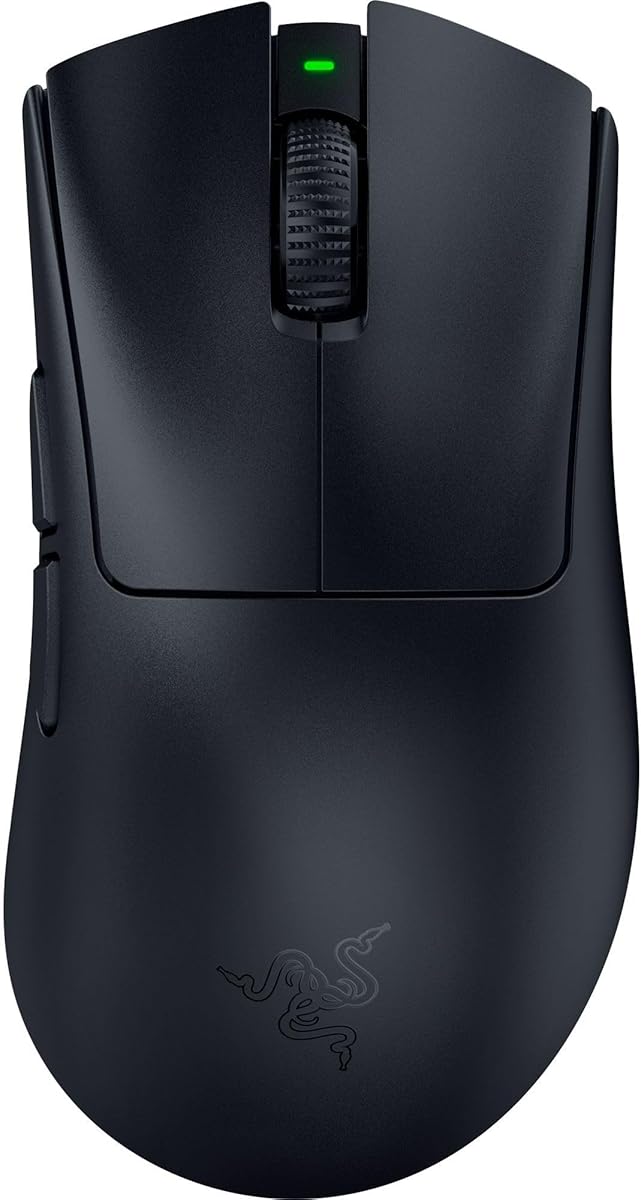
Razer DeathAdder V4 Pro
4.4Editor score
45K DPI Focus Pro Sensor
8K Polling Rate Support
56g Ultra Lightweight Design
This guide compares the best high DPI mouse for 4K gaming precision, evaluating sensors, polling rates, and ergonomics to help you choose the right tool for
Finding the right high DPI mouse for 4K gaming precision is essential for modern shooters and strategy titles. These devices offer the tracking accuracy needed to hit targets on ultra high resolution displays without losing control or responsiveness during intense matches.
We evaluated ten top models based on sensor performance, polling rates, build quality, and ergonomic design. Each product was analyzed for its ability to deliver pixel perfect accuracy and consistent tracking across different surfaces and gaming environments.
Every pick highlights unique strengths like wireless speed, customization options, or lightweight designs. Prices and availability change frequently so please verify current details before purchasing to ensure you get the best deal available today.
4.4Editor score

4.4Editor score

4.6Editor score
Here is a side by side comparison of all ten selected mice to help you quickly identify key specifications and features that matter most for your specific gaming needs and setup requirements.
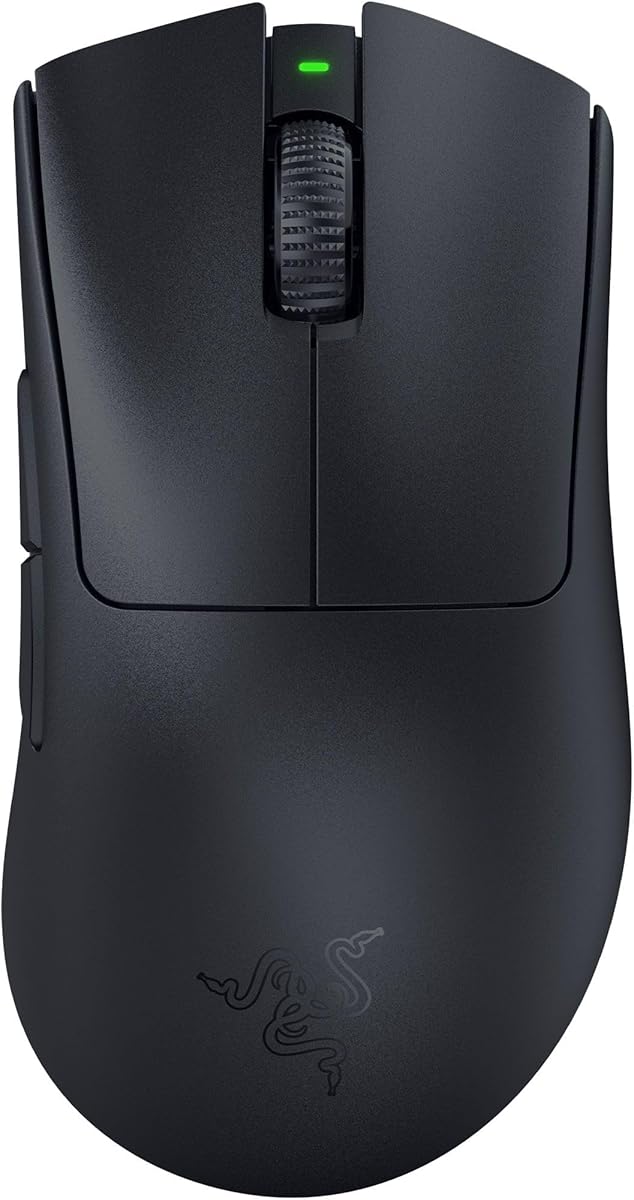




The Razer Basilisk V3 Pro stands out as a top contender for high DPI precision gaming with its 35K optical sensor and robust feature set. It earned high marks for its ability to track movement flawlessly across various surfaces including glass which is critical for 4K displays.
We may earn a commission when you buy through this link, at no additional cost to you.
Its HyperScroll tilt wheel allows seamless transitions between precise clicking and free spin scrolling making it versatile for both gaming and productivity. The wireless performance is lag free and the battery lasts up to 140 hours ensuring you stay connected during extended sessions.
While the price is higher than average the build quality and customization options justify the investment. Some users might find the Synapse software overwhelming but once configured it offers unmatched control over your gaming experience.
This mouse is ideal for competitive gamers who demand precision and reliability. If you want a versatile high performance mouse that excels in 4K environments this is a strong recommendation to consider.
The Focus Pro 35K sensor delivers intelligent functions and 1 DPI step adjustments for granular aim control.
Thirteen customizable controls allow you to map macros and commands to fit your specific playstyle needs.
We may earn a commission when you buy through this link, at no additional cost to you.
The DeathAdder V4 Pro brings pro level speed with an ultra light 56g body and a massive 45K DPI sensor. This combination makes it perfect for high resolution gaming where quick movements and precise tracking are essential for competitive edge.
We may earn a commission when you buy through this link, at no additional cost to you.
Its 8K polling rate ensures inputs are registered instantly providing a smooth responsive feel during intense matches. The ergonomic shape is refined for comfort while the optical switches offer a crisp tactile click with zero debounce delay.
The premium features come at a cost and the shape may not suit every grip style. However for those who prioritize performance and weight the specs are unmatched in the current market offerings.
Choose this mouse if you are a serious FPS player seeking the fastest and lightest option available. It is a significant upgrade for anyone looking to maximize their performance in 4K gaming setups.
HyperSpeed Wireless Gen 2 delivers lower latency and ultra stable connectivity with up to 8000 Hz polling.
The sensor ensures reliable tracking across surfaces with 900 IPS speed and 99.8 percent accuracy.
We may earn a commission when you buy through this link, at no additional cost to you.
The RS3 Ultra offers premium specs like an 8K polling rate and 52K DPI sensor at a very accessible price point. It delivers high performance tracking and a lightweight design that competes with much more expensive options on the market.
We may earn a commission when you buy through this link, at no additional cost to you.
Its standout feature is the massive 800 hour battery life which means you can game for months on a single charge. The carbon fiber hybrid shell provides strength and stability while keeping weight low for fast flicks and accurate tracking.
While the brand is less known the specs speak for themselves. Some users might prefer more extensive RGB customization but the performance and battery life make up for it easily in competitive scenarios.
This mouse is perfect for budget conscious gamers who refuse to compromise on quality. It proves that high precision gaming does not require an exorbitant budget if you know what to look for.
Web driver allows direct browser access to customize buttons DPI and polling rates without installing software.
Optical microswitches rated for 100 million clicks ensure consistent performance over years of heavy use.
We may earn a commission when you buy through this link, at no additional cost to you.
The DeathAdder V3 Pro is a classic choice refined for modern wireless performance. It maintains the iconic ergonomic shape trusted by many top players while offering a lightweight build that reduces fatigue during long matches.
We may earn a commission when you buy through this link, at no additional cost to you.
Its Focus Pro 30K sensor ensures flawless tracking on various surfaces including glass. The optical switches provide a fast 0.2ms actuation which is crucial for competitive gameplay where timing is everything.
Battery life is decent at 90 hours but falls short of some newer models in the lineup. The lack of extra programmable buttons may limit customization for MMO gamers but it suits FPS players well.
Choose this if you prefer a trusted ergonomic shape and reliable wireless performance. It is a solid all rounder for those who value comfort and simplicity in their setup.
Developed with top esports pros to continue the legacy of award winning handling and comfort.
HyperSpeed Wireless ensures a connection faster than other available tech for stable low latency play.
We may earn a commission when you buy through this link, at no additional cost to you.
The Basilisk V3 Pro Custom offers a blend of ergonomics and advanced features for gamers who want both comfort and style. Its signature shape supports long sessions while the sensor delivers precise tracking for 4K accuracy.
We may earn a commission when you buy through this link, at no additional cost to you.
The 13 zone Chroma lighting and full underglow allow deep immersion with game integrated effects. The battery life is impressive at 150 hours on Bluetooth which ensures extended play without frequent charging interruptions.
The scroll wheel mode switch is a unique feature that adds utility beyond just gaming. While RGB is fun it can impact battery life slightly so be mindful of settings during long matches.
This is ideal for players who want a premium look and feel without sacrificing performance. The balance of features makes it a versatile choice for various gaming genres.
React dynamically with over 150 Chroma integrated games to customize every zone from millions of colors.
HyperScroll tilt wheel allows you to spin freely for speed or switch to tactile for precise feedback.
We may earn a commission when you buy through this link, at no additional cost to you.
The Mercury M1 Pro stands out with its magnesium alloy construction which feels robust and premium in the hand. It offers a solid alternative for gamers who prefer a bit more weight for stability during high precision movements.
We may earn a commission when you buy through this link, at no additional cost to you.
Its 26K DPI sensor supports 4K polling for fast response times in critical moments. The triple mode connectivity lets you switch between 2.4G Bluetooth and wired modes easily for flexible usage scenarios.
At 88 grams it is heavier than the ultralight trend but this weight is intentional for control. The battery life reaches up to 200 hours which is great for marathon gaming sessions.
Choose this if you value build quality and a distinctive design. It is a great option for those who want something different from standard plastic gaming mice.
Sculpted to fit hand naturally reducing fatigue and delivering crisp tactile buttons for accurate clicks.
GlowSync RGB zones can be customized to match your setup or game to amplify focus and victories.
We may earn a commission when you buy through this link, at no additional cost to you.
The G502 Hero remains a favorite for gamers who prefer a wired connection for zero latency. Its adjustable weights allow you to tailor the balance to your exact preference for maximum comfort during long play.
We may earn a commission when you buy through this link, at no additional cost to you.
The HERO sensor delivers precision tracking up to 25600 DPI without smoothing ensuring that every movement is recorded accurately. The dual mode scroll wheel provides tactile feedback for precision and free spin for speed.
While it lacks wireless convenience it is often praised for its durability and classic feel. The mechanical button tensioning system provides a crisp click feedback that many competitive gamers appreciate.
If you want a proven reliable mouse with extensive customization options this is a great pick. It continues to be a top choice for those who prioritize function over wireless features.
Arrange up to five 3.6g weights for a personalized weight and balance configuration that fits your style.
Capable of detecting sub micron level movement with pinpoint accuracy for sub pixel tracking.
We may earn a commission when you buy through this link, at no additional cost to you.
The M916 is one of the lightest gaming mice available weighing just 49 grams. This makes it ideal for quick flicks and reduced wrist strain during high intensity gaming sessions on high resolution displays.
We may earn a commission when you buy through this link, at no additional cost to you.
Equipped with 4K transmission technology it ensures precise tracking and low consumption. The tri mode connectivity via BT and 2.4G offers flexibility for users who switch between devices frequently.
For the price the performance is hard to beat. While it has fewer programmable buttons than some high end models it covers essential needs for most gamers effectively.
This is an excellent choice for budget players wanting a lightweight wireless experience. It proves that you do not need to spend a lot to get high performance.
Armed with Nordic flagship chip unleashing precise tracking and lowest consumption performance available.
Perfectly shaped for long lasting use reducing fatigue during pm gaming parties or work sessions.
We may earn a commission when you buy through this link, at no additional cost to you.
The Basilisk V3 is a wired variant that brings high performance features to a lower price point. It features an ergonomic design with a thumb rest that supports the hand for long sessions without strain.
We may earn a commission when you buy through this link, at no additional cost to you.
Its Focus plus 26K DPI sensor tracks movement flawlessly ensuring pixel precise accuracy. The optical switches provide a rapid 0.2ms actuation for responsive clicks that are critical in competitive titles.
The HyperScroll wheel allows you to switch between tactile and free spin modes for versatility. While it lacks wireless convenience the consistent wired connection ensures zero latency during play.
This is a great option for those who prefer wired setups for reliability. It offers a balanced mix of comfort and performance for the price.
Assign macros and secondary functions across 11 buttons for quick access to push to talk and ping.
React dynamically with Chroma games using 11 RGB lighting zones from over 16.8 million colors.
We may earn a commission when you buy through this link, at no additional cost to you.
The G703 Lightspeed combines pro level responsiveness with a comfortable design that has been favored for years. It supports POWERPLAY wireless charging so you can keep playing without worrying about battery levels.
We may earn a commission when you buy through this link, at no additional cost to you.
The HERO 25K sensor offers 1:1 tracking with zero smoothing ensuring that your inputs are recorded accurately. The metal spring tensioning provides a consistent button feel that many users appreciate.
While 95 grams is heavier than modern ultralight options the balance feels solid and comfortable. Battery life is good for a mouse but charging is simplified with the compatible POWERPLAY mat.
Choose this if you prioritize ergonomics and want the option for wireless charging. It is a reliable choice for users who value comfort over cutting edge weight.
Add the POWERPLAY wireless charging system to keep your mouse charged while at rest and at play.
Metal spring button tensioning keeps primary buttons poised to trigger with less force for better feel.
We may earn a commission when you buy through this link, at no additional cost to you.
Selecting the right mouse requires understanding how sensors and design features impact your performance on high resolution displays.
For 4K gaming precision the sensor must be capable of tracking movement without acceleration or smoothing. Look for optical sensors with high DPI counts such as 25K or above to ensure pixel perfect alignment on large screens.
Prioritize sensors that offer 1 DPI step adjustments for granular aim control and accurate tracking across different surfaces.
A high polling rate like 8K Hz ensures that your mouse sends data to your PC very frequently reducing input lag. This is essential for competitive games where split second reactions determine the outcome of a match.
Higher polling rates lead to smoother cursor movement and more responsive gameplay which is critical for high precision play.
Lightweight mice around 60g help reduce wrist fatigue during marathon sessions while allowing faster flicks. Ensure the shape fits your hand naturally to prevent strain and improve accuracy over time.
Choose a weight and grip style that feels comfortable to you as personal preference varies based on hand size and play style.
Modern wireless tech offers latency as low as wired connections so consider this if you value a clean setup. Look for reputable brands that use proprietary wireless tech to avoid interference and maintain stability.
Ensure the battery life is sufficient for your usage to avoid interruptions during long gaming sessions.
More buttons allow you to map macros and keybinds directly to the mouse which can speed up your gameplay. This is particularly useful for MMOs and strategy games where you need quick access to abilities.
Look for intuitive mapping software that lets you customize controls easily to suit your specific game needs.
High end switches and durable materials ensure that the mouse can withstand the intensity of daily use. Optical switches are preferred as they have a longer lifespan and avoid double clicking issues.
Invest in a mouse with a sturdy construction that offers consistent performance over years of gaming.
Reliable software allows you to adjust DPI settings create lighting profiles and optimize performance for games. This ensures that the mouse can be fine tuned to your exact preferences.
Check if the software is user friendly and offers features like on the fly sensitivity adjustment.
Some sensors perform better on specific surfaces such as glass or textured pads. Ensure the mouse you choose tracks reliably on the surface you use most often.
Testing the mouse on your preferred surface can help ensure it meets your precision standards.
Clean your mouse pads and sensor lens regularly to ensure the sensor tracks accurately without interference from dust or debris.
Adjust DPI settings in your mouse software to match the resolution of your monitor for optimal cursor speed and control.
Keep firmware and drivers up to date to benefit from performance improvements and bug fixes released by the manufacturer.
Not necessarily as higher DPI allows for sensitivity adjustments but precision depends on sensor quality. A 4K monitor benefits from a sensor that tracks well at lower DPI settings with high accuracy.
Yes higher polling rates reduce input lag and ensure movements are registered quickly. For competitive play 4K or 8K polling rates are ideal for responsiveness.
Most pros prefer mice between 60g and 80g for a balance of speed and control. However personal preference dictates the best choice for your play style.
Modern wireless tech offers latency as good as wired so yes it is suitable. Ensure you choose a reputable brand with reliable connectivity technology.
Optical switches are more durable and have faster actuation than mechanical ones. They are a great choice for longevity and consistent performance.
Disable Enhance pointer precision in Windows settings to prevent acceleration. Use the mouse software to adjust DPI for accurate cursor movement.
Most sensors work best on cloth pads but check compatibility for glass surfaces. Ensure your surface is clean and consistent for accurate tracking.
Long battery life ensures uninterrupted play and reduces charging frequency. Look for models with at least 50 hours for daily use.
The top picks offer a range of options from lightweight wireless models to ergonomic wired ones ensuring you find a match for your setup.
Prioritize sensor quality and ergonomics over extra features to ensure the mouse serves your primary gaming needs effectively.
Always check current availability and prices before purchasing to secure the best deal for your high precision gaming needs.