
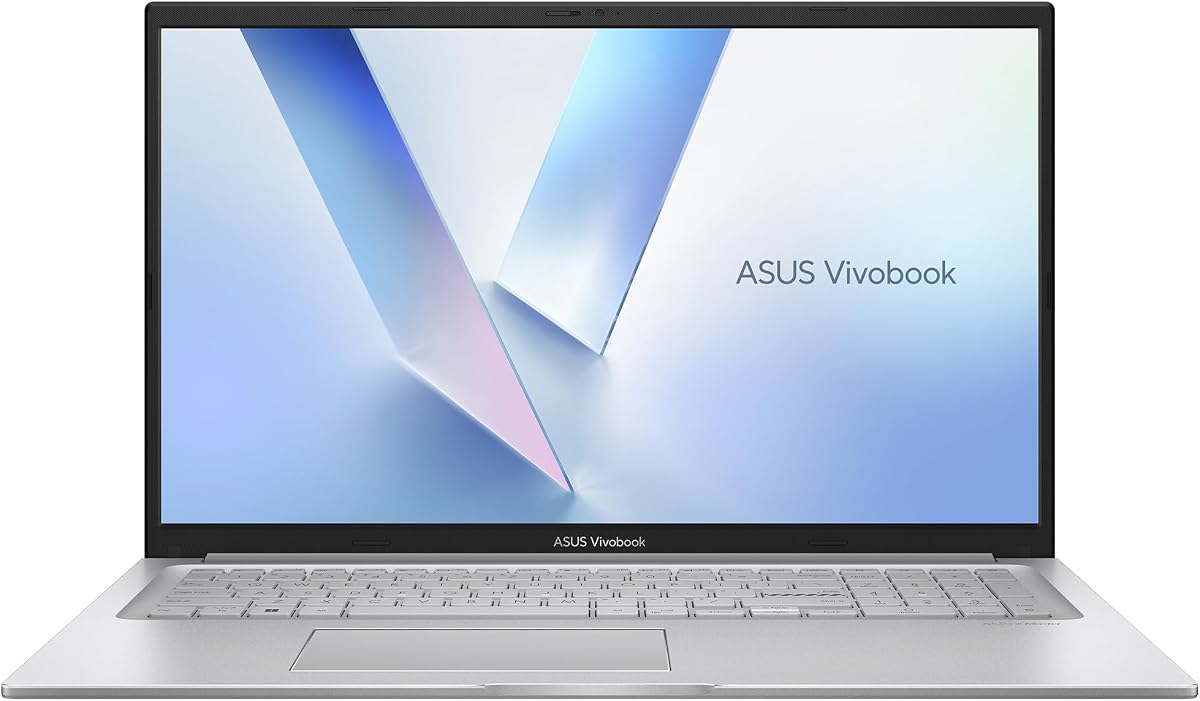
ASUS Vivobook Go 15
4.3Editor score
AMD Ryzen 3 Processor
128GB SSD Storage
Fast Charging Support
This guide compares the top ten ASUS Vivobook laptops available today focusing on performance, display quality, battery life, and value for various user needs
Finding the right laptop can be challenging with so many options available on the market today. The ASUS Vivobook series offers a wide range of models designed to meet different needs from budget-conscious students to power users seeking high performance.
We have carefully analyzed ten distinct models from the ASUS Vivobook lineup to help you make an informed decision. Each product was evaluated based on its processor capabilities, memory storage, display quality, and overall value proposition for the current market.
Each pick in this list highlights specific strengths and ideal use cases to guide your selection process. Please note that product availability and pricing can change frequently so always verify current details before making your final purchase decision.
4.3Editor score

4.5Editor score

4.2Editor score
The following table provides a side-by-side comparison of all ten ASUS Vivobook models featured in this guide. Review the key specifications for each device to quickly identify which one aligns best with your specific computing requirements and preferences.






This model stands out as a powerful choice for professionals needing high performance. With a 4.5 rating from users it delivers reliable speed for complex tasks and multitasking demands.
We may earn a commission when you buy through this link, at no additional cost to you.
The Intel Core i9 processor paired with 32GB of RAM ensures smooth operation even under heavy loads. The included PCO bundle enhances thermal management preventing overheating during intense usage sessions.
While the performance is top tier the device is heavier than ultra-thin alternatives which may affect portability. The price reflects the premium components but remains competitive for the specs offered.
Ideal for power users creators and business professionals requiring desktop level performance in a laptop. We recommend this for those prioritizing speed and capacity over portability.
Optimized specifically for AI workloads this processor handles creative software and simulations efficiently for future proofing your investment.
The fingerprint reader and physical webcam shield provide robust privacy protections ensuring your data and identity remain secure.
We may earn a commission when you buy through this link, at no additional cost to you.
This 16-inch model leverages the new Qualcomm Snapdragon X processor for impressive efficiency and battery life. Users appreciate the visual quality of the WUXGA display and the smooth performance for daily tasks.
We may earn a commission when you buy through this link, at no additional cost to you.
The Snapdragon chipset offers unparalleled power efficiency making it ideal for mobile professionals. The integrated Adreno GPU provides significant generational improvements for visual performance while keeping power consumption low.
Compatibility with specific legacy Windows applications may require verification before purchase. The ARM architecture is new for Windows laptops and some x86 apps may not run natively.
Best suited for users focused on productivity streaming and web applications where battery life is crucial. Consider this if you need all-day power without carrying a charger.
The 1920 x 1200 resolution delivers sharp visuals and rich colors perfect for media consumption and design work.
Built-in Hexagon NPU accelerates AI tasks making communication and creation more efficient than traditional processors.
We may earn a commission when you buy through this link, at no additional cost to you.
A well balanced option for students and home office users needing reliable performance without excessive cost. The i7 processor handles multitasking well and the 16GB RAM ensures smooth browsing and document editing.
We may earn a commission when you buy through this link, at no additional cost to you.
The lightweight portability makes it easy to carry to classes or meetings. The WUXGA display offers a crisp viewing experience for spreadsheets and streaming content.
Battery life is average compared to newer ARM based models which may limit all day usage away from outlets. The build quality is functional but lacks premium materials like metal chassis.
Recommended for general productivity and light creative work. This model offers strong value for those needing a versatile daily driver.
Multiple USB ports HDMI and a microSD reader eliminate the need for dongles in most scenarios.
Vibrant colors and sharp text make this screen ideal for reading and detailed work.
We may earn a commission when you buy through this link, at no additional cost to you.
This 17.3 inch model offers expansive screen real estate for multitasking and entertainment. Users note the ergonomic benefits of the numeric keypad and the durability of the military-grade build.
We may earn a commission when you buy through this link, at no additional cost to you.
The fast charging feature allows quick top-ups getting you back to work in minutes. The lay-flat hinge facilitates collaboration and sharing content with colleagues easily.
Due to its size this laptop is not ideal for frequent travel or cramped spaces. It is better suited as a stationary replacement for a desktop setup.
Perfect for home offices or students needing extra screen space. Prioritize this if screen size is your top requirement over portability.
The ergonomic keyboard with numeric keys significantly speeds up data entry and accounting tasks.
Meeting MIL-STD 810H standards ensures reliability in various environments and conditions.
We may earn a commission when you buy through this link, at no additional cost to you.
Designed for students and budget conscious buyers this model offers solid everyday performance. The Ryzen 5 processor provides responsive speed for web browsing and document editing without breaking the bank.
We may earn a commission when you buy through this link, at no additional cost to you.
Fast charging capabilities ensure you can quickly regain power during busy schedules. The AI noise canceling feature improves video call quality for online classes or meetings.
The memory is fixed at 8GB which might limit heavy multitasking in the future. Upgrades are not possible so consider your long-term needs carefully.
An excellent entry level laptop for basic tasks and light media consumption. Choose this for affordability and simplicity.
Ultra-slim NanoEdge bezels maximize screen real estate for a more immersive viewing experience.
IceCool technology keeps the device cool even during prolonged use sessions.
We may earn a commission when you buy through this link, at no additional cost to you.
The most affordable option in this lineup suitable for basic tasks and light browsing. It provides a decent start for those needing a simple machine without unnecessary features.
We may earn a commission when you buy through this link, at no additional cost to you.
DDR5 memory offers faster data access than older generations improving responsiveness. The included privacy shield adds a layer of security for online calls.
Storage is limited to 128GB which fills up quickly with modern applications and media. Cloud storage or external drives will be necessary for most users.
Ideal for secondary use or very light primary computing tasks. This model serves best as a backup or entry level device.
A thin and light design makes it easy to carry in a backpack for daily commutes.
The privacy shutter gives physical control over your webcam for better peace of mind.
We may earn a commission when you buy through this link, at no additional cost to you.
This model allows for significant customization of RAM and storage to suit demanding workloads. Users love the flexibility to choose configurations that match their specific professional requirements.
We may earn a commission when you buy through this link, at no additional cost to you.
The Core i9 processor paired with up to 48GB RAM provides exceptional performance for heavy multitasking. Windows Pro offers additional security features beneficial for business users.
Warranty coverage is split between manufacturer and upgrade provider which might complicate claims. Ensure you understand the coverage details before purchasing.
Recommended for professionals needing specific high-end configurations not found in stock models. This is the go-to for bespoke performance needs.
PCOnline US provides a 3-year coverage on upgraded components for added reliability.
Windows 11 Pro includes BitLocker and Remote Desktop for secure and flexible work environments.
We may earn a commission when you buy through this link, at no additional cost to you.
Offers an interesting combination of high memory and storage at a modest price. The 24GB RAM allows for extensive multitasking despite the budget oriented processor.
We may earn a commission when you buy through this link, at no additional cost to you.
The 14 inch form factor provides portability while still offering enough screen space for productivity. Wi-Fi 6 ensures stable and fast internet connections for remote work.
The i3 processor may struggle with intensive tasks like video editing or 3D rendering. This device is better suited for office work and web browsing.
Great for users who prioritize RAM and storage over raw processing power. Choose this for cost effective everyday computing.
The high bandwidth RAM enables smooth switching between multiple applications and browser tabs.
A large NVMe SSD ensures fast startup and quick access to your files.
We may earn a commission when you buy through this link, at no additional cost to you.
This compact laptop embraces the new Copilot+ PC standard for next generation AI features. The Snapdragon X processor delivers excellent battery life and fast performance for daily tasks.
We may earn a commission when you buy through this link, at no additional cost to you.
Users appreciate the quiet blue finish and the slim design making it easy to carry around. The 16GB RAM ensures smooth operation for modern productivity applications.
Some users may encounter compatibility issues with specific x86 legacy applications on ARM. Verify software needs before committing to this device.
Best for tech enthusiasts wanting future ready AI features and portability. This model is perfect for those prioritizing battery and new tech.
Copilot+ features enable advanced workflows and intelligent assistance directly within the system.
The ARM architecture provides extended battery life ideal for travelers and students on the go.
We may earn a commission when you buy through this link, at no additional cost to you.
This premium model combines high-end Ryzen AI performance with a striking platinum gold finish. The WUXGA display offers sharp visuals and the dedicated NPU handles AI tasks efficiently.
We may earn a commission when you buy through this link, at no additional cost to you.
The Radeon graphics provide better visual performance than integrated competitors for light gaming and editing. The Copilot+ features allow for innovative workflows and content creation.
The price is higher than base models reflecting the premium components and design. Warranty coverage is limited to one year which may require additional protection plans.
Ideal for professionals who value aesthetics and performance equally. This model balances style and functionality for a high-end experience.
The 1920 x 1200 resolution provides detailed and vibrant images for creative work.
The XDNA NPU accelerates complex AI tasks for improved productivity and efficiency.
We may earn a commission when you buy through this link, at no additional cost to you.
Selecting the right Vivobook requires understanding your specific needs and budget. This guide breaks down the key factors to consider before making a purchase.
The processor determines how well the laptop handles tasks. For heavy workloads choose i9 or Ryzen AI models. For general use i5 or Ryzen 5 are sufficient.
Prioritize higher core counts for multitasking and video editing to ensure smooth operation.
RAM affects multitasking ability. 8GB works for basic tasks but 16GB is recommended for future proofing. 32GB or more is needed for professional content creation.
Look for expandable RAM options if you plan to upgrade later.
SSDs offer fast boot times and file access. 512GB is a good baseline but 1TB is better for large media files. NVMe PCIe drives are standard now.
Ensure the drive type is NVMe for maximum speed benefits over older SATA options.
Screen size ranges from 14 to 17 inches. FHD is standard but WUXGA offers more vertical space. Look for high brightness and good color accuracy.
Choose WUXGA if you work with detailed images or documents regularly.
Battery life varies significantly by model and processor. ARM models typically offer longer endurance than Intel. Check watt-hour ratings for accurate estimates.
Opt for larger battery capacities if you work away from power sources often.
Larger screens mean heavier weights. 14 inch models are easiest to carry. Consider build materials like metal versus plastic for durability.
Select a weight you can comfortably carry in a bag for daily commutes.
Check the ports available for your peripherals. USB-C with power delivery is essential. HDMI is useful for external monitors and dongles.
Ensure you have enough USB ports to avoid needing extra hubs.
Modern Vivobooks include fingerprint readers and privacy shutters. Windows Hello support allows fast secure logins. Encryption is often built into SSDs.
Use these features to protect sensitive data especially on shared devices.
To maximize battery life adjust power settings and reduce screen brightness when not under heavy load. Closing unused applications also reduces power consumption significantly.
Keep vents clear of dust and debris to prevent overheating. Use a cooling pad during long work sessions to maintain optimal internal temperatures.
Clean the screen and keyboard regularly using a microfiber cloth. Avoid harsh chemicals or spraying liquids directly on the device to prevent damage.
Not all Vivobooks are designed for heavy gaming. Most models use integrated graphics suitable for light or casual games. For AAA gaming look for specific models with discrete GPUs or high-end Ryzen/Intel processors.
Some Vivobook models have soldered RAM that cannot be upgraded later. Check the specific product data for memory details. Some bundles allow upgrades but verify before purchase to ensure compatibility.
Battery life typically ranges from 8 to 12 hours depending on the processor and usage. ARM based models like Snapdragon X may offer longer endurance than standard Intel i7 processors.
Many models support fast charging to reach 60 percent in about 40 to 50 minutes. Check individual product data to confirm if fast charging is included in your chosen model.
Many Vivobook models meet military grade durability standards for shock and vibration resistance. This makes them reliable for travel provided they are stored in a protective case.
Yes all modern Vivobook models listed come pre-installed with Windows 11. Some bundles offer Windows 11 Pro while others include the Home edition for basic users.
This guide covered ten distinct ASUS Vivobook models ranging from budget friendly options to powerful professional machines. Each offers unique strengths depending on your specific use case.
Prioritize performance and memory if you are a power user. Choose battery efficiency and screen size if you are a student or traveler.
Remember to verify current prices and availability as stock levels and offers change frequently across retailers.