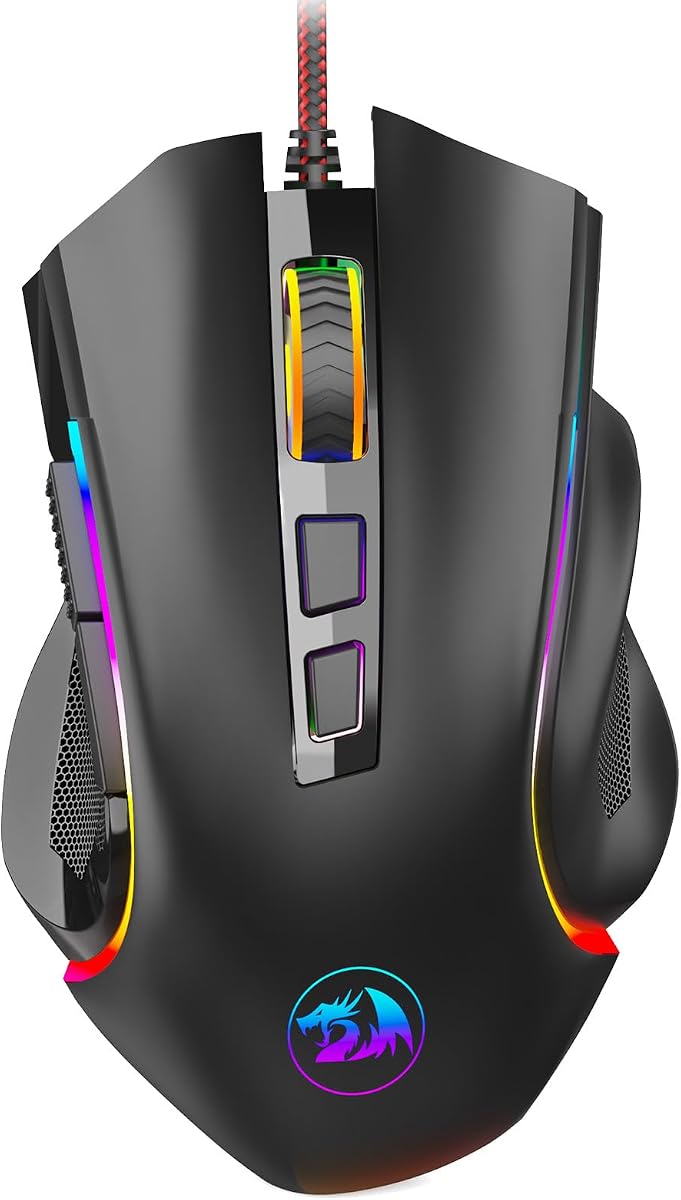
Redragon M602 Gaming Mouse
4.6Editor score
7200 Adjustable DPI
9 Programmable Buttons
Ergonomic RGB design
This guide compares the best gaming mouse for Diablo 4 options including wired and wireless models with programmable buttons and high DPI sensors for optimal
Finding the right gaming mouse for Diablo 4 can transform your experience from frustrating to fluid. The action and combat in this title demand precision, quick reaction times, and comfortable ergonomics to handle long raid sessions without fatigue or strain on your hand.
We evaluated ten top-rated mice based on sensor accuracy, button customization, build quality, and ergonomic design. Our analysis focuses on models that excel in MMO and action RPG scenarios, ensuring you have the tools needed to execute complex macro combinations and rapid movements effectively.
Each pick below highlights specific strengths and ideal use cases to help you decide which model fits your budget and play style. Keep in mind that retail prices fluctuate frequently so verify current costs before purchasing to ensure you get the best value for your investment today.
4.6Editor score

4.6Editor score

4.2Editor score
This comparison table outlines the core specifications and key strengths of each mouse to help you quickly identify the model that aligns with your specific needs and preferences for Diablo 4 gameplay.






The Logitech G502 Hero stands out as a top choice for Diablo 4 players due to its versatile design and precision tracking capabilities. With a rating of 4.6 stars from thousands of users it is widely recognized for its robust build and customizable features.
We may earn a commission when you buy through this link, at no additional cost to you.
Its HERO sensor delivers up to 25600 DPI with zero smoothing ensuring that every movement translates accurately on screen. This is crucial for targeting enemies and executing precise skill rotations in fast-paced combat scenarios.
The inclusion of 11 programmable buttons allows you to map complex macros or key binds directly to the mouse reducing reliance on keyboard combos. The mechanical switch tensioning provides a crisp click feel that enhances feedback during intense gameplay moments.
This mouse is ideal for gamers who prioritize control and customization in a wired setup. The adjustable weights let you tailor the feel to your preference making it a strong all-rounder for extended gaming sessions.
You can arrange up to five weights to adjust the mouse balance and heft to match your specific grip style and preference.
Switch between hyper-fast scrolling for inventory management or precise mode for tactical control during critical moments.
We may earn a commission when you buy through this link, at no additional cost to you.
The Razer DeathAdder Essential offers a classic ergonomic form factor that fits naturally in the hand. It is highly rated for its comfort and reliability making it a solid pick for players who prefer a straightforward mouse without extra bulk.
We may earn a commission when you buy through this link, at no additional cost to you.
The 6400 DPI optical sensor provides sufficient accuracy for most action RPG needs without requiring complex calibration. Dedicated DPI buttons allow quick sensitivity adjustments on the fly which helps when switching between exploration and combat modes.
Mechanical switches are tested to last up to 10 million clicks ensuring long-term durability even during heavy use. The ridged rubberized scroll wheel offers tactile feedback that aids in precise scrolling through skill bars or menus.
This mouse is best suited for those who value comfort and simplicity over advanced features. Its straightforward design minimizes distractions and ensures you stay focused on the game mechanics during long play sessions.
The contoured shape is designed to support the hand naturally reducing fatigue during extended use.
High-quality materials and switches ensure the mouse withstands the wear and tear of daily gaming.
We may earn a commission when you buy through this link, at no additional cost to you.
Corsair's NIGHTSWORD distinguishes itself with an innovative tunable weight system that adapts to your hand and play style. This feature allows for precise balance adjustments which can significantly improve control during fast-paced actions in Diablo 4.
We may earn a commission when you buy through this link, at no additional cost to you.
The custom Pixart sensor offers up to 18000 DPI with adjustable resolution steps ensuring accurate tracking across various surfaces. Ten fully programmable buttons give you ample room to map skills or macros without cluttering your keyboard layout.
Comfort is enhanced by a contoured shape inspired by pro sports equipment providing a natural fit for the hand. High-performance rubber grips add traction preventing slippage during intense moments when your hand might sweat.
Ideal for players who want to fine-tune every aspect of their mouse performance this model delivers a professional feel. The combination of weight customization and sensor accuracy makes it a strong contender for competitive and casual gamers alike.
Two sets of weights and multiple mounting locations offer over a hundred configuration options to find your perfect balance.
Adjustability in single DPI steps ensures you can find the exact sensitivity you need for any task.
We may earn a commission when you buy through this link, at no additional cost to you.
The Razer Basilisk V3 is celebrated for its iconic ergonomic design and extensive customization options. Its form factor is favored by millions worldwide ensuring that your hand remains supported during long gaming marathons.
We may earn a commission when you buy through this link, at no additional cost to you.
With 11 programmable buttons you can assign macros or secondary functions to execute complex actions with ease. The optical mouse switches provide crisp and responsive execution with minimal actuation delay which enhances your reaction times.
The HyperScroll tilt wheel allows you to spin freely for quick inventory checks or switch to tactile mode for precise scrolling. This dual functionality is particularly useful in RPGs where navigating menus and maps is a frequent task.
This mouse is perfect for gamers who demand both performance and style. The extensive RGB lighting and button customization ensure you can tailor the device to your specific needs and aesthetic preferences.
Advanced tracking technology ensures pixel-precise accuracy allowing for confident aiming and movement.
Over 16 million color options and game-reactive effects enhance immersion during gameplay.
We may earn a commission when you buy through this link, at no additional cost to you.
Logitech G305 delivers impressive wireless performance at a budget-friendly price point. Its HERO sensor provides incredible efficiency ensuring that you get up to 250 hours of gameplay on a single AA battery.
We may earn a commission when you buy through this link, at no additional cost to you.
The LIGHTSPEED technology ensures a lag-free experience with a 1ms report rate matching wired mouse responsiveness. This reliability is crucial for maintaining precision during fast movement and combat encounters in Diablo 4.
Weighing in at only 3.4 oz the mouse offers high maneuverability without feeling too light or flimsy. The compact design makes it easy to transport which is ideal for those who game from different setups or travel.
This mouse is best for players seeking the freedom of wireless without sacrificing performance or breaking the bank. Its durability and efficiency make it a practical choice for daily use and casual gaming.
Endurance mode extends battery life up to nine months for users who play less frequently.
Built-in storage keeps the receiver secure and prevents loss when on the move.
We may earn a commission when you buy through this link, at no additional cost to you.
The Corsair Scimitar RGB Elite is engineered specifically for players who need extensive button access. Its unique Key Slider system allows you to reposition the 12 side buttons to perfectly fit your thumb grip.
We may earn a commission when you buy through this link, at no additional cost to you.
With 17 programmable buttons you can map nearly every ability in your arsenal directly to the mouse. This reduces keystrokes and streamlines your combat rotation which is vital in high-demand situations.
The sensor supports up to 18000 DPI ensuring precise tracking across different surfaces and resolutions. Durable Omron switches are rated for 50 million clicks guaranteeing that the mouse will last through years of heavy usage.
This model is ideal for MMO enthusiasts or players who rely heavily on macro usage. The customizable fit and robust build make it a specialized tool for managing complex gameplay mechanics.
Reposition the side buttons to align with your hand size and comfort preferences.
Sculpted shape fits the palm and offers a finger rest for added support.
We may earn a commission when you buy through this link, at no additional cost to you.
The UtechSmart Venus Pro combines wireless convenience with the extensive button layout needed for MMO play. It offers both wireless and wired modes allowing you to switch based on power or connection stability needs.
We may earn a commission when you buy through this link, at no additional cost to you.
With 16 programmable buttons arranged at different angles you can easily reach all inputs without straining your thumb. The battery life supports up to 70 hours of continuous gameplay which is sufficient for most sessions without recharging.
The custom sensor ensures precise tracking and responsiveness even during rapid movements. The ergonomic design includes a grinding coating that provides sweat-resistant grip ensuring comfort during long hours of play.
This mouse is a strong option for players who want wireless freedom with MMO capabilities. Its versatility and detailed customization make it a compelling choice for those who value both mobility and control.
Rechargeable capacity ensures over 300 charge cycles for lasting performance.
Choose between wireless freedom or wired stability depending on the situation.
We may earn a commission when you buy through this link, at no additional cost to you.
Redragon M901K offers a robust set of features including 19 macro programmable buttons and extensive weight tuning. This setup allows you to build a mouse specifically tailored to your gaming style and physical preferences.
We may earn a commission when you buy through this link, at no additional cost to you.
The sensor supports up to 12400 DPI ensuring smooth movement and accurate tracking. Adjustable polling rates and weights give you further control over how the mouse feels and performs during critical moments.
Five memory profiles let you store settings for different games so you do not have to reconfigure every time you switch. The ergonomic design aims to reduce fatigue during long sessions making it practical for daily use.
This mouse is ideal for players who want a high feature count at a reasonable price. The ability to customize weight and buttons ensures you can optimize your setup for any game.
Eight removable weights allow you to find the perfect balance and heft for your hand.
Save specific configurations for different games to ensure instant access.
We may earn a commission when you buy through this link, at no additional cost to you.
The Redragon M602 is a highly rated budget mouse that delivers solid performance for its price. With a 4.6 rating it proves that you do not need to spend a lot to get a functional gaming peripheral.
We may earn a commission when you buy through this link, at no additional cost to you.
Its ergonomic shape ensures that your hand is comfortable even during long play sessions. The 7200 DPI sensor is adequate for most gaming scenarios and offers adjustable settings to suit different preferences.
Nine programmable buttons allow for basic macro mapping which is useful for many game types. The RGB lighting adds a touch of style without increasing the cost significantly.
This mouse is perfect for beginners or casual gamers who need reliable performance without advanced features. It offers excellent value and reliability for those starting their gaming journey.
Launched in 2015 this model has been verified by users for its lasting quality.
Designed to fit natural hand positions to reduce strain during use.
We may earn a commission when you buy through this link, at no additional cost to you.
The Razer Naga V3 Pro brings next-level precision and versatility to the table. Its Focus Pro 50K sensor ensures accurate tracking and supports high acceleration for any gaming genre.
We may earn a commission when you buy through this link, at no additional cost to you.
Three swappable side plates let you choose between 12 6 or 2-button layouts depending on the game you are playing. This flexibility is unmatched and allows you to use one mouse for MMOs and shooters.
Wireless connectivity via HyperSpeed ensures low latency and freedom of movement. The battery life supports days of continuous play ensuring that you never have to stop due to power issues.
This mouse is designed for gamers who demand the best in performance and adaptability. While it carries a higher price tag the features and build quality justify the investment for serious players.
Swap plates to switch from MMO to FPS without buying a new mouse.
Gen 4 switches offer lighter actuation and high durability for responsive clicks.
We may earn a commission when you buy through this link, at no additional cost to you.
Selecting the right mouse involves considering several factors that impact performance and comfort.
The sensor is the core component that tracks your movements. Look for a sensor with high DPI (Dots Per Inch) and zero smoothing to ensure your cursor moves exactly as you intend. High accuracy prevents overshooting or missing targets.
Prioritize models with adjustable DPI settings so you can switch between precise combat and quick navigation.
Diablo 4 relies on various skills and inventory management. Mice with 12 side buttons are ideal for MMOs but 5 to 11 buttons may suffice for casual play. Ensure buttons are easy to press without accidental triggers.
Choose a layout that matches your grip style to avoid strain during extended use.
Comfort is critical for long gaming sessions. A mouse that fits your hand size and grip type reduces fatigue. Look for features like thumb rests or contoured shapes to support natural hand positioning.
Test the grip texture to ensure it prevents slipping even when your hands get sweaty.
Wired mice offer consistent connection and no battery worries but limit movement range. Wireless mice provide freedom but require attention to battery life and latency. Modern wireless tech is nearly lag-free but check for 1ms report rates.
Decide based on your setup needs and whether mobility matters more than uninterrupted power.
Software allows you to remap buttons and create macros. Check if the software is user-friendly and stable on your system. Good software ensures you can access all features without constant tweaking.
Look for onboard memory so your settings travel with the mouse even on different computers.
Gaming mice endure heavy clicking and movement. Check for high click ratings (e.g., 50 million clicks) and sturdy switches to ensure longevity. Materials should feel premium and resist wear over time.
Durable construction ensures your investment lasts through years of gameplay without failure.
Weight affects control and comfort. Some mice come with adjustable weights to let you find the right heft. Lighter mice allow faster movements while heavier ones provide stability.
Balance customization ensures the mouse feels natural in your hand regardless of play style.
RGB lighting does not impact performance but enhances immersion. Choose models with customizable lighting if aesthetics matter to you. However do not pay a premium for lights alone if performance is your goal.
Focus on features that matter most to gameplay and let RGB be a secondary benefit.
Install the manufacturer software to map your most used skills to side buttons. Assign complex macros to reduce keystrokes and improve reaction times during boss fights. Test these mappings in the game settings to ensure they do not conflict with existing keys.
Keep your mouse surface clean by wiping it with a dry cloth. Ensure your mousepad is free from dust and debris to maintain sensor accuracy and smooth movement. Avoid harsh chemicals that could damage the sensor lens or button coatings.
Adjust your mouse speed settings based on your playstyle. If you use a large mousepad lower the DPI for better precision. Regularly update drivers to keep the mouse performance optimal and avoid connectivity issues.
For Diablo 4 a DPI range between 800 and 1600 is usually ideal for balancing speed and precision. Higher DPI helps with fast movement but might reduce accuracy. Adjust based on your mousepad size and personal preference.
Yes modern wireless mice are just as responsive as wired ones. Ensure you choose one with a 1ms report rate and reliable battery life. Wireless models offer more freedom of movement without sacrificing performance.
Diablo 4 does not require as many buttons as MMOs. A mouse with 5 to 11 programmable buttons is usually sufficient to map core skills. You do not need a massive side panel unless you play on hardcore settings often.
Yes many gaming mice have ergonomic designs suitable for office tasks. Look for customizable buttons that can double for productivity macros. This versatility ensures you get value from the device beyond just gaming.
Lag can be caused by low polling rates or outdated drivers. Check your mouse settings to ensure the polling rate is set to 1000Hz. Updating firmware and using a clean surface can also resolve minor latency issues.
Use a soft cloth to gently wipe the exterior and buttons. For hard-to-reach areas use compressed air to remove dust. Avoid using water or liquids directly on the device to prevent internal damage.
Choosing the right mouse can significantly improve your gameplay experience in Diablo 4. Whether you prefer the precision of a wired model or the freedom of wireless there is a great option for every budget and preference.
Prioritize comfort and sensor quality to ensure your hand remains steady and your aim is accurate. Consider how many buttons you need for your playstyle and whether customization features matter for your setup.
We encourage you to check current prices and availability before purchasing to get the best value. Investing in the right tool now will pay off in smoother gameplay and better performance over time.