
HP Chromebook 14 x360 Plus
4.2Editor score
360-degree flexible hinge
Intel N150 processor
14-inch WUXGA touchscreen
Finding the right laptop often means weighing performance against budget and ecosystem needs. Whether you want Windows flexibility or ChromeOS simplicity, there are compelling choices today. These devices offer diverse form factors and capabilities suited for students, professionals, and casual users alike.
We analyzed ten top-rated laptops to identify the most capable substitutes for the classic MacBook experience. Our comparison covers build quality, display clarity, processing power, and battery endurance. Each selection balances real-world usability with the price points that matter to modern buyers seeking reliable tools.
Every pick highlights specific strengths like touchscreens, convertible designs, or powerful processors. We focus on what makes each machine stand out in its category. Keep in mind that availability and offers shift frequently, so verify current details before purchasing your next device.
4.2Editor score

4.4Editor score

4.6Editor score
As an Amazon Associate we earn from qualifying purchases.
This side-by-side table summarizes key specifications for each laptop to help you quickly identify the best fit for your workflow and budget needs.


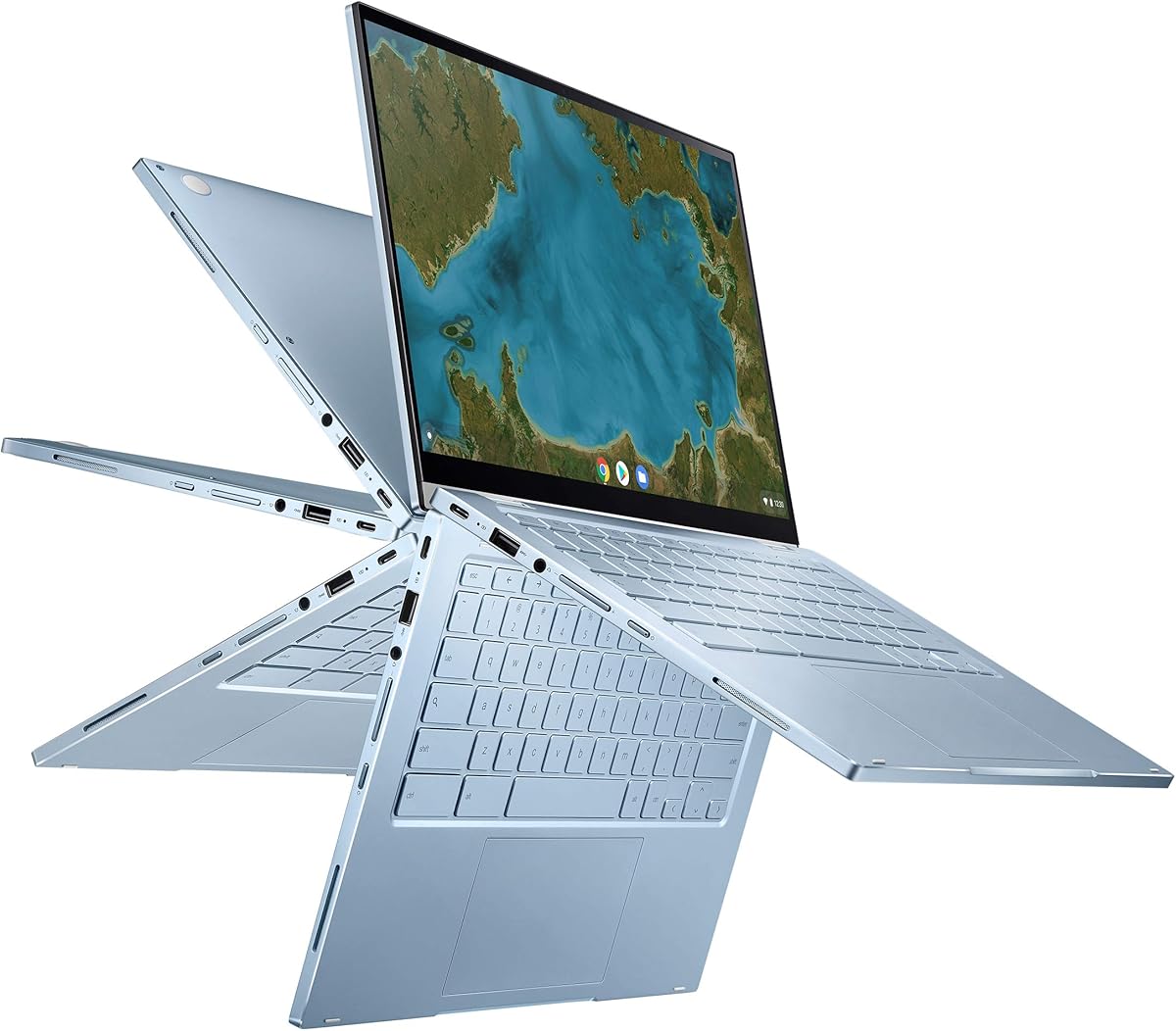


This HP Chromebook stands out as an accessible entry point for users seeking versatility without high costs. Its 4.2 rating reflects consistent satisfaction among students and families looking for reliable daily tools. The 360-degree hinge allows you to shift between laptop, tablet, and tent modes effortlessly for various activities.
We may earn a commission when you buy through this link, at no additional cost to you.
Performance remains smooth for web browsing, document editing, and video streaming thanks to the Intel N150 processor and 4GB of LPDDR5 memory. The 14-inch WUXGA touchscreen offers crisp visuals with anti-glare coating to reduce strain during long sessions. Connectivity is well covered with USB-C, USB-A, and Wi-Fi 6 support.
While storage is limited to 128GB UFS, the cloud-centric nature of Chrome OS mitigates this for most users. Battery life and build quality meet expectations for this price tier, though heavy multitasking may slow things down slightly. These trade-offs are acceptable given the overall value and flexibility offered here.
Buy this if you need a portable device for school or home use where budget matters. It excels at light productivity and media consumption while providing the freedom of a convertible form factor. Check current availability to ensure you get the best deal today.
The 360-degree hinge enables four versatile modes including tablet and tent for different use cases.
Built for modern workflows with fast updates and thousands of apps for everyday tasks.
We may earn a commission when you buy through this link, at no additional cost to you.
The ASUS Chromebook Flip CX1 combines practical design with a generous amount of RAM for its class. With a 4.3 rating, users appreciate its balance of portability and performance for daily tasks. The 14-inch FHD touchscreen is responsive and clear, making it easy to work from any angle.
We may earn a commission when you buy through this link, at no additional cost to you.
Powered by the Intel Celeron N4500, this device handles multitasking smoothly with 8GB of RAM. Its battery can last up to 11 hours, which is excellent for students on the go. The build meets US Military Grade standards ensuring durability without adding too much weight.
Storage is 128GB eMMC which is adequate for cloud files but slower than SSDs. The included Google One AI Premium plan adds value for those needing extra cloud storage and AI tools. Overall, it is a solid choice for casual users who prioritize flexibility.
Choose this if you want a durable convertible that supports long sessions without frequent charging. It covers essential needs well and offers extra software perks. Verify your current needs before committing to this versatile option.
US Military Grade standards ensure reliability while keeping weight under 3.6 pounds.
Up to 11 hours of battery power keeps you productive through a full day of tasks.
We may earn a commission when you buy through this link, at no additional cost to you.
The Samsung Galaxy Book4 delivers robust performance with its 10-Core Intel processor and 16GB of RAM. Rated 4.4 stars, it is ideal for professionals who need reliability for work tasks and presentations. The 15.6-inch FHD IPS display provides clear visuals with wide viewing angles.
We may earn a commission when you buy through this link, at no additional cost to you.
With 512GB NVMe SSD storage, data access is fast and efficient for large files. Wi-Fi 6E and Bluetooth 5.1 ensure stable connectivity across various devices. The backlit keyboard and fingerprint reader enhance security and comfort during extended typing sessions.
While it is heavier than ultraportables, the added screen real estate and connectivity justify the trade-off for desk work. Battery life supports up to 12 hours which is strong for a machine with this level of power. It balances performance and practicality well.
Buy this if you need a capable Windows laptop that handles demanding apps without lag. The mix of speed and usability makes it a top contender for business users. Check stock levels to secure your copy today.
Intel 7 150U with 10 cores handles complex workflows and multitasking with ease.
Wi-Fi 6E and multiple USB ports keep you connected to networks and peripherals smoothly.
We may earn a commission when you buy through this link, at no additional cost to you.
The Google Pixelbook Go is designed for mobility, weighing barely 1kg and staying thin at 13mm. Its 4.2 rating shows strong appreciation for portability and battery life. The 12-hour battery allows you to work unplugged through long travel days.
We may earn a commission when you buy through this link, at no additional cost to you.
Performance comes from the 8th Gen Intel Core which is snappy for web apps and documents. The fanless design ensures it stays cool and quiet on your lap. Security is handled by the Titan C chip and automatic OS updates.
Port choices are limited compared to Windows laptops so you may need adapters for extra peripherals. The keyboard is comfortable with quiet Hush Keys ideal for quiet offices. It remains a sleek option for those prioritizing carryability.
Select this if you travel often and need a machine that disappears in your bag. It is perfect for students and remote workers focused on cloud apps. Confirm compatibility with your tools before purchase.
Up to 12 hours of power means you stay unplugged and productive throughout the day.
Fanless design keeps the device cool and quiet even during extended use on your lap.
We may earn a commission when you buy through this link, at no additional cost to you.
This Lenovo Flex 14 offers a strong Windows experience with a useful active pen included in the box. Rated 4.4 stars, it appeals to those who need touch input for notes or creative sketches. The AMD Ryzen 5 processor delivers reliable performance for daily apps.
We may earn a commission when you buy through this link, at no additional cost to you.
With 12GB of RAM, multitasking remains smooth even with many browser tabs open. The 256GB NVMe SSD ensures quick boot times and file access. A privacy shutter on the webcam provides extra security for video calls.
While Windows 10 is the OS, it still runs many applications well though upgrades may be needed soon. Battery life reaches up to 10 hours which is decent for a convertible. The pen support adds significant value for students.
Buy this if you want a convertible with pen capabilities at a reasonable price point. It fits well for students and home users who prefer Windows apps. Verify software compatibility before ordering.
Active pen included allows direct drawing and note taking on the touchscreen display.
Physical privacy shutter on the webcam gives you control over camera access easily.
We may earn a commission when you buy through this link, at no additional cost to you.
The ASUS Flip C433 boasts a striking 14-inch FHD NanoEdge display with slim bezels. It earns a 4.3 rating for its clean design and fast responsiveness to touch inputs. The Intel Core m3-8100Y processor handles daily work with ease.
We may earn a commission when you buy through this link, at no additional cost to you.
8GB of RAM helps manage multiple apps without slowing down the system. The backlit keyboard is comfortable for typing in dim environments. The 360-degree hinge allows flexible usage as a tablet for reading or watching videos.
Storage is limited to 64GB which may require cloud reliance for files. The narrow bezels look modern but can show fingerprints easily. It remains a sleek option for users who prioritize screen real estate over storage.
Choose this if you want a compact and stylish laptop for basic tasks. It works well for browsing and streaming while offering convertible flexibility. Confirm storage needs before buying.
Ultra-narrow bezels create a large 14-inch screen in a 13-inch footprint.
360-degree hinge lets you use the device in tent and tablet modes easily.
We may earn a commission when you buy through this link, at no additional cost to you.
This Lenovo Chromebook brings a reliable experience with its MediaTek Kompanio 520 processor. With a 4.2 rating it suits basic computing needs and educational environments well. The 14-inch FHD touchscreen is bright and clear for viewing content.
We may earn a commission when you buy through this link, at no additional cost to you.
It includes 4GB of RAM which is adequate for standard tasks. Wi-Fi 6 ensures fast and reliable internet connections. The slim design makes it easy to carry to class or meetings.
Storage is 64GB which works best with cloud storage. The privacy shutter on the webcam provides peace of mind during video calls. It is a straightforward choice for those needing simple tools.
Buy this if you want a secure and light machine for web tasks. It fits students and families looking for straightforward operation. Check current stock for deals.
Wi-Fi 6 provides fast and reliable connection for online learning and streaming.
Thin design reduces weight and size making it easy to carry daily.
We may earn a commission when you buy through this link, at no additional cost to you.
The MacBook Neo brings Apple Intelligence and a stunning Liquid Retina display to the market. Its 4.6 rating reflects high user satisfaction with its performance and design. The A18 Pro chip powers everyday tasks and AI features efficiently.
We may earn a commission when you buy through this link, at no additional cost to you.
Battery life reaches up to 16 hours which is excellent for travel and long days. The recycled aluminum enclosure offers durability and style. Integration with iPhone allows seamless handoff for calls and messages.
Memory is 8GB which may limit heavy workflows but works for most daily use. The display supports 1 billion colors making photos pop. It is a premium choice for Apple users.
Choose this if you value battery life and integration with other Apple devices. It is ideal for students and pros who want longevity. Confirm software compatibility before purchasing.
Built-in AI tools help write, summarize notes, and complete tasks effortlessly.
Up to 16 hours of battery lets you work unplugged all day easily.
We may earn a commission when you buy through this link, at no additional cost to you.
This renewed MacBook Pro brings the power of the M1 Max chip to professionals at a lower cost. With 64GB RAM and 2TB SSD it handles heavy workloads easily. It earns a 4.4 rating for its robust specs.
We may earn a commission when you buy through this link, at no additional cost to you.
It is professionally inspected and tested to meet high standards. The battery exceeds 80% capacity ensuring good runtime. The display is vibrant and sharp for editing media.
As a renewed unit accessories may be generic and cosmetic imperfections are minimal. It offers a premium experience for demanding users who need power. It is a strong candidate for creative pros.
Buy this if you need maximum power for video or coding tasks. Verify condition details to ensure it meets your expectations before ordering.
M1 Max chip supports complex workflows and multitasking without slowing down.
Professionally inspected unit ensures reliability and function like new.
We may earn a commission when you buy through this link, at no additional cost to you.
This renewed MacBook Pro offers the classic Mac experience with a large 15-inch Retina display. With 16GB RAM and 512GB storage it handles daily needs well. It earns a 3.7 rating reflecting mixed reviews on age.
We may earn a commission when you buy through this link, at no additional cost to you.
The Intel Core i7 provides decent speed though newer chips may outperform it. As a renewed unit it is a budget entry into macOS. The build quality remains durable and sleek.
It suits users who need a larger screen for multitasking on a budget. Performance is adequate for standard tasks but may lag on heavy workloads. Check reviews carefully for condition.
Select this if you need macOS and a large screen for the price. It is good for general users. Verify seller details for assurance before buying.
15-inch Retina display offers ample space for multiple windows and tools.
Stable operating system and ecosystem integration for consistent performance.
We may earn a commission when you buy through this link, at no additional cost to you.
Selecting the right alternative requires weighing performance needs against budget and ecosystem preferences.
Choose between ChromeOS for web apps or Windows for full software compatibility. Each OS has distinct strengths and app libraries.
Decide on OS based on your daily needs and familiarity level.
Look for Intel Core i5 or higher, AMD Ryzen 5, or Apple silicon for solid performance. This affects multitasking and media handling.
Higher core counts ensure smooth performance under load.
8GB RAM is the baseline for smooth browsing while 16GB supports heavy tasks. SSD storage ensures faster load times than eMMC.
Prioritize SSD and at least 8GB RAM for longevity.
FHD resolution is standard but IPS panels offer better viewing angles. Touchscreens enable direct interaction and creative input.
Select IPS and touch for flexible viewing and interaction.
Look for models promising 10 hours or more for portability. Real-world usage varies but high ratings indicate reliable endurance.
Longer battery life supports working away from power sources.
Convertible designs offer tablets while clamshells focus on keyboards. Weight matters if you carry it daily to classes.
Choose form factor based on mobility needs and usage.
Check for USB-C and USB-A ports and HDMI if needed. Wi-Fi 6 ensures faster wireless networking.
Ensure ports match your peripheral requirements for work.
Consider total value including included software or plans. Renewed units offer savings but verify warranty terms carefully.
Balance upfront cost with long term support and warranty.
Set up your device with essential apps and cloud sync immediately. Use a protective case to shield against daily wear and tear.
Keep the system updated regularly to ensure security and performance. Avoid exposing the laptop to extreme heat or moisture.
Use a screen protector to reduce glare and scratches. Clean the display and keyboard with a soft microfiber cloth often.
The Apple MacBook Neo leads with up to 16 hours on a single charge. It is ideal for all-day use without access to a power outlet.
Some Chromebooks support Android apps which may cover basic needs. Full Windows apps require a Windows laptop unless using cloud services.
Renewed Macs are tested for functionality but check warranty details. They offer cost savings while retaining MacOS benefits and performance.
Chromebooks like the HP or Lenovo models are cost-effective with long battery. They suit web-based coursework and research tasks perfectly.
Many options in this list feature touchscreens for direct input. Convertible models allow tablet mode for flexible viewing and note-taking.
8GB is adequate for light tasks while 16GB supports heavy multitasking. For longevity consider 16GB if your budget allows it.
Our top picks include the Samsung Galaxy Book4 for power and the HP Chromebook for value. Each offers distinct strengths suited to different user needs and budgets.
Prioritize performance and battery life if you work on the go. For students focus on cost and portability to maximize learning efficiency.
Always verify current pricing and availability before finalizing your purchase. Deals change often so check the latest offers online.