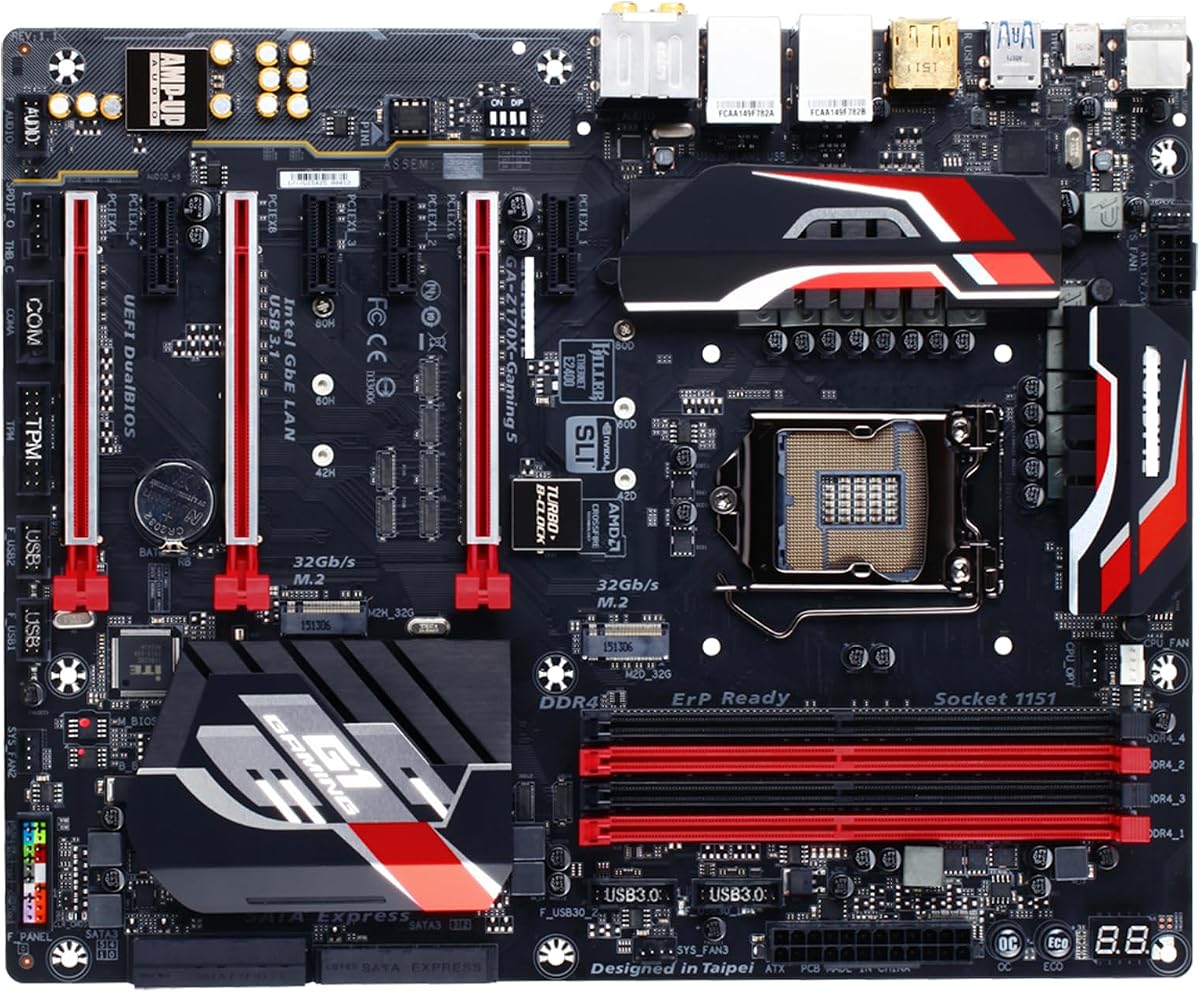
Gigabyte GA-Z170X-Gaming 5
5.0Editor score
Supports 6th 7th Gen
Dual M.2 slots included
Industrial package style
This guide compares the top 1151 Z170 Skylake gaming motherboards for performance, connectivity, and durability to help you build a reliable system.
Choosing the right motherboard is crucial for any gaming build, especially when working with legacy platforms like the 1151 Z170 Skylake socket. These boards support powerful 6th and 7th generation Intel processors, offering a solid foundation for high-performance rigs without breaking the bank today.
We evaluated ten top-rated models based on their chipset capabilities, VRM design, expansion slots, and onboard connectivity features. Each product was selected for its reputation in the enthusiast community and its ability to handle modern gaming workloads efficiently on the Skylake architecture.
Each pick below highlights unique strengths, from budget-friendly options to premium boards with advanced audio and networking. Keep in mind that availability and pricing can fluctuate, so check current listings before making your final decision for your specific build needs.
5.0Editor score

4.2Editor score

4.2Editor score
This side-by-side comparison details the key specifications of each board to help you identify which model best fits your specific gaming and connectivity requirements today.


The Asus ROG Maximus VIII Hero stands out as a top-tier choice for enthusiasts looking to maximize their Skylake platform. With a 4.2 rating from users, it offers a balance of power, sound, and connectivity that few competitors match in this segment.
We may earn a commission when you buy through this link, at no additional cost to you.
Its Extreme Engine DIGI+ ensures stable power delivery for high-performance processors, while the SupremeFX 2015 audio provides immersive soundscapes without external DACs. The inclusion of USB 3.1 Type A and Type C ports future-proofs your connections for faster data transfers.
While the price is higher than budget options, the build quality and feature set justify the investment for serious gamers. The BIOS can be overwhelming initially, but the customization options allow precise control over performance metrics.
This board is ideal for users building a high-end gaming rig who value audio quality and stable power delivery. If you want a reliable foundation for your 1151 platform, this model is a strong recommendation.
The Extreme Engine DIGI+ technology ensures precise voltage control for stable overclocking and system performance under load.
SupremeFX 2015 audio delivers high-fidelity sound with low noise and high dynamic range for competitive gaming.
We may earn a commission when you buy through this link, at no additional cost to you.
The Gigabyte GA-Z170X-Gaming 5 offers exceptional value for builders on a budget without compromising core gaming features. With a perfect 5.0 rating, users appreciate its reliability and support for both 6th and 7th generation Intel processors.
We may earn a commission when you buy through this link, at no additional cost to you.
It features dual M.2 slots for ultra-fast storage and supports up to 64GB of DDR4 RAM, ensuring your system can handle heavy multitasking. The expansion slots allow for flexible GPU configurations, making it versatile for different gaming setups.
The industrial packaging is a minor trade-off, but it keeps costs low for you. Ensure you update the BIOS before installing 7th gen CPUs to avoid compatibility issues during setup.
This board is perfect for budget-conscious gamers who still want high-speed storage and robust connectivity. It delivers the essential features you need without unnecessary extras driving up the cost.
Two M.2 connectors allow for multiple high-speed NVMe drives, significantly reducing load times in games.
Compatible with both 6th and 7th gen Intel Core processors, giving you flexibility in CPU selection.
We may earn a commission when you buy through this link, at no additional cost to you.
The Gigabyte GA-Z170X-Gaming 7 is designed for enthusiasts who want to run multiple graphics cards simultaneously. With a 4.2 rating, it delivers reliable performance for demanding gaming workloads using SLI or Crossfire configurations.
We may earn a commission when you buy through this link, at no additional cost to you.
It includes numerous USB 3.0 ports for peripherals and storage, along with a robust VRM design to handle power-hungry processors. The board prioritizes expansion and connectivity, making it a powerhouse for high-end setups.
While the price is steep, the capability to run dual GPUs justifies the cost for those needing extra graphical power. It is best suited for users who require the maximum performance available on the 1151 platform.
Invest in this board if you plan to build a top-tier gaming rig with multiple GPUs. It offers the stability and bandwidth necessary for serious performance-oriented systems.
Supports 2-Way SLI and 3-Way Crossfire, allowing you to scale graphics performance for 4K gaming.
Multiple USB ports ensure you can connect all your peripherals without needing extra hubs.
We may earn a commission when you buy through this link, at no additional cost to you.
The ASUS Z170 PRO Gaming strikes a balance between performance and cost with a focus on immersive audio. Rated 4.1 by users, it includes SupremeFX audio technology that enhances in-game sound quality for better spatial awareness.
We may earn a commission when you buy through this link, at no additional cost to you.
It features USB 3.1 for fast data transfer and LANGuard for protected networking, ensuring stable connections during online play. The durable components contribute to longevity and system stability over time.
Although it may lack some premium extras, it covers all the essentials for a great gaming experience. It is an excellent choice for those who prioritize audio quality without spending premium prices.
Choose this board if you want a reliable gaming platform with good sound and network protection. It fits well into a mid-range budget while delivering consistent performance.
SupremeFX audio technology provides clear and immersive sound, enhancing your gameplay experience.
LANGuard protects your network connection from surge damage, ensuring consistent online performance.
We may earn a commission when you buy through this link, at no additional cost to you.
This model is marketed with an upgraded power design and high-grade standards to ensure stability for serious gamers. While it lacks a user rating, the description emphasizes durability and optimized performance for marathon gaming sessions.
We may earn a commission when you buy through this link, at no additional cost to you.
The board supports up to 64GB of DDR4 memory and features advanced cooling options to keep temperatures in check. It is built to maximize the potential of Intel processors through enhanced power delivery and rugged construction.
Because it is listed with variations, verify the exact specs before purchasing. However, its focus on durability makes it a solid candidate for builds that need to run under heavy loads for long periods.
Opt for this board if you prioritize long-term reliability and power stability. It is designed to handle rigorous usage without sacrificing performance or system integrity.
Upgraded power design ensures stable voltage for overclocking and sustained high-performance usage.
Cooling features are optimized to keep system temperatures low during extended gaming sessions.
We may earn a commission when you buy through this link, at no additional cost to you.
This Gigabyte board offers substantial expansion flexibility with multiple PCIe slots and SATA Express connectivity. Rated 3.7 by users, it supports both NVIDIA SLI and AMD Crossfire for multi-GPU configurations if you have the budget.
We may earn a commission when you buy through this link, at no additional cost to you.
It features standard DDR4 slots and a reliable ATX form factor that fits most cases easily. The chipset is optimized for 6th gen Core processors, ensuring compatibility and performance for gaming applications.
The SATA Express feature is noted, though standard M.2 is more common now. If you need specific legacy connectivity or plan to expand graphics, this board provides the necessary physical slots.
It is a good fit for builders who need specific expansion capabilities at a mid-range price point. Check reviews for specific issues before committing to ensure it matches your hardware needs.
Multiple PCIe slots allow for flexible component addition like sound cards or network adapters.
Compatible with both SLI and Crossfire setups for increased graphical power in supported games.
We may earn a commission when you buy through this link, at no additional cost to you.
The ASRock Z170 EXTREME4 is noted for its Realtek ALC1150 audio codec, which offers high fidelity for onboard sound. With a 4.2 rating, it provides a strong feature set including three PCIe x16 slots for flexible graphics layouts.
We may earn a commission when you buy through this link, at no additional cost to you.
It includes six SATA ports, making it ideal for builds with many hard drives or SSDs. The memory slots support various DDR4 speeds up to 3200MHz, ensuring you can run fast RAM for better system responsiveness.
While it is an older board, its extensive connectivity options remain relevant for storage-heavy setups. The audio codec is a standout feature that delivers good sound without needing separate components.
Select this board if you need lots of storage ports and solid audio performance. It is a cost-effective choice for users who value versatility in their build.
The Realtek ALC1150 codec provides premium sound quality suitable for high-definition audio playback.
Six SATA ports allow for extensive storage expansion without needing extra controllers or hubs.
We may earn a commission when you buy through this link, at no additional cost to you.
This MSI board emphasizes gaming-specific features like Audio Boost 3 and Steel Armor to protect your hardware. Rated 3.9 by users, it aims to deliver an immersive sound experience and durable components for daily use.
We may earn a commission when you buy through this link, at no additional cost to you.
It features DDR4 Boost for optimized memory performance and supports multi-GPU setups for enhanced graphics. The USB configuration offers ample connectivity for peripherals essential for gaming setups.
The Steel Armor adds a layer of physical protection for PCIe cards which can be beneficial in high-vibration environments. However, check user feedback for specific stability issues before purchasing.
Choose this board if you value gaming-focused hardware features at a competitive price. It offers a good blend of protection and audio enhancements for enthusiasts.
Reinforced PCIe slots provide physical support for heavy graphics cards during transport and use.
Audio Boost 3 technology delivers clearer sound with less noise for better in-game awareness.
We may earn a commission when you buy through this link, at no additional cost to you.
The Asus Z170-A is praised for its 5-Way Optimization which simplifies tuning for both CPU and memory performance. With a 4.3 rating, it is one of the higher-rated options in this legacy category for reliability.
We may earn a commission when you buy through this link, at no additional cost to you.
It includes 5X Protection II for system safety and DTS Studio Sound for enhanced audio quality. The USB 3.1 Boost ensures faster file transfers without requiring extra configuration from you.
While it may lack some of the extreme features found in higher-tier boards, it offers a stable and user-friendly experience. The protection features add peace of mind for daily usage and overclocking.
This board is excellent for users who want easy optimization and reliable performance without complex settings. It balances ease of use with solid hardware specifications effectively.
5-Way Optimization automatically adjusts key parameters based on system usage for better performance.
5X Protection II safeguards the motherboard from common issues like overvoltage or ESD damage.
We may earn a commission when you buy through this link, at no additional cost to you.
This model is a compact mATX version of the Hero series, offering ROG features in a smaller footprint. Rated 4.0 as refurbished, it has been tested to work like new and comes with a minimum 90-day warranty.
We may earn a commission when you buy through this link, at no additional cost to you.
It retains the SupremeFX 2015 audio and USB 3.1 features found in larger boards. This is ideal for small form factor builds where you still want high-end audio and connectivity without taking up too much room.
Since it is refurbished, ensure you are comfortable with pre-owned hardware. The price often reflects this, making it an attractive option for tight budgets needing premium specs.
Select this board if you need a compact system with strong audio and connectivity options. It is a smart choice for enthusiasts building mini-towers or SFF PCs.
mATX design allows for smaller cases while maintaining high-end feature sets and connectivity.
Refurbished units are tested and certified to ensure functionality matches new product standards.
We may earn a commission when you buy through this link, at no additional cost to you.
Selecting the right board requires understanding key specifications that impact performance and upgradeability. Here are the factors you should evaluate before purchasing to ensure compatibility and value.
The Z170 chipset supports 6th and 7th generation Intel Core processors. Ensure you check BIOS requirements especially for 7th gen CPUs which may need an update before installation.
Always verify CPU support lists before purchasing to avoid compatibility headaches during assembly.
Most Z170 boards feature four DDR4 DIMM slots. Look for support up to 64GB and speeds like 2400MHz or higher to maximize gaming performance.
Faster RAM can improve system responsiveness and reduce load times in modern titles.
Check for PCIe x16 slots if you plan to run multiple GPUs. Ensure the board supports SLI or Crossfire if you need extra graphical power.
More PCIe x1 slots offer flexibility for sound or network cards in specific builds.
Look for M.2 slots if you want ultra-fast NVMe storage. SATA ports are also important for bulk storage with mechanical hard drives.
More storage ports provide flexibility for your data organization needs without extra controllers.
USB 3.1 Type C ports are valuable for fast data transfers and modern peripherals. Standard USB 3.0 ports remain essential for mice and keyboards.
Ensure the board has enough rear ports to support your current and future peripheral needs.
High-end boards include specialized audio codecs like SupremeFX or Realtek ALC1150. These reduce noise and provide clearer in-game sound.
Good onboard audio saves money by eliminating the need for a separate sound card.
A strong VRM ensures stable power delivery for your CPU especially when overclocking. Boards with heatsinks on VRMs stay cooler and perform better.
Investing in better power design increases system longevity and stability under heavy gaming loads.
Features like LANGuard or 5X Protection II safeguard against power surges and static damage. Durable capacitors contribute to the longevity of the board.
Protection features ensure your investment lasts longer and remains stable during use.
Install the motherboard in your case with proper standoffs to prevent short circuits. Connect power cables first before adding components to ensure safe handling during assembly.
Update the BIOS immediately using a compatible CPU if available. This ensures stability and compatibility with newer processors and faster RAM speeds.
Keep your system clean by regularly dusting the board and using compressed air. Proper ventilation prevents overheating which can degrade performance over time.
Yes, all Z170 motherboards support DDR4 memory. Most support speeds up to 2400MHz or higher with overclocking depending on the model.
Many Z170 boards include M.2 slots. Check the specific product details to confirm if your model has an M.2 connector and supported speeds.
Yes, using a 7th Gen processor typically requires a BIOS update on Z170 boards. Ensure you have a compatible 6th Gen CPU for the initial update.
Most Z170 boards support up to 64GB of RAM. Check the specific model specifications to confirm the exact maximum capacity.
No, Z170 motherboards are not compatible with 8th Gen CPUs. You would need a 300 series chipset for 8th Gen support.
Some Z170 boards support SLI or Crossfire. Verify if the specific model has multiple PCIe x16 slots and supports multi-GPU configurations.
Certified refurbished boards are tested and come with warranties. They are generally safe and cost-effective if they are from a reputable seller.
Many newer models include USB 3.1 Type-C ports. Check the product specifications to confirm the presence of Type-C connectors.
We have reviewed ten top boards ranging from budget picks to premium models like the Asus ROG Maximus VIII Hero and Gigabyte GA-Z170X-Gaming 7. Each offers unique strengths for different build needs.
Prioritize features like VRM design and audio quality if you want a high-end experience. For budget builds, options like the Gigabyte GA-Z170X-Gaming 5 provide great value.
Always verify current pricing and availability before buying since market conditions change frequently. Choose the board that aligns best with your performance goals and budget today.