
Lightning to HDMI Adapter for iPhone to TV
4.4Editor score
Affordable Price Point
Includes Charging Port
Supports iOS 17 System
This guide compares the top ten HDMI Lightning adapters for iPhone to help you choose the best mirror option for streaming and presentations.
Finding the right HDMI Lightning adapter for iPhone can transform your viewing experience by connecting your device to larger screens easily. These tools enable seamless mirroring for movies, games, and presentations without needing complex setups or wireless connections. Selecting a reliable adapter ensures stable performance and compatibility with your specific iOS device models.
We evaluated ten distinct adapters based on compatibility, build quality, video output capabilities, and user feedback to compile this list. Our analysis focuses on MFi certification, supported resolutions, charging port availability, and overall ease of use across different scenarios. Each product offers unique features designed to meet various needs from casual entertainment to professional business presentations.
Each pick highlights key specifications and real-world performance traits to help you make an informed decision for your setup. Prices and availability can fluctuate frequently so please verify the latest details before completing your purchase online. Use this guide to find the adapter that best fits your specific requirements and budget constraints today.
4.4Editor score

4.2Editor score
4.6Editor score
This side-by-side comparison highlights the key specifications and capabilities of each adapter to help you compare features quickly.






This Lightning to HDMI adapter stands out as a top choice for iPhone users seeking reliable screen mirroring capabilities. With an MFi certified chip, it guarantees safe connectivity and stable performance across various iOS versions and devices. Users appreciate the convenience of a built-in charging port that keeps their device powered during extended viewing sessions.
We may earn a commission when you buy through this link, at no additional cost to you.
The adapter supports full 1080p HD resolution allowing you to enjoy crisp video and audio quality on larger screens. It works seamlessly with a variety of apps including YouTube and local videos making it ideal for entertainment and presentations. The plug-and-play design eliminates the need for complex setup steps or additional software installations.
While highly versatile, potential buyers should note that some streaming services with strict copyright protections may not work through this adapter. This limitation is common across most Lightning to HDMI solutions due to Apple's HDCP policy rather than a specific product flaw. However for general use cases this adapter delivers consistent performance without signal lag or dropouts.
Ideal for travelers and professionals this adapter combines portability with essential functionality for on-the-go connectivity. Its compact form factor makes it easy to carry in a laptop bag or pocket without adding bulk. Whether for home entertainment or business presentations this adapter provides a dependable bridge between your iPhone and external displays.
MFi certification ensures the adapter meets Apple's strict safety and performance standards for optimal device protection.
The included charging port allows your device to stay powered during long video streams or presentations without interruption.
We may earn a commission when you buy through this link, at no additional cost to you.
This adapter is engineered to deliver seamless screen mirroring for both personal and professional use cases. Its MFi certification ensures a stable connection that maintains high-quality video output up to 1080p HD. Users find it particularly useful for presenting slideshows or browsing websites on a larger display without technical interruptions.
We may earn a commission when you buy through this link, at no additional cost to you.
The plug-and-play functionality simplifies setup significantly requiring no additional software or network configurations. You simply connect the adapter to your iPhone and an HDMI cable to the display then trust the device when prompted. This streamlined process saves valuable time especially in urgent business or educational settings where quick connectivity is essential.
While it supports many popular apps like YouTube and local videos some subscription services are restricted due to digital rights management policies. This restriction is standard across most third-party adapters but users should verify their specific app needs before purchasing. Despite this limitation the adapter performs well for standard media playback and document viewing.
Compact and lightweight this adapter is perfect for professionals who travel frequently or need portable presentation solutions. Its small design allows it to fit comfortably in a pocket or briefcase ensuring you are always prepared to connect to any display. With reliable performance and ease of use it remains a solid choice for everyday mirroring tasks.
No drivers or apps are required as the adapter connects automatically after a simple trust prompt on your device.
Ideal for Keynote and PowerPoint presentations with stable signal delivery and high-definition visual clarity.
We may earn a commission when you buy through this link, at no additional cost to you.
The KikoSaka adapter is designed to provide a flawless mirroring experience across a wide array of Apple devices. Its commitment to supporting all iOS versions ensures that newer and older models alike can connect without compatibility issues. Users report consistent performance that minimizes lag and maintains high-quality video output throughout the session.
We may earn a commission when you buy through this link, at no additional cost to you.
Constructed with durability in mind this adapter features a robust design that withstands regular plugging and unplugging. The MFi certification guarantees that it meets safety standards protecting your device from potential electrical hazards or data corruption. This reliability makes it a trustworthy choice for daily use in both home and office environments.
While it handles most local media and web apps well users should be aware that premium streaming services may not function fully. This limitation stems from industry-wide copyright protections rather than the adapter itself so checking app compatibility is advised. For general use however the adapter delivers a smooth and uninterrupted viewing experience on larger screens.
Its universal compatibility makes it an excellent option for families or offices with multiple different iPhone and iPad models. You can rely on it to work across generations without needing different adapters for each device. Whether for gaming presentations or streaming local content this adapter offers a solid and dependable solution for screen expansion.
The adapter maintains compatibility across all iOS updates ensuring continued functionality as your device software evolves.
Built with reinforced materials this adapter is designed to resist wear and tear from frequent travel and use.
We may earn a commission when you buy through this link, at no additional cost to you.
This adapter distinguishes itself by including a built-in HDMI cable which simplifies connectivity and reduces the need for extra accessories. The MFi certified chip ensures a stable connection that supports delay-free performance ideal for gaming or interactive presentations. Users appreciate the convenience of having a complete solution ready to connect directly to their TV or projector.
We may earn a commission when you buy through this link, at no additional cost to you.
The 6.6ft length provides enough reach to position your device comfortably while projecting content on a larger screen. It maintains high-definition video quality up to 1080p ensuring that images remain sharp and clear during playback. The design prioritizes user convenience with a straightforward connection process that requires no technical knowledge or configuration.
While it handles most local files and web-based media well users should note that certain streaming services are restricted due to copyright rules. This is a common limitation across the category but the adapter performs exceptionally well for supported content types. For casual viewing and presentations the performance remains consistent without noticeable signal degradation or delays.
This adapter is particularly well-suited for users who want a single integrated solution for screen mirroring without managing multiple cables. Its reliable performance and included cable make it a practical choice for home entertainment systems or classroom setups. With its focus on stability and ease of use it offers a straightforward path to expanding your display options.
The included 6.6ft HDMI cable eliminates the need to purchase separate cables for connecting to your display.
The MFi chip ensures minimal latency making this adapter suitable for gaming and real-time interactive content.
We may earn a commission when you buy through this link, at no additional cost to you.
As an official Apple product this adapter guarantees seamless integration with the iOS ecosystem and optimal performance. It supports full 1080p HD resolution for both video and audio ensuring high-quality output on any compatible display. Users trust the official branding for long-term reliability and consistent performance without unexpected connection issues or compatibility errors.
We may earn a commission when you buy through this link, at no additional cost to you.
The design is straightforward focusing on essential functionality without extra features that might complicate use. You simply connect it to your device and an HDMI cable to mirror your screen instantly. This simplicity appeals to users who prefer a no-fuss solution backed by the manufacturer's quality standards and support.
While the price point is higher than third-party alternatives the assurance of quality and compatibility justifies the investment for many. It avoids the risk of uncertified hardware that could potentially affect device performance or void warranties. For those prioritizing stability and official support this adapter remains the gold standard for Lightning-based connectivity.
This adapter is ideal for users who want guaranteed compatibility and peace of mind when connecting their iPhone to external displays. Whether for home theater use or business presentations the official branding ensures a reliable experience every time. It sets a benchmark for quality that other adapters aim to match in terms of performance and safety.
Manufactured by Apple this adapter ensures perfect compatibility and meets all official safety and performance standards.
Delivers high-fidelity audio alongside 1080p video for a complete and immersive viewing experience on larger screens.
We may earn a commission when you buy through this link, at no additional cost to you.
This budget-friendly adapter offers exceptional value for users seeking basic mirroring functionality without overspending. It supports current iOS versions including the latest 17 system ensuring compatibility with recent iPhone models. Despite its affordable price point it includes essential features like a charging port to keep your device powered during use.
We may earn a commission when you buy through this link, at no additional cost to you.
The compact design makes it easy to carry in a bag or pocket for presentations or travel scenarios. Users report reliable performance for local media playback and supported apps delivering clear 1080p HD video. The inclusion of a warranty adds an extra layer of confidence for those purchasing a third-party solution at this price range.
Potential buyers should note that a separate USB charging cable is required to power the adapter during use. This small additional requirement is common among adapters at this price point and does not significantly impact usability. While some streaming services are restricted due to copyright policies it handles most general use cases effectively.
For those on a tight budget this adapter provides a practical solution for connecting iPhones to larger displays. Its balance of performance and cost makes it an attractive option for students or casual users. With strong user ratings and essential features included it represents one of the best entry-level choices available today.
This adapter delivers solid performance at a fraction of the cost of premium or official Apple options.
Works seamlessly with the latest iOS 17 system ensuring continued support for modern iPhone devices.
We may earn a commission when you buy through this link, at no additional cost to you.
The lulaven adapter has gained significant trust with thousands of verified ratings making it a reliable choice for travelers. Its zero-lag performance ensures instant mirroring which is crucial when connecting to hotel TVs or conference room projectors. The MFi certification provides assurance of safety and compatibility across a wide range of iOS devices.
We may earn a commission when you buy through this link, at no additional cost to you.
Users appreciate that it requires no WiFi or password setup simplifying connections in public or shared spaces. It supports a variety of applications including YouTube and local videos making it versatile for entertainment and presentations. The pocket-sized design allows it to fit easily in any travel bag without taking up much space.
While it handles many common apps well users should note that certain streaming services are restricted due to copyright protection. This limitation is industry-wide but does not affect general media playback or document viewing capabilities. For users who need a dependable adapter for on-the-go use this option offers excellent value and performance.
Ideal for frequent travelers this adapter simplifies the process of connecting personal devices to unfamiliar screens. Its proven track record and ease of use make it a top recommendation for business trips or vacations. With strong support and a reliable connection it ensures you can enjoy your content wherever you go.
Designed for hotel and conference use it connects instantly without needing passwords or internet setups.
With over 2000 verified ratings this adapter has a proven track record of reliability and user satisfaction.
We may earn a commission when you buy through this link, at no additional cost to you.
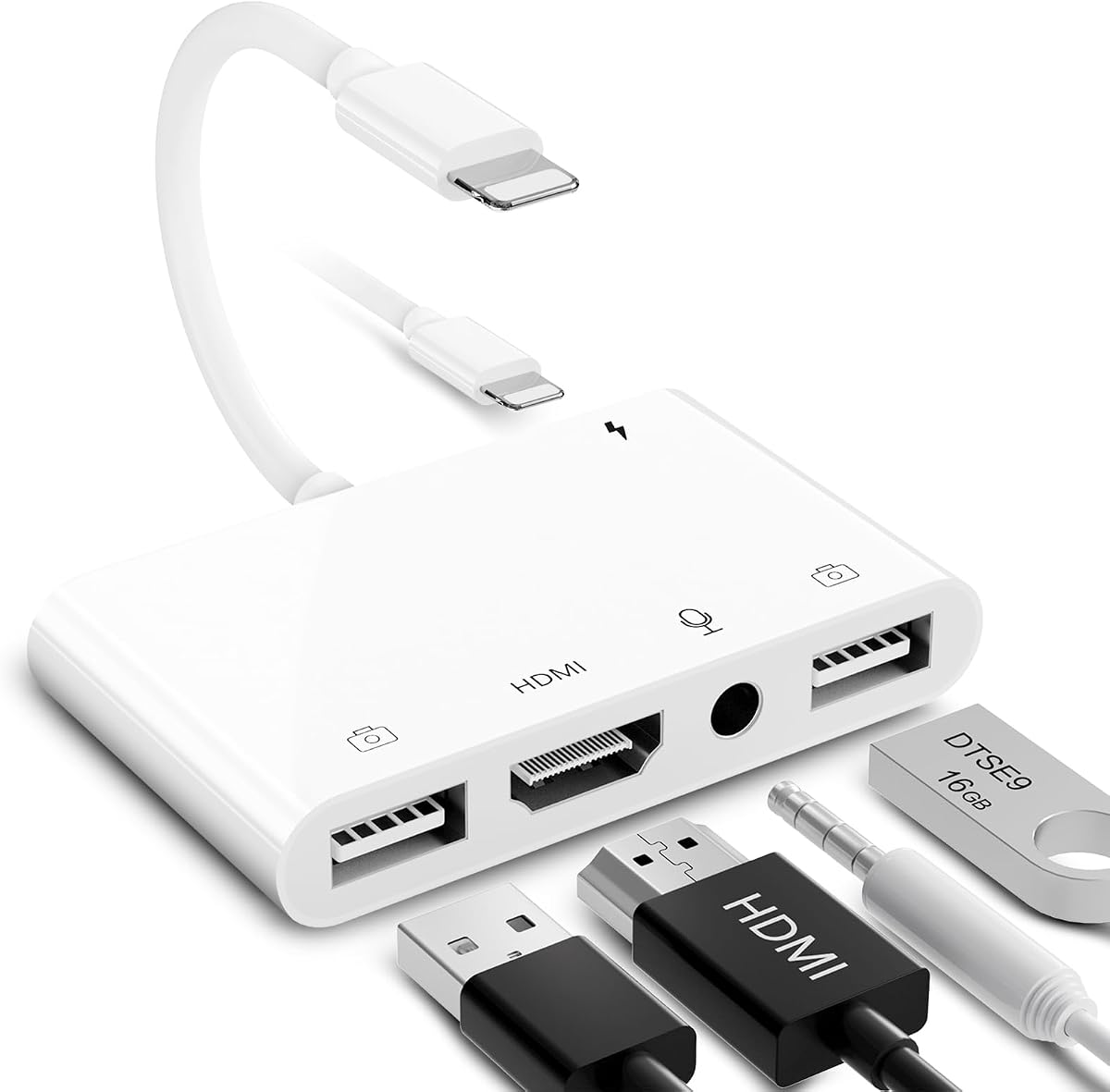
This unique adapter functions as a 5-in-1 hub providing multiple connectivity options beyond just HDMI video output. It includes dual USB ports allowing you to connect keyboards mice or flash drives directly to your iPhone. The addition of a microphone jack makes it suitable for live streaming or recording audio alongside video content.
We may earn a commission when you buy through this link, at no additional cost to you.
Ideal for professionals this device enhances productivity by enabling document editing and file transfers on the go. You can plug in a keyboard for faster typing or connect external storage for quick data access. The integrated charging port ensures your device stays powered even when multiple peripherals are in use simultaneously.
Users should note that this adapter is bulkier than standard options and may require external power for stable HDMI output. This trade-off is worth it for those who need expanded connectivity options during work or creative sessions. While it does not support all streaming apps it excels in scenarios requiring peripheral support and data transfer.
For users who need more than just video mirroring this adapter provides a comprehensive connectivity solution. It bridges the gap between mobile devices and desktop-like functionality making it a valuable tool for work and creativity. With its versatile port selection it stands out as a powerful option for advanced users.
The dual USB ports let you connect keyboards and storage drives for enhanced productivity on your iPhone.
The included microphone jack enables live streaming or recording audio while mirroring video to a display.
We may earn a commission when you buy through this link, at no additional cost to you.
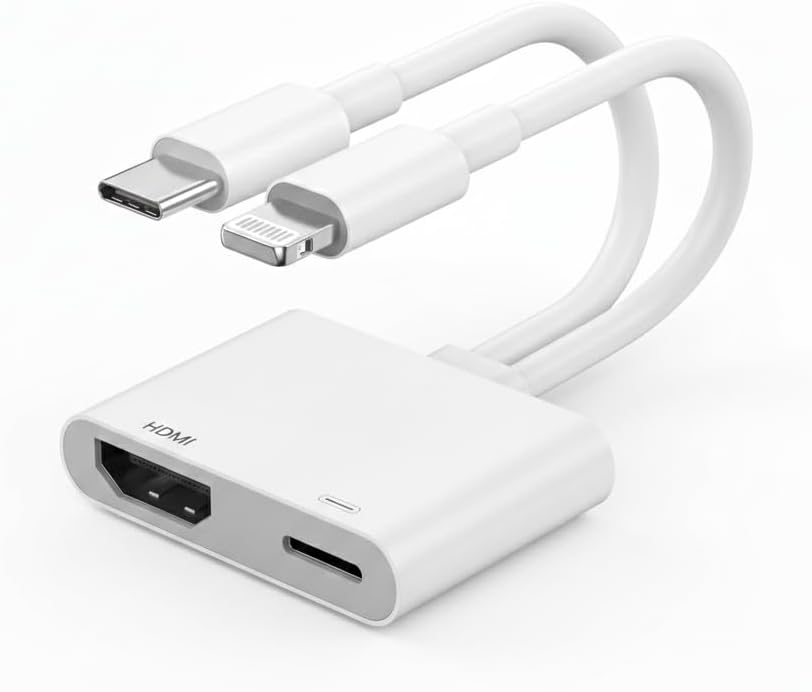
This adapter stands out by supporting both USB-C and Lightning ports making it a universal solution for many devices. It delivers 4K resolution on USB-C devices and supports protected content like Netflix which is rare for standard adapters. The 100W charging port ensures your device stays fully powered even during high-resolution streaming sessions.
We may earn a commission when you buy through this link, at no additional cost to you.
For users with mixed ecosystems including iPhones and USB-C phones or laptops this adapter offers great flexibility. The MFi chip ensures stable connectivity for Lightning devices while leveraging USB-C capabilities for higher performance. It simplifies your tech setup by reducing the number of different adapters you need to carry around.
While Lightning connections still face HDCP restrictions the USB-C side handles premium streaming content effectively. This dual-mode approach makes it a forward-thinking choice as more devices transition to USB-C while keeping compatibility with older models. The build quality and features justify the higher cost for those needing advanced connectivity.
Ideal for tech enthusiasts and professionals this adapter provides a versatile solution for various display and power needs. Its ability to handle 4K and streaming content on USB-C sets it apart from standard adapters. With robust charging and broad compatibility it is an excellent investment for future-proofing your connectivity options.
Supports both Lightning and USB-C devices reducing the need for multiple adapters across your tech collection.
On USB-C devices it supports protected content like Netflix providing a complete entertainment experience on big screens.
We may earn a commission when you buy through this link, at no additional cost to you.
This Apple adapter continues to be a top recommendation for those seeking guaranteed compatibility and reliability. It supports full 1080p HD video and audio ensuring high-quality mirroring on any compatible display. The official branding means you receive a product that meets strict safety and performance standards set by the manufacturer.
We may earn a commission when you buy through this link, at no additional cost to you.
Users report high satisfaction with its consistent performance over time making it a dependable choice for daily use. The setup is straightforward requiring only an HDMI cable to connect to a display. While it lacks extra features like charging ports it excels in core functionality and stability.
While the price is higher than many third-party options the peace of mind and quality justify the investment for many users. It is particularly well-suited for those who prioritize long-term reliability over additional features or cost savings. Its proven track record ensures that you can connect your device with confidence anytime.
For anyone wanting a no-compromise solution this adapter remains the benchmark for Lightning-based connectivity. It delivers reliable performance without the risks associated with uncertified hardware. With high user ratings and official support it is a wise choice for those seeking a durable and effective mirroring solution.
Users appreciate the consistent performance and durability that comes with using an official Apple accessory.
Stripping away unnecessary features this adapter focuses on providing stable and high-quality video output.
We may earn a commission when you buy through this link, at no additional cost to you.
Selecting the right adapter requires considering several factors to ensure compatibility and performance for your specific needs.
MFi certification guarantees that the adapter meets Apple's strict safety and performance standards. This ensures your device is protected from potential electrical hazards and that the connection remains stable. Always check for the MFi logo to avoid issues with unauthorized accessories.
Choose adapters with MFi certification to ensure safety and compatibility.
Most adapters support up to 1080p HD which is sufficient for most viewing needs. Some newer options offer 4K output especially for USB-C devices which provide sharper visuals. Ensure the resolution matches your display capabilities for the best experience.
Look for at least 1080p support for clear video quality.
Adapters with a built-in charging port allow you to power your device while mirroring. This is essential for long presentations or movie sessions to prevent battery drain. Without this feature you may need to stop usage to recharge your device.
Prioritize adapters with a charging port for uninterrupted use.
Verify that the adapter supports your specific iPhone model and iOS version. Newer adapters support the latest iOS versions ensuring continued functionality over time. Older models may face issues if the adapter is not updated to support them.
Check device compatibility lists before making a purchase.
Most adapters work well with YouTube and local videos but streaming services like Netflix are often restricted. This is due to HDCP copyright protection and applies to most adapters regardless of brand. If streaming specific apps is a priority consider a USB-C adapter which supports these features.
Be aware of streaming app restrictions when choosing an adapter.
A durable build ensures the adapter withstands regular plugging and travel without wear. Look for reinforced connectors and high-quality materials for long-term use. Cheap plastic builds may break easily leading to replacement costs.
Invest in durable materials for better longevity.
Compact adapters are easier to carry in bags or pockets for travel and presentations. Bulky designs might be cumbersome if you move around often. A smaller form factor ensures you can bring the adapter wherever needed.
Choose a portable design for frequent travel.
Prices vary significantly between official Apple adapters and third-party options. Third-party adapters often offer more features at a lower cost while Apple products provide official quality. Assess your budget and feature needs to find the best value.
Balance cost with the features you actually need.
To start using your adapter connect the Lightning end securely to your iPhone or iPad. Then plug an HDMI cable into the adapter and connect the other end to your TV or monitor. Ensure your display is set to the correct HDMI input source.
If prompted on your device tap Trust to allow the connection. Wait a few seconds for the screen to mirror automatically. You can now open videos apps or presentations to view them on the larger screen.
Keep the adapter clean and dry when not in use to prevent damage. Store it in a protective case to avoid bent pins or physical stress. Avoid bending the cable excessively to maintain long-term durability.
Most Lightning to HDMI adapters do not support Netflix due to HDCP copyright protection. This is a system-level restriction rather than a product defect. Only specific USB-C adapters with full DRM support allow Netflix streaming on compatible devices.
No driver installation is required for most adapters as they work plug-and-play. Simply connect the device and the screen will mirror automatically. This ensures ease of use without technical setup steps.
Yes if your adapter includes a Lightning charging port you can power your device while streaming. This prevents battery drain during long sessions. Ensure you use a compatible power adapter for charging.
Most adapters support a wide range of iPhone models including older devices. Check the specific compatibility list for your model before purchasing. Many options support iOS versions going back several years.
Most Lightning adapters support up to 1080p HD resolution. Some USB-C models offer 4K output. Ensure your display supports the output resolution for the best visual experience.
Connection issues can arise from a loose cable or low battery. Ensure the adapter is firmly connected and your device has sufficient power. Using the charging port can help stabilize the connection.
The top picks range from official Apple adapters to versatile third-party options catering to different needs. Budget-friendly choices offer essential features while premium adapters provide universal compatibility and advanced specs.
Prioritize MFi certification and charging ports for the best balance of safety and convenience. Consider your specific use case such as travel or business presentations to narrow down your selection.
Always verify the latest compatibility details before purchasing to ensure it fits your current setup. Prices may vary so take advantage of deals when they are available for maximum value.