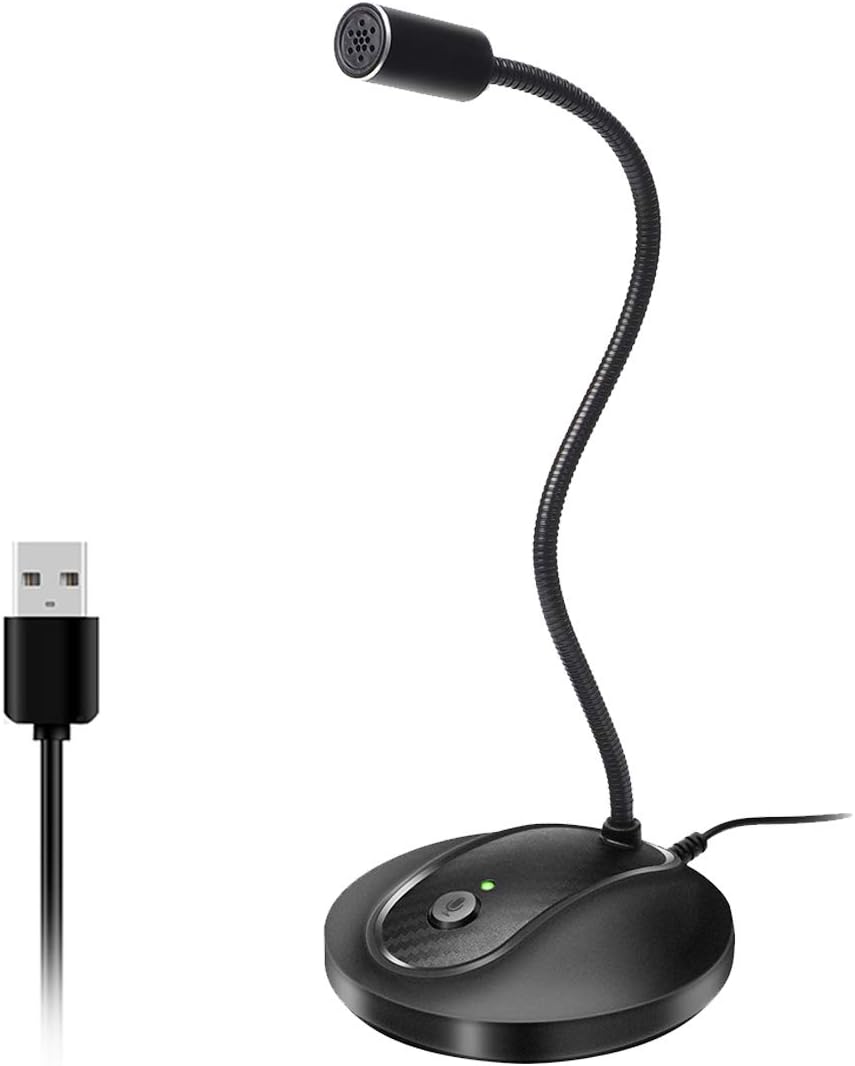
USB Microphone 360 Degree Adjustable Gooseneck Design
4.4Editor score
360 degree adjustable gooseneck
Intelligent noise canceling technology
Plug and play USB connection
This guide compares the top 10 dictation microphone for computer options to help you choose the best device for speech recognition and clear audio recording.
Finding the right dictation microphone for computer use is essential for professionals who rely on speech-to-text software. These devices ensure accurate transcription and reduce background noise effectively.
We compared ten highly-rated models based on build quality, connectivity, noise cancellation, and compatibility with popular dictation software. Each product was evaluated for its unique features and user feedback.
Each pick highlights specific strengths like portability, premium features, or budget friendliness. Prices may vary over time so check current listings before making a final purchasing decision today.
4.4Editor score

4.6Editor score

4.2Editor score
This side by side comparison highlights key specifications and features across all ten selected microphones to help you find the perfect match for your workflow needs.




This USB microphone stands out as an affordable option for basic dictation tasks. It features a 360-degree adjustable gooseneck design that allows you to position the mic exactly where you need it. With a rating of 4.4 stars it offers reliable performance for everyday use.
We may earn a commission when you buy through this link, at no additional cost to you.
Its intelligent noise-canceling technology ensures clear voice capture while reducing background noise. The built-in mute button with LED indicator provides quick control over your audio status. Plug-and-play compatibility with Windows and macOS makes setup effortless.
While it lacks advanced audio controls found in premium models it delivers solid performance for its price. The metal pipe and heavy-duty ABS stand ensure durability. It is an ideal choice for users seeking simplicity without compromising basic quality.
Anyone looking for a budget-friendly dictation solution should consider this model. It works well with speech recognition software and general recording needs. Check current prices to ensure you get the best value for your investment today.
The 360-degree adjustable gooseneck allows you to find the perfect angle for optimal sound capture during long sessions.
Built-in noise-canceling technology helps isolate your voice from ambient distractions ensuring cleaner audio input for dictation.
We may earn a commission when you buy through this link, at no additional cost to you.
The Philips LFH3500 SpeechMike is designed for professionals who demand high precision in their dictation work. With a decoupled microphone and built-in motion sensor it offers unique control features. Its 4.2-star rating reflects its specialized utility in professional settings.
We may earn a commission when you buy through this link, at no additional cost to you.
The microphone grille is optimized for crystal-clear sound while the motion sensor enables gesture-based device control. Freely configurable function keys allow you to tailor the workflow to your specific needs. This level of customization boosts productivity significantly.
While it comes at a higher price it delivers unmatched accuracy for speech recognition. The push button control and pop filter enhance usability. However it may require more setup time compared to standard USB microphones.
Professionals relying heavily on Dragon NaturallySpeaking or similar software will benefit most from this device. Its premium features justify the investment for frequent users. Always check the latest pricing before purchasing to align with your budget.
The free-floating decoupled microphone minimizes vibrations ensuring pure and accurate voice recording without physical interference.
Integrated motion sensors allow you to control functions with gestures adding convenience to your dictation workflow.
We may earn a commission when you buy through this link, at no additional cost to you.
This mini gooseneck microphone offers portability without sacrificing quality for dictation needs. Its compact design takes up minimal desk space while remaining sturdy. A rating of 4.3 stars highlights its popularity among users seeking flexibility and ease of use.
We may earn a commission when you buy through this link, at no additional cost to you.
The flexible 5.7-inch gooseneck allows precise positioning for optimal voice pickup. Included windscreen reduces background noise for cleaner audio. Its compatibility with Dragon NaturallySpeaking and other apps makes it a versatile choice for various tasks.
The anti-slip rubber pad keeps the base stable during use. While it lacks premium features it performs reliably for everyday dictation. The durable metal construction ensures longevity even in busy environments.
Ideal for students or professionals needing a lightweight solution this model fits well in compact setups. It balances affordability with functional design. Review current availability to ensure you secure the right model for your needs.
Its tiny footprint allows you to take it anywhere while still providing reliable audio capture for dictation tasks.
The included windscreen helps reduce plosive sounds and background noise improving overall voice recording clarity.
We may earn a commission when you buy through this link, at no additional cost to you.
The Blue Yeti USB microphone is a favorite for those seeking high-quality audio across multiple applications. With a custom three-capsule array and Blue VO!CE software it delivers clear powerful sound. Its 4.6-star rating reflects widespread satisfaction among users.
We may earn a commission when you buy through this link, at no additional cost to you.
It features four pickup patterns allowing flexibility for different recording scenarios. Onboard audio controls provide convenient access to gain and mute settings. The adjustable desktop stand ensures optimal positioning for voice capture.
While it is larger than dedicated dictation mics its versatility makes it a strong contender. Plug-and-play setup works seamlessly with Mac or PC. The advanced effects enhance your voice beyond basic dictation needs.
This model suits users who want one mic for dictation and creative projects. Its build quality and performance justify the investment. Check current pricing and compatibility to confirm it meets your requirements.
Choose from cardioid omni bidirectional or stereo patterns to adapt the mic to your specific recording environment easily.
Enhance your voice with advanced modulation and HD audio samples for professional quality results during dictation sessions.
We may earn a commission when you buy through this link, at no additional cost to you.
This conference microphone excels at capturing multiple voices in a room making it useful for group dictation. Its omnidirectional pattern picks up subtle sounds from 360 degrees. A 4.3-star rating shows reliable performance for meetings and training.
We may earn a commission when you buy through this link, at no additional cost to you.
With a pickup distance of 11.5 feet participants can speak naturally without raising voices. The mute button with blue indicator light helps manage audio quickly. It works with various softwares like Skype and Zoom easily.
The nylon shielded wire reduces interference ensuring clear transmission. Its compact design fits well on any desk. Plug-and-play compatibility makes it accessible for all users without technical hurdles.
Small to medium teams will appreciate its ability to capture clear sound from multiple directions. It simplifies remote communication significantly. Verify current stock and pricing before making your final selection today.
Capture sound from all directions effortlessly making this ideal for shared workspaces or group dictation scenarios.
No drivers are needed for setup allowing you to start recording immediately after connecting to your computer.
We may earn a commission when you buy through this link, at no additional cost to you.
The ZealSound K66 offers studio-quality sound with intelligent noise reduction for clear recordings. Its cardioid pickup pattern focuses on your voice while minimizing background noise. A 4.4-star rating reflects its quality across various uses including dictation.
We may earn a commission when you buy through this link, at no additional cost to you.
Physical knobs for gain and echo allow precise sound shaping without software. Real-time zero-latency monitoring helps you hear exactly what is being recorded. Included adapters expand compatibility to mobile devices for flexible work.
The solid metal base ensures stability during use. The built-in mute button with LED indicator prevents accidental audio transmission. While primarily for podcasts it works well for detailed dictation tasks.
Creators and professionals needing hands-on audio control will find this mic invaluable. Its versatility supports multiple platforms. Check current availability and compare features to ensure it meets your specific needs.
Press the mute button to enable noise reduction mode and eliminate unwanted sounds like keyboard clicks or fan noise.
Use the headphone jack to hear your voice in real time with zero latency ensuring accurate voice capture.
We may earn a commission when you buy through this link, at no additional cost to you.
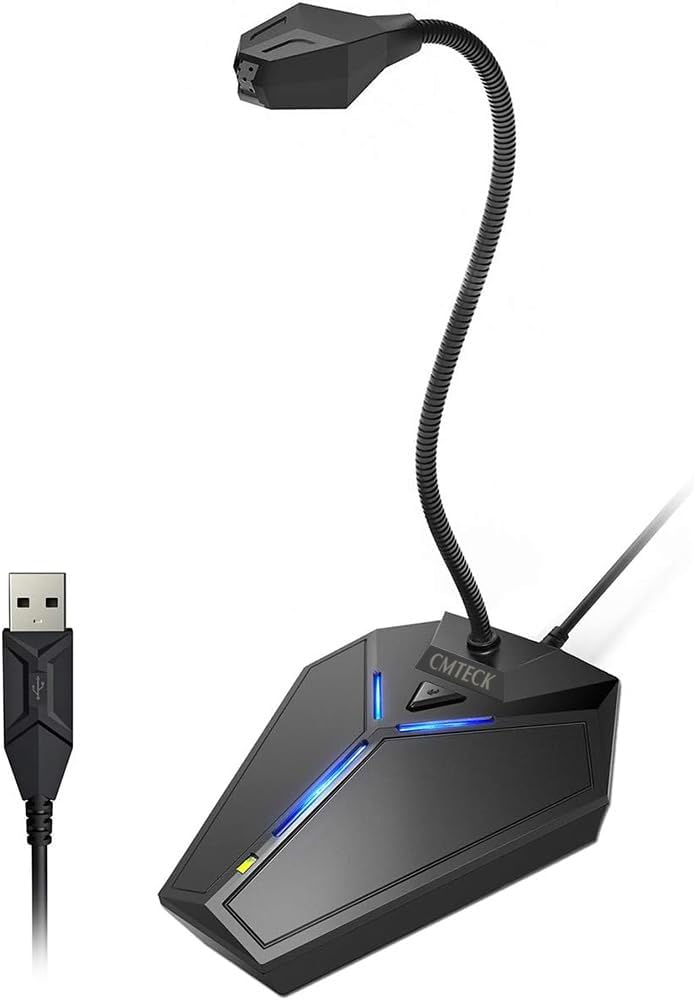
This CMTECK microphone uses a high-performance smart chip to suppress background noise for crisp audio. Its flexible gooseneck design allows precise positioning for optimal recording. A 4.4-star rating indicates reliable performance for various tasks.
We may earn a commission when you buy through this link, at no additional cost to you.
The metal gooseneck tube and ABS shockproof base ensure durability. True plug-and-play functionality simplifies setup for Windows and macOS users. A unique blue LED adds visual appeal during use.
While the blue LED is not dimmable it provides a visual cue. The mute button helps manage privacy easily. It is a solid choice for home office or casual dictation needs.
Anyone seeking a simple and effective solution will appreciate its ease of use. It balances affordability with decent quality. Check current stock and pricing before making your final purchase decision.
The built-in smart chip effectively filters background noise ensuring your voice comes through crisp and clear for dictation.
No drivers are required for setup allowing you to start recording immediately after connecting to your computer.
We may earn a commission when you buy through this link, at no additional cost to you.
The Nuance PowerMic III combines a USB microphone with PC mouse capabilities for seamless control. Its ergonomic thumb controls help increase dictation speed significantly. A 4.2-star rating highlights its specialized performance in professional environments.
We may earn a commission when you buy through this link, at no additional cost to you.
The unidirectional microphone with noise cancellation ensures higher accuracy even in noisy spaces. It is designed to work with Dragon Medical and Legal software. Plug and play installation eliminates the need for soundcard enabled PCs.
While it is not compatible with Dragon Home 15.0 it works well with other versions. The nine-foot cord provides flexibility during use. It is a premium tool for serious users.
Professionals using Dragon software extensively will find this microphone indispensable. Its advanced features justify the investment. Verify compatibility with your software version before purchasing.
Thumb controls allow easy dictation and PC navigation without switching between mouse and keyboard constantly.
Control standard diction functions with mouse capabilities enhancing efficiency and reducing physical strain during long sessions.
We may earn a commission when you buy through this link, at no additional cost to you.
This Philips SpeechMike III Pro delivers accurate speech recognition results with noise-canceling technology. Its advanced speaker design ensures crystal-clear playback for efficient workflows. A 4.3-star rating confirms its professional reliability in office environments.
We may earn a commission when you buy through this link, at no additional cost to you.
Push button operation simplifies control while it is designed for Dragon Naturally Speaking. It is Energy Star compliant for efficiency. The build quality ensures long-lasting use in demanding settings.
While the software is sold separately the microphone integrates seamlessly. It is built for professionals who need accuracy and speed. Consider your existing software setup before purchasing.
Lawyers and medical transcriptionists often benefit from its specialized features. It streamlines documentation significantly. Check current pricing and software compatibility to ensure it meets your needs.
Advanced noise-canceling technology ensures accurate recognition even in busy office environments for reliable results.
Designed with energy efficiency in mind to reduce power consumption during long professional dictation sessions.
We may earn a commission when you buy through this link, at no additional cost to you.
The Olympus RecMic II offers a practical solution for standard dictation with push button controls. Its trackball provides improved functionality for navigation. A 4.0-star rating reflects basic but functional performance in professional workflows.
We may earn a commission when you buy through this link, at no additional cost to you.
Dragon preset buttons allow quick assignments for Windows users. The smooth UV coating and silent keys minimize contact noise during use. It supports two microphone systems for recording in noisy environments.
While it is a standard model it offers solid utility for basic tasks. The USB connection ensures easy setup. Consider your specific software needs before choosing this model.
Ideal for users seeking simplicity without complex features this microphone meets everyday needs. It works well with Dragon software. Check current compatibility and pricing before purchasing.
The included trackball helps navigate software controls smoothly without needing an external mouse during dictation.
Silent keys and smooth UV coating minimize annoying contact noise for cleaner recordings during active use.
We may earn a commission when you buy through this link, at no additional cost to you.
Selecting the right dictation microphone for computer use depends on your specific workflow needs and budget. This guide explores key factors to consider for making an informed decision.
Microphones come in condenser dynamic and electret types. Condenser mics are sensitive and capture detailed audio which is ideal for quiet environments. Dynamic mics are robust and less sensitive to background noise making them better for noisy offices.
Consider your environment when choosing. If you work in a quiet space a condenser mic is sufficient. For busy environments dynamic mics with noise cancellation are safer choices.
USB connectivity is the standard for dictation microphones for computers. Look for plug-and-play support to avoid driver issues. Ensure the microphone is compatible with your operating system whether Windows or macOS.
USB-C is becoming more common so check your ports. Wired connections are generally more stable than wireless options for critical transcription work.
Noise cancellation technology is crucial for accurate speech recognition. It filters out ambient sounds like fan noise or office chatter. Advanced models include hardware-based noise reduction for clearer voice capture.
Prioritize microphones with noise cancellation if you cannot control your surroundings. This feature improves accuracy and reduces post-processing time significantly.
Ensure the microphone works with your specific dictation software. Some specialized models like Dragon PowerMic are optimized for certain platforms. Universal compatibility with Windows and macOS is safer for general use.
Check if the microphone requires additional drivers or software. Plug-and-play devices save time and technical hassle during setup.
A sturdy build ensures longevity especially if you plan to use the microphone frequently. Metal parts and reinforced cables prevent wear and tear. Look for anti-slip bases to keep the mic stable on your desk.
Consider the materials used in construction. Heavy-duty ABS and metal tubing offer better durability compared to all-plastic models.
Built-in controls like mute buttons and gain knobs provide convenient access to audio settings. Some models include trackballs or motion sensors for workflow integration. LED indicators show mute status at a glance.
Evaluate how often you need to adjust settings. Physical controls are faster than software toggles during active dictation sessions.
Cable length affects flexibility during use. A longer cable allows you to position the mic optimally without moving your computer. Shielded cables reduce signal interference for clearer audio transmission.
Standard lengths range from 6 to 9 feet. Choose a length that suits your desk setup and movement needs.
Dictation microphones range from budget-friendly options to high-end professional tools. Balance your needs with your budget to find the best value. Expensive models may offer features you do not need for basic transcription.
Invest in quality if you rely heavily on dictation. A reliable microphone reduces errors and improves productivity over time.
Start by plugging the microphone into an available USB port on your computer. Ensure your operating system recognizes the device automatically. Set it as the default input device in your sound settings to activate it for dictation.
Position the microphone 6 to 12 inches from your mouth for optimal voice capture. Avoid placing it near noisy equipment like fans or speakers. Speak clearly and directly into the mic for best results during sessions.
To maintain your microphone regularly wipe it with a soft dry cloth to remove dust. Keep it in a cool dry place when not in use to protect internal components. Check cables periodically for wear to ensure stable performance.
The best choice depends on your specific needs. For general use the Logitech Blue Yeti offers versatility and high quality. For specialized workflows the Philips LFH3500 provides professional features. Budget-conscious users may prefer the USB Microphone with 360-degree gooseneck.
Most microphones listed are plug-and-play devices requiring no additional drivers. They work seamlessly with Windows and macOS out of the box. However specialized models like Nuance PowerMic might need specific software for full functionality.
Yes most USB microphones are compatible with Dragon NaturallySpeaking. However optimized models like Nuance PowerMic provide better control and speed. Ensure the mic supports your Dragon version for best results.
Noise cancellation filters out background sounds like keyboard clicks or fans. This ensures the software hears only your voice improving recognition accuracy. It is essential for work in noisy environments.
Position the mic 6 to 12 inches from your mouth. Avoid direct exposure to noise sources. Speak clearly and maintain consistent distance for best results during long sessions.
Yes most microphones listed work seamlessly with macOS. Look for models explicitly stating Mac compatibility. Ensure you select the correct USB port type such as USB-A or USB-C.
Selecting the right dictation microphone for computer use depends on your workflow needs and budget. The top picks like the Philips LFH3500 offer specialized features while models like the ZealSound Podcast Mic provide versatility.
Prioritize noise cancellation and compatibility with your software. Consider build quality and connectivity options for long-term use. Physical controls and motion sensors enhance productivity significantly.
Always check current pricing before purchasing to align with your budget. Prices may vary over time so compare features carefully. Choose a model that balances performance with affordability for your needs.