
PS5/Slim/Pro Horizontal Stand
4.3Editor score
Scalable design for all models
Three speed adjustable cooling fans
Integrated storage space
This guide compares the top ten cooling stands for PS5 Console in October 2026, evaluating fan performance, charging docks, storage space, and build quality.
Finding the right cooling stand for your PS5 Console ensures your system runs smoothly during intense gaming sessions. A good accessory manages heat effectively while offering convenient charging solutions for your controllers and media devices.
We evaluated ten leading models based on fan efficiency, compatibility with Slim and Pro versions, and additional features like USB hubs and LED lighting. Each product was analyzed for build quality and user feedback.
Each pick highlights specific strengths to help you choose the best fit for your setup. Please note that availability and terms may change over time, so verify details before purchasing your preferred model.
4.3Editor score
4.4Editor score

4.4Editor score
The following table provides a side-by-side comparison of all ten models, highlighting their primary cooling mechanisms, controller compatibility, and unique storage capabilities to assist your decision process.


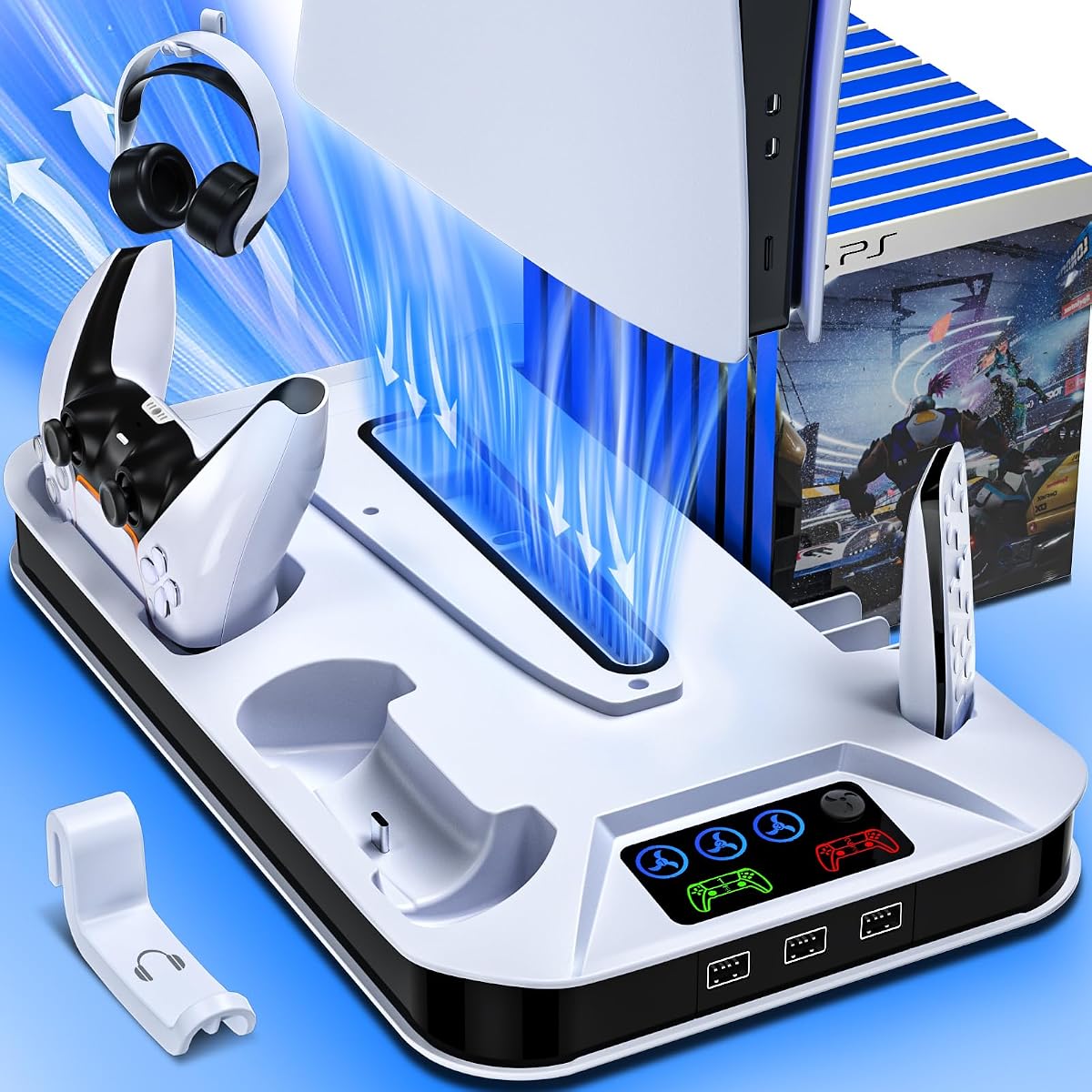
This cooling stand ranks as the top pick due to its robust cooling fan and comprehensive accessory organization. It offers three adjustable speeds and includes USB hubs for charging various devices simultaneously while keeping your console safe.
We may earn a commission when you buy through this link, at no additional cost to you.
The turbo fan effectively dissipates heat from the bottom of the console, which is crucial during long gaming sessions. Its design fits the Standard, Slim, and Pro models securely with a safety screw to prevent movement.
While it lacks Edge controller support, the charging speed is fast and reliable for standard controllers. The LED indicators provide clear status updates for charging and fan modes ensuring you never miss a notification.
Gamers seeking a complete all-in-one solution should consider this model for its balance of cooling efficiency and extra storage slots for discs and media remotes.
The high-efficiency turbo fan ensures your console stays cool even under heavy load extending the lifespan of your hardware.
Three additional USB ports allow you to charge headsets and other peripherals without needing extra wall adapters.
We may earn a commission when you buy through this link, at no additional cost to you.
This horizontal stand offers excellent value for gamers who need a reliable cooling solution without a high price tag. It features a scalable design that fits all PS5 versions and includes a dual controller charger with clear LEDs.
We may earn a commission when you buy through this link, at no additional cost to you.
The high-performance turbo fan provides three speed settings adjustable via a touch switch ensuring you can customize airflow based on your room temperature and console load needs.
Installation is straightforward and requires no complex tools making it ideal for beginners. However, the horizontal orientation may require more desk space compared to vertical alternatives.
Those looking for a budget-friendly option that still supports Edge controllers and offers solid cooling performance will find this model a practical choice for their gaming station.
The scalable design adapts to different console generations ensuring a secure fit whether you use a Disc or Digital Edition.
With included EVA foam and screws you can set up this stand in minutes without needing additional hardware or expertise.
We may earn a commission when you buy through this link, at no additional cost to you.
This premium station stands out for its intelligent auto-adjusting fan that reacts to console temperature in real time. It combines high-speed cooling with vibrant RGB lighting to create a stunning visual effect on your desk.
We may earn a commission when you buy through this link, at no additional cost to you.
The built-in temperature probe ensures the fan speed adjusts automatically based on heat levels offering optimal performance without manual intervention. You can also manually override settings to suit your preference.
Charging is quick taking only two and a half hours for full battery life on both controllers. The memory function saves your last settings for lights and fans which adds to the convenience.
Gamers who value aesthetics and smart features will appreciate this model for its blend of advanced cooling technology and customizable ambient lighting options.
The automatic mode adjusts fan speeds seamlessly ensuring your console never overheats even during intense marathon gaming sessions.
Nine RGB lighting effects allow you to match your console setup to your room decor or gaming theme effortlessly.
We may earn a commission when you buy through this link, at no additional cost to you.
This white cooling station offers a clean aesthetic that matches the official console look. It focuses on safety with non-slip pads and a screw lock to keep your console stable on any surface.
We may earn a commission when you buy through this link, at no additional cost to you.
The low-noise turbo fan improves air circulation effectively reducing heat during long play sessions. It also includes three USB hubs to charge controllers and headsets without cluttering your desk.
Protection is a key highlight as the smart chip stops charging at eighty percent to prevent battery overcharging. This extends the life of your controllers over time significantly.
If you prioritize safety and a tidy appearance this model provides solid performance and essential features for a streamlined gaming environment.
Integrated smart chips protect against overcharging ensuring your accessories remain safe even if left plugged in overnight.
Non-slip pads and safety screws prevent the console from sliding or tipping during vigorous use.
We may earn a commission when you buy through this link, at no additional cost to you.
This stand is designed for versatility offering support for both original and Edge controllers. The enlarged turbo fan provides distinct speed levels ensuring effective cooling during heavy usage.
We may earn a commission when you buy through this link, at no additional cost to you.
It includes a built-in cable compatible with various power sources allowing for flexible setup options. The smart chip prevents overcharging to safeguard your controllers battery health.
The memory function saves your preferred fan mode so you do not have to reset settings after a system restart. A dedicated remote slot keeps your media remote within easy reach.
Gamers with Edge controllers will find this model particularly useful for its specific compatibility and reliable safety features that protect your investment.
Fully compatible with the innovative PS5 Edge controller ensuring all your hardware is supported seamlessly.
The smart chip stops charging at eighty percent preventing potential damage from overcharging or voltage issues.
We may earn a commission when you buy through this link, at no additional cost to you.
This model features an intelligent temperature-controlled fan that adjusts speeds based on console heat ensuring efficient cooling without manual input. The honeycomb lighting adds a unique visual flair to your setup.
We may earn a commission when you buy through this link, at no additional cost to you.
Charging takes two and a half hours with clear red and blue indicators showing status. The memory function allows the device to resume last settings automatically after a restart.
Manual controls let you switch between speeds easily while the auto mode handles complex adjustments. The lighting system offers nine modes including single color and breathing effects.
For users wanting a mix of smart features and style this stand provides a convenient way to keep your console cool and your setup visually engaging.
The temperature probe automatically increases fan speed when the console gets hot ensuring consistent performance.
The honeycomb lighting pattern creates a striking effect that enhances the overall gaming atmosphere on your desk.
We may earn a commission when you buy through this link, at no additional cost to you.
This horizontal stand uses a scalable structure to fit different console generations securely. It integrates a dual controller charger that supports Edge models and provides clear LED status indicators.
We may earn a commission when you buy through this link, at no additional cost to you.
The turbo fan offers three speed settings adjustable via touch switch ensuring optimal airflow for your gaming environment. Installation is effortless and requires no tools making it beginner-friendly.
Power comes directly from the console simplifying the cable management. However, rest mode settings must be configured to ensure continuous charging when the console is off.
Gamers who want a comprehensive horizontal solution that supports Edge controllers and saves desk space will find this model a strong practical option.
The scalable structure meets the placement needs of different PS5 generations offering excellent compatibility.
First-time users can set it up quickly and start enjoying an organized gaming space immediately.
We may earn a commission when you buy through this link, at no additional cost to you.
This cooling station features a touchscreen control and auto mode that adjusts fan speed based on temperature thresholds. It uses a Type-C cable allowing power from a wall outlet or console port.
We may earn a commission when you buy through this link, at no additional cost to you.
The larger turbo fan provides strong airflow and the auto mode ensures quiet operation at low load. It supports cooling down hot air for both Disc and Digital Edition versions effectively.
Storage includes slots for game cards and a hard drive making it a comprehensive hub for accessories. The built-in smart chips stop charging at seventy percent to prevent battery overcharging.
Users looking for automated cooling and ample storage capacity will appreciate the detailed design and efficient airflow management of this model.
Built-in sensor monitors console temperature and adjusts fan speed accordingly quiet at low load and powerful when hot.
Slots for game cards and a hard drive help you save space keeping your favorite games at your fingertips.
We may earn a commission when you buy through this link, at no additional cost to you.
This stand combines functional cooling with vibrant RGB lighting to enhance your gaming setup. The three silent fan speeds ensure efficient cooling without disrupting your audio experience.
We may earn a commission when you buy through this link, at no additional cost to you.
The ring of LEDs offers multiple modes and colors creating an immersive atmosphere. It includes USB A hub ports for powering additional devices alongside your controllers.
Safety is maintained with overcharging and overheating protection for your controllers. The built-in screw securely fixes your console preventing accidental knocks and keeping it stable.
Gamers who want a visually appealing and safe stand with silent cooling will find this model a great addition to their desk.
The three silent fan speeds provide efficient cooling while maintaining a quiet environment for uninterrupted gameplay.
Eight vibrant RGB colors and four light modes allow you to create cool gaming scenes and immerse yourself.
We may earn a commission when you buy through this link, at no additional cost to you.
This cooling station focuses on a clean aesthetic with concealed built-in cables for a tidy look. It offers powerful cooling via an adjustable turbo fan that dissipates heat from the bottom of the console.
We may earn a commission when you buy through this link, at no additional cost to you.
The stand includes three USB hubs and a Type-C port for charging phones and other devices safely. It prevents overheating through smart chip protection against overvoltage and short circuits.
Fully charge both controllers in just three hours ensuring uninterrupted gameplay sessions. The sturdy materials ensure daily use without shaking or damage to your products.
For a professional and reliable cooling solution that prioritizes cable management and device safety this stand is a solid choice for any setup.
Built with sturdy materials this stand can withstand daily use without shaking or damaging your products.
Concealed built-in cables ensure a stable and secure connection with the console for safety and balance.
We may earn a commission when you buy through this link, at no additional cost to you.
Selecting the right cooling stand requires evaluating several factors to ensure compatibility and performance for your specific console setup.
Look for stands with turbo fans that offer multiple speed settings to adjust airflow based on your gaming load. Automatic fan control can be a valuable feature that adjusts speed based on real-time temperature readings.
Prioritize models with adjustable speed settings to ensure your console stays cool without unnecessary noise.
Verify that the stand supports your specific PS5 model whether it is the standard Digital Slim or Pro version. Some stands include screws or EVA foam to secure different sizes effectively.
Check the product specifications to ensure it fits your console edition perfectly.
Dual controller charging docks with clear LED indicators help manage multiple devices efficiently. Ensure the charging speed meets your needs such as two and a half hours for full charges.
Confirm support for original and Edge controllers if you use specialized hardware.
Smart chips that prevent overcharging overheating and overcurrent protect your controllers and console from damage. Look for features that stop charging at a certain percentage to extend battery life.
Safety is paramount for long-term health of your accessories and console.
Stands with slots for media remotes headsets and game discs help keep your desk organized and clutter-free. Additional USB hubs allow you to charge other devices like phones or headphones.
Choose models that maximize storage capacity to optimize your gaming space.
Durable materials and non-slip pads ensure the stand remains stable during intense gaming sessions. Security screws lock the console in place preventing accidental movements.
Invest in sturdy stands to prevent potential damage to your console.
Consider the color and lighting effects to match your gaming setup vibe. RGB lighting can add a personalized touch but may be distracting for some users.
Select a design that complements your room decor and personal preferences.
Look for models with easy tool-free installation to save time and effort. Clear instructions and included accessories make the setup process smooth.
Prioritize stands that offer a hassle-free setup experience.
Start by securing the console with the provided screw to prevent movement during use. Connect the stand to your console or a power outlet to activate the charging and cooling features.
Adjust the fan speed settings based on your room temperature and gaming intensity. Use automatic modes if available to optimize cooling without manual intervention.
Keep the vents and fans clear of dust and debris to maintain efficiency. Regularly check the charging ports and LEDs to ensure all functions are working properly.
Not all stands are designed for the Pro model. Check the product specifications to confirm it lists compatibility with the 2024 PS5 Pro Disc and Digital editions. Most modern stands offer scalable designs to accommodate new releases.
Some stands support Edge controllers while others only work with the original DualSense. Look for explicit mentions of Edge compatibility in the product description before purchasing. This ensures your specialized controller fits securely in the dock.
Most models charge two controllers in about two and a half to three hours. This ensures you can switch controllers quickly between gaming sessions without long downtimes. LED indicators help you track the charging progress easily.
Yes these stands are designed to function during gameplay to prevent overheating. The cooling fans dissipate heat generated during long sessions ensuring smooth performance. Just ensure the stand is placed in a well-ventilated area.
Some stands feature concealed cables for a clean look while others require standard cables. Look for models with built-in solutions to hide wires and improve aesthetics. A tidy setup prevents accidental trips and clutter.
Many models include three USB ports to charge headsets and other peripherals. This eliminates the need for extra adapters on your desk. Check the product specs to confirm the number of hubs provided.
Models with RGB lighting usually offer multiple modes including single colors and breathing effects. You can often adjust brightness and switch modes via a button. This allows for a personalized gaming atmosphere.
Look for smart chips that prevent overcharging and overheating to protect your devices. Stands with safety screws and non-slip pads ensure the console stays stable. These features extend the lifespan of your hardware.
The top picks offer a range of features from basic cooling to advanced RGB lighting and smart temperature control. Each model addresses specific needs such as Edge support or compact storage solutions.
Prioritize stands with adjustable fans and safety protections to ensure your console remains protected during extended play sessions. Consider your desk space and cable management requirements when selecting a design.
Always verify compatibility with your specific console edition before purchasing. Check current availability to ensure you get the best value for your gaming setup.