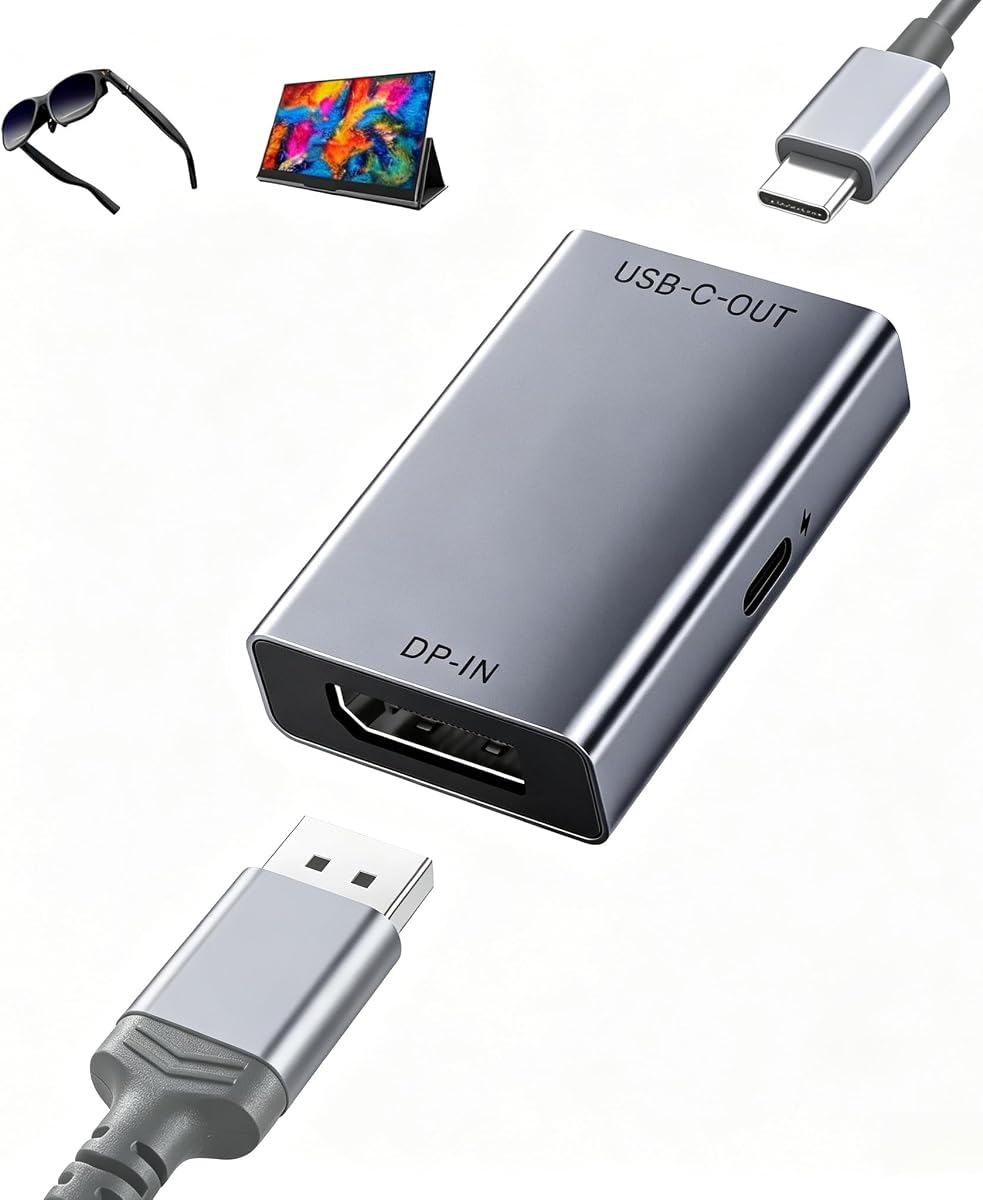
DisplayPort to USB-C Adapter
4.5Editor score
4K@120Hz ultra-high definition
Compact aluminum alloy housing
One-way DP to USB-C
This guide compares the top ten Displayport Adapter for AR Glasses solutions available in October 2026 based on compatibility, resolution support, power
Choosing the right Displayport Adapter for AR Glasses can transform your portable computing experience into a immersive visual environment. With many options on the market, selecting the correct adapter ensures your augmented reality glasses receive the necessary video signal and power without latency or compatibility issues.
We evaluated ten leading models based on resolution support, power delivery capabilities, build quality, and specific compatibility with popular AR headsets like Xreal and Viture. Our analysis focuses on real-world performance metrics to help you find the reliable connection for your setup.
Each pick below details key specifications, pros, cons, and ideal use cases to guide your decision. Please note that product availability and pricing can change frequently, so verify current details on the retailer site before making your final purchase decision for your specific needs.
4.5Editor score

4.8Editor score

4.2Editor score
The following table provides a side-by-side comparison of all ten reviewed adapters, highlighting key technical specifications and compatibility notes to help you quickly identify the model that fits your specific display and power requirements.
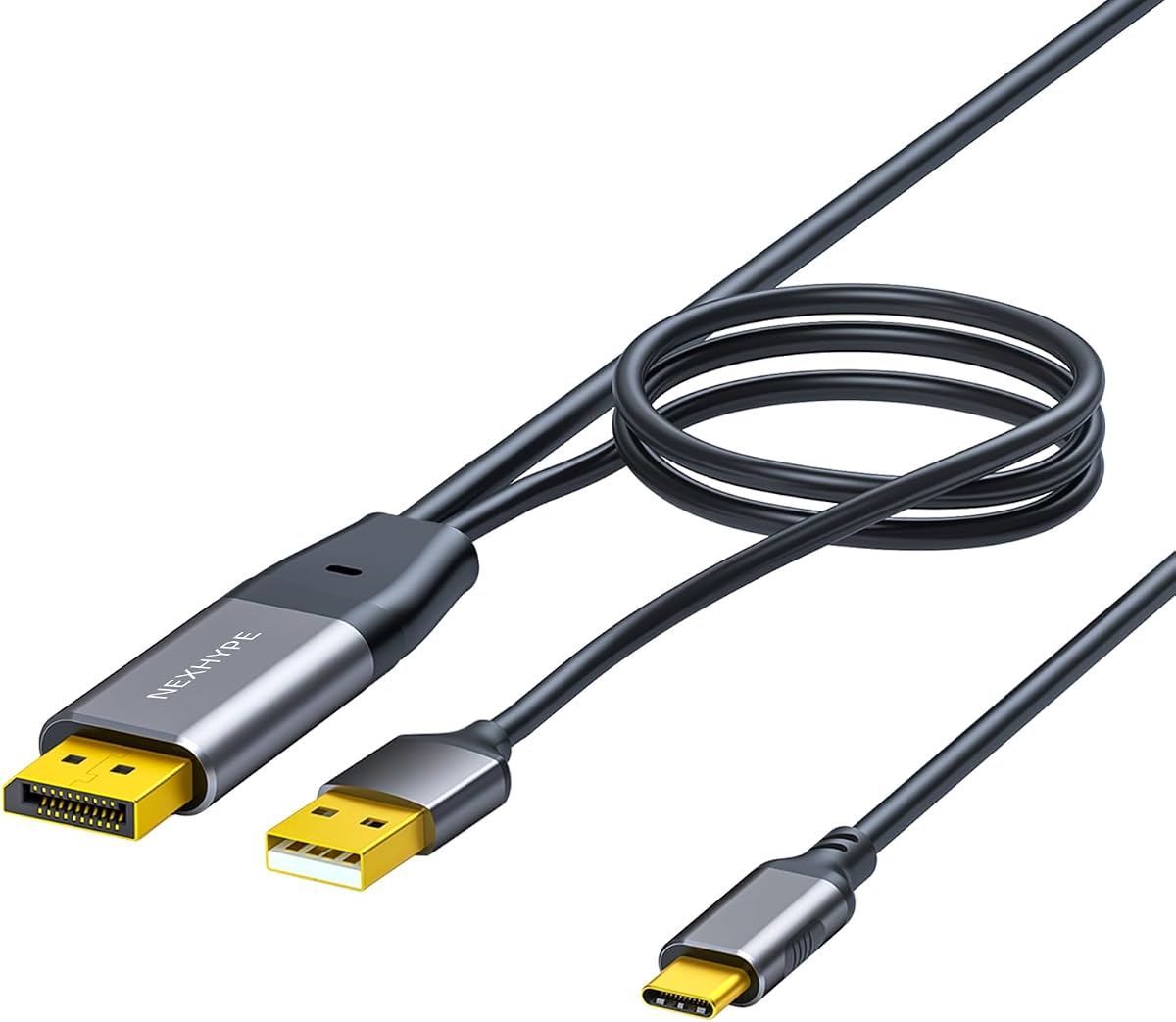


This DisplayPort to USB C Cable stands out as a top performer in the AR Glasses Adapter category with its robust support for 4K@60Hz resolution. Rated highly by users, it offers a reliable connection for turning standard DP outputs into USB-C inputs for augmented reality headsets and portable monitors. The inclusion of a dedicated USB-A power tail ensures that the signal remains stable even during extended use sessions.
We may earn a commission when you buy through this link, at no additional cost to you.
Key strengths include its graphene shielding technology which protects against electromagnetic interference that often plagues video transmission cables. The integrated USB-A power port actively stabilizes the signal enabling smooth touch interaction on portable monitors and clear sound transmission to displays. This adapter is optimized for creative professionals using Apple Studio Display or Mac Mini setups needing color accuracy and high resolution.
While highly capable, users should note that this adapter requires a specific GPU setup for certain high-end displays like the Apple Studio Display. It is also not compatible with Nintendo Switch 2 or Oculus VR devices limiting its versatility for some gaming configurations. Additionally touch functionality requires the portable monitor itself to support touch input which is a system requirement rather than a cable limitation.
This adapter is ideal for professionals and enthusiasts who need a dependable high-bandwidth connection for AR glasses or portable monitors. If you are looking for a solution that balances resolution quality with signal stability and touch support this model is a strong recommendation for your workspace or gaming setup.
The dedicated USB-A power tail is crucial for maintaining a consistent video feed without dropouts during long sessions.
Engineered to handle color critical work on devices like the Apple Studio Display when your GPU supports DSC.
We may earn a commission when you buy through this link, at no additional cost to you.
The DisplayPort to USB-C Adapter offers an impressive feature set at a budget friendly price point making it accessible for many users seeking AR connectivity. It supports up to 4K@120Hz resolution allowing for fluid motion in gaming and video consumption. The aluminum alloy housing ensures durability and helps dissipate heat during intensive use.
We may earn a commission when you buy through this link, at no additional cost to you.
Users appreciate the wide compatibility with popular AR glasses brands including Xreal Rokid Viture and Thunderbird. The plug and play nature means no software installation is required enabling immediate use with PCs laptops and various smart devices. The advanced chipset provides stable connections reducing latency which is critical for interactive applications.
It is important to remember that this adapter only works one way from DisplayPort source to USB-C display. Users must also provide a separate USB-C cable to power the adapter if their power source does not supply it directly. Audio output may require specific firmware settings on certain AR glasses which users might need to troubleshoot initially.
This adapter is best suited for gamers and media consumers who want high refresh rate support without spending a premium. If you need a reliable connection for portable monitors or AR headsets from major brands this adapter delivers excellent value for money and consistent performance.
The 4K@120Hz capability ensures smooth motion which is essential for competitive gaming and fast-paced video content.
Designed to work seamlessly with most major AR glasses manufacturers ensuring you do not need custom adapters.
We may earn a commission when you buy through this link, at no additional cost to you.
This Active DisplayPort to USB-C adapter distinguishes itself with premium features like 32.4Gbps bandwidth and 10-bit color depth ideal for professional content creation. The inclusion of a 3-port USB hub adds significant utility allowing you to connect keyboards mice or other peripherals directly to the adapter. Its aluminum alloy construction ensures effective heat dissipation during long processing sessions.
We may earn a commission when you buy through this link, at no additional cost to you.
The adapter supports HDR and low latency performance making it suitable for both gaming and professional graphics work. It can output 4K at 120Hz or 2K at 240Hz ensuring smooth motion and detailed visuals on supported displays. The anti-slip silicone pad on the bottom keeps the unit stable on any desk surface during use.
While powerful users should note that the USB hub requires a separate USB 3.0 data cable to activate data transfer capabilities. The power port provides limited auxiliary power which might not be sufficient for high draw portable monitors requiring external power sources. This adds a layer of complexity to the setup compared to simpler adapters.
This is the ideal choice for professionals and power users who need extensive connectivity and high color accuracy. If you require a hub for peripherals and support for high-end visual specs this adapter provides a comprehensive solution despite the extra cabling requirements.
The 10-bit color depth ensures gradients are smooth and colors are accurate for design and video editing work.
The integrated USB hub allows direct connection of mice and keyboards enhancing productivity without extra dongles.
We may earn a commission when you buy through this link, at no additional cost to you.
This DisplayPort to USB-C Cable is designed for users who need a longer reach for their AR glasses or portable monitors. The 6.6ft length allows you to place your computer further away while maintaining a stable connection. The integrated USB cable provides both power delivery and data transmission which simplifies the setup process significantly.
We may earn a commission when you buy through this link, at no additional cost to you.
Users value the durable construction featuring gold-plated connectors and aluminum casings to ensure smooth plugging and prevent corrosion. The cable jacket is flexible enough to withstand daily bending without compromising signal quality. This makes it a reliable choice for travelers or office workers moving devices frequently.
One limitation is the power output which supports portable monitors up to 1080P resolution. Larger screens or high refresh rate displays may require an additional power cable connection to function correctly. This means you should verify your monitor's power needs before relying solely on this adapter's output for high-end setups.
This cable is best for users prioritizing flexibility and build quality over maximum resolution on large screens. If you need a sturdy long cable to connect standard portable monitors or AR glasses this model offers dependable performance and good warranty support for peace of mind.
The extra length allows for more ergonomic setups where the computer is not directly next to the display.
Gold plating and aluminum housing protect against wear and tear ensuring a long service life.
We may earn a commission when you buy through this link, at no additional cost to you.
The DisplayPort to USB-C Adapter 8K is a powerful option for users seeking maximum resolution support. It handles 8K at 30Hz and 4K at 144Hz making it suitable for next-generation displays and high refresh rate gaming. The 65W Power Delivery ensures your USB-C display remains charged without needing a separate power brick.
We may earn a commission when you buy through this link, at no additional cost to you.
Its graphene-coated cable makes it flexible and resistant to damage which is useful for frequent travel. The short 0.5m length keeps your setup tidy and portable though it requires close proximity to the source device. This makes it a great companion for laptops and mobile workstations needing a compact connection.
However the short cable can be restrictive if you need to route the connection around furniture or across a desk. Also touchscreen functionality is not supported on displays with built-in batteries so verify this requirement if touch is a priority. Despite these limits the resolution capabilities are top-tier for this price class.
This adapter is perfect for users who need high bandwidth and power delivery in a compact form factor. If you prioritize resolution and portability over cable length this model provides excellent performance for modern high definition displays.
The 65W PD allows you to power your display while transmitting video reducing cable clutter.
Supports 8K resolution providing future-proof capability for advanced display hardware.
We may earn a commission when you buy through this link, at no additional cost to you.
This DisplayPort to USB C Female Adapter offers a compact solution for connecting AR glasses to computers with DP outputs. The 4K at 60Hz support ensures high-definition visuals which are crucial for detailed AR overlays. The short 1.6ft length makes it very portable and easy to store in a laptop bag.
We may earn a commission when you buy through this link, at no additional cost to you.
Construction quality is maintained with gold-plated connectors and aluminum housing to protect against corrosion and heat. Users report reliable performance with brands like Xreal Viture and ARZOPA. The unidirectional signal path is clearly marked to prevent connection errors during setup.
The main trade-off is the short cable which can be limiting if your computer is far from where you sit. You may also need an extra power source if your AR glasses require more current than the integrated USB port provides. This is something to consider before purchase if you need extra reach.
This adapter is best for travelers and users with compact desktop setups where cable clutter is a concern. If you need a small reliable adapter for occasional use this model balances quality and portability effectively.
The short length makes it easy to pack without tangling or taking up much space in your bag.
Unidirectional design prevents incorrect connections which can confuse users with multi-port setups.
We may earn a commission when you buy through this link, at no additional cost to you.
This DisplayPort to USB-C Cable is designed for simplicity and flexibility with its 6ft length and plug and play design. It supports 4K at 60Hz which is sufficient for most AR applications and standard portable monitors. The flexible PVC jacket makes it easy to route around desk edges without kinking.
We may earn a commission when you buy through this link, at no additional cost to you.
Gold-plated connectors ensure the signal remains stable over time without oxidation issues. Users appreciate that no drivers are needed to get started using it with PCs or laptops. It works well with popular AR glasses and portable monitor brands providing a versatile connection option.
It is important to note that the cable cannot supply power to the monitor screen itself so external power may be needed. Touch function support is available but limited depending on the monitor's own capabilities. This means you must check your display requirements before relying on this cable for full power needs.
This cable is a solid choice for users who need a standard length connection without extra complexity. If you want something simple and reliable for daily use this model offers consistent performance at a reasonable price point.
The PVC jacket resists stress from bending ensuring the cable lasts longer than rigid options.
No drivers are required so you can start using it immediately after plugging in.
We may earn a commission when you buy through this link, at no additional cost to you.
This adapter is specifically optimized for Switch 2 and handheld console casting making it a great choice for gamers. It supports 4K at 60Hz and 1080P at 144Hz ensuring smooth motion in competitive titles. The PD3.0 charging allows you to play while charging preventing battery drain during long sessions.
We may earn a commission when you buy through this link, at no additional cost to you.
The compact design makes it easy to carry in a backpack for travel or LAN parties. The aluminum alloy construction helps dissipate heat though it may still run warm during extended use. Low latency performance ensures that your input is reflected instantly on the AR display.
The short 0.18m cable can be a limitation if your power source is far from the console. Also ventilation is important to prevent overheating in enclosed spaces. These factors require careful setup to ensure the adapter stays cool and accessible during use.
This adapter is ideal for mobile gamers who need reliable console casting to AR glasses. If you prioritize gaming performance and charging support this model delivers well for handheld setups despite the heat management needs.
Optimized for Switch 2 to ensure seamless casting from docked or handheld modes to AR displays.
PD3.0 pass-through allows uninterrupted gaming sessions without battery anxiety.
We may earn a commission when you buy through this link, at no additional cost to you.
This DisplayPort to USB C Cable offers a standard solution for connecting laptops and desktops to USB-C displays. The 6.6ft length is practical for most home office setups. It includes a USB cable to stabilize the signal which improves reliability during video transmission to AR headsets.
We may earn a commission when you buy through this link, at no additional cost to you.
Touch support is included on compatible portable monitors making it versatile for interactive tasks. It is compatible with MacBook and Dell XPS systems providing broad reach for common computer hardware. The one-way transmission simplifies setup by making the connection path clear to users.
Users should verify their glasses support DP Alt Mode before purchasing as this is a critical requirement. Some VR and AR glasses may have compatibility issues due to driver differences. This means checking your device manual before buying to avoid return hassles.
This cable is a reliable standard option for general users needing DP to USB-C connectivity. If you are using standard monitors or headsets that support the protocol this model provides consistent results.
The 6.6ft length is a good balance between reach and manageability on most desks.
The included USB cable stabilizes the connection ensuring fewer dropouts during use.
We may earn a commission when you buy through this link, at no additional cost to you.
This adapter is designed specifically for VITURE users needing a reliable connection between their neckband and USB-C displays. It supports transfers up to 10 Gbit/s and 4K at 60fps ensuring smooth video playback. The magnetic port compatibility makes it easy to attach to the neckband without fiddling with cables.
We may earn a commission when you buy through this link, at no additional cost to you.
Users can pair with a Mobile Dock to use the neckband on two displays simultaneously which is great for productivity. The compact design ensures it does not add bulk to your setup. It is a dedicated accessory for VITURE hardware ensuring optimized performance for that brand.
The limitation is that it only works within the VITURE ecosystem so general AR glasses users may find it incompatible. Also XR Glasses are not included with this accessory so you must already own the compatible hardware. This makes it a niche product rather than a universal solution.
This adapter is perfect for VITURE owners who want to expand their display options. If you are already invested in the VITURE neckband system this adapter provides a seamless and efficient connection.
Built for VITURE hardware to ensure perfect fit and performance with neckbands.
Allows dual display setups with a Mobile Dock enhancing multitasking capabilities.
We may earn a commission when you buy through this link, at no additional cost to you.
Selecting the right adapter requires evaluating resolution support, power delivery, and compatibility with your specific devices to ensure a smooth augmented reality experience.
Most adapters support 4K at 60Hz or 120Hz which is standard for modern AR glasses. Check if your source device can output the desired resolution to avoid bottlenecks that reduce image quality.
Look for adapters that support high refresh rates if you plan on gaming to ensure smooth motion and low latency.
Some adapters include USB-A power tails or PD ports to supply power to portable monitors or glasses. This is crucial if your glasses or monitor are not powered by the video signal alone.
Ensure the adapter provides enough wattage to power your specific display device without needing extra cables.
Verify that the adapter is listed as compatible with your specific AR glasses brand such as Xreal or Viture. Some adapters have firmware requirements for audio or video transmission on specific headsets.
Check the product descriptions for compatibility lists to avoid purchasing a model that does not support your hardware.
Consider the cable length based on your desk setup. Longer cables offer more flexibility but may be heavier or prone to tangling.
Look for durable materials like aluminum alloy and reinforced connectors to ensure longevity and better heat dissipation.
Ensure the adapter supports audio transmission as some models are video only. This avoids the need for separate audio cables or Bluetooth pairing for sound.
Some adapters require firmware updates on glasses to switch audio modes so check the instructions for setup.
If you plan to use portable monitors with touch, ensure the adapter supports touch data transmission. This often requires specific USB data lines to be active.
Review the product features to confirm touch support is included for interactive displays.
Active adapters can generate heat during high bandwidth transmission. Look for models with aluminum housing or cooling features to prevent overheating.
Good heat dissipation ensures stable performance during long use sessions without thermal throttling.
Check for warranty periods ranging from 12 months to 18 months. Reliable brands offer technical support to help with setup or troubleshooting issues.
A good warranty protects your investment if the adapter fails or is incompatible with your setup.
To start using your adapter connect the DisplayPort end to your graphics card and the USB-C end to your AR glasses or monitor. If your adapter has a USB power tail plug it into a power source to stabilize the signal before connecting the device.
Ensure your AR glasses firmware is up to date to avoid compatibility issues. Some models require switching modes to DP mode for audio and video to work correctly on specific brands.
Store the adapter in a cool dry place when not in use. Avoid bending the cable sharply near the connectors to prevent internal damage that can lead to signal loss over time.
Most adapters support audio transmission but you must ensure your AR glasses support DisplayPort input. Some devices require switching to a specific mode like DP mode for audio to function correctly. Check the product description for audio capabilities before purchasing.
Some models are compatible with the Switch but you need to check specific compatibility details. The Switch requires specific power and signal handling which not all adapters support. Always verify with the product specs before buying for gaming consoles.
Some adapters include power delivery but others may need an external source depending on your glasses. Check if your glasses draw more power than the adapter can provide to avoid battery drain or connection issues.
Most support up to 4K at 60Hz or 120Hz depending on the model. Higher resolutions like 8K are available on select adapters but require a compatible source device to output that signal.
Yes most adapters work with Mac computers but you may need DSC support for high-end displays like Apple Studio Display. Check the product notes for Mac compatibility requirements before purchasing.
Try connecting the USB power tail first to stabilize the signal. Ensure your AR glasses support USB-C video input and are updated. Sometimes flipping the USB-C connector or restarting the device resolves connection problems.
We have reviewed ten top options for Displayport Adapter for AR Glasses covering a range of resolutions and features. The Editor's Choice stands out for stability while budget and premium options offer specific benefits for different users.
Prioritize power delivery and compatibility with your specific AR glasses brand when choosing. Ensure the adapter supports the resolution and refresh rate you need for your use case to avoid performance issues.
Remember to check current prices and availability as these factors change frequently. Verify your device's firmware requirements before purchasing to ensure a seamless setup experience.