
QUI Presentation Clicker with Volume Control
4.3Editor score
Affordable price point option
328 foot wireless range
Volume control included
This guide compares the top laser pointer for presentations models based on visibility, range, battery life, and compatibility to help you choose the perfect
Finding the right laser pointer for presentations can transform how you engage your audience. A reliable clicker ensures smooth slide transitions and clear visual emphasis on key points during talks.
We evaluated ten leading models based on connectivity, laser brightness, battery efficiency, and ergonomic design. Our testing criteria focused on real-world performance in classrooms, offices, and large lecture halls.
Each pick highlights specific strengths like green visibility or USB-C charging. Prices fluctuate frequently so check current listings before buying to ensure you get the best value for your needs today.
4.3Editor score

4.6Editor score

4.6Editor score
The following table provides a side-by-side view of key specifications for all ten selected products to help you compare features like laser type, battery, and wireless range quickly.


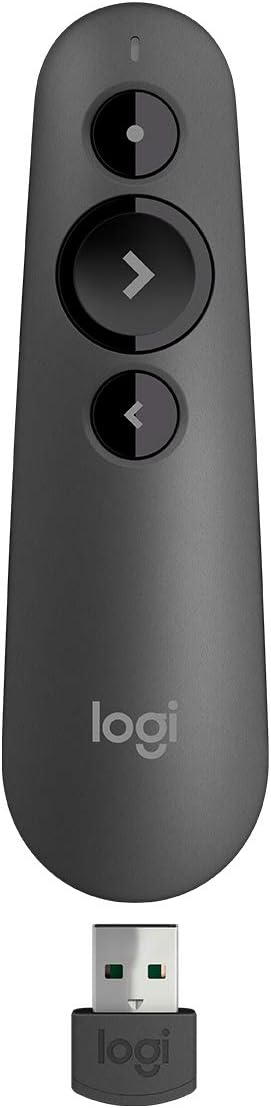


This clicker stands out as the top choice for professionals who need reliable visibility. It features a bright green laser that cuts through ambient light effectively on projectors and whiteboards.
We may earn a commission when you buy through this link, at no additional cost to you.
The USB-C rechargeable battery eliminates the need for disposable AAA cells making it eco friendly and cost effective over time. Users appreciate the plug and play functionality which works instantly with Mac Windows and Chromebooks without software.
Some might find the body slightly larger than compact models but the ergonomic design ensures comfort during long lectures. The receiver storage is magnetic which prevents loss but could be slightly less secure than a hard dock.
Educators and business presenters will find this tool indispensable for maintaining engagement. It balances performance features and ease of use better than most competitors in this category today.
The 532nm green light is significantly brighter than red alternatives ensuring your pointer remains visible even in well lit rooms or against reflective screens.
With a single hour charge powering weeks of use you avoid the hassle of hunting for batteries before critical presentations.
We may earn a commission when you buy through this link, at no additional cost to you.
The R400 is a classic choice known for its simplicity and reliability. It uses a standard red laser which works well in darker rooms or on traditional projection screens.
We may earn a commission when you buy through this link, at no additional cost to you.
Its plug and play nature means you can start presenting immediately after inserting the USB receiver. The design is straightforward with buttons that are easy to find by touch.
While it lacks some advanced features like volume control or rechargeable power it excels in basic slide navigation. The receiver storage keeps everything organized when you are packing up quickly.
This model is best for users who want a no fuss tool that just works. It is ideal for occasional presenters who prioritize dependability over extra features.
No drivers or pairing required allows you to focus on your content rather than troubleshooting connectivity issues.
Logitech is a known name in peripherals offering consistent build quality and performance you can count on.
We may earn a commission when you buy through this link, at no additional cost to you.
This remote offers a strong value proposition with extra features like volume control at a budget friendly price point. It is designed for daily presentations where functionality matters most.
We may earn a commission when you buy through this link, at no additional cost to you.
The bright red pointer is effective against most backgrounds but may struggle on high contrast LED screens. Wireless range extends to 100 feet giving you freedom to move around the room.
Battery life is decent with auto sleep features to conserve power. The ergonomic design ensures comfort even during extended use sessions without causing hand fatigue.
For those on a tight budget who still need reliable slide control this option delivers. It is particularly useful for educators who need to manage media volume during lessons.
Adjusting audio levels directly from the clicker allows for smoother transitions between slides and media clips.
With a 100 foot range you can roam the stage confidently without worrying about signal dropouts.
We may earn a commission when you buy through this link, at no additional cost to you.
The R800 is a premium tool designed for professional speakers who need time management tools built into their clicker. The LCD screen helps keep you on schedule without needing to look at a clock.
We may earn a commission when you buy through this link, at no additional cost to you.
Its green laser is powerful enough for use on LCD and plasma displays where red light might fail. The vibrating alerts provide discreet notifications so you do not distract your audience.
The build quality feels robust and the buttons are easy to locate by touch. While it is more expensive than basic models the added features justify the cost for frequent presenters.
This device is ideal for keynote speakers or lecturers who strictly adhere to time limits. It combines visibility and utility in a way few other clickers match.
The built in timer and silent alerts help you stay within your allotted presentation time effortlessly.
Smooth contours and high grade materials ensure it feels comfortable and durable in your hand for years.
We may earn a commission when you buy through this link, at no additional cost to you.
This model bridges the gap between traditional presentation clickers and modern mobile devices. It supports Bluetooth connections allowing use with tablets or laptops without a USB port.
We may earn a commission when you buy through this link, at no additional cost to you.
The battery life is exceptional lasting up to a year on a single AAA cell which reduces waste significantly. Slide control is intuitive with buttons designed for quick and accurate navigation.
To unlock advanced features like custom button mapping you may need to install the companion app. The red laser works well but may not be bright enough for all bright screens.
Tech savvy users who present across multiple device types will appreciate the flexibility. It is a versatile choice for hybrid workflows involving both desktop and mobile systems.
Bluetooth low energy technology ensures you can connect to modern devices that lack traditional USB ports.
Smart power management extends usage time to twelve months reducing the need for frequent battery changes.
We may earn a commission when you buy through this link, at no additional cost to you.
This clicker offers an incredibly low entry price while maintaining solid functionality for everyday tasks. The 328 foot wireless range is among the highest in the category giving you extreme freedom to roam.
We may earn a commission when you buy through this link, at no additional cost to you.
It includes volume control and page navigation which helps manage media presentations seamlessly. The compact design fits easily in a pocket with a clip to keep it secure when carried.
Build quality is utilitarian focusing on function over form. The red pointer is standard and should be tested on your specific screen type to ensure visibility.
For teachers or small business owners watching their budget this is a strong contender. It delivers essential features without unnecessary frills or high costs.
Control distance up to 328 feet allows you to interact with audience members at the back of large halls.
The integrated clip and lightweight body make it easy to carry in a notebook or pocket without bulk.
We may earn a commission when you buy through this link, at no additional cost to you.
Norwii offers a modern clicker with distinct connectivity options that adapt to both old and new computers. The green laser provides clear visibility ensuring your pointer remains the focal point of the room.
We may earn a commission when you buy through this link, at no additional cost to you.
You can customize button functions through the Norwii Presenter app allowing you to tailor the device to your workflow. The wireless range reaches up to 100 meters covering most lecture halls effectively.
Battery charging takes a few hours but lasts for weeks of use. The receiver works with both USB-A and USB-C ports making it versatile for Mac and PC users alike.
This device is suitable for users who want customization and modern connectivity. It is a great choice for hybrid environments where different devices are used for presentations.
Adjusting button layouts to match personal preferences allows for a more intuitive control experience during complex presentations.
The dual USB receiver supports both legacy and modern ports ensuring compatibility across various computing environments.
We may earn a commission when you buy through this link, at no additional cost to you.
This clicker focuses on comfort and ergonomics providing a soft rubber feel that fits naturally in the hand. It is designed for users who prioritize physical comfort during long use.
We may earn a commission when you buy through this link, at no additional cost to you.
The receiver is stored securely under the battery cover which prevents it from getting lost easily. It supports a wide range of systems and software for flexible use.
While the range is shorter than some competitors it is sufficient for most standard meeting rooms. The build quality ensures it feels durable despite its small size.
It is an excellent option for those who need a reliable tool for daily tasks. The ergonomic design reduces strain making it easy to hold for extended periods.
Rubberized materials and contoured shapes reduce hand fatigue during lengthy presentations or repeated use.
High quality materials ensure longevity while maintaining a small footprint for easy transport in pockets.
We may earn a commission when you buy through this link, at no additional cost to you.
This clicker stands out with a receiver that supports both USB-A and USB-C ports directly. This eliminates the need for adapters when switching between different laptops or systems.
We may earn a commission when you buy through this link, at no additional cost to you.
It includes volume control and full screen options making it a comprehensive tool for presentations. The magnetic storage slot ensures the receiver stays attached to the device when not in use.
The range reaches up to 100 feet allowing movement across large conference halls. Battery life is optimized with auto sleep modes to extend usage between replacements.
For users who frequently switch devices this versatility is a major advantage. It offers a practical solution for those who need compatibility without extra hardware.
A single receiver supports both USB-A and USB-C ports simplifying connectivity across different devices.
Wireless control up to 100 feet ensures you can engage with audiences in spacious rooms without limits.
We may earn a commission when you buy through this link, at no additional cost to you.
This clicker is designed to be unobtrusive and lightweight with a dark gray button design for a sleek look. It is ideal for casual presenters who do not need extensive customization options.
We may earn a commission when you buy through this link, at no additional cost to you.
The connection process is straightforward with no drivers required. A single AAA battery can last around two months which is sufficient for regular use without constant replacements.
The wireless range is solid at 100 feet providing enough room for movement in most classrooms. The ergonomic design ensures it feels secure and comfortable during use.
It is a great choice for students or teachers who need a simple tool. Its small size and light weight make it easy to carry anywhere.
Weighing only 38 grams it fits easily in a pocket without adding noticeable bulk to your carry bag.
Efficient power consumption allows a single battery to last for months reducing maintenance tasks.
We may earn a commission when you buy through this link, at no additional cost to you.
Selecting the right clicker depends on your specific presentation environment and technical needs. Consider these factors to ensure you choose a tool that enhances your delivery.
Green lasers are significantly brighter than red ones making them better for use on modern high brightness LCD or LED screens. Red lasers are cheaper and work well in dimly lit environments or with traditional projectors.
If you present in brightly lit rooms opt for a green laser model to ensure your pointer remains visible to the entire audience.
Range determines how far you can walk away from your computer while maintaining control. Most clickers offer between 30 to 100 feet which covers standard meeting rooms.
For large auditoriums or lecture halls choose a model with at least 100 feet range to avoid signal dropouts during your talk.
Rechargeable models use built in batteries charged via USB-C eliminating the need for disposable cells. Disposable models rely on AAA batteries which are easy to replace but create waste.
Choose rechargeable if you present frequently to save money long term while disposable batteries are convenient for occasional use.
Most devices use a USB receiver but some offer Bluetooth for devices without USB ports. Dual port receivers with USB-A and USB-C offer maximum flexibility for different laptops.
Ensure the clicker matches your computer setup to avoid needing extra dongles or adapters during your presentation.
Advanced features like volume control hyperlinks or built in timers can enhance presentation flow. Basic models focus purely on slide navigation for simplicity.
Identify which extras are necessary for your specific content style to avoid paying for unused functions.
Most clickers work universally with Windows Mac Linux and Chromebook without software. Some models require drivers for specific functions like custom buttons.
Verify compatibility with your operating system and presentation software to ensure plug and play functionality works smoothly.
Comfort matters during long sessions so look for ergonomic designs with soft rubber grips. The weight and size should allow you to hold it naturally without strain.
Check reviews for durability to ensure the device withstands daily handling in a professional or educational environment.
Prices vary widely from basic models to premium versions with advanced timers. Determine your spending limit based on the features you genuinely need for your workflow.
Often a mid range model offers the best balance of performance and cost for most users.
To begin always insert the USB receiver into an available port on your computer before starting your presentation software. Ensure the device is switched on and visible lights confirm it is ready to use.
For optimal laser visibility keep the device steady when pointing at specific content. Avoid sweeping motions across bright screens to prevent the dot from fading or disappearing momentarily.
Maintain your clicker by storing it in a safe place when not in use. Replace or recharge batteries regularly to prevent unexpected power loss during important presentations.
Yes green lasers are typically more visible especially on bright screens or in well lit environments. Red lasers work well but may struggle against high contrast displays making green the safer choice for modern venues.
Most models are universally compatible with Mac OS requiring no additional software to work. Simply plug in the USB receiver and it should be recognized immediately by your system for seamless control.
Disposable battery models often last between two weeks to several months depending on usage. Rechargeable models can last weeks on a single charge reducing the need for replacements during events.
While possible the dot is hard to see on glossy laptop screens especially in light. It is more effective when used on a projected display or whiteboard for clear audience visibility.
The majority of clickers are plug and play meaning no drivers are needed for basic slide control. Some advanced features may require software installation to unlock custom button functionality.
Ensure there are no large metal objects blocking the signal path between the clicker and receiver. Try moving the receiver to a different USB port closer to your location to improve stability.
The Green Light Presentation Clicker stands out as the top choice due to its superior visibility and rechargeable battery. It balances performance with ease of use making it ideal for educators and professionals alike.
Consider your specific needs like screen type and connectivity options before buying. If budget is a priority the QUI Presentation Clicker offers excellent value with essential features.
Remember to check current availability and compatibility before purchasing to ensure the device meets your requirements. A reliable clicker makes a significant difference in delivering a confident presentation.