
Canon PIXMA TR4720
3.8Editor score
Wireless printing capability
Built-in fax function
Compact home office design
This guide compares the top 10 cheap fax machines available in October 2026 to help you find reliable communication tools for home and office use today.
Finding a reliable cheap fax machine is essential for small businesses and home offices that need secure document transmission without breaking the bank. Modern fax devices offer a range of features from basic sending capabilities to all-in-one printing solutions. We have evaluated the market to identify the most cost-effective options that do not sacrifice performance or durability for your daily communication needs.
Our selection process involved analyzing user reviews, technical specifications, and overall value propositions across various price points. We focused on models that provide clear transmission quality, adequate paper handling, and useful additional functions like copying and scanning. This ensures that whether you need a standalone fax or a multifunction device, you will find a suitable match for your specific workflow requirements and budget constraints.
Each pick in this list highlights key strengths and potential limitations to help you make an informed decision based on your unique situation. We have included a mix of dedicated fax units and all-in-one printers that support faxing to give you flexibility in choosing the right tool. Please note that prices and availability can change frequently, so verify current details before finalizing your purchase to ensure you get the best deal available now.
3.8Editor score

4.0Editor score

4.0Editor score
The following comparison table outlines the key specifications and features of each top-rated fax machine to help you quickly identify which model fits your needs best.




The Brother FAX-575 stands out as a reliable choice for those seeking a dedicated fax machine with essential functions. With a rating of 4.0, it offers convenient and easy-to-operate faxing capabilities that simplify daily communication tasks. Its standout qualities include a robust memory system and fast transmission speeds that ensure your documents are sent promptly without errors.
We may earn a commission when you buy through this link, at no additional cost to you.
Key strengths of this device lie in its technical specifications. It features black-and-white copying with up to 400 x 400 dpi resolution for clear document reproduction. The 9,600 BPS fax modem transmits at about 15 seconds per page, which is efficient for small volume needs. Additionally, the 512 KB memory stores up to 25 pages, allowing you to queue documents when the line is busy.
Despite its strengths, there are honest trade-offs to consider. The machine relies on thermal paper which might not be suitable for all archival needs. It also lacks some modern connectivity options like wireless printing that newer all-in-one devices offer. However, these limitations are acceptable if your primary goal is straightforward and reliable fax transmission without extra complexity.
This fax machine is ideal for small offices or home users who prioritize functionality over advanced features. If you need a device that simply works well for sending and receiving faxes with minimal setup, this is a strong recommendation. Its balance of performance and ease of use makes it a top contender in the budget-friendly fax category.
The 512 KB memory ensures you can store multiple pages for transmission, preventing delays during high-volume faxing sessions.
With 400 x 400 dpi resolution, your copied documents will remain legible and professional for business correspondence.
We may earn a commission when you buy through this link, at no additional cost to you.
The Canon PIXMA TR4720 is an excellent choice for those who need a compact all-in-one device with built-in fax capabilities. Rated at 3.8, it combines printing, copying, scanning, and faxing into one versatile unit. Its standout qualities include easy setup and wireless connectivity that allow you to manage documents from various devices effortlessly.
We may earn a commission when you buy through this link, at no additional cost to you.
This device excels in its convenience features designed for home use. The auto document feeder simplifies multi-page faxing and copying tasks saving you time on repetitive loading. With a front paper tray holding 100 sheets, you have ample capacity for daily tasks. The Canon PRINT Inkjet/SELPHY app makes mobile printing and faxing intuitive for users on the go.
Trade-offs involve potential ongoing ink costs which might add up over time for heavy users. The scanning resolution may not be as high as dedicated scanners for archival needs. However, for general home office use these are minor issues compared to the value of having four functions in one small footprint.
We recommend this model for home users who want an affordable all-in-one solution with fax support. If you need to send faxes occasionally while printing letters or receipts, this printer delivers the necessary functions. It balances cost and utility well making it a strong budget option for small workspaces.
The Canon PRINT app allows you to fax documents directly from your smartphone reducing the need to walk to the printer.
Its compact build ensures it fits easily on small desks without cluttering your home office workspace.
We may earn a commission when you buy through this link, at no additional cost to you.
The Canon PIXMA TR8620a offers premium features that elevate the faxing experience beyond basic transmission. With a 4.0 rating it supports voice control and smart reordering through Alexa for seamless ink management. Its standout qualities include a high paper capacity and auto 2-sided printing which enhance productivity for busy home offices.
We may earn a commission when you buy through this link, at no additional cost to you.
Key strengths include its ability to print 15 ipm black and 10 ipm color ensuring fast document turnaround. The 200 sheet capacity means fewer refills during large tasks. Additionally the Airprint and Android support provides flexibility for connecting various devices without needing extra drivers. The Micro SD slot allows direct printing from memory cards too.
Trade-offs involve a higher initial cost compared to budget models which might be a barrier for some buyers. The number of features might require a bit of time to set up and understand fully. However for users who value convenience and smart home integration these factors are often worth the investment for long term satisfaction.
This model is perfect for users who want a high performance all-in-one printer with smart fax capabilities. If you need speed capacity and voice control to streamline your workflow this device is a top pick. It brings modern convenience to traditional faxing making it a premium choice for tech savvy offices.
Alexa notifications ensure you never run out of ink during important fax transmission tasks.
Auto 2-sided printing reduces paper waste and saves time on multi document fax jobs.
We may earn a commission when you buy through this link, at no additional cost to you.
The Brother FAX-575 Renewed provides the same essential features as the new model at a more accessible price point. Rated at 3.8, it offers convenient faxing and copying capabilities that meet the needs of small businesses. Its standout qualities include a proven track record of reliability and ease of use for daily communication tasks.
We may earn a commission when you buy through this link, at no additional cost to you.
Key strengths are derived from the same robust specs as the new version. It features 400 x 400 dpi copying for clear output and a 9,600 BPS modem for fast transmission. The 50-Sheet paper capacity ensures you can handle moderate fax volumes without constant refills. This makes it a practical choice for those who want performance without paying full price.
Trade-offs include a potentially shorter warranty period compared to new units which might affect long term peace of mind. The condition of a refurbished device can vary though reputable sellers inspect them thoroughly. However for budget conscious buyers these are acceptable compromises given the significant cost savings available.
This device is best for users who want a proven fax machine without the premium price tag. If you need a simple reliable unit for sending faxes and copying documents this renewed model is a smart choice. It balances affordability with functionality making it a strong contender in the budget fax market.
You get the same core fax capabilities as the new model for a significantly lower investment.
The straightforward controls allow you to start faxing almost immediately after unboxing.
We may earn a commission when you buy through this link, at no additional cost to you.
The Sharp UXB20 is a dedicated inkjet fax machine that provides standard communication functions with reasonable capacity. With a 3.3 rating it serves basic fax needs effectively for home or small office settings. Its standout qualities include speed dial presets and high memory that help manage outgoing documents efficiently.
We may earn a commission when you buy through this link, at no additional cost to you.
Key strengths involve its technical capabilities like the 9,600 bps modem speed ensuring fast transmission times. The 449 KB memory and 24-page out-of-paper memory allow you to queue jobs when the machine is busy. Additionally the corded handset with caller ID and distinctive ring detection ready adds a layer of convenience for call management.
Trade-offs include lower customer ratings which might indicate occasional reliability issues or usability quirks. The interface is basic compared to modern all-in-one devices which could be a drawback for tech savvy users. However for those who need a simple fax only machine these limitations may not be significant.
We suggest this model for users who prefer a dedicated fax unit with inkjet capabilities. If you need a machine that handles faxes and copies without the complexity of a full printer this is a viable option. Its features support efficient communication at a modest price point for small operations.
The 449 KB memory stores multiple pages so you do not miss fax transmissions during busy times.
With 30 speed dial presets you can frequently called numbers quickly without manual entry.
We may earn a commission when you buy through this link, at no additional cost to you.
The HP DeskJet 2955 brings modern AI technology to home printing and faxing needs. With a 3.7 rating it offers a compact solution for basic document management. Its standout qualities include HP AI capabilities that optimize formatting and wireless printing options that streamline workflow from any device.
We may earn a commission when you buy through this link, at no additional cost to you.
Key strengths include the dual-band Wi-Fi which automatically detects and resolves connection issues for stable output. The 60-sheet input tray supports moderate volume tasks without constant refills. The included 3-month trial of Instant Ink helps manage ongoing costs for a period. Additionally the intuitive control panel makes basic operations straightforward for all users.
Trade-offs involve the fax functionality which might be limited compared to dedicated fax machines. Print speed is moderate at 7.5 ppm black which may not suit high volume needs. However for casual home users these limitations are balanced by the convenience of AI assisted printing and mobile access.
This printer is ideal for home users who prioritize smart features over pure fax volume. If you need to send faxes occasionally while printing everyday documents with high quality this unit works well. It combines modern convenience with essential office functions for a versatile home setup.
HP AI removes unwanted content from web pages ensuring clean prints without wasted paper.
Dual-band Wi-Fi ensures reliable wireless printing and faxing from your smartphone or laptop.
We may earn a commission when you buy through this link, at no additional cost to you.
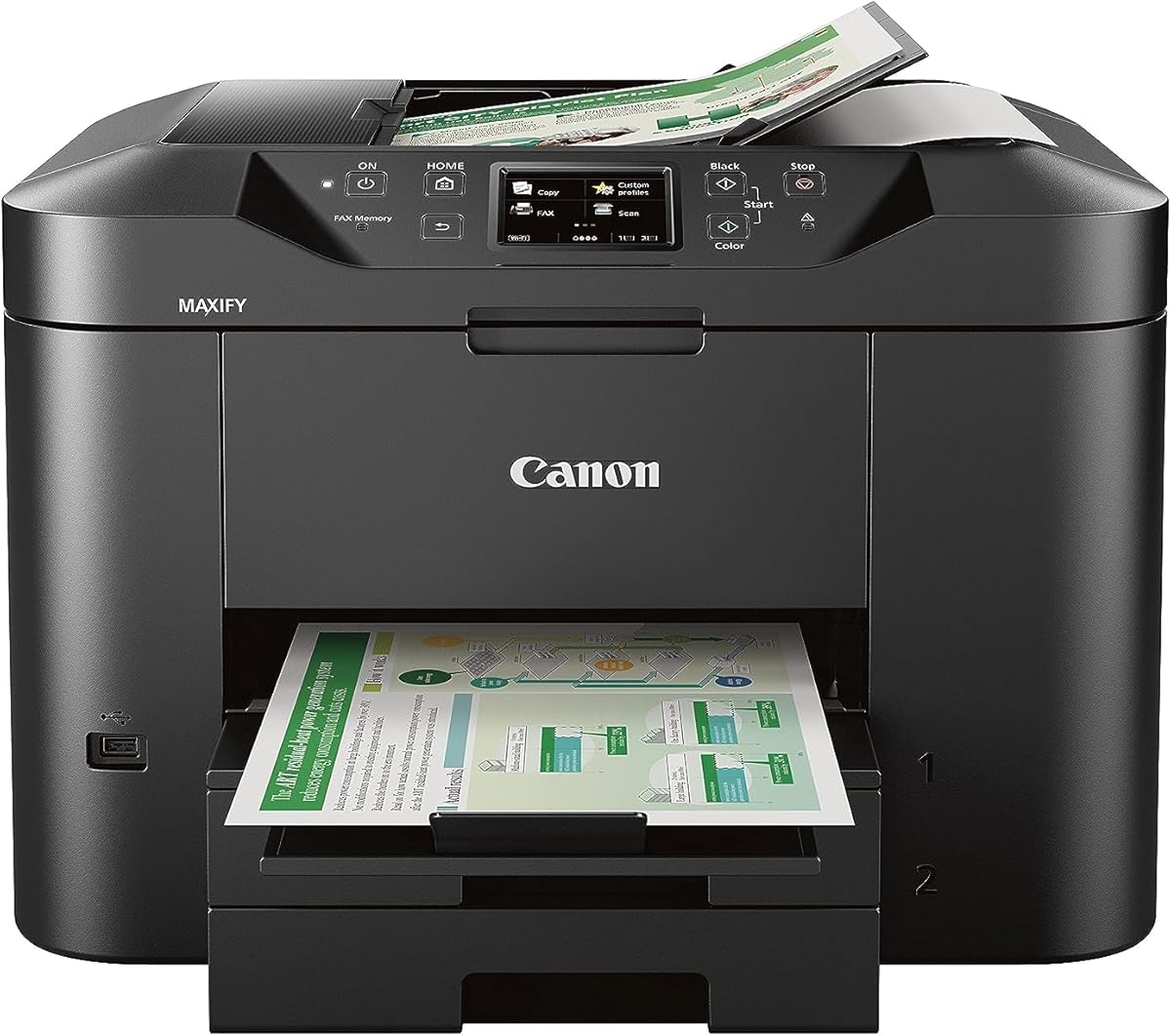
The Canon MAXIFY MB2720 is designed for business environments that require robust document handling and faxing. With a 3.9 rating it provides reliable performance for high volume tasks. Its standout qualities include a 500 sheet paper capacity and a 20,000 page duty cycle that support continuous operation.
We may earn a commission when you buy through this link, at no additional cost to you.
Key strengths include the Dual Resistant High Density Inks which produce laser-sharp text that is highlighter and smudge resistant. The Canon PRINT app enables scanning and copying from mobile devices which enhances office workflow efficiency. Additionally the US based Service and Support ensures you get help quickly when needed.
Trade-offs include a larger physical footprint which might not fit well in small home spaces. The device is optimized for business use which might be more than needed for simple personal fax tasks. However for users who need reliability and high volume capacity these factors are acceptable trade-offs.
This model is best for small businesses that need a durable all-in-one solution with faxing. If you deal with regular document and fax volume this printer offers the capacity and speed to handle it. Its business oriented features make it a strong choice for growing professional offices.
With 500 sheets of paper capacity you can print and fax for hours without refilling.
DRHD inks ensure your printed documents stay legible and professional even after handling.
We may earn a commission when you buy through this link, at no additional cost to you.
The Brother intelliFAX-2840 offers laser quality faxing for users who prefer sharp and durable documents. With a 3.9 rating it delivers fast transmission and reliable performance. Its standout qualities include 21 ppm speed and laser technology that ensures clear text on every page.
We may earn a commission when you buy through this link, at no additional cost to you.
Key strengths include the 200 x 300 dpi resolution which provides clean and legible output for business documents. The laser technology generally requires less maintenance than inkjet models making it ideal for offices. With fast transmission speeds you can send multiple pages quickly which improves overall efficiency.
Trade-offs include the lack of network readiness which limits sharing the device across a network. The unit is also bulkier than many inkjet fax options which might be a consideration for space constrained environments. However for quality focused users these limitations are often outweighed by the benefits of laser output.
We recommend this model for offices that prioritize print quality and speed for fax tasks. If you need a dedicated fax that delivers professional results with minimal intervention this is a solid choice. It balances performance and reliability well for users who want a strong fax tool.
Laser technology ensures that text on your faxes remains crisp and professional.
With 21 ppm capability you can handle large document faxing tasks efficiently and quickly.
We may earn a commission when you buy through this link, at no additional cost to you.
The Brother IntelliFax 575 Thermal is a straightforward fax machine designed for basic office needs. With a 3.3 rating it offers essential fax and copy functions at an affordable price. Its standout qualities include Energy Star certification and a 512 KB memory that supports efficient document handling.
We may earn a commission when you buy through this link, at no additional cost to you.
Key strengths include the 400 x 400 dpi resolution which ensures clear output for everyday communication tasks. The 10 Sheet ADF allows you to automatically feed multiple pages for faxing reducing manual effort. This model is easy to operate making it accessible for users who need a simple solution.
Trade-offs include the reliance on thermal paper which might not be suitable for permanent archival. Thermal prints can fade over time compared to ink or laser documents. However for short term communication needs this is a minor concern for users prioritizing ease of use.
This device is best for small offices needing a basic and budget friendly fax solution. If you want a machine that handles sending and receiving faxes without complexity this is a practical option. It balances energy efficiency with functional design for cost effective office communication.
Energy Star certification ensures the device consumes less power during operation saving on costs.
The 10 Sheet ADF makes it easy to fax multi page documents without manually feeding each page.
We may earn a commission when you buy through this link, at no additional cost to you.
The Panasonic KX-FHD331 is a plain paper fax machine suitable for users who prefer standard document formats. With a 2.7 rating it provides essential fax capabilities with some added convenience features. Its standout qualities include caller ID compatibility and an answering machine interface for better call handling.
We may earn a commission when you buy through this link, at no additional cost to you.
Key strengths include the use of plain paper which is more durable and easier to store than thermal paper. The 9.6 Kpbs modem speed ensures reliable transmission times for standard documents. Additionally the answering machine interface allows for seamless integration of voice and fax communication.
Trade-offs involve a lower customer rating which may indicate reliability or usability issues over time. The feature set is basic and might not meet the needs of users requiring advanced functions. However for those who simply want a plain paper fax option this unit remains a functional choice.
We suggest this model for users who prioritize standard paper output on a budget. If you need a machine that accepts standard paper and offers basic fax and answering features this is a viable option. It works well for home offices that do not require high volume faxing.
Using plain paper means your documents are easier to file and store without special handling.
The answering machine interface helps you manage both voice calls and faxes efficiently.
We may earn a commission when you buy through this link, at no additional cost to you.
Selecting the right cheap fax machine requires understanding your specific needs and the features that will help you operate efficiently.
Fax machines typically use thermal paper inkjet or laser technology. Thermal is cheapest but fades quickly while laser offers the best quality. Inkjet balances cost and quality for standard home office use.
Choose laser for professional documents inkjet for general home use and thermal for minimal cost temporary needs.
Look at how much paper the machine can hold at once to prevent frequent refills. A larger tray is essential if you handle high volume faxing regularly.
Higher capacity reduces interruptions and ensures smooth workflow during busy periods.
Memory allows you to store outgoing faxes when the phone line is busy. More memory means you can queue more pages without losing data.
Choose at least 25 pages of memory to handle common transmission delays effectively.
Modem speed determines how quickly a fax is sent. Faster modems like 9600 bps save time on large documents.
Opt for faster modem speeds if you send multi-page faxes regularly to save time.
Multifunction devices combine faxing with printing scanning and copying. This saves space and adds utility for home offices.
Select an all-in-one if you need more than just faxing to get better overall value.
Modern fax machines may offer wireless printing and mobile app support. These features allow you to fax from smartphones and computers without a phone line.
Prioritize wireless connectivity if you need flexibility in your workspace setup.
An intuitive control panel and straightforward setup process are vital for daily operation. Complex menus can lead to errors and wasted time.
Choose a model with simple controls if you need quick and reliable operation.
A solid warranty and accessible customer support are crucial for long-term reliability. Check the terms before buying to ensure protection.
Always verify warranty details to safeguard your investment against defects or issues.
Always place documents face down in the input tray to ensure the scanner reads the text correctly. Align the edges of the paper properly to prevent jams or skewed fax transmissions.
Regularly clean the glass scanner and paper rollers with a soft cloth to maintain print quality. Dust and debris can cause streaks or errors during the fax process.
Keep the machine in a cool dry place to protect the internal components from heat and humidity. This extends the life of the device and ensures consistent performance.
Most traditional fax machines require a standard phone line to transmit documents reliably. However some modern models support internet faxing or apps that do not need a physical line. Check the specs to see if your chosen model offers VoIP support.
Thermal fax machines use heat-sensitive paper that is cheaper but fades over time. Plain paper machines use standard office paper which is better for long-term storage. Plain paper is generally preferred for professional documents.
Yes many modern all-in-one fax printers include mobile apps that allow you to send faxes from your phone. You will need a Wi-Fi connection and the appropriate app installed to use this feature.
It is recommended to clean the glass and rollers at least once a month to prevent smudges and jams. More frequent cleaning may be needed if you operate in a dusty environment or send high volumes.
The duty cycle indicates the maximum number of pages the machine can handle per month without damage. Choose a model with a duty cycle that matches your expected usage to ensure longevity.
Costs can include ink or toner replacement and paper which vary by model. Some devices may also require phone line fees or internet services depending on the technology used.
We have reviewed ten affordable fax machines that cater to different needs from basic standalone units to advanced all-in-one models. Each option offers unique benefits such as speed capacity and smart features to help you stay connected.
Prioritize features that match your specific workflow whether it is wireless connectivity paper capacity or output quality. Selecting the right tool will ensure your communication remains efficient and reliable.
Always check current prices and availability before purchasing as these can change frequently. By staying informed you can secure the best deal on a fax machine that fits your budget.