
TRENDnet 28-Port Multi-Gig Switch
4.8Editor score
24 2.5G RJ45 ports
4 10G SFP+ ports
Lifetime protection warranty
This guide compares the top 25GbE switches with SFP28 ports for performance, port density, and enterprise features to help you choose the right network gear.
Selecting the right network infrastructure is critical for modern data centers and high-performance computing environments. 25GbE switches with SFP28 ports offer the ideal balance of speed and cost efficiency for servers that need more bandwidth than 10GbE provides without the expense of 100GbE.
We evaluated ten top-rated switches based on port configuration, switching capacity, management features, and reliability. Our analysis includes options from leading vendors like Cisco, Ubiquiti, Mikrotik, and QNAP to cover diverse needs from small offices to large clusters.
Each product pick highlights key strengths, ideal use cases, and potential limitations to help you make an informed decision. Please note that pricing and availability can fluctuate, so always verify current details before purchasing your networking equipment.
4.8Editor score

4.8Editor score

5.0Editor score
The following table provides a quick side-by-side comparison of the ten switches reviewed in this guide. Look at port types, management capabilities, and physical design to find the model that fits your rack and performance requirements.





The Ubiquiti UniFi Aggregation Switch Pro stands out as a top contender for network professionals seeking high performance. It offers a strong combination of 10G and 25G ports to handle demanding bandwidth needs effectively.
We may earn a commission when you buy through this link, at no additional cost to you.
Its Layer 3 features allow for efficient routing and segmentation, while the 760Gbps switching capacity ensures minimal latency. The unique touchscreen provides quick access to system insights without needing a separate login.
While it is priced higher than basic unmanaged switches, the value comes from its advanced capabilities and ease of use. The limitation on mixed speeds for SFP28 ports is a trade-off for maintaining consistent throughput.
This switch is ideal for businesses upgrading their core network infrastructure who need reliable aggregation. It bridges the gap between cost and enterprise performance effectively for many modern setups.
The switch allows you to create high-bandwidth aggregation links easily, ensuring your core network is not a bottleneck for data transfer.
The built-in touchscreen displays key system metrics concisely, making it easier for administrators to monitor health at a glance.
We may earn a commission when you buy through this link, at no additional cost to you.
The TRENDnet TEG-S50284 is an excellent choice for those needing faster speeds without breaking the budget. It provides multi-gigabit connectivity over existing Cat5e cabling which saves on wiring costs.
We may earn a commission when you buy through this link, at no additional cost to you.
With 24 ports supporting up to 2.5Gbps and four 10G uplinks, it handles most SMB needs well. The lifetime protection from TRENDnet adds significant value and peace of mind for long-term use.
The lack of actual 25GbE ports means it is not strictly a 25GbE switch but it serves as a great stepping stone. The energy-efficient fans ensure quiet operation while keeping the hardware cool under load.
Ideal for small to medium businesses transitioning to faster networks, this switch offers a balance of price and utility. It is perfect for upgrading desktop connections without replacing all infrastructure immediately.
Utilizing existing Cat5e cabling for 2.5G speeds makes this switch a highly economical upgrade path for organizations avoiding fiber costs.
NDAA and TAA compliance makes it a viable option for government customers or those working with federal contracts in the US and Canada.
We may earn a commission when you buy through this link, at no additional cost to you.
The Cisco Nexus N9K-C92160YC-X offers an impressive density of 48 ports supporting 25GbE speeds. This makes it a strong candidate for data centers where rack space is at a premium.
We may earn a commission when you buy through this link, at no additional cost to you.
As a renewed product, it provides access to enterprise-class hardware at a more accessible price point. The dual AC power support ensures high availability for critical network infrastructure in server rooms.
While the setup may require advanced networking knowledge, the performance is robust for virtualization and storage networks. It is a practical option for those needing many 25G ports without the cost of new units.
Choose this switch if you need maximum port count in a single chassis. It is suitable for expanding server connectivity efficiently while maintaining consistent performance across all nodes.
With 48 ports on a single unit, this switch maximizes your rack space efficiency for connecting multiple servers or storage arrays.
We may earn a commission when you buy through this link, at no additional cost to you.
The Mikrotik CRS520 brings extra processing power to your network stack with its dedicated quad-core ARM CPU. This ensures that complex tasks do not interfere with data forwarding speed.
We may earn a commission when you buy through this link, at no additional cost to you.
It offers a mix of ports including 28 Gigabit SFP28 options and 100G QSFP28 uplinks for high-speed backbone connections. The hardware is designed to handle heavy traffic loads smoothly without dropping packets.
Managing this device requires familiarity with Mikrotik interfaces but the control you gain is significant. It is a powerful choice for enthusiasts or enterprises that need custom routing or advanced firewalling.
For those comfortable with technical interfaces, this switch provides excellent flexibility. It serves well as a core switch or firewall gateway in mixed speed network environments.
The 2 GHz quad-core ARM processor handles complex routing and firewalling tasks efficiently ensuring traffic flow remains uninterrupted.
We may earn a commission when you buy through this link, at no additional cost to you.
The Dell EMC PowerSwitch N3224P-ON is designed for environments requiring high power delivery and speed. It supports PoE++ allowing you to power high-demand devices over Ethernet cables effectively.
We may earn a commission when you buy through this link, at no additional cost to you.
Its modular nature allows for flexible deployment while the 25GbE and 100GbE ports provide strong uplink capabilities. This makes it versatile for both access and aggregation layers in modern networks.
While power consumption is high, the performance trade-off is acceptable for demanding workloads like AI clustering. It ensures that your connected devices receive sufficient energy without separate adapters.
Choose this model if you need to power and connect multiple high-bandwidth devices. It is well suited for dense server racks needing both data and power through a single switch.
Support for PoE++ means you can deliver power to devices that require higher wattage reducing the need for individual power supplies.
We may earn a commission when you buy through this link, at no additional cost to you.
The TRENDnet TEG-3284WS focuses on ease of use through its web smart management interface. It allows administrators to configure VLANs and security settings without complex command lines.
We may earn a commission when you buy through this link, at no additional cost to you.
With 24 multi-gigabit ports and 10G uplinks, it supports modern desktop networking needs well. The cloud service option adds remote management capabilities for IT teams managing multiple locations.
While the rating is lower than other options, it offers a balance of affordability and manageability for SMBs. The Hive enabled cloud service is optional but adds flexibility for those who want remote access.
This switch is a solid choice for offices needing simple management tools. It provides a cost effective way to add multi-gigabit speeds to your workstations without heavy IT overhead.
The Hive cloud service allows you to manage and diagnose the switch remotely adding convenience for distributed network deployments.
We may earn a commission when you buy through this link, at no additional cost to you.
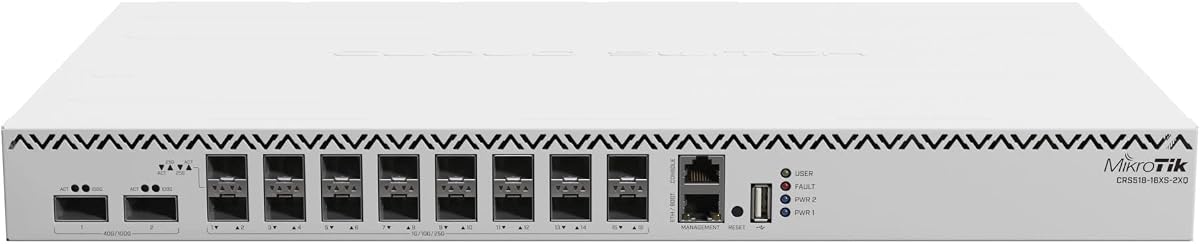
The MikroTik CRS518 is a compact Cloud Router Switch that combines routing and switching in a small package. It is designed for smaller environments needing high-speed uplinks without bulky hardware.
We may earn a commission when you buy through this link, at no additional cost to you.
With QSFP28 support, it can handle high-speed connections to larger networks or data centers. The CPU is sufficient for standard routing tasks making it reliable for edge deployments.
Its small size makes it easy to fit in tight spaces or wall mounts. This is ideal for edge locations where full rack units are not practical or needed.
Choose this switch for simple yet fast connectivity needs. It serves well as an edge device connecting a small office to a high-speed backbone network.
This device acts as both a router and switch simplifying your network setup by reducing the number of devices required.
We may earn a commission when you buy through this link, at no additional cost to you.
The Cisco N9K-C93180YC-EX delivers enterprise grade performance with its cut-through switching architecture. It minimizes latency to less than one microsecond which is critical for high performance computing.
We may earn a commission when you buy through this link, at no additional cost to you.
Hot-swappable power supplies and fans ensure your network stays running even during maintenance. The NX-OS operating system provides consistent and reliable administration across your Cisco ecosystem.
As a renewed product, it offers premium features at a better price. The modular design allows for easy upgrades so you can adapt to changing requirements over time.
This switch is perfect for large data center deployments needing consistent reliability. It provides unmatched connectivity for handling demanding applications and virtualization workloads.
By processing packets immediately rather than buffering them, this architecture significantly reduces latency for real-time data processing.
We may earn a commission when you buy through this link, at no additional cost to you.
The D-Link DGS-1210-28 is designed for quiet environments with its fanless design. It operates silently making it suitable for offices or classrooms where noise is a concern.
We may earn a commission when you buy through this link, at no additional cost to you.
It supports Layer 2+ features like VLANs and static routing which helps organize network traffic effectively. The lifetime warranty and NDAA compliance add to its value and trustworthiness.
While it does not offer 25GbE speeds, it provides reliable Gigabit connectivity for most general needs. The energy efficient design saves on power costs over long periods.
Ideal for noise sensitive spaces, this switch offers dependable performance. It is a great fit for SMBs needing a simple and quiet solution for wired connections.
The fanless hardware design ensures zero operational noise allowing the device to be placed near users without disruption.
We may earn a commission when you buy through this link, at no additional cost to you.
The QNAP QSW-M7230 offers future proof scalability with its high speed backbone and 25GbE access ports. It is designed for environments requiring low latency and high throughput.
We may earn a commission when you buy through this link, at no additional cost to you.
Built-in technologies like Priority Flow Control ensure lossless network performance for critical data transmission. The Layer 3 Lite managed features help optimize IT infrastructure efficiently.
While it comes with a higher price, the capabilities for AI clustering and large NAS deployments are strong. It bridges modern fiber backbones with existing copper setups effectively.
This switch is a top choice for high-bandwidth enterprise environments. It ensures cost-effective migration to faster networks while maintaining reliable performance.
Priority Flow Control minimizes packet loss ensuring your high-speed data moves smoothly without bottlenecks.
We may earn a commission when you buy through this link, at no additional cost to you.
Choosing the right 25GbE switch requires understanding your network needs and growth plans. This guide covers the essential factors to consider before purchasing.
Look for switches that offer enough ports for your servers plus room for growth. Ensure you have the right mix of 25GbE and higher speed uplinks.
Verify that the port types match your existing cabling and server NICs.
Switching capacity determines the total bandwidth the switch can handle at once. Higher capacity ensures better performance when all ports are active.
Choose a capacity that exceeds your current traffic to allow for future spikes.
Decide between unmanaged, smart managed, or fully managed switches. Layer 3 features are vital for routing and segmentation in larger networks.
Managed switches provide better control but require more setup time.
Check the power consumption to ensure your power supply is adequate. Cooling fans can be noisy in office environments so consider fanless models if needed.
Redundant power options improve reliability for critical network tasks.
Ensure the switch fits your rack space. 1U designs are common for server rooms but smaller units might be needed for edge closets.
Rack mounting kits should be included to secure the device properly.
Good customer support is crucial if issues arise. Look for lifetime warranties or extensive support periods.
Check if the manufacturer offers clear documentation for configuration.
Select switches that support higher speed uplinks like 100GbE for growth. This allows you to upgrade without replacing the whole switch.
Consider models with flexible port configurations for evolving needs.
Compare price against features to find the best value. Expensive switches might have features you do not need.
Balance initial cost with long-term operational benefits.
Place the switch in a well-ventilated rack to prevent overheating. Ensure cables are neatly organized to avoid blocking airflow around the ports.
Update the firmware regularly to access security patches and new features. Use the manufacturer web portal or CLI tools for these updates.
Monitor traffic patterns periodically to optimize bandwidth usage. Adjust QoS settings if certain applications need higher priority than others.
25GbE switches offer 2.5 times the bandwidth of 10GbE models. They are ideal for servers that need to handle larger data transfers without the cost of 100GbE. This makes them a sweet spot for high performance computing and modern NAS systems.
Yes SFP28 ports typically require fiber optics or twinax copper cables. Ensure your cables support 25G speeds. Existing Cat6a or Cat7 copper may work for shorter distances but fiber is best for reliability.
Most modern switches allow speed negotiation between devices. However some high performance switches may require dedicated ports for specific speeds. Check the switch manual to confirm compatibility with mixed speeds.
Switching capacity ensures all ports can transfer data simultaneously without congestion. High capacity prevents bottlenecks during peak usage. It is a key metric for handling heavy traffic loads in data centers.
Managed switches provide VLAN support QoS and better security. If you run multiple networks or need traffic prioritization they are worth it. For simple home use an unmanaged switch might suffice.
Look for Layer 3 or Routing features in the product description. Layer 3 switches can route traffic between subnets without a separate router. This reduces hardware costs in complex networks.
A 100GbE uplink allows the switch to connect to a high-speed backbone. It aggregates traffic from multiple 25GbE ports to one fast link. This prevents the uplink from becoming a bottleneck.
Network switches often last five to ten years if maintained well. Quality components and proper cooling extend the life. Regular firmware updates help keep the system secure and efficient.
We reviewed ten top switches ranging from budget friendly to enterprise grade. The Ubiquiti Aggregation Switch Pro leads with its balance of speed and ease of use.
Prioritize port density and switching capacity based on your specific workload needs. Ensure the switch fits your physical and management constraints for best results.
Prices fluctuate frequently so check current listings before buying. This guide provides a strong foundation for selecting the right gear for your network.