
LG Smart Monitor Swing
4.1Editor score
webOS smart platform included
Rolling wheeled base stand
AirPlay 2 and Bluetooth support
Touchscreen monitors have transformed how we interact with computers, offering intuitive control for creative work and presentations. Finding the right 32 inch touchscreen monitor requires balancing resolution, responsiveness, and ergonomic design to suit your specific needs effectively.
We evaluated ten leading models based on display quality, touch accuracy, connectivity options, and stand flexibility. Our analysis focuses on real-world performance metrics and user feedback to ensure you select a device that enhances your workflow without compromising on reliability.
Each selection highlights unique strengths, from budget-friendly options to premium smart displays with rolling stands. Remember that specifications and availability can change, so verify current details before purchasing to ensure the model meets your evolving technical requirements and space constraints.
4.1Editor score

5.0Editor score

4.2Editor score
As an Amazon Associate we earn from qualifying purchases.
The following table provides a side-by-side comparison of the top ten 32 inch touchscreen monitors available this month. It highlights key specifications such as resolution, refresh rate, panel type, and unique features to help you quickly identify the best fit for your setup.



This monitor stands out as the top choice for users seeking a blend of high resolution and smooth motion. With a 4K display and 144Hz refresh rate, it delivers exceptional clarity for design work and fluidity for interactive applications. The 10-point touchscreen ensures precise control across various software environments.
We may earn a commission when you buy through this link, at no additional cost to you.
Its connectivity suite is robust, featuring HDMI 2.1 and DP 1.4 for high bandwidth video, alongside a full-featured Type-C port for single-cable setups. The stand offers full adjustability including pivot and height, making it easy to find a comfortable viewing angle. VESA compatibility allows for flexible mounting solutions in any workspace.
While it offers wide compatibility, users should note that macOS devices are limited to 2-point touch functionality due to protocol restrictions. Additionally, the monitor requires a specific power-up sequence where the power adapter must be connected before signal cables. These minor caveats do not detract from its overall performance capabilities.
For professionals and enthusiasts who need a versatile screen for creative tasks and entertainment, this model is highly recommended. It balances premium features with reliable performance, making it the best overall option for those prioritizing both resolution and touch responsiveness in a 32-inch form factor.
The 144Hz refresh rate ensures that every touch and swipe feels instantaneous, reducing motion blur during fast-paced tasks like gaming or dynamic presentations.
Multiple ports including HDMI 2.1 and Type-C allow you to connect modern laptops and desktops effortlessly, supporting both video and touch signals through a single cable.
We may earn a commission when you buy through this link, at no additional cost to you.
The LG Smart Monitor Swing redefines versatility with its unique rolling stand and smart operating system. Designed for spaces where flexibility is key, it allows you to move the display easily between rooms while maintaining high 4K image quality. The built-in webOS means you can stream content or manage tasks without needing a separate computer.
We may earn a commission when you buy through this link, at no additional cost to you.
Its connectivity options support up to 65W power delivery via USB-C, making it an ideal hub for laptops. The Switch app enables multitasking by splitting the screen into multiple sections, enhancing productivity significantly. Furthermore, seamless wireless sharing via AirPlay 2 and Bluetooth ensures easy integration with mobile devices and audio systems.
While the feature set is impressive, the price reflects its premium status and specialized design. Users should ensure they have adequate space for the wheeled base, which requires some floor room to maneuver effectively. However, for collaborative environments or dynamic offices, this mobility offers a distinct advantage over static monitors.
This monitor is perfect for businesses or creative studios needing a portable presentation tool or a standalone smart display. Its combination of touch control, smart features, and physical flexibility makes it the best premium choice for those willing to invest in a versatile workstation solution.
The hidden adapter compartment keeps cables organized while the wheeled base allows you to move the monitor effortlessly to wherever you need it most.
webOS lets you access cloud services and video conferencing tools directly, reducing the need for a connected PC in certain use cases.
We may earn a commission when you buy through this link, at no additional cost to you.
Offering excellent value for money, the FYHXele monitor delivers a sharp QHD image and responsive touch without a high price tag. It is ideal for users who need a large interactive screen for daily tasks, design work, or casual gaming. The IPS panel ensures consistent colors from various viewing angles, making it a reliable choice for shared workspaces.
We may earn a commission when you buy through this link, at no additional cost to you.
The 100Hz refresh rate provides smooth motion that reduces blur during fast-paced content. Connectivity includes a versatile USB-C port for efficient power and signal transmission, simplifying cable management. The stand supports tilt and pivot adjustments, ensuring comfortable usage over long periods. Its color precision makes it suitable for photography and graphic design tasks.
Some device compatibility limitations exist, particularly with certain gaming consoles and mobile devices which may not support touch functionality. Also, it lacks integrated speakers, so external audio is needed for multimedia consumption. These trade-offs are acceptable given the competitive pricing and strong performance in core visual and touch metrics.
For budget-conscious buyers seeking a large 32-inch touchscreen, this model is a standout option. It balances performance and affordability effectively, making it the best budget choice for those who prioritize visual quality and touch responsiveness over premium brand features or built-in audio.
With 100% coverage of standard color spaces, this monitor offers vibrant and true-to-life hues essential for professional design work and photo editing.
The 100Hz refresh rate ensures that motion appears fluid and responsive, minimizing ghosting during fast videos or interactive gaming sessions.
We may earn a commission when you buy through this link, at no additional cost to you.
This monitor combines high resolution with practical features like built-in speakers and a free stylus for precise touch control. It is well-suited for office environments or commercial displays where clear visuals and user interaction are priorities. The 100Hz refresh rate ensures that animations and videos remain smooth and responsive during use.
We may earn a commission when you buy through this link, at no additional cost to you.
Its compatibility extends across various operating systems including Windows, Android, and Linux, making it versatile for different setups. The ergonomic stand allows for full adjustment including height and pivot, supporting comfortable long-term usage. Integrated speakers provide basic audio output without needing extra peripherals for simple tasks.
While it offers many features, the lack of available rating data makes it harder to assess long-term reliability from user feedback. The speakers are functional but low power, which may not suffice for immersive media. Despite this, the inclusion of a stylus and wide system support adds value for diverse applications.
For users needing a reliable 2K touchscreen for general work or industrial control, this model is a solid candidate. Its blend of resolution, touch accuracy, and flexible mounting options makes it a practical choice for environments where durability and versatility are key requirements.
The free stylus allows for detailed input and precise navigation, making it ideal for design work or signing documents directly on screen.
Support for multiple operating systems ensures you can use it with existing infrastructure whether it is a PC, Raspberry Pi, or industrial controller.
We may earn a commission when you buy through this link, at no additional cost to you.
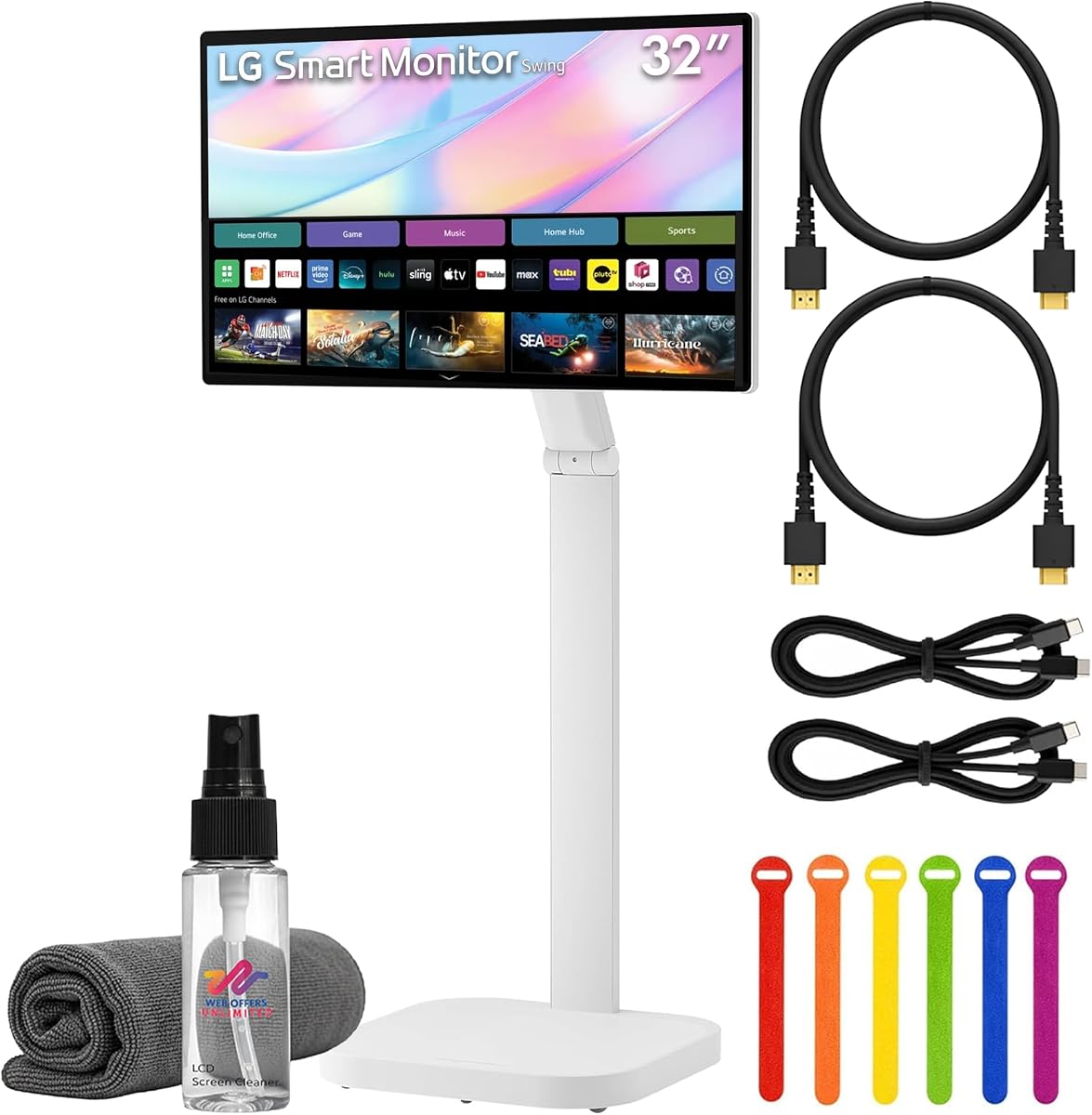
This bundle expands the LG Smart Monitor experience by including essential accessories like cables and a cleaning kit, making setup straightforward. It offers the same flexible rolling stand and smart features as the standard model but ensures you have everything needed to start using it immediately. The 4K display remains sharp and suitable for both work and entertainment.
We may earn a commission when you buy through this link, at no additional cost to you.
WebOS integration allows you to access streaming services without a PC, while USB-C with 65W power delivery keeps laptops charged. The bundle components simplify cabling and maintenance, saving time on setup. Its ability to connect multiple devices and support remote PC access enhances its utility in modern office spaces.
While the bundle adds value through included items, it may cost more than buying items separately depending on current discounts. The lack of specific rating data for this bundle version means relying on the main monitor's performance history. However, the convenience of having all necessary tools in one package is a strong selling point.
For organizations wanting a ready-to-deploy smart display solution, this bundle is highly recommended. It provides the mobility of the swinging stand and the convenience of smart features along with necessary accessories, making it an efficient choice for businesses setting up collaborative work areas quickly.
The inclusion of HDMI cables and a cleaning kit means you can install and maintain the display immediately without purchasing extra accessories separately.
With 65W power delivery, the Type-C port can charge compatible laptops while transmitting video and touch data through a single cable.
We may earn a commission when you buy through this link, at no additional cost to you.
This monitor is engineered for commercial environments, offering durability for continuous operation and high-traffic areas. Its design supports external PC mounting and power passthrough, simplifying cabling in professional installations. The impact testing compliance ensures it can withstand physical contact in busy public spaces like retail stores or kiosks.
We may earn a commission when you buy through this link, at no additional cost to you.
Built-in IoT control allows for remote management, making it ideal for large deployments where centralized control is necessary. VESA mounting provides flexibility in installation options, ensuring the display can be positioned securely. These features prioritize reliability and ease of maintenance over consumer entertainment capabilities.
While it is robust, the price point reflects its commercial grade construction which may be higher than consumer alternatives. It lacks consumer-focused smart features like built-in streaming apps, focusing instead on hardware durability and management tools. This makes it less suitable for home entertainment but perfect for business signage.
Businesses requiring a durable and manageable display solution should consider this model. Its ability to run continuously and withstand physical wear makes it the ideal choice for industrial control, retail, or public information systems where reliability is paramount.
Designed for 24/7 operation, this display is built to handle long hours without overheating or performance degradation in commercial settings.
Compliance with IK-07 impact testing ensures the screen can withstand accidental bumps and physical contact in busy environments.
We may earn a commission when you buy through this link, at no additional cost to you.
This monitor offers a reliable large-screen option for basic display needs with IPS technology for wide viewing angles. It provides solid brightness suitable for well-lit rooms and a comfortable size for general office or home use. The build quality reflects LG's reputation for durability and consistent image performance across its product lines.
We may earn a commission when you buy through this link, at no additional cost to you.
It features a standard Full HD resolution which is adequate for documents and video consumption. The IPS panel ensures that colors remain consistent even when viewed from the side. Its simple design integrates easily into existing setups without requiring specialized ports or connectivity options.
While it is a quality monitor, it does not include touch functionality which limits interactive use. The resolution is lower than newer 4K models, which might affect sharpness for detailed design work. These limitations are acceptable for general usage where interaction is not required.
For users needing a standard large monitor for general tasks, this model is a dependable choice. Its balance of size and performance makes it suitable for everyday computing without the complexity or cost of touch-enabled models.
IPS panel technology ensures consistent color and brightness even from side angles, making it ideal for shared workspaces.
We may earn a commission when you buy through this link, at no additional cost to you.
This model is a standard commercial touchscreen option designed for reliability in business settings. It offers essential touch features for interactive presentations or point-of-sale systems. The build quality is noted as good, ensuring it meets the demands of daily commercial use without frequent failures or defects.
We may earn a commission when you buy through this link, at no additional cost to you.
While it focuses on functionality rather than advanced smart features, it provides a stable platform for tasks requiring user input. The FHD resolution is sufficient for text and basic graphics, making it a practical choice for informational displays. Its simplicity reduces potential points of failure in busy environments.
As a basic commercial display, it lacks high resolution or smart capabilities found in premium consumer models. It serves its purpose well for touch interactions but may not be ideal for high-detail work. These limitations are acceptable given its targeted use case in professional settings.
For businesses needing a reliable interactive display, this model is a safe choice. Its focus on durability and essential touch features makes it a practical option for kiosks, meeting rooms, or general office tasks where performance stability is critical.
The monitor is constructed with materials that ensure longevity, meeting the high standards expected from Samsung commercial products.
We may earn a commission when you buy through this link, at no additional cost to you.
This variant offers a straightforward 32-inch display with basic touch capabilities for commercial applications. The 75Hz refresh rate provides smooth visuals for standard content playback. Its black finish ensures it blends into office environments without drawing unnecessary attention to the hardware itself.
We may earn a commission when you buy through this link, at no additional cost to you.
It is designed for general use where touch input is needed but advanced features are not critical. The resolution supports clear text and video for meetings or presentations. Its simplicity makes it easy to integrate with existing systems without requiring complex configuration or driver updates.
While functional, it does not offer the high refresh rates or smart connectivity of newer models. This makes it less suitable for high-performance needs but perfect for traditional office or retail touch applications. The focus remains on reliability and ease of use.
For businesses seeking a no-frills touchscreen display, this model is a practical option. It provides the essential tools needed for interaction and presentation without the cost of premium features, making it a solid choice for standard office setups.
The black finish ensures the display looks professional and matches standard office furniture or equipment setups.
We may earn a commission when you buy through this link, at no additional cost to you.
This model delivers a 4K display with smart features that allow standalone streaming and easy wireless sharing. It is designed for environments where mobility and connectivity are priorities, such as collaborative workspaces. The rolling stand ensures you can move the screen to where it is needed most during meetings or presentations.
We may earn a commission when you buy through this link, at no additional cost to you.
WebOS integration means you can access apps directly without a PC, and AirPlay 2 allows seamless mirroring from Apple devices. The USB-C port supports power delivery to keep connected devices charged while displaying content. These features make it a versatile tool for both entertainment and professional use.
While the feature set is strong, the rating suggests some users may experience issues with setup or software. Internet connectivity is required for full smart functionality, which might be a constraint in certain networks. Despite this, the hardware remains robust for those needing a flexible display.
For users wanting a smart display with physical mobility, this is a compelling option. Its ability to combine 4K visuals with smart OS capabilities makes it a strong candidate for modern office spaces or dynamic presentation needs.
AirPlay 2 allows you to mirror content from Apple devices instantly, making presentations effortless without cables.
WebOS lets you run streaming apps and cloud services directly on the monitor, reducing reliance on external hardware.
We may earn a commission when you buy through this link, at no additional cost to you.
Selecting the right 32 inch touchscreen monitor involves evaluating several technical and practical factors to ensure it meets your specific needs.
Higher resolution options like 4K offer sharper text and more detailed visuals, which is essential for design work or reading text. Ensure the monitor supports the resolution required for your tasks to avoid scaling issues that might reduce sharpness or clarity on screen.
Prioritize models with at least QHD or 4K resolution for the best visual experience and professional-grade accuracy in your work.
Capacitive touch screens provide a more natural feel and better sensitivity compared to resistive options. Look for 10-point touch capability to support multi-gesture interactions like pinching or rotating which improve usability in creative apps.
Choose a model with capacitive touch and multiple touch points for smooth and responsive interactions across your daily tasks.
A higher refresh rate such as 100Hz or 144Hz ensures that motion on screen appears smooth and reduces blur during animations. This is particularly important if you plan to use the monitor for interactive gaming or dynamic content presentation.
Select a monitor with at least 100Hz refresh rate for fluid motion and minimal visual artifacts during fast-paced interactions.
Versatile connectivity including HDMI, DisplayPort, and USB-C ensures compatibility with your current devices. USB-C with power delivery is a significant advantage as it simplifies cabling by delivering both video and power through one cable.
Check for multiple ports including USB-C for flexible and efficient connection options with your laptops and desktops.
An adjustable stand that allows height, tilt, and swivel adjustments helps maintain a comfortable viewing posture during long work sessions. VESA mount compatibility offers further flexibility for wall mounting or using monitor arms to save desk space.
Ensure the monitor supports ergonomic adjustments like pivot and height to maintain comfort and reduce strain during extended use.
Brightness levels around 350 nits or higher ensure the screen remains visible even in brightly lit rooms. High color accuracy is vital for professionals working with graphics or photography to ensure colors match what you see on other devices.
Look for models with high brightness and wide color gamut coverage to maintain visual quality across different lighting conditions.
Some monitors include built-in smart platforms like webOS that allow standalone streaming and app access without a PC. These features add convenience for media consumption but require reliable internet connectivity and may increase the overall cost of the device.
Consider smart platforms if you need standalone media capabilities but balance this against your budget and connectivity requirements.
For commercial or heavy daily use, industrial-grade durability and impact resistance are important factors. Built-in IoT control or robust casing ensures the monitor lasts longer in high-traffic environments compared to standard consumer models.
Select commercial-grade models if you plan to use the monitor continuously in busy or professional environments.
To set up your monitor, ensure you connect the power adapter before attaching signal cables to prevent boot issues. For touch functionality, connect the USB cable between the monitor and your PC to enable the driver interaction if not using a Type-C single-cable solution.
Regularly clean the screen using a soft microfiber cloth to remove fingerprints and dust. Avoid using harsh chemicals or abrasive materials that can damage the touch layer or anti-glare coating on the display surface.
Adjust the stand to a comfortable height and angle to reduce eye strain. If you need to rotate the screen, ensure the stand supports pivot mode and the software settings are updated for landscape or portrait orientation.
Most monitors work with Mac for display, but touch functionality may be limited to 2 points due to system protocol restrictions. Check specific compatibility notes for your model before purchasing to ensure multi-touch features are fully supported on macOS.
Many consoles support video display but do not support touch input. Devices like PS5 or Xbox will work for video but touch features will remain inactive. Confirm with the manufacturer if touch is required for your gaming setup.
USB-C ports allow for single-cable connectivity that can deliver video, data, and power simultaneously. This simplifies your workspace by reducing cable clutter and powering connected laptops while displaying content on the screen.
Most modern monitors support plug-and-play drivers on Windows, but some may require additional software installation for full multi-touch features. Check the manual or manufacturer website for specific driver requirements for your operating system.
Calibration is typically handled through the monitor's built-in calibration tool or by using the operating system's display settings. Access the touch settings menu to run a calibration wizard that ensures accurate touch responses across the screen surface.
Most models support VESA mounting patterns like 100x100mm or 75x75mm allowing for wall mounting or monitor arms. Verify the specific VESA compatibility for your model to ensure proper fit with mounting hardware.
Choosing the right 32 inch touchscreen monitor depends on balancing your needs for resolution, touch responsiveness, and connectivity. The top picks offer distinct advantages, from high refresh rate performance to smart platform features and flexible stands.
Prioritize resolution and touch accuracy if you work with design or presentations, while smart features benefit those needing standalone content access. Ergonomics and build quality ensure comfort and durability in the long run.
Always check current availability and specifications before purchasing as features and models may evolve over time. Verify compatibility with your existing setup to ensure a smooth integration into your daily workflow.