
TP-Link Nano AC600
4.5Editor score
Compact nano design
Dual band connectivity
Windows and Mac support
This guide compares the top 5GHz WiFi Dongle options for desktop PCs and laptops, evaluating speed, range, and compatibility to help you choose the right
Finding a reliable wireless connection is essential for modern computing. A good 5GHz WiFi Dongle offers fast speeds and reduced interference for streaming and gaming.
We compared ten top-rated adapters based on performance, build quality, and compatibility. Each product was evaluated for its ability to deliver stable dual-band connectivity.
Each pick highlights key features like antenna design and USB standards. Note that prices and availability change frequently, so check the latest listings before buying.
4.5Editor score

4.4Editor score

4.1Editor score
The following table provides a side-by-side overview of all ten adapters. It highlights key specifications to help you quickly identify the model that fits your needs.


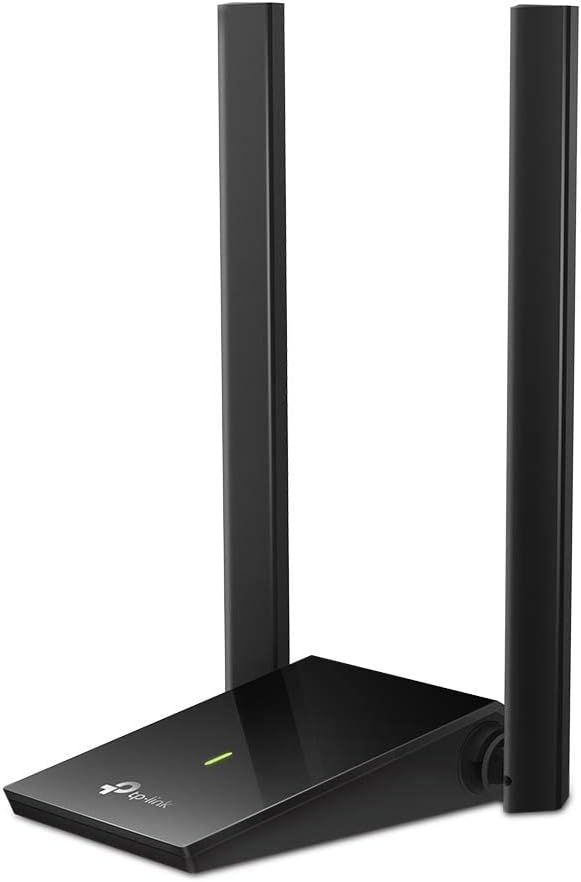


This adapter is a solid choice for users needing reliable connectivity. It offers strong speeds on the 5GHz band for modern tasks.
We may earn a commission when you buy through this link, at no additional cost to you.
The high gain antenna improves signal strength significantly. This helps maintain stable connections even at a distance from the router.
While it is limited to Windows systems, it covers most common versions. The driver setup is straightforward for most users.
It is an ideal pick for budget-conscious desktop users. We recommend it for general browsing and streaming needs.
The adjustable antenna allows you to optimize signal reception for better performance.
Access both 2.4GHz and 5GHz bands for flexible and faster internet speeds.
We may earn a commission when you buy through this link, at no additional cost to you.
The Nano adapter is perfect for laptops where space matters. It delivers solid performance without taking up much room.
We may earn a commission when you buy through this link, at no additional cost to you.
Its small design lets you leave it plugged in without obstruction. This makes it very convenient for travel and daily use.
While it lacks an external antenna, it still performs well in most homes. It is a great entry-level choice for basic needs.
We suggest this for users wanting a simple solution. It balances cost and functionality effectively for many households.
The miniature size ensures it does not block other ports on your device.
Works with both Windows and Mac systems for wider usability.
We may earn a commission when you buy through this link, at no additional cost to you.
This adapter provides a significant speed boost with AC1300 standards. It handles heavy streaming and gaming with ease.
We may earn a commission when you buy through this link, at no additional cost to you.
USB 3.0 ensures faster data transfer compared to older ports. MU-MIMO helps manage multiple devices efficiently on your network.
It is a reliable upgrade for desktops with limited internal slots. The portable form factor makes it easy to move between devices.
We recommend this for power users needing better throughput. It strikes a good balance between performance and convenience.
Beamforming connects to multiple devices simultaneously for smoother streaming.
Connects to USB 3.0 for ten times faster data speeds.
We may earn a commission when you buy through this link, at no additional cost to you.
This adapter stands out with its dual external antennas. They provide excellent signal strength for difficult wireless environments.
We may earn a commission when you buy through this link, at no additional cost to you.
USB 3.0 ensures the connection keeps up with the adapter's speed. It is a solid choice for desktops that need reliable data.
The driver installation is generally easy on modern Windows systems. You can expect stable connections even through walls or floors.
We recommend this for users needing better range. The two antennas make it a strong competitor in the mid-range market.
Two 5dBi antennas improve transmission and reception significantly.
Super Speed USB 3.0 prevents bottlenecking for fast wireless data.
We may earn a commission when you buy through this link, at no additional cost to you.
This adapter brings WiFi 6 features to older desktops. It offers faster speeds with lower latency for modern tasks.
We may earn a commission when you buy through this link, at no additional cost to you.
The built-in drivers make setup very quick on Windows. You can get online without needing a CD or manual download.
It works best with a matching WiFi 6 router. Ensure your network supports AX standards to get the full benefit.
We suggest this for users upgrading to WiFi 6. It is a practical way to enable newer standards on your PC.
New generation standards provide faster and more reliable connections.
Built-in drivers save time by eliminating manual installation steps.
We may earn a commission when you buy through this link, at no additional cost to you.
This model features a high-gain external antenna for better reach. It is designed to handle weak signals in difficult spots.
We may earn a commission when you buy through this link, at no additional cost to you.
The setup process is streamlined with preloaded drivers. You can connect in under a minute on supported systems.
It also includes an access point mode for sharing internet. This adds flexibility beyond simple client connections for your PC.
We recommend this for users needing range and speed. The external antenna gives it an edge over internal-only models.
The external 6dBi antenna captures signals better than built-in versions.
Turn your PC into a hotspot for other devices easily.
We may earn a commission when you buy through this link, at no additional cost to you.
This adapter is built for maximum range and speed. The extension cable helps you place the unit in a better spot.
We may earn a commission when you buy through this link, at no additional cost to you.
Dual antennas provide strong signal stability through obstacles. OFDMA technology helps manage traffic efficiently for better performance.
It supports Linux which is rare for budget adapters. This makes it versatile for technical users needing specific OS options.
We suggest this for power users with large homes. It delivers top-tier performance in the WiFi 6 category.
Place the adapter anywhere using the included 3.3 foot cable.
Enables efficient communication with multiple devices at once.
We may earn a commission when you buy through this link, at no additional cost to you.
This adapter delivers strong performance with dual antennas. It is great for users needing reliable coverage over a large area.
We may earn a commission when you buy through this link, at no additional cost to you.
USB 3.0 ensures you get the full speed of the connection. The adjustable design lets you optimize signal for your setup.
It supports both Windows and Mac systems comfortably. This flexibility makes it a safer choice for mixed environments.
We recommend this for desktop users needing range. The combination of speed and antenna design is hard to beat.
Two antennas improve signal quality and transmission performance.
Multi-directional antennas allow flexible deployment for best reception.
We may earn a commission when you buy through this link, at no additional cost to you.
This adapter focuses on speed and security for modern needs. WPA3 ensures your connection is protected from common threats.
We may earn a commission when you buy through this link, at no additional cost to you.
It includes a built-in driver for quick setup. You can start using it almost immediately after plugging it in.
The ventilation holes help manage heat during long sessions. This maintains performance stability over time for heavy use.
We suggest this for security-conscious users. It combines high speeds with the latest safety standards effectively.
Advanced security provides safer browsing and data protection.
Back ventilation holes maintain stable performance during use.
We may earn a commission when you buy through this link, at no additional cost to you.
This mini adapter brings WiFi 6 to smaller form factors. It is ideal for users wanting modern speeds without bulk.
We may earn a commission when you buy through this link, at no additional cost to you.
The compact design makes it easy to use on laptops. It fits neatly into tight ports without interfering with other devices.
Although it uses USB 2.0, speeds remain efficient for the AX900 standard. It balances size and performance well for daily tasks.
We recommend this for travel or small desks. It offers the latest tech in a very portable package.
Small size ensures portability and a clean workspace.
Setup is fast with included drivers for Windows systems.
We may earn a commission when you buy through this link, at no additional cost to you.
Choosing the right adapter involves looking at several key factors. These include speed standards, antenna design, and system compatibility.
Look for the latest WiFi standards to ensure you get future-proof performance. WiFi 6 offers significant improvements in speed and efficiency over older models.
Prioritize adapters with higher AC or AX ratings for faster data transfer and better multitasking capabilities.
External antennas generally provide better signal strength than internal ones. This is crucial if you are far from your router or have physical obstacles.
Choose models with adjustable or high-gain antennas to maximize your range and connection stability.
Ensure the adapter matches your available ports. USB 3.0 is preferred for high-speed data transfer, though USB 2.0 works for basic tasks.
Check the physical size to ensure it fits your device without blocking other ports.
Verify that the driver supports your current operating system. Many adapters focus on Windows and may not work on Mac or Linux.
Select an adapter that offers driver-free installation if you want a seamless setup experience.
Modern security protocols like WPA3 help protect your data from threats. This is essential for maintaining privacy while browsing or streaming.
Look for adapters that support the latest encryption standards for safer connections.
Dual band adapters offer both 2.4GHz and 5GHz bands. This flexibility helps you switch to the less crowded 5GHz band for speed.
Use the 2.4GHz band for better range and the 5GHz band for performance when close to the router.
Some adapters offer AP modes or MU-MIMO for better network management. These features add versatility for specific use cases like hotspots.
Consider these extras if you need to share internet or manage multiple devices efficiently.
A sturdy build ensures durability over time. Look for vents or materials that dissipate heat well during long usage sessions.
Good thermal design prevents performance throttling and extends the lifespan of the adapter.
Plug the adapter into an available USB port on your computer. Wait for the system to detect the device automatically.
Install the necessary drivers if they do not install on their own. Follow the instructions provided on the manufacturer website.
Place the adapter in a central location or use an extension cable to improve signal. Avoid metal surfaces that may block transmission.
A 5GHz WiFi dongle is a USB adapter that connects your PC to a wireless network using the 5GHz band. It offers faster speeds and less interference than 2.4GHz networks.
You do not need a WiFi 6 router to use the adapters, but you get better speeds and features with one. Older routers will still work with basic AC adapters.
Not all adapters support Mac. You must check the specifications for macOS compatibility before buying. Most models listed offer some level of Mac support.
USB 3.0 is recommended for high-speed adapters to avoid data bottlenecks. It ensures the connection reaches its maximum potential speed.
Some adapters are plug-and-play, while others need manual installation. Download the drivers from the manufacturer website if your system does not find them automatically.
The 5GHz band provides higher speeds and less congestion from other devices. It is better for streaming and gaming where performance matters most.
The top picks offer a range of solutions for different user needs. From budget options to high-speed WiFi 6 models, there is something for everyone.
Prioritize compatibility and range when making your decision. Ensure the adapter fits your system and your environment.
Prices and availability change often so check current listings. Review the latest details before finalizing your purchase today.