
ARCTIC P12 Pro A-RGB
4.7Editor score
High Static Pressure
Fluid Dynamic Bearing
Wide Speed Range
This guide compares the top 10 addressable RGB fans for PC cooling, evaluating airflow, noise, bearing types, and lighting sync features to help you choose.
Building a modern PC requires balancing performance with aesthetics. Addressable RGB fans provide vibrant lighting while keeping components cool. Choosing the right ones involves understanding airflow, noise levels, and connectivity options for a seamless setup.
We evaluated ten leading models based on cooling efficiency, build quality, and visual customization. Each product offers unique features like daisy chaining, reverse blades, or specialized bearings. Our analysis helps you find the perfect match for your case and budget.
Every pick highlights key strengths and potential trade-offs to guide your decision. We focus on real-world performance and user feedback. Prices and availability change often, so verify current details before purchasing to ensure you get the best value.
4.7Editor score

4.7Editor score
4.8Editor score
This table presents a side-by-side comparison of all ten selected fans. It highlights key specifications like airflow, static pressure, bearing type, and special features to help you quickly identify the best option for your specific build needs.




The Thermalright TL-C12C-S five-pack stands out as the top choice for most builders. It combines strong cooling performance with whisper-quiet operation and attractive lighting. With a 4.7 rating, users praise its balance of price and performance for standard cases.
We may earn a commission when you buy through this link, at no additional cost to you.
Its S-FDB bearings minimize noise while extending fan life significantly. The PWM control adjusts speed automatically based on temperature, ensuring efficiency without constant manual tuning. The soft ARGB light reflects well off blades for a smooth visual look.
While the plastic frame is durable, it may flex slightly under tension. RGB synchronization relies on motherboard software rather than a dedicated controller. These are minor issues compared to the impressive overall value and cooling capability provided.
This pack is ideal for users needing multiple fans without overspending. Whether filling a case or upgrading CPU coolers, it delivers consistent results. It is our top recommendation for those seeking reliable addressable RGB fans today.
S-FDB bearings reduce vibration and noise compared to standard ball bearings.
The 4-pin interface allows the motherboard to manage fan speed dynamically.
We may earn a commission when you buy through this link, at no additional cost to you.
CORSAIR RS120 fans offer exceptional airflow with 72.8 CFM, perfect for high-performance builds. The Magnetic Dome bearings ensure smooth rotation even at high RPMs. A 4.6 rating reflects satisfaction with their cooling power and clean cabling design.
We may earn a commission when you buy through this link, at no additional cost to you.
Daisy chaining simplifies installation by reducing cable clutter significantly. Anti-vortex vanes direct air precisely where needed for better heat removal. The lighting is bright and easily customizable through standard motherboard RGB software.
At maximum speed, noise levels can rise noticeably. The price point is higher than budget options like Thermalright. However, the performance gain justifies the cost for users prioritizing cooling efficiency over budget constraints.
This triple pack suits gamers and enthusiasts needing reliable radiator cooling. The connection design makes expansion straightforward for future upgrades. Choose these if airflow and neat wiring are your main priorities for a modern PC build.
Anti-vortex vanes push air toward hot components for concentrated cooling effects.
Single connectors for power and light reduce internal cable management work.
We may earn a commission when you buy through this link, at no additional cost to you.
ARCTIC P12 Pro A-RGB delivers premium performance at a budget-friendly price. Its high static pressure penetrates radiators and filters efficiently. A 4.7 rating highlights user appreciation for its quiet operation and strong cooling capabilities.
We may earn a commission when you buy through this link, at no additional cost to you.
The Fluid Dynamic Bearing minimizes noise and ensures long service life. PWM control allows speeds up to 3000 RPM, offering versatile performance options. Precision manufacturing reduces vibration for smoother running across all speeds.
Lighting is functional but lacks advanced controller features found elsewhere. Users needing extensive visual customization may need extra hardware. Despite this, the cooling performance remains unmatched at this specific price tier available.
This fan is perfect for budget builds requiring effective radiator cooling. Its reliability and efficiency make it a favorite among value-focused builders. Pick it if you prioritize cooling power and silence over elaborate lighting setups.
New blade shapes balance performance and low noise especially at low speeds.
PWM control allows stopping completely below 5 percent duty cycle for silence.
We may earn a commission when you buy through this link, at no additional cost to you.
Thermaltake CT120 EX fans introduce MagForce 2.0 for magnetic daisy chaining. This simplifies wiring by linking fans with fewer cables. A 4.6 rating shows user satisfaction with the innovative connection and quiet hydraulic bearing operation.
We may earn a commission when you buy through this link, at no additional cost to you.
The optimized bearing ensures reliable and silent use over time. Anti-vibration mounting systems reduce case rattling during high-speed operation. Each fan houses 9 addressable LEDs for customizable lighting effects via software.
Magnetic alignment requires care during installation to ensure secure connections. Lighting modes are somewhat basic compared to premium competitors. Still, the improved cabling significantly tidies up the inside of PC cases.
This pack benefits users seeking neat cable management solutions. The magnetic design is a standout feature for cleaner builds. Choose it if you value organized interiors and reliable cooling performance daily.
Magnetic connectors allow quick daisy chaining without separate wiring for each fan.
Hydraulic bearings minimize noise and vibration during standard usage hours.
We may earn a commission when you buy through this link, at no additional cost to you.
This six-pack includes forward and reverse fans for optimized three-dimensional cooling. The reverse blades maintain lighting visibility on bottom intake positions. A 4.4 rating reflects good value for complete case airflow solutions including a controller.
We may earn a commission when you buy through this link, at no additional cost to you.
Each fan has 28 ARGB LEDs for vivid lighting across the chassis. The included hub controls both speed and color to simplify setup. HDB bearings provide stable performance for standard daily gaming or work loads.
Noise levels can increase under heavy load compared to quieter fans. The central hub requires extra routing cables for connections. However, the reverse design solves visibility issues common with standard intake fans.
This kit is ideal for comprehensive case upgrades requiring air intake. The controller removes dependency on motherboard sync for lights. Pick this if you want visible bottom intake lights and flexible airflow options.
Reverse blades allow light to face outward even when used as intake fans.
Included hub manages PWM speeds and ARGB lighting in one convenient device.
We may earn a commission when you buy through this link, at no additional cost to you.
The three-pack variant of the TL-C12C-S offers flexibility for smaller upgrades. It shares the same high performance as the five-pack in a compact size. A 4.6 rating confirms users appreciate its balance of noise and cooling efficiency.
We may earn a commission when you buy through this link, at no additional cost to you.
S-FDB bearings ensure smooth and quiet operation even at max RPM. PWM controls allow automatic speed adjustment based on real-time temperature needs. The ARGB lighting blends well with most PC case aesthetics.
It lacks a dedicated controller requiring motherboard sync for lights. Users wanting independent light control might find this limiting. However, for most setups, standard motherboard control is sufficient for usage.
This pack suits those needing a few extra fans rather than a full set. Its consistent quality makes it a safe choice for standard builds. Choose it if you need reliable silent cooling for fewer fan slots.
PWM cables connect to motherboard for temperature-based speed changes.
High brightness LEDs reflect off blades for a softer glow.
We may earn a commission when you buy through this link, at no additional cost to you.
This five-pack emphasizes intelligent temperature control for hands-free cooling. Fans adjust speeds automatically based on motherboard signals for optimal efficiency. A 4.7 rating highlights user satisfaction with silent operation and consistent performance.
We may earn a commission when you buy through this link, at no additional cost to you.
S-FDB bearings ensure reliability and minimal noise during daily use. The 66 CFM airflow handles standard case cooling effectively without extra power. Lighting offers 17 modes accessible through standard motherboard control software.
RGB sync requires compatible motherboard headers for color adjustments. Users without ARGB headers may find color control limited. The frame is functional but lacks premium materials found in high-end options.
This pack is excellent for standard PC builds needing silent cooling. The automated speed control simplifies setup for beginners. Select it if you value reliable cooling and quiet operation over advanced color customization.
Fans adjust speeds automatically to match system temperature changes.
Works well with radiators or CPU coolers for effective heat removal.
We may earn a commission when you buy through this link, at no additional cost to you.
Thermaltake CT120 offers a refined 7-blade design for balanced airflow. It provides a solid dual-fan option for upgrades or replacements. A 4.6 rating indicates strong performance in cooling and visual integration with modern cases.
We may earn a commission when you buy through this link, at no additional cost to you.
Daisy-chain support reduces wiring complexity for multiple fans. Hydraulic bearings ensure smooth and quiet operation across all speeds. The 9 LEDs provide enough brightness for effective lighting effects.
Only two fans are included which limits large case fills. No controller means reliance on motherboard ports for color management. However, the design focuses on efficiency and ease of installation primarily.
This pack works well for specific case spot upgrades. Its daisy-chain feature helps future expansion. Choose it if you need reliable silent fans for targeted areas in your build.
The 7-blade design improves CFM and static pressure for cooling.
Solid frame and mounting systems reduce noise transfer to case.
We may earn a commission when you buy through this link, at no additional cost to you.
Thermaltake LE120 ARGB fans provide consistent airflow for standard cases. This pack includes a splitter to simplify fan wiring significantly. A 4.8 rating reflects exceptional reliability and user satisfaction with its ease of setup.
We may earn a commission when you buy through this link, at no additional cost to you.
The 9-blade design balances airflow and noise effectively. Hydraulic bearings ensure smooth rotation over extended usage hours. PWM speeds range from 500 to 1500 RPM for flexible control options.
The splitter needs a spare 4-pin header on the motherboard. Standard RGB lighting lacks advanced color customization options. Despite this, the straightforward installation is a major plus for builders.
This pack suits users wanting reliable cooling without complex setups. The splitter saves time on cable management. Pick it if you value simplicity and solid performance for a basic case upgrade.
Included 3-way splitter allows connecting three fans to one port.
9 blades deliver 66 CFM for effective standard case ventilation.
We may earn a commission when you buy through this link, at no additional cost to you.
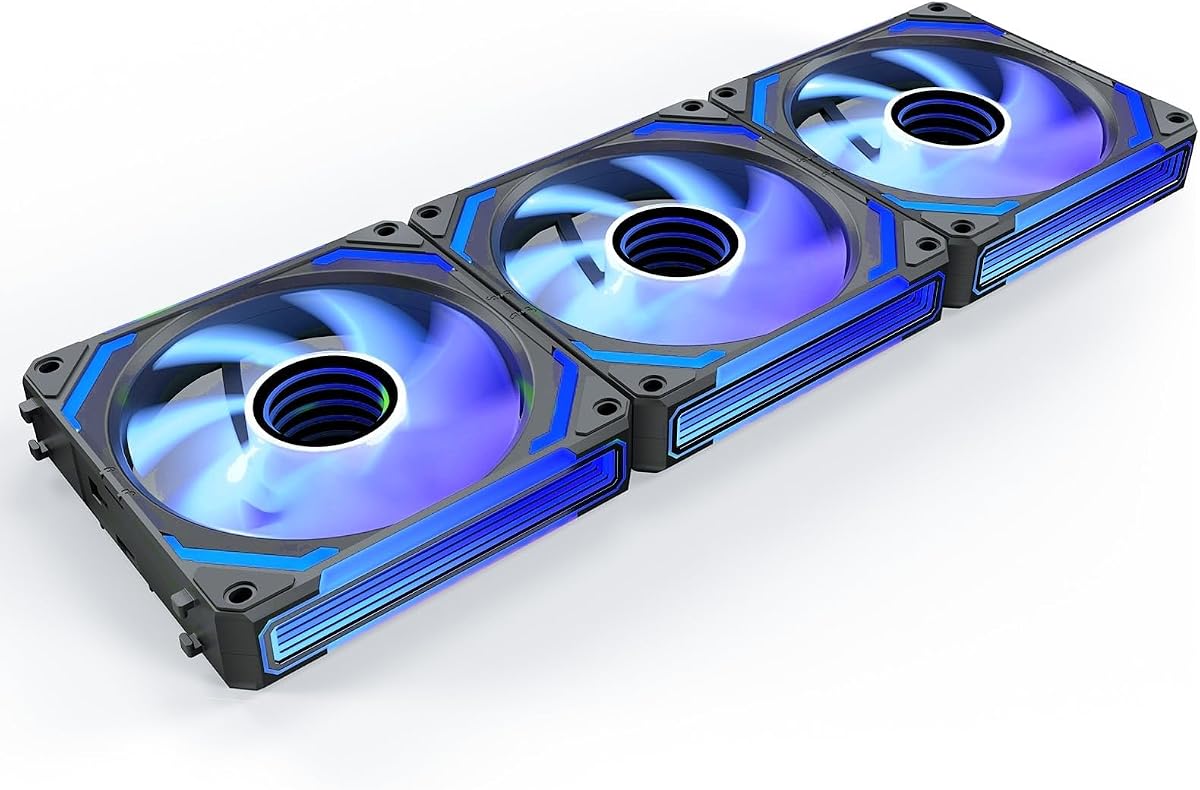
AsiaHorse COSMIQ fans deliver premium visual appeal with an infinity mirror design. They combine high airflow with unique reverse blades for full case coverage. A 4.8 rating shows user delight with both lighting effects and silent performance.
We may earn a commission when you buy through this link, at no additional cost to you.
The FDB bearing keeps noise low even at 2000 RPM. Music sync adds dynamic lighting changes based on system audio. Daisy chaining simplifies wiring while maintaining high performance for complex builds.
The price is higher than standard options due to extra features. Installation requires care for reverse blades and proper alignment. However, the visual results and performance justify the cost for enthusiasts.
This pack is ideal for showcase builds prioritizing aesthetics and performance. The music sync adds a fun interactive element to your setup. Choose it if you want top-tier lighting and airflow for a custom PC.
Layered LEDs create a stunning 3D visual effect inside cases.
Built-in sound pickup changes lighting colors to match game or music.
We may earn a commission when you buy through this link, at no additional cost to you.
Selecting the right addressable RGB fans involves balancing performance, visual customization, and ease of setup. This section breaks down the critical factors to consider for your build.
Airflow measured in CFM indicates how much air moves through the fan for case cooling. Static pressure in mm-H2O shows ability to push through restricted areas like radiators. High CFM suits open cases while high static pressure suits dense components.
Look for higher CFM for front and rear fans and high static pressure for radiator mounts to optimize overall cooling.
Bearings determine fan life and noise levels. Fluid Dynamic Bearings (FDB) and S-FDB reduce friction and vibration significantly. Hydrodynamic (HDB) bearings offer similar quiet operation for long service lives.
Choose fans with FDB or S-FDB for quiet performance especially in low noise environments or quiet builds.
Addressable RGB fans allow individual LED control for custom patterns. Infinity mirror or prism designs add depth to visuals. Check LED counts to ensure brightness matches your case style.
Ensure motherboard supports 5V ARGB sync or use a controller for full lighting effects and customization.
Daisy chain connections link fans with single wires reducing clutter. Magnetic connectors further simplify setup for faster installation. Traditional cables may require more internal routing effort.
Opt for daisy chain or magnetic options to keep cables neat and accessible inside the case.
Most cases use 120mm or 140mm fans. Confirm your case supports standard 120mm dimensions before purchasing reverse or thick models. Some coolers require specific fan sizes for proper clearance.
Check case specs to ensure 120mm fans fit front, rear, and top positions without obstruction.
Forward fans blow air through blades while reverse fans keep blades hidden when reversed. This matters for side and bottom intake positions where aesthetics are important. Standard fans may expose blades when reversed.
Buy reverse fans if you want consistent visible lighting on intake positions.
PWM 4-pin connectors allow motherboard speed control based on temperature. This saves energy and reduces noise at idle. DC control is alternative but less precise for modern systems.
Select PWM fans to enable automatic speed adjustment and better energy efficiency.
Some packs include controllers for lighting and speed independent of motherboard. Others rely entirely on software like Armory Crate or RGB Fusion. Controllers add flexibility for non-compatible boards.
Verify software compatibility or purchase controllers for full RGB customization and control.
Connect 4-pin PWM cables to motherboard headers and 5V ARGB to corresponding RGB headers. Ensure daisy chain cables link fans correctly to avoid connection errors and signal loss.
Use BIOS or software to adjust fan curves based on temperature. Keep fans clear of cables to maintain smooth rotation and reduce noise caused by physical contact.
Regularly dust fans to prevent buildup affecting airflow. Spin blades gently by hand if noisy to check bearing issues and maintain performance.
Addressable RGB fans offer customizable lighting patterns without extra cables. They provide similar cooling to standard fans but add visual appeal. For aesthetic builds they are ideal but performance remains comparable.
5V ARGB controls individual LEDs for unique patterns while 12V RGB lights all LEDs at once. Do not mix them as voltages differ and damage may occur. Check motherboard headers before buying.
Link fans using provided daisy chain cables connecting outputs to inputs. Then connect the first fan to motherboard headers. Ensure secure connections to prevent signal loss or lighting errors.
Reverse fans work as airflow intake but show light when blades face outward. They are perfect for bottom or side intake. Standard fans work fine as exhaust or top intakes.
Not always if your motherboard has 5V ARGB headers. Controllers help if ports are missing or you want independent control. Many packs include hubs for added flexibility.
1200 to 1500 RPM balances cooling and noise. Higher RPM like 2000+ works for radiators but may be noisy. Lower RPM ensures quiet operation for idle systems.
The Thermalright TL-C12C-S 5 pack leads as Editor's Choice for balanced performance. ARCTIC P12 Pro A-RGB offers great value for budget-conscious buyers. AsiaHorse COSMIQ brings premium visuals with reverse fans and music sync.
Prioritize airflow and bearing types based on your cooling needs. Daisy chaining and PWM control simplify setup significantly for most users. Match fan speed to case clearance to avoid interference during operation.
Always check current prices and availability before purchasing. Deals change frequently and availability varies by region. Verify motherboard compatibility to ensure smooth installation and RGB synchronization for your build.