
HP OmniBook 5 16 inch
4.2Editor score
Snapdragon X Processor
34 Hour Battery Life
Affordable Price Point
AI laptops are transforming how we work and create by integrating powerful neural processing units directly into the system. These devices handle complex tasks like real-time translation and image generation locally. They offer unprecedented efficiency and speed for modern workflows.
We compared ten leading models based on processor performance, battery endurance, and display quality. Each entry represents a distinct approach to AI computing. Our analysis focuses on real-world usability and the practical benefits of Copilot+ experiences.
Every pick highlights specific strengths for different user needs. Prices fluctuate frequently based on market demand and inventory levels. Always verify the current listing details before making your final purchase decision.
4.2Editor score
4.8Editor score

5.0Editor score
As an Amazon Associate we earn from qualifying purchases.
This side-by-side comparison outlines the core specifications and unique advantages of each selected model. We focus on processor architecture, memory capacity, storage speed, and display technology to help you differentiate between similar options.


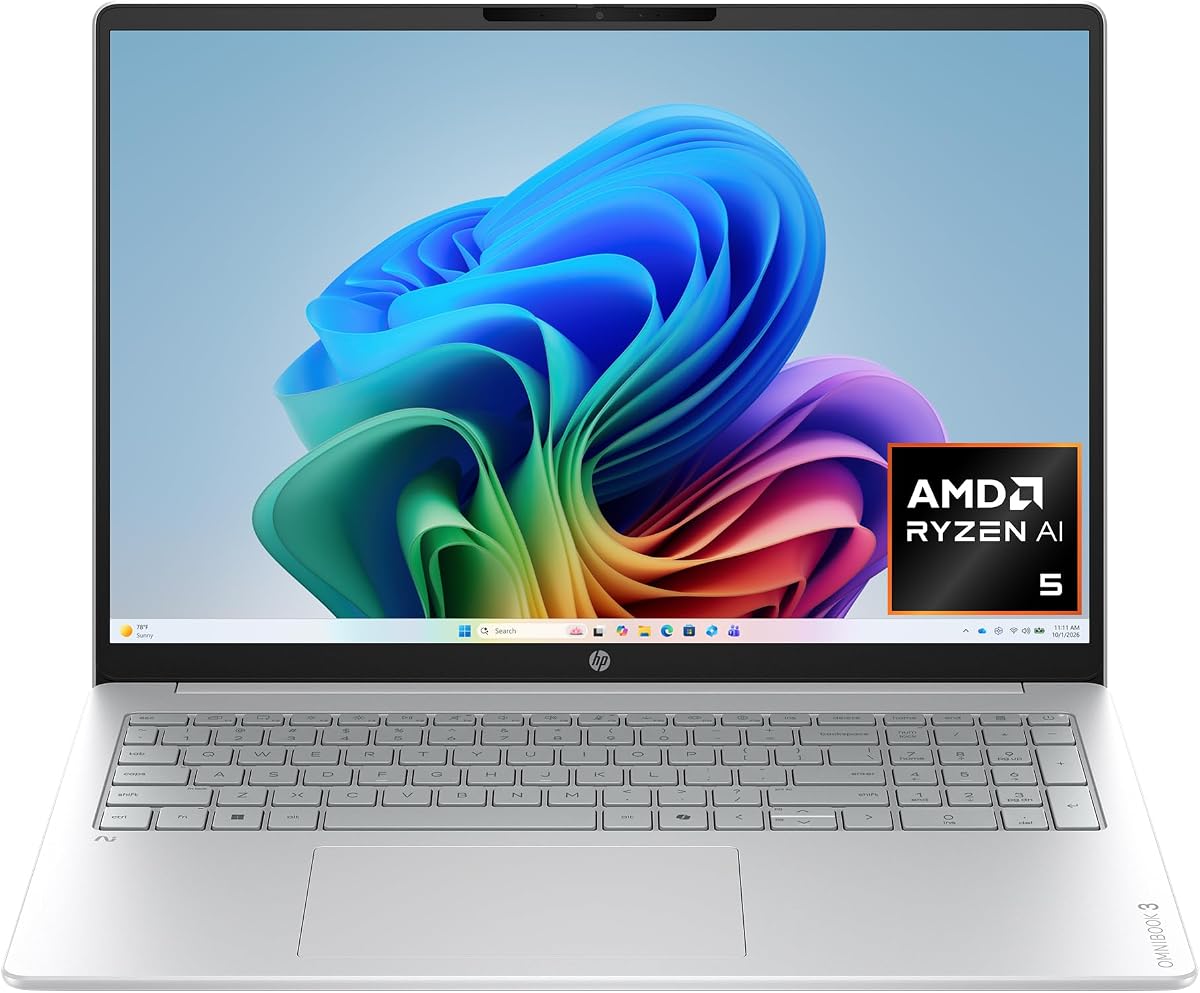
The HP OmniBook 3 16 inch stands out as a premier choice for general users seeking a balanced Next Gen AI PC. Its AMD Ryzen AI 5 430 processor delivers robust capabilities while maintaining impressive power efficiency. The device is designed to streamline daily tasks and enhance productivity seamlessly.
We may earn a commission when you buy through this link, at no additional cost to you.
Its standout qualities include an Advanced AI Noise Reduction feature that filters background chatter during calls for focused communication. The display offers wide viewing angles and lifelike color reproduction suitable for creative work. Fast Charge technology restores battery from 0 to 50% in approximately 45 minutes ensuring you stay mobile.
Trade-offs include the lack of a discrete GPU card for heavy gaming or 3D rendering tasks. However the AMD Radeon 840M GPU handles everyday graphical needs well. The 512 GB storage is adequate for most but power users may need external solutions for large media libraries.
This laptop is ideal for professionals and students who prioritize battery life and communication clarity. The Copilot+ PC experiences offer intelligent assistance that simplifies workflows. It represents a reliable investment for those entering the AI PC landscape.
Advanced AI Noise Reduction tracks only your voice during conference calls to eliminate background distractions effectively.
The 2K IPS touchscreen delivers incredible detail and wide viewing angles for an immersive visual experience.
We may earn a commission when you buy through this link, at no additional cost to you.
The Lenovo ThinkBook 16 Gen 8 is engineered for business environments where data security and multitasking are paramount. It features an Intel 16-Core Ultra 7 255H processor with AI acceleration designed to handle complex spreadsheets and enterprise applications effortlessly. This model supports demanding workloads without lag.
We may earn a commission when you buy through this link, at no additional cost to you.
Its 32 GB DDR5 RAM ensures smooth operation when running multiple business applications simultaneously. The fingerprint reader and Windows 11 Professional provide advanced security features to protect sensitive business data effectively. The 16-inch display offers ample real estate for presentations and data analysis on the go.
A potential trade-off is the price point which reflects its professional grade capabilities and components. The 1 TB PCIe SSD eliminates lag but may fill up with extensive historical data archives. Bluetooth 5.3 ensures stable connections for file sharing and video conferencing needs.
This laptop is best suited for business professionals who require robust security and heavy multitasking capabilities. The seamless collaboration features make remote work efficient and reliable. It is a strong contender for corporate procurement and independent consultants.
Fingerprint reader and Windows 11 Professional protect sensitive business data with advanced security features.
WiFi 6E and Bluetooth 5.3 ensure stable connections for video conferencing and file sharing.
We may earn a commission when you buy through this link, at no additional cost to you.
The HP OmniBook X 14 inch offers a premium experience with its breathtaking 3K OLED touchscreen that lights each pixel separately. This technology brings deeper blacks and richer contrast enhancing color depth significantly. It delivers up to 27 hours of battery life making it ideal for all-day travel.
We may earn a commission when you buy through this link, at no additional cost to you.
Its Intel Core Ultra 7 Processor 356H provides incredible battery life and powerful performance built-in graphics and AI. The Smart Sense feature optimizes performance based on your activity adapting temperature and fan noise automatically. Poly Studio Audio with dual speakers ensures clear and perfect audio for collaboration.
The primary trade-off is the higher price point reflecting the premium OLED display and battery technology. The 24 GB RAM is an unusual configuration but offers higher bandwidth efficiency. The 1 TB SSD provides fast speed and efficient storage for extensive file collections.
This device is perfect for creators and executives who prioritize display quality and portability. The battery life allows for uninterrupted work during long flights or commutes. It represents a top-tier choice for users seeking luxury performance features.
3K OLED touchscreen brings deeper blacks and richer contrast for stunning visual clarity.
Smart Sense switches modes to optimize performance and adapt fan noise automatically for comfort.
We may earn a commission when you buy through this link, at no additional cost to you.
The HP OmniBook 5 16 inch provides an accessible entry point into AI-enhanced computing with powerful Intel Core Ultra 7 performance. It features a large 16-inch touchscreen that offers crisp visuals and responsive touch control perfect for presentations and creative tasks. The design balances cost and capability effectively.
We may earn a commission when you buy through this link, at no additional cost to you.
Its key strengths include a massive 1TB SSD ensuring ample storage for files photos and applications. The 16GB high-speed RAM supports smooth multitasking and ultra-fast boot times for daily productivity. AI-Enhanced Windows 11 features help you work smarter with intelligent suggestions.
Trade-offs include the standard 16GB RAM which may not suffice for heavy virtual machine workloads. The build materials are practical but lack the premium feel of higher end models. However it remains a robust daily driver for general users.
This laptop is ideal for students and home users seeking a large screen without breaking the bank. The Copilot AI support enhances workflows without extra software costs. It is a practical choice for budget-conscious buyers.
Massive 1TB SSD ensures plenty of storage for files photos and applications.
Immersive 16-inch touchscreen provides crisp visuals for work and streaming.
We may earn a commission when you buy through this link, at no additional cost to you.
The HP OmniBook 5 16 inch stands out as the best budget AI laptop offering unmatched battery duration of up to 34 hours and 45 minutes. Powered by the Snapdragon X Processor it delivers essential performance and AI capabilities while staying efficient all day. It is perfect for on-the-go productivity.
We may earn a commission when you buy through this link, at no additional cost to you.
Its standout features include an Otter.ai integration that records audio and generates meeting summaries to save time. The 2K OLED display offers rich colors and crisp visuals despite the affordable price point. HP Fast Charge restores battery from 0 to 50% in approximately 30 minutes.
Trade-offs involve potential app compatibility limitations due to ARM architecture compared to traditional x86 processors. The 512 GB SSD is standard but may require cloud storage for heavy media usage. However the battery life compensates significantly for these minor constraints.
This laptop is ideal for travelers and students who prioritize battery life and budget constraints. The Otter.ai feature enhances productivity during meetings automatically. It is the best value choice for general AI computing needs.
Up to 34 hours and 45 minutes of battery life supports all-day usage without charging.
Otter.ai assistant records audio and generates meeting summaries to save time and stay organized.
We may earn a commission when you buy through this link, at no additional cost to you.
The HP OmniBook 3 14 inch redefines portable AI computing with a massive 41 hours and 45 minutes of battery life. Its Snapdragon X processor delivers essential performance and AI capabilities while maintaining high efficiency. It is the ultimate travel companion for extended trips.
We may earn a commission when you buy through this link, at no additional cost to you.
Key strengths include Otter.ai integration to record audio and generate meeting summaries for enhanced productivity. The FHD IR camera with HDR auto-switch ensures smooth and detailed video calls even in challenging backlight conditions. Wi-Fi 6E provides lightning fast speeds and expanded capacity.
Trade-offs include the 256 GB SSD which may fill up quickly with media files requiring external storage. The smaller 14 inch screen limits multitasking compared to larger laptops. However the battery life makes it unmatched for mobile workers.
This laptop is perfect for frequent travelers who need reliable connectivity and long power duration. The Otter.ai feature automates note-taking during meetings effectively. It is the best compact choice for AI assistants.
Up to 41 hours and 45 minutes of battery life supports extended usage without outlets.
Otter.ai assistant records audio and generates meeting summaries to keep you organized.
We may earn a commission when you buy through this link, at no additional cost to you.
The Dell 16 Plus Touchscreen is a powerhouse featuring the Intel Core Ultra 9 288V vPro processor with 12 TOPS NPU performance. It supports up to 48 TOPS for running AI features like Microsoft Studio Effects during video calls. This model handles heavy workloads with exceptional speed.
We may earn a commission when you buy through this link, at no additional cost to you.
Its 32GB LPDDR5X memory and 1TB NVMe SSD ensure seamless multitasking and large project file handling. The modular design enhances durability while the 16-inch FHD+ display offers narrow bezels and detailed visuals. It includes a full-size backlit keyboard and numeric keypad.
Trade-offs include the price point reflecting its premium components and high-performance specs. The webcam is standard FHD+ which is good but not the highest resolution. However the connectivity is robust with USB-C and Thunderbolt 4 ports.
This laptop is ideal for professionals requiring maximum processing power and extensive connectivity. The NPU ensures future-ready AI capabilities for intensive tasks. It is a strong workstation replacement for business users.
12 TOPS NPU supports running AI features like Microsoft Studio Effects during video calls.
Multiple USB-C Thunderbolt and HDMI ports ensure extensive connectivity for peripherals.
We may earn a commission when you buy through this link, at no additional cost to you.
The ASUS Vivobook S16 delivers a stunning visual experience with its 16-inch 16:10 WUXGA OLED display providing deep contrast and vivid detail. Powered by the AMD Ryzen AI 9 465 processor it offers up to 50 NPU TOPS for fast on-device AI. It is sleek and minimal at just 3.75 lbs.
We may earn a commission when you buy through this link, at no additional cost to you.
Its strengths include 32 GB of memory ensuring multitasking feels effortless wherever your day takes you. The Dolby Atmos audio adds extra clarity and volume for immersive entertainment. It offers all essential ports including USB-C and HDMI 2.1 to leave hubs behind.
Trade-offs include battery life varying depending on usage and power management settings. The physical privacy shutter adds peace of mind but limits webcam resolution compared to some competitors. However the display quality compensates fully for these factors.
This laptop is ideal for creators and media consumers who value display fidelity. The 50 NPU TOPS power supports demanding AI workflows smoothly. It is a premium choice for users seeking high-end portability.
16-inch 16:10 WUXGA OLED display provides deep contrast and vivid detail for work.
Dolby Atmos with Audio Booster adds extra clarity and volume for immersive sound.
We may earn a commission when you buy through this link, at no additional cost to you.
The Acer Aspire 16 AI features a 120Hz Multi-Touch Display that offers smooth and immersive visuals for entertainment and AI experiences. Powered by the Snapdragon X Processor with 45 TOPs NPU it optimizes processing across CPU and GPU workloads effectively. It delivers best-in-class performance and power efficiency.
We may earn a commission when you buy through this link, at no additional cost to you.
Key strengths include 100% sRGB colors ensuring rich visuals on the 16-inch WUXGA display. AcerSense provides intelligent AI solutions to streamline settings and optimize your video presence. Wi-Fi 7 supports unprecedented wireless performance and capacity.
Trade-offs include limited RAM upgradeability due to LPDDR5X soldered configuration. The build materials are practical but may feel less premium than competitors. However the refresh rate offers a smoother user interface experience.
This laptop is ideal for users who prioritize smooth scrolling and connectivity. The 120Hz display enhances daily navigation fluidity. It is a strong option for those seeking specific screen refresh rates.
16-inch 120Hz WUXGA touchscreen display offers smooth and immersive viewing experiences.
AcerSense provides intelligent AI solutions to streamline settings and optimize video presence.
We may earn a commission when you buy through this link, at no additional cost to you.
The HP Omnibook 16 combines the AMD Ryzen AI 7 350 processor with 32 GB DDR5 RAM for seamless creativity. It features a 50 TOPS NPU ensuring seamless AI workloads and future-ready capabilities. It handles large project files and media libraries with ease.
We may earn a commission when you buy through this link, at no additional cost to you.
Its key strengths include Windows 11 Pro enterprise-grade security and AI-powered Windows Studio Effects. The 1 TB SSD offers ample space for professional workflows. It also includes an HP True Vision 1080p FHD IR camera and DTS:X Ultra audio.
Trade-offs include thermal management under heavy NPU load which may require cooling attention. Battery life may vary depending on usage intensity and power management settings. However the memory capacity supports heavy multitasking well.
This laptop is ideal for enterprise users and power multitaskers needing high RAM. The 50 TOPS NPU ensures advanced AI features run efficiently. It is a strong contender for professional environments.
32 GB DDR5 RAM ensures smooth touch screen experience and handles media libraries easily.
Windows 11 Pro features enterprise-grade security and advanced hardware support.
We may earn a commission when you buy through this link, at no additional cost to you.
Selecting the right AI laptop requires balancing processing power with battery efficiency. We detail the key factors that distinguish a good model from the rest.
AI laptops rely on specific neural processing units (NPUs) integrated into the CPU to handle tasks like image generation and translation locally. Look for models featuring Intel Core Ultra or AMD Ryzen AI processors that support 45 to 50 TOPS of computing power.
Choose a processor with a dedicated NPU to ensure efficient on-device AI performance without draining your battery.
Generative AI apps and large language models often require significant RAM to run smoothly without lag. Aim for at least 16 GB of DDR5 or LPDDR5x memory to handle modern AI-enhanced workflows comfortably.
Prioritize 32 GB RAM if you plan on running multiple heavy applications or virtual machines simultaneously.
AI features can be power-intensive so battery efficiency is crucial for mobile use. Select models that advertise at least 15 to 20 hours of real-world usage to maintain productivity throughout the workday.
Always verify battery ratings by checking independent reviews to ensure claims match real-world performance.
High-resolution screens with good color accuracy are essential for creative work and detailed data analysis. OLED panels provide deeper blacks and higher contrast which enhances visual comfort during long working sessions.
Opt for a 2K or 3K resolution with an IPS or OLED panel for the best visual clarity.
Fast storage helps loading large AI models and transferring files quickly. A PCIe Gen4 SSD with at least 512 GB of space ensures your system remains responsive and ready for updates.
Choose 1 TB storage if you store large media libraries or extensive project files locally.
Look for laptops that support Copilot+ PC experiences to unlock advanced AI features like Recall and Click to Do. Compatibility with the latest Windows versions ensures you receive timely AI updates.
Verify that the device supports the required AI features before purchasing to ensure software compatibility.
Modern wireless standards like Wi-Fi 6E or Wi-Fi 7 ensure stable connections for video conferencing and cloud syncing. Bluetooth 5.3 or higher allows for seamless connection to peripherals and audio devices.
Prioritize Wi-Fi 6E or higher to ensure fast and stable network performance.
To get the most out of your AI laptop start by setting up your Microsoft account and enabling Copilot features. This allows you to access advanced AI tools like smart summaries and search enhancements immediately.
Regularly update your BIOS and system drivers to ensure the AI NPU receives the latest performance optimizations. Keeping your software current helps maintain smooth AI interactions and security.
Use a laptop stand or external keyboard when possible to reduce heat buildup during intensive tasks. Proper ventilation extends the lifespan of the internal components and maintains optimal AI processing speeds.
A Copilot+ PC is a new standard for laptops that include powerful AI processors and specific requirements like 16GB of RAM. These devices feature a dedicated Neural Processing Unit (NPU) capable of running AI tasks like image generation and voice transcription locally.
If your work involves heavy multitasking or AI-assisted tasks like translation or image editing then an AI laptop is highly beneficial. However for basic tasks like email and browsing a standard laptop may suffice depending on your needs.
The Neural Processing Unit handles AI tasks separately from the main CPU allowing for faster processing and better battery efficiency. This means features like background noise removal and live translation happen smoothly without draining your system resources.
Most standard applications run fine on AI laptops but some specialized legacy software may have compatibility issues with ARM-based models. It is best to check your essential apps' compatibility before switching to a Snapdragon-based device.
For optimal performance with AI features you should aim for at least 16GB of RAM but 32GB is recommended for heavy workflows. This ensures that large models and multitasking applications do not slow down your system.
Yes many AI features like live translation and photo organization run locally on the device's NPU. This means you can use key AI tools even when you are offline or traveling without an active connection.
Battery life varies by model and usage but AI laptops generally offer 15 to 30 hours depending on efficiency settings. Models with AMD or Snapdragon processors often provide longer battery life compared to traditional x86 counterparts.
We highlighted ten distinct models ranging from the HP OmniBook 3 for general users to the Dell 16 Plus for power professionals. Each choice offers a unique balance of performance and AI capabilities suitable for different workflows.
When deciding prioritize the AI NPU power and memory capacity if you plan to run advanced local models. Otherwise focus on battery life and display quality to ensure daily comfort and reliability.
Prices fluctuate frequently based on market demand and inventory levels. Always verify the current listing details before making your final purchase decision to secure the best value.