
Thrustmaster T-Flight Hotas X
4.4Editor score
Detachable throttle design
Programmable buttons
Adjustable resistance
This guide compares the top 10 airplane controllers for PC to help you find the best flight simulator joystick or yoke for your setup.
Flight simulation enthusiasts demand precise controls to replicate the thrill of aviation. A quality airplane controller for PC brings realism to virtual cockpits with ergonomic design and responsive inputs.
We evaluated ten leading models based on build quality, feature sets, and user feedback. Our analysis covers everything from budget-friendly sticks to premium yoke systems for serious simmers.
Each pick highlights key strengths and ideal use cases for different piloting styles. Please note that product availability and pricing may change over time on retailer sites.
4.4Editor score

4.0Editor score
4.6Editor score
The following table provides a side-by-side overview of each controller’s core specifications to simplify your selection process based on flight simulation needs.





The Logitech G X56 H.O.T.A.S stands out as a top-tier flight controller for PC enthusiasts seeking maximum customization. With over 189 programmable controls, it caters to complex sim scenarios. Its military-grade precision ensures accurate inputs during intense maneuvers.
We may earn a commission when you buy through this link, at no additional cost to you.
Users appreciate the dual throttles with friction adjusters and the hall-effect sensors on the stick. The RGB backlighting allows for easy identification of functions in low light. The adjustable stick force system via springs adds a layer of realism.
While powerful, the X56 requires time to configure properly using the software. The large size means it needs significant desk space. However, for serious simmers, the trade-off is worthwhile given the depth of control.
This controller is best suited for users who want a complete HOTAS setup without buying separate throttles. It delivers a premium experience that bridges the gap between hobbyist and professional simulation standards effectively.
The sheer number of programmable controls ensures you rarely need to reach for a keyboard mid-flight.
Hall-effect sensors and adjustable spring systems provide consistent, reliable feedback over thousands of hours of use.
We may earn a commission when you buy through this link, at no additional cost to you.
For those dreaming of civil aviation, the Logitech G PRO Flight Yoke System offers an authentic cockpit experience. The stainless steel shaft provides smooth, accurate control essential for approach and landing phases. It helps build muscle memory for real-world skills.
We may earn a commission when you buy through this link, at no additional cost to you.
The system includes a throttle quadrant with multiple controls for managing speed and altitude. The robust desk clamp keeps everything stable during vigorous flight operations. It supports popular simulators like Microsoft Flight Simulator and X-Plane effectively.
Some users note the need for a PS/2 connector for the throttle which may require adapters on modern PCs. The software setup is optional but recommended for full functionality. Despite this, the hardware quality remains excellent.
This yoke is ideal for pilots focused on commercial flight simulation. It transforms a standard gaming desk into a credible cockpit station with professional-grade tactile feedback and build quality that stands the test of time.
The stainless steel shaft ensures smooth movement that mimics the resistance found in actual aircraft control yokes.
Combining the yoke with a separate throttle quadrant allows for a versatile setup tailored to specific aircraft types.
We may earn a commission when you buy through this link, at no additional cost to you.
The Thrustmaster T-Flight Hotas X is a fantastic entry point for new simmers. Its detachable throttle offers flexibility for different desk setups. The ergonomic design reduces fatigue during long sessions, making it comfortable for extended use.
We may earn a commission when you buy through this link, at no additional cost to you.
With 12 programmable buttons and 5 axes, it covers essential flight functions well. The adjustable resistance dial lets you tune the stick to your preference. It supports both military and civil aviation scenarios out of the box.
While it lacks advanced features like hall-effect sensors, it delivers solid performance for the price. The weighted base provides stability without requiring clamps. Users appreciate the plug-and-play simplicity for quick setup.
This controller is perfect for hobbyists who want a complete HOTAS experience without breaking the bank. It balances quality and affordability effectively, providing a reliable foundation for building a flight simulation setup later on.
The detachable throttle allows you to position components based on your available desk space or personal preference.
Plug-and-play functionality means you can start flying immediately without complex software installation or configuration steps.
We may earn a commission when you buy through this link, at no additional cost to you.
The Logitech G Saitek X52 Pro brings a unique LCD display to the table for monitoring commands. This feature helps pilots keep track of active modes without looking away from the screen. The progressive throttle offers precise control over engine power.
We may earn a commission when you buy through this link, at no additional cost to you.
Users benefit from the No Contact Technology on axes which reduces wear over time. The 5-position handle adjustment ensures comfort for different hand sizes. It remains a solid choice for those who prioritize feedback visibility.
Being an older model, some may find the design less modern than newer competitors. However, the build quality and functionality remain strong for dedicated pilots. The smart software allows for detailed customization of profiles.
This system suits intermediate pilots looking for visual feedback on their controls. It bridges the gap between basic sticks and complex setups, offering a balance of features that enhance situational awareness during flight simulation.
The multi-function LCD display keeps you informed of active flight modes and settings at a glance.
Multiple handle positions ensure that users of all hand sizes can find a comfortable grip for long sessions.
We may earn a commission when you buy through this link, at no additional cost to you.
The PXN 2113PRO offers an ultra-affordable option for casual flight simulation enthusiasts. It includes a vibration function that adds tactile feedback to certain games. The suction cups at the base help keep it steady during operation.
We may earn a commission when you buy through this link, at no additional cost to you.
Designed strictly for Windows PCs, it ensures compatibility with most flight sim titles like War Thunder. The 12 programmable buttons cover essential functions for basic maneuvers. Its compact form factor makes it ideal for small desks.
While the build is not as robust as premium models, it fulfills the basics well. Some users note that the driver setup can be straightforward if followed correctly. It serves as a functional entry-level tool.
This joystick is best for budget-conscious users testing the waters of flight simulation. It provides a reliable way to experience flight dynamics without a significant financial investment or space commitment.
Its small size fits easily on limited desk space making it a great choice for smaller gaming setups.
The vibration feature adds an extra layer of immersion by responding to events within supported games.
We may earn a commission when you buy through this link, at no additional cost to you.
The Logitech G X52 Flight Control System balances performance and usability well. Its magnetic sensors provide enhanced longevity and accuracy for the x and y axes. The 3D twist function with rudder lock prevents accidental inputs when not needed.
We may earn a commission when you buy through this link, at no additional cost to you.
Users can manage 282 programmable commands across three modes reducing keyboard dependency. The LCD display shows commands clearly aiding in complex missions. The 5-position grip system accommodates different hand sizes effectively.
While it requires some initial software configuration, the result is a highly customizable tool. The build is sturdy enough for regular use without feeling too heavy. It is a reliable choice for intermediate pilots.
This controller fits users who want precision and feedback without the bulk of a full HOTAS setup. It offers a streamlined approach to flight simulation control that remains versatile for various game genres.
Magnetic sensors eliminate physical contact on axes which significantly extends the lifespan of the device.
Multiple programming modes allow you to save distinct setups for different aircraft or game scenarios easily.
We may earn a commission when you buy through this link, at no additional cost to you.
The Thrustmaster TCA Yoke & Quadrant Boeing Edition brings authentic airliner controls to your home. The 1:1 scale replica of the Boeing 787 yoke transforms your setup into a true cockpit. It delivers smooth responsive control with a pendular mechanism.
We may earn a commission when you buy through this link, at no additional cost to you.
Crafted with a metal internal structure, this yoke feels durable and balanced during operation. The throttle quadrant includes an iconic autopilot function for altitude and airspeed management. It is officially licensed by Boeing adding to its credibility.
While the price is higher than standard joysticks, the realism justifies the cost for serious simmers. It demands significant desk space and proper mounting. However, the immersion gained is unmatched by other controllers in this list.
This pack is ideal for aviation fans who want the most realistic commercial flight experience available. It bridges the gap between gaming and professional simulation with premium materials and engineering standards.
The officially licensed design ensures that the layout and feel match the real-world Boeing 787 aircraft exactly.
The metal internal construction provides the weight and balance required for a professional simulation experience.
We may earn a commission when you buy through this link, at no additional cost to you.
The Thrustmaster TCA Sidestick Airbus Edition offers an authentic A320 experience for pilots. Its magnetic sensor technology ensures flawless accuracy and eliminates wear over time. The integrated throttle and rudder control save space while keeping essential functions accessible.
We may earn a commission when you buy through this link, at no additional cost to you.
Users benefit from 17 action buttons with braille-style identification for tactile feedback. Swappable joystick head modules allow customization to suit different scenarios. It supports plug and play connectivity for quick setup.
While designed specifically for Airbus layouts, it remains versatile for other aircraft types. The build quality is high enough for daily use without sacrificing ergonomics. It is a top choice for Airbus focused enthusiasts.
This joystick is perfect for those who prefer side-stick controls over traditional yokes. It combines style and function effectively offering a compact solution that looks great on any desk setup.
The sidestick layout mimics the exact design found in Airbus cockpits enhancing the realism of your sessions.
Integrated throttle and rudder controls eliminate the need for extra peripherals saving valuable desk space.
We may earn a commission when you buy through this link, at no additional cost to you.
The Turtle Beach VelocityOne Flightstick stands out for its compatibility across Xbox and PC platforms. It features an OLED flight management display that keeps critical info visible during missions. The touchpad sensor allows for full cursor control without a mouse.
We may earn a commission when you buy through this link, at no additional cost to you.
With 27 programmable buttons and 8 axes, it offers a high degree of control. The integrated throttle and flap levers save space. Ambidextrous design means it suits both left and right-handed users effectively.
While the stick feel is compact, it remains responsive and durable. The RGB lighting adds a nice aesthetic touch to your setup. It bridges the gap between console gaming and PC simulation effectively.
This controller is best for gamers who switch between Xbox and PC frequently. It provides a versatile all-in-one solution that maintains high performance standards for various flight simulation titles.
Support for Xbox and PC allows you to use one controller across multiple devices without buying separate hardware.
The OLED screen displays critical flight data which enhances situational awareness during complex maneuvers.
We may earn a commission when you buy through this link, at no additional cost to you.
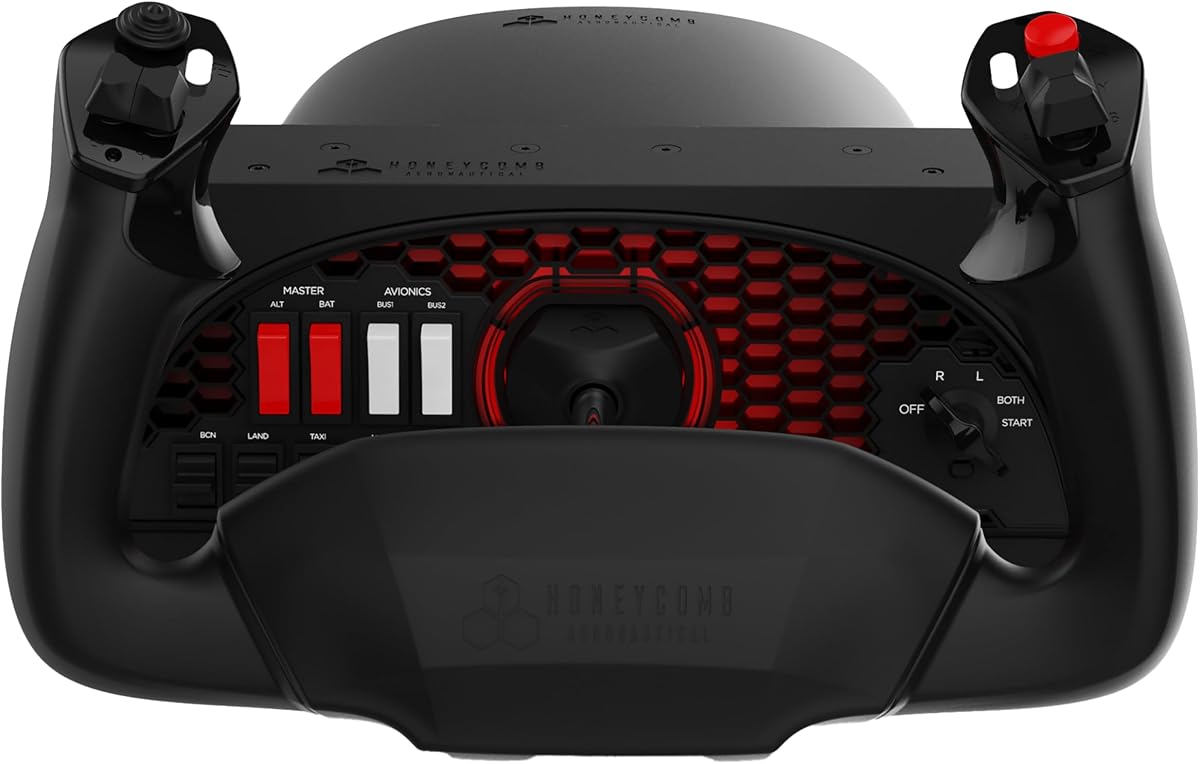
The Honeycomb Alpha Flight Controls Yoke delivers premium build quality with its integrated switch panel. Featuring main alternator and avionics switches it offers true-to-life flight control. The steel shaft and ball bearings ensure smooth accurate movement.
We may earn a commission when you buy through this link, at no additional cost to you.
Red LED backlighting helps during night flights making controls visible in dim settings. The dual mounting solution provides flexibility with clamps or suction pads. Users appreciate the responsive feedback and minimal deadzone.
This model does not include a throttle so it pairs well with separate throttle units. It focuses on delivering excellence in yoke performance. The design is trusted by aviation enthusiasts for its reliability.
Ideal for pilots who value authentic cockpit details and tactile switches. It transforms your setup into a highly functional and realistic environment for serious flight simulation training and enjoyment.
The dedicated switch panel replicates real aircraft systems providing a more authentic experience for pilots.
Linear ball bearings and steel construction ensure precise control inputs without unwanted friction or play.
We may earn a commission when you buy through this link, at no additional cost to you.
Selecting the right controller depends on your flight style and budget. This guide covers essential factors to consider before purchasing.
Choose between a joystick stick yoke or HOTAS setup. Joysticks suit military sims while yokes are better for civil aviation.
Decide on the primary type based on the aircraft you fly most often.
Look for durable materials like metal shafts and reinforced plastics. High quality builds last longer under heavy use.
Prioritize sturdy construction to ensure longevity during frequent sessions.
Ensure the controller has enough buttons and axes for your needs. More programmable controls reduce reliance on your keyboard.
Select a model with extensive customization options for a streamlined cockpit.
Force feedback adds immersion by vibrating during turbulence or landing impacts. Check if the model supports this feature.
Opt for controllers with force feedback for a more realistic experience.
Verify that the controller works with your operating system and sim software. Most support Windows but some may not work on Mac.
Always check compatibility lists before buying to avoid connection issues.
Yokes and dual throttle systems require significant desk space. Consider your room layout before purchasing large setups.
Measure your desk area to ensure the controller fits comfortably.
Good software allows you to map controls easily and create profiles. Look for intuitive apps that update regularly.
Choose brands known for reliable and user-friendly configuration software.
Prices vary widely from budget sticks to premium yokes. Determine how much you can spend before exploring options.
Balance cost with features to find the best value for your needs.
Start by plugging the controller into a USB port and installing any required drivers. Ensure the device is recognized by your operating system.
Configure the buttons and axes in your flight simulator settings. Assign common functions like pitch roll and throttle to accessible locations.
Keep your controller clean by wiping it regularly with a soft cloth. Avoid excessive force on buttons to maintain smooth operation over time.
Most controllers are designed to be compatible with major flight simulators like Microsoft Flight Simulator and X-Plane. However, always check the product details for specific software support to ensure proper functionality before purchasing.
A joystick is a stick used for military aircraft while a yoke resembles a steering wheel used in commercial planes. The choice depends on whether you prefer realistic civil aviation or tactical combat simulations.
Most models are built for Windows systems and may not support Mac. Check compatibility before buying to ensure your operating system is supported for proper driver installation and usage.
Calibration is usually done through the software provided by the manufacturer. You may also use Windows game controller settings to adjust axes and ensure accurate response during flights.
Yokes and larger HOTAS systems often come with clamps for stability. Joysticks with weighted bases may not require clamping depending on their design and desk surface.
Most flight controllers use wired USB connections for reliability and low latency. Wireless options are rare in this category due to the precision required for accurate flight simulation.
We have explored ten top-rated controllers ranging from budget sticks to premium yoke systems. Each model offers unique features tailored to different simulation styles.
Prioritize build quality and programmability when selecting a controller for your setup. These factors ensure longevity and customization for complex flight scenarios.
Remember to check current prices and availability as they can change frequently. Investing in the right tool will enhance your virtual aviation experience significantly.