
ASUS Prime AP201 Micro-ATX PC Case
4.7Editor score
Mesh panels for airflow
Compact 33L footprint
Tool-free side panels
Discover the top ASUS PC Case options for 2026. This guide compares cooling, design, and compatibility to help you choose the right chassis for your build.
Selecting the right chassis is crucial for any desktop build. A good case protects components while ensuring efficient airflow and easy access for upgrades.
We evaluated ten top models based on airflow, build quality, and features. Each pick offers unique strengths for different budgets and system requirements.
This guide highlights standout features and trade-offs for every option. Prices and availability change frequently, so verify details before purchasing your next case.
4.7Editor score

4.8Editor score

4.6Editor score
The following table provides a side-by-side comparison of all ten models. Review key specifications to identify the best fit for your hardware needs.


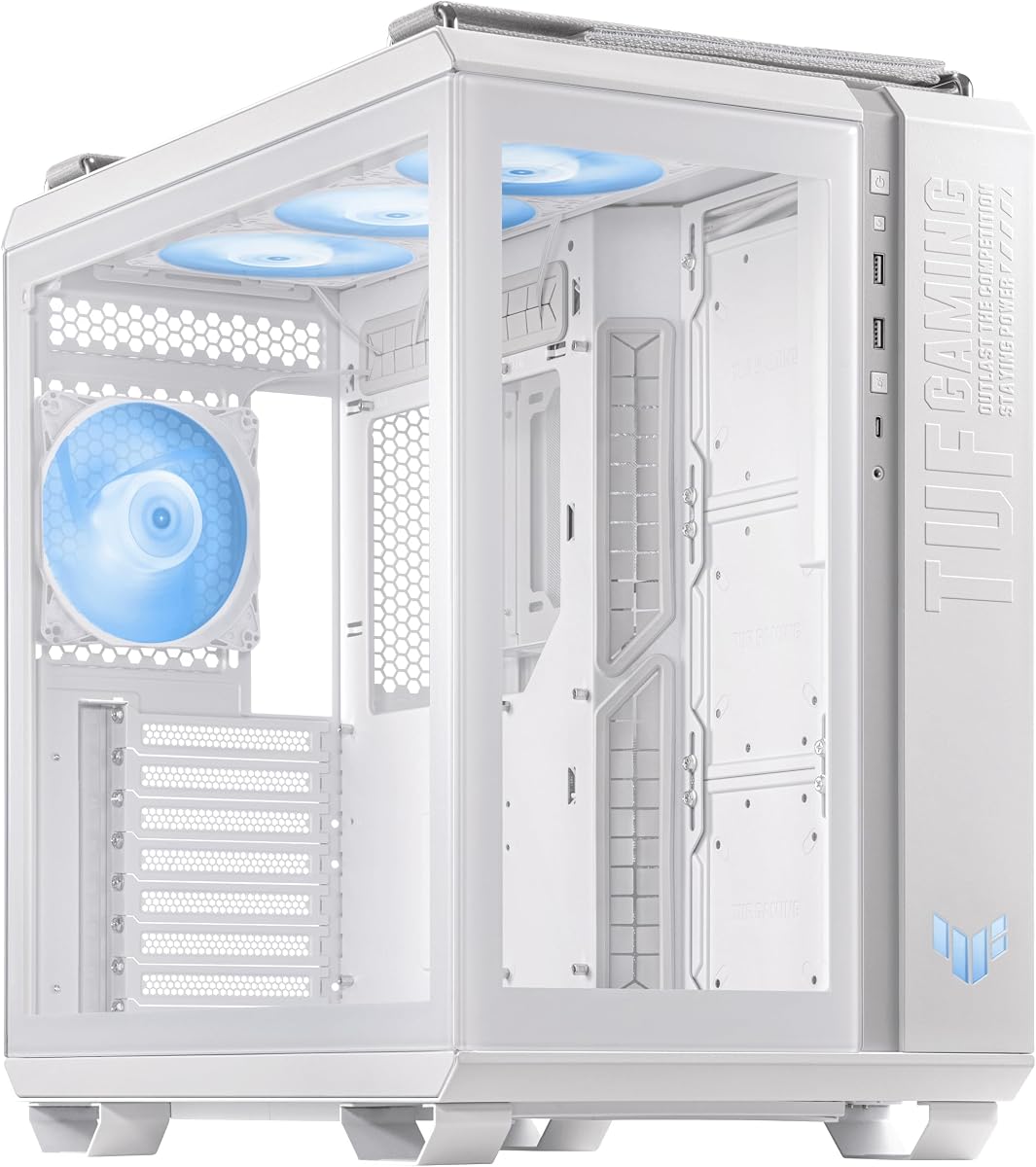
The GT501 is a robust E-ATX case designed for serious gamers. It holds a high rating for its sturdy construction and excellent thermal performance.
We may earn a commission when you buy through this link, at no additional cost to you.
Its standout feature is the support for custom liquid cooling with pre-drilled holes for pumps. The tempered glass panel showcases components beautifully while protecting them.
One trade-off is the size, which can be bulky on smaller surfaces. However, the carry handles make transport significantly easier than standard cases.
Buy this if you need a premium chassis for high-end hardware. It balances style and function perfectly for enthusiast builds.
The chassis supports multiple radiators and fans to ensure optimal cooling for high-performance components.
Built with a metal chassis and custom TUF spatter pattern, this case is built to last and resist wear.
We may earn a commission when you buy through this link, at no additional cost to you.
The AP201 offers exceptional value for budget builders. Despite its low cost, it provides excellent airflow and space efficiency for small form factors.
We may earn a commission when you buy through this link, at no additional cost to you.
Its quasi-filter mesh panels allow for maximum cooling without sacrificing component visibility. The tool-free side panels make maintenance a breeze.
While it lacks premium features like RGB headers or glass panels, it focuses on what matters: cooling and space. This is ideal for practical builds.
Choose this case if you need reliability without overspending. It is a smart choice for entry-level and mid-range systems.
Despite a small footprint, the case supports long GPUs and custom cooling options efficiently.
Over 57,000 precision holes ensure air moves freely to keep temperatures low under load.
We may earn a commission when you buy through this link, at no additional cost to you.
The ROG Hyperion is a flagship case designed for extreme builds. It features a unique semi-open structure for massive airflow and supports huge radiators.
We may earn a commission when you buy through this link, at no additional cost to you.
Its diecast aluminum frame and integrated graphics card holder offer a premium experience. The built-in drawer adds convenient storage for small parts.
The main trade-off is the high price, which may not fit every budget. However, the build quality and features justify the cost for enthusiasts.
Invest in this if you want the ultimate chassis. It showcases high-end components with style and offers unparalleled build convenience.
Supports dual 420mm radiators, allowing for custom loops that handle even the hottest CPUs.
Front Type-C ports with fast charging support modern devices while simplifying peripheral connections.
We may earn a commission when you buy through this link, at no additional cost to you.
The GT502 Horizon redefines case aesthetics with its panoramic glass design. It offers a clear view of your build while maintaining a robust chassis.
We may earn a commission when you buy through this link, at no additional cost to you.
Its dual-chamber structure isolates heat from the CPU and GPU, improving overall thermal efficiency. The modular panels simplify hardware installation significantly.
While the price is higher, the unique design and cooling benefits make it worthwhile. It is perfect for those who value visual impact.
Select this case if you want a standout center-piece for your desk. It combines modern style with effective thermal management.
Independent cooling zones prevent heat buildup from one component affecting another.
Front panel Type-C ports enable fast data transfer for modern external storage devices.
We may earn a commission when you buy through this link, at no additional cost to you.
The A31 PLUS is tailored for users seeking a clean, clutter-free setup. It supports motherboards with hidden connectors for optimized cable management.
We may earn a commission when you buy through this link, at no additional cost to you.
Its panoramic design and angled base enhance both airflow and viewing angles. The pre-installed ARGB fans save time and ensure consistent lighting.
The angled base is a unique feature that boosts airflow but may limit desk placement. Ensure your space can accommodate the tilt.
Ideal for those who prioritize cable neatness. It delivers a professional look without requiring extra accessories or complex setups.
Hidden connector support allows cables to stay out of sight for a pristine build.
The 8-degree tilt improves thermal performance and offers a wider viewing angle for the build.
We may earn a commission when you buy through this link, at no additional cost to you.
The White Edition of the GT501 brings a striking aesthetic to high-end builds. It matches white components perfectly for a cohesive look.
We may earn a commission when you buy through this link, at no additional cost to you.
It shares the robust features of the standard model, including ample space for cooling and hardware. The carry handles make transport easy.
While white finishes can show dust more than dark ones, the impact is minimal with regular cleaning. It is a great choice for themed builds.
Pick this if you are aiming for a white or light-themed PC. It offers the same performance as the black version with a fresher look.
The custom white spatter pattern adds a unique touch to any desk setup.
Ergonomic handles allow you to move the unit safely without damaging internal parts.
We may earn a commission when you buy through this link, at no additional cost to you.
The GT301 focuses on high airflow with its honeycomb front panel. It is an excellent choice for users who prioritize thermal performance.
We may earn a commission when you buy through this link, at no additional cost to you.
It comes with an integrated RGB controller and a headphone hanger, adding convenience and style. The front supports up to a 360mm radiator.
The open front design can allow more dust accumulation compared to mesh filters. Regular maintenance is recommended to keep it clean.
This case is ideal for gamers who want great cooling without breaking the bank. It balances performance and features effectively.
The perforated honeycomb design allows maximum air intake for efficient component cooling.
An integrated RGB controller and headphone hanger add value to the build process.
We may earn a commission when you buy through this link, at no additional cost to you.
The ARGB version of the GT502 Horizon continues to impress with its dual-chamber design. This layout ensures CPU and GPU cooling zones remain separate.
We may earn a commission when you buy through this link, at no additional cost to you.
The panoramic glass provides an unobstructed view, while the front Type-C port supports high-speed storage devices. Pre-installed fans simplify setup.
Cleaning the glass panels may require more effort, but the visual reward is worth it. The modular design also makes installation straightforward.
Recommended for those seeking a balance of modern style and thermal efficiency. It delivers a polished look and reliable performance.
Two independent chambers prevent heat from the GPU affecting the CPU cooling zone.
High-speed USB Type-C ports ensure compatibility with fast external SSDs and peripherals.
We may earn a commission when you buy through this link, at no additional cost to you.
The A31 Plus TG ARGB earns high marks for its design and functionality. It supports concealed port motherboards to keep cables out of sight.
We may earn a commission when you buy through this link, at no additional cost to you.
Its wide compatibility ensures it fits large GPUs and radiators. The angled base enhances airflow and improves the viewing angle significantly.
The 8-degree tilt is a unique feature that aids performance but requires a flat surface. Ensure your desk can support this design choice.
Choose this for a sleek and efficient build. It offers excellent value for users who prioritize both aesthetics and practical hardware support.
Supports up to 380mm GPUs and 360mm radiators for high-end configurations.
The angled base is designed to improve cooling and visual presentation of components.
We may earn a commission when you buy through this link, at no additional cost to you.
The GT502 Plus is a white variant that delivers on dual-chamber cooling. It is ideal for users who want separation between heat sources.
We may earn a commission when you buy through this link, at no additional cost to you.
Front USB 3.2 Gen 2 Type-C ensures fast data speeds for modern storage. The tool-free panels simplify access for cleaning and upgrades.
While the features are standard for the category, the white finish and modular design stand out. It is a solid choice for clean builds.
Recommended for those needing a reliable, stylish case. It combines practical cooling with a look that fits well on any desk.
Dual chambers allow for independent cooling management for CPU and GPU zones.
USB 3.2 Gen 2 Type-C ports provide high-speed data transfer for peripherals.
We may earn a commission when you buy through this link, at no additional cost to you.
Selecting the right chassis involves evaluating several key factors to ensure compatibility and performance.
The first step is choosing a case that fits your motherboard. E-ATX cases offer maximum room, while Micro-ATX models save space.
Ensure the case dimensions fit your desk before purchasing.
Effective cooling depends on mesh panels and fan support. Cases with honeycomb or mesh fronts allow more air to reach components.
Prioritize models with multiple fan mounts for better thermal management.
Steel and aluminum frames provide durability and reduce vibration. Look for cases with sturdy hinges and secure latching mechanisms.
Metal construction often ensures the longevity of the chassis.
Design choices like tempered glass panels and RGB support define the look. Panoramic designs showcase hardware but require careful handling.
Choose a style that matches your personal preference and room decor.
Good cases offer cutouts and tie-down points to hide wires. Hidden connector support further streamlines the internal look.
Adequate space behind the motherboard tray makes routing easier.
Modern cases include USB 3.0 and Type-C ports for fast data. Front panel options vary widely across models.
Ensure the I/O panel meets your peripheral connection needs.
Tool-free side panels simplify maintenance and upgrades. Clips or screws that do not require a screwdriver save time.
This feature is vital for users who upgrade hardware regularly.
Prices vary significantly based on materials and features. Determine which features are essential for your build to save money.
Balance cost with the features you will actually use.
When installing hardware, follow the manual for tool-free panels. Ensure the GPU is properly supported to avoid stress on the chassis.
Clean dust filters regularly using compressed air. This maintains airflow and prevents overheating of internal components.
Avoid moving the case while components are in use. The internal hardware is fragile and can be damaged by sudden impact.
The ASUS Prime AP201 is designed for Micro-ATX motherboards. Its compact 33L footprint makes it ideal for small form factor builds.
Yes, the GT501 supports top or front mounted 360mm radiators. It also has pre-drilled holes for water pumps.
Some models like the A31 PLUS come with four pre-installed ARGB fans. Others may require purchasing fans separately.
Yes, the ROG Hyperion supports up to two 420mm radiators for extreme cooling setups.
The dual chamber design isolates heat from the CPU and GPU. This separation helps maintain lower overall temperatures.
The GT501 is a full tower while the GT502 is a mid tower with panoramic glass panels.
We highlighted ten top models ranging from budget picks to premium options. Each offers unique strengths for different build requirements.
Prioritize airflow and compatibility to ensure your system runs efficiently. Features like USB-C and dual chambers add modern utility.
Prices and stock levels change frequently. Always verify current details before finalizing your purchase.