
PROZOR 192KHz Digital to Analog Audio Converter
4.4Editor score
Supports 192KHz high-resolution audio
Aluminum alloy housing for durability
Optical and coaxial input support
Discover the top 10 audio converters for Mac in October 2026. This guide compares DACs, adapters, and interfaces for optimal sound quality and compatibility.
Finding the right audio converter for your Mac can transform your listening experience. Whether you need to digitize old tapes or connect high-end headphones, a quality device ensures crisp sound and reliable performance across your system.
We evaluated ten top-rated products based on compatibility, audio fidelity, and ease of use. Our comparison includes digital-to-analog converters, USB adapters, and professional interfaces designed to work seamlessly with macOS environments.
Each pick highlights specific strengths like high-resolution support or portable design. Note that pricing fluctuates frequently, so verify current offers before purchasing to ensure you get the best value for your specific audio needs today.
4.4Editor score

4.6Editor score

4.5Editor score
This side-by-side comparison highlights the key specifications of each top-rated audio converter to help you choose the right model for your Mac setup.
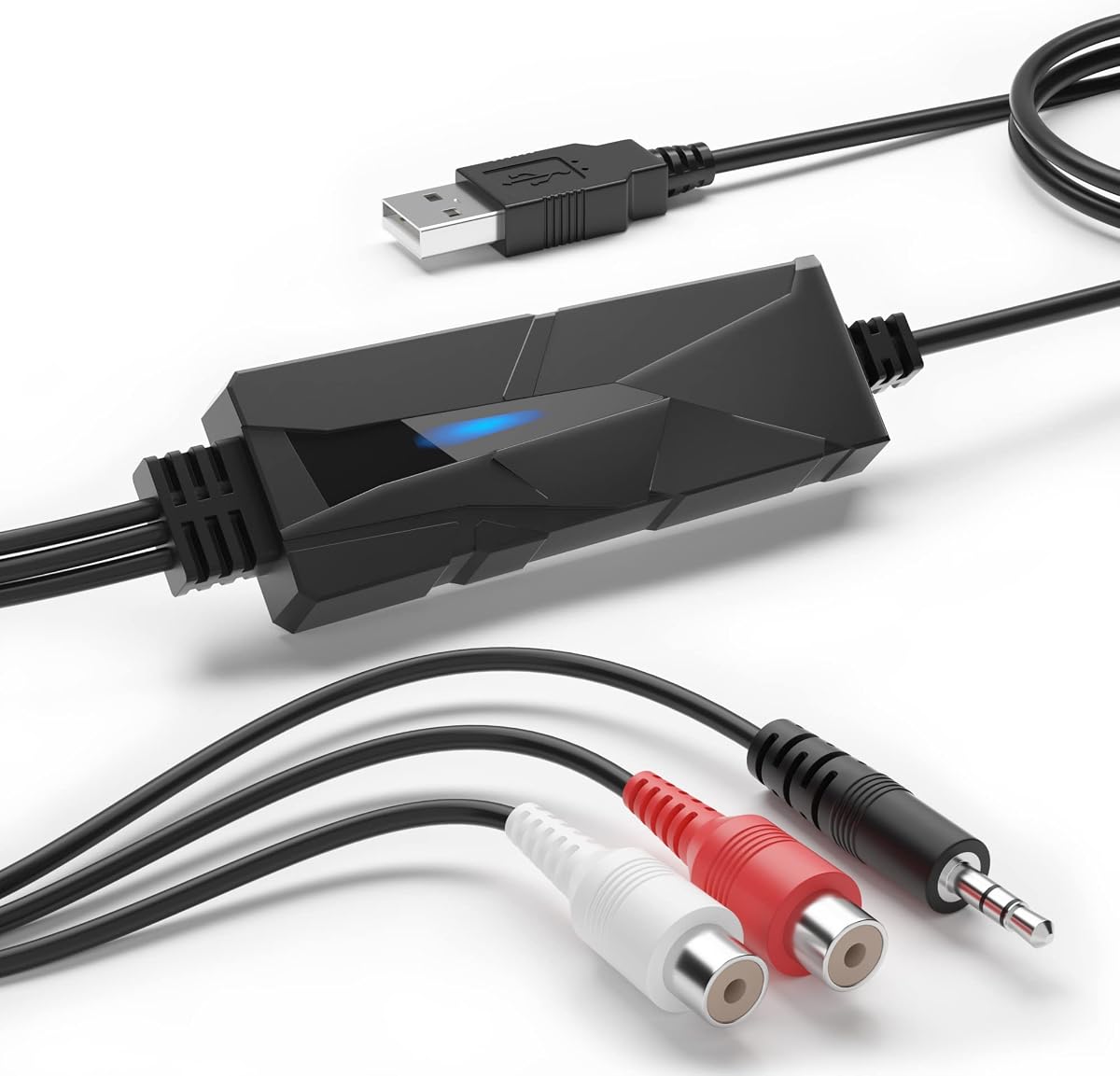


The DriverGenius AudioXfer is a specialized device designed to capture analog audio and convert it into digital formats like MP3 or WAV. It receives a solid rating for its simplicity and effectiveness in digitizing old media like cassettes or LPs on a Mac.
We may earn a commission when you buy through this link, at no additional cost to you.
Its primary strength lies in the included Audacity software which allows users to edit and save their recordings directly. The hardware supports 3.5mm and RCA inputs making it versatile for connecting various audio sources to your computer.
Users should note that while it supports macOS 15 users may need to update specific drivers or use older versions of Audacity for compatibility. This requirement can add a step to the setup process for newer system users.
This device is ideal for anyone looking to preserve memories on old tapes. If you need a straightforward solution to move audio from physical media to your digital library this is a reliable choice.
The device allows you to convert cassette tapes and LPs into digital files for easy playback on modern devices.
Audacity is included to help you edit and save your captured audio tracks with professional tools.
We may earn a commission when you buy through this link, at no additional cost to you.
The Fosi Audio K5 Pro serves as both a DAC and a headphone amplifier making it a versatile choice for Mac users. It receives a high rating for its ability to deliver clear audio with low distortion across a wide range of devices.
We may earn a commission when you buy through this link, at no additional cost to you.
It supports USB Type-C Optical and Coaxial inputs which provides flexibility for connecting different audio sources. The integrated amplifier can drive headphones with impedance up to 300 Ohms ensuring powerful sound.
The volume and power functions are combined into a single button which might be slightly inconvenient for users who prefer separate controls. However the sound quality and connectivity options outweigh this minor design choice.
Gamers and desktop users will benefit from its ability to enhance audio output from their Mac. If you need a reliable external sound card with mic support this unit delivers excellent performance.
Connect your Mac via USB Type-C or optical cable depending on your device's available ports.
The amplifier can power high-impedance headphones ensuring you get full audio detail and volume.
We may earn a commission when you buy through this link, at no additional cost to you.
The PROZOR 192KHz converter is a cost-effective solution for converting digital optical signals to analog audio. It earns a high rating for its ability to support high-resolution PCM audio up to 192KHz while maintaining a compact form factor.
We may earn a commission when you buy through this link, at no additional cost to you.
Its aluminum alloy housing provides better heat dissipation and shielding compared to plastic units. This ensures stable performance during extended use and protects against electromagnetic interference from other devices.
Powering the device requires a specific 5V 1A adapter and using incorrect plugs may cause issues. Additionally managing TV volume settings can be confusing if your TV does not support optical volume control via remote.
For users needing to connect their Mac to analog speakers or receivers this converter is an excellent value. If you want high-quality audio conversion without spending a lot this model is a top choice.
The device supports audio signals up to 192KHz ensuring detailed sound reproduction for high-quality files.
The durable housing protects internal components and helps dissipate heat for long-term reliability.
We may earn a commission when you buy through this link, at no additional cost to you.
The Douk Audio U2PRO is a digital interface that converts USB signals to Optical Coaxial and I2S outputs. It receives a solid rating for its use of the XMOS XU316 chip which ensures stable and low-jitter digital transmission.
We may earn a commission when you buy through this link, at no additional cost to you.
The UAC mode switch allows users to toggle between plug-and-play compatibility and high-resolution audio modes. This flexibility makes it suitable for both gaming consoles and high-fidelity music setups on a Mac.
Some users have noted past driver issues though recent updates have resolved many of these. If you are using an older operating system you might need to verify compatibility before purchasing this specific model.
Audiophiles looking to upgrade their digital signal chain will appreciate the precision of this device. If you need to feed a clean signal to a classic DAC this adapter is a powerful tool.
Switch between mode 1.0 for gaming and 2.0 for high-resolution audio playback on your computer.
Supports PCM up to 32-bit/768kHz and DSD512 for the highest quality audio streaming possible.
We may earn a commission when you buy through this link, at no additional cost to you.
The SMSL SU-1 is a DAC designed to handle MQA files and high-resolution audio formats. It earns a high rating for its ability to decode MQA signals to restore original studio quality for compatible files.
We may earn a commission when you buy through this link, at no additional cost to you.
It uses the AK4493S DAC chip which is known for ultra-low distortion. This ensures that the audio signal remains clean and accurate throughout the conversion process from digital to analog.
Windows users will need to install drivers to use this device which adds a step to the setup. Mac users should check compatibility as the support focuses on older macOS versions and Linux systems.
If you subscribe to services that use MQA this DAC will help you hear the intended sound. For enthusiasts wanting to hear studio-grade detail from digital files this unit is a strong contender.
The device restores the original high-resolution signal from MQA encoded files for authentic listening.
With distortion lower than 0.00013% the audio remains pure and free from unwanted artifacts.
We may earn a commission when you buy through this link, at no additional cost to you.
The SMSL PO100 PRO is a portable digital interface that converts USB signals to Optical and Coaxial outputs. It receives a high rating for its small size and ability to support MQA decoding without additional software.
We may earn a commission when you buy through this link, at no additional cost to you.
It features the XMOS XU316 chip which ensures asynchronous transmission and high-resolution audio support. This makes it ideal for users who need to move audio from their Mac to an external DAC easily.
Users should note that the input uses Type-C and the device is best used with a digital source set to maximum volume. While small the build quality is robust enough to handle travel in bags or backpacks.
Travelers and mobile users will appreciate how easy it is to carry this unit. If you need a portable way to upgrade your digital audio chain this is a top choice.
The small form factor allows you to carry it easily in a bag for audio upgrades on the go.
It decodes MQA files natively so you get high-quality sound without needing special apps.
We may earn a commission when you buy through this link, at no additional cost to you.
The Sound Blaster Play! 3 is a simple USB audio adapter that adds high-quality audio output to your Mac. It earns a high rating for its plug-and-play functionality which requires no driver installation.
We may earn a commission when you buy through this link, at no additional cost to you.
It supports 24-bit 96kHz audio which is a significant upgrade from basic built-in audio cards. This allows for clearer and more detailed sound when listening to music or watching videos.
The device is compatible with all analog headsets and includes software enhancements for control. However it is primarily a basic adapter and does not offer advanced DAC features found in higher-end models.
For users needing a quick and easy fix for headphone connectivity this adapter is ideal. If you want to improve sound without complicating your setup this is a great option.
The device works straight out of the box with no software installation required on your computer.
Downloadable software provides audio enhancements to customize your sound profile for different headphones.
We may earn a commission when you buy through this link, at no additional cost to you.
The iFi Audio Go Link Max is a portable headphone amp and DAC designed for high-resolution audio. It receives a high rating for its dual ESS Sabre DACs which provide a balanced circuit for clean sound.
We may earn a commission when you buy through this link, at no additional cost to you.
It supports PCM up to 384kHz and DSD256 ensuring that high-quality files are reproduced with precision. The balanced 4.4mm output allows for higher power delivery to demanding headphones.
The cable is flexible to aid portability but may be subject to wear over time. Users should handle the USB-C connector with care to maintain good connectivity on your Mac device.
If you use high-end headphones and need a powerful yet portable amp this is a great choice. For serious listeners on the go this dongle delivers audiophile-quality performance.
The 4.4mm balanced output provides up to 241mW power for efficient driving of high-impedance headphones.
Dynamic Range Enhancement technology improves signal purity and reduces noise for a better listening experience.
We may earn a commission when you buy through this link, at no additional cost to you.
The Fosi Audio Q6 is a compact desktop DAC designed for home stereo systems. It receives a high rating for its ability to support PCM 32-bit/768kHz and DSD512 which delivers crystal-clear audio fidelity.
We may earn a commission when you buy through this link, at no additional cost to you.
It features Optical Coaxial and USB-C inputs making it versatile for connecting different sources to your Mac or media players. The RCA and Sub-Out outputs allow you to integrate it easily with amplifiers.
While it provides excellent signal conversion it cannot drive headphones directly without an external amp. This makes it more suitable for users who already have a stereo system or powered speakers.
If you want to upgrade your home audio setup this DAC is a reliable option. For audiophiles seeking high fidelity and build quality this unit is a strong recommendation.
The DAC supports up to 32-bit/768kHz PCM to ensure you hear every detail in your music.
Connect a subwoofer via the Sub-Out port for a complete surround sound experience at home.
We may earn a commission when you buy through this link, at no additional cost to you.
The Shure MVX2U Gen 2 is a professional audio interface that converts XLR signals to USB-C. It earns a high rating for its onboard DSP which provides real-time audio processing for podcasting and streaming.
We may earn a commission when you buy through this link, at no additional cost to you.
It offers up to 60 dB of clean gain and supports 48V phantom power for condenser microphones. This makes it ideal for professionals who need studio-quality input from their Mac or tablet.
The device includes Auto Level Mode and Digital Popper Stopper to ensure consistent output. While powerful it is designed primarily for recording which makes it a premium choice over standard DACs.
If you stream or record audio professionally this interface is a top-tier tool. For creators seeking reliable and high-performance input this unit is highly recommended.
The interface accepts any XLR microphone for studio-quality recording and streaming from your Mac.
Onboard DSP includes Auto Level Mode and Real-Time Denoiser for consistent audio output.
We may earn a commission when you buy through this link, at no additional cost to you.
Selecting the right audio converter requires understanding your specific needs and compatibility with your Mac system.
Ensure the device supports the ports available on your Mac such as USB-C or Thunderbolt. For older models you may need adapters to connect analog or optical cables.
Check that the output matches your speakers or headphones whether that is RCA 3.5mm or balanced connections.
Look for devices that support high-resolution audio like PCM up to 24-bit/192kHz or DSD formats. This ensures you are not losing quality when converting digital signals.
Higher bit depths and sample rates preserve more detail in your music which is critical for audiophiles.
The DAC chip determines the quality of conversion from digital to analog. Chips like AKM or ESS are known for low distortion and high fidelity.
Invest in a device with a reputable chipset to avoid background noise and ensure accurate sound reproduction.
Some converters are USB-powered while others require an external power adapter. USB-powered units are more portable but may draw significant power from your Mac.
Check if the device requires a specific voltage to avoid connectivity issues or damage to your ports.
Verify that the device is compatible with your macOS version. Some require specific drivers which may need updates for newer systems.
Plug-and-play devices are generally preferred to avoid complex setup processes on your computer.
If you travel often choose a compact dongle or portable DAC. These fit easily in bags and provide high-quality sound on the go.
Desktop models offer more power but lack mobility so decide based on where you use your Mac most.
If you need to record voice input ensure the converter has a mic input or supports audio interfaces. Standard DACs usually lack input capabilities.
Hybrid units that offer both input and output are best for users who stream or record content.
Choose devices with durable materials like aluminum alloy which dissipate heat and resist interference. Plastic units may be prone to wear over time.
A solid build ensures longevity and consistent performance especially if you connect and disconnect frequently.
Connect your converter to the Mac via the appropriate cable such as USB-C or Optical. Ensure the device is recognized in system preferences before playing audio.
Set your Mac sound output to the external device in the audio settings menu. This routes the audio signal through the converter instead of the internal speakers.
Keep the device clean and avoid exposing it to moisture or extreme heat. Regularly check cables for wear to maintain stable connections and prevent signal loss.
Most modern USB audio converters are plug-and-play and do not require drivers. However some high-end models may need specific drivers for full functionality on newer macOS versions.
A DAC converts digital signals to analog while an amplifier boosts that signal to drive speakers or headphones. Some devices combine both functions for a complete solution.
MacBook Air models typically do not have optical ports so you will need a USB-C to optical adapter or a USB DAC instead. Check your specific model's ports before purchasing.
USB converters often provide better sound quality due to reduced electromagnetic interference. They also offer more flexibility and high-resolution support than built-in audio.
If your headphones are high-impedance or require balanced connections a DAC is beneficial. Most standard earbuds work fine with basic adapters.
Standard DACs are for playback only. To record audio you need an audio interface with input support like the Shure MVX2U Gen 2.
We have reviewed ten top audio converters that offer various solutions from simple adapters to professional interfaces. Each model brings unique strengths suited for different Mac users and setups.
Prioritize audio quality and connectivity options that match your headphones and speakers. Whether you need portability or desktop power there is a pick for every preference.
Remember to check current pricing and compatibility before buying to ensure the best value for your needs today.