
BlueFinger RGB Gaming Keyboard and Mouse
4.4Editor score
Rainbow backlit keyboard design
Includes mouse pad accessory
Anti-conflict keys for gaming
Explore the top 10 keyboard and mouse combos optimized for Baldurs Gate 3, comparing features, comfort, and performance for RPG gaming setups.
Choosing the right peripherals can transform your gaming experience in Baldurs Gate 3. A responsive keyboard and mouse combo ensures precise spell casting and quick inventory management during intense encounters. We have compiled a list of the most reliable options available for players seeking comfort and functionality.
Our team evaluated each product based on build quality, responsiveness, and ergonomic design. We considered factors like key travel, DPI settings, and lighting customization to find setups that suit long gaming sessions. This guide covers a range of budgets to help you find the perfect match for your needs.
Each pick below highlights unique strengths and potential trade-offs to aid your decision. Whether you need wireless freedom or wired reliability, these options offer solid performance. Keep in mind that availability and features may change over time, so verify details before purchasing your new gear.
4.4Editor score

4.5Editor score
4.4Editor score
This side-by-side comparison highlights the core specifications and unique features of each keyboard and mouse combo. We focus on connectivity, lighting options, and ergonomic support to help you distinguish between similar models quickly.


The Redragon S101-3 PRO stands out as a top choice for Baldurs Gate 3 players seeking a complete set. It offers a full-size RGB backlit keyboard paired with a high-precision mouse. This combination ensures you have the tools needed for complex spell rotations and inventory management.
We may earn a commission when you buy through this link, at no additional cost to you.
Its standout feature is the inclusion of independent macro record keys. You can record complex command sequences to execute multi-step actions quickly. The soft-touch membrane keys provide feedback that is satisfying yet quiet, making it ideal for shared spaces or late-night sessions.
While it lacks wireless capability, the wired connection ensures stable performance without latency concerns. The anti-ghosting feature guarantees that every key press registers instantly during intense action. This reliability is crucial when timing critical spells or dodging enemy attacks.
This set is perfect for first-time gamers or anyone upgrading from basic peripherals. It balances durability with responsive performance at a value-oriented price point. The ergonomic wrist rest included helps reduce fatigue during extended gameplay.
The five dedicated macro keys allow you to bind frequent spell combinations to single presses for efficiency.
Membrane keys are designed to minimize noise, ensuring your gaming session does not disturb others nearby.
We may earn a commission when you buy through this link, at no additional cost to you.
The RedThunder K10 Wired offers a premium feel with its mechanical feel keys and sturdy construction. The full-size layout includes F-keys and a numeric keypad, essential for managing inventory items and shortcuts. Its mouse features a high-precision optical sensor for accurate movement.
We may earn a commission when you buy through this link, at no additional cost to you.
This set excels in durability and comfort. The built-in steel plate adds strength to the keyboard base, while the soft leather wrist rest provides extra relaxation during long sessions. The RGB lighting enhances the visual setup, creating an immersive atmosphere for your game.
The mouse includes adjustable DPI settings up to 7200, allowing you to switch between browsing and gaming speeds quickly. The anti-slip material ensures a better grip, which is vital for precision aiming. The combination of features justifies its position as a high-quality choice.
Ideal for players who want robust peripherals that look and feel professional. The ergonomic design reduces hand fatigue, making it suitable for both work and gaming. Its reliable performance ensures you stay focused on your adventures.
The curved ABS keycaps and steel plate base ensure the keyboard remains sturdy and resistant to falls.
Anti-slip ABS material provides a secure hold, preventing accidental slips during rapid movements.
We may earn a commission when you buy through this link, at no additional cost to you.
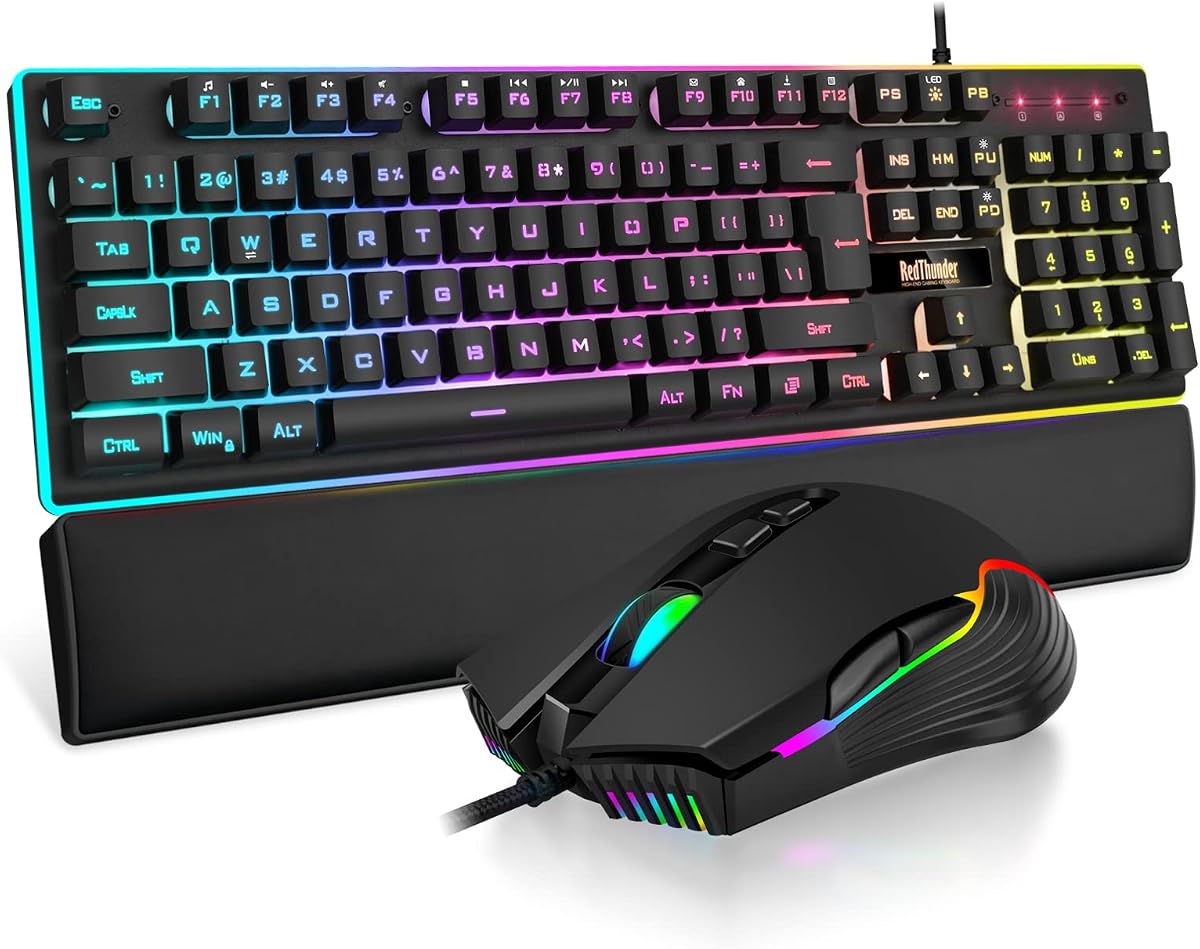
The BlueFinger RGB Gaming Keyboard and Mouse is a fantastic entry-level option for Baldurs Gate 3. It features a rainbow backlit design that makes typing in the dark easy. The keyboard includes 104 keys with non-conflict technology for simultaneous presses.
We may earn a commission when you buy through this link, at no additional cost to you.
A unique value-add is the included mouse pad, which provides ample space for movement. The mouse has adjustable DPI settings and breathing light effects that match the keyboard's aesthetic. This bundle offers a complete setup without extra costs.
Although it is budget-friendly, it maintains durability with a built-in steel plate and braided cables. The anti-conflict keys prevent input errors during intense combat sequences. Its lightweight design makes it easy to transport if needed.
This combo is perfect for students or casual gamers who want style without breaking the bank. The plug-and-play functionality means you can start playing immediately. It balances cost and performance effectively for new setups.
Includes a large mouse pad that matches the aesthetic of the keyboard and mouse set.
Rainbow backlighting illuminates the keys to enhance the gaming atmosphere in dim environments.
We may earn a commission when you buy through this link, at no additional cost to you.
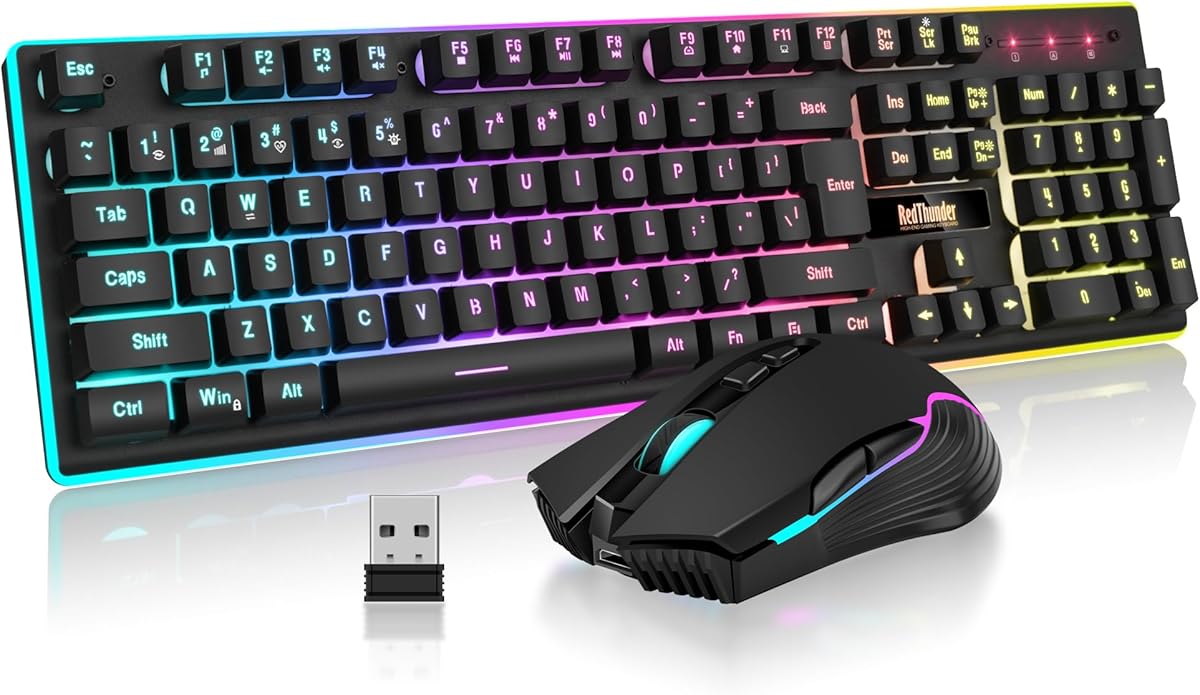
The RedThunder K10 Wireless offers the freedom of wireless play without compromising on gaming features. It uses a stable 2.4G transmission to maintain performance. The keyboard and mouse share a single USB receiver, simplifying setup on your desk.
We may earn a commission when you buy through this link, at no additional cost to you.
Battery life is a strong point, with the keyboard holding a charge for hours of continuous use. The smart energy-saving functions help extend runtime by entering sleep mode when idle. This reduces the need for constant recharging.
While wireless setups can have latency, this model is designed for high-speed transmission. The mechanical feel keys provide the tactile feedback gamers expect. The mouse includes 7D buttons for quick access to essential controls during gameplay.
This is an excellent choice for those who prefer a clutter-free desk. The durable design and ergonomic fit make it comfortable for long sessions. It bridges the gap between wired performance and wireless convenience.
One USB receiver controls both keyboard and mouse, reducing USB port usage.
Automatically enters sleep mode after inactivity to conserve battery power effectively.
We may earn a commission when you buy through this link, at no additional cost to you.
The Rii Gaming Keyboard and Mouse Set is designed for a cool visual effect with practical usability. It features a professional mechanical feel that mimics high-end switches. The 3-LED backlighting for the keyboard adds a stylish touch to your setup.
We may earn a commission when you buy through this link, at no additional cost to you.
Key durability is emphasized with a life of 5 million clicks for the keyboard keys. The mouse supports multiple DPI levels to suit different usage scenarios. The laser-carved characters ensure the labels remain visible over time.
Ergonomics play a big role in this set, helping to release hand fatigue. It works with a wide range of operating systems, making it versatile for different users. The non-slip design keeps the mouse steady during use.
Ideal for those seeking a reliable compact setup that looks good. The balance of cost and functionality makes it a strong contender for general use. It provides enough features for gaming without unnecessary bloat.
Keyboard keys are rated for 5 million clicks ensuring longevity for frequent typists.
3-LED backlight and 7-color breath light on the mouse create a dynamic aesthetic.
We may earn a commission when you buy through this link, at no additional cost to you.
The K1 RGB LED Backlit Keyboard focuses on ergonomic design to fit your hands naturally. The scientific layout of high and low keycaps reduces hand fatigue after prolonged use. Its floating keycaps are removable, making cleaning straightforward.
We may earn a commission when you buy through this link, at no additional cost to you.
Lighting is a major feature here with 8 light colors and 5 modes to choose from. The mouse offers 6 levels of speed to match different tasks from typing to gaming. The waterproof USB cable ensures stable data transmission even in wet conditions.
This keyboard operates without drivers, allowing for immediate use. The non-slip pads on the bottom enhance stability, preventing movement during fast inputs. The double-shot injection molding ensures letters never fade over time.
Best for those who prioritize comfort and ease of use. The simple plug-and-play setup saves time on configuration. Its reliable performance makes it a solid choice for daily gaming sessions.
Floating keycaps can be removed for easy cleaning of dust and debris.
Non-slip pads keep the keyboard secure on your desk during intense gameplay.
We may earn a commission when you buy through this link, at no additional cost to you.
The Large Print Light Up Keyboard is designed for clarity with letter characters larger than usual. The command keys are in a bolder font, helping those who have trouble seeing standard keyboards. It works well for various environments like libraries or offices.
We may earn a commission when you buy through this link, at no additional cost to you.
Its adjustable backlight offers 7 color options and 3 brightness levels to suit your preferences. The ergonomic design includes stand feet to reduce hand fatigue during extended use. Silent operation helps maintain focus without distractions.
The mouse is optical and provides precise tracking for everyday tasks. The keyboard layout is standard, so there is no relearning required. It supports a wide range of Windows versions and laptops seamlessly.
This combo is ideal for users who need better visibility without sacrificing comfort. The high-contrast keys make typing accurate and faster. It is a practical choice for both daily work and casual gaming.
Command keys are bold and larger for improved visibility and accuracy.
Integrated stand and wrist rest help maintain a comfortable typing position.
We may earn a commission when you buy through this link, at no additional cost to you.
This USB Wired Keyboard and Mouse Combo features oversized keys printed three times larger than standard. The quiet low-profile keys reduce typing noise, making it ideal for shared spaces. The keyboard includes multimedia hotkeys for quick audio adjustments.
We may earn a commission when you buy through this link, at no additional cost to you.
The mouse supports adjustable DPI levels to handle different tasks efficiently. RGB lighting on the mouse adds a touch of style while remaining functional. The integrated wrist rest provides support to relieve fatigue during prolonged use.
Spill resistance and durable construction ensure long-term reliability. The compact slim design fits well on smaller desks. Compatibility with Windows and Mac systems makes it versatile for various users.
Perfect for those who prioritize quiet operation and visibility. The ergonomic design supports long work or gaming sessions without pain. It combines utility with comfort in a simple package.
Low-profile keys operate silently, ideal for quiet environments like libraries or offices.
Keys are 3x larger than standard for effortless typing and visibility.
We may earn a commission when you buy through this link, at no additional cost to you.
The SABLUTE Wired Large Print Keyboard and Mouse Combo features characters four times larger than standard. This design helps seniors and students identify keys quickly and accurately. The adjustable palm rest supports a comfortable typing angle to reduce fatigue.
We may earn a commission when you buy through this link, at no additional cost to you.
Its 7-color adjustable backlight allows you to match your mood or lighting conditions. The ergonomic mouse has an anti-slip base to prevent misclicks. Silent operation ensures you can work or play without disturbing others.
The keyboard layout is standard, so there is no learning curve. It connects via a reliable USB cable for stable performance. The built-in backlighting on the mouse helps you locate it easily in the dark.
This is a thoughtful choice for students and families seeking comfort. The design focuses on accuracy and ease of use over complex gaming features. It is a practical option for everyday computer tasks.
Integrated palm rest reduces wrist strain during long typing sessions.
4X larger characters make typing easier and more accurate for all users.
We may earn a commission when you buy through this link, at no additional cost to you.
The VEILZOR Wireless Combo keeps your workspace tidy with reliable 2.4G wireless connections. It includes a phone holder and a sturdy wrist rest for ergonomic comfort. The silent keyboard reduces noise significantly for focus.
We may earn a commission when you buy through this link, at no additional cost to you.
RGB backlighting with 9 effects allows personalization of your setup. The mouse matches with silent clicks and comfortable contoured design. Charging is handled via USB-C, eliminating the need for disposable batteries.
The keyboard offers full-size keys with good spacing for accuracy. The tilt legs allow you to adjust the typing angle for better comfort. This setup supports extended use without cramping or noise distractions.
Ideal for modern setups that require wireless freedom and style. The USB-C charging ensures longevity and convenience. It is a solid option for those who value a clean desk and comfortable typing.
2.4G connection provides a range of up to 10 meters for flexibility.
Mouse and keyboard are designed to reduce noise by 99% for focus.
We may earn a commission when you buy through this link, at no additional cost to you.
Selecting the right peripherals involves evaluating connectivity, ergonomics, and specific features that enhance gameplay. We break down the key factors to consider for a smooth and immersive experience.
Decide between wired and wireless options based on your desk setup. Wired setups offer zero latency and consistent power, while wireless setups reduce clutter and allow for flexibility. For competitive gameplay, wired may be preferred, but modern wireless is often sufficient for RPGs.
Choose the connection type that matches your priority for stability or desk space.
Since Baldurs Gate 3 involves long sessions, comfort is paramount. Look for keyboards with ergonomic stands and mouse designs that fit your hand shape. Wrist rests can prevent strain during extended play, ensuring you can continue without discomfort.
Prioritize ergonomic features to maintain comfort during long gaming or work sessions.
The speed of input registration is critical for spell casting and movement. Anti-ghosting technology ensures multiple key presses register simultaneously. High DPI settings on the mouse allow for precise cursor control when navigating menus or targeting.
Ensure your peripherals support responsive inputs to avoid lag during combat.
Build quality determines how long your peripherals last. Look for reinforced keycaps, steel plates, or braided cables that resist wear. A durable mouse with reliable clicks will prevent failures when you need precision most.
Invest in sturdy materials to ensure longevity and reliability over time.
RGB lighting and macro keys allow you to personalize your setup. Macros can bind complex actions to single keys, streamlining your gameplay. Customizable lighting can also enhance the atmosphere of your gaming environment.
Consider customization options that fit your workflow and aesthetic preferences.
Ensure the device works with your operating system. Most options support Windows, but verify Mac or Linux support if needed. Driver-free options provide easier setup for quick plug-and-play functionality.
Check system compatibility to avoid setup issues or missing features.
Prices vary widely from basic combos to high-end sets. Determine how much you are willing to spend based on your needs. Often, mid-range options offer the best balance of features and cost for casual gaming.
Set a budget that aligns with your feature requirements and financial limits.
If choosing wireless, battery life is a key factor. Look for rechargeable options with long endurance to avoid frequent charging. Energy-saving features like auto-sleep help extend runtime during idle periods.
Select a battery capacity that supports your daily usage without interruptions.
Start by connecting your device to a USB port or pairing the wireless receiver. Ensure the keyboard and mouse are recognized by your system before launching the game. Adjust settings like DPI or lighting in the provided software if available to suit your preferences.
Regularly clean the keys and mouse surface with a soft cloth to remove dust and debris. For keyboards with removable keycaps, gently clean underneath to prevent grime buildup. Keeping your peripherals clean maintains smooth operation and extends their lifespan.
If using wireless models, recharge or replace batteries as needed to maintain performance. Store the wireless receiver in a safe place when not in use to avoid loss. Proper care ensures your setup remains reliable for every adventure you embark on.
Most keyboards listed are plug-and-play and do not require drivers for basic use. However, advanced features like macro recording or specific lighting effects may need dedicated software. Check the product details for software requirements before purchase.
Modern wireless technology offers performance similar to wired options for most users. However, wired connections still provide absolute zero latency and continuous power. Choose based on your preference for desk aesthetics versus absolute stability.
Many of these keyboards are compatible with Mac OS, though some multimedia keys may not function. Check the product specs for specific Mac support before buying. Most basic typing and mouse functions work universally across systems.
Turn off the keyboard and unplug it before cleaning. Use a soft cloth or compressed air to remove dust from the keys. Avoid liquid cleaners directly on the surface to prevent damage to the internal electronics and lighting.
Anti-ghosting allows multiple keys to be pressed simultaneously without missing any inputs. This is vital for gaming when you need to move and act at the same time. It ensures your commands are registered accurately during intense moments.
Yes, many of these models feature ergonomic designs suitable for office use. Quiet membrane keys can be beneficial for shared workspaces. The layout and comfort make them viable for daily typing tasks alongside gaming.
Battery life varies by model and usage, typically lasting several hours to weeks on a full charge. Some models offer energy-saving modes to extend runtime. Always check the product description for estimated battery duration.
We have reviewed ten reliable keyboard and mouse options suitable for Baldurs Gate 3. Whether you need wireless freedom or wired stability, these choices offer strong performance and comfort for gaming.
Prioritize ergonomic design and responsiveness to ensure you can enjoy long sessions without fatigue. The right setup can enhance your ability to manage complex spells and inventory effectively.
Remember to verify current availability and features before purchasing. Prices and stock may change, so checking the latest details will help you make the best choice for your setup.