
NetumScan USB 1D Barcode Scanner
4.4Editor score
Plug and play USB connectivity
Durable design withstands drops from 2m
Reads smudged and reflective barcodes
This guide compares the top barcode scanners for library use, focusing on wireless connectivity, durability, battery life, and compatibility with various
Libraries rely on efficient systems to manage vast collections of books and media. A reliable barcode scanner is essential for tracking inventory, checking items in and out, and maintaining accurate records without disrupting patrons.
We evaluated ten top-rated scanners based on connectivity options, scanning accuracy, battery performance, and ruggedness. Our analysis prioritizes devices that handle ISBN codes well and offer flexible wireless ranges for busy library environments.
Each selection highlights key strengths like portability or hands-free scanning. While we provide detailed insights, actual costs may fluctuate over time so verifying current listings helps ensure you secure the best value for your needs.
4.4Editor score

4.4Editor score

4.3Editor score
The following table offers a side-by-side look at the specifications and capabilities of each scanner we reviewed. It helps you quickly identify which model aligns with your specific library workflow and device requirements.




The NETUM Bluetooth Barcode Scanner stands out as the top pick for libraries needing flexibility. With a high rating of 4.4 stars it delivers consistent performance across various devices and operating systems.
We may earn a commission when you buy through this link, at no additional cost to you.
Its ability to switch between Bluetooth 2.4G wireless and wired modes ensures you are never tethered or out of range. The 2600mAh battery lasts through long days of checking books in and out without frequent recharging.
While it offers robust features like programmable prefixes and suffixes users should note it does not work with certain POS systems like Square. However for library circulation this limitation is rarely an issue.
Librarians looking for a reliable all-rounder will appreciate its balance of speed and battery life. It handles ISBN codes efficiently making it ideal for managing large collections with minimal downtime.
The upgraded 2600mAh battery allows continuous scanning up to 200000 times on a full charge ensuring uninterrupted workflow during peak hours.
Users can choose between manual trigger continuous scanning or auto-sensing modes to fit their specific cataloging or checkout tasks.
We may earn a commission when you buy through this link, at no additional cost to you.
For libraries on a tight budget the NetumScan USB 1D Barcode Scanner offers incredible value. It maintains a solid 4.4 rating while providing essential features needed for accurate inventory tracking.
We may earn a commission when you buy through this link, at no additional cost to you.
Its CCD technology ensures it captures 1D codes from paper and screens reliably. The durable ABS material withstands accidental drops making it suitable for high-traffic circulation desks.
The main trade-off is the lack of wireless capability which restricts movement around the shelves. However if your setup has fixed stations this wired scanner performs flawlessly.
Librarians who need a reliable workhorse without breaking the bank should consider this model. Its plug-and-play setup means you can start scanning immediately after unpacking.
Simple plug and play USB connectivity ensures reliable and stable connection without the need for additional software installation or configuration.
High-quality ABS construction supports repeated drops from 2m high to the concrete ground guaranteeing a long service life in active environments.
We may earn a commission when you buy through this link, at no additional cost to you.
The Tera Barcode Scanner with Screen elevates the experience with unique features like an adjustable display. Its 4.3 rating reflects satisfaction from users needing advanced control over their scanning operations.
We may earn a commission when you buy through this link, at no additional cost to you.
Unlike standard scanners this model lets you change language volume and connection preferences directly on the device. The 1D and 2D support ensures it can handle QR codes too for modern library tasks.
While the price is higher the included charging cradle and built-in receiver add significant value. The 2500mAh battery supports seamless all-day operation without frequent interruption.
Libraries wanting premium features and future-proofing will find this device meets their needs. It balances power and flexibility making it a strong candidate for tech-forward institutions.
It allows you to customize the screen display according to your preferences including language volume settings and connection options for unparalleled convenience.
Superior Global CMOS Imaging Scanning handles ordinary and high-density barcodes including PDF417 on driver licenses and reflective materials with speed.
We may earn a commission when you buy through this link, at no additional cost to you.
The Eyoyo Mini is designed for users who prioritize portability above all else. Weighing just 35 grams it fits easily in a pocket making it perfect for on-the-go inventory checks.
We may earn a commission when you buy through this link, at no additional cost to you.
Its Bluetooth range reaches up to 50 meters allowing staff to walk freely through aisles while scanning items. The vibration mode ensures discreet operation in quiet library reading areas.
However the 650mAh battery may require more frequent charging compared to larger models. Additionally it does not read 2D codes from screens which limits some use cases.
Librarians needing a lightweight tool for quick audits will love this device. It simplifies scanning tasks without adding bulk to your daily carry essentials.
Completely mini pocket size and ultralight at 35g making this scanner a better choice for portable use especially for bookstores and warehouses.
Transmission range of up to 30m in 2.4G mode and up to 50m in Bluetooth mode without barriers ensures connectivity across large spaces.
We may earn a commission when you buy through this link, at no additional cost to you.
The Tera 5100 Purple impresses with its battery indicator light which eliminates low battery anxiety during busy shifts. Its 4.5 rating shows strong trust from users relying on consistent performance.
We may earn a commission when you buy through this link, at no additional cost to you.
With a transmission range up to 328 feet it covers large library spaces easily. The IP54 protection and silicone cover keep the device safe from dust and accidental drops.
While it focuses on 1D scanning which is typical for books it lacks storage mode for offline data syncing. However for direct connection setups this is rarely a barrier.
Librarians who value reliability and clear status updates will prefer this model. Its combination of range and durability makes it a solid choice for daily circulation tasks.
Unique battery indicator light showing the remaining battery level ensures no more low battery anxiety during critical scanning operations.
Anti shock silicone protective cover prevents scratches even when dropped from up to 6.56 feet keeping the device functional in tough conditions.
We may earn a commission when you buy through this link, at no additional cost to you.
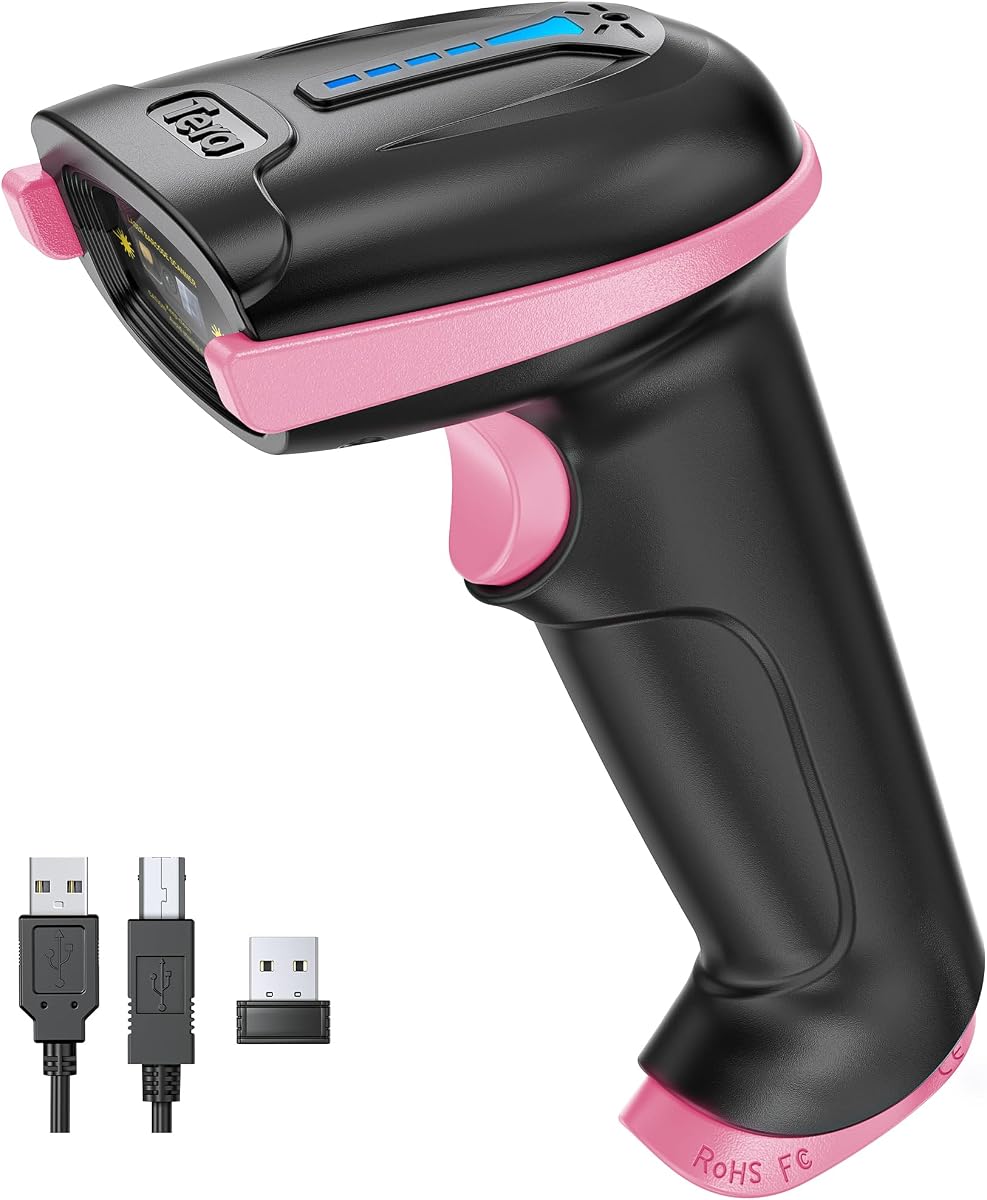
The pink version of the Tera 5100 offers the same robust features as the purple variant in a vibrant color. It maintains the 4.5 rating for performance and durability in daily library use.
We may earn a commission when you buy through this link, at no additional cost to you.
Staff often appreciate the color for easy identification on desks or in bags. The battery indicator and long standby time ensure the scanner is ready when needed without constant monitoring.
While it lacks storage mode for offline use its connectivity range is excellent. The ergonomic handle design ensures comfortable gripping during extended scanning sessions.
Libraries looking to add a touch of style to their tech inventory will enjoy this model. It balances form and function effectively for professional environments.
Larger battery enables longer continuous usage and twice the stand-by time for uninterrupted work throughout the day.
Anti shock silicone protective cover prevents scratches and friction even when dropped ensuring long-term durability and aesthetic appeal.
We may earn a commission when you buy through this link, at no additional cost to you.
The WoneNice USB Laser Barcode Scanner is known for its speed with 200 scans per second. It holds a strong 4.5 rating among users needing rapid throughput at circulation desks.
We may earn a commission when you buy through this link, at no additional cost to you.
Its laser technology works well on printed labels but may not read screens effectively. The plug-and-play USB connection makes setup simple without requiring driver installations on any computer.
While it lacks wireless flexibility its configuration options allow customization of keyboard outputs. This ensures compatibility with various library management software systems seamlessly.
Librarians needing high-speed input for fixed stations will find this device efficient. It provides reliable performance for handling large volumes of book check-ins and check-outs.
Scanning speed of 200 scans per second allows for rapid processing of inventory and circulation tasks with minimal delays.
300 configurable options for prefix suffix and termination strings provide flexibility to match specific software input requirements.
We may earn a commission when you buy through this link, at no additional cost to you.
The Symcode Wireless Barcode Scanner stands out for its long-range capabilities reaching up to 100 meters indoors. It earns a 4.4 rating for reliable connectivity and robust battery performance.
We may earn a commission when you buy through this link, at no additional cost to you.
Its offline storage mode saves up to 100000 barcodes ensuring data is never lost even if connection is lost. Network mode allows multiple scanners to work simultaneously to a single receiver.
The rechargeable battery offers over a week of continuous scanning on a single charge. Setup is simple with automatic pairing for immediate use on any USB port.
Libraries requiring wide coverage and multi-user support will find this device ideal. It simplifies large inventory tasks by removing the need for individual cable management.
Delivers up to 400m transmission in open air and 100m transmission indoor ensuring connectivity across large warehouse or library floors.
Internal offline storage supports up to 100000 barcodes ensuring no data loss when far away from the wireless receiver during scanning.
We may earn a commission when you buy through this link, at no additional cost to you.
The Eyoyo Portable Mini in Pink is designed with style in mind offering a vibrant option for users who value aesthetics. It maintains a 4.3 rating for consistent Bluetooth performance.
We may earn a commission when you buy through this link, at no additional cost to you.
With 3-in-1 connection options it adapts to different setups easily. The adjustable volume allows for quiet operation which is essential in library reading environments.
Battery life supports about 5 hours of continuous work after charging. While not the longest it suffices for typical shifts without requiring frequent stops.
Staff who appreciate a colorful tool for daily tasks will enjoy this model. It brings a personal touch to professional inventory management with reliable scanning features.
Specially designed for women with a mini pocket 1D barcode scanner that brings more color and pleasure to boring scanning life.
Switch between 2.4G wireless and Bluetooth and USB wired three types of connection modes more convenient for various scenarios.
We may earn a commission when you buy through this link, at no additional cost to you.
The Barcode Scanner with Stand offers a hands-free solution ideal for stationary desks. With a 4.0 rating it provides solid functionality for users needing to scan items without holding the device.
We may earn a commission when you buy through this link, at no additional cost to you.
Its auto-sensing sensor detects barcodes automatically when placed on the stand allowing for quick and efficient processing. The adjustable stand ensures the best angle for optimal scanning accuracy.
It supports 2D QR codes making it versatile for modern labeling needs. However the wired connection limits mobility and may require careful cable management.
Libraries seeking a dedicated station for rapid processing will find this setup practical. It simplifies scanning for repetitive tasks by reducing manual effort during peak hours.
Equipped with an adjustable stand so you can freely adjust the best scanning angle as needed realizing hands-free scanning without holding the device.
With an advanced CMOS sensor the handheld inventory scanner can easily decode most 1D 2D QR barcodes on labels paper and screen accurately.
We may earn a commission when you buy through this link, at no additional cost to you.
Selecting the right barcode scanner involves balancing connectivity durability and specific library needs. This guide outlines key factors to consider before purchasing a new device.
Libraries often require flexible connection methods to accommodate different stations. Wireless scanners using Bluetooth or 2.4G allow staff to move freely around shelves while wired USB models offer stable and consistent performance at fixed desks.
Always check if the scanner supports the operating systems used by your library software to ensure seamless integration.
For wireless devices battery life is critical to prevent interruptions during busy hours. Look for scanners with at least 2000mAh capacity or those that support quick charging to maintain workflow throughout the day.
Models with battery indicators help staff monitor power levels effectively avoiding unexpected shutdowns.
A good scanner must read damaged or worn barcodes commonly found on older library books. CCD or laser sensors that handle reflective or smudged codes ensure high accuracy and reduce scanning errors.
Wireless transmission range should cover the full area of your library aisles to prevent data gaps during inventory tasks.
Library equipment often faces accidental drops or heavy daily use. Rugged scanners with protective silicone covers or high drop resistance ratings ensure longer lifespan and lower replacement costs over time.
IP protection ratings can also safeguard devices from dust which is common in storage areas.
Most libraries primarily use 1D codes such as ISBNs so ensure the scanner reads these formats reliably. Some advanced models also support 2D QR codes for modern digital inventory links or event check-ins.
Verify compatibility with your specific barcode standards to avoid issues with certain book classifications.
Customizable settings like adding prefixes or suffixes allow integration with existing library management systems. Look for models that let you adjust volume or enable mute modes for quiet operation in reading areas.
Offline storage modes can be useful if you need to scan large inventories before syncing data to the main server.
Plug-and-play scanners save time by eliminating the need for complex driver installations. User-friendly interfaces or screen settings simplify adjustments so staff can start using the device immediately.
Clear instructions and quick pairing processes reduce the learning curve for new employees.
While higher-end models offer more features standard scanners can still meet most library needs effectively. Balance the cost against long-term benefits like battery life and durability to choose the best value option.
Consider warranties and customer support when investing in equipment to ensure reliability over time.
To start using your scanner connect it via Bluetooth or USB following the pairing instructions in the manual. Ensure your library software is open and ready to receive data before scanning any items.
For best results keep the scanner lens clean and free from dust which can affect reading accuracy. If using a wireless model regularly charge the battery to maintain consistent performance during shifts.
Store the device in a protective case when not in use to prevent accidental drops or damage. If your scanner has a vibration mode enable it to reduce noise while working in quiet library zones.
Yes most modern barcode scanners are designed to read standard ISBN codes found on books. Models with CCD sensors handle these formats reliably even if the label is slightly worn or damaged.
Wired scanners connect directly to a computer via USB providing stable power and data transfer. Wireless scanners use Bluetooth or 2.4G connections allowing staff to move freely around the library during scanning tasks.
Most barcode scanners operate as keyboard inputs meaning they work with standard software like Excel or library management systems without extra drivers. Some advanced models may include configuration software for customization.
Battery life varies by model but many offer 8 hours or more of continuous use on a single charge. Some high capacity batteries can last several days depending on scanning frequency and power settings.
Not all scanners can read codes from screens. CCD sensors generally handle screen codes better than laser models but check the product specifications to confirm if your chosen scanner supports digital screen scanning.
Most scanners feature plug and play setup requiring no complex installations. Simply connect the device to your computer or pair it via Bluetooth and it should be ready to scan immediately.
Some models include offline storage to save scanned data temporarily when out of range. Once reconnected within range the data syncs automatically to your system preventing any loss during inventory tasks.
Many models designed for commercial use feature durable ABS materials and protective covers. They are built to withstand accidental drops and frequent use ensuring longevity in busy library environments.
Choosing the right scanner depends on your specific workflow whether you need mobility or a fixed station. Our top picks highlight devices that balance battery life connectivity and durability for effective library operations.
Prioritize models that read ISBN codes reliably and support quiet modes to maintain a peaceful environment. Features like battery indicators and offline storage add value by reducing downtime and manual effort.
Always verify the latest product listings for any updates or new features before finalizing your purchase. Ensuring compatibility with your existing systems will guarantee a smooth transition and efficient management of your library collection.