
Newsoul 4K Portable Monitor
4.2Editor score
Ultra-bright 1200 nits
Aluminum alloy shell
VESA mount compatible
Finding a monitor that works well in bright sunlight is crucial for outdoor professionals and mobile users. Standard screens often become unreadable under direct light, causing eye strain and reduced productivity. High brightness and anti-glare coatings are essential features to consider.
We evaluated ten top models based on brightness, color accuracy, and connectivity options. Our analysis focuses on displays that maintain visibility in challenging lighting conditions. Each product offers unique strengths for different use cases and budgets.
Each pick highlights key specifications and real-world performance metrics. Prices and availability may change, so verify details before purchasing. This guide helps you select the right monitor for your specific workflow and environment.
4.2Editor score
4.8Editor score

4.7Editor score
As an Amazon Associate we earn from qualifying purchases.
This side-by-side comparison highlights key specifications across all ten models to help you make an informed decision based on your specific requirements.





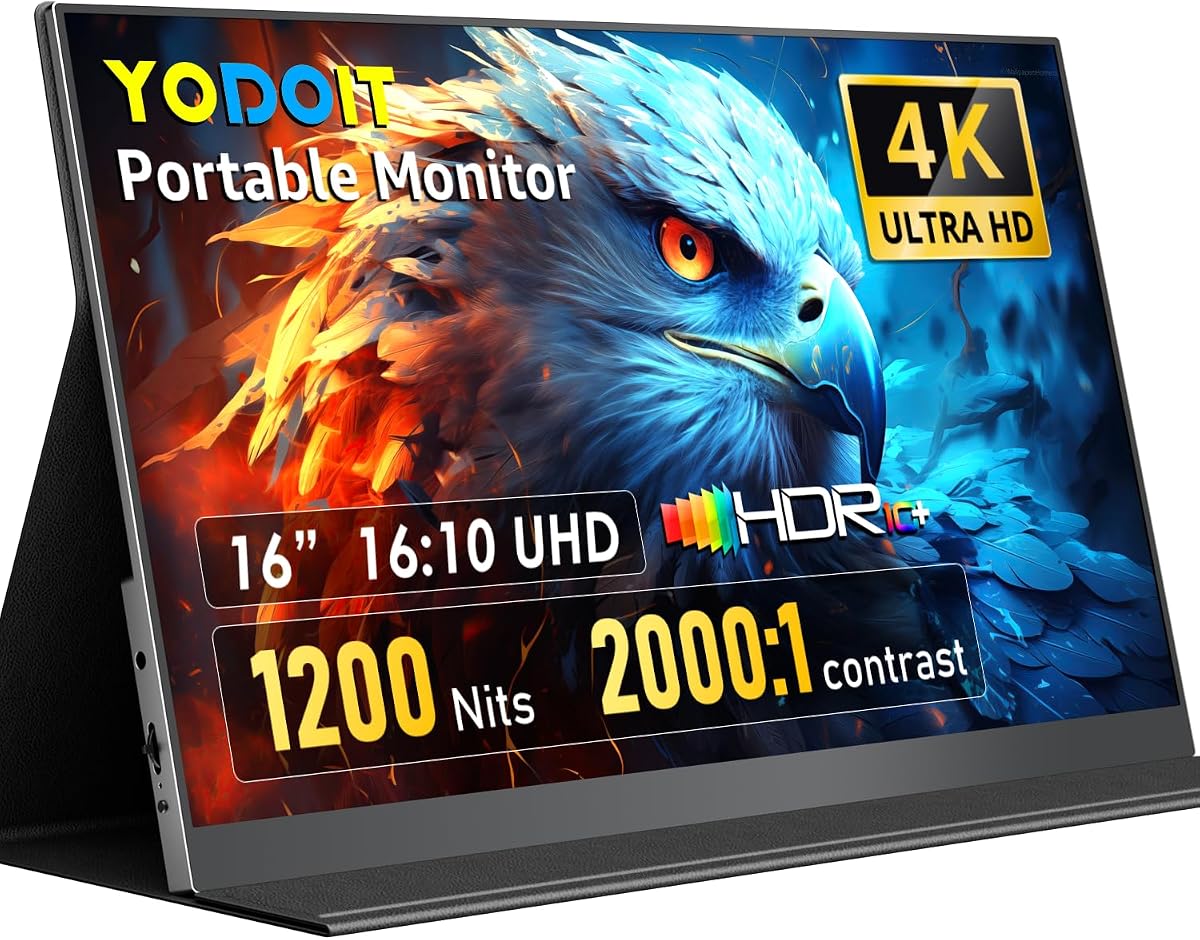
The Yodoit 4K Portable Monitor stands out as the top choice for users needing a bright sunlight PC monitor. Its 1200 nits peak brightness ensures visibility even in direct sunlight, making it ideal for outdoor professionals.
We may earn a commission when you buy through this link, at no additional cost to you.
This monitor offers true 4K resolution with a 16:10 aspect ratio, providing extra vertical space for productivity. The 145% sRGB coverage ensures vibrant colors for creative work like photo editing and design.
While it delivers exceptional performance, achieving peak brightness requires connecting the power adapter. This minor trade-off is acceptable given the superior display quality and outdoor functionality.
Ideal for photographers and field inspectors, this monitor combines portability with professional-grade specs. It is highly recommended for anyone needing reliable outdoor visibility.
The 1200 nits brightness outshines standard portable monitors, allowing clear viewing without seeking shade.
With 145% sRGB coverage, this display delivers accurate colors essential for print-proofing and color grading.
We may earn a commission when you buy through this link, at no additional cost to you.
The Dell 24 Monitor SE2426H offers excellent value with a 144Hz refresh rate and IPS technology. While not designed for direct sunlight, its eye comfort features make it great for indoor tasks.
We may earn a commission when you buy through this link, at no additional cost to you.
This model provides consistent color accuracy and wide viewing angles, suitable for collaborative work. The TÜV certification reduces blue light, enhancing comfort during long hours.
Its primary limitation is standard brightness levels, which may struggle under direct sunlight. However, for office environments, it performs reliably and efficiently.
Users seeking a budget-friendly display with gaming capabilities will appreciate this choice. It balances performance and comfort effectively.
The 144Hz refresh rate ensures smooth visuals, ideal for gaming and streaming applications.
TÜV Rheinland certification helps reduce eye strain during extended usage sessions.
We may earn a commission when you buy through this link, at no additional cost to you.
The Dell 27 Monitor S2725QS delivers a premium 4K experience with HDR readiness and smooth 120Hz refresh rates. It is suited for creative tasks and media consumption in controlled lighting.
We may earn a commission when you buy through this link, at no additional cost to you.
Its 99% sRGB coverage ensures vibrant and accurate colors. The anti-blue light technology supports extended viewing sessions without discomfort.
While visually stunning, it is not optimized for direct sunlight exposure. For indoor offices or studios, it excels in clarity and color performance.
This monitor is best for professionals prioritizing resolution and color fidelity. It offers a refined aesthetic with its thin bezel design.
Immerse yourself in breathtaking 4K visuals with excellent depth and detail.
Re-engineered sound quality offers detailed audio output for a complete experience.
We may earn a commission when you buy through this link, at no additional cost to you.
The Dell 24 Plus Monitor offers versatile adjustability with height, tilt, pivot, and swivel options. It features integrated speakers and a high refresh rate for dynamic content.
We may earn a commission when you buy through this link, at no additional cost to you.
Its 4-star TÜV certification ensures eye comfort during long workdays. The monitor provides clear visuals and smooth motion for both work and entertainment.
While it lacks outdoor brightness, its ergonomic design and audio features make it a strong all-rounder for desk setups.
Ideal for users needing flexibility and connectivity, this model supports various workflows efficiently.
Adjust the monitor to suit your preference throughout the day for maximum comfort.
Dual 3W speakers deliver immersive sound without external hardware.
We may earn a commission when you buy through this link, at no additional cost to you.
The LG 24U411A-B features a 120Hz refresh rate and HDR10 support for vibrant visuals. Its virtually borderless design creates a clean look for multitasking setups.
We may earn a commission when you buy through this link, at no additional cost to you.
Motion blur reduction ensures crisp gameplay and smooth video playback. The monitor is well-suited for gaming and creative work in indoor environments.
While it does not offer sunlight readability, its color fidelity and response time are impressive for the price.
This model is recommended for users prioritizing smooth motion and modern aesthetics in their workspace.
1ms motion blur reduction minimizes ghosting for sharper fast-paced action.
Virtually borderless design focuses attention directly on the screen content.
We may earn a commission when you buy through this link, at no additional cost to you.
The Acer 27in FHD SB273 G0bi offers a spacious 27-inch display with zero-frame design for maximum visibility. It is designed for office tasks and media playback with adaptive sync support.
We may earn a commission when you buy through this link, at no additional cost to you.
Its 120Hz refresh rate ensures smooth visuals, while the 1ms response time reduces ghosting. This makes it suitable for casual gaming and productivity.
While it is not built for outdoor use, its large size and clarity are beneficial for indoor workstations.
Users seeking a cost-effective, large monitor for multitasking will find this model appealing.
Zero-frame design allows you to see the screen from edge to edge.
Adaptive sync technology matches the monitor refresh rate to your graphics card.
We may earn a commission when you buy through this link, at no additional cost to you.
The LG 32 inch QHD monitor provides an immersive viewing experience with its large display and vibrant colors. USB-C connectivity simplifies setup by allowing both video and power transmission.
We may earn a commission when you buy through this link, at no additional cost to you.
Its 99% sRGB coverage ensures accurate color reproduction for design and editing. HDR10 support enhances contrast for a more dynamic viewing experience.
While it is not suitable for direct sunlight, it excels in indoor entertainment and productivity tasks.
This model is ideal for users wanting a large, color-accurate display for home or office use.
Featuring a 32-inch QHD IPS panel, it delivers vibrant true-to-life colors.
USB Type-C connection allows for video transmission and device charging.
We may earn a commission when you buy through this link, at no additional cost to you.
The Dell 27 Plus QHD Monitor balances QHD resolution with a 144Hz refresh rate for smooth performance. It includes built-in speakers and extensive ergonomic adjustability.
We may earn a commission when you buy through this link, at no additional cost to you.
Its TÜV certification ensures reduced blue light exposure, promoting eye comfort. The ash white finish adds a modern aesthetic to any workspace.
While designed for indoor use, its combination of resolution and refresh rate makes it versatile for gaming and work.
Users needing a reliable monitor with integrated audio will appreciate its feature set.
QHD resolution and 1500:1 contrast bring depth and vivid detail.
Integrated dual speakers deliver a wider range of frequencies.
We may earn a commission when you buy through this link, at no additional cost to you.
The Acer 23.8in FHD KB242Y G0bi is a compact monitor perfect for smaller workspaces. It offers a 120Hz refresh rate and adaptive sync for smooth visuals.
We may earn a commission when you buy through this link, at no additional cost to you.
Its zero-frame design maximizes screen visibility, providing a clean look. The monitor is suitable for office tasks and casual entertainment.
While not intended for outdoor use, it delivers reliable performance for everyday computing needs.
This model is a great choice for those needing a straightforward display with modern features.
1ms response time enhances fast-paced content without smearing or ghosting.
Provides maximum visibility of the screen from edge to edge.
We may earn a commission when you buy through this link, at no additional cost to you.
The Newsoul 4K Portable Monitor rivals the Yodoit with ultra-high brightness and 4K resolution. It is designed for users needing high-quality outdoor visibility and creative work.
We may earn a commission when you buy through this link, at no additional cost to you.
Its aluminum alloy shell ensures durability, while the matte screen reduces reflections. Connectivity options like USB-C and HDMI make it versatile for various devices.
Although peak brightness requires power, the visual performance in sunlight is exceptional for creative tasks.
This monitor is recommended for professionals needing a robust, high-performance portable display for outdoor or on-location work.
1200 nits brightness makes content clear even in strong light conditions.
145% sRGB coverage offers accurate and vivid colors for creative projects.
We may earn a commission when you buy through this link, at no additional cost to you.
Choosing a monitor for bright environments requires understanding key technical specifications. This section breaks down critical factors to help you select the right device.
Brightness is measured in nits (candelas per square meter). Standard indoor monitors range from 250 to 350 nits, which often fail in direct sunlight. For outdoor use, look for displays rated at 1000 nits or higher to ensure readability.
Higher brightness ensures the screen remains visible under harsh lighting conditions without causing eye strain or squinting.
Matte or anti-glare coatings are essential for reducing reflections from sunlight. Glossy screens may look vibrant indoors but create glare outdoors that obscures content. A good matte surface scatters light for a clearer view.
Always choose a monitor with a certified matte finish if you plan to use it outside.
Higher resolution like 4K provides sharp text and detailed images, which is important for creative work. In bright environments, clarity ensures you can distinguish fine details without leaning in. 1080p may suffice for basic tasks, but 4K is preferred for editing.
Opt for 4K if you need to review photos or complex graphics accurately.
Color accuracy is vital for design and photography. Look for displays covering at least 99% of the sRGB spectrum to ensure faithful color reproduction. Wide gamut panels help distinguish subtle hues that may be washed out in bright light.
Prioritize panels with high color gamut coverage for professional creative tasks.
Mobile workflows require versatile connectivity. USB-C is essential for single-cable power and video transmission for laptops and phones. HDMI ensures compatibility with game consoles and cameras. Check that ports support the required resolution and refresh rate.
Select a monitor with both USB-C and HDMI for maximum flexibility.
Outdoor work involves travel, so durability is key. Aluminum chassis provide better heat dissipation and protection against bumps compared to plastic. A protective case or magnetic cover adds longevity and reduces wear and tear.
Choose a monitor with a robust build and protective accessories for portability.
High-brightness panels consume more power. While many portable monitors draw power from USB, achieving peak brightness often requires an external power adapter. Plan your power needs to avoid interruptions during critical outdoor tasks.
Always carry the required power adapter for peak performance.
Specialized outdoor monitors are premium products and cost more than standard displays. Determine how much you value sunlight readability versus cost. Sometimes, a high-brightness outdoor monitor offers better ROI for fieldwork than buying multiple lower-end units.
Invest in quality upfront to save on long-term productivity losses.
To achieve peak brightness on high-performance portable monitors, always connect the external power adapter. This ensures the display can reach its maximum nits rating when required.
Clean the matte screen with a soft, lint-free cloth to avoid scratching the anti-glare coating. Avoid using harsh chemicals that may degrade the surface over time.
Store the monitor in its protective case when not in use to prevent dust accumulation. This extends the lifespan of the panel and keeps the connectors clean.
Monitors rated at 1000 nits or higher are generally considered sunlight-readable. They provide enough light to counteract the glare and washing out effects of direct sunlight.
Standard monitors typically have brightness levels between 250 to 350 nits. While they can work in shaded areas, they are often unreadable in direct sunlight due to glare.
Matte screens can slightly diffuse light, which may reduce perceived contrast compared to glossy screens. However, modern matte coatings maintain excellent color accuracy and are preferred for outdoor use.
Yes, many portable monitors require an external power adapter to achieve peak brightness. This ensures stable performance without draining your laptop battery rapidly.
While USB-C can carry video, delivering 4K resolution at high brightness often requires additional power. Using the provided power adapter ensures stable output and full performance.
Use a dry or slightly damp microfiber cloth to wipe the surface gently. Avoid using alcohol or abrasive cleaners that can damage the matte coating.
Many models feature aluminum chassis and magnetic covers for durability. Using the protective case during transport helps prevent scratches and impact damage.
Sizes between 16 and 17 inches offer a balance of portability and visibility. Larger screens are heavier but provide more workspace for complex tasks.
Choosing a bright sunlight PC monitor requires balancing brightness, color accuracy, and portability. The Yodoit and Newsoul 4K models lead the pack with 1200 nits brightness and 4K resolution.
If you prioritize indoor use with high refresh rates, Dell and LG alternatives offer robust features at lower price points. Consider your primary environment when making your decision.
Prices and availability change frequently. Verify current specs and costs before purchasing to ensure you get the best value for your needs.