
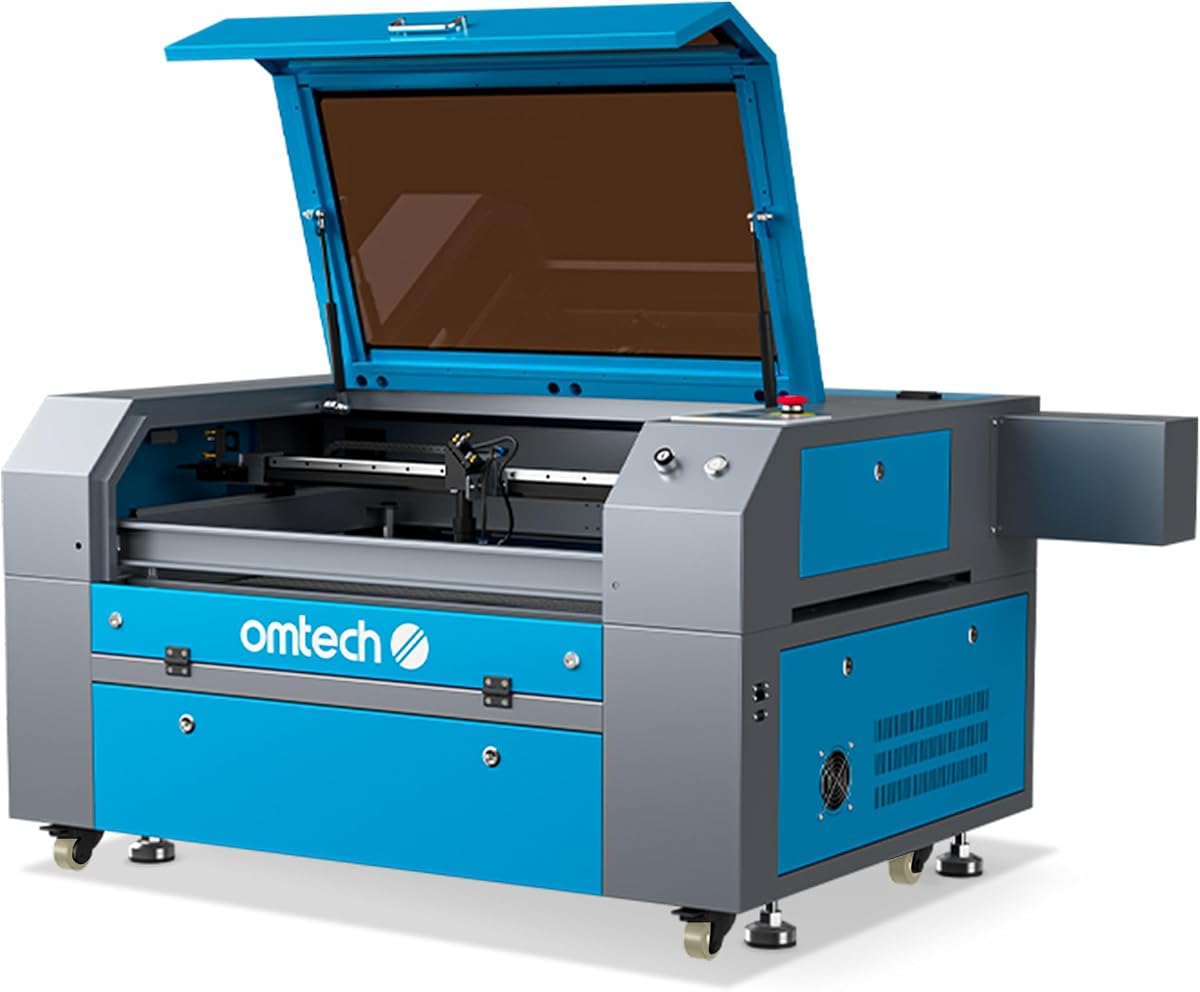
OMTech K40+ 45W Desktop CO2 Laser Engraver & Cutter
4.4Editor score
Upgraded 45W laser performance
Integrated air assist system
Wide software compatibility
Choosing the right CO2 Laser Engraver can transform your creative projects into professional quality outputs. Whether you are a hobbyist or a small business owner, finding a machine with the right power and work area is essential for consistent results.
We have analyzed ten leading models based on their laser power, cutting speeds, software compatibility, and safety features. Our comparison covers desktop units suitable for small projects as well as larger industrial-grade machines designed for high-volume production.
Each pick highlights key strengths and potential trade-offs to help you make an informed decision. Please note that product prices and availability may change over time, so check current listings before purchasing.
4.4Editor score

5.0Editor score

4.5Editor score
As an Amazon Associate we earn from qualifying purchases.
Here is a side-by-side comparison of the top CO2 Laser Engraver models available this month to help you evaluate their key specifications quickly.



The VEVOR 45W CO2 Laser Engraver stands out with a perfect 5.0 rating for its high-efficiency engraving and cutting capabilities. It is designed for small creations with a 12 x 8 inch work area that handles wood acrylic and glass effectively.
We may earn a commission when you buy through this link, at no additional cost to you.
Its standout qualities include a precision knob for simple manual focusing and broad compatibility with popular software like LightBurn and CorelDRAW. The built-in air-assist system keeps dust and smoke clear for a fresh workspace.
While it offers reliable accuracy, the work area is limited to small projects like phone cases and keychains. It is not suitable for metal engraving unless the metal is coated.
This machine is ideal for hobbyists or small businesses needing a reliable desktop cutter. Its user-friendly design and robust performance make it a strong recommendation for those starting out.
The simple manual focusing mechanism with a precision knob ensures you can adjust focus effortlessly every time without complex tools.
Full compatibility with LightBurn GRBL CorelDraw and AutoCAD allows you to use your preferred design tools seamlessly.
We may earn a commission when you buy through this link, at no additional cost to you.
The OMTech K40+ 45W Desktop CO2 Laser Engraver & Cutter offers an upgraded 45W laser that boosts cutting speed and depth for professional results. It features a compact 12 by 8 inch workspace suitable for DIY makers and small businesses.
We may earn a commission when you buy through this link, at no additional cost to you.
Key strengths include an integrated air assist system that reduces fire risk and a range of safety features like door and water protection. It supports wide software compatibility for seamless control during operations.
The laser class is 2 with a low output power which requires attention to safety during use. Some manual adjustments may be needed for focusing compared to autofocus models.
This model is perfect for those seeking a budget-friendly entry into laser engraving without sacrificing essential power. Its safety features and support make it a reliable choice for daily use.
Prioritizing user safety with door and water protection an emergency stop function and a flame-retardant acrylic panel.
A compact workspace supports both standard and irregular materials with an optional rotary axis for cylindrical items.
We may earn a commission when you buy through this link, at no additional cost to you.
The OMTech Maker 60W CO2 Laser Engraver comes with a water chiller and LightBurn software for consistent performance. It features a spacious 20 x 28 inch work area that can handle most larger projects with ease.
We may earn a commission when you buy through this link, at no additional cost to you.
Its autofocus technology takes the guesswork out of setup by automatically finding the right focal distance. The widened viewing window is made from flame retardant material to ensure lasting safe use.
While the laser class is 2 the safety features and autofocus make it easier to use than manual models. The price is higher but justified by the commercial bundle and workspace size.
This unit is ideal for makers needing a larger workspace and autofocus capabilities. It provides consistent laser performance and intuitive navigation for your work without complex manual adjustments.
Workbeds adjust up and down at the touch of a button with preinstalled autofocus that finds the right focal distance automatically.
The widened viewing window and built-in air assist efficiently remove smoke and dust to protect your laser lenses.
We may earn a commission when you buy through this link, at no additional cost to you.
The OMTech Maker 90W CO2 Laser Engraver offers powerful cutting and engraving achieving up to 0.4 inch deep in wood. It features a spacious 28 x 20 inch workspace with four-way pass-through doors for large designs.
We may earn a commission when you buy through this link, at no additional cost to you.
Key strengths include a high-performance 90W DC laser tube providing up to 12000 hours of reliable operation. Enhanced safety features include a widened viewing window made from flame-retardant material.
The automatic cover interlock shuts off the laser when the lid is opened to keep you safe at all times. It is heavier than desktop units but worth it for large scale projects.
This model is perfect for commercial use or serious hobbyists needing power and size. It transforms your ideas into reality with consistent and clean engraving results.
The high-performance 90W DC laser tube provides up to 12000 hours of reliable operation to support your creative workflow.
The automatic cover interlock shuts off the laser when the lid is opened keeping you safe at all times.
We may earn a commission when you buy through this link, at no additional cost to you.
The xTool P3 80W Flagship CO2 Laser Cutter delivers industrial-grade cutting that easily cuts 20mm wood and 25mm acrylic. It features a massive 36 by 18 inch workspace with dual HD cameras for precise positioning.
We may earn a commission when you buy through this link, at no additional cost to you.
Its standout features include a revolutionary automated creation system that integrates LiDAR ranging for perfect autofocus and an AutoLift Base to simplify operation. The AI-powered Smart Nesting achieves high material utilization.
The machine is Class 1 safety rated with a fully enclosed design and active detection for advanced protection. While the price is premium it offers endless production potential for large scale projects.
This flagship unit is ideal for professional businesses needing speed and automation. It masters materials diode laser engraver cant touch with cleaner and faster results.
Experience a true Place and Go workflow with LiDAR ranging dual HD cameras and an AutoLift Base to automate setup.
Work with total peace of mind with a fully enclosed Class 1 safety-rated design and active detection and suppression system.
We may earn a commission when you buy through this link, at no additional cost to you.
The OMTech K40+ 45W Desktop CO2 Laser Engraver & Cutter offers high-speed engraving capability up to 300 mm/s ideal for complex designs and bulk orders. It has a compact 12 by 8 inch workspace that supports standard and irregular materials.
We may earn a commission when you buy through this link, at no additional cost to you.
Key strengths include an integrated air assist system that auto-adjusts airflow and comprehensive safety features like door protection and emergency stop. It supports wide software compatibility for seamless control.
While the work area is small the speed and safety features make it reliable for repeated use. Manual focusing is required but the machine is easy to set up and operate.
This model is perfect for DIY makers and small businesses needing to get more done in less time. Its safety features and support make it a reliable choice for bulk production.
Engrave at speeds up to 300 mm/s ideal for complex designs and bulk orders to get more done in less time.
Prioritizing user safety with door and water protection an emergency stop function and a flame-retardant acrylic panel.
We may earn a commission when you buy through this link, at no additional cost to you.
The OMTech Pronto 100W CO2 Laser Engraver & Cutter features a powerful 100W laser tube with revolutionary engraving speeds up to 39.4 inches per second. It has a spacious 40 by 24 inch work area to fit most projects.
We may earn a commission when you buy through this link, at no additional cost to you.
Its advanced autofocus technology takes the guesswork out of setup for consistent high-quality results with minimal effort. The high-performance laser tube delivers up to 12000 hours of usage.
While the laser class is 2 the safety features like water protection and air assist help prioritize your safety. The machine is heavier and more expensive than smaller desktop units.
This machine is ideal for makers and small businesses looking to expand their capabilities quickly. It handles a variety of non-metal materials with unmatched efficiency and precision.
Experience revolutionary engraving speeds of up to 39.4 inches per second to transform your creative visions into reality in record time.
The honeycomb and aluminum blade beds feature a 40 by 24 inch work area to fit most projects with pass-through doors.
We may earn a commission when you buy through this link, at no additional cost to you.
The OMTech Maker 90W CO2 Laser Engraver comes with a water chiller and LightBurn software for consistent laser performance. It features a spacious 20 x 28 inch work area that can fit most projects.
We may earn a commission when you buy through this link, at no additional cost to you.
Key strengths include a high-performance Yongli H2 tube delivering 90W of power for up to 8000 hours of usage. Enhanced safety features include a widened viewing window made from flame retardant material.
The cover interlock automatically cuts the laser beam if the window is opened to ensure lasting safe use. It requires manual adjustments but delivers intuitive navigation for your work.
This model is ideal for commercial use needing a reliable 90W machine with essential bundles. It offers consistent laser performance and intuitive navigation for your work without complex setups.
Comes with a water chiller and LightBurn software to provide consistent laser performance and intuitive navigation for your work.
The widened viewing window is made from flame retardant material to ensure lasting safe use with cover interlock safety.
We may earn a commission when you buy through this link, at no additional cost to you.
The OMTech 100W CO2 Laser Engraver with Water Chiller offers an ultra-fast engraving speed of 1000 mm/s and a spacious 28 x 20 inch work area. It features instant autofocus to fine-tune the laser focal point with a single button press.
We may earn a commission when you buy through this link, at no additional cost to you.
Key strengths include advanced sensors that monitor air pressure and temperature for safety. It works with popular software like RDWorks CorelLaser and LightBurn to allow you to design and engrave with ease.
While the laser class is 2 the safety features like air pump and turbo exhaust fan keep dust and debris in check. It is heavier than desktop units but provides consistent performance.
This machine is ideal for makers needing fast speeds and precise autofocus features. It lets you work with your favorite software to bring ideas to life with accuracy.
Our smart autofocus feature instantly fine-tunes the laser focal point with a single button press for crisp and precise results.
Featuring a spacious 28 x 20 inch work area and an ultra-fast engraving speed of 1000 mm/s to complete bulky projects quickly.
We may earn a commission when you buy through this link, at no additional cost to you.
The OMTech Maker 90W CO2 Laser Engraver & Cutter with Water Chiller offers powerful cutting and engraving achieving up to 0.4 inch deep in wood. It features a spacious 28 x 20 inch workspace with four-way pass-through doors for large designs.
We may earn a commission when you buy through this link, at no additional cost to you.
Key strengths include a high-performance 90W DC laser tube providing up to 12000 hours of reliable operation. Enhanced safety features include a widened viewing window made from flame-retardant material.
The automatic cover interlock shuts off the laser when the lid is opened to keep you safe at all times. It requires manual adjustments but offers global support for personalized care.
This model is perfect for commercial use or serious hobbyists needing power and size. It transforms your ideas into reality with consistent and clean engraving results.
The high-performance 90W DC laser tube provides up to 12000 hours of reliable operation to support your creative workflow.
The automatic cover interlock shuts off the laser when the lid is opened keeping you safe at all times.
We may earn a commission when you buy through this link, at no additional cost to you.
When choosing a CO2 Laser Engraver there are several key factors to consider to ensure you get the best value and performance for your needs.
Laser power is measured in watts and directly affects how quickly you can cut materials. Higher wattage machines offer faster speeds and deeper cuts which is essential for commercial use.
If you work with thicker wood or acrylic aim for a machine with at least 60W or higher to ensure efficiency.
The work area determines the size of materials you can engrave or cut. Consider the largest item you plan to create to avoid purchasing a unit that is too small.
For small projects a compact 12 by 8 inch workspace is sufficient but larger designs may require a 20 by 28 inch or bigger area.
Check if the engraver supports your preferred design software like LightBurn CorelDRAW or AutoCAD. Broad compatibility allows for smoother workflows without needing to learn new programs.
Choose a machine that is fully compatible with the software you already use to save time on setup and learning.
Safety features like emergency stops door locks and air assist systems are vital to protect you during operation. Always look for models with built-in safety protocols to reduce fire risk.
Prioritize units with comprehensive safety features like cover interlocks and water protection for peace of mind.
A good cooling system like a water chiller helps extend the lifespan of the laser tube by preventing overheating. Continuous operation is only possible with effective heat management.
Ensure your chosen unit comes with a reliable cooling system or budget for an external chiller if needed.
Look for manufacturers that offer global support and warranties to help you if technical issues arise. Good support ensures that you can get expert assistance when you need it.
Choose a brand with a proven track record of comprehensive service to protect your investment.
Engraving speed affects how quickly you can complete orders. Models with higher mm/s rates can save significant time on bulk jobs.
Select a machine that balances speed with precision to maintain quality on detailed designs.
Laser engravers vary widely in price depending on power size and features. Determine a budget range that aligns with your professional needs without overspending on unnecessary features.
Invest in a machine that meets your current requirements while allowing room for future growth.
Begin by setting up your CO2 Laser Engraver on a stable surface and ensuring all safety covers are in place. Always use proper ventilation to manage smoke and dust effectively during operation.
Use the manual or autofocus feature to adjust the focal distance based on your material thickness before starting any job. This step ensures clean cuts and prevents damage to the lens or material.
Regularly clean the lens and mirrors with a soft cloth to maintain performance and prevent dust buildup. Check the air assist and water cooling systems periodically to ensure they are functioning correctly.
A CO2 Laser Engraver is ideal for cutting non-metallic materials such as wood acrylic leather glass and paper. It generally cannot cut metals unless they are coated with a special paint or foil.
Yes when used properly with safety features like door locks and ventilation. Always ensure the unit is enclosed and follow manufacturer guidelines to minimize risks of fire or fumes.
Many machines are compatible with standard software like LightBurn or CorelDRAW. Some come with their own proprietary software but broad compatibility ensures you can use the tools you prefer.
A typical CO2 laser tube lasts between 6000 to 12000 hours depending on usage and maintenance. Proper cooling and avoiding overuse can significantly extend its lifespan.
Yes a 45W machine can cut acrylic up to 10mm thick while 60W+ models can go even thicker. Ensure the power level matches your material thickness for clean results.
An air assist system blows air at the cutting point to clear dust and smoke. This helps prevent burns on materials and keeps the lens clean for better performance.
Clean the lens gently with a soft cloth and isopropyl alcohol to remove residue. Avoid touching the surface with bare hands to prevent oils from damaging it.
Industrial models offer larger work areas higher power and faster speeds. Desktop models are more compact and budget-friendly making them suitable for hobbyists and small businesses.
We hope this guide has helped you explore the top 10 CO2 Laser Engraver models available in November 2026. Each option offers unique strengths depending on your specific project needs and budget constraints.
Consider factors like laser power work area and safety features when making your final decision. Investing in a reliable machine with good support can save you time and money in the long run.
Remember to check current prices and availability on Amazon before purchasing as these can change frequently. Selecting the right model will ensure you get the professional results you deserve.