
8mm & Super 8 Film to Digital Converter
3.7Editor score
2.4 inch display
32GB SD card included
Up to 9 inch reel capacity
This guide compares the top digital converters for Super 8 and 8mm film to help you choose the best device for digitizing your old home movies.
Preserving old home movies is essential for keeping family history alive. Digital converters for Super 8 and 8mm film allow you to transform analog reels into modern video files easily. These devices scan frames directly, outputting MP4 files that work on computers and TVs without extra software.
We compared ten leading models based on resolution output, screen size, reel capacity, and ease of use. Each product offers unique features like touch screens, built-in storage, and cable options for playback. Our analysis focuses on reliability and performance to help you find the right tool for your archive.
Each pick highlights key strengths and trade-offs to guide your decision. We review standalone operation, image quality, and compatibility with different reel sizes. Prices change frequently so verify current offers before purchasing. Use these insights to select the best converter for your specific film collection needs.
3.7Editor score

4.1Editor score

4.0Editor score
The following table provides a side-by-side comparison of all ten models. It highlights key specifications like resolution, screen size, and reel capacity to help you quickly identify the device that fits your needs.




The KODAK REELS Digitizer is a robust solution for converting 8mm and Super 8 film to digital. It features a large 5-inch LCD screen with touch controls, making operation intuitive without a computer. With an 8MP sensor, it produces 1080p MP4 files that preserve detail from analog sources.
We may earn a commission when you buy through this link, at no additional cost to you.
Its standout feature is the universal supply reel supporting 3 to 9-inch reels, allowing for extended sessions. You can adjust exposure and sharpness directly on the screen. The included accessory kit ensures you have everything needed to start converting immediately.
One limitation is the lack of audio output, meaning sound must be added later. Additionally, an SD card is not included for storage. Despite these trade-offs, the ease of use and high resolution make it a top choice for family archives.
Ideal for those wanting a standalone device with minimal setup, this converter excels in frame-by-frame capture. It simplifies the process of preserving decades of family films without needing a projector or PC.
The 5-inch display allows easy zooming and frame alignment, simplifying the digitization process significantly.
Compatible with reel sizes from 3 to 9 inches, accommodating various film formats without extra adapters.
We may earn a commission when you buy through this link, at no additional cost to you.
This budget-friendly converter offers solid performance for digitizing 8mm and Super 8 film. It produces 1080p MP4 files and includes a 32GB SD card, letting you start immediately. The device supports reels up to 9 inches, ideal for longer conversion sessions.
We may earn a commission when you buy through this link, at no additional cost to you.
Its 2.4-inch display allows quick review of files without needing a TV. The frame-by-frame capture ensures smooth playback on modern devices. Since no computer is required, it is perfect for casual users with limited tech experience.
While the screen is smaller than premium models, functionality remains intact. The main trade-off is the absence of audio, requiring post-production for sound. However, the price point makes it a strong contender for basic needs.
Buyers seeking an entry-level solution will appreciate the included storage and ease of use. It effectively bridges the gap between analog reels and digital archives without high costs.
The included 32GB SD card removes initial setup costs, allowing immediate use upon unboxing.
No PC is needed to capture or save files, simplifying the digitization workflow for everyone.
We may earn a commission when you buy through this link, at no additional cost to you.
The Magnasonic Super 8/8mm Scanner provides a high-quality experience for digitizing film. Its 2.3-inch vibrant screen allows clear viewing of scans. The device supports reels up to 7 inches and offers adjustable brightness and sharpness for optimized output.
We may earn a commission when you buy through this link, at no additional cost to you.
Frustration-free setup makes it accessible for non-technical users. You can connect to a TV via RCA cable for larger viewing, enhancing family sharing. Direct SD card storage up to 32GB ensures files are saved without external software.
While it supports fewer reel sizes than some rivals, the image quality compensates. Like most devices, it lacks audio capture, but video clarity remains strong. This balance of features justifies its premium positioning.
Recommend this for those prioritizing display quality and ease of use over massive reel capacity. It delivers reliable MP4 files for archiving precious home movies efficiently.
The high-contrast LCD screen allows for precise frame alignment and easy review of converted footage.
Included RCA cable connects directly to TVs for immediate playback, bypassing computer transfers.
We may earn a commission when you buy through this link, at no additional cost to you.
This model stands out with a 5-megapixel sensor for sharp image capture. It features a 2.4-inch LCD with touch buttons for adjusting settings like brightness and framing. The device supports reels up to 9 inches and includes a 32GB SD card.
We may earn a commission when you buy through this link, at no additional cost to you.
Comprehensive packaging includes a reel, cables, and cleaning cloth. This ready-to-use kit simplifies initial setup for users. The frame-by-frame digitization ensures high-definition 1080p video files for long-term preservation.
While it lacks audio, video clarity is strong. The included SD card reduces extra costs. However, audio post-processing is necessary for complete restoration of original recordings.
Good for buyers wanting a full accessory set. It balances sensor performance with user-friendly controls to deliver consistent results across various reel sizes.
Everything needed from power adapters to cables is provided, enabling immediate setup without extra purchases.
High-resolution sensor captures fine details in film frames, ensuring high-quality digital output.
We may earn a commission when you buy through this link, at no additional cost to you.
The MovieMaker Pro converter digitizes 8mm and Super 8 film into 1080p MP4 files. It includes a 32GB SD card and supports reels up to 9 inches. The 2.4-inch screen allows easy viewing of files before transfer.
We may earn a commission when you buy through this link, at no additional cost to you.
Standalone operation removes the need for software, streamlining the conversion process. It supports Windows, Mac, and Linux for file access. The automated scanning process ensures consistent results without manual intervention.
A limitation is the 20fps frame rate which may feel slow. Additionally, audio is not captured. However, for silent archival purposes, it provides a reliable and straightforward solution.
Best for users needing automated scanning with large capacity. It balances ease of use with reasonable resolution for digital preservation of family archives.
Fully automated digitization reduces manual steps, making the process faster and less prone to errors.
Captures footage at 1080p ensuring sharp details are preserved during conversion to digital formats.
We may earn a commission when you buy through this link, at no additional cost to you.
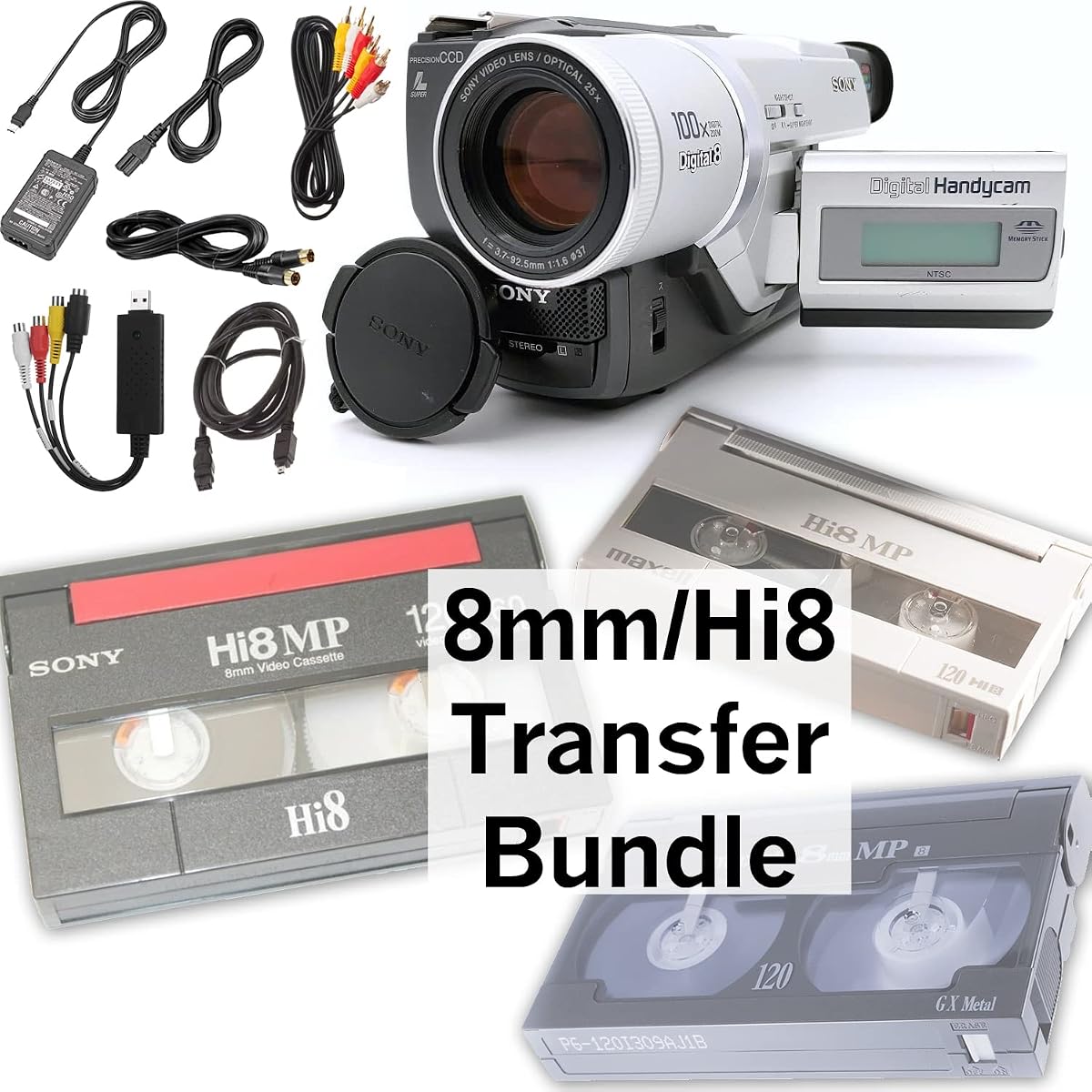
This bundle focuses on converting 8mm and Hi8 tapes rather than film reels. It includes a camcorder to play tapes and a USB adapter to capture video to a PC. AV cables allow TV playback for immediate viewing.
We may earn a commission when you buy through this link, at no additional cost to you.
It is ideal for users with cassette tapes rather than film. The bundle offers guaranteed 100% working condition with free returns. A spare tape is included for testing purposes.
Unlike film scanners, this device handles magnetic media exclusively. It does not support reels. However, it is a reliable solution for those specifically needing to digitize tape recordings.
Best for families transitioning from tapes to digital files. It simplifies the process with all-in-one hardware ensuring functional playback and capture.
Includes a working camcorder to play back tapes without needing to source your own player device.
USB adapter transfers footage directly to computer files for storage, editing or burning to DVD.
We may earn a commission when you buy through this link, at no additional cost to you.
Similar to the previous model, this bundle is designed for 8mm and Hi8 tape conversion. It comes with a camcorder and USB capture adapter to move footage to digital files. Blank tapes are included for immediate testing.
We may earn a commission when you buy through this link, at no additional cost to you.
It supports burning to DVD as well as digital file creation. The AV cables allow direct connection to TVs. This setup is straightforward for users without tape playback equipment.
While limited to tapes, it offers a complete hardware set. It does not support film reels. It is a practical choice for those focusing solely on tape preservation projects.
Ideal for converting home video tapes easily. The included components ensure you can start digitizing without additional purchases.
Includes camcorder blank tape and USB adapter for a fully functional setup right out of the box.
Designed specifically for cassette tapes, not suitable for film reels or non magnetic media types.
We may earn a commission when you buy through this link, at no additional cost to you.
This scanner converts 8mm and Super 8 film into MP4 files for home viewing. It features a 2.4-inch display for reviewing scans. You can load film onto the universal supply reel and save directly to SD cards.
We may earn a commission when you buy through this link, at no additional cost to you.
The device works without computers or drivers, simplifying the process. TV cables allow for instant playback on larger screens. It is designed for family sharing with minimal technical steps required.
While it provides video capture, audio is not included. Documentation may be minimal compared to branded models. However, the standalone operation makes it accessible for basic users.
Best for those prioritizing simplicity and ease of use. It offers a straightforward way to digitize film without complex software setups.
Requires no computer connection to scan and save files, reducing setup time and technical requirements.
Accommodates various film sizes easily making it versatile for different home movie reel formats.
We may earn a commission when you buy through this link, at no additional cost to you.
This scanner digitizes 8mm and Super 8 films into digital files for viewing. It features a 2.4-inch display for scanning review. Film loads onto a universal reel and saves to SD cards without PC connection.
We may earn a commission when you buy through this link, at no additional cost to you.
Designed for simplicity, it uses on-screen prompts for operation. TV cables enable playback on larger screens. It is ideal for those wanting a straightforward conversion process.
Limitations include lack of audio capture and basic feature set. However, it serves well for basic video conversion needs without complexity.
Recommended for casual users prioritizing ease of use. It offers a simple path to digital archives for family films.
No computer or drivers are needed to convert footage making it easy for non-technical users to operate.
Files save directly to SD card allowing for immediate access and transfer to other devices.
We may earn a commission when you buy through this link, at no additional cost to you.
This scanner provides straightforward digitization of 8mm and Super 8 film. It features a 2.4-inch display for review. Universal reel support allows loading various sizes with direct SD card storage.
We may earn a commission when you buy through this link, at no additional cost to you.
TV cables enable playback on large screens. No computer is required which simplifies use. It focuses on basic conversion without advanced features.
While lacking audio, it delivers essential video digitization. Controls are simple for quick setup. This makes it suitable for simple archival needs.
Best for users needing a no-fuss solution. It balances ease of use with basic functionality for home film preservation.
Simplified interface ensures quick setup without complex menu navigation or technical knowledge requirements.
Works with multiple film sizes allowing versatility in converting different formats without extra hardware.
We may earn a commission when you buy through this link, at no additional cost to you.
Choosing the right converter requires evaluating several technical aspects to ensure quality results. Below are key factors to consider before purchasing.
Resolution determines how detailed your digitized films will look. Most modern converters offer 1080p output which is standard for HD. Higher resolution sensors capture fine details from old film frames better than lower resolution ones.
Always check the advertised resolution before buying to ensure clarity in your digital files.
Reel capacity affects how many reels you can load without stopping. Models supporting up to 9-inch reels allow longer sessions. Smaller capacities may require frequent changes for larger collections.
Consider your collection size to choose a model with adequate capacity.
Screen size impacts how easily you can align frames. Larger screens like 5 inches make adjustments simpler. Smaller displays may require more attention to ensure accurate scanning.
Prioritize a larger screen if you want an intuitive user interface.
Many standalone converters do not capture audio. If sound is important, check if the model supports audio capture or plan for post-production editing. This limitation affects the realism of the final output.
Verify audio capabilities to meet your sound preservation goals.
Storage determines where your digital files are saved. SD card slots are standard for standalone devices. Some models include SD cards which adds value. Check compatibility with card size limits.
Ensure the device supports the storage capacity you need.
User interface design influences how quickly you can convert films. Touchscreens and on-screen prompts simplify operations. Devices that require computers add complexity for non-tech users.
Choose standalone units if you want minimal setup and software.
Connectivity options like USB or RCA allow transfer or playback. RCA outputs enable TV viewing without computers. USB connections facilitate file access on PCs.
Look for included cables to match your playback preferences.
Included accessories reduce extra purchases. Reels, cables, and cleaning cloths add convenience. Comprehensive kits save time and effort.
Review package contents to ensure you have everything needed.
To begin, load your film reel onto the universal supply reel provided. Follow the on-screen prompts to start scanning. Ensure film is properly aligned for smooth capture.
After scanning, insert an SD card to save files. You can preview scans on the device display before transfer. Use included cables to connect to a TV for viewing.
Clean the device gently with the provided cloth to maintain sensor quality. Store in a dry place to prevent damage. Handle film reels carefully to avoid scratches.
Most standalone converters do not capture audio as older 8mm film often lacks sound tracks. Some specialized units may capture audio if the film has magnetic stripes. Check product specifications for audio capabilities before purchasing.
Yes many models include RCA cables for TV connection. This allows direct playback without needing a computer. Verify if your selected model includes the necessary cable.
No most converters are standalone and do not require computers. You save directly to SD cards. Computers are only needed if you want to transfer files for editing.
Most devices output MP4 files which are widely compatible. This format works on modern computers and media players. Always check supported formats before purchasing.
Time varies by reel size and scanner speed. Expect several minutes per foot of film. Longer reels require more time. Automated models help speed up the process.
Yes you can transfer files to a computer for editing. Use standard video editing software to trim or add sound. The MP4 format supports most editing tools.
Some models include universal adapters for multiple sizes. Others may require specific adapters for certain reels. Check package contents for included adapters before starting.
The top picks offer a range of options from budget to premium features. Models like the KODAK REELS provide high resolution and large screens. Budget units offer solid performance for basic digitization needs.
Prioritize features like resolution and screen size to match your needs. Reel capacity matters for large collections. Consider audio requirements to ensure complete restoration.
Remember to check current prices and availability before purchasing. Prices fluctuate and offers change regularly. Use this guide to make an informed decision for your film preservation.