
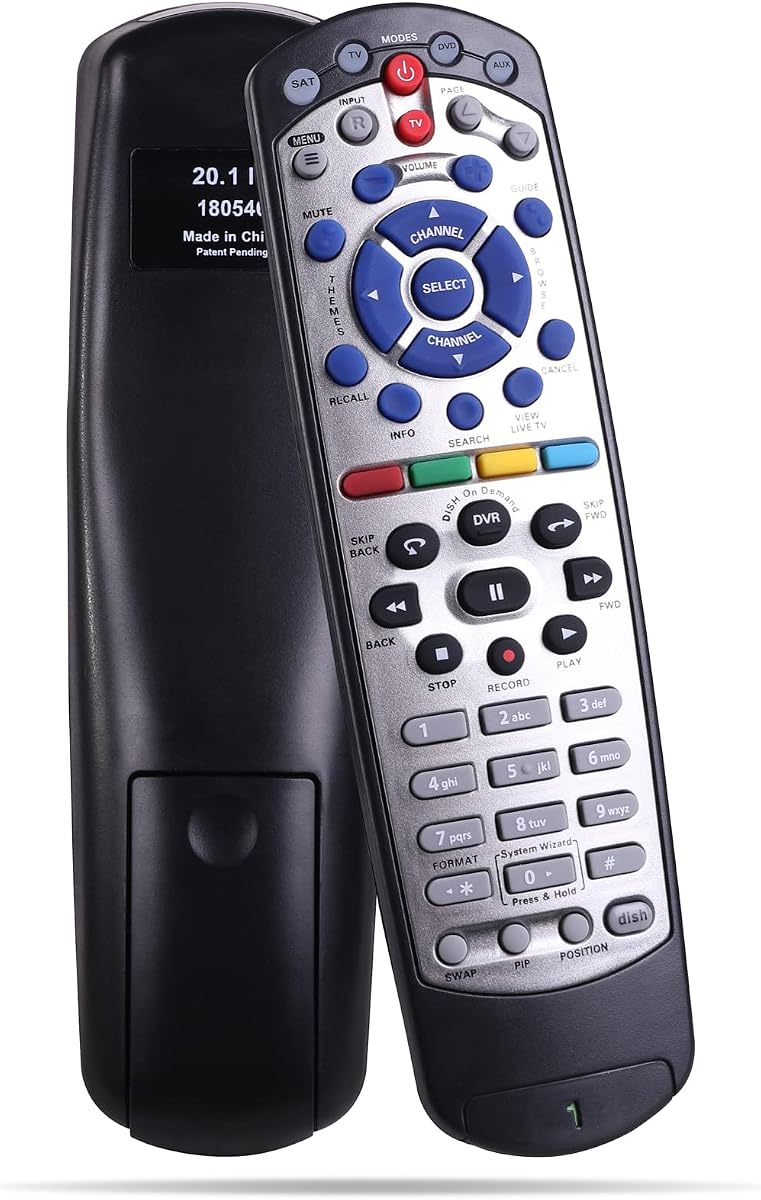
New IR Remote Control Replecement for Dish Network 20.1 IR Satellite Receiver TV DVD VCR
3.7Editor score
Infrared technology
One year warranty
Basic function coverage
This guide compares the top Dish Network replacement remotes for Hopper, 20.1, and 54 series receivers to help you find the perfect control solution.
Finding a reliable Dish Network replacement remote is essential for uninterrupted entertainment. Whether your original controller is lost or broken, choosing the right model ensures seamless operation of your receiver and connected devices without hassle.
We evaluated ten top-rated remotes based on compatibility, build quality, and user feedback. Each product was assessed for pairing ease, button responsiveness, and feature sets to provide a comprehensive list for every Dish Network household need.
Each pick highlights key specifications and user experiences to guide your decision. Prices and availability change frequently so verify current details on the product pages before purchasing your next remote control today.
3.7Editor score

4.5Editor score

4.6Editor score
Explore the side by side comparison of the top ten Dish Network replacement remotes available today. This table highlights key features and compatibility to help you quickly identify the best match for your setup.

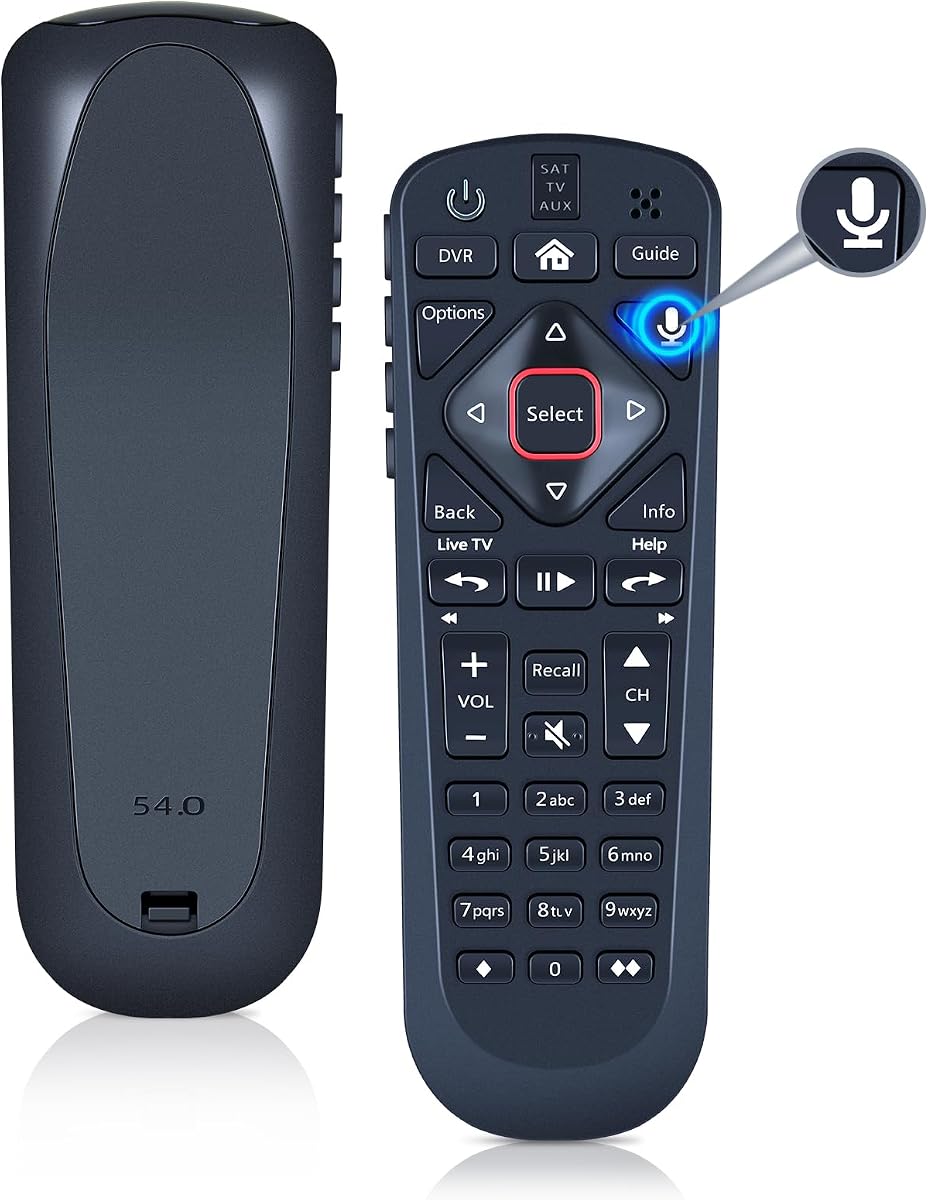



This replacement remote stands out as a top choice for users with Dish Upgraded Network receivers. It offers voice search capabilities and reliable pairing for seamless control of your entertainment setup.
We may earn a commission when you buy through this link, at no additional cost to you.
Users appreciate the straightforward pairing process using the SYS INFO button on the receiver. The voice search function helps find channels quickly without extensive menu navigation making daily use more efficient.
While the remote requires initial setup steps the time invested ensures stable connectivity. Some users note the need to unpair before reconnecting which is a standard protocol for this technology.
This remote is ideal for households needing a direct replacement for their 54 series units. Its combination of voice features and reliable connectivity makes it a strong recommendation for most Dish users.
The pairing process is designed to be user friendly with clear audio cues to confirm connection. This ensures you can get started quickly without frustration.
Built in voice search allows you to find shows and channels simply by speaking. This feature reduces the need for manual scrolling through channel guides.
We may earn a commission when you buy through this link, at no additional cost to you.
This original Dish remote is designed specifically for the Hopper family of receivers. It includes premium features like backlit keys and a remote locator that enhance usability in various lighting conditions.
We may earn a commission when you buy through this link, at no additional cost to you.
The backlit keys automatically illuminate when you pick up the remote making it easy to use in a dark living room. Additionally the remote locator helps you find misplaced remotes quickly by making them beep and blink.
While it relies on internet connectivity for full search functionality the benefit of quick channel access is significant. The ability to program hotkeys adds a layer of personalization for frequent tasks.
This is the best choice for users who want the full original experience with added convenience features. Its high rating reflects satisfaction with its build quality and functional design.
The automatic backlight adjusts to your environment so you never have to fumble for buttons in the dark. This enhances comfort during nighttime viewing.
You can program hotkeys to launch specific apps or functions directly. This customization streamlines your viewing experience for favorite content.
We may earn a commission when you buy through this link, at no additional cost to you.
This remote provides a budget friendly option for owners of the Dish Network 20.1 IR satellite receiver. It covers essential functions required to control your TV and receiver effectively without extra bells and whistles.
We may earn a commission when you buy through this link, at no additional cost to you.
Users note that setup is required to pair the remote and choose the correct codes for their TV brand. While it lacks learning functions it serves well as a direct replacement for standard operation.
The one year warranty offers peace of mind for those concerned about longevity on a budget item. This makes it a practical choice for households needing a quick fix without high costs.
If you have an older 20.1 receiver this remote offers reliable basic control. It is ideal for those who prioritize cost savings over advanced smart features.
At a lower price point this remote delivers essential functionality for older receivers. It is a sensible choice for basic needs.
Using infrared ensures compatibility with the older receivers without needing Bluetooth or complex connections. It operates on standard line of sight principles.
We may earn a commission when you buy through this link, at no additional cost to you.
This replacement remote is designed for Dish Upgraded 54 series receivers offering voice search capabilities. It provides a solid alternative for users needing a reliable controller with modern search features.
We may earn a commission when you buy through this link, at no additional cost to you.
The UHF connection ensures stable communication with your receiver even from a distance. Users can utilize voice commands to find content quickly though pairing steps are necessary for initial setup.
It is important to note this model is not compatible with Dish Hopper 3 receivers. Checking your model number before purchase ensures you get the right unit for your system.
This remote is a strong candidate for 54 series owners looking for voice control. It balances affordability with useful features for everyday usage.
Voice search helps users navigate content faster without using arrow keys. This adds convenience to daily TV watching.
The UHF signal provides a stronger connection compared to traditional infrared options. This reduces signal drop issues in larger rooms.
We may earn a commission when you buy through this link, at no additional cost to you.
The WDZP brand remote offers voice search capabilities for the Dish Network Upgraded 54 series. It is designed to provide a seamless replacement for lost or broken controllers with similar functionality.
We may earn a commission when you buy through this link, at no additional cost to you.
Users highlight the easy pairing process which guides them through setup via the menu. The built-in microphone allows for voice queries making channel surfing more efficient than typing.
While the warranty is shorter than some competitors the overall rating suggests reliable performance. It is a good option for those looking for a voice-enabled replacement at a competitive price.
This remote suits users needing a direct voice-enabled replacement for their 54 series. The positive feedback indicates it meets expectations for daily control tasks.
The built-in microphone enables quick voice searches for shows and channels. This reduces time spent navigating menus manually.
The pairing process is straightforward with clear prompts on the receiver. Users can get started quickly without extensive manuals.
We may earn a commission when you buy through this link, at no additional cost to you.
This universal remote supports DISH TV receivers for both TV1 and TV2 locations. It is designed to handle multiple zones making it useful for households with multiple setups.
We may earn a commission when you buy through this link, at no additional cost to you.
Users appreciate its compatibility with various receivers which allows for centralized control. The PRO version typically includes enhanced functions to manage complex systems effectively.
It is a solid choice for those who need to control different parts of their home entertainment system. The high rating reflects its reliability across different receiver models.
This remote is ideal for multi-room setups needing a versatile controller. It simplifies managing different zones with a single device.
Supporting TV1 and TV2 allows you to manage separate receiver locations easily. This is perfect for homes with multiple TVs.
The remote works with a wide range of DISH receivers ensuring broad utility. You do not need a specific model for basic functions.
We may earn a commission when you buy through this link, at no additional cost to you.
This remote offers a no-programming solution for Dish 20.1 receivers. It is designed for immediate use once batteries are installed which simplifies the setup process significantly.
We may earn a commission when you buy through this link, at no additional cost to you.
It supports a wide range of models from VIP to HD PVR ensuring broad compatibility. Users find the high quality feel and sensitive keys provide a good user experience.
Since receiver settings are stored in the remote it maintains functionality similar to the original unit. This makes it a seamless replacement for daily operations without extra steps.
This is the best choice for those wanting a quick fix without technical setup. Its high rating suggests it performs well for essential tasks.
The remote works as soon as batteries are installed without extra pairing. This saves time for users needing immediate replacement.
It covers a wide list of older receivers ensuring many users can find a match. This reduces the need to search for specific codes.
We may earn a commission when you buy through this link, at no additional cost to you.
This value pack includes two remotes for Dish Network 20.1 receivers which is ideal for households needing backups. The compact design ensures they are easy to hold and use daily.
We may earn a commission when you buy through this link, at no additional cost to you.
Each unit is rigorously tested to ensure it functions like an original remote. This quality control adds confidence for buyers purchasing in bulk without needing to test individually.
The one year warranty covers potential defects and adds value to the two pack deal. It is a practical option for those needing to replace remotes for multiple devices.
This pack is perfect for families needing extra remotes at a better value. The quality assurance makes it a reliable choice for standard control needs.
Buying two remotes together reduces the cost per unit significantly. This is great for keeping backups in different rooms.
Every item is tested before shipment to ensure it works properly out of the box. This reduces the risk of receiving defective units.
We may earn a commission when you buy through this link, at no additional cost to you.
This remote is a standard IR replacement for Dish Network 20.1 receivers. It provides the necessary functions to control your TV and receiver effectively without unnecessary extras.
We may earn a commission when you buy through this link, at no additional cost to you.
Setup requires pairing to match codes with your TV brand but the manual guides you through this. Once configured it performs like the original unit for daily tasks.
The one year warranty provides protection against defects which adds value to the purchase. Users appreciate the prompt service if questions arise after receiving the remote.
This is a reliable choice for those needing a basic replacement for older units. It balances cost and functionality well for everyday use.
The remote handles all basic functions needed for daily TV watching. It is a direct functional replacement for older models.
Prompt customer service is available if you have questions about setup or use. This support adds confidence to your purchase.
We may earn a commission when you buy through this link, at no additional cost to you.
This remote is designed for the Hopper family of receivers offering features like a remote finder. It is a reliable option for those needing a standard replacement with useful enhancements.
We may earn a commission when you buy through this link, at no additional cost to you.
The remote finder allows you to locate your remote by pressing a button on the receiver which is very helpful for misplaced devices. Backlit keys ensure visibility in dark settings.
Users can personalize hotkeys to launch apps like Netflix or turn on closed captioning quickly. This adds a layer of convenience for frequent tasks.
This remote is ideal for Hopper users needing a functional replacement with quality of life features. Its high rating reflects satisfaction with its design and utility.
The remote finder helps you locate your remote by making it beep and blink. This saves time when the remote is lost in the couch.
You can program hotkeys to launch specific apps or functions directly. This speeds up access to your favorite content.
We may earn a commission when you buy through this link, at no additional cost to you.
Selecting the right replacement remote involves matching your receiver model and considering necessary features. This section outlines the key factors to help you make an informed decision.
Ensure the remote is compatible with your specific Dish receiver model such as the 20.1 21.1 or 54 series. Using the wrong model may result in pairing issues or limited functionality.
Always check the product description for supported models before purchasing to avoid returns and frustration.
Remotes use either Infrared (IR) or Radio Frequency (RF) technology. IR requires a line of sight while RF allows control through obstacles which may be preferable for larger rooms.
Choose the technology that fits your living room layout and the range you need for control.
Voice search capabilities allow you to find channels and shows using spoken commands. This feature adds convenience but typically requires a compatible receiver and internet connection.
If quick content discovery is important look for remotes with built-in voice functionality.
Backlit keys illuminate automatically in low light conditions making them easier to see at night. This is a valuable feature for households watching TV in dark environments.
Prioritize remotes with backlit keys if you often use your remote in dim lighting.
Some remotes require a pairing process with your receiver while others are plug-and-play. Understanding the setup steps ensures you are prepared to get started quickly.
Check if the remote needs specific setup steps to ensure it works with your current receiver.
Look for remotes that come with a warranty such as one year to protect against defects. Good customer support ensures you can get help if issues arise during use.
A solid warranty provides peace of mind and adds value to your purchase decision.
A durable remote should feel comfortable in your hand with responsive buttons that do not get stuck. High quality materials ensure the remote lasts longer with regular daily use.
Select remotes with a reputation for sturdy construction and reliable button performance.
Consider the features you need versus the price of the remote. Basic remotes are affordable while voice-enabled models may cost more but add convenience.
Balance your budget with the functionality you need to ensure you get the best value for your money.
Insert fresh batteries into the battery compartment ensuring they match the polarity signs correctly. Use two AAA batteries for most models and replace them when the signal weakens.
For remotes requiring pairing press the SYS INFO button on your receiver followed by the SAT button on the remote to sync the devices. Follow on-screen prompts to complete the process.
Store your remote in a dry place away from direct sunlight to protect the plastic casing. Clean the buttons occasionally with a soft cloth to prevent dirt buildup from affecting performance.
Most replacement remotes are designed for specific receiver families like the Hopper or 20.1 series. Always verify compatibility with your exact model before purchasing to ensure it functions correctly.
Pairing usually involves pressing the SYS INFO button on the receiver then the SAT button on the remote. Follow any on-screen prompts to complete the synchronization process for full functionality.
Yes voice search requires internet connectivity to function properly on compatible Dish receivers. Without internet you can still use basic channel controls but voice features will be disabled.
Check the batteries first and try unpairing then re pairing the remote. If issues persist consult the manual or contact customer support for further troubleshooting steps.
Most high quality replacement remotes are tested to match original durability standards. Choosing units with good reviews and warranties helps ensure they last for regular daily use.
Yes third party remotes can work if they are explicitly compatible with your Dish receiver model. Ensure they support the correct signal type to avoid connectivity issues with your setup.
Use a soft slightly damp cloth to wipe the exterior of the remote. Avoid getting moisture into the battery compartment or pressing buttons too hard during cleaning.
IR remotes require a direct line of sight while RF remotes work through obstacles and over distances. Choose RF if you need to control your receiver from another room.
We covered ten top options ranging from budget-friendly IR remotes to premium voice-enabled models for Hoppers. Each pick offers unique features to suit different household needs and receiver types.
Prioritize compatibility with your receiver model and consider features like backlit keys or voice search that match your lifestyle. These choices will impact your satisfaction with the remote daily.
Prices and availability change frequently so verify current details on the product pages before purchasing your next remote control today to get the best deal available.