
Kingston IronKey Vault Privacy 50
4.5Editor score
256-bit AES XTS Encryption
BadUSB Attack Protection
Multi-Password Option Available
This guide compares the top ten encrypted USB flash drives available in October 2026, evaluating hardware encryption standards, durability certifications, and
In an era where digital privacy is paramount, securing sensitive data on portable media is essential. Encrypted USB flash drives provide a robust layer of protection against unauthorized access, ensuring your files remain safe even if the device is lost or stolen. These devices utilize advanced hardware encryption to safeguard information effectively.
We have meticulously evaluated the leading models on the market to bring you a comprehensive comparison. Our analysis focuses on encryption standards, physical durability, authentication methods, and overall performance metrics. This ensures that you receive accurate insights into which drive best suits your specific security requirements.
Each selection in this guide highlights distinct advantages tailored to different user needs and budgets. From government-approved FIPS validated drives to budget-friendly options, we cover a wide spectrum of capabilities. Please note that availability and specific model configurations may vary, so verify details before purchasing to ensure compatibility.
4.5Editor score
4.6Editor score

4.1Editor score
This side-by-side comparison outlines the key specifications and capabilities of each selected model. We examine encryption types, physical interfaces, and unique security features to help you differentiate between similar options efficiently.


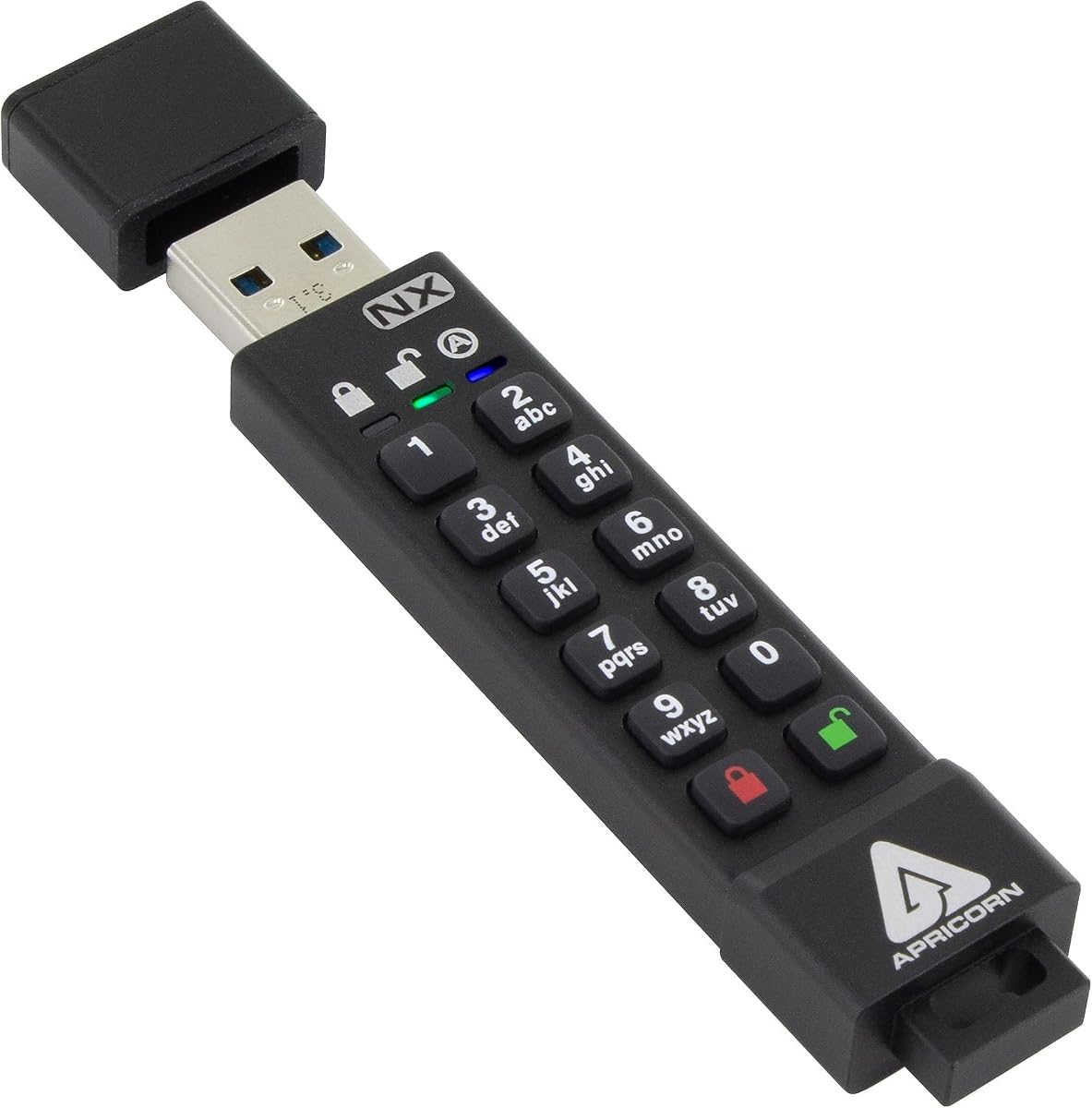
The Apricorn 8GB Aegis Secure Key 3 NX stands out as a top contender in the secure storage market. It offers robust security features backed by government-approved certifications. Users benefit from hardware encryption that protects data without relying on external software installations.
We may earn a commission when you buy through this link, at no additional cost to you.
This drive features a separate admin and user mode, allowing for granular control over access rights. The FIPS 140-2 Level 3 validation ensures it meets strict standards for cryptographic module security. This makes it suitable for environments where regulatory compliance is a primary concern.
While the price is higher than standard flash drives, the security investment is justified for sensitive data. The physical design includes a durable casing that protects against daily wear and tear. It balances performance with security effectively for professional use cases.
Ideal for business professionals and IT administrators who need reliable portable security. It ensures your data remains protected during transit or if the device is misplaced. The recovery PIN feature adds an extra layer of access management flexibility.
The FIPS 140-2 Level 3 validation is crucial for organizations needing auditable security measures.
Separate modes allow administrators to manage keys while users access files independently.
We may earn a commission when you buy through this link, at no additional cost to you.
Kingston IronKey Vault Privacy 50 delivers enterprise-level security in a portable package. It features digitally signed firmware to protect against malicious USB attacks. This drive is designed for users who prioritize maximum data protection above all else.
We may earn a commission when you buy through this link, at no additional cost to you.
The passphrase mode allows for longer, more memorable passwords without sacrificing security. Dual read-only settings prevent accidental data modification during critical file transfers. It uses XTS-AES 256-bit encryption to ensure data integrity and confidentiality effectively.
Although it is a premium product, the features justify the cost for high-security needs. The brute force protection locks the drive after multiple failed attempts. This proactive security approach minimizes the risk of unauthorized access attempts.
Perfect for executives and IT staff handling confidential corporate data. It provides peace of mind knowing that physical theft does not compromise data. The TAA compliance also meets specific government procurement requirements.
BadUSB protection ensures that the device firmware cannot be hijacked by malicious code.
Multi-password options allow organizations to enforce complex security policies easily.
We may earn a commission when you buy through this link, at no additional cost to you.
The Integral 4GB Crypto-197 offers a cost-effective solution for basic encryption needs. It is certified to FIPS 197 standards which validate high-level information security. This drive ensures that even entry-level devices provide robust data protection.
We may earn a commission when you buy through this link, at no additional cost to you.
Its dual-layer waterproof design protects the electronics from physical damage and moisture. Users do not need to install software, making it compatible with various systems immediately. The auto-lock feature secures data when the drive is removed from the computer.
While the capacity is limited, it is sufficient for documents and small files. The price point makes secure storage accessible to individuals and small businesses. Security is maintained without the burden of complex setup procedures.
Best for students or professionals needing portable secure storage on a budget. It offers peace of mind against theft or loss without high costs. The physical durability ensures it lasts through daily use scenarios.
Waterproof design ensures reliability even in harsh environmental conditions or accidental drops.
No software installation means you can use it on any compatible computer immediately.
We may earn a commission when you buy through this link, at no additional cost to you.
This model bridges the gap between modern device compatibility and high security. The USB 3.2 Type C connector ensures compatibility with newer laptops and tablets. It retains the rigorous FIPS 140-2 Level 3 validation for trusted protection.
We may earn a commission when you buy through this link, at no additional cost to you.
The drive supports 128GB of storage making it viable for larger data sets. Separate admin and user modes provide control over who can write data. Power supply options allow for flexibility during usage across different devices.
The hardware encryption remains a primary benefit here ensuring no software overhead. The type C interface significantly reduces the need for dongles. This simplifies the workflow for professionals using modern portable computers.
Recommended for tech-savvy users needing large secure storage on type C devices. It balances high performance with top-tier encryption standards. The validation ensures it meets strict organizational requirements effectively.
Type C support ensures compatibility with the latest laptops and mobile devices.
128GB capacity allows for storage of extensive media and document libraries securely.
We may earn a commission when you buy through this link, at no additional cost to you.
The iStorage datAshur PRO uses a physical PIN entry keypad for access. This method eliminates the need to enter passwords on the host computer. It provides an extra layer of protection against keyloggers and software attacks.
We may earn a commission when you buy through this link, at no additional cost to you.
The device is rated IP57 for dust and water resistance making it very durable. It works across Windows, macOS, Linux, and even mobile platforms without drivers. The PIN length is adjustable between seven and fifteen digits for customization.
While the bulkier design may not fit all pockets, the security advantage is significant. The hardware encryption operates in real time ensuring all transferred data is safe. Speeds are competitive with standard drives offering fast throughput.
Best for users who require a dedicated authentication method outside the keyboard. It is ideal for high security environments where physical keypads are standard. The rugged build ensures reliability in field conditions.
PIN entry on the drive means host keyboard input is never used for passwords.
Works on embedded systems and Chrome without requiring specific software drivers.
We may earn a commission when you buy through this link, at no additional cost to you.
This compact drive fits easily into a keychain or pocket for extreme portability. The aluminum shell provides a lightweight yet durable exterior for daily carry. It includes an automatic lock that engages after a set timeout period.
We may earn a commission when you buy through this link, at no additional cost to you.
Security relies on hardware encryption which protects data without software dependencies. The interface supports fast data transfers for quick backups of small files. Reset functions wipe data after multiple incorrect password attempts for safety.
The design prioritizes convenience without compromising essential encryption features. It is a practical choice for users needing quick access to secured files. The build quality supports regular handling and transport.
Recommended for casual users needing portable security for documents. The size makes it easy to carry daily without weight. The automatic lock ensures security even if you forget to lock it manually.
Size comparable to a lighter ensures it does not weigh down your keyring.
Timeout lock ensures data is protected if the drive is left unattended.
We may earn a commission when you buy through this link, at no additional cost to you.
The Lexar 128GB JumpDrive F35 PRO uses biometric security for access. A fingerprint sensor allows for quick unlocking without typing passwords. This offers a balance of convenience and strong security for sensitive files.
We may earn a commission when you buy through this link, at no additional cost to you.
It supports up to ten different fingerprints enabling shared access or backups. The read speed reaches up to 400MB/s which is significantly faster than standard drives. This reduces wait times during data transfers and backup processes.
AES 256-bit encryption ensures that stored data is protected even without access. The form factor is standard but the sensor adds a unique functional element. It is suitable for users who prefer biometrics over numeric codes.
Best for tech enthusiasts wanting fast storage with advanced access control. It provides quick access when speed is important. The multi-fingerprint support makes it versatile for shared secure environments.
Fingerprint recognition in under a second allows for rapid access to files.
Up to ten fingerprints allow multiple users to access the drive.
We may earn a commission when you buy through this link, at no additional cost to you.
This model takes durability to the next level with IP68 certification. It is fully protected against dust and water immersion for prolonged periods. This makes it ideal for outdoor work or harsh industrial environments.
We may earn a commission when you buy through this link, at no additional cost to you.
Security features remain consistent with the PRO model including hardware encryption and PIN entry. The certification ensures compliance with strict government and enterprise security standards. Speeds are fast enough for daily data transfers.
The rugged build provides confidence that data is safe from physical hazards. It combines high security standards with physical toughness. The PIN entry prevents unauthorized access even if the casing is damaged.
Ideal for construction professionals or field workers needing reliable storage. It ensures that devices survive tough conditions without data loss. The security certification meets corporate compliance requirements.
IP68 rating ensures operation in dusty or wet conditions without failure.
FIPS 140-2 Level 3 ensures the device meets rigorous security standards.
We may earn a commission when you buy through this link, at no additional cost to you.
The D500S offers a unique dual partition feature for enhanced privacy. It allows users to hide a secure partition within a public one. This separation ensures sensitive files are distinct from regular data.
We may earn a commission when you buy through this link, at no additional cost to you.
It features a zinc casing that provides robust physical protection. The FIPS 140-3 Level 3 pending certification indicates upcoming higher standards. Brute force protection ensures attempts to guess passwords are stopped quickly.
The multi-pin option allows for different credentials for different partitions. This flexibility supports complex security policies. The drive is fully customizable allowing administrators to set specific attributes.
Best for organizations needing compartmentalized data access. It provides robust physical and digital security. The partition feature offers an additional layer of privacy for critical files.
Dual partitions allow separation of public and private data on one drive.
Zinc casing protects against drops and physical impact during transport.
We may earn a commission when you buy through this link, at no additional cost to you.
This drive offers a straightforward approach to secure storage. It uses hardware encryption to protect data without relying on software. The compact design ensures it is easy to carry everywhere.
We may earn a commission when you buy through this link, at no additional cost to you.
With 8GB of storage, it is suitable for documents and small files. The AES 256-bit encryption ensures robust protection against unauthorized access. It operates across systems without requiring installation of extra tools.
The simplicity of the design reduces the risk of user error. It is reliable for essential secure storage needs. The brand reputation adds a layer of trust in the security implementation.
Best for individuals needing a simple secure drive. It provides essential protection without complex features. The reliability and ease of use make it a practical choice.
Simple setup and operation ensure that even non-technical users can secure data.
Kingston offers a proven track record for quality hardware products.
We may earn a commission when you buy through this link, at no additional cost to you.
Selecting the right encrypted drive requires balancing security, capacity, and budget. This guide outlines the critical factors to consider.
Look for drives offering hardware-based AES 256-bit encryption which is the industry standard for high security. Hardware encryption is more secure than software because it operates independently of the host computer.
Prioritize models with XTS encryption modes which prevent data tampering effectively.
FIPS 140-2 Level 3 is a critical certification for government and enterprise security compliance. It ensures the cryptographic module has been rigorously tested.
Choosing certified drives ensures your data meets regulatory requirements like GDPR or HIPAA.
Consider how you authenticate to the drive. PIN pads, fingerprints, or passwords offer different security benefits. PIN pads prevent keyloggers from capturing your credentials.
Biometric options provide convenience but can be less secure than strong alphanumeric passwords.
Ensure the drive includes features that wipe data after multiple failed password attempts. This prevents attackers from guessing your password over time.
This feature is essential for physical security if the drive is lost or stolen.
Rugged casing and water resistance are important for drives used in the field. IP57 or IP68 ratings indicate strong resistance to water and dust.
A durable drive ensures data safety even if the device is dropped or exposed to elements.
Determine how much data you need to store securely. While some drives offer massive capacity others focus on small critical files.
Choose a capacity that matches your usage to avoid overloading the device.
Ensure the USB connector matches your devices. Type C drives are necessary for modern laptops and smartphones.
USB 3.0 or higher ensures faster data transfer speeds for efficiency.
If you use multiple operating systems ensure the drive works on Windows, Mac, and Linux without extra software. Zero footprint designs ensure compatibility without installation.
This flexibility is crucial for shared environments or IT administrators.
Always set a strong unique password or PIN immediately after unboxing. Use a mix of numbers and characters to ensure security. Avoid sharing this code with unauthorized individuals.
Store the drive in a cool dry place away from direct sunlight. Physical protection prevents damage to the internal components. Keep it away from strong magnets or heat sources.
Eject the drive safely from your computer before removing it. This ensures all files are written correctly and prevents data corruption. Always lock the device before unplugging.
Hardware encrypted drives are generally more secure because the encryption happens on the drive itself. This prevents malware on the host computer from capturing the decryption key. Software drives rely on the computer to process the encryption.
Most drives do not allow recovery of the PIN due to security protocols. You may need to use a data recovery PIN provided by the manufacturer. If that fails the drive data might be permanently inaccessible.
Most modern encrypted drives work without software. They mount as standard drives once unlocked. However some enterprise drives may use management software for additional controls.
Most hardware encrypted drives are compatible with all major operating systems. They rely on hardware logic rather than OS specific software. Always verify compatibility with the specific model before purchasing.
Yes you can delete files and overwrite them without reformatting. The encryption remains active on the drive. This allows for standard use as a regular storage device.
Keyboards allow you to enter PINs directly on the drive. This prevents keyloggers on the computer from recording your password. It adds an extra layer of physical security.
It is a US government standard for cryptographic modules. Level 3 ensures physical security measures are in place. It validates the drive meets strict security protocols.
Drives with internal batteries last based on usage intensity. Most last for thousands of PIN entries before needing recharge. Always charge them before long trips or storage.
We reviewed ten top options ranging from budget friendly to premium security solutions. The Apricorn and Kingston models stand out for their robust certifications and advanced features.
Prioritize hardware encryption and FIPS validation to ensure your data is truly protected. Security should not be compromised for convenience when sensitive files are involved.
Check current stock and configurations before buying to ensure you get the right capacity. Prices and models can change so verify the details on the retailer site.