
LIUJINCAN Untwist Tool
4.2Editor score
Solid brass tube construction
Slip-resistant grip coating
Dual-headed for CAT5/6/7
This guide compares the top Ethernet Untwist Tool models for network technicians and DIY installers based on speed, durability, and ease of use.
Network cabling projects often involve tedious manual tasks that slow down installation and cause physical strain. An Ethernet Untwist Tool helps technicians separate twisted pairs quickly without damaging the internal wires or exhausting their hands during long jobs.
We evaluated ten real products based on their design, material quality, and user feedback to determine which tools deliver the best performance. Each option offers unique features ranging from manual separators to rechargeable electric devices for different budgets and needs.
Every pick in this list highlights specific strengths and weaknesses to help you choose the right tool for your work environment. Keep in mind that availability and pricing may change over time so check current details before making a final decision.
4.2Editor score

4.5Editor score

5.0Editor score
This side-by-side comparison breaks down the key specifications and capabilities of each Ethernet Untwist Tool to help you decide which model fits your specific networking needs.



The Untwist Tool PRO-COMBO is a rechargeable electric device designed to separate twisted pairs at high speed. With a rating of 4.5 stars it stands out as the most efficient option for large scale network installations where time matters.
We may earn a commission when you buy through this link, at no additional cost to you.
This tool can handle up to 2000 pairs on a single charge making it ideal for data centers or enterprise deployments. The built-in LED work light ensures visibility in dark crawl spaces and the USB-C charging means you can power up quickly between jobs.
While it costs more than manual separators the time saved often pays for itself after just a few projects. The main drawback is that it relies on battery power so you must remember to recharge it before starting a critical task.
If you are a professional technician who installs hundreds of cables a week this tool is highly recommended. It reduces finger strain and speeds up the termination process significantly compared to manual methods.
With the ability to untwist 2000 pairs per charge this tool is built for volume work without frequent interruptions.
The built-in LED light helps you see twisted pairs clearly in low light environments where cables are often installed.
We may earn a commission when you buy through this link, at no additional cost to you.
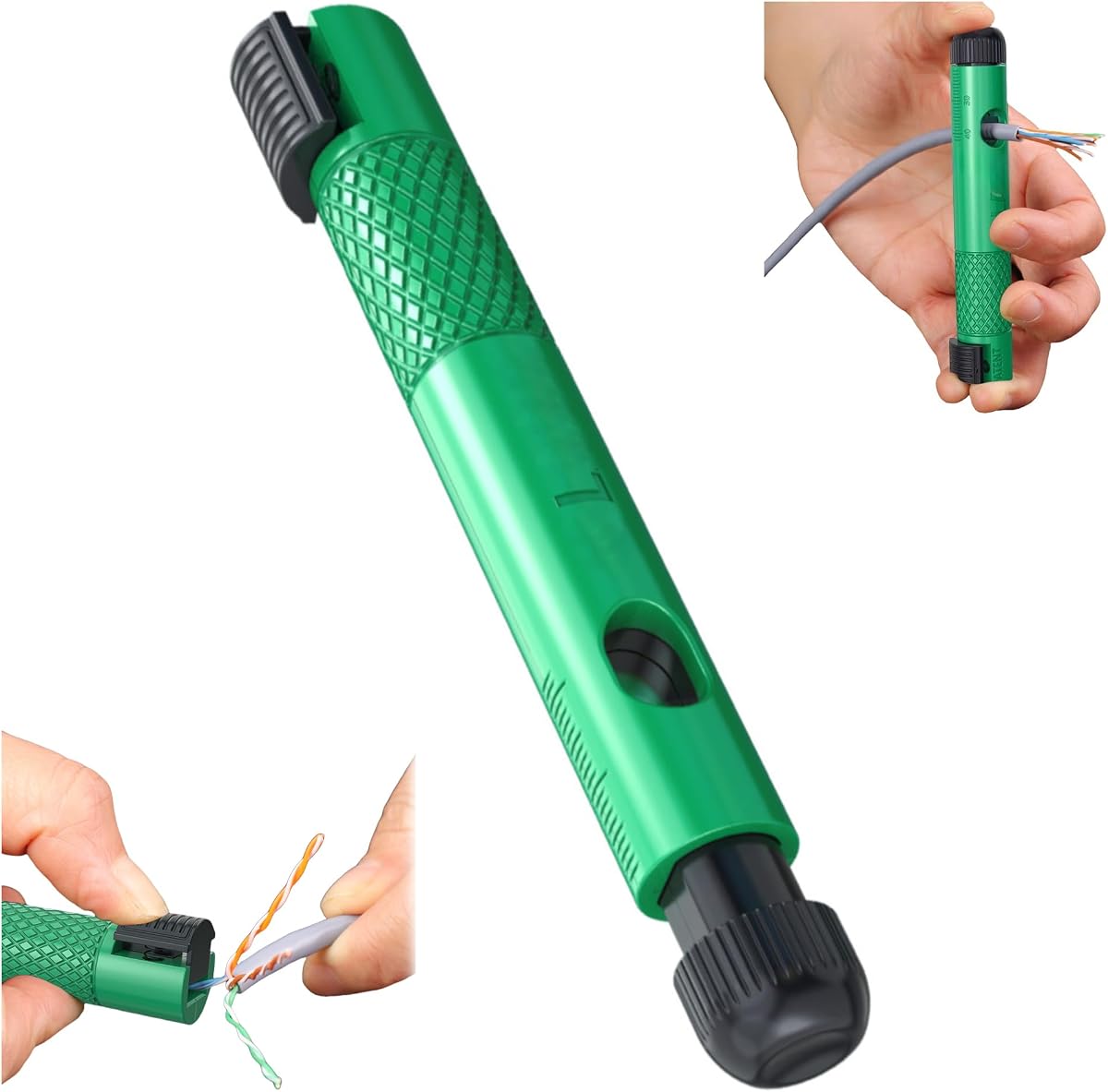
The LIUJINCAN Untwist Tool is a solid brass separator that offers professional quality at a budget friendly price. It earns a 4.2 star rating for its durability and ability to reduce hand strain during repetitive termination tasks.
We may earn a commission when you buy through this link, at no additional cost to you.
Its solid brass tube ensures long lasting performance without bending or breaking under pressure. The heat-shrink coated grip provides excellent control even when wearing gloves which is useful in colder work environments.
The main trade-off is that it relies on manual twisting rather than a motor so it may be slower for massive projects. However for most home or small business installs the speed is more than adequate.
This tool is perfect for DIYers or technicians who need a reliable handheld option without spending extra on electronics. It balances cost and quality effectively for everyday network cabling work.
Constructed from solid brass this tool resists corrosion and maintains precision alignment over many uses.
The heat-shrink coating on the handle provides a secure grip that prevents slipping during repetitive twisting motions.
We may earn a commission when you buy through this link, at no additional cost to you.
This 3-in-1 network cable tool combines stripping cutting and straightening functions in one compact device. With a perfect 5.0 star rating it stands out for its precision and ability to ensure smooth plug-in connections.
We may earn a commission when you buy through this link, at no additional cost to you.
The dedicated slot for manual straightening helps reduce signal interference by aligning wires properly before termination. Its heavy-duty construction withstands frequent professional use while remaining lightweight enough for portable fieldwork.
One limitation is that it works only with round Ethernet cables and not flat ones which may restrict its use in some modern setups. However for standard network installations it delivers exceptional results.
If you need a versatile tool that handles multiple prep tasks in one go this is an excellent choice. The high rating reflects user satisfaction with its build quality and performance.
This tool combines wire stripping cutting and straightening so you need fewer gadgets in your toolkit.
The dedicated straightening slot helps reduce signal interference by aligning wires before termination.
We may earn a commission when you buy through this link, at no additional cost to you.
This 3-piece set offers a practical solution for separating twisted pairs in home or small office networks. It holds a 4.3 star rating for its versatility across CAT5 to CAT7 cables and convenient size.
We may earn a commission when you buy through this link, at no additional cost to you.
Each tool measures about 12 cm which makes it easy to store in a toolbox or carry to different rooms. The dual-headed design helps separate pairs quickly without damaging the internal cores.
The manual design means it works best for occasional projects rather than high volume installations. For DIYers setting up home networks this provides enough capability without overcomplicating the process.
Consider this set if you need a reliable manual tool at a friendly price point. It covers most common network cable types and fits well in small tool kits.
Measuring 12 cm this tool is easy to store in tool bags and take to different work sites.
The dual headed shape helps separate twisted pairs efficiently without straining your fingers.
We may earn a commission when you buy through this link, at no additional cost to you.
This 2-piece kit combines an untwist tool with a mini wire stripper for a complete cable prep solution. With a 4.2 star rating it is popular among users who want a simple all-in-one package for basic tasks.
We may earn a commission when you buy through this link, at no additional cost to you.
The included stripper allows you to cleanly remove insulation before untwisting which speeds up the workflow. The untwist tool is compact enough to carry easily and works on most standard cable categories.
Manual operation means it is better suited for small jobs where speed is not critical. For larger projects you might need something more robust but this covers the basics well.
This kit is ideal for beginners or those who need a spare tool to keep in their vehicle. It offers good value for the price and covers most common cable types.
The package includes both an untwist tool and a wire stripper so you can prepare cables in one step.
The design is straightforward to use making it easy for beginners to handle network cables properly.
We may earn a commission when you buy through this link, at no additional cost to you.
This pen-style tool combines stripping straightening and organizing functions in one compact device. With a 2.8 star rating it has mixed reviews but still offers a unique design for those who want a multi-tool approach.
We may earn a commission when you buy through this link, at no additional cost to you.
The rotating handle is designed to reduce hand fatigue during use which is helpful for longer sessions. It works with Cat5e Cat6 and Cat7 cables making it versatile for different projects.
The lower rating suggests some users found the stripping or untwisting function less precise than dedicated tools. It may work best for light duty tasks where convenience is more important than speed.
Consider this option if you prefer a single pen-like tool for multiple functions. It is portable and can replace several gadgets in your toolbox for simple tasks.
This tool combines stripping straightening and organizing so you can manage cables with one device.
Its pen-style shape fits easily in pockets or small tool kits for quick access on the job.
We may earn a commission when you buy through this link, at no additional cost to you.
This tool is specifically designed for 1.3mm crystal network cables making it ideal for specialized installations. It holds a 3.8 star rating and offers a comfortable ergonomic grip for extended use.
We may earn a commission when you buy through this link, at no additional cost to you.
The dimensions are around 14.3cm which fits easily into toolkits without taking up much space. It works well for new network installations where precise separation of wires is needed.
The main limitation is that it is tailored to a specific wire size which may not suit all cable types. If you work with standard Ethernet cables this might be too narrow for some tasks.
Consider this tool if you frequently handle 1.3mm crystal cables in your work. It provides efficient separation for those specific needs and remains portable for field use.
This tool is designed for 1.3mm wires ensuring precise separation for specific network cable types.
The ABS material grip is comfortable to hold reducing fatigue during repeated use.
We may earn a commission when you buy through this link, at no additional cost to you.
This untwist tool is designed to save time and reduce finger pressure during large jobs. With a 4.1 star rating it is praised for its simplicity and ability to make separation easier.
We may earn a commission when you buy through this link, at no additional cost to you.
The ergonomic design is tailored to fingers which helps prevent sore hands when working on multiple cables. It works quickly with CAT5 to CAT7 pairs and is easy to carry around.
Manual operation means it relies on your hand strength which may be tiring for very high volume tasks. However for most users it provides enough leverage to make the job manageable.
Choose this tool if you need a simple lightweight option that reduces strain. It is affordable and effective for standard network cabling preparations.
The design is specially made for fingers to reduce pressure and make separation more comfortable.
This tool separates twisted pairs quickly which helps save time on larger installation jobs.
We may earn a commission when you buy through this link, at no additional cost to you.
This pen-shaped tool combines stripping straightening and organizing functions in one compact device. It holds a 3.2 star rating and is marketed towards IT technicians and electricians who need a versatile option.
We may earn a commission when you buy through this link, at no additional cost to you.
Equipped with an SK5 steel blade it delivers clean cuts without damaging internal wires. The rotating handle helps reduce hand fatigue during prolonged use which is valuable during long installations.
The lightweight design at 18g makes it easy to carry but some users found the untwist function less effective than dedicated tools. It works best for tasks where you need multiple functions in one tool.
Consider this option if you want an all-in-one device for cable management. It is compact and may replace several gadgets in your toolkit for basic tasks.
The SK5 steel blade ensures clean precise cuts that do not damage the internal wires.
The rotating handle reduces hand fatigue making it more comfortable to use for longer periods.
We may earn a commission when you buy through this link, at no additional cost to you.
This tool features an innovative roller mechanism that allows for easy untwisting with a simple turn. It holds a 3.9 star rating and is designed for Category 5/6 cables and telephone wires.
We may earn a commission when you buy through this link, at no additional cost to you.
The ABS and metal construction ensures durability and reliability over time. Its ergonomic design reduces hand fatigue during extended use which is helpful for technicians working on multiple projects.
The roller operation is simple but still relies on manual effort which may be slower than electric options. For standard Category 5/6 cables it provides a smooth and efficient process.
Choose this tool if you value ease of use and a reliable grip. It is a solid addition to any toolkit for general cable preparation tasks.
The roller mechanism allows for easy untwisting with a simple turn making the process smooth.
Constructed with ABS and metal this tool is built to last through frequent use.
We may earn a commission when you buy through this link, at no additional cost to you.
Selecting the right Ethernet Untwist Tool depends on your budget, cable types, and how frequently you perform installations.
Tools range from basic manual separators to rechargeable electric devices. Set a budget that reflects how much you can spend upfront versus long-term value.
If you do occasional work a manual tool is sufficient but high volume users should consider electric options for productivity.
Ensure the tool supports the cable categories you work with such as CAT5e CAT6 or CAT7. Some tools only work with round cables while others handle flat ones too.
Check product descriptions for compatibility to avoid buying a tool that cannot handle your specific cable types.
Look for tools made from durable materials like brass steel or high-strength plastics. These materials ensure the tool lasts through frequent use without bending.
High-quality materials also prevent damage to the internal wires which is critical for maintaining network performance.
A comfortable grip reduces hand fatigue especially during long installation sessions. Look for non-slip coatings or rotating handles for better comfort.
Prioritize tools that fit your hand size and reduce strain to prevent repetitive stress injuries over time.
Electric tools require charging via USB-C or other methods while manual tools rely on your hand strength. Consider whether you need the speed of an electric tool or the simplicity of a manual one.
If you choose electric ensure you have a charging plan so the tool is ready when you need it.
Compact tools that fit in a pocket or toolbox are ideal for fieldwork. Heavier devices might not be convenient for carrying around.
Check the dimensions and weight to ensure the tool is easy to transport between different job sites.
Some tools include LED lights wire strippers or organizing functions which add value. Evaluate whether these extras justify the higher price.
Features like built-in lights help in low light environments but may not be necessary for all users.
Read reviews to see how real users feel about the tool performance and durability. High ratings often indicate reliability but look for detailed feedback.
Pay attention to comments about specific use cases that match your needs to make a better informed choice.
To use the tool strip about 2 cm of the outer insulation from the cable first. Insert the exposed wires into the untwist slot and rotate the handle gently to separate the pairs.
Avoid applying excessive force which can bend or break the internal wires. Let the tool do the work by twisting slowly and smoothly.
Keep the tool clean by wiping it down after use and storing it in a dry place. For electric models charge the battery fully before starting a new project.
An Ethernet Untwist Tool separates the twisted pairs inside network cables to make them easier to straighten and terminate. This process prepares the wires for crimping and reduces signal interference.
Manual tools are affordable and simple while electric tools are faster for large volumes. Choose manual for occasional home use and electric for professional installations.
Most tools support CAT5e CAT6 and CAT7 cables. Check the product specs for compatibility with flat cables if that is your primary use case.
Wipe the tool with a dry cloth after use to remove dust and debris. For electric tools avoid getting water inside the charging port.
Proper use should not damage cables. Always strip the insulation first and rotate the tool gently to avoid nicking internal wires.
You will also need a crimping tool and a cable stripper for a complete setup. Some untwist tools include stripping functions but verify this before buying.
The Untwist Tool PRO-COMBO and LIUJINCAN options stand out for their performance and value. Electric models suit high volume work while manual tools are practical for smaller jobs.
Prioritize durability ergonomics and cable compatibility when making your decision. A quality tool will save time and protect your cables during installation.
Prices and availability may change so check current details on the product pages before buying. This guide helps you compare the top options available in November 2026.