
USB Power Cable Adapter 4K
4.5Editor score
Supports 4K Ultra HD
Smart LED power indicators
Auto on off sync
This guide compares the best Fire TV Stick USB power cable adapters to eliminate AC outlets and declutter your home theater setup with reliable power solutions.
Finding the right power solution for your streaming device can be frustrating when outlets are scarce. A dedicated USB power cable adapter simplifies your setup by drawing power directly from your television. This ensures your device runs smoothly without needing extra wall adapters or messy cables hanging around.
We evaluated ten top-rated adapters based on compatibility, power stability, and ease of installation. Our selection includes options with advanced circuitry and built-in battery backups to prevent interruptions. Each product was analyzed for its ability to handle high-performance streaming like 4K and HDR content effectively.
Every review below details specific features, pros, cons, and ideal use cases for each adapter. Please note that pricing and availability can change frequently on Amazon. Always check the current listings before purchasing to ensure you get the best deal for your specific TV model and needs.
4.5Editor score

4.6Editor score

4.1Editor score
The table below provides a side-by-side overview of all ten selected USB power adapters. It highlights key specifications like output voltage, cable length, and unique features to help you quickly identify the right model for your setup.


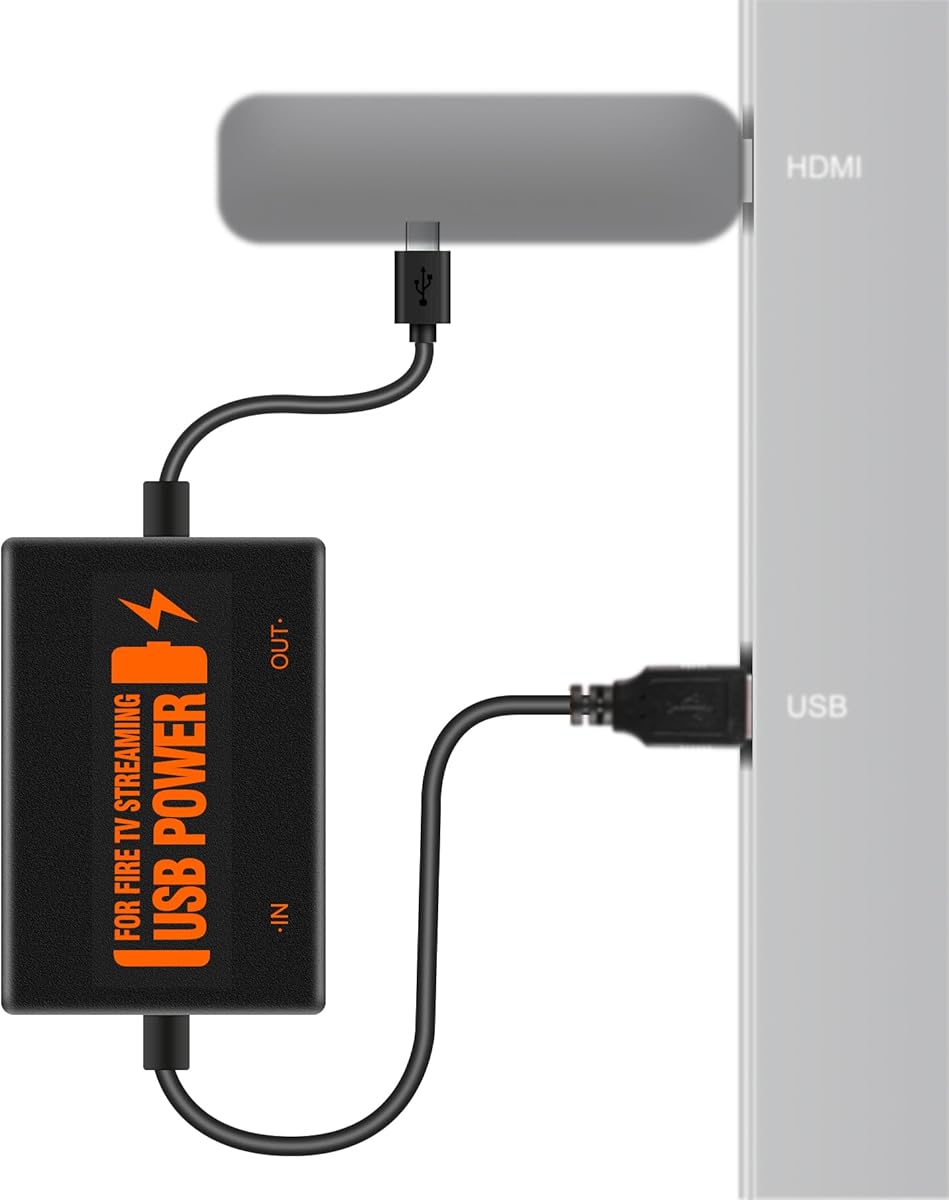


This official Amazon power cable stands out as the top recommendation for reliability and ease of use. It eliminates the need for an external AC adapter by powering your Fire TV Stick directly from your TV's USB port. The rating of 4.6 reflects strong user satisfaction with its consistent performance.
We may earn a commission when you buy through this link, at no additional cost to you.
The standout quality is its advanced power management circuitry which stores excess energy and releases it as needed. This ensures your device receives stable power even if the TV USB port fluctuates. The package includes both USB-C and Micro-B connectors to ensure seamless compatibility.
While it offers premium features, the price is higher than generic alternatives. The cable length is also optimized for short distances which might limit placement flexibility. These are acceptable trade-offs for the guaranteed compatibility and safety provided by an official accessory.
If you want a hassle-free setup guaranteed to work with your device you should buy this adapter. It is the best choice for users who prioritize official support and advanced power features over budget pricing. The included adapter makes it ready for any Fire TV Stick model.
Being an official product ensures it meets strict safety standards and works perfectly with Amazon devices.
The inclusion of both USB-C and Micro-B adapters means you do not need to buy separate cables for different models.
We may earn a commission when you buy through this link, at no additional cost to you.
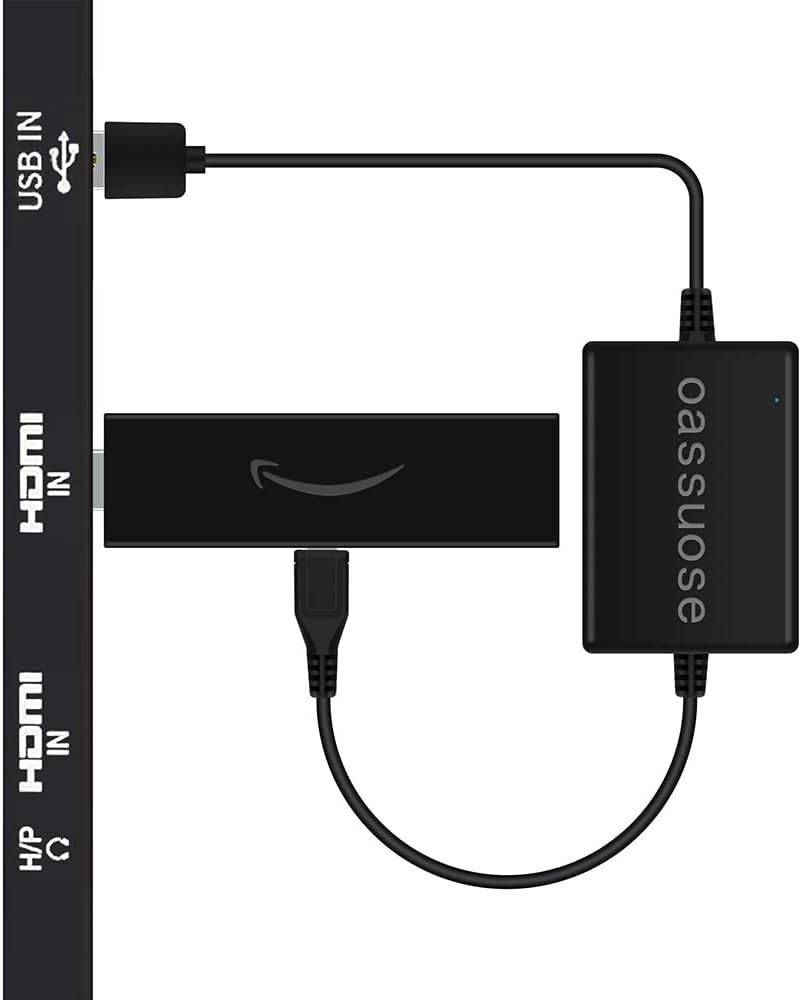
The Oassuose adapter provides a stable power solution designed to prevent restart issues common with insufficient USB power. It features a built-in power conversion module that ensures constant voltage and current output for your streaming device. Users appreciate its ability to keep their Fire TV Stick running smoothly without interruptions.
We may earn a commission when you buy through this link, at no additional cost to you.
This adapter solves the problem of failing to start or restarting repeatedly due to low power supply from the TV. The energy storage component helps maintain performance during fluctuations. It works with all Fire Stick models except the new 2026 HD version which uses USB-C.
Users must wait about ten minutes to charge the device before initial installation which can be a minor inconvenience. The safety warnings about avoiding high temperatures and disassembly are important to follow for longevity. These requirements are standard for devices with energy storage components.
Buy this adapter if you experience power issues with your current setup and need a reliable replacement. It is suitable for most Fire Stick models and offers solid protection circuits. Remember to check your device compatibility before purchasing to ensure it matches your TV and stick model.
The 5V power conversion module protects your device from voltage spikes and ensures steady operation.
Verify your TV Stick model as this adapter does not support the specific 2026 HD version with USB-C port.
We may earn a commission when you buy through this link, at no additional cost to you.
This adapter delivers stable power specifically tuned for high-quality 4K streaming experiences with vibrant video and audio. The integrated LED lights indicate optimal performance operation which helps users confirm everything is working correctly. Its design prevents restart failures that often occur with insufficient power supply from TVs.
We may earn a commission when you buy through this link, at no additional cost to you.
The intelligent power management automatically powers the stick when the TV turns on and cuts power when it turns off. This smart feature helps conserve energy and prevents overheating issues. The built-in over-current and short-circuit protection add a layer of safety for your device.
The LED indicators might be distracting if they shine directly into your eyes during dark viewing sessions. Since it supports Micro-USB, you need to check if your stick uses this port before purchasing. These minor points do not outweigh the benefits of stable 4K performance.
Choose this adapter for the best 4K experience if your device relies on a Micro-USB connection. It is ideal for users who want visual confirmation of power status and smart energy management. The focus on high-definition streaming makes it a premium choice for quality seekers.
Designed to unlock vibrant 4K streaming and Dolby Atmos audio by preventing power-related interruptions.
Two indicator lights show when the adapter is in optimal performance operation for peace of mind.
We may earn a commission when you buy through this link, at no additional cost to you.
This adapter features a built-in 1800mAh battery that serves as a supplemental power source during insufficient supply. This design ensures smooth 4K video playback by preventing restarts or shutdowns due to low power spikes. It effectively eliminates lagging issues common with weaker USB ports on older TVs.
We may earn a commission when you buy through this link, at no additional cost to you.
The smart chip provides multi-protection including over-current and short-circuit safeguards for safe operation. Premium materials ensure efficient heat dissipation to keep the device cool during extended use. The 5V 2.1A output fully meets the power requirements for demanding streaming devices like the 4K Max.
It is important to note that the battery is supplementary and cannot power the stick independently without the USB connection. Users must wait about ten minutes to charge the device before first use for optimal performance. These steps ensure the backup system is ready when needed.
Purchase this adapter if you want extra peace of mind against power fluctuations and restarts. The supplemental battery adds a layer of reliability that standard cables lack. It is a strong choice for users who experience frequent power issues with their current setup.
The 1800mAh battery releases power only when supply is insufficient to maintain smooth video playback.
Crafted with premium materials for efficient heat dissipation to ensure safe operation during long sessions.
We may earn a commission when you buy through this link, at no additional cost to you.
This affordable adapter offers a simple solution to power your Fire TV Stick directly from your TV USB port. The three-inch cable design tucks neatly behind your TV to eliminate hanging wires and clean up your home theater system. It automatically powers your stick down when the TV turns off to save energy.
We may earn a commission when you buy through this link, at no additional cost to you.
The main benefit is the instant cleanup of messy wire clutter by eliminating the need for an AC outlet. This is perfect for wall-mounted TVs where finding a nearby power socket is difficult. It installs in seconds by connecting one end to the stick and the other to the TV.
Users must ensure their TV has a USB 3.0 port or at least 900mA output for optimal performance. The three-inch length may be too short if the USB port is far from the HDMI port. These requirements are essential for proper functioning but limit universal compatibility.
Buy this if you need a cost-effective way to declutter your setup and save on electricity. It is ideal for users with compatible TVs and short distances between ports. The low price makes it a great option for budget-conscious shoppers.
Instantly cleans up your messy hanging wire clutter and gives your wall mount a clean wireless appearance.
Automatically powers your stick down when you turn your TV off to save on your electricity bill.
We may earn a commission when you buy through this link, at no additional cost to you.
This 10W power adapter includes a six-foot braided cable to offer flexibility in placement and reach distant ports. It is designed for Micro USB devices and supports a charging current up to 2.4A for efficient power transfer. The unit is UL, FCC, and RoHS certified to ensure safety and reliability.
We may earn a commission when you buy through this link, at no additional cost to you.
The thick copper wire supports data transmission and prevents overheating even during continuous use. This makes it a reliable choice for users who need a long cable or prefer a traditional plug-in solution. The low energy consumption conforms to US Energy VI standards for efficiency.
It is not compatible with USB-C devices such as the latest Fire TV Stick HD models. If you have a newer stick with USB-C this adapter will not work with your device. This limitation requires careful checking of your device specifications before purchase.
Choose this adapter if you need extra cable length or are using older Micro USB devices. The six-foot cord provides significant flexibility for placement compared to standard short cables. It is a safe and certified option for users prioritizing cable length over USB power integration.
The six-foot braided cable offers flexibility to reach distant ports or place the adapter comfortably.
UL, FCC, and RoHS certifications guarantee safe operation and compliance with energy efficiency standards.
We may earn a commission when you buy through this link, at no additional cost to you.
This adapter uses an advanced circuit chip to effectively improve conversion rate and ensure stable discharge voltage. It provides multiple circuit protections to keep your streaming stick safe from power surges or drops. The plug and play design allows you to solve insufficient power errors easily.
We may earn a commission when you buy through this link, at no additional cost to you.
The built-in battery keeps the stick always having power to maintain proper current going to your device. It only provides power when the TV is turned on to save energy and prevent overheating. This dual function ensures smooth operation while keeping your setup tidy.
For the first installation, you must charge the device for ten minutes before use to activate the battery. Without this step it will not immediately start working which might confuse first-time users. This requirement is standard for batteries and ensures long-term stability.
Buy this adapter if you want a reliable replacement that improves conversion efficiency and protects your device. The built-in battery adds stability for consistent performance. It is a strong option for users seeking a balance of protection and power quality.
The advanced circuit chip improves the conversion rate and ensures stable voltage for optimal device function.
A built-in battery maintains proper current to the device only when the TV is on for efficiency.
We may earn a commission when you buy through this link, at no additional cost to you.
This adapter ensures a stable 5V 2.1A output that perfectly suits 4K streaming needs for various models. It works with all streaming devices that support Micro USB ports including the new 4K and Max versions. The solution solves problems of failing to start or restarting due to insufficient supply.
We may earn a commission when you buy through this link, at no additional cost to you.
Energy saving features mean the adapter only powers the stick when the TV is on and stops when off. This automatic sync helps prevent overheating and conserves energy for your home. The design keeps your setup clean and tidy by eliminating extra outlets.
It is not compatible with the 2026 Fire TV Stick HD which uses a USB-C port. Users must fully charge the device before first use to ensure optimal performance. This compatibility limit is important to note for owners of newer HD models.
Choose this adapter for 4K streaming if you have a Micro USB model and want reliable power. It provides stable output to prevent lag or crashes during playback. It is a solid choice for users needing to declutter their entertainment system.
The stable 5V 2.1A output is perfect for 4K streaming and prevents power issues.
Automatically stops when the TV is off to prevent overheating and conserve energy for your home.
We may earn a commission when you buy through this link, at no additional cost to you.
This product includes a power adapter plus a six-foot USB cable to offer extended reach for your setup. It is compatible with all Fire TV Stick models making it a versatile choice for many users. The color of the adapter may vary between black or white based on stock availability.
We may earn a commission when you buy through this link, at no additional cost to you.
The long cable allows you to position the adapter in a convenient spot away from the TV. This flexibility helps in managing cables when your USB port is hard to reach. The simple design ensures it works with most HDMI streaming devices requiring Micro USB power.
Users should be aware that the adapter color is not guaranteed which might not match other accessories perfectly. It is a basic solution without advanced smart features like battery backup or LED indicators. These are acceptable trade-offs for the extra length and compatibility.
Buy this if you need a long cable to reach difficult USB ports and want a simple solution. It is a great value option for users who do not need extra smart power management features. The six-foot length adds significant flexibility to your installation.
Includes a six-foot USB cable to provide extended reach and positioning flexibility for your setup.
Compatible with all Fire TV Stick models ensuring it works with most HDMI streaming devices.
We may earn a commission when you buy through this link, at no additional cost to you.
This unique adapter adds USB OTG functionality to your Fire Stick allowing you to connect peripherals like keyboards. It is specially designed to let you continue charging while using external devices for added convenience. The compact six-inch design makes it easy to carry and store for on-the-go needs.
We may earn a commission when you buy through this link, at no additional cost to you.
The two-pack value lets you have spares or share with another device. It works with hosts like FireStick, PlayStation Classic, and Raspberry Pi Zero when they support OTG. This feature expands the utility of your streaming device beyond media streaming.
Note that your host device must support OTG functionality for this to work. It is not designed for smart phones or tablets but rather for specific host devices. Always check your host specs before purchasing to ensure compatibility.
Choose this if you want to expand your Fire Stick with a keyboard or flash drive while charging. It is a niche tool for users who need peripheral connectivity. The two-pack ensures you always have one available for your setup.
Adds USB OTG functionality to your Fire Stick so you can connect peripherals like keyboards.
Allows you to continue charging your device while using external peripherals for added convenience.
We may earn a commission when you buy through this link, at no additional cost to you.
Choosing the right USB power adapter involves checking compatibility, power output, and build quality to ensure stable streaming.
Check if your Fire TV Stick uses Micro-USB or USB-C. Most adapters support Micro-USB but newer models require USB-C. Ensure the product includes the correct connector to fit your device securely.
Always verify the connector type before buying to avoid returns or incompatibility issues.
A reliable adapter should output 5V with at least 2A to support 4K streaming. Insufficient voltage causes restarts or lag. Look for specifications that clearly state 5V/2A or higher for stability.
Prioritize adapters that guarantee 5V/2A output to ensure your device runs smoothly.
Some adapters include a small battery backup to smooth out power dips from weak TV ports. This feature prevents unexpected restarts during peak usage. It adds value for older TVs with weaker USB ports.
Consider models with battery backup if your TV often fails to provide steady power.
Cable length affects how you position your Fire Stick behind the TV. Longer cables offer more flexibility but may add clutter. Choose a length that suits your TV wall mount distance and USB port location.
Select a cable length that reaches your USB port without creating unnecessary wire mess.
Look for UL, FCC, or RoHS certifications to ensure safe operation. Certified adapters protect your device from voltage spikes or short circuits. Safety certifications give confidence in the product's build quality.
Always choose certified adapters to protect your expensive streaming device from electrical hazards.
Good adapters turn off power to the stick when the TV turns off. This saves energy and reduces heat buildup in your home theater. It extends the lifespan of the device by preventing overheating.
Pick an adapter with auto on-off sync to save electricity and reduce heat.
Prices vary from budget to premium options. Budget models save money but may lack advanced features. Premium models often include better materials and guarantees. Check for a warranty to cover defects or issues.
Balance your budget with the features you need and look for a warranty on your purchase.
Connect one end of the adapter to your Fire TV Stick and the other end to a powered USB port on your TV. Ensure the USB port is enabled in your TV settings for power delivery.
If the adapter has a built-in battery, charge it for ten minutes before first use to activate the circuit. Follow manufacturer instructions for initial setup to ensure it works correctly.
Keep the adapter and cable in a well-ventilated area away from heat sources. Do not squeeze or puncture the cable to maintain safety and product lifespan.
Not all USB ports provide enough power. Look for ports labeled with 5V/2A or higher. If your TV has low-power ports you may see restart issues. Check your TV manual for specifications.
Restarting is often caused by insufficient power from the TV USB port. The power needs more than the port supplies. Using an adapter with built-in backup or higher output can solve this issue.
Most work with Micro-USB models but newer 2026 HD models use USB-C. Always check your device type before purchasing. Some adapters include multiple connectors for compatibility.
Yes, many adapters turn off power when the TV is off. This reduces energy consumption compared to leaving an AC adapter plugged in. It also prevents heat buildup.
Models with built-in batteries require a ten-minute charge before initial use. This activates the internal storage. Standard power-only cables do not need pre-charging.
Overheating can damage the adapter and your device. Use it in a ventilated space and avoid covering it. Adapters with smart chips include protection to prevent this risk.
The Made for Amazon USB Power Cable stands out as the top choice for overall reliability and official compatibility. It eliminates the need for an AC outlet and ensures smooth performance for all models.
For users needing extra stability, adapters with built-in battery backups provide peace of mind against power fluctuations. These are ideal for older TVs or those with weak USB ports.
Always verify current prices and compatibility before purchasing as models may change. Check your TV and stick specs to ensure you choose the right adapter for your setup needs.