
SteelSeries Nimbus+
4.0Editor score
Official Apple Licensed
50 Hour Battery
Click Joysticks
Explore our comprehensive guide comparing the top gaming controllers for Apple TV to find the perfect fit for your streaming and gaming needs today.
Finding the right gaming controller for Apple TV transforms your living room into an immersive entertainment hub. You need a device that pairs easily, offers precise inputs, and supports the wide range of games available on tvOS. This guide helps you navigate the options to elevate your gaming experience.
We evaluated ten leading controllers based on compatibility, battery life, build quality, and feature sets. Our analysis focuses on how well each device integrates with Apple ecosystems and performs during extended gaming sessions. We also considered unique features like motion controls and customizable buttons.
Each pick highlights specific strengths to help you match a controller to your play style. Whether you prioritize budget value or premium features, you will find a suitable option here. Keep in mind that prices and availability can change frequently across online retailers.
4.0Editor score

4.7Editor score

4.4Editor score
This table provides a quick side-by-side comparison of the top ten controllers evaluated for Apple TV compatibility and overall performance features.
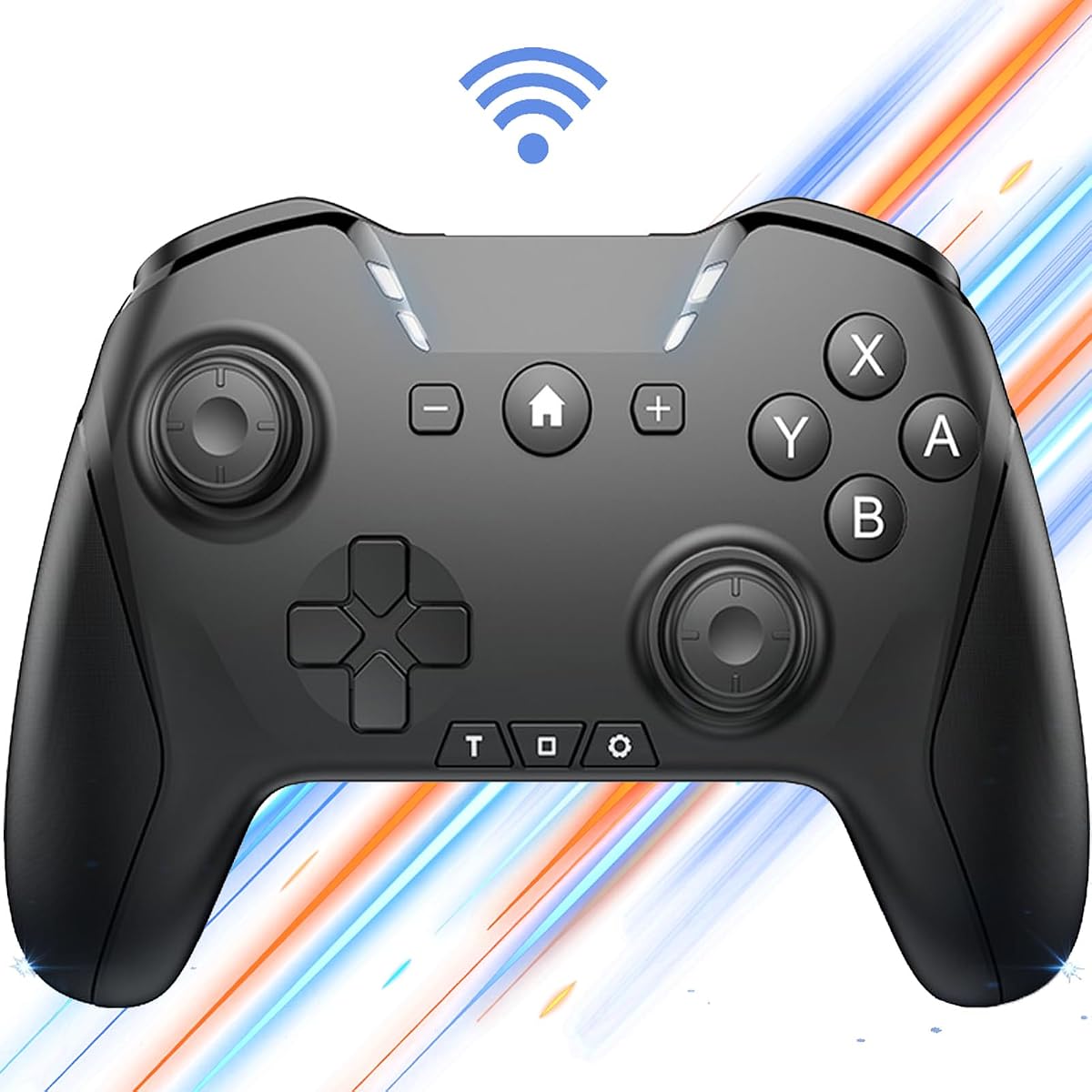



This Bluetooth controller stands out for its extensive customization options, making it a strong choice for gamers who want to tailor their inputs. It supports a wide range of platforms including Apple TV and offers solid motion controls for immersive gameplay experiences.
We may earn a commission when you buy through this link, at no additional cost to you.
The standout feature is the ability to program complex operation sequences up to thirty seconds long. This functionality is particularly useful for repetitive tasks or combining inputs that might otherwise require multiple fingers. The adjustable turbo and vibration settings further enhance control flexibility.
While the controller offers impressive features, users should note that mastering the macro programming requires time. The build quality is functional but may not match premium options in terms of long-term durability. It is a great value proposition for those seeking feature-rich control.
It is ideal for gamers on a budget who do not want to sacrifice advanced features. If you value customization and cross-platform compatibility over absolute build perfection, this controller delivers significant utility for your Apple TV setup.
Users can record complex button combinations to execute actions automatically, enhancing gameplay efficiency.
The controller works seamlessly across iOS, Android, Windows, and Apple TV for versatile gaming.
We may earn a commission when you buy through this link, at no additional cost to you.
The SteelSeries Nimbus+ is designed specifically with Apple ecosystems in mind, ensuring seamless connectivity and performance. With an official Apple license, it guarantees compatibility with tvOS and other Apple devices, making it a reliable choice for Apple TV gamers.
We may earn a commission when you buy through this link, at no additional cost to you.
Its most impressive specification is the battery life, offering over fifty hours of play on a single charge. This longevity is rare in mobile controllers and reduces the frequency of charging sessions. The tactile D-Pad and clickable joysticks provide precise feedback during intense gaming moments.
Despite its strengths, the controller does require the SteelSeries Engine for optimal compatibility settings on iOS devices. The design lacks a built-in phone mount which might be inconvenient for some users who play on mobile devices alongside TV gaming.
If you prioritize long battery life and official support for Apple services, this is the top recommendation. It offers a polished experience that integrates well with your existing Apple hardware and software ecosystem.
With over fifty hours of playtime, you can game for days without needing to recharge the controller.
The L3 and R3 buttons add extra input options for games that require pressing down the sticks.
We may earn a commission when you buy through this link, at no additional cost to you.
VOYEE Switch Controllers offer an excellent entry point for gamers seeking a budget-friendly option with robust features. The inclusion of RGB lighting and programmable buttons makes it feel more expensive than its price tag suggests. It is well-suited for casual gaming on Apple TV.
We may earn a commission when you buy through this link, at no additional cost to you.
The controller features a 9-color LED lighting system with multiple modes to personalize your setup. Additionally, the programmable M1 and M2 keys allow for shortcut mappings, while the turbo function assists in rapid-fire scenarios. The motion control adds another layer of interactivity.
While the price is attractive, users should be aware that wireless connectivity on PC is limited to wired connections. The build quality is functional but relies heavily on plastic materials. However, for the cost, the performance remains surprisingly capable.
This controller is perfect for those who want visual flair and functionality without a high investment. It balances affordability with enough features to satisfy most casual gamers looking for an Apple TV companion.
The customizable RGB lighting allows you to match the controller to your room setup or mood.
Extra buttons on the back can be mapped to frequently used actions for quicker access during play.
We may earn a commission when you buy through this link, at no additional cost to you.
The 8Bitdo SN30 Pro combines nostalgia with modern reliability, offering a fully featured retro controller that works officially with Apple TV. Its D-Pad is widely praised for accuracy, making it ideal for fighting games and retro titles played on your Apple TV.
We may earn a commission when you buy through this link, at no additional cost to you.
Equipped with Hall Effect joysticks, this controller significantly reduces the risk of stick drift over time. The motion controls and rumble vibration provide immersive feedback, while the compact size ensures it is easy to carry anywhere. The battery lasts for eighteen hours per charge.
The main trade-off is the size, which may feel small for those with larger hands. The battery life is decent but falls short of competitors like the Nimbus. However, the precision and build quality often outweigh these minor drawbacks for most users.
It is the best choice for retro gamers or anyone who prefers a classic design with modern tech. If you need a portable, reliable controller for your Apple TV that avoids common issues like drift, this is a top contender.
Magnetic sensing in the sticks prevents wear and tear, ensuring long-term accuracy and durability.
The cross-shaped directional pad offers crisp inputs that are essential for platformers and fighters.
We may earn a commission when you buy through this link, at no additional cost to you.
This renewed version of the SteelSeries Nimbus+ offers the same Apple-licensed features as the new model at a reduced price point. It is professionally inspected and tested to meet quality standards, ensuring you get a functional device for your Apple TV without the full retail price.
We may earn a commission when you buy through this link, at no additional cost to you.
The controller retains its responsive buttons and long battery life capabilities, providing a stable wireless connection for gaming. You get the same tactile feedback and analog stick performance as the standard model. It is a practical way to access premium hardware economically.
However, cosmetic imperfections may be present since it is renewed, and the warranty is typically shorter than new items. While this does not affect functionality, it is worth considering if you prefer pristine condition products. The rating reflects these variable conditions.
This option is ideal for budget-conscious buyers who want the reliability of a premium brand. If you can accept minor wear and tear, you gain significant savings while maintaining full compatibility with Apple TV and iOS games.
Each unit undergoes professional inspection to ensure it meets functional standards before being sold.
Buying renewed allows access to higher-end features at a fraction of the original retail price.
We may earn a commission when you buy through this link, at no additional cost to you.
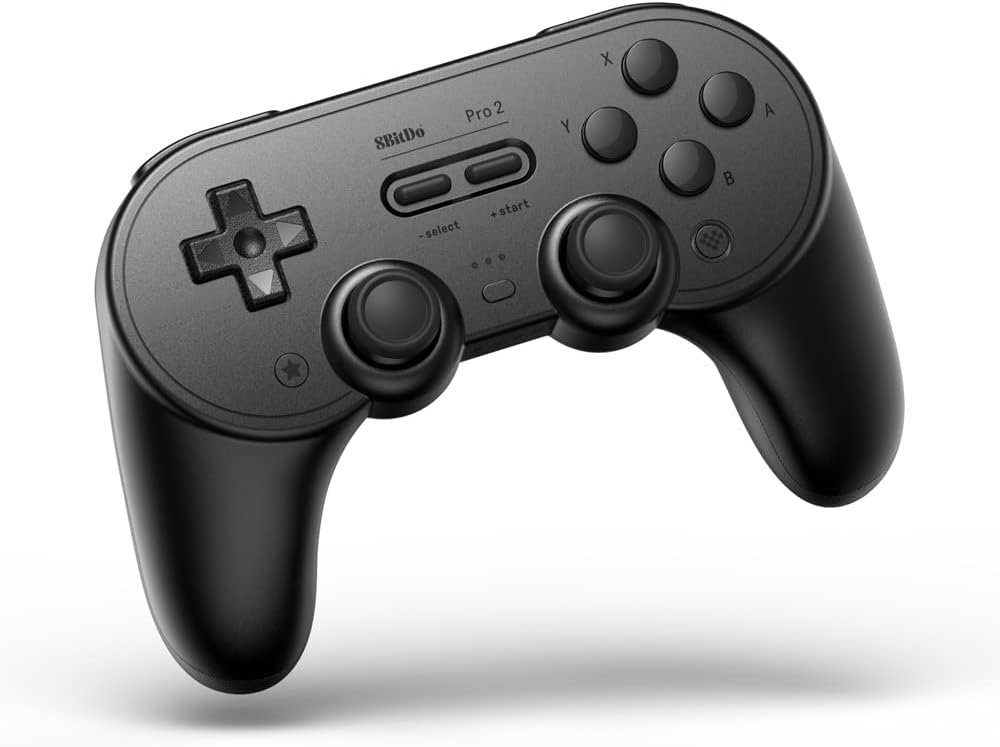
The 8BitDo Pro 2 is a powerhouse of versatility, working officially with Apple TV and across many other platforms. It features back buttons and extensive customization through software, making it a favorite among serious gamers who need precise input configurations for Apple TV play.
We may earn a commission when you buy through this link, at no additional cost to you.
Ergonomics are a strong suit here, with a grip that accommodates extended sessions comfortably. The dual analog sticks and triggers are precise, while the motion controls add depth to gameplay. Battery life extends to twenty hours on a single charge for continuous play.
The only notable downsides are the lack of a visible battery indicator and the larger physical footprint. These do not detract significantly from the performance, but users with small hands might find it cumbersome. Overall, it offers a balanced premium experience.
If you value ergonomics and deep customization options, this controller is a top tier choice. It delivers a high-quality feel that matches its performance capabilities across your Apple TV and other devices.
Two programmable back buttons allow you to map important actions to your middle fingers easily.
Desktop and mobile software lets you tweak every button and stick setting to your preference.
We may earn a commission when you buy through this link, at no additional cost to you.
This version of the SteelSeries Nimbus+ continues to be a solid classic choice for Apple TV users. It offers a clean and straightforward design focused on reliability and compatibility. The official Apple license ensures smooth pairing and minimal technical issues.
We may earn a commission when you buy through this link, at no additional cost to you.
Key strengths include a robust rechargeable battery and responsive buttons that handle various game genres well. The ergonomic shape makes it comfortable for long gaming sessions without causing fatigue. It is designed to work out of the box with minimal setup required.
While it lacks some advanced programmable features found in newer models, it focuses on delivering core performance reliably. The price reflects the premium branding, which might be steep for some users. However, for simplicity and trust, it remains a strong option.
It is best for gamers who want a no-fuss controller that just works. If you prefer established reliability over cutting-edge customization, this Nimbus variant serves Apple TV needs effectively.
The controller pairs instantly with Apple devices, allowing you to start playing immediately without setup.
The ergonomic shape and textured grips ensure a secure hold during intense gaming moments.
We may earn a commission when you buy through this link, at no additional cost to you.
The AceGamer Aurora II brings advanced features like Hall Effect joysticks and RGB lighting to a budget-friendly controller. It supports both Bluetooth and 2.4G wireless connections, offering stable performance for Apple TV and other devices. The battery capacity is significantly higher than many competitors.
We may earn a commission when you buy through this link, at no additional cost to you.
Programmable back buttons and rotary motors allow for detailed customization of your gameplay experience. The drift reduction in the joysticks ensures longevity and precision over time. It is packed with features that are rare at this price point.
However, the pairing process can be slightly complex for non-technical users, requiring specific button sequences. Compatibility notes must be checked carefully for your specific iOS version to ensure full functionality. Once set up, it performs well.
This controller is ideal for tech-savvy users who want maximum features for less. If you value Hall Effect technology and extensive customization on Apple TV, this provides excellent value despite the setup learning curve.
Magnetic sensors detect stick position accurately, reducing the likelihood of wear and drift over time.
Supports both Bluetooth and 2.4G for flexible connection options depending on your device setup.
We may earn a commission when you buy through this link, at no additional cost to you.
The Official Luna Wireless Controller is designed primarily for cloud gaming but works via Bluetooth on Apple TV as well. Its unique Cloud Direct technology ensures low-latency gameplay when used with Amazon Luna services. It offers a seamless way to switch between screens without losing progress.
We may earn a commission when you buy through this link, at no additional cost to you.
The controller features offset thumbsticks and precise triggers that feel comfortable during long sessions. USB connectivity provides an alternative for direct connection to compatible devices. The build quality is solid and fits standard gaming needs well for Apple TV.
Because it is optimized for cloud services, some native features might be less emphasized compared to other controllers. However, the Bluetooth support makes it versatile enough for local gaming on Apple TV. It remains a reliable option for specific users.
It is the best choice if you use cloud gaming services regularly. For Apple TV users who value low latency and cross-device continuity, this controller delivers a specialized and effective experience.
Connects directly to game servers to minimize lag and improve response times significantly.
Allows you to pause a game on one device and resume it instantly on another without reloading.
We may earn a commission when you buy through this link, at no additional cost to you.
The GMBACK Wireless Switch 2 Pro offers unique macro capabilities that allow for automated gameplay sequences. It is widely compatible with Apple TV and supports loop macros to automate repetitive tasks. This functionality is particularly appealing for gamers who enjoy RPGs or grinding sessions.
We may earn a commission when you buy through this link, at no additional cost to you.
It features a robust battery that lasts fifteen to twenty hours, along with RGB lighting for aesthetic appeal. The 6-axis gyro sensor enhances motion controls for precise aiming. The controller supports multiple platforms, making it a versatile tool for diverse gaming setups.
While the macros are powerful, they require time to configure correctly, and the build quality might not match premium brands. Users should follow the manual carefully to ensure proper pairing. However, the features provide significant value for specific use cases.
If you are looking for automated gaming assistance and a flexible controller, this is a strong candidate. It brings automation features to Apple TV that are rarely found at this price point, enhancing your overall gameplay efficiency.
Record sequences of actions to repeat automatically, saving time during repetitive gameplay tasks.
One-click wake up allows you to turn on your console or TV directly from the controller.
We may earn a commission when you buy through this link, at no additional cost to you.
Selecting the right controller involves considering compatibility, battery life, and specific features that match your gaming habits.
Ensure the controller explicitly supports tvOS and Bluetooth protocols. Look for controllers that work with MFi games for seamless integration. Check if it requires an app for pairing or if it connects directly.
Always verify official Apple licensing to avoid connection issues or feature limitations during gameplay.
Battery life varies significantly between models, ranging from ten to fifty hours. Consider how often you game to determine if a rechargeable battery with high capacity is necessary. Charging speed and cable type also impact convenience during sessions.
Prioritize controllers with long battery life if you play frequently to avoid interruptions in the middle of games.
Materials and shape determine comfort during extended use. Look for textured grips and button placement that suits your hand size. Premium models often offer better durability and tactile feedback than budget options.
Test the controller ergonomics if possible, or check reviews for long-term comfort feedback before purchasing.
Features like motion controls, rumble vibration, and programmable buttons enhance immersion. Advanced users may prefer macro capabilities for automation. Check if these features are active on tvOS since some might be console specific.
Focus on features that directly benefit your favorite games to get the most value from your purchase.
Budget models offer core functionality while premium models add polish and durability. Consider the value of included accessories like charging cables or cases. A good warranty provides peace of mind for potential defects or issues.
Balance your budget with the features you need to ensure you are not paying for unnecessary extras.
Motion sensing uses gyroscopes to detect movement for aiming or steering. Not all games support motion inputs on Apple TV. Ensure the controller's motion tech is compatible with the titles you intend to play regularly.
Choose a controller with a reliable gyroscope if you play sports or adventure games that use motion controls.
Analog triggers and shoulder buttons provide nuanced control for driving or shooting games. A standard D-Pad is crucial for platformers. The layout should feel natural and allow quick access to inputs.
Check that button response is responsive and that there is no delay or lag during rapid inputs.
Many gamers use multiple devices like PC, Switch, or mobile alongside Apple TV. A controller that switches easily between platforms adds versatility. Look for mode switches or Bluetooth pairing profiles for different devices.
Versatility allows one controller to serve all your devices simplifying your gaming setup at home.
Pair your controller by enabling Bluetooth on your Apple TV and putting the controller into pairing mode. Follow the specific button instructions provided by the manufacturer to establish a connection. Keep the controller close during the process to ensure a stable signal.
Charge your controller using the provided cable and allow it to reach full capacity before extended use. Avoid using it while plugged in for long periods to prevent battery degradation. Unplug it once the charging light indicates full status.
Store your controller in a cool dry place away from direct sunlight to maintain battery health. Clean the buttons and grips regularly with a soft cloth to remove dust and oils. Use a case or cover when transporting to protect against physical damage.
Not all controllers support every game since some titles may require specific inputs or motion controls. Officially licensed controllers generally have the best compatibility. Check the game description to see which controllers are supported before purchasing.
Yes, modern Xbox wireless controllers support Bluetooth and work with Apple TV. Ensure your controller firmware is updated for best performance. Some older models may not pair correctly with tvOS due to compatibility issues.
Look for the Made for iPhone iPad (MFi) badge or Apple license mentions in the product description. Certified controllers undergo testing to meet Apple standards for reliability. This ensures a smooth pairing experience without connection drops.
Wired controllers offer zero latency and continuous power but lack mobility. Wireless controllers provide freedom of movement but rely on battery life. For Apple TV, wireless is usually preferred unless you play competitive games where latency matters.
Connectivity issues can result from low battery, Bluetooth interference, or outdated firmware. Ensure the controller is charged and close to the Apple TV during pairing. Updating both device and controller firmware often resolves persistent connection drops.
Most modern controllers last between ten and twenty hours on a single charge. Premium models like the SteelSeries Nimbus can extend this to over fifty hours. Consider your gaming habits to choose a capacity that fits your needs.
We have reviewed ten top controllers ranging from budget options to premium choices like the 8Bitdo SN30 Pro and SteelSeries Nimbus+. Each brings unique strengths whether you prioritize battery life, retro design, or advanced features.
Prioritize official Apple compatibility and long battery life to ensure a smooth gaming experience. Consider additional features like motion controls or macro support based on the types of games you play most often.
Prices and availability may fluctuate so check current offers before purchasing. We hope this guide helps you find the perfect controller to enhance your Apple TV gaming setup today.