
2×2 4k Video Wall Controller
4.6Editor score
HDMI and DVI input
11 splicing modes
Memory function for settings
This guide compares the top HDMI video wall controllers for seamless multi-screen displays, featuring 4K support, bezel adjustment, and flexible control
Creating a seamless multi-screen display requires a reliable HDMI video wall controller. These devices split one source across multiple screens, ensuring synchronized content for advertising or presentations.
We evaluated ten top-rated models based on resolution support, display modes, control options, and audio extraction. Our analysis highlights units that offer bezel adjustment and stable performance.
Each pick showcases unique strengths like 4K inputs or web control. Prices fluctuate frequently, so verify current deals before purchasing your preferred video wall processor model.
4.6Editor score

4.8Editor score

4.2Editor score
This side-by-side comparison highlights key specifications across all ten selected video wall controllers. Review resolution inputs, output modes, and control methods to find the perfect fit.



This J-Tech Digital processor stands out as the top choice for most users. It boasts an impressive 4.8 rating and supports 4K inputs while delivering 1080p outputs across four screens.
We may earn a commission when you buy through this link, at no additional cost to you.
Its key strengths include eight display modes and edge masking to minimize bezel gaps. You can rotate images 180 degrees and extract audio via SPDIF or 3.5mm ports.
Trade-offs include fixed 1080p outputs and lack of advanced web control. These are acceptable given the low price point and robust basic features for standard setups.
Ideal for retail or office use, this unit offers reliable performance. We recommend it for anyone needing a seamless 2×2 video wall without complex setup.
Edge masking adjusts up to 8 pixels to reduce visible seams between screens for a unified look.
Supports 4K 30Hz input to ensure high-quality source signals before downscaling for multi-display viewing.
We may earn a commission when you buy through this link, at no additional cost to you.
OREI offers a solid entry with USB-C input and 4K 60Hz support. It handles multiple display modes including 2×2, 1×2, and split configurations for flexible setups.
We may earn a commission when you buy through this link, at no additional cost to you.
Strengths include RS-232 control for integration and audio extraction via optical outputs. The 180-degree rotate feature helps align screens when mounted upside down.
Limitations are lack of HDR10 and some modes limited to 1080i. These are minor for general use where color depth isn't critical for large displays.
Buy this if you need USB-C compatibility and professional control. It suits presentations or digital signage with basic audio needs.
Supports both HDMI and USB-C inputs to connect laptops or media players without needing separate adapters.
RS-232 port enables advanced integration with building management systems for automated display switching.
We may earn a commission when you buy through this link, at no additional cost to you.
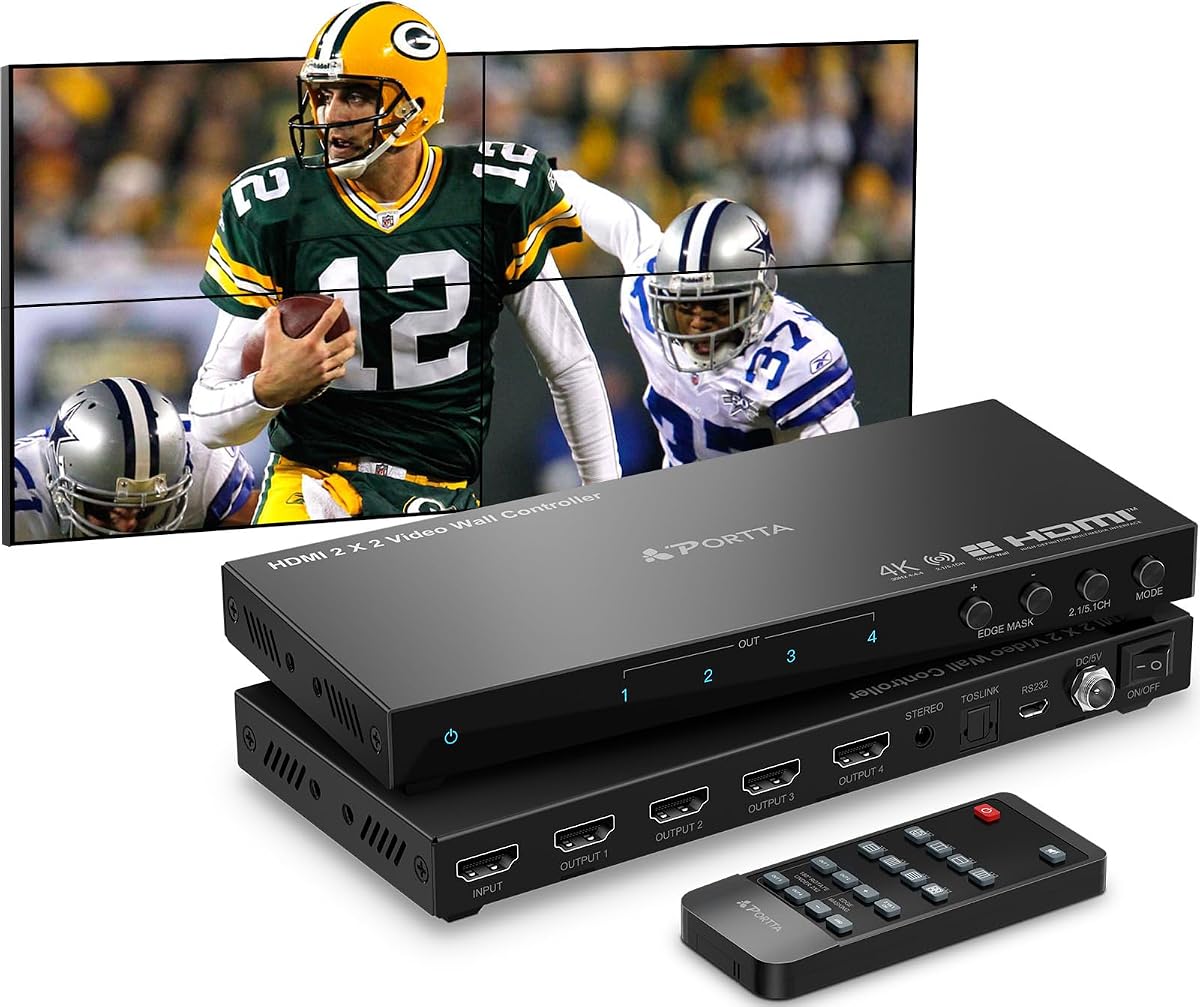
PORTTA delivers great value with 11 splicing modes and edge masking. It supports 4K input but fixes outputs at 1080p for stability across all four screens.
We may earn a commission when you buy through this link, at no additional cost to you.
It stands out for portrait display support and a strong 2-year warranty. The masking prevents unnatural looks by trimming output edges by 8 pixels.
Limitations include fixed resolution and no HDR. These are minor for static digital signage where cost matters more than raw pixel fidelity.
Choose this for budget projects needing flexibility. Its 11 modes cover most commercial uses like retail windows or lobby displays.
Offers 11 modes including 1×3 and 2×1 to match varied TV wall configurations without extra hardware.
Adds cuts to output edges to hide bezels and ensure images blend smoothly across multiple screens.
We may earn a commission when you buy through this link, at no additional cost to you.
This OREI model emphasizes bezel adjustment and dual voltage for global use. It accepts 4K 60Hz via HDMI or USB-C and outputs 1080p to four screens.
We may earn a commission when you buy through this link, at no additional cost to you.
Standouts are HDCP 2.2 compliance and optical analog audio outputs. The bezel adjustment enhances viewing by fine-tuning display overlap for cleaner seams.
Trade-offs are 1080p output limits. For most signage tasks, this balance is acceptable as source quality is preserved even if outputs scale down.
Ideal for international deployments. Its dual voltage and bezel tweaks suit travelers needing reliable, portable display solutions.
Dual voltage power supply supports US and international plugs with included adapter for worldwide use.
Adjustable bezel settings help align content precisely across multiple displays for professional multi-screen presentations.
We may earn a commission when you buy through this link, at no additional cost to you.
OREI offers a 4×4 matrix with web control for advanced scenarios. It switches four sources across four displays seamlessly and supports video wall modes.
We may earn a commission when you buy through this link, at no additional cost to you.
Strengths include advanced EDID management and support for Dolby TrueHD. Web control simplifies remote management for enterprise or large-scale setups.
Higher price and complexity are trade-offs. It suits professional environments needing multiple inputs rather than simple single-source splits.
Buy this for enterprise control. The web interface and 4×4 switching offer unmatched flexibility for command centers or studios.
Web control interface allows remote management via network for easy configuration changes without physical access.
Supports PCM, Dolby TrueHD, and DTS-HD for immersive sound across multi-display installations.
We may earn a commission when you buy through this link, at no additional cost to you.
This affordable controller stands out with memory function and memory-play via USB. It supports HDMI or DVI input and offers 11 splicing modes for various layouts.
We may earn a commission when you buy through this link, at no additional cost to you.
Key strengths include auto-play for USB drives and memory settings on reboot. This simplifies operations for continuous loop displays.
Limitations are DVI not supporting 4K and simpler controls. These suit tight budgets where USB media playback matters more than high res.
Choose for kiosks or simple signage. Its auto-play and memory features reduce ongoing operational effort significantly.
USB playback with auto display reduces need for connected PCs in looped content scenarios.
Memory function retains your display mode and rotation settings even after power cycling.
We may earn a commission when you buy through this link, at no additional cost to you.
ISEEVY delivers true 4K outputs unlike many rivals. It supports HDMI and USB-C inputs with 4K60Hz and offers six standard splice modes.
We may earn a commission when you buy through this link, at no additional cost to you.
Strengths are 4K per port and 24×7 stable design. Rotation and plug-and-play setup suit high-res digital signage needing clarity.
Trade-offs are only six modes and basic manual. For 4K clarity needs, these are minor compromises compared to lower-res units.
Ideal for high-end displays. Its 4K output ensures sharp details when paired with compatible 4K screens.
Each of the four HDMI ports supports full 3840×2160 resolution for high-fidelity multi-display walls.
Professional design supports continuous 24×7 operation ideal for digital signage needing constant uptime.
We may earn a commission when you buy through this link, at no additional cost to you.
This J-Tech unit is packed with LAN control and seamless switching. It accepts 4K60Hz inputs and outputs 4K30Hz with multiviewer presets.
We may earn a commission when you buy through this link, at no additional cost to you.
Standouts include LAN for web management and five multiviewer presets. You can view four sources on one screen or split across walls.
High price and complexity suit pros. Downscale/upscale options offer flexibility but demand technical know-how for setup.
Choose for command centers or studios. Its seamless switching and LAN control provide robust professional-grade capabilities.
Five presets let users view multiple sources on single screens for monitoring or presentations.
Web-based LAN control enables remote configuration changes for enterprise environments.
We may earn a commission when you buy through this link, at no additional cost to you.
This unit shines with USB auto display and brightness control. It supports 4K inputs and offers auto-play for USB media drives seamlessly.
We may earn a commission when you buy through this link, at no additional cost to you.
Strengths are USB auto display and brightness/contrast controls. You can adjust image quality directly on the device without extra tools.
Trade-offs are no web control and standard modes. For USB-driven digital signage, these are minor limitations for the ease of use.
Ideal for self-contained displays. USB playback and direct image adjustments simplify standalone signage setups.
Auto-play on USB insertion allows quick media playback without connecting a PC or player.
Built-in brightness, sharpness, and color controls enable fine-tuning for ambient lighting conditions.
We may earn a commission when you buy through this link, at no additional cost to you.
ISEEVY extends to six HDMI outputs for larger walls. It supports up to 13 splice modes and USB-C with 4K60Hz inputs.
We may earn a commission when you buy through this link, at no additional cost to you.
Key strengths are 6 outputs and 13 modes for varied layouts. It is ideal for large-scale installations needing more than four screens.
Higher cost and complexity are trade-offs. If you need six displays, the extra outputs and modes justify the investment.
Buy for large walls. Its 6 outputs and 4K support deliver unmatched flexibility for expanded video arrays.
Six HDMI outputs allow creation of 2X3 or 3X2 configurations for larger-than-standard walls.
Supports 13 splice modes to accommodate almost any wall layout with 4K quality.
We may earn a commission when you buy through this link, at no additional cost to you.
Selecting the right video wall controller requires understanding inputs, outputs, and control methods. This guide covers six key factors to consider.
Ensure the controller supports your source's resolution like 4K60Hz inputs. Check if outputs are scaled to 1080p or stay 4K for clarity.
Prioritize units with matching input and output specs to avoid quality loss across screens.
Check how many display modes like 2×2, 1×4, or portrait options the controller offers. More modes mean greater layout flexibility.
Choose units with enough modes to match your wall configuration like 2×3 or 1×4 setups.
Bezel adjustment and edge masking reduce visible gaps between screens. Look for features that trim pixels to hide bezels.
Edge masking is essential for seamless displays where bezels can disrupt visual continuity.
Some units offer RS-232 or web control for remote management. Others rely only on remote or buttons. Decide based on your setup size.
Use RS-232 or web control for professional or large setups requiring remote adjustments.
Look for optical or analog audio outputs if you need separate sound systems. Some controllers pass audio through HDMI outputs only.
Optical extraction provides better audio quality for multi-screen installations needing external speakers.
Check if the power supply supports dual voltage for international use. Longer warranties and lifetime tech support reduce risk.
Prioritize units with strong warranties and lifetime support to safeguard your investment.
Connect your HDMI or USB-C source to the controller and link four displays to outputs. Power on devices and use the remote to select a display mode.
Adjust bezels via the menu if screens overlap visually. Use edge masking to trim unwanted gaps and ensure a smooth image flow.
Keep the controller in a well-ventilated area to avoid overheating. Update firmware via web control if available to maintain performance and compatibility.
A splitter duplicates the same image to all screens, while a controller divides the image across screens like 2×2. Controllers enable seamless multi-screen layouts for one source.
Not all do. Many support 4K inputs but output 1080p to all screens. Some premium units output full 4K per port at a higher price.
Some units support HDMI and USB-C inputs. Verify the specs if you plan to connect laptops via USB-C to avoid needing adapters.
Edge masking cuts pixels around images to hide bezels between screens. This creates a seamless look where displays appear as one large screen.
Standard HDMI cables work for most setups. Ensure they are high-speed for 4K signals. Some models include cables but verify before buying.
Most controllers support 180-degree rotation. For portrait modes, you must rotate the source desktop and enable matching display modes in the controller.
If you need external speakers, look for optical or analog outputs. Controllers without these pass audio through HDMI only, limiting external sound systems.
Most are plug-and-play with remote control. Premium models offer web control via LAN which uses a browser interface and requires no driver installation.
Our top picks include the J-Tech Digital model with 4K support and edge masking, the budget-friendly 2×2 controller with memory function, and the advanced J-Tech unit with LAN control.
Prioritize input/output resolution and bezel management for seamless setups. Choose units with the right control options for your environment to simplify daily use.
Prices change regularly, so verify current deals before purchasing. Confirm specs match your screens to ensure optimal performance and minimal setup effort.