
Harvopu Keyboard Case
4.4Editor score
7-color backlight options
Magnetic detachable design
High-sensitivity trackpad
Finding the right keyboard case for your iPad Pro 13 M4 transforms your tablet into a powerful workstation. A good option offers comfortable typing, a responsive trackpad, and solid protection for daily use.
We compared ten leading models based on build quality, connectivity, and versatility. Each product was evaluated for how well it supports productivity tasks while maintaining the sleek design of your device.
Each pick highlights unique strengths to help you choose the best fit. Please note that availability and offers may change, so verify current details before purchasing your next accessory.
4.4Editor score

4.3Editor score

3.7Editor score
As an Amazon Associate we earn from qualifying purchases.
Here is a side-by-side comparison of the top keyboard cases available for the iPad Pro 13 M4 to help you identify the best fit for your needs.



This case stands out as the premier option for iPad Pro users seeking a seamless typing experience. It features a built-in glass trackpad and a function row for added control.
We may earn a commission when you buy through this link, at no additional cost to you.
The scissor mechanism keys provide a comfortable typing feel similar to a laptop. The two-cantilever hinge design allows for smooth viewing angles while maintaining stability.
While it lacks the adjustable angles of some competitors, the stability is top-notch. The pass-through charging ensures your iPad stays powered without extra cables.
If you prioritize typing quality and trackpad responsiveness, this is the ideal choice for professional workflows.
The scissor mechanism keys are designed for a tactile feel that reduces finger fatigue during long sessions.
The dedicated function row offers quick access to essential controls without navigating through the iPad interface.
We may earn a commission when you buy through this link, at no additional cost to you.
The ESR Multi-Mode Keyboard transforms your iPad into a productivity machine with ease. Its magnetic stand allows for quick adjustments to suit your workflow.
We may earn a commission when you buy through this link, at no additional cost to you.
The detachable back case provides instant access to the iPad for touch tasks while maintaining full-body protection. The trackpad supports precise multi-touch gestures.
While the magnetic connection is strong, some users might find the stand less rigid than heavier options. It remains a solid choice for versatile usage.
Ideal for those who need flexibility between typing and touch modes without removing the case entirely.
Ultra-strong magnets seamlessly combine the case and tablet to let you easily open the floating cantilever stand.
The back case detaches for instant hands-on access with full-body protection when you need to use the iPad directly.
We may earn a commission when you buy through this link, at no additional cost to you.
This model offers ultimate flexibility with its adjustable landscape stand and detachable keyboard. It supports both portrait and landscape modes for various tasks.
We may earn a commission when you buy through this link, at no additional cost to you.
The trackpad is significantly larger than standard options, enhancing navigation precision. A dedicated pencil holder ensures your stylus stays secure and scratch-free.
The magnetic connection is secure, allowing you to switch modes instantly. However, the design may be bulkier than minimalist alternatives.
Best for users who want maximum adjustability and a large trackpad for efficient workflow management.
The adjustable landscape stand adapts to your perfect viewing angle, while the low-angle support is ideal for writing.
The fully responsive trackpad provides smoother and more precise control for easier editing and app switching.
We may earn a commission when you buy through this link, at no additional cost to you.
The typecase Edge brings a stylish touch with 11 backlight colors and a lightweight profile. It transforms your iPad into a sleek laptop effortlessly.
We may earn a commission when you buy through this link, at no additional cost to you.
Its magnetic clasp ensures security while providing a spot for your Pencil. The instant wake and sleep feature conserves energy effectively.
While it offers full front and back protection, the angle adjustment is less flexible than multi-mode stands. The backlight adds a personalized flair.
Recommended for those who value aesthetics and a portable setup for on-the-go work.
Adjusting 11 backlight and 3 levels of brightness ensures clear visuals in every setting, enhancing your immersive experience.
Boasting a slim, lightweight profile, the Typecase Edge is the ideal companion for on-the-go users seeking functionality without bulk.
We may earn a commission when you buy through this link, at no additional cost to you.
The Logitech Combo Touch is known for its sturdy build and detachable keyboard feature. It offers multiple use modes for typing, sketching, and watching videos.
We may earn a commission when you buy through this link, at no additional cost to you.
The flexible kickstand helps you find the perfect angle for any task. The Smart Connector ensures seamless connectivity without charging requirements.
While highly protective, it can be slightly heavier than other cases. The recycled plastic components also appeal to environmentally conscious buyers.
Ideal for users seeking durability and reliable protection with the convenience of a detachable keyboard.
Detach the keyboard to sketch, watch, or read with total freedom while maintaining protection with the base case.
Seamless, instant connectivity on your Combo Touch iPad Pro keyboard case with no charging required as it is powered by your iPad.
We may earn a commission when you buy through this link, at no additional cost to you.
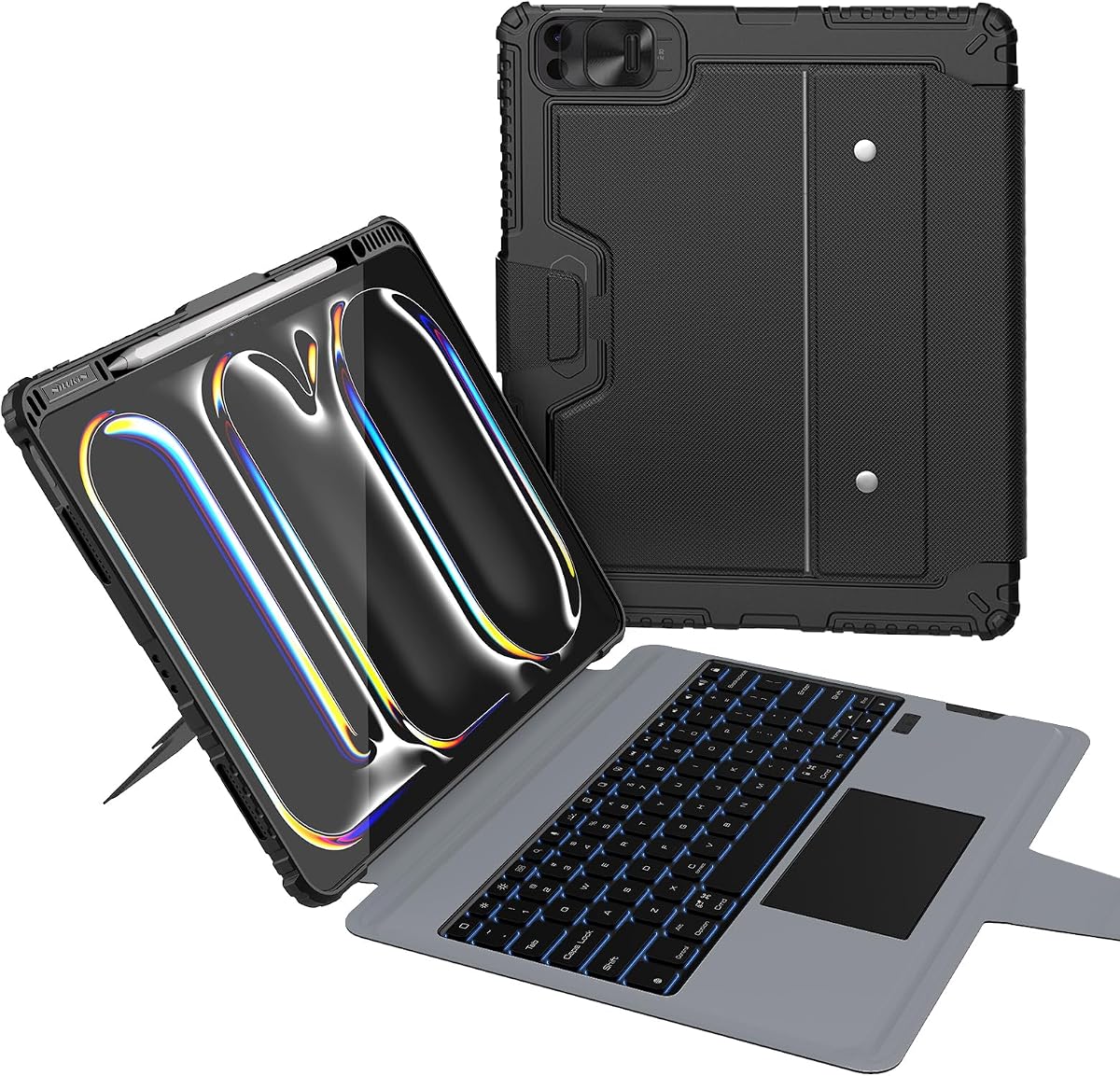
The Harvopu keyboard case delivers excellent value with its 7-color backlight and adjustable brightness. It features a magnetic detachable design for easy use.
We may earn a commission when you buy through this link, at no additional cost to you.
Built with a 500mAh battery, it supports hours of typing before needing a recharge. The stain-resistant material makes cleaning a breeze.
The three viewing angles provide stability for different tasks. While the trackpad is functional, it may not match premium options in precision.
Best for budget-conscious users looking for vibrant features and essential productivity tools.
Features a backlit keyboard with 7-color backlight mode and 3-levels brightness to adjust based on your needs.
Features a built-in 500mAh high-capacity battery with sleep mode after 15 minutes of inactivity for enhanced efficiency.
We may earn a commission when you buy through this link, at no additional cost to you.
The Edge+ offers all-in-one versatility with detachable wingshell back case and adjustable stand. It transforms your iPad into a productivity hub instantly.
We may earn a commission when you buy through this link, at no additional cost to you.
Strong N54H magnets ensure a stable connection even when using the tablet on the go. The 135-degree magnetic floating stand allows flexible adjustments.
The 11-color backlight personalizes your typing environment. However, some users might find the setup complex compared to simpler models.
Recommended for users needing a blend of reading and typing modes with premium magnetic locking.
The detachable Wingshell back case seamlessly switches between typing, sketching, and reading modes to meet your work and entertainment needs.
The powerful N54H magnets securely attach the keyboard and back case providing a stable connection for any environment.
We may earn a commission when you buy through this link, at no additional cost to you.
This model features a 360 rotating kickstand allowing precise angle adjustment for any posture. The transparent design highlights your iPad while protecting it.
We may earn a commission when you buy through this link, at no additional cost to you.
The vibrant 7-color illumination enhances your typing experience day and night. Its wireless connection provides a smooth trackpad experience for navigation.
While lightweight, the transparent design may show fingerprints easily. The 360-degree stand offers unique flexibility for vertical and horizontal use.
Great for users who prioritize viewing angles and minimalist style.
Equipped with a built-in 360 omnidirectional rotating stand it allows for smooth and precise angle adjustment.
Provides superior protection with premium hardshell design highlighting your device's original design perfectly.
We may earn a commission when you buy through this link, at no additional cost to you.
Built for tough environments, this case offers military-grade protection with 1.2-meter drop testing. The sliding camera cover ensures privacy when needed.
We may earn a commission when you buy through this link, at no additional cost to you.
The scissor-switch keys offer a real typing feel similar to laptops. Its hinge is rated for 10,000 cycles ensuring durability over time.
While heavy, the protection it offers is unmatched. It is perfect for professionals working in challenging conditions.
Best for users who prioritize rugged durability and privacy features.
We dropped this case off desks and out of backpacks onto concrete and it keeps going with air-cushion bumpers taking the hit.
The 1.4mm scissor-switch keys give you real travel and real feedback that makes you forget you are typing on a tablet.
We may earn a commission when you buy through this link, at no additional cost to you.
This case features a futuristic acrylic design revealing intricate circuitry with a 7-color glow keyboard. It combines minimalist style with rugged protection.
We may earn a commission when you buy through this link, at no additional cost to you.
The 360 rotating base allows effortless multitasking in any orientation. The transparent hard case showcases your iPad while guarding against drops.
The wireless keyboard transforms your iPad into a portable workstation. Its design is distinct and adds a touch of sophistication.
Ideal for creative professionals who value unique aesthetics and functionality.
A crystal-clear hard case showcases your iPad's design while reinforced corners and shock-absorbent edges guard against drops and scratches.
The luxe inspired 7-color glow keyboard adds a touch of sophistication perfect for low-light productivity or late-night inspiration.
We may earn a commission when you buy through this link, at no additional cost to you.
Selecting the right case depends on your specific needs for typing, protection, and portability.
The tactile feel of the keys is crucial for productivity. Scissor-switch keys offer a laptop-like experience that reduces finger fatigue over time.
Look for backlit options to ensure comfort in low-light environments during extended work sessions.
A responsive trackpad enhances navigation efficiency significantly. Larger surfaces support multi-touch gestures for smooth multitasking.
Ensure the trackpad supports all relevant iPadOS gestures to maximize utility.
Consider the level of protection offered by the case. Rugged options with drop testing provide peace of mind for frequent travelers.
Form-fit cases with reinforced corners offer reliable defense against daily wear.
Connectivity options like Bluetooth or Smart Connector impact convenience. Wireless models offer flexibility but require battery management.
Choose based on whether you prefer a battery-free connection via Smart Connector.
Adjustable stands allow ergonomic positioning. Multi-angle stands provide versatility for typing, drawing, and watching videos.
Check the range of motion to ensure it meets your specific usage habits.
Lightweight cases are easier to carry for on-the-go use. However, rugged designs often add bulk for better protection.
Balance the weight against your need for durability and daily mobility.
Connect your keyboard using the provided Bluetooth or Smart Connector instructions to ensure seamless operation with your iPad.
Clean the keys and trackpad regularly with a soft cloth to maintain responsiveness and prevent dust buildup.
Charge wireless models periodically and store the iPad in the case when not in use to ensure consistent protection.
Most cases listed are designed for the 2024 and 2025 iPad Pro 13 models (M4/M5). Always check the model number on the back of your device to ensure a perfect fit before purchasing.
Models with Smart Connectors do not need charging as they draw power from the iPad. Bluetooth models typically come with rechargeable batteries that last for weeks.
Yes, most cases allow you to fold the keyboard back or remove it entirely for touch-only use. This flexibility supports switching between typing and sketching modes.
Many models include a dedicated pencil holder or slot. Ensure the holder is secure to prevent your stylus from falling or getting damaged.
Smart Connectors provide instant, charging-free connectivity. Bluetooth requires pairing and charging but offers more flexibility across different devices.
Use a soft, slightly damp cloth for the exterior. Avoid using harsh chemicals directly on the keys or trackpad to prevent damage to sensitive components.
Our top picks include the Apple Magic Keyboard for overall performance, the Harvopu for budget value, and the Logitech Combo Touch for robust protection.
Prioritize features that align with your daily tasks such as trackpad precision or rugged durability. Your choice should enhance rather than hinder your workflow.
Always verify current compatibility and offers before purchasing to ensure you get the best fit for your specific iPad Pro model.