
NIMO 15.6 AI Ready Laptop
4.8Editor score
15.6 Full HD Display
8GB RAM 256GB SSD
Multiple USB Ports Available
Finding the right laptop for karaoke gear can transform your home entertainment setup. You need a machine that handles streaming, audio mixing, and visual displays without lag or glitches during your favorite performances.
We compared ten highly-rated models based on their processing power, screen real estate, and connectivity options. Our analysis focuses on devices that support external mics, mixers, and large screens for an immersive karaoke experience.
Each pick highlights unique strengths like battery life or port selection. Keep in mind that prices fluctuate frequently, so check current listings before making your final decision to ensure you get the best value today.
4.8Editor score

4.5Editor score

4.5Editor score
As an Amazon Associate we earn from qualifying purchases.
This side-by-side comparison evaluates ten leading laptops to help you find the ideal device for your karaoke needs. We examine screen size, processor speed, memory capacity, and input/output options to ensure smooth multimedia performance.






This HP laptop stands out as our top pick due to its generous screen size and robust performance. It earns a 4.5 rating from users who appreciate its reliability for work and entertainment tasks alike.
We may earn a commission when you buy through this link, at no additional cost to you.
The 17.3 inch display provides ample space to view lyrics or video feeds clearly. With 16GB RAM and a 512GB SSD, you can run karaoke software alongside browsers without slowdowns.
Battery life is a strong point, allowing sessions to continue without immediate access to an outlet. The fast charge feature ensures you can top up quickly between events or meetings.
Ideal for home setups where portability is less critical than screen real estate. This machine delivers the consistency needed for smooth audio-visual experiences during parties.
The anti-glare display reduces eye strain during long sessions while maintaining vivid color for better visual engagement.
Windows 11 with Copilot helps organize playlists and notes quickly, enhancing your preparation time before singing.
We may earn a commission when you buy through this link, at no additional cost to you.
Dell delivers a premium experience with this model, featuring a smooth 120Hz display and fast DDR5 memory. Users rate it 4.5 stars for its dependable performance in daily tasks.
We may earn a commission when you buy through this link, at no additional cost to you.
The high refresh rate makes scrolling through track lists fluid. Its port selection includes HDMI and USB-C, making it easy to connect external speakers or projectors.
Storage is adequate for essential files, though you might need cloud solutions for large media libraries. The SD card slot is handy for importing media directly from cameras.
Perfect for users seeking a balance of speed and connectivity. It handles multitasking well, ensuring your music and visuals stay synchronized.
The 120Hz refresh rate ensures animations and transitions look smooth, reducing lag during interactive sessions.
Multiple USB and HDMI ports allow direct connections to audio interfaces without needing dongles.
We may earn a commission when you buy through this link, at no additional cost to you.
This HP OmniBook offers excellent value with a large screen and solid storage at a budget-friendly price. Its 4.5 rating reflects satisfaction among users looking for affordability.
We may earn a commission when you buy through this link, at no additional cost to you.
The 17.3 inch screen is great for viewing lyrics in a group setting. You get 512GB of storage which is plenty for song files and basic apps.
While 8GB RAM might limit heavy multitasking, it suffices for streaming karaoke apps. The fast charge feature is a nice bonus for quick top-ups.
Recommended for those starting their karaoke journey who need a reliable device without overspending. It delivers core functionality efficiently.
Enjoy a wide viewing area without breaking the bank, making it ideal for casual home use.
The SSD ensures quick boot times and fast app launches, keeping your session starting smoothly.
We may earn a commission when you buy through this link, at no additional cost to you.
NIMO impresses with a lightweight design and exceptional customer satisfaction rating of 4.8 stars. It is designed for portability and ease of use.
We may earn a commission when you buy through this link, at no additional cost to you.
Weighing only 3.7 lbs, it is easy to move around or transport to different locations. The full port suite eliminates the need for extra adapters.
Storage is limited but adequate for streaming services. The fingerprint reader adds a layer of security for your account details.
Great for mobile setups or smaller spaces. It provides essential features without unnecessary bulk.
Its slim profile fits easily into backpacks for convenient transport to friends houses or events.
A two year warranty offers peace of mind for long term usage and reliability.
We may earn a commission when you buy through this link, at no additional cost to you.
This Ultrabook comes with a comprehensive accessory bundle and lifetime Office access. It rates 4.2 stars for its utility in both work and casual use.
We may earn a commission when you buy through this link, at no additional cost to you.
16GB RAM ensures smooth operation even with many tabs open. The anti-glare screen is useful for environments with varying lighting.
While the screen is smaller, it remains portable. The included mouse and USB extensions add convenience.
Suitable for those needing a multi-purpose machine. It balances productivity and entertainment reasonably well.
The included accessories save time and money by providing essential peripherals right out of the box.
Built-in tools help manage schedules and lyrics efficiently during busy days.
We may earn a commission when you buy through this link, at no additional cost to you.
The HP 255 offers solid specs for everyday tasks at a competitive price point. Users appreciate its lightweight design and responsive performance.
We may earn a commission when you buy through this link, at no additional cost to you.
16GB RAM allows for comfortable multitasking. The AMD Radeon graphics provide decent visuals for video content.
Storage is standard for this class. It is designed for general use rather than specialized media tasks.
A safe choice for budget conscious buyers. It meets basic requirements for streaming and browsing.
The processor handles everyday workloads efficiently without overheating.
The interface is intuitive, making it easy to navigate apps quickly.
We may earn a commission when you buy through this link, at no additional cost to you.
This model features a crisp 2K touchscreen that enhances interaction with karaoke apps. It holds a 4.5 rating for quality build and responsiveness.
We may earn a commission when you buy through this link, at no additional cost to you.
The high resolution display looks sharp. Touch input makes selecting songs intuitive.
Battery charging is fast. AI noise reduction helps during calls.
Best for interactive home setups. Touch control adds a fun element.
Navigate menus and playlists directly with fingers for speed.
High pixel count ensures text and images are crisp.
We may earn a commission when you buy through this link, at no additional cost to you.
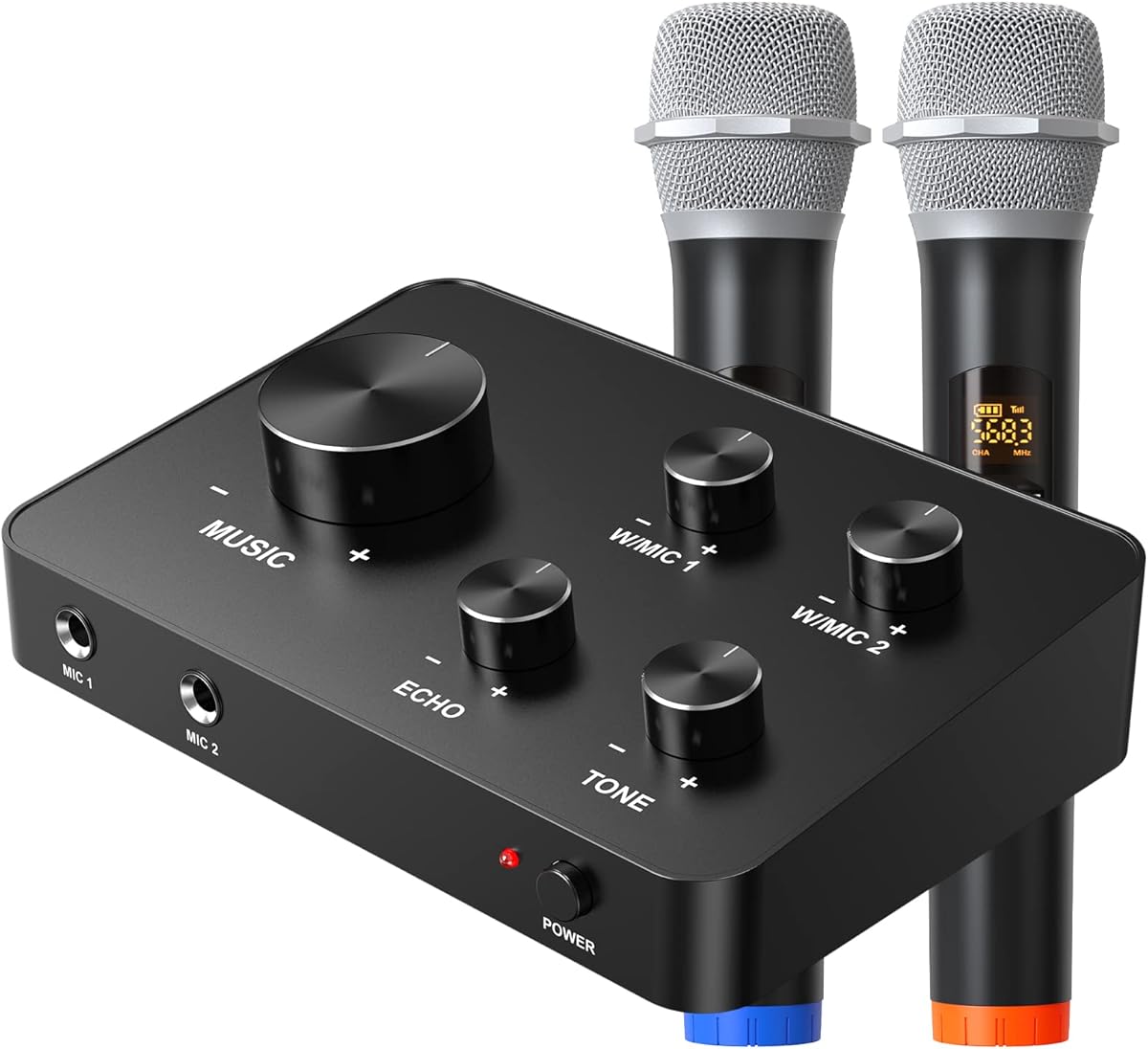
This mixer pairs well with laptops to create a complete setup. It allows wireless freedom with dual microphones for duets.
We may earn a commission when you buy through this link, at no additional cost to you.
Controls for echo and volume help tailor the sound. It connects to laptops via AUX or HDMI.
Batteries need regular charging. Range is decent for indoor use.
Great for party upgrades. It adds professional feel to home setups.
No cables allow performers to move around the room freely.
Adjustable dials let you fine tune audio output instantly.
We may earn a commission when you buy through this link, at no additional cost to you.
This mixer supports advanced audio inputs like Optical and HD ARC. It is designed for versatile home theater integration.
We may earn a commission when you buy through this link, at no additional cost to you.
Vocal cut mode simplifies practice. Bluetooth allows wireless streaming directly to it.
Setup requires some trial. It offers detailed control options.
Suitable for enthusiasts. It handles complex audio routing well.
Digital inputs ensure high fidelity sound transmission to speakers.
Connect various devices without needing adapters.
We may earn a commission when you buy through this link, at no additional cost to you.
This microphone operates independently of a laptop. It has built-in speakers and sound effects for fun.
We may earn a commission when you buy through this link, at no additional cost to you.
Lights add visual excitement. Battery life is good for sessions.
Best for quick fun. It lacks professional audio depth.
Ideal for kids or casual fun. It is simple to use.
Sing immediately without any setup or computer connections.
Transform your voice with different presets for variety.
We may earn a commission when you buy through this link, at no additional cost to you.
Selecting the right laptop requires considering screen size, processing power, and connectivity to ensure smooth performance.
For karaoke, a larger screen is essential for reading lyrics comfortably. Look for at least 15 inches with Full HD resolution to avoid pixelation.
A bigger screen helps group viewing. Higher resolution ensures text remains clear at any distance.
Karaoke software often runs alongside video streams. A modern processor like Intel Core 3 or AMD Ryzen 3 ensures no lag.
Strong CPUs prevent freezing during live playback. Multicore options handle background apps better.
Multitasking is common. 8GB RAM is the minimum; 16GB provides better headroom for browser tabs and apps.
More RAM means smoother switching between tracks. It reduces load times during events.
An SSD is crucial for fast boot times and app launches. Aim for at least 256GB to store your media library.
SSDs keep the system responsive. Larger capacity avoids needing external drives immediately.
Connectivity is key for external microphones and mixers. Ensure HDMI and USB ports are available.
Adequate ports reduce dongle use. Check for specific audio jacks if needed.
Long sessions require good battery life. Look for devices offering 8 hours or more of usage.
Extended battery ensures uninterrupted fun. It is vital for venues with limited outlets.
Quality speakers or audio jacks matter. Some laptops include enhanced audio tech for better sound.
Better output reduces external gear needs. High fidelity aids in tuning vocals.
If you host at different locations, weight matters. Lighter laptops under 4 lbs are easier to transport.
Portability aids in flexible setups. A compact design fits in standard bags.
Start by installing a reliable karaoke app and connecting your microphone to the laptop. Ensure volume levels are balanced between the device and external speakers.
Test the audio output before guests arrive. Use a dedicated song list to avoid searching mid-performance. Keep the screen clean to maintain visual clarity.
Regularly update drivers to prevent compatibility issues. Store the laptop in a cool, dry place when not in use to prolong its lifespan.
You need at least 8GB of RAM and a 256GB SSD. A modern CPU and Full HD display are also essential for smooth playback. These specs ensure no lag when loading songs.
Yes, most mixers connect via USB or AUX jacks. Ensure your laptop has the necessary ports. This setup enhances sound quality significantly.
A larger screen makes reading easier for everyone. 17 inches provides a better view than 13. However, resolution is also key to text clarity.
Wireless mics typically use an RF receiver connected to the laptop via USB or AUX. Check the mic system requirements. Most are plug-and-play compatible.
Yes, especially for outdoor events. Look for models with 8 hours or more. It avoids interruption when power sources are unavailable.
Tablets work for simple setups but lack ports for mixers. A laptop offers more versatility. They are better for complex audio-visual needs.
Close unnecessary background apps to free up resources. Use an internet connection if streaming tracks. Clearing cache helps maintain speed over time.
We found that the HP 17 inch Business Laptop offers the best balance of screen size and performance. The Dell Pro provides premium features for those needing faster refresh rates. Budget shoppers should look at the HP OmniBook 3 for value.
When choosing, prioritize a large display and sufficient RAM. Connectivity options are also critical for attaching external microphones and speakers to your setup.
Prices vary frequently due to market demand. Always verify current pricing on the retailer page before purchasing to ensure you secure the best deal available today.