
HUANUO Laptop Desk Mount
4.5Editor score
2-in-1 laptop and monitor
240 holes for airflow
Easy cable management
Creating a comfortable and efficient workspace is essential for productivity and health. A laptop tray desk mount allows you to elevate your device to eye level, reducing strain on your neck and back while freeing up valuable desk space for other essentials.
We have evaluated ten leading laptop tray desk mount models based on their adjustability, build quality, cooling features, and ease of installation. Our analysis focuses on how each option supports different desk types and laptop sizes to ensure a perfect fit for your specific needs.
Each selection in this list highlights unique strengths and potential limitations to help you make an informed decision. Please note that product availability and pricing can change frequently, so always verify current details before making your final purchase.
4.5Editor score

4.5Editor score
4.4Editor score
As an Amazon Associate we earn from qualifying purchases.
The following table provides a side-by-side comparison of all ten selected laptop tray desk mount models. Review the specifications to find the best match for your desk thickness, laptop size, and desired range of motion.
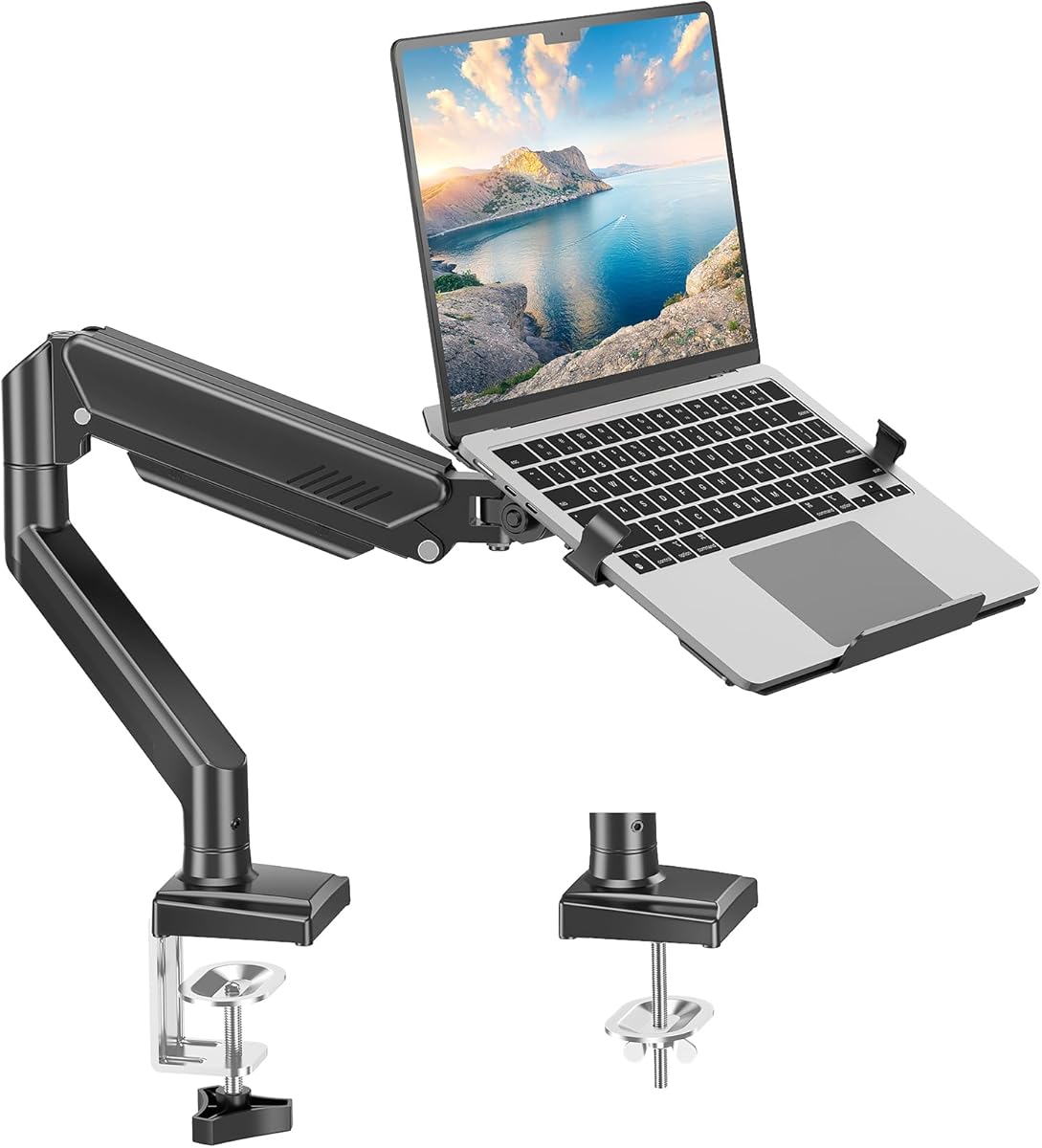


The WALI Adjustable Laptop Desk Mount stands out as a top contender in this category with a solid 4.5 star rating. It is designed to accommodate laptops up to 17 inches and supports a weight of up to 22 pounds, making it suitable for most standard and gaming notebooks.
We may earn a commission when you buy through this link, at no additional cost to you.
Its dual mounting options allow for a C-clamp or grommet installation, providing flexibility for various desk thicknesses. The arm offers extensive adjustment including height extension and rotation, ensuring you can find a comfortable viewing angle without straining your neck or shoulders.
While the build is sturdy, users with glass desks might need to ensure the clamp fits securely to avoid slipping. The assembly process involves multiple steps which could be slightly time-consuming for those looking for a quick setup.
This mount is ideal for professionals who need to optimize their workspace ergonomics while keeping their desk organized. Its ability to switch between laptop and monitor modes adds significant versatility to any home office or workstation setup.
Raising your laptop to eye level significantly reduces neck strain during long work sessions and promotes better posture throughout the day.
Lifting the device off the surface frees up room for keyboards and mice, creating a cleaner and more functional workspace environment.
We may earn a commission when you buy through this link, at no additional cost to you.
The MOUNT PRO Laptop Arm Mount offers excellent value for money with a rating of 4.4 stars. It features a versatile 2-in-1 design that works with both laptops and monitors, giving you flexibility to switch between devices as needed.
We may earn a commission when you buy through this link, at no additional cost to you.
Safety is a priority with this mount as it includes anti-slip pads and latches to keep your device secure. The ventilated tray helps maintain proper airflow which prevents overheating during extended use periods like gaming or video editing.
One limitation is that it is not compatible with curved monitors which may be a drawback for some users. Additionally the tray should not be rotated to a vertical position to ensure safety which limits some flexibility.
This model is perfect for students or home office workers who need a reliable and affordable solution. It provides all the essential ergonomic features without a high price tag making it accessible to a wide audience.
The ability to remove the tray for monitor use makes this a cost effective investment for those planning to upgrade their display later.
Built-in latches and anti-slip pads ensure your laptop stays in place even if you accidentally bump the desk or adjust the arm.
We may earn a commission when you buy through this link, at no additional cost to you.
The VIVO Single Laptop Notebook Desk Mount has earned a strong 4.6 star rating from users who appreciate its straightforward design. It supports laptops up to 17 inches and offers a drill-free mounting solution that simplifies the installation process.
We may earn a commission when you buy through this link, at no additional cost to you.
Its fully articulating arm allows for extensive movement including tilt and rotation which helps you find the perfect viewing angle. The integrated cable clips keep your workspace tidy by organizing power and AV cords neatly along the arm.
Some users may find the arm joints slightly stiff requiring firm adjustments to move them into place. The weight limit is standard for this class of mount so it might not support heavier custom gaming rigs.
This mount is an excellent choice for those seeking a reliable and easy to use ergonomic solution. It balances functionality and simplicity making it a great addition to any home office setup.
By elevating your laptop you reclaim valuable desk real estate that can be used for other accessories or simply to clear clutter.
Positioning the screen at eye level encourages a natural head position reducing the risk of back and neck pain over time.
We may earn a commission when you buy through this link, at no additional cost to you.
The HUANUO Adjustable Monitor Arm is designed to handle a wide range of monitors from 13 to 32 inches while also accommodating laptops. With a 4.5 star rating it is recognized for its versatility and ease of installation.
We may earn a commission when you buy through this link, at no additional cost to you.
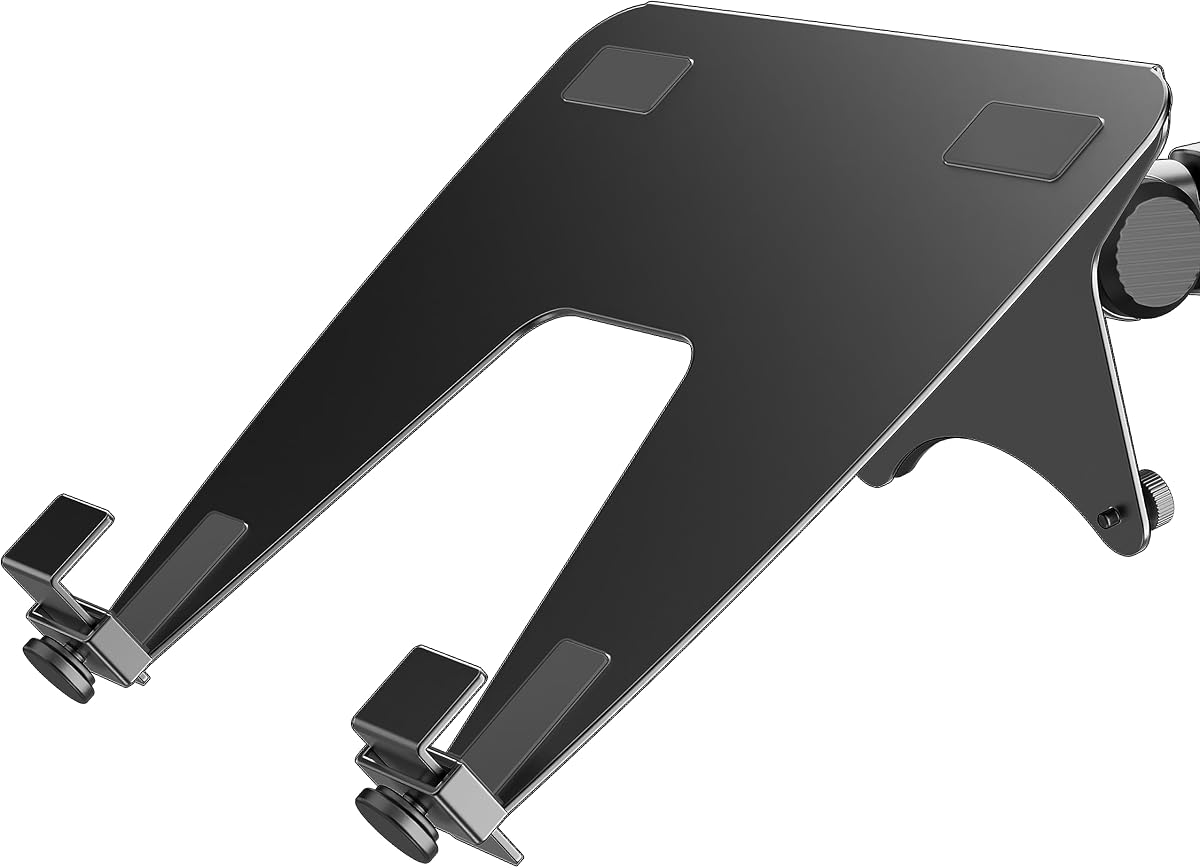
The ventilated tray features a protruding lip to prevent laptops from sliding off while allowing airflow to keep the device cool. Cable management features help keep your desk organized by routing wires along the arm structure efficiently.
Users should ensure they tighten screws securely when adjusting angles to maintain stability. The tray dimensions are specific so checking compatibility with your device size is recommended before purchase.
This arm is suitable for users who need a dual-purpose mount for both laptops and external displays. Its robust construction and flexible adjustments make it a practical choice for modern workspaces.
The ability to tilt and swivel the screen helps reduce glare and allows for comfortable viewing from different seating positions.
Integrated cable channels keep wires out of sight reducing visual clutter and preventing tangling during daily use.
We may earn a commission when you buy through this link, at no additional cost to you.
The HUANUO Laptop Desk Mount is highlighted for its innovative cooling design featuring 240 ventilation holes to prevent overheating. With a 4.5 star rating it is a favorite for users who want to protect their device performance.
We may earn a commission when you buy through this link, at no additional cost to you.
The mount supports laptops up to 17 inches and monitors up to 32 inches allowing for easy transition between devices. The ergonomic design aims to reduce neck strain by bringing the screen closer to eye level effectively.
Some users have noted that the instructions could be clearer which might lead to a frustrating initial setup. The tray is not designed for curved screens so this should be considered if you own one.
This product is ideal for gamers or professionals who run high-performance applications that generate heat. The robust build and cooling features ensure your laptop stays safe and secure during long sessions.
The ventilated tray allows air to flow freely under the device preventing hot spots and maintaining consistent performance.
A tidy and ergonomic setup helps you focus better by reducing distractions and physical discomfort during work hours.
We may earn a commission when you buy through this link, at no additional cost to you.
This HUANUO model stands out by supporting monitors up to 34 inches which is wider than many competitors. It has a 4.4 star rating and offers a full range of motion to adjust your screen to any angle.
We may earn a commission when you buy through this link, at no additional cost to you.
The quick setup is facilitated by a pre-assembled VESA plate saving time and effort. Secure velcro straps help keep the laptop and tray together preventing unwanted movement while you type or game.
The price is slightly higher than budget options but the extra capacity justifies the cost for many. The tray size is fixed so ensure your laptop fits well before ordering.
Ideal for users with large displays or those who switch between laptop and monitor frequently this mount provides stability and flexibility. Its thoughtful design features contribute to a comfortable and efficient workspace.
Supporting monitors up to 34 inches gives you the freedom to use larger screens for detailed work or entertainment.
The combination of a solid clamp and velcro straps ensures your device remains steady even with active use.
We may earn a commission when you buy through this link, at no additional cost to you.
The VIVO Black Clamp-on Tray offers a unique under desk mounting solution that saves significant desk space. It has a 4.3 star rating and features a rotating clamp that allows you to pivot the tray as needed.
We may earn a commission when you buy through this link, at no additional cost to you.
When not in use you can rotate the tray under the desk for discreet storage which is perfect for shared workspaces. The clamp holds tightly without damaging the desk surface making installation safe and easy.
A downside is the need for 31 inches of clearance to allow for rotation which might not fit all desk setups. The tray size is smaller than standard options so it may not fit larger laptops comfortably.
This tray is ideal for individuals with limited desk space who still want an ergonomic typing angle. Its innovative design provides a practical solution for organizing work areas efficiently.
Mounting the tray under the desk maximizes surface area for other tasks making it a smart choice for compact environments.
The ability to rotate the tray allows you to position your laptop exactly where you need it for optimal comfort.
We may earn a commission when you buy through this link, at no additional cost to you.
The monTEK 2-in-1 Desk Mount is praised for its durable steel and aluminum construction. With a 4.6 star rating it is known for supporting a wide range of laptops and monitors securely.
We may earn a commission when you buy through this link, at no additional cost to you.
The hollow metal tray is designed for heat dissipation and stability while scratch-free clamps protect your device. It offers full motion adjustment allowing for tilt and rotation to suit different viewing preferences.
Assembly can be complex and may require careful attention to instructions to ensure proper installation. The price is higher than basic models but the quality and durability make it a worthwhile investment.
This mount is best for users with heavier laptops or those looking for a premium build quality. Its robust design ensures long-term reliability for daily work and gaming sessions.
The use of steel and aluminum ensures the mount remains stable and sturdy even with heavy devices.
Scratch-free clamps and padding protect your laptop from damage during mounting and adjusting.
We may earn a commission when you buy through this link, at no additional cost to you.
The Suptek Single Laptop Notebook Desk Mount is designed for ease of use with installation completed in about 10 minutes. It has a 4.4 star rating and supports monitors from 13 to 27 inches effectively.
We may earn a commission when you buy through this link, at no additional cost to you.
It features a detachable laptop tray with venting holes to prevent overheating. The included cable management keeps wires organized ensuring a clean and functional workspace environment.
The weight limit is lower than some competitors which might restrict use with very heavy devices. The tray is specific to this model so flexibility is limited compared to 2-in-1 options.
This mount is a great choice for those who value time and simplicity in setup. It provides essential ergonomic benefits without complicating your daily routine.
The ability to install the mount quickly means you can start enjoying ergonomic benefits almost immediately.
Proper cable management reduces clutter and makes your desk look more professional and tidy.
We may earn a commission when you buy through this link, at no additional cost to you.
The ergounion Laptop Tray is a premium attachment for VESA mounts that supports laptops up to 28.6 pounds. With a 4.4 star rating it is designed to hold heavy gaming laptops securely.
We may earn a commission when you buy through this link, at no additional cost to you.
Its unique design ensures all side ports remain accessible without obstruction which is rare among laptop trays. The hollow design helps dissipate heat and the industrial-grade alloy steel ensures long-term durability.
This is not a full mount but an accessory to add to an existing arm which limits standalone use. The fixed angle might not suit everyone if you need constant repositioning.
Ideal for users with existing monitor arms who need a robust solution for heavy laptops this tray adds significant value. It prioritizes stability and access making it a top choice for power users.
Supporting up to 28.6 pounds means even the heaviest gaming laptops can be mounted securely and safely.
The design ensures USB and HDMI ports remain reachable so you never have to unplug cables to adjust the tray.
We may earn a commission when you buy through this link, at no additional cost to you.
Selecting the right laptop tray desk mount requires considering several factors to ensure compatibility and comfort. This guide breaks down the key features to look for when making your purchase.
Check the maximum weight and size limits of the mount to ensure it can support your specific laptop model. Heavy gaming laptops may require a sturdier mount with higher weight capacity than standard ultrabooks.
Always verify the dimensions provided by the manufacturer against your device to avoid fit issues after purchase.
Most mounts offer C-clamp or grommet options for attaching to your desk. Ensure the clamp fits your desk thickness to guarantee a secure hold without damage.
Grommet mounting requires a hole in the desk so verify your desk type before choosing this option.
Look for mounts that offer tilt swivel and rotation to find your ideal viewing angle. Full articulation allows you to adjust the screen based on your lighting and seating position.
A wide range of motion is essential for reducing strain during long working hours and varying tasks.
Integrated cable clips or channels help keep your workspace organized and prevent tripping over cords. A clutter-free desk contributes to a more professional and efficient environment.
Choose a model that includes these features to simplify your setup and daily use.
Sturdy materials like aluminum or steel ensure the mount remains stable over time without sagging. A solid build is crucial for safety especially when supporting heavier devices.
Investing in a durable model can save you money in the long run by avoiding frequent replacements.
Ventilated trays allow air to circulate around the laptop preventing overheating during intensive tasks. This is particularly important for gaming or video editing where heat generation is high.
Ensure the tray design promotes airflow to maintain optimal device performance.
Models with pre-assembled parts and clear instructions save time and frustration during setup. Look for tools included in the package to simplify the process.
A straightforward installation ensures you can start using the mount immediately without professional help.
Consider whether you need a 2-in-1 mount that supports both laptops and monitors. This flexibility can be useful if you switch between devices regularly.
A versatile mount allows you to adapt your workspace to changing needs without buying additional equipment.
When setting up your mount ensure the clamp is tightened securely to the desk edge. Use a rubber mat if needed to prevent slipping and protect your desk finish from scratches.
Regularly check all joints and screws to ensure they remain tight. Over time vibration can loosen parts so a monthly inspection will maintain safety and stability.
Clean the tray and arm with a dry cloth to remove dust and debris. Avoid using harsh chemicals that might damage the finish or coating on the metal surfaces.
Most mounts are designed for wooden desks but some are not suitable for glass or metal surfaces. Always check the manufacturer specifications regarding desk material and thickness to ensure compatibility.
Yes but you must choose a model with a high weight capacity. Look for mounts that support at least 22 pounds to handle the weight of gaming laptops securely.
Some designs have clamps that may block ports but others are designed to avoid this issue. Check the specific product details to ensure your necessary ports remain accessible.
Use a soft brush or compressed air to remove dust from the holes. Wipe the surface with a dry cloth to maintain hygiene and airflow efficiency.
Some mounts are not compatible with curved screens due to VESA limitations. Verify the product notes on curved monitor support before purchasing to avoid compatibility issues.
Ensure the hole in your desk matches the required diameter for the mount base. Follow the manual steps carefully to secure the mount tightly for stability.
Many manufacturers offer warranties for defects or damage but terms vary. Check the seller details for specific warranty coverage and support options.
Clamps are easier to install on most desks while grommet mounts provide a cleaner look if your desk has a hole. Choose based on your desk setup and preference.
The top picks in this guide offer a range of features to suit different needs and budgets. Whether you prioritize cooling capacity or adjustability there is a model that will enhance your workspace.
Prioritize ergonomic features and build quality to ensure a long-lasting and comfortable setup. Investing in a good mount can significantly improve your posture and daily comfort.
Remember to check current pricing and availability as they may change frequently. Select the option that best fits your specific requirements for an optimal experience.