
ASRock Motherboard Micro ATX DDR3 1066 NA D1800M
4.0Editor score
Affordable dual core option
Multiple USB connectivity ports
Compact micro ATX design
This guide compares the best low power motherboard options for NAS, home servers, and efficient builds based on performance and connectivity.
Low power motherboards are essential for building energy-efficient systems that run 24/7 without draining your electricity bill. They offer reliable performance for home servers, network attached storage, and light computing tasks while keeping heat and noise levels minimal.
We evaluated ten top models based on processor efficiency, connectivity options, storage capacity, and overall build quality. Each product was analyzed for its suitability in different use cases ranging from basic office PCs to robust industrial NAS appliances.
Each pick highlights specific strengths like multi-GbE networking or compact form factors to help you match the right board to your project. Prices and availability change frequently so verify current details before finalizing your purchase decision.
4.0Editor score

4.5Editor score

4.4Editor score
The following table provides a side-by-side comparison of all ten models selected for their efficiency and feature sets. Review each specification carefully to determine which board aligns best with your specific power and performance requirements for your next build.



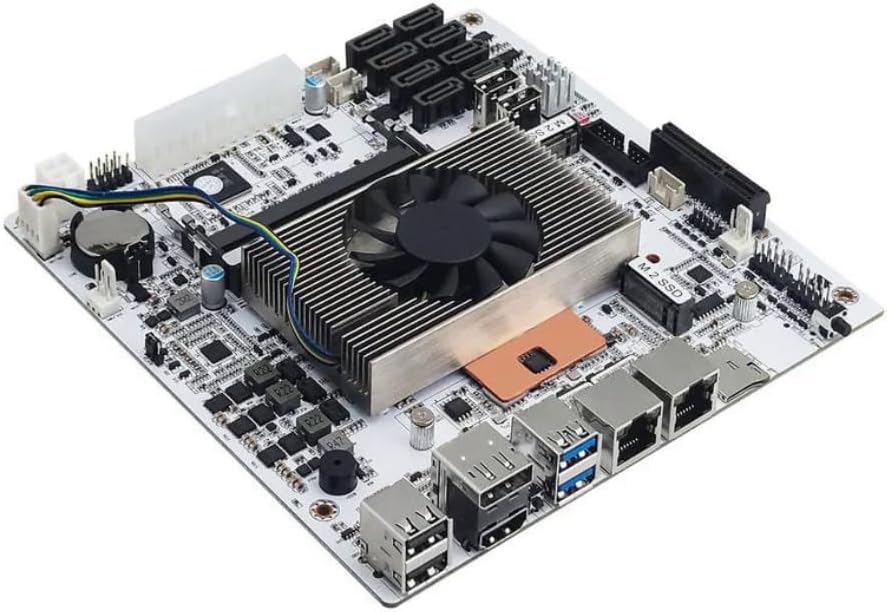
This industrial NAS motherboard combines a Celeron N5105 processor with robust networking features making it an exceptional choice for low power systems. With a 4.5 rating it stands out as the top pick for home servers and network security appliances.
We may earn a commission when you buy through this link, at no additional cost to you.
The standout feature is the inclusion of four i226 2.5GbE network ports which provide secure and fast connections ideal for professional firewall or multimedia use. Its Mini-ITX size ensures it fits compact cases while the high-density fiber circuit board enhances durability in varying environments.
While it offers impressive performance and connectivity the boot up process may take a few minutes to read memory information which requires user patience. Additionally the system requires both 24PIN and 4PIN power connections which adds a layer of complexity for first time builders.
Buyers seeking a powerful yet energy efficient solution for 24/7 operation will find this board ideal for NAS or firewall deployments. Its combination of network speed storage options and display support makes it the best overall option for demanding low power tasks.
Four 2.5GbE ports allow for advanced network setups including link aggregation and VLAN separation for professional reliability.
The Mini-ITX form factor and moisture proof circuitry ensure it operates reliably in tight spaces or industrial conditions.
We may earn a commission when you buy through this link, at no additional cost to you.
The ASRock D1800M offers an incredibly budget friendly entry into low power computing with a 4.0 rating reflecting its solid basic functionality. It is perfect for users who need a no fuss system for light tasks without breaking the bank.
We may earn a commission when you buy through this link, at no additional cost to you.
Key strengths include its included Intel J1800 processor which provides adequate dual core performance for basic web browsing and document editing. The board features a mix of USB 2.0 and USB 3.0 ports along with multiple video outputs ensuring compatibility with older peripherals.
However the use of DDR3 memory limits future upgrade paths as it is not compatible with newer RAM standards. Furthermore the limited expansion slots and older connectivity options may not suit more demanding or modern system requirements.
Ideal for budget conscious buyers needing a simple office or media server this board delivers reliable performance at a minimal cost. Check compatibility with your case and existing components before purchasing to ensure a smooth setup process.
Provides essential computing features at a price point that makes low power builds accessible to anyone.
Supports older DDR3 RAM and video interfaces which helps utilize existing parts for cost savings.
We may earn a commission when you buy through this link, at no additional cost to you.
This GIGABYTE model brings premium features like PCIe 4.0 and Ryzen 5000 support to the low power category earning a strong 4.4 rating. It balances power efficiency with modern performance making it suitable for compact yet capable builds.
We may earn a commission when you buy through this link, at no additional cost to you.
The enhanced power solution with a digital 3+3 VRM design ensures steady power delivery for compatible processors which improves stability. Advanced thermal armor with chipset heatsinks helps dissipate heat effectively allowing the system to run quietly even under load.
While it is an excellent board it is better suited for users who need higher performance rather than absolute minimum wattage consumption. Compatibility is limited to AMD AM4 sockets meaning Intel users must look elsewhere for their low power motherboard needs.
Those building a modern home server or workstation that values speed and expandability will appreciate this board's robust feature set. Its combination of connectivity and cooling makes it the top premium choice for flexible small form factor projects.
PCIe 4.0 support allows for faster NVMe drives and graphics cards when paired with compatible CPUs.
The 3+3 power phase design provides clean power which helps maintain system stability without excessive heat.
We may earn a commission when you buy through this link, at no additional cost to you.
The MSI PRO B550M-P is designed for users wanting high performance from an AM4 platform with a 4.4 rating. It includes Core Boost technology to improve stability and offers AI cooling to manage fan settings based on system temperatures.
We may earn a commission when you buy through this link, at no additional cost to you.
Standout features include DDR4 memory boosting to support speeds up to 4400+ MT/s and a PCIe 4.0 x16 slot for modern graphics cards. The Frozr AI cooling system automatically adjusts fans which helps maintain optimal performance during intensive tasks without manual intervention.
On the downside passive cooling on the chipset may not be sufficient in hot environments without additional case airflow. The rear connectivity is somewhat limited compared to other boards which might restrict peripheral options for specific configurations.
Buyers looking for a reliable and powerful option for compact builds will find this board meets high standards for speed and stability. Verify your case supports micro ATX before purchase to ensure proper installation and airflow for the system.
Automatically adjusts system fan settings to balance noise and cooling based on real time CPU and GPU temperatures.
DDR4 Boost allows for higher memory speeds which can improve overall system responsiveness and application performance.
We may earn a commission when you buy through this link, at no additional cost to you.
This ASRock board includes the J4125 quad core processor making it a self contained solution for efficient computing with a 3.4 rating. It supports DDR4 memory and features a dedicated slot for wireless connectivity making it versatile for small projects.
We may earn a commission when you buy through this link, at no additional cost to you.
Strengths include the integrated quad core CPU which provides more processing power than dual core alternatives for tasks like transcoding. The use of Super Alloy components suggests enhanced durability and quality compared to standard motherboard parts in its price range.
However the reliance on older PCIe 2.0 standards limits bandwidth for high speed expansion cards. The rating is lower than many competitors which may indicate potential issues with long term reliability or feature set limitations.
Users needing a simple plug and play solution for light server tasks may find this board useful for its included processor. Always check user reviews for reliability insights before committing to this model for critical applications.
Having the CPU included simplifies the build process as you do not need to source a separate processor.
The M.2 Key E slot specifically supports wireless cards to add WiFi without taking up external ports.
We may earn a commission when you buy through this link, at no additional cost to you.
The ASRock B550M-HDV offers comprehensive AMD AM4 platform support with a 4.5 rating indicating strong user satisfaction. It includes legacy display outputs and high speed memory support making it versatile for various system configurations.
We may earn a commission when you buy through this link, at no additional cost to you.
Key strengths include the three video outputs which ensure maximum monitor compatibility for office or home systems. The 6x USB 3.2 Gen1 ports provide ample connectivity for peripherals while Full Spike Protection guards ports against electrical surges effectively.
One limitation is that the micro-ATX form factor may not fit in all compact cases so verifying chassis specifications is crucial. Additionally the 4733+ memory support requires careful testing to ensure stability with specific RAM kits.
This board is an excellent choice for builders needing a flexible budget friendly option with strong modern features. Prioritize checking your case dimensions and RAM compatibility to avoid installation issues when setting up your system.
Multiple USB ports ensure you can connect all your devices without needing extra hubs or adapters.
Full Spike Protection on USB Audio and LAN ports helps prevent hardware damage from electrical surges.
We may earn a commission when you buy through this link, at no additional cost to you.
The Gigabyte A520I AC delivers a compact Mini ITX solution with integrated WiFi and Bluetooth earning a 4.4 rating. Its digital PWM design and optimized heatsink make it suitable for small form factor builds requiring robust cooling.
We may earn a commission when you buy through this link, at no additional cost to you.
Standout features include Direct 6 Phases Digital PWM with 55A DrMOS for stable power delivery and three display interfaces for multi monitor setups. The inclusion of Intel WiFi and Bluetooth removes the need for additional expansion cards simplifying the build process.
However Mini ITX boards can be more difficult to install due to tighter clearances and limited expansion options. Also the PCIe 3.0 x4 M.2 slot may limit high end storage compared to Gen4 options found on other boards.
This board is ideal for users seeking a powerful mini PC with reliable wireless connectivity and modern AM4 support. Ensure you have a compatible case with good airflow to maximize the performance of this compact solution.
Built in WiFi and Bluetooth eliminate the need for extra cards making the system cleaner and simpler to build.
Direct 6 phase digital PWM with 55A DrMOS ensures the CPU receives stable power for better overclocking.
We may earn a commission when you buy through this link, at no additional cost to you.
This ASRock model stands out with a perfect 5.0 rating reflecting exceptional user satisfaction and performance reliability. It supports Ryzen 3000 to 5000 series processors with robust 8 phase power delivery for stable operation.
We may earn a commission when you buy through this link, at no additional cost to you.
Highlights include Wi-Fi 6E support which provides low latency connectivity ideal for gaming or streaming. The board also features Hyper M.2 Gen4 for ultra-fast storage and a premium Realtek audio codec for immersive sound quality.
While the price may be higher than basic options the feature set justifies the investment for users needing top tier connectivity and audio. The Micro-ATX form factor fits most standard cases but verifying chassis support is always recommended.
Buyers seeking a high quality build with extensive connectivity options will find this board meets all critical needs. Check your case dimensions and verify CPU compatibility before purchasing to ensure a smooth experience with this model.
The 6GHz band support enables faster speeds and lower latency for wireless gaming and media streaming.
Realtek ALC1220 codec with Nahimic delivers high fidelity sound suitable for gaming and entertainment.
We may earn a commission when you buy through this link, at no additional cost to you.
This board includes an 8th generation U series quad core 8-thread processor making it powerful for virtualization and NAS tasks with a 4.1 rating. Its low 15W TDP ensures energy efficiency while the industrial Mini-ITX design supports robust operation.
We may earn a commission when you buy through this link, at no additional cost to you.
Key strengths include 8 SATA ports for massive storage expansion and dual 2.5GbE network ports for high speed data transfer. The board also supports virtualization with VT-x and VT-d which is essential for running multiple virtual machines smoothly.
Users should note a known sleep mode bug that may require workarounds and the first boot can take several minutes to read memory. These issues are acceptable trade-offs given the powerful CPU and extensive connectivity options available.
Ideal for home servers and firewall appliances this board balances performance with low power needs effectively. Ensure you have sufficient airflow for the included fan cooler to maintain stable operation during continuous use.
VT-x and VT-d support enable smooth operation of multiple VMs which is crucial for advanced home lab setups.
With 8 SATA ports and dual M.2 slots you can connect plenty of drives for comprehensive storage solutions.
We may earn a commission when you buy through this link, at no additional cost to you.
The M11 motherboard features a Core i5 8265U processor and 8 SATA ports providing massive storage capacity for NAS builds. While it has an N/A rating its specification list highlights high value for power efficient storage solutions.
We may earn a commission when you buy through this link, at no additional cost to you.
It supports virtualization passthrough allowing NIC and storage devices to be directly accessible to VMs which enhances performance. The inclusion of a Clear CMOS button and included I/O shield adds convenience and reliability for users building custom systems.
However the lack of sleep mode support limits energy saving features during idle times and the rating is unavailable for verification. The base 1.6GHz CPU may feel limited compared to newer options for intensive tasks despite its low TDP.
This board is a strong candidate for specialized NAS builds needing high drive counts and stable virtualization support. Verify current availability and read community feedback before purchasing due to the N/A rating status.
Eight SATA ports allow for building large storage pools essential for media servers or backup appliances.
The Clear CMOS button and included shield make initial setup and hardware protection easier for custom builds.
We may earn a commission when you buy through this link, at no additional cost to you.
Selecting the right low power motherboard requires evaluating several key factors that impact efficiency performance and compatibility. This section breaks down the most important specifications to consider before making your final decision for your specific project.
The thermal design power or TDP of the CPU is a primary factor for low power boards. Look for models with TDPs of 15W or less if you prioritize minimal heat and electricity consumption. Processors like the Intel N5105 or Core i5 8265U offer a balance of performance and efficiency for most tasks.
Always check the specific TDP ratings to ensure the system fits your power and cooling requirements.
Low power boards often come in compact form factors like Mini ITX or Micro ATX. It is critical to verify that your chosen case supports the board dimensions. Some industrial boards have specific mounting requirements that may limit case options for standard builds.
Measure your case internal space carefully before selecting a board to avoid physical fit issues.
For NAS or storage focused builds the number of SATA and M.2 slots matters significantly. Some boards offer up to 8 SATA ports while others may only have two. Ensure the board supports your required drive count and has enough M.2 slots for fast NVMe cache or system drives.
Prioritize native SATA ports over chip extended ones for better reliability and performance.
Many low power motherboards include multiple Ethernet ports which is vital for network appliances. Look for boards with 2.5GbE or Gigabit LAN controllers that support link aggregation. Industrial boards often feature Intel i226 controllers for better stability in firewall or server tasks.
Confirm the network speed and port count match your intended use case.
Modern low power boards typically use DDR4 memory while older budget models may still use DDR3. Check the maximum supported capacity and speed to ensure future compatibility. Some industrial boards require SO-DIMM memory which is different from standard DIMMs used in desktop PCs.
Always verify the RAM type and speed limits before purchasing memory modules.
Adequate video outputs are necessary if you plan to attach monitors directly to the board. Look for HDMI and DisplayPort support that can handle 4K resolution if needed. USB port counts and types also vary widely so ensure there are enough for your peripherals.
Check that the video ports match your monitor resolution requirements.
Some industrial boards require both a standard 24PIN ATX connector and an additional 4PIN CPU power connector. This can add complexity to power management and cable routing. Ensure your power supply unit has the necessary cables to support the board.
Always confirm the power connector types before buying your power supply.
For advanced users running VMs features like Intel VT-x and VT-d are essential for hardware virtualization. These allow for more efficient operation of virtual machines and direct device passthrough. Check the specs to see if these features are supported by the chipset.
Verify virtualization features if you plan to use Proxmox or similar systems.
When installing your low power motherboard ensure you handle it by the edges and use an anti static wrist strap to prevent electrical damage. Align the standoff screws correctly in the case before lowering the board to avoid short circuits.
After installation connect the power supply securely paying attention to all required connectors like the 4PIN CPU power. Verify that your cooling fan is properly attached to prevent overheating during initial boot up and heavy use.
Regular maintenance includes checking for dust accumulation in the vents and ensuring the case fans are functioning. Keep the system in a well ventilated area to maintain stable temperatures and prolong the life of the components.
A low power motherboard is primarily used for building energy efficient systems like home servers NAS devices or small office PCs. They minimize electricity costs and heat output while providing sufficient performance for continuous operation.
Yes many modern low power motherboards support recent processors including Ryzen 5000 series or Intel Celeron N5105. Always verify the specific CPU support list for the board you choose to ensure compatibility before buying.
These boards are ideal for home servers because they are designed to run 24/7 with minimal power consumption. Features like multiple network ports and storage options make them perfect for media streaming and file storage applications.
Mini ITX is generally the best form factor for compact builds due to its small size. Many low power boards use this format to fit into tiny cases while still supporting essential features like WiFi and multiple drives.
While not designed for high end gaming some boards with Ryzen support can run lighter games efficiently. For serious gaming you may need higher power components but these boards work well for basic or retro gaming setups.
Most modern low power boards use DDR4 memory while some older models may use DDR3 or SO-DIMM laptop RAM. Check the specifications carefully to buy the correct memory type and capacity for your system.
Many come with passive cooling or small fans since they generate little heat but adequate case airflow is still important. Ensure your case has vents or fans to keep internal temperatures stable during extended operation.
The main pros include low electricity bills quiet operation and reliable 24/7 performance for servers. They also often include unique features like multiple network ports that standard consumer boards lack for specific applications.
We have covered the top options from industrial NAS boards to budget friendly micro ATX models. Whether you need massive storage or compact connectivity there is a pick in this list for every project.
Prioritize TDP and connectivity based on your specific needs to ensure the system meets your performance goals efficiently. Always double check compatibility with your case power supply and other components before finalizing your choice.
Remember that product availability and prices can fluctuate so verify the latest details on Amazon before buying. These boards offer great value for energy conscious builders and should serve your projects well for years.