
G650-04686-01 Coral M.2 Accelerator B+M Key
5.0Editor score
4 TOPS Peak Performance
Debian Linux Compatible
Supports TensorFlow Lite
This guide compares the top M2 Accelerator Cards for AI inference and edge computing to help you choose the right hardware for your specific project needs
M2 Accelerator Cards are essential for deploying machine learning models efficiently on edge devices. These compact modules provide dedicated processing power for tasks like image recognition and natural language processing without relying on cloud services.
We evaluated ten leading M2 Accelerator Cards based on performance metrics, software compatibility, and ease of integration. Our analysis focuses on real-world inference speeds, power efficiency, and support for popular frameworks like TensorFlow and PyTorch.
Each pick highlights specific strengths for different use cases from hobbyist projects to industrial deployments. Keep in mind that product availability and pricing can change frequently so always verify details before making your final purchase decision.
5.0Editor score

4.6Editor score

4.3Editor score
The following table provides a side-by-side comparison of all ten M2 Accelerator Cards reviewed in this guide. Each entry lists key specifications to help you quickly identify the most suitable option for your specific computing requirements and budget constraints.


The waveshare Hailo-8 M.2 AI Accelerator Module stands out as a top contender in the M2 Accelerator Card market. With a rating of 4.6 stars from verified buyers, it delivers exceptional performance for edge AI workloads. Its standout quality lies in the powerful Hailo-8 processor that enables real-time inference with minimal latency.
We may earn a commission when you buy through this link, at no additional cost to you.
Powered by 26 Tera-Operations Per Second, this module handles complex models efficiently. It supports major frameworks like TensorFlow, PyTorch, and ONNX making integration straightforward for developers. The low power consumption of just 2.5W ensures it runs cool even during intensive tasks.
While the price is higher than entry-level options, the performance gains justify the investment for professional use. Some users may find initial driver setup slightly technical but the rich wiki resources help streamline the process. These trade-offs are acceptable given the reliability and speed offered.
This card is ideal for developers building smart cameras or industrial IoT systems. We recommend it for projects requiring high throughput and low power draw. If you need a robust solution for serious AI tasks this module is the top pick.
The Hailo-8 processor provides 26 TOPS enabling complex neural networks to run smoothly on edge devices.
Compatibility with TensorFlow PyTorch ONNX and Keras ensures you can deploy models without extensive retraining.
We may earn a commission when you buy through this link, at no additional cost to you.
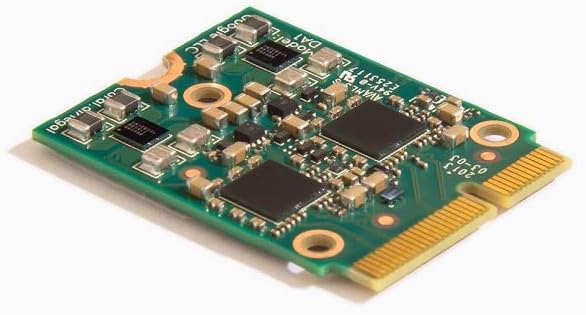
The G650-04686-01 Coral M.2 Accelerator B+M Key offers an impressive balance of performance and affordability. It holds a perfect 5.0 rating from users who praise its simplicity and effectiveness. This card is designed to bring edge AI to Debian-based Linux systems with minimal friction.
We may earn a commission when you buy through this link, at no additional cost to you.
Its onboard Edge TPU coprocessor delivers 4 TOPS of performance using only 0.5 watts per TOPS. This efficiency allows it to run models like MobileNet v2 at high frame rates without overheating. The support for TensorFlow Lite means you can compile existing models quickly without rebuilding from scratch.
The main trade-off is the lower performance ceiling compared to premium options. However for many hobbyist and light commercial projects this power is sufficient. The restriction to TensorFlow Lite might limit advanced users but it simplifies deployment for most.
We recommend this card for those starting with edge AI or needing a reliable cheap accelerator. It fits well into Raspberry Pi projects or small Linux boxes. For budget-conscious buyers seeking quality this Coral module is an excellent choice.
Seamlessly integrates with any Debian-based Linux system making setup easy for developers familiar with Ubuntu or Raspbian.
With 2 TOPS per watt it consumes minimal power ensuring stable operation in thermally constrained enclosures.
We may earn a commission when you buy through this link, at no additional cost to you.
The MX3 M.2 AI Accelerator is engineered for demanding AI computer vision workloads. With a 4.3 star rating it delivers exceptional performance and efficiency for professional applications. The card targets users needing more power than basic edge modules can provide.
We may earn a commission when you buy through this link, at no additional cost to you.
Its flexible integration allows easy deployment into existing systems via the M.2 M-key form factor. The comprehensive software development kit simplifies development and deployment significantly. It works well with Raspberry Pi 5 when used with the appropriate M-key 2280 HAT extension.
While the hardware compatibility is broad users should ensure their system meets the PCI-SIG M.2 M-key 2280 Specification. The higher price reflects the advanced capabilities and SDK support. This cost is justified for projects where speed and reliability are critical.
This card is best suited for industrial vision systems or advanced prototyping. We recommend it for developers who need a powerful Linux-native solution. If you require premium performance and support the MX3 is a top-tier option.
The included SDK provides robust tools for developers to build and deploy complex AI applications efficiently.
Designed for easy integration into existing systems via the M.2 M-key form factor and Linux support.
We may earn a commission when you buy through this link, at no additional cost to you.
The M.2 Accelerator with Dual Edge TPU combines two Google Edge TPU ML accelerators on one card. This configuration offers a total peak performance of 8 TOPS at int8 precision. With a 4.1 star rating it appeals to those needing more power than a single TPU can deliver.
We may earn a commission when you buy through this link, at no additional cost to you.
Each TPU provides 2 TOPS per watt ensuring high efficiency even when running two processors simultaneously. The card uses a standard M.2 2230 E-key slot which fits many embedded boards. It is ideal for projects requiring simultaneous multi-model inference.
Users should note it relies on a PCIe Gen2 x1 interface per TPU which may limit bandwidth in high throughput scenarios. However for many edge AI tasks this throughput is sufficient. The dual core design provides a balanced step up in capability.
We recommend this for developers needing more horsepower without moving to PCIe cards. It works well for video analytics or multi-camera setups. If you need a cost-effective dual accelerator this card is a strong candidate.
Running two Edge TPUs on one card doubles the peak performance for parallel model processing.
The 2 TOPS per watt rating ensures low power consumption even when both processors are active.
We may earn a commission when you buy through this link, at no additional cost to you.
The QNAP QM2-2P10G1TB expansion card enhances performance with dual M.2 NVMe slots and a 10GbE port. Rated 4.4 stars it serves users needing fast storage and network integration for data-intensive tasks. While storage focused it supports caching that can benefit AI pipelines.
We may earn a commission when you buy through this link, at no additional cost to you.
Equipped with Marvell's AQtion controller it ensures reliable high-speed data transfers. It supports QNAP QTS QuTS hero Windows and Linux operating systems for versatility. The 10GbE port allows direct connection to high-speed network devices for rapid data access.
The main limitation is that this card is primarily designed for storage rather than AI acceleration. Users seeking pure M2 Accelerator Cards for inference might find better specialized options elsewhere. However for NAS setups needing AI caching it is uniquely useful.
We recommend this for system administrators managing large data sets. It provides a robust way to add speed to your storage infrastructure. If you need networking and storage expansion this card delivers high value.
The 10GbE port allows connecting to high speed networking devices for rapid data retrieval.
Two M.2 2280 NVMe SSD slots allow connecting high-speed drives for caching or storage.
We may earn a commission when you buy through this link, at no additional cost to you.
The Rocket 1604L PCIe Gen5 x16 card brings cutting-edge interface speeds to M.2 devices. While it lacks a user rating yet the hardware specs suggest high potential. It offers four M.2 ports each with dedicated x4 lanes for maximum bandwidth.
We may earn a commission when you buy through this link, at no additional cost to you.
Built on PCIe 5.0 technology this card supports the fastest NVMe drives currently available. It works with x86 Intel and AMD platforms as well as ARM systems. The native support for mainstream operating systems simplifies integration into existing workstations.
Users should note there is no active cooling included on the card itself. High-performance NVMe drives may require additional airflow to prevent throttling during intensive use. This is a consideration for compact or silent setups.
We recommend this for high-performance workstations needing massive storage throughput. It is future-proof and ready for next-generation drives. If you need four slots with maximum speed this card is a top choice.
Natively supported by Mainstream Operating systems and delivers up to 512 Gbps bandwidth for smooth data transfers.
Supports M.2 devices in 2242 2260 and 2280 form factors for broad compatibility.
We may earn a commission when you buy through this link, at no additional cost to you.
The Dual Edge TPU PCIe Adapter transforms a standard workstation into a dual-TPU AI machine. It is designed specifically for Coral M.2 Accelerator Cards to maximize inference performance. With no user rating yet the specs promise robust functionality for edge computing.
We may earn a commission when you buy through this link, at no additional cost to you.
This adapter uses a PCIe Gen3 x4 to 4X Gen2 x1 lane splitter to feed two TPUs. A built-in heatsink ensures both cards stay cool during continuous operation. It allows developers to scale up their AI power without buying a new system.
Users should note this adapter only works with Coral M.2 Accelerator modules not other brands. It requires a PCIe Gen3 slot on the host board which may not exist on older PCs. These constraints are acceptable given the cost savings.
We recommend this for builders needing more AI power on a budget. It is perfect for multi-camera detection systems. If you want to scale using existing hardware this adapter is ideal.
Maximize your existing hardware investment instead of buying a whole new system.
Get dual TPU performance without requiring multiple PCIe slots.
We may earn a commission when you buy through this link, at no additional cost to you.
The ASUS Hyper M.2 x16 Gen5 Card supports up to four NVMe M.2 devices with excellent cooling. With a 4.2 star rating it is trusted for reliable high-speed data transfers. It offers up to 512 Gbps bandwidth for smooth multi-drive performance.
We may earn a commission when you buy through this link, at no additional cost to you.
A large heatsink and active fan reduce M.2 SSD temperatures to prevent throttling. The card supports RAID functions across different platforms to create a bootable array. It uses a server-grade PCB to ensure stability under heavy loads.
Installation requires a 6-pin PCIe power connector and potentially an extra fan cable for control. This adds complexity compared to passive cards but ensures performance remains consistent. Most users find the trade-off worth the stability gains.
We recommend this for workstation builders needing multiple drives and cooling. It supports RAID and high throughput for demanding workflows. If you need reliability and speed this ASUS card is a solid pick.
Large heatsink top and bottom thermal pad and active fan reduce M.2 SSD temperatures for unthrottled transfer speeds.
Supports RAID functions across different platforms to create a bootable RAID array with up to four M.2 SSDs.
We may earn a commission when you buy through this link, at no additional cost to you.
The Coral M.2 Accelerator A+E Key integrates an Edge TPU for ML inference tasks. Rated 4.2 stars it is known for strong performance and reliability. It delivers 4 TOPS peak performance for machine learning inference tasks in an energy-efficient design.
We may earn a commission when you buy through this link, at no additional cost to you.
This card supports M.2 A+E key interface making it easy to integrate into existing systems. It works with Linux Debian 10/Ubuntu 16.04 and Windows 10 64-bit. The industrial-grade reliability allows it to operate in harsh environments from -20°C to +85°C.
The power design provides 2 TOPS per watt which is ideal for battery-powered or thermal constrained applications. Some users might find the performance lower than high-end options but it is sufficient for many standard models. The broad OS support is a major plus for flexibility.
We recommend this for embedded systems needing stable AI inference. It fits well into industrial projects where reliability is critical. If you need an A+E key card this Coral module is a reliable choice.
Compatible with Linux Debian 10/Ubuntu 16.04+ and Windows 10 64-bit for flexible deployment.
Industrial-grade reliability allows operation in harsh environments with a temperature range of -20C to +85C.
We may earn a commission when you buy through this link, at no additional cost to you.
The Coral Dual Edge TPU Adapter is designed exclusively for Coral M.2 Accelerator modules. It holds a perfect 5.0 rating for its reliable performance and simple design. The card allows dual TPU usage via a standard M.2 2280 B+M Key slot.
We may earn a commission when you buy through this link, at no additional cost to you.
Bidirectional Gen2 bandwidth ensures data moves efficiently between the host and the TPUs. It includes a stainless steel mounting screw to secure the PCB against vibrations. Explicit compatibility notes prevent buyer errors by stating it does not work with SATA or Pi CM4 enclosures.
While it supports PCIe only the clear documentation saves time and prevents returns. The compact design fits well into small cases where space is limited. Users appreciate the focus on maximizing performance with minimal overhead.
We recommend this for users building compact dual-TPU systems. It is ideal for edge devices needing low cost expansion. If you want a simple reliable adapter this Coral board is the top pick.
Designed exclusively for Coral M.2 Accelerator with Dual Edge TPU modules to maximize AI inference performance.
Includes stainless steel mounting screw for vibration-resistant PCB fixation.
We may earn a commission when you buy through this link, at no additional cost to you.
Selecting the right M2 Accelerator Card requires understanding your specific performance needs and system constraints. We have outlined the key factors to consider before making your purchase.
Identify the complexity of the models you plan to run. High throughput tasks like video analysis need higher TOPS ratings while simple object detection may work with lower power options. Check if the card supports batch processing or multi-stream inference to meet your demands.
Prioritize raw performance if you need real-time results on multiple feeds.
Ensure the card supports the AI frameworks you already use. Many cards favor TensorFlow Lite while others support PyTorch or ONNX. Compatibility with your existing models saves time and resources during deployment.
Choose a card that aligns with your current development environment.
Verify the card works with your host operating system. Most M2 Accelerator Cards prefer Linux but some support Windows or specific distros. Driver availability and community support matter for long-term stability.
Select a card with confirmed OS support to avoid driver headaches.
Assess the power draw and thermal output of the card. Low power designs are essential for edge devices or battery-powered systems. Active cooling features may be needed for sustained high-performance workloads.
Balance performance with thermal and power constraints of your enclosure.
Check the M.2 key type (B, M, E) and slot size (2230, 2280). Ensure your host board has the correct slot and interface support. Some cards require adapters or PCIe expansion slots to function correctly.
Match the physical interface to your available slots to avoid compatibility issues.
Consider if you might need to scale up your AI capability later. Cards that support dual TPUs or adapters allow growth without replacing the host. Future-proofing your hardware investment can save money in the long run.
Opt for solutions that allow easy upgrades as your needs grow.
Compare the cost against the performance and features offered. Budget cards may have lower TOPS but often provide excellent value for entry-level projects. Premium options include robust SDKs and industrial durability which justify higher prices.
Set a budget range and choose the best performing card within that limit.
Look for comprehensive documentation and active user communities. Good resources help troubleshoot issues and speed up deployment. Cards with official wikis or strong GitHub repositories are easier to maintain.
Prioritize products with strong support ecosystems for long-term success.
Install the card by carefully inserting it into the matching M.2 slot on your motherboard or adapter. Secure it with the provided screw to ensure a firm connection. Verify that your system BIOS or OS recognizes the new hardware device.
Download and install the official SDK or drivers from the manufacturer website. Follow the step-by-step guides to compile and run test models on your new card. Regularly update the software to access performance improvements and security patches.
Monitor the thermal performance during initial heavy workloads to ensure the cooling solution is effective. Keep the area around the card clean and free of dust to maintain airflow. Periodically check connector stability to prevent loose contacts from affecting speed.
M2 Accelerator Cards are designed to speed up AI inference tasks like image recognition and natural language processing. They offload compute-intensive workloads from the CPU to specialized hardware for faster and more efficient results.
Not all laptops have an M.2 slot compatible with these cards. You must check if your laptop has a supported key type like M or E key and enough physical space. Desktop PCs often have more flexibility for these additions.
You do not need a separate GPU to use M2 Accelerator Cards. These cards are designed to handle ML workloads independently. They are often used in systems where a GPU is not available or needed.
M2 Accelerator Cards are built for AI inference and not gaming graphics. They do not render game visuals but can assist with AI features in games. For gaming performance standard GPUs remain the primary hardware choice.
Drivers are usually found on the manufacturer's website. Download the SDK or driver package and follow the installation instructions for your operating system. Ensure your OS is updated to avoid compatibility issues.
Upgrading to an M2 Accelerator Card is worth it if you need faster AI processing. It reduces latency and frees up the CPU for other tasks. For basic apps a CPU alone may suffice but heavy tasks benefit greatly from the upgrade.
We have reviewed ten top M2 Accelerator Cards offering options for every budget and use case. The waveshare Hailo-8 module stands out for performance while the Coral options provide excellent value for entry users.
When choosing prioritize the performance requirements and framework support for your specific project. Ensure your hardware can handle the power and cooling needs of the card you select.
Always check current availability and verify the latest specifications before purchase. The market evolves quickly so ensuring your choice meets today's needs is essential for long-term success.