
Thermalright Assassin X120 Refined SE
4.7Editor score
Four efficient heat pipes
Quiet PWM fan operation
Wide socket compatibility
This guide compares the top CPU Air Cooler Fan Heatsink models for performance and silence to help you choose the right cooling solution for your system.
Finding the right cooling solution is essential for maintaining peak system performance. A quality CPU Air Cooler Fan Heatsink ensures your processor stays within safe temperature limits even under heavy workloads. This protects your hardware from thermal throttling and extends the overall lifespan of your computer components significantly.
We have carefully evaluated ten leading models based on thermal efficiency, noise levels, and build quality. Each product was assessed for compatibility with modern motherboards and ease of installation. Our goal is to provide you with a clear overview of the best options available in the current market for your specific needs.
Every selection in this list highlights unique strengths tailored to different user requirements and budgets. You will see detailed breakdowns of specifications and real-world performance characteristics. Please note that availability and pricing can fluctuate frequently so checking the latest store listings is always recommended before purchasing.
4.7Editor score

4.8Editor score

4.8Editor score
The following table provides a side-by-side overview of all selected models to help you compare key specifications at a glance.


The Thermalright Assassin X120 Refined SE is a standout budget cooler that delivers performance usually reserved for more expensive models. It holds a high rating from users who appreciate its ability to keep processors cool without breaking the bank.
We may earn a commission when you buy through this link, at no additional cost to you.
This unit features four heat pipes and a dedicated PWM fan that ensures efficient heat transfer even during intensive tasks. The AGHP technology ensures that the heat pipes work effectively regardless of orientation which adds to its reliability.
While it lacks the flashy RGB lights found on other coolers the performance is where this model truly shines. The fan noise is kept to a minimum making it suitable for quiet office environments or home entertainment systems.
Anyone building a new PC on a budget or upgrading an older system will find this cooler to be a fantastic choice. It offers the perfect balance of cost and cooling power that most users need.
The four heat pipes combined with the aluminum fins maximize surface area for rapid heat removal.
Supports a wide range of sockets including the latest Intel and AMD platforms out of the box.
We may earn a commission when you buy through this link, at no additional cost to you.
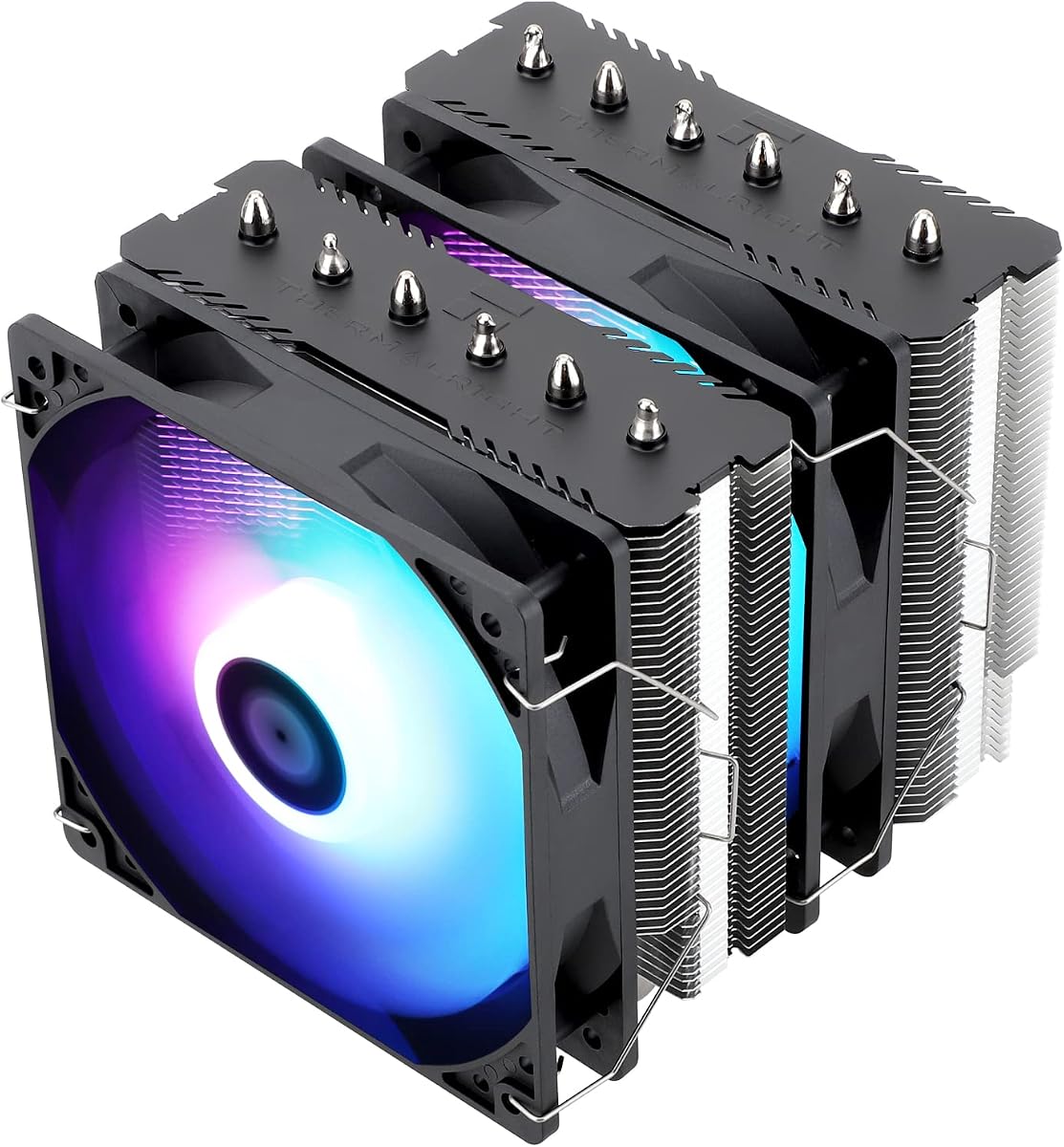
The Peerless Assassin 120 SE ARGB brings dual tower cooling to the mid-range market with impressive results. It is designed to handle high heat output processors without struggling under load during long sessions.
We may earn a commission when you buy through this link, at no additional cost to you.
Six heat pipes and dual fans provide a massive surface area for dissipating heat efficiently. The ARGB fans add a visual flair that many gamers and enthusiasts appreciate for their custom PC builds.
The main consideration with this cooler is its size as it is quite tall and may require careful RAM selection to avoid interference. However the cooling performance is robust enough to justify the extra space requirements.
If you want premium cooling performance with some aesthetic customization this model is an excellent option. It bridges the gap between budget and high-end coolers effectively.
Solves inverse gravity effects ensuring consistent performance in any mounting orientation.
Two fans working together increase airflow significantly for better cooling under peak loads.
We may earn a commission when you buy through this link, at no additional cost to you.
Noctua has long been the benchmark for premium air cooling and the NH-D15 chromax.Black continues that legacy. It is widely recognized as one of the best air coolers available for both overclocking and silent operation.
We may earn a commission when you buy through this link, at no additional cost to you.
The dual 140mm fans are renowned for moving a lot of air while maintaining a whisper quiet profile. Combined with the six heat pipes this system handles thermal loads that would trip up lesser coolers easily.
The main drawbacks are the cost and the size which means it may not fit in smaller cases or with tall RAM modules. However for those prioritizing performance and silence the investment is often well worth it.
This model is ideal for professionals or enthusiasts who need the best possible air cooling without moving to liquid. It remains a top recommendation for high performance desktop builds.
Two large fans provide ample airflow to cool the massive aluminum fin stack effectively.
SecuFirm2 system ensures secure attachment across many different processor sockets easily.
We may earn a commission when you buy through this link, at no additional cost to you.
The NH-U12A chromax.Black offers a more compact alternative to the dual tower D15 without sacrificing much in terms of cooling. It is built around top tier 120mm fans that punch well above their weight class.
We may earn a commission when you buy through this link, at no additional cost to you.
Despite being smaller this unit still handles high TDP processors with ease thanks to its efficient fin design. The NF-A12x25 fans are engineered for high performance and low noise simultaneously which is a key advantage.
It is particularly useful when case clearance is limited or when you need to avoid RAM interference on some motherboards. The price is high but the quality and performance justify the cost for serious users.
For those who need premium cooling but have space constraints this cooler is a perfect fit. It delivers outstanding results in a slightly smaller package.
Advanced fan blades reduce turbulence and noise while increasing total airflow output.
Designed to fit most standard tower cases without blocking memory slots or PCIe lanes.
We may earn a commission when you buy through this link, at no additional cost to you.
This unique model features a digital screen on top that displays vital system data like CPU temperature and usage. It brings a modern aesthetic to the system while providing practical monitoring tools for users.
We may earn a commission when you buy through this link, at no additional cost to you.
The cooling performance is solid with four heat pipes and a high speed fan ensuring heat is moved away quickly. The ARGB fan allows for customization that matches the rest of your PC components perfectly.
While the fan does run a bit louder than passive coolers the visual appeal is a major draw for many builders. The digital interface can be customized via software to show different metrics and colors.
Users who want both performance and a unique look for their system will love this cooler. It combines functionality with style in a way few other air coolers do.
The LCD top cover allows real-time monitoring of CPU and GPU temperatures at a glance.
ARGB lighting integrates with your motherboard to create a cohesive lighting theme across the PC.
We may earn a commission when you buy through this link, at no additional cost to you.
The classic NH-D15 is the original version of Noctua s top tier cooler and remains a powerful choice today. It features the same high quality components that make the chromax version popular but with a different color scheme.
We may earn a commission when you buy through this link, at no additional cost to you.
Its dual fan design ensures maximum airflow through the fins which keeps temperatures low even during overclocking. The fans are designed to be extremely quiet making it suitable for noise sensitive environments.
The main difference is the color which many users find less modern compared to the all black chromax versions. However the cooling performance is identical and it comes with the same excellent warranty coverage.
For those who prefer the traditional look or find a better deal on this model it is still a top performer. It continues to set the standard for air cooling reliability and efficiency.
This model has been tested by thousands of users worldwide proving its long term reliability.
The cooling output rivals many liquid coolers while keeping the simplicity of air cooling.
We may earn a commission when you buy through this link, at no additional cost to you.
The NH-D15S is designed to solve the RAM clearance issues of the standard D15 while maintaining strong cooling power. Its asymmetrical shape shifts the fan so it does not obstruct memory slots on most boards.
We may earn a commission when you buy through this link, at no additional cost to you.
This makes it an excellent choice for users who need to use high profile RGB RAM modules. The cooling performance is still top tier thanks to the large heatsink and efficient fan design.
The single fan setup reduces noise slightly compared to the dual fan version but still provides ample airflow. The black finish ensures it matches modern aesthetics better than the classic beige version.
If you need maximum cooling with a better fit for memory modules this is a great solution. It balances compatibility and performance effectively for demanding systems.
The offset design provides 65mm of clearance which fits almost all standard RAM modules easily.
Unlike larger coolers this model does not block PCIe slots on most ATX or Micro-ATX boards.
We may earn a commission when you buy through this link, at no additional cost to you.
The NH-D9L is specifically designed for small form factor builds where space is extremely limited. It brings the dual tower performance to a much smaller footprint that fits in tight cases.
We may earn a commission when you buy through this link, at no additional cost to you.
With a height of just 110mm it is perfect for HTPCs and ITX builds without compromising on cooling. The 92mm fan is efficient and quiet which is essential for silent living room setups.
While it cannot match the raw cooling of larger coolers it is impressive for its size. It is a premium solution for small cases that still need reliable thermal protection.
Builders focusing on compact systems will find this cooler to be a vital tool for performance. It ensures your CPU stays cool even in a tiny enclosure.
Its slim profile allows installation in cases where standard towers would not fit at all.
Designed to be ultra quiet making it perfect for home theater PCs or office environments.
We may earn a commission when you buy through this link, at no additional cost to you.
The NH-U12S is a classic single tower cooler known for its slim profile and excellent compatibility. It is a great option when you need a reliable cooler that does not interfere with other components.
We may earn a commission when you buy through this link, at no additional cost to you.
The NF-F12 fan is highly optimized to move air efficiently while keeping noise levels very low. This makes it suitable for systems where silence is a priority without sacrificing thermal performance.
Its slim design means it fits easily into many cases without overhanging or blocking other ports. It is a balanced choice for those who want Noctua reliability without the bulk of dual towers.
Ideal for users who need a simple effective cooling solution that looks clean and professional. It offers great performance in a traditional tower form factor.
The fan blades focus airflow directly onto the fins for maximum cooling efficiency and low noise.
The slim tower design ensures compatibility with most motherboards and memory configurations available.
We may earn a commission when you buy through this link, at no additional cost to you.
This version of the Peerless Assassin offers dual fan cooling at an affordable price that competes with high end options. It provides a strong balance of performance and value for a wide range of users.
We may earn a commission when you buy through this link, at no additional cost to you.
The six heat pipes and dual fans ensure that heat is dissipated efficiently even during intense workloads. The AGHP technology ensures consistent performance regardless of how the cooler is oriented in the case.
It is slightly more affordable than the ARGB version making it a practical choice for those who do not need lights. The build quality is robust enough to last for years of daily use.
For those seeking maximum performance per dollar this cooler is a highly recommended choice. It delivers exceptional cooling power without the premium price tag of other brands.
The offset asymmetric layout ensures better compatibility with graphics cards and motherboard slots.
Nickel plated pipes and soldered base ensure fast heat transfer from the processor to the fins.
We may earn a commission when you buy through this link, at no additional cost to you.
Selecting the right cooler involves evaluating several factors to ensure compatibility and performance for your specific setup.
The primary purpose of a CPU Air Cooler Fan Heatsink is to dissipate heat effectively. Look for models with multiple heat pipes and large surface areas on the fins. Higher TDP ratings indicate the cooler can handle more heat which is essential for overclocking or high performance processors.
Prioritize coolers with proven cooling benchmarks to ensure they meet your thermal needs.
Noise is a significant factor for those who value a quiet computing environment. Check the decibel ratings provided by the manufacturer and look for PWM controlled fans that adjust speed based on temperature. Large fans typically move more air at lower speeds which reduces noise.
Select a model with a low noise rating if you use your PC in a quiet room.
Ensure the cooler supports your current motherboard socket to avoid installation issues. Most modern coolers support common Intel and AMD sockets but it is crucial to verify compatibility with your specific generation. Manufacturers usually provide a list of supported sockets on the packaging or website.
Always check the compatibility list before purchasing to ensure proper fit and mounting.
The height of the cooler must fit within your PC case without touching the side panel. Measure the internal height of your case and compare it to the cooler specifications. Some coolers also have specific requirements for clearance around the motherboard RAM slots.
Verify your case s clearance limits to avoid fitting problems during assembly.
Large coolers can sometimes interfere with high profile memory modules. Look for designs that offer ample clearance or asymmetrical layouts to allow room for RAM. Ensuring your cooler does not block memory slots is key to a smooth build process.
Choose a cooler with sufficient RAM clearance to support your memory configuration.
A durable cooler ensures long term performance and reliability. Check for features like copper bases nickel plating and high quality fans that resist wear over time. Solid construction helps maintain thermal performance throughout the lifespan of the unit.
Invest in a unit with robust materials for lasting durability and consistent cooling.
Easy installation saves time and reduces the risk of damage during setup. Look for models with clear instructions and secure mounting systems that are user friendly. Pre applied thermal paste can also simplify the initial setup process for users.
Opt for a cooler with a straightforward mounting system for a hassle free experience.
A strong warranty reflects the manufacturer confidence in their product quality. Check the duration of the warranty and what it covers to ensure peace of mind. Reliable customer support is also valuable should you encounter issues during use.
Select a product with a comprehensive warranty to protect your investment.
Proper installation starts with preparing the CPU surface and applying thermal paste correctly. Ensure the paste covers the CPU evenly without excess and secure the cooler firmly to achieve optimal contact.
Regular cleaning is essential to maintain airflow and cooling performance over time. Use compressed air to remove dust from the fins and fans every few months to prevent overheating.
Check that the fan is spinning freely and responding to temperature changes via PWM. If noise increases or cooling drops consider reseating the cooler to replace thermal paste.
You should measure the internal clearance of your PC case specifically the height from the CPU socket to the side panel. Compare this measurement with the cooler s height specification to ensure it fits without obstruction. Always check the user manual or manufacturer site for exact dimensions.
Air coolers are often more reliable and easier to maintain since they have fewer moving parts and no risk of leaks. They offer excellent performance for most users at a lower cost. Liquid coolers may offer slight advantages in extreme cases but air coolers are generally more practical.
Most coolers come with the necessary mounting hardware for major Intel and AMD sockets. However some platforms may require specific brackets or backplates that should be verified before installation. Check the included accessories list to ensure everything needed is present.
Noise often comes from dust buildup on the fan blades or bearing wear over time. Cleaning the fan with compressed air can reduce noise significantly. If the fan is old or damaged replacing it may be necessary to restore quiet operation.
Many coolers have RAM clearance limits that might conflict with tall memory modules. Look for coolers that specify clearance dimensions or choose a model with a single tower design to ensure compatibility. Asymmetrical designs can also help avoid blocking memory slots.
It is recommended to replace thermal paste every two to three years for optimal performance. Over time the paste can dry out and lose its conductivity leading to higher temperatures. Reseating the cooler and applying fresh paste can help maintain efficient heat transfer.
We have reviewed ten top models that offer a variety of features to suit different cooling needs. Each option brings unique benefits whether you need quiet operation or maximum thermal performance.
Prioritize compatibility and build quality when making your final decision to ensure long term satisfaction. The right cooler protects your processor and maintains system stability under heavy workloads.
Please remember to check current availability and store listings before purchasing to get the best value. Your system s performance depends on choosing the right cooling solution for your specific build.