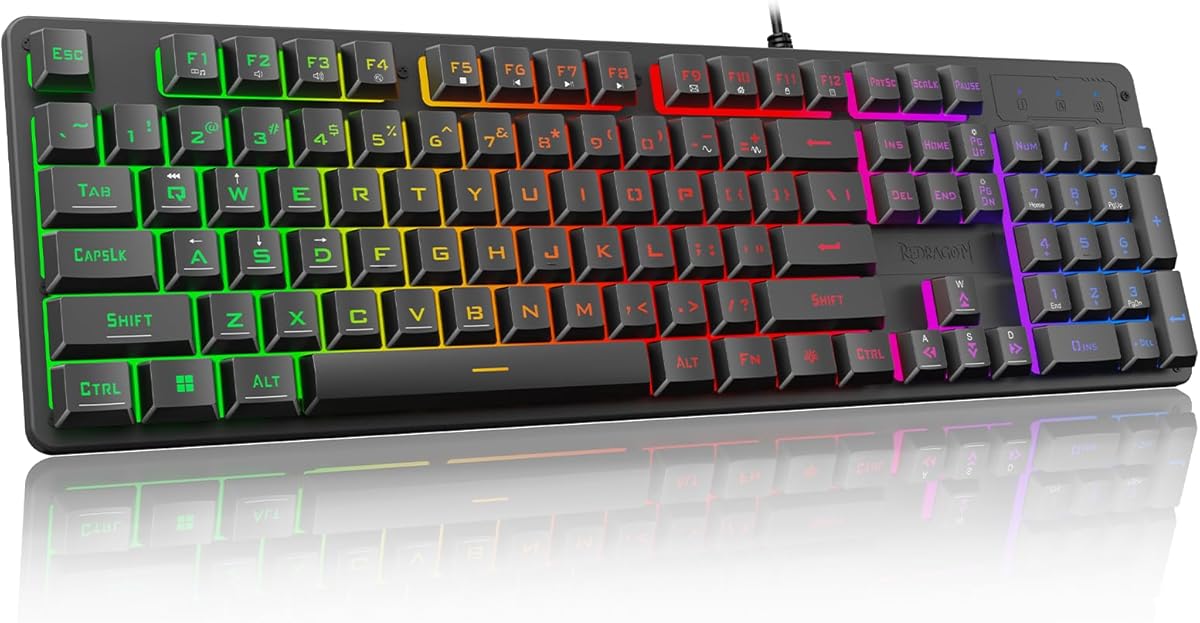
Redragon K521 Upgrade
4.4Editor score
Mechanical feeling switches
19 keys anti-ghosting
Rainbow LED backlighting
Discover the best Keyboard for Rainbow Six Siege with this expert guide comparing top models for speed, precision, and reliability in tactical FPS gaming.
Choosing the right Keyboard for Rainbow Six Siege can significantly impact your performance in high-stakes tactical matches. Precision, speed, and reliability are essential when every frame and keystroke matters during intense operations.
This guide evaluates ten top-rated keyboards based on switch type, build quality, and responsiveness. We analyze how each model supports rapid inputs and macro management needed for competitive play.
Each pick highlights key strengths and potential trade-offs to help you decide. Note that prices and availability may change, so verify current details before purchasing your next gaming peripheral.
4.4Editor score

4.4Editor score

4.6Editor score
The following table provides a side-by-side comparison of the top ten keyboards evaluated for Rainbow Six Siege performance. Each entry highlights essential specifications to help you identify the best fit for your setup.



The Corsair K55 RGB PRO stands out as a top contender for Rainbow Six Siege players seeking reliability and customization. With a 4.4 rating, it balances performance and comfort effectively for tactical shooters.
We may earn a commission when you buy through this link, at no additional cost to you.
Its six dedicated macro keys allow you to map complex operator abilities or utility commands without interrupting gameplay. The IP42 spill-resistant design ensures longevity even during intense sessions where accidents might occur.
While membrane switches may lack the tactile feedback of mechanical options, the keyboard delivers consistent responsiveness. The detachable palm rest adds comfort for long matches, though some may prefer full mechanical actuation.
This keyboard suits budget-conscious gamers who need reliable macros and durability. Its balance of features and price makes it a strong recommendation for entry to mid-level competitive play.
Assign specific skills to macro keys for rapid deployment without breaking focus on the tactical map.
IP42 protection guards against liquid spills, ensuring your setup survives unexpected coffee spills during ranked matches.
We may earn a commission when you buy through this link, at no additional cost to you.
The SteelSeries Apex 3 is designed for players who prioritize silence and comfort. Its whisper quiet switches ensure your typing does not distract teammates during voice communication.
We may earn a commission when you buy through this link, at no additional cost to you.
With IP32 water resistance, this keyboard offers peace of mind against accidental spills. The magnetic wrist rest provides full support, reducing fatigue during long Siege sessions.
While the membrane switches are comfortable, they may not offer the precision some competitive players seek. However, the durability and quiet operation make it ideal for shared living spaces.
This model fits players needing a silent, durable option. Its 4.6 rating reflects strong satisfaction with comfort and build quality for daily gaming use.
Whisper quiet switches minimize noise, allowing for clear communication without keyboard clatter interfering with voice chat.
The magnetic wrist rest offers ample support to maintain wrist health during extended tactical matches.
We may earn a commission when you buy through this link, at no additional cost to you.
The Razer Ornata V3 offers a unique blend of mechanical feedback and membrane durability. Its low-profile keys reduce strain and allow for quick finger movements essential in fast-paced scenarios.
We may earn a commission when you buy through this link, at no additional cost to you.
Mecha-membrane switches provide satisfying clicks while maintaining the fluid travel of a membrane. UV-coated keycaps ensure legends remain clear despite heavy daily use over months.
Some players might find the low profile less familiar than traditional mechanical boards. Yet the ergonomic benefits and aesthetic design justify the choice for many gamers.
Ideal for users seeking a sleek, responsive keyboard. This model delivers a balanced experience combining style with practical performance for tactical gaming.
Slimmer keys allow natural hand positioning, reducing wrist strain during extended play sessions.
UV coating protects legends from fading, keeping your controls readable even after thousands of keystrokes.
We may earn a commission when you buy through this link, at no additional cost to you.
The Logitech G413 TKL SE brings tactile mechanical switches to a compact form factor. This layout saves desk space while retaining essential keys for gaming commands and movement.
We may earn a commission when you buy through this link, at no additional cost to you.
PBT keycaps offer superior durability compared to standard ABS, resisting wear over time. The brushed aluminum top case provides a sturdy feel that minimizes flex during intense typing.
Limited RGB lighting might disappoint users wanting full customization. However, the reliable performance and solid build make it a great starting point for mechanical keyboards.
Recommended for gamers upgrading from membrane boards. It delivers the tactile response needed for precise inputs without a high price tag.
Tenkeyless design frees up mouse space, crucial for low sensitivity aiming in tactical shooters.
PBT material ensures key legends remain legible and smooth to the touch even after heavy use.
We may earn a commission when you buy through this link, at no additional cost to you.
The Redragon K521 Upgrade delivers exceptional value for budget-conscious gamers. Despite its low price, it offers mechanical-like feedback and essential anti-ghosting features for accurate inputs.
We may earn a commission when you buy through this link, at no additional cost to you.
19 keys anti-ghosting ensures that complex key combinations register correctly during intense moments. The rainbow LED backlighting adds a touch of flair without needing complex software setup.
Build quality reflects the cost, so it may not withstand years of heavy use. However, it is an excellent starting point for those new to mechanical-style gaming keyboards.
Perfect for students or casual players needing basic performance. This keyboard proves you do not need to spend much to get functional gaming features.
Mechanical feeling keys allow fast taps, helping you execute rapid movements and reloads efficiently.
No drivers are needed, so you can start using the keyboard immediately after plugging it into your PC.
We may earn a commission when you buy through this link, at no additional cost to you.
The AULA F75 Pro offers the flexibility of wireless use without sacrificing mechanical performance. Its tri-mode connection lets you switch between devices effortlessly, suiting hybrid gaming and work setups.
We may earn a commission when you buy through this link, at no additional cost to you.
Hot-swappable switches mean you can customize the feel later. Pre-lubed reaper switches provide a smooth typing experience that feels great out of the box.
Side printed PBT keycaps are durable and stylish, ensuring long term performance. The multi-function knob adds convenience for volume or brightness adjustments during gameplay.
This model suits users wanting a wireless mechanical keyboard. It combines customization potential with solid build quality for an immersive gaming experience.
Tri-mode connection allows seamless switching between PC and other devices, ideal for multitasking users.
Hot-swappable sockets let you change switches easily, tailoring the keyboard to your personal preference.
We may earn a commission when you buy through this link, at no additional cost to you.
The ASUS ROG Strix Scope II 96 delivers premium features with its wireless capability and robust build. Its 96 percent layout keeps a number pad while remaining compact enough for competitive play.
We may earn a commission when you buy through this link, at no additional cost to you.
Hot-swappable pre-lubed switches ensure smooth keystrokes right out of the box. Sound dampening foam reduces noise, making it ideal for shared spaces or quiet streaming.
The price reflects its high-end status, but the battery life and connectivity justify the investment. PBT keycaps resist wear, ensuring longevity even with heavy daily use.
Recommended for professionals needing top-tier performance. This keyboard balances style, functionality, and build quality for the ultimate gaming setup.
The 96 percent layout retains the numpad while saving space, ideal for spreadsheet work or gaming.
Low latency wireless ensures responsiveness matches wired performance, critical for competitive shooters.
We may earn a commission when you buy through this link, at no additional cost to you.
The ASUS ROG Strix Scope II X offers reliability through its wired connection and full-size layout. It includes a number pad for versatile use beyond gaming, such as data entry or productivity.
We may earn a commission when you buy through this link, at no additional cost to you.
PBT doubleshot keycaps ensure legends never fade, providing long-term clarity. The hot-swappable switches allow for future upgrades without replacing the entire unit.
Sound dampening foam minimizes noise, creating a pleasant typing experience. While expensive, the build quality and features justify the cost for serious enthusiasts.
Ideal for those who prefer wired stability. This keyboard delivers consistent performance and durability for demanding tactical gaming sessions.
A full number pad aids productivity tasks, making this a versatile tool for work and play.
Doubleshot molding ensures legends remain clear even after years of heavy use and cleaning.
We may earn a commission when you buy through this link, at no additional cost to you.
The Razer BlackWidow V4 X features linear switches designed for rapid-fire inputs. With low actuation force and sound dampeners, it delivers speed without excessive noise.
We may earn a commission when you buy through this link, at no additional cost to you.
Six dedicated macro keys expand your command arsenal for operator abilities. Chroma RGB lighting integrates with hundreds of games, adding visual flair to your setup.
ABS keycaps may show wear over time compared to PBT options. However, the improved acoustics and roller control enhance usability significantly.
Recommended for players favoring smooth linear switches. This keyboard balances speed and customization for a high-end tactical gaming experience.
Linear switches enable quick, continuous inputs, ideal for rapid weapon switching and ability usage.
Chroma RGB integrates with game lighting, creating an immersive atmosphere synchronized with your screen.
We may earn a commission when you buy through this link, at no additional cost to you.
The Aula WIN60 HE is engineered for competitive FPS play with magnetic switches and an 8000 Hz polling rate. This technology offers unmatched speed and precision for high-stakes tactical scenarios.
We may earn a commission when you buy through this link, at no additional cost to you.
Rapid trigger mode allows instant reset of keys, enabling fast peeking and quick-stop shooting. The compact 60 percent design saves desk space for massive mouse movement.
Lacking dedicated arrow keys may inconvenience some users, but the web-based driver simplifies customization. This keyboard is a specialized tool for those prioritizing performance above all else.
Perfect for competitive players seeking an edge. Its advanced features justify the learning curve for serious tactical gamers.
Ultra-fast polling reduces input lag to near zero, giving you split-second advantages in competitive matches.
The web-based driver allows easy customization without bulky downloads, making setup simple on any device.
We may earn a commission when you buy through this link, at no additional cost to you.
Selecting the right keyboard requires balancing features like switch type, layout, and connectivity. Consider these factors to find the perfect match for your playstyle.
Switches determine the tactile feedback and actuation force. Mechanical switches offer precise feedback while membrane switches provide a quieter experience. Linear switches favor speed whereas tactile ones offer a bump for confirmation.
Layouts range from full-size to 60 percent. Full-size includes a numpad but takes more desk space. Compact layouts save room for mouse movement, essential for low-sensitivity aiming in shooters.
Wired keyboards offer zero latency while wireless options provide flexibility. Modern wireless tech is fast enough for competitive play. Choose based on your desk setup and preference for cable management.
Materials like aluminum tops and PBT keycaps extend lifespan. Spill resistance is useful for accidental drink splashes. A durable keyboard withstands the intensity of ranked matches over time.
Dedicated macro keys or software macros help manage operator abilities. Customization is vital for complex tactical commands. Ensure the keyboard supports easy programming for your needs.
A comfortable wrist rest and key angle reduce fatigue during long sessions. Adjustable tilt positions help maintain natural hand posture. Comfort is crucial for maintaining focus during extended play.
Polling rate measures how often the keyboard reports to the PC. Higher rates like 8000 Hz reduce input lag. This factor matters for competitive players seeking every possible advantage.
Prices vary from budget options to premium models. Determine which features you truly need before spending. Quality keyboards last years, making higher upfront costs worthwhile for serious gamers.
To get the most out of your keyboard, configure macro keys to match your operator abilities. Map grenades or reload commands for quick access without losing focus on the map.
Keep your keyboard clean by removing dust with compressed air. Wipe keycaps regularly to prevent oil buildup. A clean setup ensures consistent key registration and extends the device lifespan.
Store your keyboard in a dry place when not in use. Avoid exposing it to direct sunlight or extreme temperatures. Proper care maintains the look and function of your investment.
Mechanical switches often provide faster actuation and better feedback than membrane ones. This can help with precise movements and ability usage. However, the difference depends on your personal preference and muscle memory.
Modern wireless keyboards use low-latency technology that rivals wired connections. They are reliable for competitive play if they use a dedicated dongle. Battery life is usually sufficient for long sessions.
TKL or 60 percent layouts are often preferred because they save desk space. More mouse room allows for better control at low sensitivities. However, personal comfort with the layout matters most.
Macro keys let you execute complex commands with one press. This can be vital for quick utility usage without breaking flow. However, ensure your use complies with game anti-cheat policies.
High-quality keyboards can last many years with proper care. Replace it only when keys fail or feel inconsistent. Durability varies by build quality and how well you maintain the device.
Rapid Trigger allows keys to reset instantly instead of waiting for a full release. This helps with quick movement inputs and rapid shooting. It is especially useful for high-speed competitive scenarios.
This guide highlights top keyboards balancing speed, durability, and customization for tactical play. Whether you choose a wireless option or a budget pick, each offers unique strengths for your setup.
Prioritize features like switch type and layout based on your playstyle. Consistency and comfort matter as much as raw speed during long ranked sessions.
Always check current prices before buying to ensure you get the best value. Your choice of keyboard can elevate your tactical precision and overall gaming experience significantly.