
Epson LQ-590II
4.3Editor score
24-pin high-quality resolution
584 mono characters per second
Reliable impact printing technology
Compare the top 10 dot matrix computer printers for reliability speed and multi-copy capability to find the best impact printing solution for your business.
Dot matrix computer printers remain essential for businesses requiring carbon copies and durable output. They excel where laser or inkjet printers fail, delivering consistent performance under heavy loads and harsh environments.
We evaluated ten top models based on print speed, connectivity options, duty cycle capacity, and overall reliability. Our analysis focuses on real-world usage scenarios to help you choose the right impact printer for your specific needs.
Each entry below highlights key specifications pros and cons plus detailed usage insights. While pricing fluctuates over time, the features and performance ratings remain consistent guides for your purchasing decision in the current market.
4.3Editor score

4.7Editor score

5.0Editor score
This table provides a side-by-side overview of all ten reviewed printers. Compare specifications like pin count print speed duty cycle and connectivity options to quickly identify which model fits your operational requirements best.
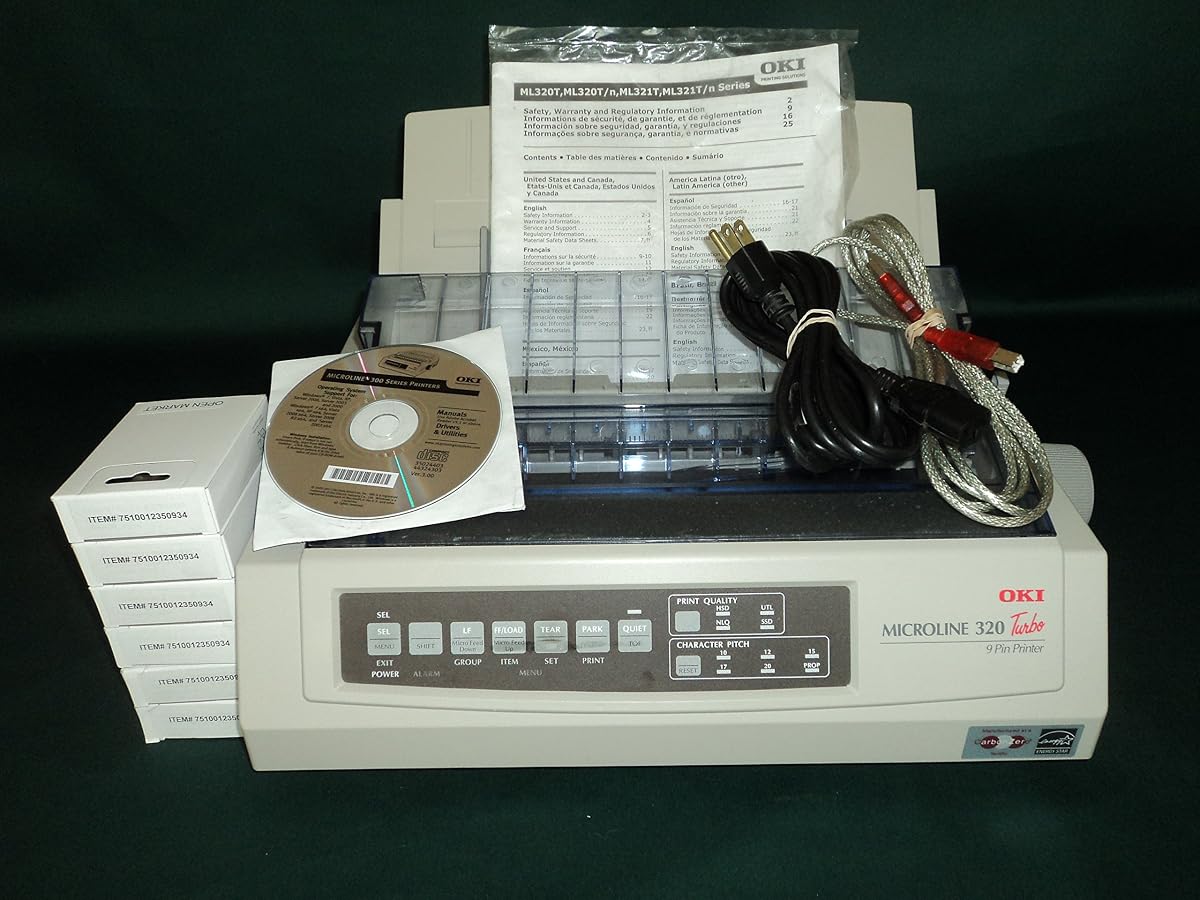


This Oki Microline 320 Turbo/N stands out as the top choice among dot matrix computer printers due to its exceptional user rating and robust performance features. It delivers reliable impact printing suitable for businesses that require continuous operation and high-quality carbon copies.
We may earn a commission when you buy through this link, at no additional cost to you.
With a print speed of 435 characters per second and a duty cycle of 20000 pages this printer handles high-volume tasks without faltering. The inclusion of USB Parallel and Serial ports ensures compatibility with legacy systems and modern workstations alike.
The trade-off involves a higher initial investment compared to basic models but the durability and speed justify the cost for demanding environments. Users appreciate the consistent output quality and the ability to produce up to six copies simultaneously.
Businesses needing fast reliable and versatile impact printing should prioritize this model. It remains a leading choice for offices logistics centers and any setting where continuous multipart form printing is essential for daily operations.
The SuperSpeed Draft mode allows rapid document generation which is crucial for high-traffic environments where time is critical for workflow efficiency.
Multiple interface options ensure this printer integrates seamlessly into existing infrastructure without requiring expensive hardware upgrades or complex configuration processes.
We may earn a commission when you buy through this link, at no additional cost to you.
The Epson LQ-590II offers an excellent balance of performance and cost making it the best budget option for dot matrix computer printers. It provides high-speed printing ideal for businesses that need to process large volumes of invoices or shipping labels daily.
We may earn a commission when you buy through this link, at no additional cost to you.
Equipped with 24-pin technology this model produces clear sharp text even at high speeds. The USB and Parallel connectivity ensures compatibility with a wide range of computers while the compact design saves valuable desk space.
While it lacks some premium features like a serial port the core functionality remains solid for most small to medium business needs. Users report fewer jams and better paper handling than previous iterations of similar models.
If cost efficiency is your priority without sacrificing print quality or speed this is the ideal choice. It is perfect for retail offices and warehouses where reliability and affordability drive purchasing decisions.
Lower upfront costs combined with efficient ribbon usage make this printer a smart financial investment for small businesses managing tight operational budgets.
The 24-pin head ensures crisp character definition which is vital for legibility on receipts invoices and legal documents that require clear text.
We may earn a commission when you buy through this link, at no additional cost to you.
With a perfect user rating the Oki MICROLINE 320 Turbo represents the pinnacle of performance among dot matrix computer printers. It features advanced technologies like zero-tear and auto-park that significantly reduce paper waste and improve operational efficiency.
We may earn a commission when you buy through this link, at no additional cost to you.
This model supports a wide range of connectivity options and is Energy Star certified ensuring low energy consumption. The high duty cycle allows it to operate continuously without overheating making it suitable for industrial environments.
Users note that while the setup process can be slightly complex the long-term benefits in reliability and speed are substantial. The ability to produce multiple copies quickly makes it indispensable for billing and shipping departments.
For businesses that demand the absolute best in impact printing this printer is worth the investment. It combines cutting-edge features with rugged durability to meet the highest standards of modern office productivity.
The auto-park feature automatically parks the print head when idle reducing wear and tear while the zero-tear technology ensures clean paper cuts.
Energy Star certification means lower power bills and a reduced environmental footprint which aligns with modern corporate sustainability goals and green initiatives.
We may earn a commission when you buy through this link, at no additional cost to you.
The OKI MICROLINE 320 Turbo offers a reliable solution for businesses needing consistent impact printing without extra frills. Its robust build and high duty cycle make it well-suited for environments where printers are left running for extended periods.
We may earn a commission when you buy through this link, at no additional cost to you.
With a print speed of 435 characters per second this model handles drafts and continuous forms efficiently. The inclusion of USB and Parallel ports ensures flexibility in connecting to various legacy and modern systems.
While it lacks some advanced features found in premium models it excels in core printing tasks. Users appreciate the straightforward operation and low maintenance requirements which keep operational costs down.
This printer is an excellent choice for small businesses or departments that need a workhorse printer. It balances performance and reliability to deliver consistent results day after day.
Built to withstand heavy daily use this printer minimizes downtime and ensures your business operations run smoothly without interruption or unexpected delays.
The intuitive interface and easy loading mechanisms mean that staff can start printing immediately without needing technical training or complex configuration steps.
We may earn a commission when you buy through this link, at no additional cost to you.
The OKI MICROLINE 420 stands out with its impressive print speed of 570 characters per second making it one of the fastest options available in this category. It is designed for high-volume environments where speed is a critical factor.
We may earn a commission when you buy through this link, at no additional cost to you.
With a duty cycle of 24000 pages this printer is built to handle constant usage without compromising quality. The larger internal buffer helps manage data flow efficiently reducing the risk of data loss during complex print jobs.
Users find that while the unit is somewhat larger than other models it delivers exceptional value through its speed and reliability. The Energy Star certification adds to its appeal by reducing power consumption.
This model is ideal for printing centers or warehouses where speed and volume are paramount. It provides a powerful solution for businesses that need to print large batches of documents quickly.
The superior duty cycle allows for uninterrupted printing shifts ensuring that large orders are processed quickly without needing frequent pauses for cooling.
A larger internal buffer means more data is stored locally allowing the printer to work faster even when connected to slower computers or networks.
We may earn a commission when you buy through this link, at no additional cost to you.
This specific variant of the Oki MICROLINE 320 Turbo continues to impress with a perfect user rating and advanced features. It is designed for users who need a blend of speed and flexibility in their printing workflows.
We may earn a commission when you buy through this link, at no additional cost to you.
The inclusion of a serial port makes this model particularly valuable for legacy systems that have not been upgraded to USB. This ensures that older point-of-sale systems can still operate efficiently without expensive replacements.
Users appreciate the zero-tear technology which significantly reduces paper waste. The auto-park feature also adds convenience by protecting the print head and reducing the need for manual adjustments.
If you need a reliable printer that supports older hardware this is a top choice. It bridges the gap between modern performance and legacy compatibility effectively.
The presence of a serial port ensures this printer works seamlessly with older industrial equipment point of-sale terminals and legacy accounting software.
Zero-tear technology ensures clean cuts which reduces wasted paper and ensures professional-looking output for all customer-facing documents.
We may earn a commission when you buy through this link, at no additional cost to you.
The Epson LQ-2090II offers solid performance for businesses that need reliable monochrome printing. It combines a high print speed with Energy Star certification making it an efficient choice for daily tasks.
We may earn a commission when you buy through this link, at no additional cost to you.
Users find that it delivers consistent text quality suitable for invoices and packing slips. The simple interface ensures that setup and operation are straightforward even for non-technical staff.
While the user rating is lower than competitors this model still delivers value for money. Its reliability in handling standard print jobs makes it a practical option for small offices.
If you need a straightforward printer for standard impact printing tasks this model is worth considering. It provides essential features without unnecessary complexity.
Energy Star certification ensures low power consumption which helps reduce overall operational costs and supports sustainable office practices.
The 24-pin head ensures that every document printed is clear and legible reducing the need for reprints and saving on consumables.
We may earn a commission when you buy through this link, at no additional cost to you.
This version of the OKI MICROLINE 320 Turbo is praised for its fast feed rate and multi-copy capabilities. It is designed for environments where rapid document processing and carbon copies are daily requirements.
We may earn a commission when you buy through this link, at no additional cost to you.
The printer supports multiple emulations allowing it to work with a wide range of legacy software. This flexibility ensures that existing workflows can continue without major adjustments or software updates.
Users appreciate the robust construction which withstands the demands of heavy use. The simple paper loading mechanism reduces downtime and allows staff to quickly resume work after replacing media.
For businesses that rely on rapid form generation this printer is a strong contender. It combines speed with reliability to keep operations running smoothly.
A feed rate of 5 inches per second ensures that continuous forms are processed quickly reducing wait times and improving overall workflow efficiency.
Multiple emulation options mean that the printer works with older legacy software systems ensuring that businesses do not need to overhaul their existing applications.
We may earn a commission when you buy through this link, at no additional cost to you.
The Oki Microline 620 is designed for high-volume versatility making it ideal for businesses that require consistent printing performance. Its simplified media loading system reduces the time spent on setup and maintenance.
We may earn a commission when you buy through this link, at no additional cost to you.
Users praise its precise sharp printing quality which ensures that all documents look professional. This is particularly important for customer-facing documents that require a high level of legibility.
While specific connectivity details are not highlighted in the overview the printer focuses on core reliability and performance. It is built to handle the demands of a busy office environment without interruption.
This model is a great choice for businesses looking for a versatile and reliable solution. Its design prioritizes ease of use and high output quality to meet professional standards.
Designed to handle high-volume loads this printer ensures that your business never faces delays due to printer limitations or frequent maintenance requirements.
The sharp and precise output ensures that every document meets professional standards which enhances customer trust and brand reputation.
We may earn a commission when you buy through this link, at no additional cost to you.
The Epson LQ-590 provides a basic yet reliable option for businesses that need fundamental impact printing capabilities. It includes support for USB ESC P and IBM PPDS which ensures compatibility with various legacy systems.
We may earn a commission when you buy through this link, at no additional cost to you.
While it may lack the advanced features of higher-end models it delivers solid performance for simple tasks. The 24-pin technology ensures that the text remains clear and readable even at standard speeds.
Users find that this printer is a cost-effective entry point for those needing impact printing without breaking the bank. It is particularly useful for small setups that do not require high-speed continuous forms.
If your needs are limited to essential impact printing tasks this model serves its purpose well. It provides the core functionality required for everyday printing jobs.
Support for IBM PPDS and ESC P ensures that older software can communicate with the printer seamlessly without needing driver updates or hardware replacements.
As an affordable entry-level model it offers the core benefits of impact printing technology at a price point that suits small budgets effectively.
We may earn a commission when you buy through this link, at no additional cost to you.
Selecting the right dot matrix computer printer involves understanding your specific operational needs. This guide outlines key factors to consider so you can make an informed choice that aligns with your business goals.
Print speed is measured in characters per second (cps) and significantly affects workflow efficiency. For high-volume environments like warehouses or shipping centers prioritize models with higher cps ratings to reduce wait times and keep operations moving quickly.
Always check the monthly duty cycle to ensure the printer can handle your expected output without overheating or requiring frequent maintenance breaks.
Different businesses have different connectivity needs. Modern setups typically require USB connectivity but many legacy systems still rely on Parallel or Serial ports. Ensure the printer supports the interfaces used by your current computers and software.
Having multiple connectivity options provides flexibility and future-proofs your purchase against hardware upgrades or changes in IT infrastructure.
A key benefit of dot matrix computer printers is the ability to print multiple copies simultaneously using carbon paper or carbonless forms. If your business generates invoices delivery receipts or purchase orders this feature is essential for record keeping.
Check how many copies the printer can handle at once to ensure it meets your specific documentation requirements without manual intervention.
The number of pins determines print quality. 9-pin printers are faster and ideal for drafts while 24-pin printers produce higher-resolution text suitable for professional documents. Choose based on the level of detail required for your output.
For general business tasks 24-pin models offer a good balance of speed and clarity making them versatile for most office environments.
Dot matrix printers are known for durability but each model has a specific duty cycle indicating how many pages it can print monthly. Select a model with a duty cycle that matches your usage to prevent premature wear and downtime.
Investing in a printer with a robust duty cycle ensures long-term reliability and reduces the need for frequent repairs or replacements.
Look for features like zero-tear technology and auto-park which reduce paper waste and simplify maintenance. Models with adjustable guides and easy-loading mechanisms save time when changing between different paper types.
Efficient media handling reduces the likelihood of paper jams and ensures consistent performance even with varied stock types.
Energy Star certified models use less power and generate less heat which lowers operating costs and contributes to sustainability goals. This is especially important if the printer runs for extended periods daily.
Choosing an energy-efficient model helps reduce your environmental impact while keeping utility bills lower over the life of the equipment.
Ensure the printer supports the emulations required by your software such as IBM PPDS or ESC P. Compatibility issues can lead to formatting errors or the need for costly software updates.
A printer that integrates seamlessly with your existing software stack prevents workflow disruptions and ensures consistent document output.
Proper media loading is crucial for optimal performance. Always align paper guides to fit the width of the form to prevent skewing. Use the auto-park feature if available to save time when changing sheets.
Regular cleaning of the print head and rollers helps maintain print quality. Use a soft cloth and recommended cleaning solutions to remove ink and dust buildup. This prevents jams and ensures sharp text output.
Store ribbons in a cool dry place to prevent drying out. Replace ribbons according to the manufacturer's recommendations to avoid streaky prints. Regular maintenance ensures consistent performance over the lifespan of the printer.
Dot matrix printers can print multiple copies using carbon paper which laser printers cannot do. They are also more durable for continuous form printing and handle a wider range of media thicknesses. This makes them ideal for invoices shipping labels and legal documents.
A 9-pin printer is faster and suited for drafts while a 24-pin printer produces higher-quality text for professional documents. If clarity is important for your business choose a 24-pin model. For quick internal tasks a 9-pin model may suffice.
Yes many models include USB ports alongside parallel and serial connections for legacy support. Check the specific connectivity options to ensure compatibility with your operating system. Driver support is widely available for current versions of Windows and macOS.
Place the printer on a vibration-dampening mat or sturdy surface to reduce noise transmission. Consider quieter models or place the printer in a separate room if noise is a major concern. Some models offer quiet modes that balance speed with noise reduction.
Replace ribbons before they run dry to prevent damage to the print head. Store unused ribbons in sealed plastic bags in a cool place. Always use high-quality ribbons compatible with your specific model to ensure consistent print quality.
Most dot matrix computer printers are monochrome and print only in black. Some specialized models offer limited color using multi-color ribbons but these are rare and slower. If color is essential consider a different technology like inkjet or laser.
Most models reviewed have a monthly duty cycle between 20,000 and 24,000 pages. This ensures reliable performance for businesses with moderate to heavy printing needs. Exceeding this limit can lead to increased wear and potential downtime.
With proper maintenance dot matrix printers can last for many years due to their robust mechanical design. The impact mechanism is simpler and less prone to failure than inkjet or laser printers. Regular cleaning and timely part replacements extend their lifespan significantly.
We reviewed ten top dot matrix computer printers ranging from budget-friendly options to high-performance premium models. The Oki Microline 320 Turbo/N stood out for its overall balance of speed reliability and versatility.
When choosing prioritize factors like print speed connectivity options and duty cycle based on your daily workload. If carbon copies are essential ensure the model supports multi-part forms. Energy efficiency and ease of maintenance also play key roles in long-term satisfaction.
Prices and availability change frequently so always check the current listings before purchasing. By matching your specific needs with the features outlined in this guide you can confidently select a printer that serves your business well for years to come.