
HyperX Origins 2 1800
4.6Editor score
Hot-swappable mechanical switches
8k polling rate for speed
Customizable housing options
High-profile ergonomic layout
Finding the right compact keyboard can transform your workspace by saving valuable desk space while maintaining full functionality. The 1800 form factor strikes a perfect balance between a full-size layout and a more condensed design, ideal for gamers, professionals, and home users alike.
We have carefully evaluated ten leading models on the market to bring you this comprehensive roundup. Our analysis focuses on build quality, typing experience, connectivity options, and unique features that define the best keyboards in this category for the current year.
Each selection below highlights specific strengths and ideal use cases to guide your decision. Please note that availability and pricing can fluctuate frequently, so we recommend verifying current details before making your final purchase to ensure you get the best value.
4.6Editor score
4.6Editor score

4.1Editor score
As an Amazon Associate we earn from qualifying purchases.
The following comparison table provides a side-by-side overview of all ten featured products. It highlights key specifications and unique attributes to help you quickly identify which model aligns best with your specific typing needs and workspace constraints.




The HyperX Eve 1800 stands out as a top contender for users seeking a reliable 1800 compact keyboard. With a strong rating, it balances functionality and aesthetics effectively. Its design prioritizes desk space efficiency without sacrificing essential features like media controls and lighting customization.
We may earn a commission when you buy through this link, at no additional cost to you.
This keyboard features responsive membrane switches that deliver a cushioned feel, making it comfortable for extended typing or gaming sessions. The 10-zone customizable RGB lighting allows users to match their setup's aesthetic perfectly. Dedicated media buttons add convenience, enabling quick adjustments to volume or modes without interrupting workflow.
While the membrane switches may not satisfy enthusiasts who prefer mechanical feedback, they provide sufficient durability and quiet operation for most users. The software allows for basic macro and lighting adjustments, though it lacks advanced scripting capabilities found in premium models. These trade-offs are acceptable given the target audience and price range.
Ideal for gamers or professionals with limited desk space, the HyperX Eve 1800 offers a practical solution. It combines essential gaming features with a sleek look. We recommend this model for those who value customization and space efficiency over high-end mechanical typing experiences.
The compact 1800 layout frees up significant space for mouse movement and peripherals, creating a more organized and efficient workspace for both work and play.
With 10 zones of customizable RGB lighting, users can create dynamic visual effects that sync with their gaming mood or desktop theme.
We may earn a commission when you buy through this link, at no additional cost to you.
The Cherry G80-1800 is a robust option designed for industrial and heavy-use environments. Its rating reflects reliability in demanding settings. This keyboard focuses on functionality and longevity, making it a practical choice for workstations where durability is paramount.
We may earn a commission when you buy through this link, at no additional cost to you.
Featuring mechanical MX Black switches, this keyboard provides a linear typing feel that is direct and powerful. The inclusion of both USB and PS/2 connections ensures compatibility with older systems or specialized hardware. The gold crosspoint contacts guarantee long-lasting performance, capable of withstanding millions of actuations.
Aesthetically, this model leans towards utilitarianism, lacking the flashy RGB elements of consumer gaming boards. The design prioritizes function over form, which may not appeal to home users seeking a modern look. However, for environments requiring consistent operation, this simplicity is a strength rather than a weakness.
Best suited for industrial settings, medical equipment, or legacy system support, the Cherry G80-1800 delivers dependability. It is an excellent choice for those needing a mechanical keyboard that can withstand constant use without failure. We recommend it for professionals who prioritize reliability above all else.
Built to meet strict standards, this keyboard ensures uninterrupted operation in demanding environments where failure is not an option.
The PS/2 adapter support allows seamless integration with older Unix computers or specialized industrial controllers that require this interface.
We may earn a commission when you buy through this link, at no additional cost to you.
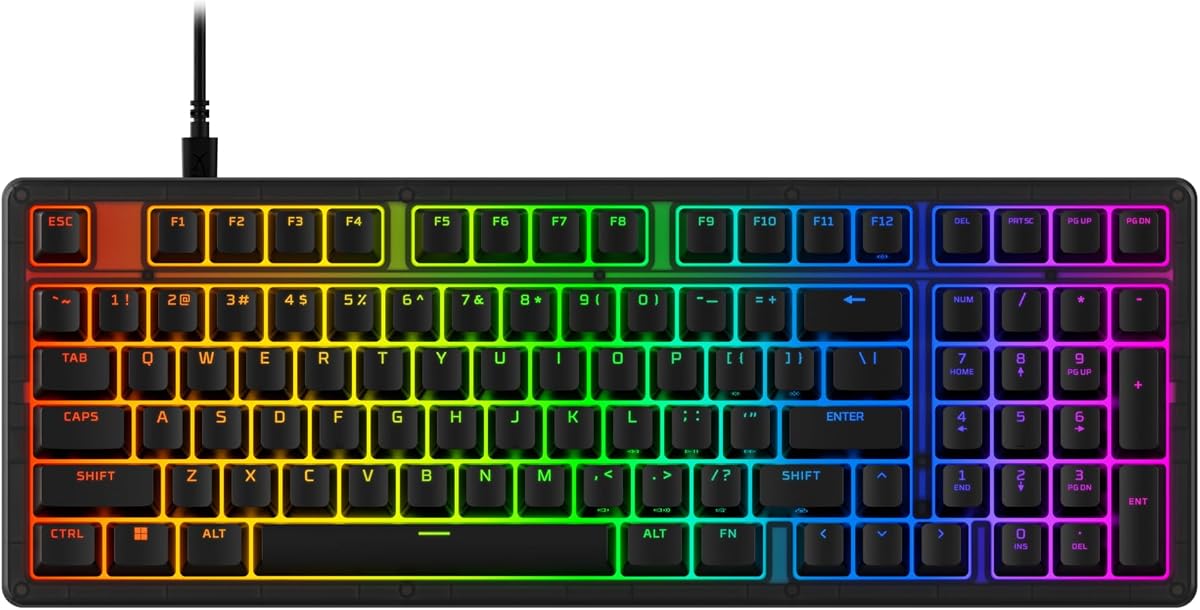
The HyperX Origins 2 1800 represents the pinnacle of customizable 1800 compact keyboards. Its exceptional rating highlights its superior performance in gaming and typing scenarios. This keyboard is built for enthusiasts who demand precision, speed, and complete control over their input device.
We may earn a commission when you buy through this link, at no additional cost to you.
With an 8k polling rate, this keyboard communicates with your PC 8000 times per second, ensuring near-instantaneous input registration. The hot-swap sockets allow you to change switches without soldering, offering endless possibilities for tuning the typing experience. The high-profile design elevates keys for easier engagement during extended sessions.
While the price reflects these advanced features, it may be a significant investment for casual users. The assembly process involves screws and optional weights, which might seem complex compared to plug-and-play alternatives. However, the ability to customize the housing and switches makes it a versatile long-term investment for hobbyists.
This keyboard is ideal for competitive gamers and custom keyboard enthusiasts. It offers a unique blend of performance and modularity. We recommend the Origins 2 1800 for those willing to invest in a premium, highly personalized typing and gaming experience.
The 8k polling rate reduces input lag to near zero, giving competitive players a distinct advantage in fast-paced games.
From switches to housing, every aspect can be modified to suit personal preferences, turning your keyboard into a unique extension of your setup.
We may earn a commission when you buy through this link, at no additional cost to you.
This Cherry model is engineered for environments requiring strict adherence to international standards. While specific ratings may vary, its reputation for industrial quality remains strong. It serves as a dependable tool for professional settings where performance metrics are critical.
We may earn a commission when you buy through this link, at no additional cost to you.
The keyboard features mechanical keyswitches designed for precision and reliability. The compact size ensures it fits into tight spaces without compromising on key layout. Dual interface support provides the flexibility to connect to a wide range of systems, from modern PCs to legacy industrial controllers.
It lacks the consumer-facing features like lighting or software customization, which might limit appeal for home users. The focus is strictly on durability and compliance. However, for environments like manufacturing or medical facilities, these omissions are intentional and necessary for regulatory adherence.
Best for industrial professionals and IT managers, this keyboard offers peace of mind through standard compliance and robust build. We recommend it for installations where reliability and regulatory fit take precedence over aesthetic customization.
Meeting ISO standards ensures this device meets the rigorous safety and performance requirements required by many industrial clients.
Designed for continuous use, the mechanical switches are built to maintain consistent performance over long operational cycles without degradation.
We may earn a commission when you buy through this link, at no additional cost to you.
The Logitech Alto Keys K98M blends mechanical performance with modern wireless convenience. Its high rating reflects satisfaction with its typing comfort and reliability. This keyboard is designed for users who need a seamless transition between work devices without sacrificing tactile feedback.
We may earn a commission when you buy through this link, at no additional cost to you.
Featuring a gasket mount, the keyboard absorbs vibrations for a soft and satisfying keystroke feel. The hot-swappable switches allow for easy customization. Smart features like AI-enhanced access keys streamline workflows, making it a powerful tool for productivity-focused users. The white backlighting ensures visibility in various lighting conditions.
The premium price point and lack of RGB may deter gamers looking for flashy setups. The focus is on clean aesthetics and functional typing comfort. However, for a professional environment, the understated look and productivity enhancements outweigh the lack of visual effects.
Ideal for office professionals and creatives who value comfort and efficiency, the Alto Keys K98M is a standout choice. We recommend it for those seeking a high-quality mechanical typing experience with the flexibility of modern wireless connectivity.
The gasket mount design reduces hand fatigue by dampening vibrations, allowing for long typing sessions without discomfort.
Programmable keys and app integration streamline daily tasks, enhancing efficiency and reducing repetitive actions.
We may earn a commission when you buy through this link, at no additional cost to you.
The Razer Joro Wireless is designed for gamers and users on the move. Its rating indicates a balance between portability and gaming performance. This keyboard proves that a compact form factor does not mean sacrificing essential controls or features.
We may earn a commission when you buy through this link, at no additional cost to you.
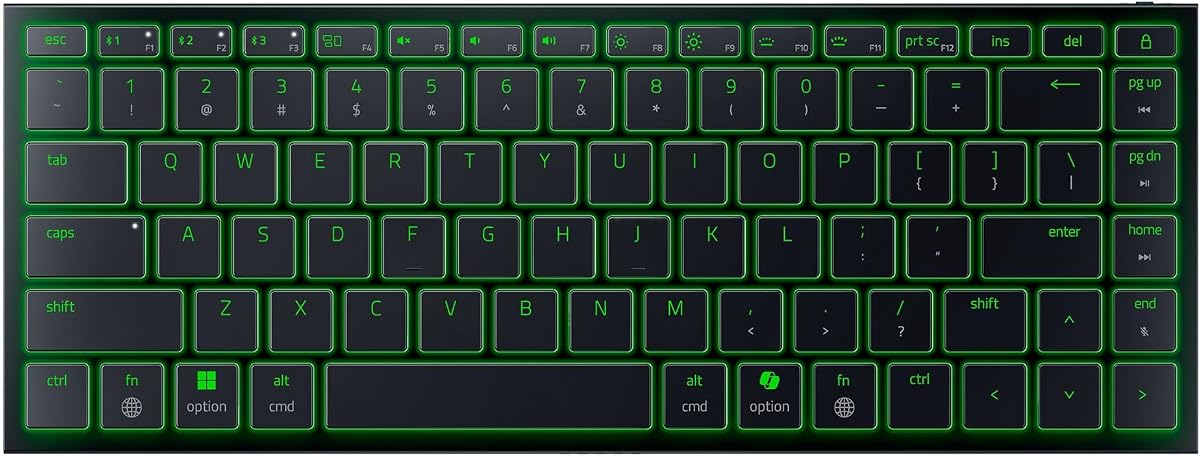
Weighing just 374 grams and only 16.5 mm thin, it slips easily into a backpack. The low-profile switches minimize strain, while the included arrow keys ensure functionality. RGB lighting adds a vibrant touch to any setup. The ability to connect to multiple devices simplifies switching between work and gaming stations.
Battery life is adequate but may require frequent charging under heavy usage. The layout differs from traditional keyboards, requiring a short adjustment period. However, for those prioritizing mobility, these compromises are minor compared to the convenience of a truly portable gaming keyboard.
Perfect for travelers, digital nomads, and students, the Razer Joro Wireless is a great travel companion. We recommend it for users who need a capable gaming keyboard that can fit into a small bag without sacrificing visual appeal.
Its slim profile and light weight make it easy to carry anywhere, ensuring you have a full typing experience on the go.
Chroma RGB support brings dynamic lighting effects that match your games, keeping the vibe immersive even in a portable setup.
We may earn a commission when you buy through this link, at no additional cost to you.
This Cherry variant maintains a standard 104-key layout in a compact form factor. While ratings vary, its construction quality remains consistent with the brand's industrial reputation. It is designed to offer a familiar typing experience without the bulk of a traditional full-size keyboard.
We may earn a commission when you buy through this link, at no additional cost to you.
Individual keys feature gold crosspoint contacts, ensuring high-quality conductivity and long service life. The compact design saves valuable desk real estate while preserving essential keys. It meets high performance demands suitable for demanding professional environments where consistency is key.
Modern features like wireless connectivity or RGB lighting are absent, reflecting its focus on stability and reliability. Users looking for advanced customization may find it limiting. However, for core typing tasks, the reliable mechanical performance is more valuable than extra bells and whistles.
Suitable for office environments and legacy systems, this keyboard provides a practical and reliable input solution. We recommend it for organizations requiring a standard layout with proven durability and minimal maintenance.
Keeping the full 104-key layout ensures compatibility with all standard keyboard shortcuts and applications without relearning keys.
The compact design places keys closer to the hands, promoting a more natural typing posture that reduces strain over time.
We may earn a commission when you buy through this link, at no additional cost to you.
The Cherry Stream Wired Keyboard is designed for noise-sensitive environments. Its high rating for quiet operation makes it ideal for shared offices. This TKL model removes the number pad to prioritize ergonomics and desk space.
We may earn a commission when you buy through this link, at no additional cost to you.
CHERRY SX scissor technology ensures a precise pressure point and a quiet typing experience. The durable lettering remains legible over years of use. The metal plate inside adds stability, preventing flex or wobble during heavy typing. The compact layout encourages a more ergonomic mouse and keyboard position.
The absence of a numpad may hinder users who rely heavily on numerical data entry. The wired connection limits flexibility for wireless setups. However, for general typing and work tasks, the quiet and stable performance is highly valued.
Best for libraries, offices, and quiet workspaces, this keyboard excels at delivering a noise-free experience. We recommend it for professionals who value a clean, quiet, and ergonomic workspace environment.
Whisper-quiet mechanics ensure your typing does not disturb colleagues, making it perfect for open-plan offices and shared spaces.
The integrated metal plate provides a rigid typing surface that prevents unwanted movement and ensures consistent key actuation.
We may earn a commission when you buy through this link, at no additional cost to you.
The Logitech Pebble Keys 2 K380s offers a unique take on compact typing with its ultra-slim design. It is highly rated for portability and ease of use across devices. This keyboard is designed for travelers and users who switch between multiple devices frequently.
We may earn a commission when you buy through this link, at no additional cost to you.
With round scooped keys, it offers a familiar laptop-like typing experience that is comfortable for short to medium sessions. The 3-year battery life ensures worry-free usage for years. Easy-Switch buttons allow seamless transition between up to three devices, enhancing workflow efficiency. The recycled materials align with sustainability goals.
The keycaps are smaller than full-size boards, which might feel cramped for some users. The typing feel is less tactile than mechanical options. However, for travel and casual use, the convenience and durability are unmatched in this form factor.
Ideal for frequent travelers and students, this keyboard fits easily into any bag. We recommend it for those who prioritize portability and long battery life over tactile feedback and full-size keycaps.
Its slim and lightweight design ensures it never adds bulk to your bag, making it the perfect travel companion.
Made with recycled plastic, this keyboard offers a sustainable choice without compromising on performance or style.
We may earn a commission when you buy through this link, at no additional cost to you.
The ProtoArc XK04 is specifically designed for mobile device users. Its high rating for portability and design reflects satisfaction among tablet and phone users. This keyboard folds into a compact size, making it perfect for on-the-go typing.
We may earn a commission when you buy through this link, at no additional cost to you.
The folded design includes a PU leather cover for protection, ensuring durability during travel. Keycaps are optimized for mobile layouts, providing a physical typing experience on tablets. The USB-C rechargeable battery ensures you are always ready to type. Bluetooth connectivity supports multiple devices for seamless switching.
The small key size may require an adjustment period for touch typists. The folding mechanism could be a point of failure over time compared to solid keyboards. However, for users who need a physical keyboard for mobile devices, the convenience outweighs these potential downsides.
Best for digital nomads and tablet users, this keyboard brings physical typing to mobile setups. We recommend it for those who frequently need to type on the go with a reliable and portable solution.
The two-fold design folds into a tiny case, allowing you to carry a physical keyboard in your pocket effortlessly.
Layouts are tuned for phone and tablet interfaces, ensuring all necessary shortcuts are accessible for mobile workflows.
We may earn a commission when you buy through this link, at no additional cost to you.
Selecting the right 1800 compact keyboard requires considering several factors to ensure it meets your specific needs. This guide breaks down the key aspects to evaluate before making your purchase.
The type of switch determines the tactile feedback and sound of your keyboard. Membrane switches are quieter and softer, while mechanical switches offer durability and distinct tactile clicks. Consider whether you prioritize silent operation or a responsive, customizable typing experience.
Choose mechanical switches for longevity and gaming performance, or membrane for quiet office use.
Decide between wired and wireless connectivity based on your setup. Wired keyboards offer zero latency and consistent power, while wireless models provide flexibility and reduced cable clutter. Check for Bluetooth or USB receiver compatibility with your devices.
Opt for wireless if you need a clutter-free desk, or wired for competitive gaming requiring maximum speed.
The 1800 layout typically includes full function keys but excludes the numpad. Ensure the layout matches your workflow; some users rely heavily on numeric keys for data entry. Verify that essential keys like arrows and function rows are present.
Prioritize a layout that retains all keys you need daily without sacrificing compactness.
Look for keyboards with metal plates or reinforced casings to ensure stability. Durability is crucial for long-term satisfaction, especially for daily use. Check for keycap materials and switch lifespans to predict how long the keyboard will last.
Select a model with robust construction to withstand daily typing without flex or wear.
Some keyboards offer RGB lighting, software macros, and hot-swappable switches. These features allow you to personalize your setup and typing feel. If you enjoy tweaking your keyboard, prioritize models with extensive software support.
Choose customizable options if you want to tailor lighting and switch types to your preference.
The compact nature of the 1800 keyboard should improve ergonomics by bringing the mouse closer. Evaluate the keyboard's height and adjustability to ensure a comfortable typing angle. A lower profile may reduce wrist strain during long sessions.
Pick a design that promotes natural hand positioning to prevent fatigue over time.
To maintain optimal performance, regularly clean the keyboard by turning it upside down and gently shaking it to remove debris. Use a soft brush or compressed air to clean between the keys, avoiding moisture that could damage internal components.
If your keyboard is wireless, ensure you charge or replace batteries regularly to avoid interruptions. For mechanical models, consider lubricating switches periodically if the feel becomes scratchy, following manufacturer guidelines for safe maintenance.
Use a protective cover or case when transporting the keyboard to prevent dust and scratches. Store it in a dry environment away from direct sunlight to prolong the lifespan of the materials and electronic components.
A 1800 compact keyboard typically features a full set of function keys and arrow keys but excludes the numeric keypad to save space. This layout allows for efficient use of desk real estate while maintaining essential controls for productivity and gaming.
Mechanical switches generally offer better durability, tactile feedback, and customization options compared to membrane switches. However, membrane keyboards can be quieter and more affordable, making them suitable for users who prioritize silence over tactile precision.
Yes, many 1800 keyboards are designed to handle both work and gaming tasks efficiently. Their compact layout leaves room for mouse movement, which is beneficial for gaming, while the function keys support productivity workflows.
Many modern 1800 compact keyboards offer wireless options via Bluetooth or USB receivers. Check the product specifications to confirm connectivity options, as some industrial models may only support wired connections.
Use compressed air to blow out dust and a soft brush to remove debris between keys. Avoid harsh chemicals; instead, use a slightly damp microfiber cloth to wipe the keycaps. Always disconnect the keyboard before cleaning to prevent damage.
Most users find the transition to a 1800 layout easy since it retains standard function keys. However, those accustomed to a numpad may need time to adapt to number input via the top row or shortcut keys.
Choosing the right 1800 compact keyboard depends on your specific needs for space, performance, and connectivity. Whether you need the rugged reliability of industrial models or the customization of gaming boards, there is a fit for everyone.
Prioritize features that align with your daily tasks, such as switch type for typing comfort or wireless connectivity for desk cleanliness. A well-chosen keyboard can significantly improve your workflow and reduce desk clutter.
Remember to check current prices and availability before making a purchase. With the variety of options available, finding a model that balances features and value is easier than ever.