
Excel/Word/Power Point Mouse Pad
4.7Editor score
Over 200 shortcuts
Large gaming size
Waterproof surface
Discover the top Excel Cheat Sheet Desk Pad options for productivity. We compare size, durability, and shortcut layouts to help you choose the perfect desk mat.
Enhance your daily workflow with a dedicated Excel Cheat Sheet Desk Pad designed to streamline your spreadsheet tasks efficiently. These mats combine protective surface functionality with instant access to essential keyboard shortcuts and formulas for professionals.
We evaluated ten leading models based on size, print clarity, material durability, and the comprehensiveness of their included reference guides. Our comparison highlights how each option supports different workstation setups and user experience levels across various industries.
Each pick showcases specific strengths like waterproof surfaces or ergonomic designs to help you find the right fit for your needs. Please note that prices and availability can change frequently, so check current listings before making your final purchase decision.
4.7Editor score

4.7Editor score

4.6Editor score
This side-by-side comparison breaks down the key specifications and features of all ten selected Excel Cheat Sheet Desk Pad options to help you visualize the differences in size, content coverage, and build quality.


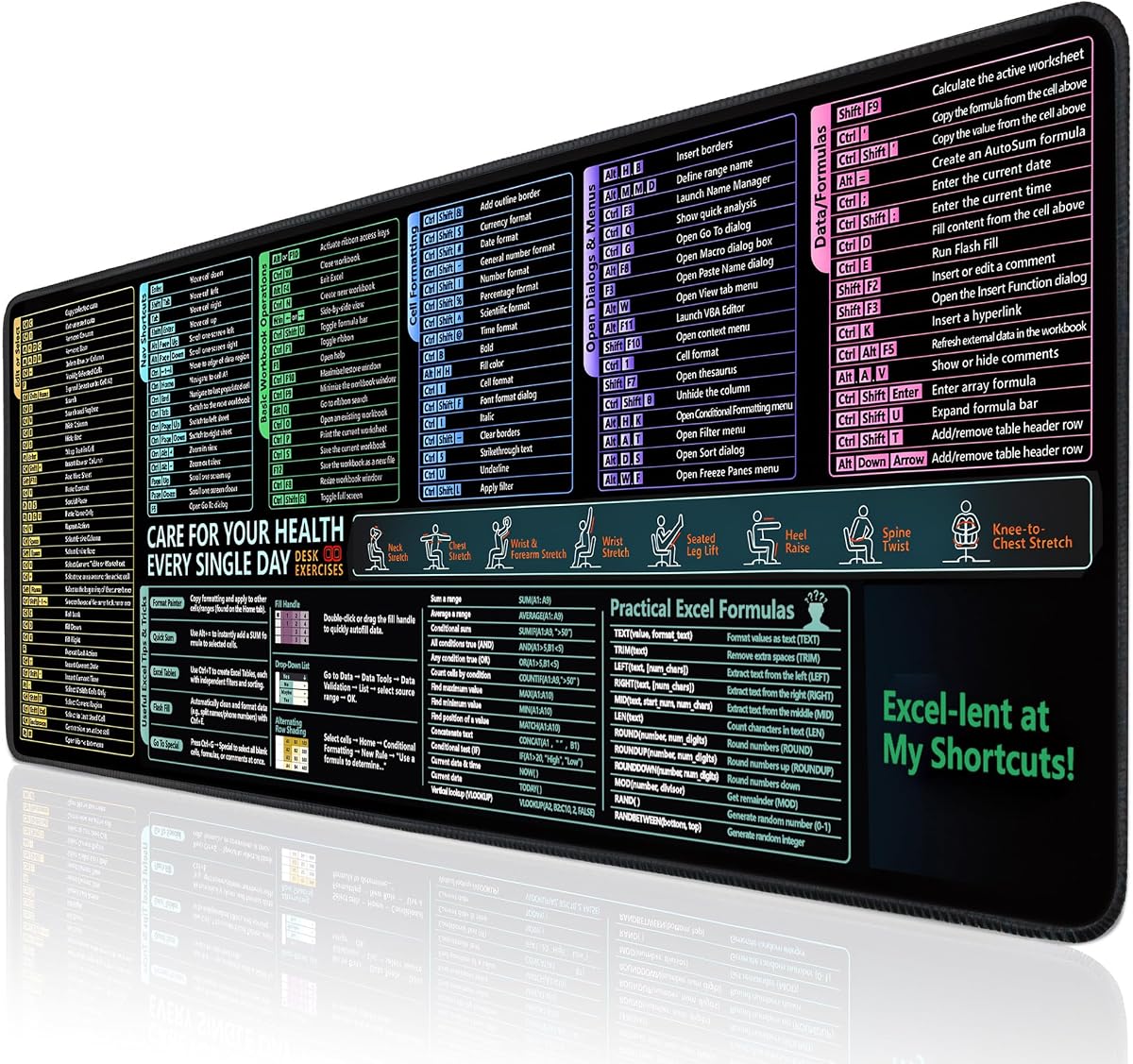


The Pixiecube Excel Cheat Sheet Desk Pad stands out as a top contender with its comprehensive command reference and practical design features for daily productivity.
We may earn a commission when you buy through this link, at no additional cost to you.
It offers clearly organized sections for navigation and data functions alongside built-in desk-exercise diagrams that help users recharge during long spreadsheet sessions efficiently.
While the price is slightly higher than basic options, the water-resistant surface and rugged stitched edges provide long-term durability that justifies the investment for professionals.
This model is ideal for users who want a complete desk solution combining mouse pad performance with a reliable reference guide and ergonomic benefits.
The unique desk-exercise diagrams encourage users to stretch and recharge which can reduce strain during long spreadsheet work sessions.
Reinforced stitched edges prevent fraying while the heavy-duty natural rubber base keeps the mat securely in place on any desk surface.
We may earn a commission when you buy through this link, at no additional cost to you.
This Excel Word and PowerPoint Mouse Pad delivers exceptional value by covering shortcuts for multiple applications making it versatile for general office work environments.
We may earn a commission when you buy through this link, at no additional cost to you.
It features over 200 keyboard shortcuts organized clearly to help beginners and experienced users find commands quickly without interrupting their workflow.
The waterproof top layer and fade-resistant printing ensure the guide remains legible over time even with regular cleaning and daily desk usage.
Budget-conscious buyers will appreciate this model for combining essential reference data with a durable gaming mouse pad surface at a low cost.
Users benefit from shortcuts for Word and PowerPoint as well making this pad suitable for a wider range of office tasks.
The waterproof surface allows for easy maintenance as spills can be wiped away quickly ensuring the shortcuts remain clear and functional.
We may earn a commission when you buy through this link, at no additional cost to you.
The Excel Cheat Sheet Desk pad XL Size offers a focused reference guide that includes detailed meanings for common functions to deepen user understanding beyond just shortcuts.
We may earn a commission when you buy through this link, at no additional cost to you.
Its large 300 by 800 by 3mm dimensions provide ample space for keyboards and mice while the waterproof cloth ensures a smooth consistent tracking experience.
Advanced inkjet technology ensures graphics are bright and clear without the odor sometimes associated with traditional printing methods on desk mats.
This option is best suited for users who prioritize detailed functional knowledge and need a large comfortable surface for their daily work setup.
Including meanings for commonly used functions helps users learn the logic behind commands rather than just memorizing key combinations.
The high-quality waterproof cloth provides a silky smooth feel that enhances mouse control precision during extended data entry tasks.
We may earn a commission when you buy through this link, at no additional cost to you.
This Large Excel Cheat Sheet Desk Pad offers a premium feel with its sleek water-resistant leather surface designed to elevate the look of any professional workspace.
We may earn a commission when you buy through this link, at no additional cost to you.
With extra wide dimensions it easily accommodates laptops and mechanical keyboards while providing a spacious area for unrestricted mouse movement during complex tasks.
The spill-repellent surface allows for effortless cleaning as simple wipes remove daily spills ensuring the pad remains pristine and functional for years.
Professionals seeking a high-end desk solution will appreciate the combination of durability and style that this model brings to their office environment.
The leather surface adds a touch of sophistication to the desk which complements professional office setups and high-end peripherals.
This versatile mat doubles as a writing pad or desk blotter providing multiple utilities beyond just being a mouse pad for your gear.
We may earn a commission when you buy through this link, at no additional cost to you.
This Excel Cheat Sheet Desk pad stands out for compiling twelve types of common skills covering both Excel and Word to offer a broader reference for office tasks.
We may earn a commission when you buy through this link, at no additional cost to you.
It includes meanings for computer FN keys which helps users understand function key operations that are often overlooked in standard reference guides for productivity.
The waterproof cloth surface ensures easy cleaning and the advanced inkjet technology keeps graphics bright and clear for long-term visibility on your desk.
Users who frequently switch between applications will find this broad skill coverage particularly useful for maintaining efficiency across different software tools daily.
Including Word skills alongside Excel makes this pad a versatile tool for general office workers who use multiple Microsoft applications regularly.
Advanced printing ensures graphics are bright and clear without any odor which enhances the visual appeal and usability of the guide.
We may earn a commission when you buy through this link, at no additional cost to you.
This Excel Cheat Sheet Desk Pad is designed to serve both professional and gaming needs with a buttery-smooth rubber base that ensures lag-free accurate tracking.
We may earn a commission when you buy through this link, at no additional cost to you.
It features a 7-zone cheat sheet covering Navigation and Formatting sections making it a handy reference for work that doubles as a high-performance gaming pad.
Thermal transfer printing delivers vivid colors and crisp details while precision-stitched edges lock the shape to prevent curling or fraying over time.
Gamers or users seeking a responsive surface will appreciate the stable non-slip base that keeps the mat securely in place during intense sessions.
The design balances professional shortcuts with gaming performance offering a versatile solution for dual-use desktop setups effectively.
Precision-stitched edges prevent fraying and curling ensuring the pad maintains a flat stable surface for daily use over years.
We may earn a commission when you buy through this link, at no additional cost to you.
This Excel Cheat Sheet Desk Pad is an excellent resource for learners with its color-coded hotkeys and practical spreadsheet functions covering essential calculation formulas.
We may earn a commission when you buy through this link, at no additional cost to you.
Unique built-in desk-stretch exercise diagrams help relieve wrist and neck strain which is crucial for users spending long hours working at a computer.
Advanced thermal-transfer printing ensures sharp high-contrast text that remains crisp and legible even after months of daily cleaning and frequent use.
Students and finance majors will find this heavy-duty build ideal for home office workspaces where reliable performance and learning tools are equally valued.
The unique built-in exercises encourage regular movement to relieve strain from sitting which promotes better health during long work sessions.
High-contrast text partitions ensure labels stay legible even after months of use which enhances long-term readability for users.
We may earn a commission when you buy through this link, at no additional cost to you.
This secret corner Excel Cheat Sheet Desk Pad balances size and functionality with a 27.6 by 11.8 inch surface that fits comfortably on most office desk setups.
We may earn a commission when you buy through this link, at no additional cost to you.
It keeps frequently used shortcuts and productivity references directly on your desk to reduce repeated searching and improve efficiency during data entry tasks.
The water-resistant surface can be wiped clean when exposed to spills ensuring the guide remains legible and the pad stays hygienic over time.
Users looking for a practical mid-size option without excessive bulk will find this model ideal for maintaining organization in tighter workspaces.
The mid-size dimensions provide enough room for essentials while keeping the desk uncluttered for those with limited space.
Reinforced stitched edges help prevent fraying and surface separation which maintains the integrity of the guide for long-term use.
We may earn a commission when you buy through this link, at no additional cost to you.
The iCasso Excel Cheat Sheet Desk Pad offers a spacious 35.4 by 15.7 inch surface with a comfortable lycra surface that enhances user comfort during long hours.
We may earn a commission when you buy through this link, at no additional cost to you.
High-quality edges prevent deformation and degumming while the flexible rubber base allows for easy transport to other workstations or different locations.
This model is absolute office essentials as it can be thrown in the washing machine to maintain hygiene and fresh appearance over time.
Users with larger desks who prioritize comfort and easy maintenance will find this washable design particularly appealing for daily office usage.
The comfortable lycra material provides a soft texture that enhances wrist comfort during long typing and gaming sessions effectively.
Users can throw this mat in the washing machine ensuring it stays clean and hygienic without needing special hand washing routines.
We may earn a commission when you buy through this link, at no additional cost to you.
This Kinevolve Mouse Pad is designed for portability with a compact 11.8 by 9.8 inch size that fits easily in bags or laptop cases for travelers.
We may earn a commission when you buy through this link, at no additional cost to you.
It features essential shortcut keys for Excel Word and PowerPoint making it a useful reference tool for professionals and students who work on the go.
The finely-textured surface ensures precise mouse control while the water-resistant fabric allows for easier maintenance during travel or office use.
Anyone needing a lightweight reference solution that fits in a bag will appreciate this practical tool for maintaining efficiency while moving between locations.
The compact size allows users to carry their reference guide anywhere without adding bulk to their backpack or laptop bag.
Includes shortcuts for multiple office applications making it a versatile companion for those who switch between different software tools.
We may earn a commission when you buy through this link, at no additional cost to you.
Selecting the right Excel Cheat Sheet Desk Pad involves evaluating factors like size, material, and content coverage to match your specific workflow needs effectively.
Consider the available space on your desk when choosing a pad size as larger mats provide more room for keyboards but require a bigger footprint.
Measure your current setup to ensure the mat fits comfortably without cluttering your workspace or blocking other essential items.
Check which software shortcuts are included as some models focus on Excel while others cover Word and PowerPoint for broader office utility.
Look for detailed layouts that group functions logically to help you find commands quickly without disrupting your work flow.
Materials like waterproof cloth or leather affect how easy the pad is to clean and how it feels under your mouse during daily use.
Prioritize options with stitched edges to prevent fraying and ensure the pad maintains its shape over long periods of heavy use.
A non-slip rubber base is crucial for keeping the pad secure in place while you type or move the mouse around your desk.
This feature prevents the mat from shifting during intense sessions which helps maintain consistency and accuracy in your work.
High-quality printing ensures that the text remains crisp and legible even after months of exposure to light and frequent cleaning.
Opt for thermal-transfer or UV-resistant inks to avoid fading that could make the reference guide hard to read over time.
Prices vary widely from budget-friendly options to premium models with unique features like built-in exercises or leather surfaces.
Balance your financial constraints with the features you need most to get the best value for your specific usage requirements.
Place the pad on a flat clean surface ensuring the non-slip base grips the desk securely to prevent any unwanted movement during use.
Familiarize yourself with the organized sections of the guide so you can reference keys quickly without constantly looking away from your screen.
Clean the surface regularly with a damp cloth to remove dust and spills keeping the text clear and maintaining the mat's texture for smooth tracking.
Yes these pads work with both optical and laser mice due to their high-quality surfaces designed for precise tracking across different sensor types.
Most pads are waterproof so you can wipe them with a damp cloth to remove spills and dust without damaging the printed shortcut guides.
Absolutely these mats function as full desk mouse pads providing ample space for your keyboard and mouse while offering a reference guide.
If you have space go for XL sizes to accommodate full keyboards comfortably but standard sizes work well for tighter setups.
Yes having quick access to shortcuts reduces the time spent searching for commands which speeds up your workflow significantly over time.
Most manufacturers keep layouts consistent as core shortcuts remain the same though you should verify compatibility if you use very specific new features.
We highlighted the Pixiecube model as our top choice for its balance of features and the budget option for those seeking value.
Prioritize a model with a size and shortcut layout that fits your daily workflow to maximize the benefit of this accessory.
Always check the latest prices and availability before buying since these details can change frequently on online marketplaces.